
Show Notes
If you are the kind of person who wants to follow along while you listen on-line, wants to go back in the audio to the important bits, wants to find that link we mentioned that you couldn't write down because you were driving or walking or working out, then this is your page!
Here you will find links to the topics we cover as well as links to software, websites articles, and other resources mentioned in the episodes of Going Linux. Each episode is documented with time stamps so you can skip forward to just the right thing.
For each episode, we provide the show in both mp3 and ogg audio formats, and we post extensive show notes. You can download any episode from the direct links below, or you can play it in your browser with the provided player. You can also receive the podcast automatically if you have software like iTunes, Amarok, Rhythmbox or gPodder.
Going Linux · Show Notes
2024 Episodes:
Apr 06: #452 · Linux Talk , Tips, Tricks and Facts
Mar 09: #451 · Listener Feedback
Feb 04: #450 · Linux 2023 Year in review
Apr 20 #453 · Linux Talk , Tips, Tricks and Facts
Bill runs Arch, by the way. We discuss zutils, podcatcher software, hacker scam, trying distros, encrypted files and file formats.
The following resources are mentioned in this episode:
- US officials and tech industry on edge : https://www.reuters.com/technology/cybersecurity/why-near-miss-cyberattack-put-us-officials-tech-industry-edge-2024-04-05/
- Parrot OS: https://www.parrotsec.org/
- Parrot support: https://community.parrotsec.org/
- Ventoy persistence: https://www.ventoy.net/en/plugin_persistence.html
- Ventoy checksums: https://www.ventoy.net/en/doc_checksum.html
- Elementary appcenter: https://appcenter.elementary.io/
- Veracrypt FAQ: https://veracrypt.eu/en/FAQ.html
- ExFAT: https://en.wikipedia.org/wiki/ExFAT
- Mastadon retires toot: https://gizmodo.com/mastodon-toot-retired-twitter-tweet-equivalent-1849786221
- Tooting elephant: https://www.deviantart.com/jonreytrevino/art/Tooting-Elephant-968997644
- Elephant noises: https://www.youtube.com/watch?v=VZZwtEhycwY
- Tootdle oo: https://www.youtube.com/watch?v=3q-1UGb5PEI
- Ventoy persistence: https://www.ventoy.net/en/plugin_persistence.html
- Ventoy checksums: https://www.ventoy.net/en/doc_checksum.html
- Elementary appcenter: https://appcenter.elementary.io/
- Veracrypt FAQ: https://veracrypt.eu/en/FAQ.html
- ExFAT: https://en.wikipedia.org/wiki/ExFAT
- Theme music provided by Mark Blasco: https://www.podcastthemes.com
Episode Time Stamps
00:00 Going Linux #453 · Listener Feedback
00:57 Bill tries Arch Linux
02:35 Bill gets better Internet speeds
06:48 What happened to Nix OS?
07:54 Is Arch finally for new Linux users?
10:02 Update on Zorin give-away
11:28 David: The xzutils vulnerability
17:59 Stephen: Struggling to listen using Pocketcast
20:52 Anonymous listener can pay cash for urgent assistance with hacker software. Is this a scam?
24:05 Jesper: Please fix the audio volume
25:59 George: Toots vs. tweets
26:52 George: Feedback on Antennapod, Ventoy, Distrosea, Veracrypt, and the most compatible file format
36:59 Thank you, listeners, for all your engagement with our podcast
39:28 goinglinux.com, goinglinux@gmail.com, +1-904-468-7889, @goinglinux, feedback, listen, subscribe
40:36 End
Apr 06 #452 · Linux Talk , Tips, Tricks and Facts
Bill's continues his Nix adventure, Larry's take on the Ubuntu MATE project, maybe we'll have a Zorin 17 Pro giveaway. In this episode we discuss the real facts about Linux and clear up some Linux 'fake news'.
The following resources are mentioned in this episode:
- Ubuntu Mate: https://ubuntu-mate.org/
- Manjaro: https://manjaro.org/
- Fedora: https://fedoraproject.org/
- Arch Linux: https://archlinux.org/
- Zorin: https://zorin.com/os/
- Linux Mint: https://linuxmint.com/
- Elementary: https://elementary.io/
- Popey’s bitcoin post: https://popey.com/blog/2024/02/exodus-bitcoin-wallet-490k-swindle/
- DO community article: https://www.digitalocean.com/community/tutorials/linux-commands
- Ubuntu: https://ubuntu.com/
- MX Linux: https://mxlinux.org/
- NixOS: https://nixos.org/
- OpenSUSE: https://www.opensuse.org/
- POP!_OS: https://pop.system76.com/
- Theme music provided by Mark Blasco: https://www.podcastthemes.com
Episode Time Stamps
00:00 Going Linux #452 · Linux Talk , Tips, Tricks and Facts
01:48 Bill's Nix adventure
03:54 Larry's take on the Ubuntu MATE project
06:29 Zorin 17 Pro giveaway?
08:12 The real facts about Linux
08:38 Clearing up Linux 'fake news'
19:11 There are no ready to use distros if you are just getting started with Linux
19:49 Ubuntu and Ubuntu derivatives
20:53 Manjaro
24:24 MX Linux
24:55 Zorin
25:11 Elementary OS
28:05 Pop!OS
29:06 Fedora
30:51 OpenSUSE
32:11 Debian
35:26 Package management: X is better than Y
43:20 The command line is scary, for power users, and you have to use it to use Linux
50:06 Distrowatch is the ultimate source to discover which Linux distro is best
55:03 App suggestion: blanket background noise generator
57:33 goinglinux.com, goinglinux@gmail.com, +1-904-468-7889, @goinglinux, feedback, listen, subscribe
58:39 End
Mar 09 #451 · Listener Feedback
In this episode: Bill hops again, lost voice mails, Google analytics, Lubuntu package manager, Bitlocker, Thunderbird, lightweight feedback, and suggestions for Bill’s testing on Nix.
The following resources are mentioned in this episode:
- Tolga’s github script installer (safe, he says, nothing to worry about) : https://github.com/tolgaerok
- Tolga’s Nixos:: https://github.com/tolgaerok/nixos-kde
- Theme music provided by Mark Blasco: https://www.podcastthemes.com
Episode Time Stamps
00:00 Going Linux #451 · Listener Feedback
00:55 Is this a special episode?
01:45 Bill hops to NixOS
06:54 Sean: Lost voicemails?
09:08 Peter: Why Google analytics?
10:28 Robert: Lubuntu package manager
26:26 Jack: Followup on Bitlocker
30:25 James: Begs for minion help with Thunderbird
36:26 Paul: Feedback on lightweight distros
43:28 Tolga: Distro suggestion for Bill to test
49:27 goinglinux.com, goinglinux@gmail.com, +1-904-468-7889, @goinglinux, feedback, listen, subscribe
50:38 End
Feb 04 #450 · Linux 2023 Year in review
Bill gets new tech and we discuss some happenings from 2023. Maya OS, Nix OS, Rhino Linux, Redhat, Cachy Linux and much more.
The following resources are mentioned in this episode:
- Steam: https://store.steampowered.com/steamos
- Maya OS: https://drdo.gov.in/
- Nix OS: https://nixos.org/
- Open Source pushback: https://arstechnica.com/information-technology/2023/06/red-hats-new-source-code-policy-and-the-intense-pushback-explained/
- Twitter (X): https://twitter.com/
- Linux kernel: https://www.msn.com/en-us/money/other/a-new-linux-kernel-has-been-released-and-its-one-of-the-largest-ever/ar-AA1mEnU8
- VIM Creator passed away: https://news.itsfoss.com/vim-creator-passed-away/
- Mastadon: https://joinmastodon.org/
- Rhino Linux: https://rhinolinux.org/
- Linux outranks MacOS: https://linuxiac.com/linux-outranks-macos-on-the-steam-platform/
- CachyOS: https://cachyos.org/
- Theme music provided by Mark Blasco: https://www.podcastthemes.com
Episode Time Stamps
00:00 Going Linux #450 · Linux 2023 Year in review
02:11 Bill's new tech
04:55 Involutary new tech
05:56 2023 in review
06:29 Indian Defense Ministry adopts Maya OS
10:21 VIM founder passed away
11:52 Nix OS is becoming popular
15:53 Twitter has become ‘X’
19:30 Rhino Linux
25:10 Redhat changes their sourcecode use policies
29:14 Beginner-friendly Cachy Linux
34:33 Valve: Linux overtook MacOS as the preferred platform for gaming on Steam
37:37 Linux releases one of the largest kernel releases ever
42:41 goinglinux.com, goinglinux@gmail.com, +1-904-468-7889, @goinglinux, feedback, listen, subscribe
43:56 End
2023 Episodes:
Dec 09: #448 · Three Lightweight Distributions
Nov 13: #447 · Listener Feedback
Oct 03: #446 · Welcome to Linux! - Utilities
Sep 12: #445 · Listener Feedback
Aug 19: #444 · Welcome to Linux! - Desktops
Jul 31: #443 · Listener Feedback
Jun 29: #442 · Welcome to Linux! Kubuntu
Jun 17: #441 · Listener Feedback
May 27: #440 · Welcome to Linux! Pt 9 - Software Choices
Apr 27: #439 · Listener Feedback
Mar 13: #438 · Welcome to Linux Pt8 - How Linux protects your privacy Pt 1
Feb 20: #437 · Listener Feedback
Feb 04: #436 · Welcome to Linux! Pt7 - How Can Linux Be Free?
Jan 11: #435 · Listener Feedback
Dec 18 #449 · Listener Feedback
Bill gets a solid state drive and leaves Windows for gaming using Steam on Linux. He continues distro hopping using Ventoy. Phil comments on Pop and Wayland, Bhiku comments on Linux antivirus, George responds to several listeners and suggests something for distro hoppers like Bill.
The following resources are mentioned in this episode:
- Steam: https://store.steampowered.com/steamos
- Ventoy: https://www.ventoy.net/en/index.html
- Gufw firewall: https://help.ubuntu.com/community/Gufw
- Ublock Origin: https://ublockorigin.com/
- Thunderbird: https://www.thunderbird.net/en-US/
- VirusTotal: https://www.virustotal.com/
- Remove Asian fonts: https://easylinuxtipsproject.blogspot.com/p/clean-mint.html#ID8
- How to install old apps on Android 14: https://liliputing.com/how-to-install-old-apps-on-android-14/
- Antennapod: https://f-droid.org/en/packages/de.danoeh.antennapod/
- Distrosea: https://distrosea.com/
- Theme music provided by Mark Blasco: https://www.podcastthemes.com
Episode Time Stamps
00:00 Going Linux #449 · Listener Feedback
01:13 Bill leaves Windows for gaming on Linux
04:46 Steam on Linux
10:20 Bill's new NVME drive
13:41 Ventoy for trying and installing Linux distributions
19:23 Phil: Pop!_OS and Wayland
22:56 Bhikhu: Linux antivirus recommendation
26:45 George: Foreign language support
28:16 George: Old Android podcast apps
29:53 George: Disk encryption when moving from Windows to Linux
33:33 George: Distrosea to try Linux distributions
37:44 goinglinux.com, goinglinux@gmail.com, +1-904-468-7889, @goinglinux, feedback, listen, subscribe
38:04 Submit your contributions for year end review
41:40 End
Dec 09 #448 · Three Lightweight Distributions
Three lightweight Linux distributions to try. The idea for this show comes from our longtime minion, Bhikhu who during the last listener feedback suggested that Bill try Bodhi and Enlive.
The following resources are mentioned in this episode:
- Lubuntu: https://lubuntu.me
- Xubuntu: https://xubuntu.org/
- Ubuntu MATE: https://ubuntu-mate.org/
- Bodhi: https://www.bodhilinux.com
- Pop!_OS: https://pop.system76.com/
- Theme music provided by Mark Blasco: https://www.podcastthemes.com
Episode Time Stamps
00:00 Going Linux #448 - Three Lightweight Distributions
01:29 Bill is happy his NVME drive died
07:37 Bodi Linux
13:16 Lubuntu Linux
19:33 Xubuntu Linux
27:42 Which could be your daily driver?
29:51 Revitalizing an older computer
32:37 Honorable mentions
33:29 Ubuntu MATE
35:50 Pop!OS
38:40 Fedora
42:19 Enlive
43:00 Zorin
51:19 goinglinux.com, goinglinux@gmail.com, +1-904-468-7889, @goinglinux, feedback, listen, subscribe
52:30 End
Nov 13 #447 · Listener Feedback
We talk about SCALE21x, an update on Ubuntu Cinnamon, and Ubuntu’s move to Wayland. Our listener, Liz seems upset, Troy connects Linux to Google Drive, Jack partitions a hard drive, Bhiku has suggestions on archiving show notes and a desktop environment we missed, Reid says that it’s not Ubuntu MATE but it’s still good, and George’s laptop is green after all.
The following resources are mentioned in this episode:
- SCALE 21x registration: https://register.socallinuxexpo.org/reg6/
- Codeberg: https://codeberg.org/
- Notabug: https://notabug.org/
- CLI list: https://github.com/toolleeo/cli-apps
- SeaMonkey: https://www.seamonkey-project.org/
- Aerc: https://aerc-mail.org/
- Vivaldi: https://vivaldi.com/features/mail/
- Rclone: https://rclone.org/
- Rclone Browser: https://kapitainsky.github.io/RcloneBrowser/
- NomadBSD: https://nomadbsd.org/
- Mumble: https://www.mumble.info/
- Mirotalk: https://p2p.mirotalk
- Enlightenment: https://www.enlightenment.org/
- Bodhi Linux: https://www.bodhilinux.com/
- Elive: https://www.elivecd.org/ com/
- UbuntuDDE: https://ubuntudde.com/
- Theme music provided by Mark Blasco: https://www.podcastthemes.com
Episode Time Stamps
00:00 Going Linux #447 · Listener Feedback
01:04 SCALE 21x registration
04:28 Update on Ubuntu Cinnamon on Tablet/Laptop
07:00 Ubuntu moves from X window manager to Wayland
07:56 Liz seems very upset
18:30 Troy: Connecting Linux to Google Drive
21:31 Bhikhu: Archiving show notes
27:60 Jack: Partition formatting
32:10 Bhiku: Desktop environment missed
37:55 Reid: Not Ubuntu MATE but still good
42:48 George from Tulsa: Follow up on "green" LG Gram Laptop
44:52 goinglinux.com, goinglinux@gmail.com, +1-904-468-7889, @goinglinux, feedback, listen, subscribe
46:52 End
Oct 03 #446 · Welcome to Linux – Utilities
We've talked about the applications that are provided with Linux. Now let's talk about some of the utilities that are provided out of the box with many Linux distributions. Command line utilities Graphical utilities System tools System administration Software package installers and package formats Accessories Third party utilities ChatGPT or AI utilities?
The following resources are mentioned in this episode:
- Destination Linux Podcast: https://tuxdigital.com/podcasts/destination-linux/338-reverse-psychology-tech-support/
- Using Ubuntu MATE and Its Applications Fifth Edition (updated for Ubuntu MATE 22.04 LTS): https://www.amazon.com/dp/ASIN/B09Y4RFJYY
- List of Unix commands: https://en.wikipedia.org/wiki/List_of_Unix_commands
- Linux utilities: https://en.wikipedia.org/wiki/Util-linux
- List of GNU Core Utilities commands: https://en.wikipedia.org/wiki/List_of_GNU_Core_Utilities_commands
- Theme music provided by Mark Blasco: https://www.podcastthemes.com
Episode Time Stamps
00:00 Going Linux #446 · Welcome to Linux! - Utilities
01:02 We were mentioned on Destination Linux Podcast Episode 338
03:41 Bill is getting ready for the Deepin Desktop on Ubuntu
05:16 Definition: Utility software
06:08 Command line utilities
09:24 Graphical utilities
11:57 System tools
15:19 System administration
16:09 Software package installers and package formats
23:31 Accessories
30:60 Third party utilities
39:48 ChatGPT or AI utilities?
42:41 goinglinux.com, goinglinux@gmail.com, +1-904-468-7889, @goinglinux, feedback, listen, subscribe
44:27 End
Sep 12 #445 · Listener Feedback
Listener Sean provides a lot of voicemail on video and audio players, command line applications, live distributions torrent clients, and more. George comments about antivirus and Phil asks about syncing with Google Drive on Linux.
The following resources are mentioned in this episode:
- Blender: https://www.blender.org/
- VLC: https://www.videolan.org/vlc/
- Timidity: https://timidity.sourceforge.net/
- MPD: https://www.musicpd.org/
- Ncmpc: https://www.musicpd.org/clients/ncmpc/
- Icebreaker: https://mattdm.org/icebreaker/
- Claws mail: https://www.claws-mail.org/
- Thunderbird: https://www.thunderbird.net/
- Puppy Linux: https://puppylinux.com/
- Debian: https://www.debian.org/
- Discord: https://discord.com/
- Qbittorrent: https://www.qbittorrent.org/
- Lutris: https://lutris.net/faq
- Sandwine : https://github.com/hartwork/sandwine
- ClamAV: https://wiki.archlinux.org/title/ClamAV
- Google Drive Syncing: https://www.fosslinux.com/98068/google-drive-clients-for-linux.htm#:~:text=You%20can%20access%20Google%20Drive,PC%20or%20in%20cloud%20storage
- Theme music provided by Mark Blasco: https://www.podcastthemes.com
Episode Time Stamps
00:00 Going Linux #445 · Listener Feedback
01:32 Sean: Show note, Blender and audio players
09:05 Definition: ncurses
14:16 Sean: Ncurses and CLI, vlc, MPD, npmpc
20:10 Sean: Linux games, email clients
33:00 Sean: PS - Live distributions and persistence
42:11 Sean: Recording the podcast
48:50 Sean: Qubit torrent client, alternative shell, spinning drives with needles
57:02 George: Linux antivirus
61:38 Phil: Syncing with Google Drive
64:29 Puppies!
68:12 goinglinux.com, goinglinux@gmail.com, +1-904-468-7889, @goinglinux, feedback, listen, subscribe
69:23 End
Aug 19 #444 · Welcome to Linux! - Desktops
We review some of the most popular Linux desktop environment options. Included are KDE Plasma, Gnome, Cinnamon, MATE, XFCE, LXDE, Budgie, Pantheon and Deepin.
The following resources are mentioned in this episode:
- The Linux Experiment: https://www.youtube.com/watch?v=09cYQJBgKEs
- KDE Plasma : https://kde.org/
- GNOME : https://www.gnome.org/
- Cinnamon : https://cinnamon-spices.linuxmint.com/
- XFCE : https://xfce.org/
- MATE : https://mate-desktop.org/
- Budgie : https://blog.buddiesofbudgie.org/
- Deepin : https://www.deepin.org/en/dde/
- Pantheon : https://elementary.io/
- LXDE : https://lxde.org/
- LXqt: https://lxqt-project.org/
- Theme music provided by Mark Blasco: https://www.podcastthemes.com
Episode Time Stamps
00:00 Going Linux #444 · Welcome to Linux! - Desktops
01:18 Bill broke KDE on his computer
02:08 Larry fixed a 13 year old laptop with LXLE
09:29 Definition: Linux desktop environments
14:50 The Linux Experiment's DE review video
17:24 The KDE Plasma desktop
21:47 Unity and the Gnome desktop
26:03 The Cinnamon desktop
27:48 The MATE Desktop
32:09 The XFCE desktop
34:25 The LXDE desktop
37:23 The Budgie desktop
40:43 The Pantheon desktop
44:17 The Deepin desktop
45:49 The most modern desktop environment
50:20 The choice is yours
51:53 goinglinux.com, goinglinux@gmail.com, +1-904-468-7889, @goinglinux, feedback, listen, subscribe
53:13 End
Jul 31 #443 · Listener Feedback
Lots of software suggestions from our listeners. Suggestion for a Linux tablet. Even hardware suggestions.
The following resources are mentioned in this episode:
- KDE: https://kdenlive.org/
- Quod Libet: https://quodlibet.readthedocs.io/en/latest/
- Mplayer: http://www.mplayerhq.hu/design7/news.html
- Carnet: https://getcarnet.app/
- Minetest: https://www.minetest.net/
- Mirotalk: https://mirotalk.up.railway.app/
- Pinetab2: https://www.pine64.org/2023/04/10/pinetab-v-and-pinetab2-launch/
- Installing Play Store on Amazon Fire Tablet: https://www.androidpolice.com/install-play-store-amazon-fire-tablet/
- F-Droid: https://f-droid.org/packages/
- Fennec: https://f-droid.org/en/packages/org.mozilla.fennec_fdroid/
- TRIM: https://www.digitalocean.com/community/tutorials/how-to-configure-periodic-trim-for-ssd-storage-on-linux-servers
- Framework: https://frame.work/linux
- NovaCustom: https://configurelaptop.eu/nv41-series/?wcmlc=USD
- How to verify Ubuntu: https://ubuntu.com/tutorials/how-to-verify-ubuntu#1-overview
- GTKHash: https://www.linux.org/threads/gtkhash-%E2%80%93-hashing-out-the-basics-wizards-corner.4430/
- Alternatives to GTKHash: https://alternativeto.net/software/gtkhash/
- Theme music provided by Mark Blasco: https://www.podcastthemes.com
Episode Time Stamps
00:00 Going Linux #443 · Listener Feedback
01:47 Update on Ubuntu Cinnamon
07:49 Cosmo
10:02 Bhikhu : Some additional software suggestions
13:23 Kendrick: Linux antivirus and malware software
20:23 Bobby: More information on Chris' query on low-end tablet suggestions
23:12 George from Tulsa: Suggestions about Linux tablet and cheap tablets
27:51 Bhikhu: Wear leveling and TRIM in SSD drives
28:25 Rich suggested the Framework
32:52 George from Tulsa wrote about our episode 442 on Kubuntu
39:01 Phil: Retro gaming adventure on POP!_OS
44:32 Next: Desktop environments
46:08 goinglinux.com, goinglinux@gmail.com, +1-904-468-7889, @goinglinux, feedback, listen, subscribe
47:04 End
Jun 29 #442 · Welcome to Linux! Kubuntu
Bill provides a review of Kubuntu, how easy it was to install, and how well it might fit for a computer user new to Linux.
The following resources are mentioned in this episode:
- Torrent: https://www.lifewire.com/torrent-file-2622839
- Ubuntu MATE: https://ubuntu-mate.org/
- Qbittorrent: https://www.qbittorrent.org/
- KDE: https://kde.org/
- Gnome: https://www.gnome.org/
- Types of hard drives: https://www.pluralsight.com/blog/it-ops/types-of-hard-drives-sata-ssd-nvme
- Kubuntu: https://kubuntu.org/
- Ubuntu: https://ubuntu.com/
- Ubuntu Cinnamon: https://ubuntucinnamon.org/?p=1197
- Cinnamon desktop: https://en.wikipedia.org/wiki/Cinnamon_(desktop_environment)
- QT: https://www.qt.io/
- MATE desktop: https://mate-desktop.org/
- Balena Etcher: https://etcher.balena.io/
- Tardis: https://en.wikipedia.org/wiki/TARDIS
- Theme music provided by Mark Blasco: https://www.podcastthemes.com
Episode Time Stamps
00:00 Going Linux #442 · Welcome to Linux! Kubuntu
00:60 Chat GPT
05:15 Kubuntu
10:19 Why choose Kubuntu?
12:55 Preparing for a change to Kubuntu
14:40 Torrents defined
15:60 Create the install media
16:45 Try the 'live' image then install
18:09 Drive types defined
21:58 Hybrid drives?
24:20 Continuing the installation
27:13 Proprietary video drivers
28:08 Additional updates and software
30:21 Learning curve
30:53 Documentation
32:05 Other first impressions
33:07 Kubuntu podcast
34:21 Upcoming episode on Desktop Environments
38:11 goinglinux.com, goinglinux@gmail.com, +1-904-468-7889, @goinglinux, feedback, listen, subscribe
39:14 End
Jun 17 #441 · Listener Feedback
We get questions on password managers, how we record the podcast, and wear-leveling on SSDs. We get asked for hardware suggestions and get a follow-up on running Linux on the LG Gram.
The following resources are mentioned in this episode:
- Ubuntu Cinnamon: https://ubuntucinnamon.org/p=1197
- Portable Monitor: https://nerdtechy.com/kyy-portable-monitor-review
- Poor Man's Internet Ad Blocker: https://github.com/hakerdefo/pmiab
- FBI recommendation: https://www.ic3.gov/Media/Y2022/PSA112111?=8324278624
- System76: https://system76.com/laptops/serw13/configure
- Tuxedo Computers: https://www.tuxedocomputers.com/en/TUXEDO-InfinityBook-Pro-16-Mk2-Gen7.tuxedo#!#configurator
- Theme music provided by Mark Blasco: https://www.podcastthemes.com
Episode Time Stamps
00:00 Going Linux #441 · Listener Feedback
01:06 Updated review of Ubuntu Cinnamon 23.04 official Ubuntu flavor
08:44 Gabe: Wants a rechargable monitor for a System76 mini
13:32 Mike: Questions about password managers
16:59 Sean: Do you use AGC while recording Going Linux?
22:34 Liam: On the Synology suggestion from George and a follow-up question
27:55 Bhiku: Ad blocking
30:17 Chris: Low-end tablet suggestion
35:25 Ambrose: Wear leveling
40:38 George: Follow-up on the LG Gram
42:43 goinglinux.com, goinglinux@gmail.com, +1-904-468-7889, @goinglinux, feedback, listen, subscribe
43:37 End
May 31 #440 · Welcome to Linux! Pt 9 - Software Choices
Question: What applications are available for Ubuntu MATE? Answer: Thousands. We discuss a few of them by category.
The following resources are mentioned in this episode:
- Musique: https://flavio.tordini.org/musique
- OBS: https://obsproject.com/
- Free Linux Games: https://itsfoss.com/free-linux-games/
- Mozilla: https://www.mozilla.org/
- LibreOffice: https://www.libreoffice.org/
- OnlyOffice: https://www.onlyoffice.com/
- Shotcut: https://www.gnome.org/
- Ubuntu Mate: https://ubuntu-mate.org/
- Ubuntu: https://ubuntu.com/
- Ubuntu Cinnamon: https://ubuntucinnamon.org/
- Discord: https://discord.com/
- Shotcut: https://shotcut.org/tutorials/
- Linux browsers: linuxconfig.org/list-of-browsers-available-on-linux
- Video players: https://www.ubuntupit.com/best-linux-video-players-enjoy-ultimate-movie-music
- Linux games: https://codeforgeek.com/top-best-free-linux-games-2022/
- WPS Office: https://www.wps.com/
- Simplenote: https://simplenote.com/
- KDE: https://kde.org/
- Debian: https://www.debian.org/
- Itsfoss: https://itsfoss.com/
- Theme music provided by Mark Blasco: https://www.podcastthemes.com
Episode Time Stamps
00:00 Going Linux #440 · Welcome to Linux! Pt 9 - Software Choices
00:58 Larry tries Ubuntu Cinnamon 22.04 (ahead of the official flavor)
12:23 Your software choices in Ubuntu MATE
13:32 How many software applications are available?
14:04 Browsers: Mozilla Firefox, Chromium, Google Chrome, Brave, Opera, SeaMonkey, Vivaldi, Tor, LYNX, Microsoft Edge
14:48 Email clients: Thunderbird, Evolution, Geary, Mutt, Claws Mail
16:26 Office Suites: WPS Office for Linux, LibreOffice, ONLYOFFICE
21:35 Note taking: Joplin, RedNoteBook, Zim, Simplenote
25:37 Music Players: Lollypop, Clementine, Audacious, DeaDBeeF, Rhythmbox, VLC, Amarok, Musique
30:15 Video Players: VLC, SMPlayer, Miro, MPV Player, Gnome Videos, Dragon Player, Xine Multimedia Engine, Deepin Movie
32:51 Recording audio: Audacity, Recorder, Sound Recorder, Ardour, MusE
35:43 Recording video: OBS Studio, Shotcut
38:37 Games: Xonotic, Warsow, SuperTuxCart, Assault Cube, 0 A.D., The Battle for Wesnoth, Dota 2(requires Steam), Team Fortress 2(requires Steam), FreeCiv, Alien Arena
43:47 What is YOUR favorite application?
44:34 Software recommendation: Discord
47:54 goinglinux.com, goinglinux@gmail.com, +1-904-468-7889, @goinglinux, feedback, listen, subscribe
49:13 End
Apr 27 #439 · Listener Feedback
Listener suggestions for Synology, ad blockers, and Bill’s boot issues. Troy needs a recommendation for a dual-boot gaming laptop.
The following resources are mentioned in this episode:
- Synology Support: https://www.synology.com/en-us/support/download/DS218?version=7.1#utilities
- How to Turn Fast Startup On or Off in Windows 11: https://www.makeuseof.com/windows-11-turn-on-or-off-fast-startup/
- Change Boot Order in Windows: https://www.thewindowsclub.com/change-boot-order-in-windows
- Theme music provided by Mark Blasco: https://www.podcastthemes.com
Episode Time Stamps
00:00 Going Linux #439 · Listener Feedback
02:13 Troy: Needs a new computer
13:05 George: For Liam's Synology issues
16:40 Avait: Pihole ad blocker
19:23 David: ChatGPT
29:45 George: Bill's boot problem
35:23 Rick: Ubuntu MATE install fail
43:24 goinglinux.com, goinglinux@gmail.com, +1-904-468-7889, @goinglinux, feedback, listen, subscribe
44:28 End
Mar 13 #438 · Welcome to Linux Pt8 - How Linux protects your privacy Part 1
We discuss how Linux compares to Windows 11 on Privacy and how it affects you. We look at some examples of data collected by the most popular operating system in use - Microsoft’s Windows 10/11. We reveal what the system is doing before you even use it. You won’t believe what your Samsung, LG, and other smart TVs do to see what you are looking at on the screen!
The following resources are mentioned in this episode:
- Your word processor is spying on you: https://www.youtube.com/watch?v=p3L7bLYz-mk
- Is Windows Spyware?: https://youtu.be/IT4vDfA_4NI
- Privacy Statement: https://privacy.microsoft.com/en-us/privacystatement
- Bitwarden: https://bitwarden.com/
- Samsung Automated Content Recognition (ACR): https://www.samsung.com/us/business/samsungads/resources/tv-ad-retargeting/#:~:text=Samsung%20Smart%20TVs%20have%20built,OTT%20apps%20in%20real%2Dtime
- How to turn off ACR on your TV: https://www.komando.com/tech-tips/stop-smart-tv-tracking/544540/#:~:text=On%20Roku%2Dpowered%20smart%20TVs,TV%20Inputs%E2%80%9D%20to%20disable%20ACR.
- Theme music provided by Mark Blasco: https://www.podcastthemes.com
Episode Time Stamps
00:00 Going Linux #438 · Welcome to Linux Pt8 - Protecting your privacy
01:21 Bill's non-weather update
06:40 Shownotes links list
08:55 What kind of information is collected from within Windows?
10:30 What you agree to... before you even begin using Windows
17:42 We respect your privacy but we reserve all rights to distribute what we've collected
18:55 Agreements within agreements
19:47 Is this privacy? You agree to let them collect, use and disclose your personal information
21:28 We use the data we collected to update and improve our products...
22:34 ... combine collected data with data collected from other Microsoft products and from third party sources for 'ligitimate purposes'
23:04 It's an ad platform!
23:49 EULA catch 22
25:42 How do you get a refund if you decline the agreement and don't use the software?
28:06 Buy computers with Linux pre-installed. Avoid the mess.
32:41 You don't realize how much information you are giving away!
33:27 It's not just Microsoft...
34:60 Leakage of specific information about YOU and WHAT YOU ARE DOING!
35:33 Automated Content Recognition (ACR)
36:16 The EULA that allows your television to spy on you
40:07 It goes beyond information about you. It includes screen captures of what is on your screen!
41:26 What if you use your smart TV as a monitor?
46:02 It's not just whether you have anything to hide.
47:41 Software to help protect you.
55:56 What is your opinion or experience on privacy?
56:54 goinglinux.com, goinglinux@gmail.com, +1-904-468-7889, @goinglinux, feedback, listen, subscribe
57:54 End
Feb 20 #437 · Listener Feedback
In this episode: Bill goes deep down the rabbit hole, pihole, Bitwarden, LG Gram, and Synology.
The following resources are mentioned in this episode:
- Ubuntu MATE Community forums: https://ubuntu-mate.community
- How can you change DNS servers: https://ubuntu-mate.community/t/how-can-you-change-dns-servers-on-ubuntu-mate-22-04-e-g-for-a-pi-hole/26309
- Ditch LastPass: https://www.theregister.com/2023/01/16/dump_lastpass_bitwarden/
- GPG instructions: https://sites.ualberta.ca/~clange/Linux/openSUSE/15.4/instructions/openSUSE154_user.html#crypt
- LG Gram audio fix for Linux Mint: https://forums.linuxmint.com/viewtopic.php?t=373391
- System Hacks for Linux Mint Users: https://easylinuxtipsproject.blogspot.com/p/hacks-mint.html?m=1#ID8.1
- Green Grow The Rushes-O: https://m.youtube.com/watch?v=nf0XJ7vxc-s
- Theme music provided by Mark Blasco: https://www.podcastthemes.com
Episode Time Stamps
00:00 Going Linux #437 · Listener Feedback
01:34 Bill went down the rabbit hole
03:27 Alpinejohn: Topic suggestion - pihole
05:56 Carlos: Bitwarden
09:04 Carl: Definitions - minion and gremlin
12:32 George from Tulsa: Update on LG Gram
16:39 Liam: Synology issues
21:53 goinglinux.com, goinglinux@gmail.com, +1-904-468-7889, @goinglinux, feedback, listen, subscribe
23:09 End
Feb 04 #436 · Welcome to Linux! Pt7 - How Can Linux Be Free?
Question: I want to use Linux but it's free and I've heard, "'Free' is not a viable business model." How can I put my trust in a Linux operating system if the developers don't charge for it? Answer: Offering substantial products and services that provide value for free only becomes a financial problem when the developer has no other revenue source to support the free product. Here is how Linux accomplishes that.
The following resources are mentioned in this episode:
- How Can Linux Be Free?: https://goinglinux.com/articles/HowCanLinuxBeFree_en.htm
- Don't Run Windows: https://goinglinux.com/articles/DontRunWindows_en.htm
- Killed by Google: https://killedbygoogle.com/
- Linux and Open Source Revenue Models: https://www.makeuseof.com/tag/linux-free-open-source-world-makes-money
- Theme music provided by Mark Blasco: https://www.podcastthemes.com
Episode Time Stamps
00:00 Going Linux #436 · Welcome to Linux! Pt7 - How Can Linux Be Free?
02:16 The question: Free isn't a valid business model. How can open source software be provided at no charge?
04:12 Microsoft's business model
06:07 Google's business model
06:32 The Killed By Google list
07:40 Add-ons and 'crapware' to provide some missing features in Windows
11:14 Offering free software is not unusual
11:44 Examples of free Linux distributions backed by businesses with solid revenue models
14:12 How open source software features are made available for other open source software to adopt
17:13 Why Linux is not going away!
18:53 Linux provides significant value to its users
22:06 Not everything that's free is bad
25:59 Switching to Linux is much like switching to macOS, Windows, or ChromeOS
26:47 Linux fights planned hardware obsolescence
28:29 goinglinux.com, goinglinux@gmail.com, +1-904-468-7889, @goinglinux, feedback, listen, subscribe
29:30 End
Jan 11 #435 · Listener Feedback
Lots of voicemail feedback in this episode. Our listeners have been saving up feedback on 2-in-1 convertible laptops, accessibility, minions, gremlins and suggestions.
The following resources are mentioned in this episode:
- Open Shell: https://open-shell.github.io/Open-Shell-Menu/
- Saytime: https://manpages.ubuntu.com/manpages/jammy/man1/saytime.1.html
- Helios Initiative: https://www.heliosinitiative.org/
- Chris' project for auto-rotation: https://codeberg.org/RyuKurisu/autorotate-sam
- Article: Run Ubuntu MATE On A 2-in-1 Convertible Laptop: https://goinglinux.com/articles/RunLinuxOnConvertibleLaptop_en.htm
- OpenDyslexic: https://opendyslexic.org
- Theme music provided by Mark Blasco: https://www.podcastthemes.com
Episode Time Stamps
00:00 Going Linux #435 · Listener Feedback
02:00 Phil: Distribution recommendation for an older laptop
05:37 Sean: accessibility software, suggested applications, minions vs. gremlins, and an update on the Helios project
18:36 Tim: Feedback about Linux on a 2-in-1 laptop
25:01 Pete: Feedback on accessibility software
27:27 Phil: Running .exe files on Linux natively
32:55 George from Tulsa: Inspired to purchase a 2-in-1 computer
41:48 Chris also commented on Larry's new toy
44:11 Daniel: A topic for a future show.
49:04 goinglinux.com, goinglinux@gmail.com, +1-904-468-7889, @goinglinux, feedback, listen, subscribe
50:32 End
2022 Episodes:
Dec 02: #433 · Run Ubuntu MATE On A 2-in-1 Convertible Laptop
Nov 25: #432 · Listener Feedback
Oct 16: #431 · Welcome to Linux! Pt5 - Adding Software to Ubuntu Mate
Sep 18: #430 · Listener Feedback
Aug 25: #429 · Welcome to Linux! Pt4 - Using Open Source Software to get a new job
Aug 07: #428 · Listener Feedback
Jul 25: #427 · Welcome to Linux! Pt3 - Create media, try and install Linux
Jun 27: #426 · Listener Feedback
Jun 05: #425 · Welcome to Linux! Pt2 - You Don't Have To Run Windows On Your PC
May 21: #424 · Listener Feedback
May 05: #42Ŗ · Welcome to Linux! Pt1 - Starting your adventure!
Apr 17: #422 · Listener Feedback
Mar 20: #421 · Listener Feedback
Mar 05: #420 · Pop!_OS
Feb 20: #419 · Listener Feedback
Feb 05: #418 · Keyboard Shortcuts
Jan 20: #417 · A Tribute To Tom
Jan 06: #416 · Listener Feedback
Dec 21 #434 · Welcome to Linux! Pt6 - Accessibility Software
In this episode we highlight some of the available accessibility software that Ubuntu Mate has and how to use it. Accessibility software can help everyone to use a computer and use it to get things done. All without breaking the bank. Accessibility, also referenced as "Assistive Technology" or "Universal Access," is a key priority for Ubuntu MATE. When computer access is shared within a household or business and where individual needs differ, Ubuntu MATE is an excellent solution.
The following resources are mentioned in this episode:
- Our Ubuntu MATE Books:: https://goinglinux.com/articles/UbuntuMATEBook_en.htm
- Orca : https://help.gnome.org/users/orca/stable/
- JAWS: https://store.freedomscientific.com/collections
- OpenDyslexic: https://opendyslexic.org
- Theme music provided by Mark Blasco: https://www.podcastthemes.com
Episode Time Stamps
00:00 Welcome to Linux! Pt6 - Accessibility Software
02:47 Accessibility Software
05:46 Accessibility software is available for all Linux distributions
06:25 Examples here are from Ubuntu MATE
07:37 JAWS: A proprietary screen reader example from Windows
11:50 How expensive is it?
16:21 Lend us your expertise: Contact us to correct our misinterpretations
19:09 Definition: Accessibility software
22:08 Keyboard shortcuts and settings
26:07 Enable accessibility at the login screen
27:05 Orca screenreader
29:43 Onboard onscreen keyboard
31:39 Magnus screen magnifier
33:17 Additional settings in the Control Center
34:45 Open Dyslexic
36:26 Other settings
39:28 goinglinux.com, goinglinux@gmail.com, +1-904-468-7889, @goinglinux, feedback, listen, subscribe
40:41 End
Dec 02 #433 · Run Ubuntu MATE On A 2-in-1 Convertible Laptop
My Lenovo Flex 5i is a 2-in-1 laptop with the ability to use the touch screen with a finger or an included stylus on the screen. Ubuntu MATE provides support for touch screens by default. I did have to make some adjustments to the stylus/screen mapping when using the stylus. In this episode I describe those adjustments and link to our article that describes some optional additional setup steps that make it more convenient to use the laptop in tablet mode.
The following resources are mentioned in this episode:
- Article: Run Ubuntu MATE On A 2-in-1 Convertible Laptop: https://goinglinux.com/articles/RunLinuxOnConvertibleLaptop_en.htm
- Arch Wiki - Tablet PC: https://wiki.archlinux.org/title/Tablet_PC
- Personalize Icons (Ubuntu MATE Guide): https://guide.ubuntu-mate.org/#personalization-icons
- Ubuntu MATE guideline to change wacom stylus buttons: https://ubuntu-mate.community/t/guideline-to-change-wacom-tablet-intuos-draw-express-keys-and-stylus-buttons/15607
- Ubuntu help topic on wacom stylus: https://help.ubuntu.com/stable/ubuntu-help/wacom-stylus.html.en
- Theme music provided by Mark Blasco: https://www.podcastthemes.com
Episode Time Stamps
00:00 Going Linux #433 · Run Ubuntu MATE On A 2-in-1 Convertible Laptop
00:60 5 Steps To Configure The Lenovo IdeaPad Flex 5i With It's Stylus Using Ubuntu MATE
03:36 How to map the stylus correctly for different screen orientations
04:14 1. Determine the names of the touch-enabled hardware
05:37 2. Determine the coordinate map for each device
08:05 3. Create on-screen buttons
09:47 4. Create the panel buttons
12:21 5. Enable the on-screen keyboard
14:15 Bonus step: Configure the stylus hardware buttons
16:34 goinglinux.com, goinglinux@gmail.com, +1-904-468-7889, @goinglinux, feedback, listen, subscribe
17:34 End
Nov 25 #432 · Listener Feedback
Larry has a new toy and installs Linux, of course. Our listeners provide suggestions for distributions that Bill should try and focus on experiences as new Linux users.
The following resources are mentioned in this episode:
- 2-in-1: https://goinglinux.com/articles/RunLinuxOnConvertibleLaptop_en.htm
- Regata OS: https://www.regataos.com
- ZD Net on Windowsfx: https://www.zdnet.com/article/want-to-ditch-windows-windowsfx-may-be-the-ideal-linux-distribution-for-you/?ftag=TRE-03-10aaa6b&fbclid=IwAR0t4DI4gvgQgw4XfcCjNljByH1JKKJ9Q_gB6i7IE5akbj9Hpd2zt5No4JE
- Spiral Linux: https://spirallinux.github.io/
- NixOS: https://nixos.org/
- Theme music provided by Mark Blasco: https://www.podcastthemes.com
Episode Time Stamps
00:00 Going Linux #432 · Listener Feedback
01:51 Larry's new toy: Linux on a 2-in-1 laptop in tablet mode
09:40 Voicemail feedback
12:39 Jason: Noob Linux user experience
19:33 Bhikhu: Getting started with Linux
27:10 Bhikhu: Distribution suggestion for Bill
29:43 Reid: Also had a suggestion
32:44 Advait: Also suggested a distribution for Bill to try
42:22 The distribution suggestions we make for new users to Linux are also full-featured distributions for the experienced Linux user.
46:02 goinglinux.com, goinglinux@gmail.com, +1-904-468-7889, @goinglinux, feedback, listen, subscribe
47:09 End
Oct 16 #431 · Welcome to Linux! Pt5 - Adding Software to Ubuntu Mate
Bill likes his new job. We received a lot of feedback from listeners trying Linux for the first time.
The following resources are mentioned in this episode:
- Book: Using Ubuntu MATE And Its Applications: https://www.amazon.com/dp/ASIN/B09Y4RFJYY
- All editions of the books: https://goinglinux.com/articles/UbuntuMATEBook_en.htm
- Theme music provided by Mark Blasco: https://www.podcastthemes.com
Episode Time Stamps
00:00 Going Linux #431 · Welcome to Linux! Pt5 - Adding Software to Ubuntu Mate
03:08 How to add software to Ubuntu MATE
03:24 Using Ubuntu MATE and its applications
07:27 How do I find software to install?
08:46 Software Boutique
09:21 Other software repositories
10:11 The Ubuntu software repositories
10:25 Trusted sources
12:07 Support for Snaps and Flatpacks
15:02 Installing additional software from Software Boutique
17:20 Installing additional software managers from the Software Boutique
18:46 Some of the most popular software selections available
20:16 The apps Bill installs first
26:07 The apps Larry installs first
33:26 The book: Using Ubuntu MATE and Its Applications
39:01 goinglinux.com, goinglinux@gmail.com, +1-904-468-7889, @goinglinux, feedback, listen, subscribe
40:09 End
Sep 18 #430 · Listener Feedback
Bill likes his new job. We received a lot of feedback from listeners trying Linux for the first time.
The following resources are mentioned in this episode:
- Barrier: https://github.com/debauchee/barrier#readme
- Lux disk encryption: https://access.redhat.com/solutions/100463
- 4 steps to begin using Linux on your computer in record time!: https://goinglinux.com/articles/GettingStartedWithLinuxFast_en.htm
- Theme music provided by Mark Blasco: https://www.podcastthemes.com
Episode Time Stamps
00:00 Going Linux #430 · Listener Feedback
01:02 Bill's new job - thanks to Linux and Open Source
04:07 Troy: What was that application again?
06:41 David: LVMs and Lux encryption
07:42 Jason: Which Linux distribution should I use for my budget laptop?
22:32 Sylvain: My experience as a new Linux user
29:01 Carl: Getting started with Ubuntu MATE
31:22 David: My experience with Pop_OS!
38:48 Lyman: Show idea and a request
44:35 goinglinux.com, goinglinux@gmail.com, +1-904-468-7889, @goinglinux, feedback, listen, subscribe
45:36 End
Aug 25 #429 · Welcome to Linux! Pt4 - Using Open Source Software to get a new job
Bill reveals his personal experiences using only Open Source software to get a new job. From resume and application through providing ID and other documents, he uses only open source software on Linux. He also provides some tips for job seekers.
The following resources are mentioned in this episode:
- Chromium browser: https://www.chromium.org/
- LibreOffice office suite: https://www.libreoffice.org/
- Ubuntu MATE: https://ubuntu-mate.org/
- Firefox browser: https://www.mozilla.org/
- GIMP Image Manipulation: https://www.gimp.org/
- Linux Mint: https://linuxmint.com/
- Theme music provided by Mark Blasco: https://www.podcastthemes.com
Episode Time Stamps
00:00 Going Linux #429 · Welcome to Linux Pt4 - Using Open Source Software to get a new job
02:52 Open source operating system(s)
04:12 Open source applications
04:36 Online resources
05:02 Quirks with Firefox, not with Chromium
09:32 No FAX required
10:50 Comparison of Linux vs. Windows or macOS experience
12:13 LibreOffice
16:58 MS Office Online is crippled
18:56 Paid vs. free Office apps
22:59 GIMP to crop and straighten pictures of ID and other cards
27:09 Tips for job seekers
28:53 Summary
34:08 goinglinux.com, goinglinux@gmail.com, +1-904-468-7889, @goinglinux, feedback, listen, subscribe
35:06 End
Aug 07 #428 · Listener Feedback
Sean asks about licenses, David saves money on hardware using Linux, Carlos uses RAID1 and Bill plans a Linux-powered career switch
The following resources are mentioned in this episode:
- Geeklog: https://www.geeklog.net/
- Ubuntu MATE Books: https://goinglinux.com/articles/UbuntuMATEBook_en.htm
- Using Ubuntu MATE and Its Applications: https://www.amazon.com/dp/ASIN/B09Y4RFJYY
- Why Carlos uses RAID 1: https://sites.google.com/site/carlosflange/linux/whyraid1
- Theme music provided by Mark Blasco: https://www.podcastthemes.com
Episode Time Stamps
00:00 Going Linux #428 · Listener Feedback
02:15 Sean: The ps command, Going Linux licenses, + Geeklog
09:46 David: Ubuntu MATE 22.04 just saved me at least $400
18:15 Carlos: Why I use RAID1
21:04 Bill uses open source to help switch careers
22:01 goinglinux.com, goinglinux@gmail.com, +1-904-468-7889, @goinglinux, feedback, listen, subscribe
22:59 End
Jul 25 #427 · Welcome to Linux! Pt 3
We continue our introduction to Linux series with what you need to get started. From making bootable media through trying the live environment, installing and getting new software applications.
The following resources are mentioned in this episode:
- Balena Etcher: https://www.balena.io/etcher/
- Installation instructions: https://guide.ubuntu-mate.org/#downloading-installing
- Ubuntu MATE Community: https://ubuntu-mate.community/
- Theme music provided by Mark Blasco: https://www.podcastthemes.com
Episode Time Stamps
00:00 Going Linux #427 · Welcome to Linux! Pt 3
01:39 Making bootable media
09:23 The .iso file
10:45 Creating the media
12:14 Launching the live environment
15:04 Trying the live system
17:11 Installing
20:33 Getting started with your new OS
22:06 Adding software
26:22 Don't choose the Internet first when searching for software
29:18 Congratulations! You are now running Linux
29:37 Spend time with the community for guidance
30:21 goinglinux.com, goinglinux@gmail.com, +1-904-468-7889, @goinglinux, feedback, listen, subscribe
31:22 End
Jun 27 #426 · Listener Feedback
In this episode we discuss feedback on Pop!_OS, installing Linux to replace Windows, and a tutorial on the top command.
The following resources are mentioned in this episode:
- Ubuntu MATE Books: https://goinglinux.com/articles/UbuntuMATEBook_en.htm
- Using Ubuntu MATE and Its Applications: https://www.amazon.com/dp/ASIN/B09Y4RFJYY
- Linux in The Hamshack: https://lhspodcast.info/
- Tutorial for the top command: https://www.youtube.com/watch?v=brc1EKcLIVk
- The Frugal Computer Guy command line tutorials: https://thefrugalcomputerguy.com/linux/seriespg.php?ser=10020
- The Frugal Computer Guy website: https://thefrugalcomputerguy.com/linux/tutorialspg.php
- Creating an Ubuntu MATE Install drive on Linux, Windows, MacOS: https://goinglinux.com/articles/BurnACD.html
- Instructions for creating live media: https://guide.ubuntu-mate.org/#downloading-installing
- Theme music provided by Mark Blasco: https://www.podcastthemes.com
Episode Time Stamps
00:00 Going Linux #426 · Listener Feedback
01:25 Adventures in Distrohopping
03:06 Reid: Comments on Ubuntu MATE and Larry's book on Ubuntu MATE
06:31 Reid: Pop!_OS mini review
18:37 Ambrose: On becoming 'Engineer Minion'
20:23 Pam: Going Linux because of concerns with Windows
27:16 Michael: The top command
32:26 goinglinux.com, goinglinux@gmail.com, +1-904-468-7889, @goinglinux, feedback, listen, subscribe
33:27 End
Jun 05 #425 · Welcome to Linux! Pt2 - You Don't Have To Run Windows On Your PC
You may know that the majority of computers sold to consumers today include the Microsoft Windows operating system. What you may not know is that running the software that comes bundled with your computer is a bad idea.
The following resources are mentioned in this episode:
- Our Ubuntu MATE books: https://goinglinux.com/articles/UbuntuMATEBook_en.htm
- Our article: https://goinglinux.com/articles/DontRunWindows_en.htm
- Theme music provided by Mark Blasco: https://www.podcastthemes.com
Episode Time Stamps
00:00 Going Linux #425 · Welcome to Linux! Pt2 - You Don't Have To Run Windows On Your PC
01:32 Why would you want to settle for any software that comes bundled 'at no charge' with your computer hardware?
04:20 So what's the alternative?
06:03 Our Ubuntu MATE books
07:17 Pre-configured yet flexible
07:39 The expected utilities
07:53 Some of the unexpected utilities
08:20 Full-featured productivity and document management applications
08:38 Entertainment applications
08:49 Built-in security
09:27 Modern and full-featured
10:19 Summary
11:50 goinglinux.com, goinglinux@gmail.com, +1-904-468-7889, @goinglinux, feedback, listen, subscribe
12:54 End
May 21 #424 · Listener Feedback
We have feedback on Deepin concerns, information about UbuntuDDE, LinuxFX, NxOS, and the application Flameshot. Bill breaks KDE Neon and Ambrose is annointed ‘Engineer Minion’.
The following resources are mentioned in this episode:
- Deepin concerns: https://linuxinsider.com/story/deepin-linux-security-threat-or-safe-to-use-86044.html
- Deepin Linux: https://github.com/linuxdeepin
- UbuntuDDE: https://ubuntudde.com/
- LinuxFX: https://www.linuxfx.org/
- NxOS (Nitrux Linux): https://nxos.org/
- Flameshot: https://flameshot.org/
- Theme music provided by Mark Blasco: https://www.podcastthemes.com
Episode Time Stamps
00:00 Going Linux #424 · Listener Feedback
01:20 Adventures in distrohopping: Bill broke KDE Neon
03:30 Manjaro
07:03 Deepin
11:18 Ubuntu MATE
17:11 Frank: The su command
20:07 Bhikhu: Deepin and other distros
24:17 Ambrose: Insight into DOS vs. UNIX EOL
31:45 Promotion to 'Engineer Minion'
32:23 JackDeth: Flameshot!
36:37 goinglinux.com, goinglinux@gmail.com, +1-904-468-7889, @goinglinux, feedback, listen, subscribe
37:35 End
May 05 #423 · Welcome to Linux! Starting your adventure! Pt 1
We go back to our roots and begin with part one of how to get started with Linux. We discuss some basic terms and definitions, talk about installing software applications and even suggest a few distributions geared to new users.
The following resources are mentioned in this episode:
- Ubuntu: https://ubuntu.com/
- Ubuntu MATE: https://ubuntu-mate.org/
- Pop!_OS: https://pop.system76.com/https://neon.kde.org/
- Linux Mint: https://www.linuxmint.com/
- Kubuntu: https://kubuntu.org/
- Ubuntu MATE Guide: https://guide.ubuntu-mate.org/#page-overview
- Using Ubuntu MATE and Its Applications: 22.04 LTS Edition : https://www.amazon.com/dp/B09Y4RFJYY
- Theme music provided by Mark Blasco: https://www.podcastthemes.com
Episode Time Stamps
00:00 Going Linux #423 · Welcome to Linux! Starting your adventure! Pt 1
01:11 Distro hopping: Bill is now using KDE Neon
08:53 Back to our roots
09:59 Where do I start?
11:27 Some basic terms and meanings
12:23 su and sudo
13:46 Help is provided right in the Operating System
15:32 top
16:07 Software packages and package managers
23:38 Universal software packaging formats (analogous to "portable apps" on Windows
33:56 Summary
34:30 Which Linux distribution should I start with?
39:13 Book: Using Ubuntu MATE And Its Applications: 22.04 LTS Edition
42:34 goinglinux.com, goinglinux@gmail.com, +1-904-468-7889, @goinglinux, feedback, listen, subscribe
43:37 End
Apr 17 #422 · Listener Feedback
We have lots of feedback on Pop!_OS, keyboard shortcuts, and backup scripts. We also have comments on installing Linux on Asus computers and talk about some Elementary news.
The following resources are mentioned in this episode:
- Regata OS NVIDIA ISO : https://osdn.net/dl/regataos/Regata_OS_21-nv.x86_64-21.0.43.iso
- Regata OS Intel ISO : https://osdn.net/dl/regataos/Regata_OS_21.x86_64-21.0.45.iso
- Q4OS ISO: https://sourceforge.net/projects/q4os/files/stable/q4os-4.7-x64.r1.iso/download
- Git Cola: https://git-cola.github.io/
- Article about Elementary founder leaving: https://www.thurrott.com/linux/265207/elementary-founder-exits-the-company
- Theme music provided by Mark Blasco: https://www.podcastthemes.com
Episode Time Stamps
00:00 Going Linux #422 · Listener Feedback
01:06 Bill's dilemma
03:52 Carl: Comments on our Pop!_OS episode
04:40 Reid: Comments on Pop!_OS episode
08:54 Ambrose: About his rsync wrapper script problem
12:58 Greg: Keyboard shortcuts
15:41 Bhikhu: More distros for Bill and comments on episode 421
18:39 Troy: Linux on Asus computers
25:12 Troy: Elementary news
35:25 goinglinux.com, goinglinux@gmail.com, +1-904-468-7889, @goinglinux, feedback, listen, subscribe
36:24 End
Mar 20 #421 · Listener Feedback
We discuss Bill's struggles with Windows and his venture into using Pop!_OS. We provide some ideas on adding a second drive to a Linux machine for dual-booting, running Windows programs without Windows, and problems with backups using rsync.
The following resources are mentioned in this episode:
- Bottles: https://ostechnix.com/run-windows-software-on-linux-with-bottles/
- Theme music provided by Mark Blasco: https://www.podcastthemes.com
Episode Time Stamps
00:00 Going Linux #421 · Listener Feedback
01:18 Windows 10 drives Bill insane
03:46 Distrohopping: Nope. Still using Pop!_OS
06:00 Michael: Adding a second drive
11:53 Troy: Running Windows apps on Linux
19:21 Advait: Help for Bill
20:30 Ambrose: A problem with backups
32:42 goinglinux.com, goinglinux@gmail.com, +1-904-468-7889, @goinglinux, feedback, listen, subscribe
33:45 End
Mar 05 #420 · Pop!_OS
The long-awaited review of Pop!_OS, the Linux distribution from the makers of System76 computers. Our impressions, our opinions and our observations.
The following resources are mentioned in this episode:
- Pop!_OS: https://pop.system76.com/
- Theme music provided by Mark Blasco: https://www.podcastthemes.com
Episode Time Stamps
00:00 Going Linux #420 · Pop!_OS 21.10
02:40 Change in plans - The Elementary review that never was
09:21 The Pop!_OS review
10:04 Hardware requirements
11:33 Performance on older hardware
15:03 Pick the right image
16:18 Create a bootable USB
16:53 Install: No Internet required
18:31 Get the latest updates
19:22 Default and additional applications
20:18 Flatpack support
21:58 Theme and user interface
24:06 Additional features
25:58 A distribution designed to get out of your way
27:15 Privacy, updates, and will Bill keep it?
30:17 Try it!
32:00 Rating: 11 out of 10!
33:21 goinglinux.com, goinglinux@gmail.com, +1-904-468-7889, @goinglinux, feedback, listen, subscribe
34:33 End
Feb 20 #419 · Listener Feedback
Are you struggling with switching from Windows or Mac to Linux. Some of our responses to emails this month might just help you out! Also, our listeners help with contact apps, brightness control for your monitor and more. We also discuss Thunderbird, and how to make a Windows display clearer.
The following resources are mentioned in this episode:
- Ubuntu Pro for the Cloud: https://ubuntu.com/blog/tag/ubuntu-pro
- Thunderbird workaround: https://bugzilla.mozilla.org/show_bug.cgi?id=1694001#c4
- Osmo: http://osmo-pim.sourceforge.net/
- Kaddressbook: https://kontact.kde.org/components/kaddressbook.html
- KDE Contacts flatpak: https://www.flathub.org/apps/details/org.kde.kontact
- Evolution: https://wiki.gnome.org/Apps/Evolution
- Nextcloud: https://docs.nextcloud.com/server/19/user_manual/pim/contacts.html
- Switch audio inputs: https://github.com/giner/helplinux/tree/master/scripts/switch-sound
- Sound switch indicator: https://yktoo.com/en/software/sound-switcher-indicator/
- Rclone: https://rclone.org/
- RcloneBrowser : https://kapitainsky.github.io/RcloneBrowser/
- ClearType on Windows: https://www.youtube.com/watch?v=tIhwEiRsiig
- Alternative to Power Director: https://alternativeto.net/software/cyberlink-powerdirector/?platform=linux&p=2
- Brightness Control: https://github.com/lordamit/Brightness
- Theme music provided by Mark Blasco: https://www.podcastthemes.com
Episode Time Stamps
00:00 Going Linux #419 · Listener Feedback
01:55 Windows 11 upgrade issues
08:28 What is 'Ubuntu Pro'?
11:28 James: Thunderbird and RSS news feeds
13:43 Bhikhu: Contact apps for Linux
19:17 Paul: Transitioning from Windows to Linux
23:18 David: Why Linux has so much better display clarity than Windows
28:58 Bill: Really needs some handholding to switch
41:09 Application: Brightness Controller 2.0
44:18 goinglinux.com, goinglinux@gmail.com, +1-904-468-7889, @goinglinux, feedback, listen, subscribe
45:28 End
Feb 05 #418 · Keyboard Shortcuts
Many Linux distributions provide keyboard shortcuts which, by pressing a combination of keys, help you do things that normally require a mouse, trackpad, or another input device. This episode provides a comparison of some of these keyboard shortcuts with those you might have used in your previous operating system.
The following resources are mentioned in this episode:
- Ubuntu MATE keyboard shortcuts: https://guide.ubuntu-mate.org/#page-shortcuts
- Enable Meta Key on Dell laptops: https://www.dell.com/support/article/us/en/19/how12108/how-to-enable-the-ubuntu-super-key-on-dell-oem-ubuntu-installations
- Theme music provided by Mark Blasco: https://www.podcastthemes.com
Episode Time Stamps
00:00 Going Linux #418 · Keyboard Shortcuts
01:05 Google voice changes won't affect us (we hope)
02:05 Keyboard shortcuts
03:25 Common keyboard shortcuts
07:20 Meta or Super Keys
09:54 Shortcuts for applications
15:12 A note on exceptions and special cases
17:43 Shortcuts for managing windows
24:54 Shortcuts to move windows on the screen
27:34 Desktop shortcuts
34:03 Compiz Effects shortcuts
38:10 Summary
42:24 goinglinux.com, goinglinux@gmail.com, +1-904-468-7889, @goinglinux, feedback, listen, subscribe
43:26 End
Jan 20 #417 · A Tribute To Tom
We remember former co-host, Tom with a re-broadcast of Tom at his best in episode 180, Listener Feedback and an interview with Jonathan Nadeau.
The following resources are mentioned in this episode:
- Tom's Obituary: https://www.greenbaypressgazette.com/obituaries/wis344673
- Episode 180: https://goinglinux.com/shownotes.html#glp180
- Theme music provided by Mark Blasco: https://www.podcastthemes.com
Episode Time Stamps
00:00 Going Linux #417·A Tribute To Tom
02:02 Episode 180
58:55 goinglinux.com, goinglinux@gmail.com, +1-904-468-7889, @goinglinux, feedback, listen, subscribe
59:57 End
Jan 06 #416 · Listener Feedback
We remember former co-host, Tom. We have several submissions about file permissions, Linux recommendations for different types of computer users, help for when sound levels drop, and advice on distro hopping. Bhikhu's suggestion:
/dev/sda1 /mnt/sda1 ntfs defaults,noauto,fmask=133,dmask=022,comment=x-gvfs-show 0 0
/dev/sda2 /mnt/sda2 ntfs defaults,noauto,fmask=111,dmask=000,comment=x-gvfs-show 0 0
The following resources are mentioned in this episode:
- Tom's Obituary: https://www.greenbaypressgazette.com/obituaries/wis344673
- Knightwise: https://knightwise.com/category/podcasts/
- Grub Customizer: https://launchpad.net/grub-customizer/
- Why you should not use Grub Customizer: https://easylinuxtipsproject.blogspot.com/p/grub-customizer.html
- Beyond Linux from Scratch: https://www.linuxfromscratch.org/blfs/
- Import contacts into address book: https://www.lifewire.com/import-gmail-contacts-to-thunderbird-1173152
- Gnome Contacts Snap: https://snapcraft.io/gnome-contacts
- Brightness Controller: https://www.omgubuntu.co.uk/2017/05/adjust-external-monitor-brightness-ubuntu
- Theme music provided by Mark Blasco: https://www.podcastthemes.com
Episode Time Stamps
00:00 Going Linux #416 · Listener Feedback
02:47 Former co-host of the Going Linux Podcast, Tom, has passed away.
08:18 Knightwise: Remembering Tom
09:07 Bhikhu: File permissions
13:03 Highlander: Bootloader customizations
15:36 Admin: Feedback for Jim
19:21 Bhikhu: About distributions for different types of users
27:45 Jack: Address books for Linux
32:09 Michael: Sound level dropping with Orca
37:26 Scott: Should I be distro hopping?
43:13 goinglinux.com, goinglinux@gmail.com, +1-904-468-7889, @goinglinux, feedback, listen, subscribe
44:19 End
2021 Episodes:
Nov 05: #414 · Listener Feedback
Oct 10: #413 · Screen Switching on Ubuntu MATE
Sep 06: #412 · Listener Feedback
Jul 31: #411 · Listener Feedback
Jul 12: #410 · 4 Ways to use Office on Linux
Jun 13: #409 · Listener Feedback
May 16: #408 · Password Managers for Linux
Apr 30: #407 · Listener Feedback
Apr 07: #406 · Pinebook Pro Reviews
Mar 24: #405 · Listener Feedback
Feb 21: #404 · Making Linux Installation Media
Feb 04: #403 · Listener Feedback
Jan 22: #402 · Streaming Music Services and Linux
Jan 06: #401 · Listener Feedback
Dec 13 #415 · Linux Distro Key Differences
In today’s episode we answer the question, 'What are some of the key differences between Linux distributions?' Bill begins his evaluation of Elementary OS and we comment on Windows 11.
The following resources are mentioned in this episode:
- What's the Difference Between Linux Distributions If They're All Linux?: https://www.makeuseof.com/tag/whats-the-difference-between-linux-distributions-if-theyre-all-linux-makeuseof-explains/
- Distrowatch: https://distrowatch.com/
- Linux Distributions Timeline: https://commons.wikimedia.org/wiki/File:Linux_Distribution_Timeline.svg
- Theme music provided by Mark Blasco: https://www.podcastthemes.com

Episode Time Stamps
00:00 Going Linux #415 · Linux Distro Key Differences
01:26 Distro hopping: Elementary OS
04:35 Thoughts on Windows 11
09:56 Differences between Linux distributions
12:03 Why so many versions?
12:55 What kind of computer user?
13:46 What software is pre-installed?
14:34 Which desktop environment?
15:51 Which package format and package manager?
16:45 Which display servers?
17:38 Then what makes Linux Linux?
19:04 The choice is yours to choose what works for you
20:50 Ubuntu MATE is a great place to start
25:42 goinglinux.com, goinglinux@gmail.com, +1-904-468-7889, @goinglinux, feedback, listen, subscribe
27:20 End
Nov 05 #414 · Listener Feedback
This episodes includes discussions about key bindings, Mastadon, Virtual Box, the Framework laptop, file permissions, astronomy programs, printers, Win-Kex, and App Outlet. There’s even more!
The following resources are mentioned in this episode:
- Article: Key binding to switch displays: https://goinglinux.com/articles/SwitchScreens_en.htm
- Framework laptop: https://frame.work/
- Autorandr: http://manpages.ubuntu.com/manpages/bionic/man1/autorandr.1.html
- Win-KeX: https://www.kali.org/docs/wsl/win-kex/
- Wine: https://appdb.winehq.org/
- Dissenter browser: https://www.producthunt.com/posts/dissenter-browser
- Samsung M2020W: https://www.openprinting.org/printer/Samsung/Samsung-M2022W
- App Outlet: https://app-outlet.github.io/
- Theme music provided by Mark Blasco: https://www.podcastthemes.com
Episode Time Stamps
00:00 Going Linux #414 · Listener Feedback
02:06 Annual issues with Site5's SSL certificate process
03:51 Elementary OS and key bindings
06:14 Games on vulkan easier to port to Linux
06:59 Former US president's developers didn't share Mastadon modifications upstream?
09:04 John: in Dallas has a Virtual Box error message
11:29 LaGaspa Commented on a Listener Feedback episode
13:35 Brad is going Linux, literally, with the Framework laptop
18:07 Jim needs help with file permissions
23:42 Stefan: Wine and astronomy programs
25:48 Bill has an issue with his Samsung Printer
28:03 Bikhu: Re episode 413 - Screen Switching on Ubuntu MATE
31:38 Hilander has Win-Kex operational
34:48 Mark provided a suggestion for distro to review or Bill to distro hop and give report
35:43 App pick: App Outlet
41:16 goinglinux.com, goinglinux@gmail.com, +1-904-468-7889, @goinglinux, feedback, listen, subscribe
42:13 End
Oct 10 #413 · Screen Switching on Ubuntu MATE
In today’s episode we provide a way to enable your "switch screens" key on your Ubuntu MATE laptop.
The following resources are mentioned in this episode:
- Our article with the script to switch displays with F8: https://goinglinux.com/articles/SwitchScreens_en.htm
- Ubuntu MATE Community: https://ubuntu-mate.community
- Question on Screen switching: https://ubuntu-mate.community/t/extended-display-keyboard-shortcut-ubuntu-mate-20-04/24633/3
- Displays topic in Help: https://guide.ubuntu-mate.org/#personalization-display
- Ubuntu documentation on setting up dual monitors: https://wiki.ubuntu.com/X/Config/Resolution/#How_to_setup_a_dual_monitor
- Our article on using xrandr: https://goinglinux.com/articles/Connect_to_HDTV_1080P_using_VGA_en.htm
- Theme music provided by Mark Blasco: https://www.podcastthemes.com
Episode Time Stamps
00:00 Going Linux #413 · Screen Switching on Ubuntu MATE
03:04 Setting up multiple displays
04:24 Setting up
05:18 Preparing to write the script
06:29 Writing the script
09:09 Assigning the keyboard shortcut
10:53 goinglinux.com, goinglinux@gmail.com, +1-904-468-7889, @goinglinux, feedback, listen, subscribe
11:57 End
Sep 06 #412 · Listener Feedback
Bill’s laptop is in computer hospital. Our listeners have suggestions, answers, and feedback on Office file formats, running Wine and Crossover, using AppImages, gaming on Linux and more.
The following resources are mentioned in this episode:
- Install NVIDIA on Kali: https://www.kali.org/docs/general-use/install-nvidia-drivers-on-kali-linux/
- Kali Linux CD image: https://cdimage.kali.org/kali-images/kali-weekly/
- Commander Keen: https://en.wikipedia.org/wiki/Commander_Keen
- Xenotic: https://xonotic.org/
- Blender: https://www.blender.org/
- Kobo Deluxe: http://olofson.net/kobodl/
- xKobo man page: http://manpages.ubuntu.com/manpages/bionic/man6/kobodl.6.html
- Etcher: https://www.balena.io/etcher
- Theme music provided by Mark Blasco: https://www.podcastthemes.com
Episode Time Stamps
00:00 Going Linux #412 · Listener Feedback
01:13 Computer hospital
03:27 Sean: Suggestions via voicemail
17:14 Jim: Microsoft Office save formats
26:47 Stefan: Episode 410 and Wine
30:09 Hilander: Update re: Nvidia video cards
34:00 Michael: Extracting and AppImage
41:10 goinglinux.com, goinglinux@gmail.com, +1-904-468-7889, @goinglinux, feedback, listen, subscribe
42:49 End
Jul 31 #411 · Listener Feedback
We find out that Ubuntu’s website isn’t accessible before you pass the warning about cookies. We discuss the latest Linux distribution... from Microsoft! Our listeners ask questions and make comments.
The following resources are mentioned in this episode:
- CBL-Mariner Linux - ZDNet: https://www.zdnet.com/article/say-hi-to-microsofts-own-linux-cbl-mariner/
- CBL-Mariner - Github: https://github.com/microsoft/CBL-Mariner
- Theme music provided by Mark Blasco: https://www.podcastthemes.com
Episode Time Stamps
00:00 Going Linux #411 · Listener Feedback
01:43 David: Switching between interim and long term support releases
10:05 Mike: Printer problems with HPLIP on Linux Mint
16:20 Michael: Thank you!
22:18 Mark: Distros and photo workflow
28:20 Anonymous: The problem with dark themes and Firefox
32:35 Daniel: ubuntu.com is not accessible
35:26 Greg: A new Linux distro
40:45 goinglinux.com, goinglinux@gmail.com, +1-904-468-7889, @goinglinux, feedback, listen, subscribe
41:55 End
Jul 12 #410 · 4 Ways to use Office on Linux
One of the many reasons people resist switching to an Open Source operating system (Linux) is a need to use the Microsoft Office suite. In this episode we discuss some of the most popular ways of running an office suite on Linux short of running a full copy of Windows and Office in a virtual machine.
The following resources are mentioned in this episode:
- 4 Ways To Use Office On Linux: https://goinglinux.com/articles/OfficeOnLinux_en.htm
- Alternative To: https://alternativeto.net/software/microsoft-office-suite/
- Microsoft Office 365: https://www.office.com/
- Apache OpenOffice: https://www.openoffice.org/
- LibreOffice: https://www.libreoffice.org/
- WPS Office: https://www.wps.com/en-US/
- ONLYOFFICE: https://www.onlyoffice.com/
- SoftMaker FreeOffice: https://www.freeoffice.com/en/
- WINE: https://www.winehq.org
- Crossover: https://www.codeweavers.com
- Theme music provided by Mark Blasco: https://www.podcastthemes.com
Episode Time Stamps
00:00 Going Linux #410 · 4 Ways to use Office on Linux
02:30 I can't switch to Linux because I need Microsoft Office
03:14 Our first way to use an Office suite on Linux - Native alternatives
06:01 A second way of using office on Linux - Online office suites
07:48 Our third way to use Office on Linux - WINE
13:31 The fourth way to run Office on Linux - Office Online
21:26 Summary
22:27 goinglinux.com, goinglinux@gmail.com, +1-904-468-7889, @goinglinux, feedback, listen, subscribe
23:41 End
Jun 13 #409 · Listener Feedback
Bill quits Manjaro and comments on documentation. We get more feedback on the Pinebook Pro, questions about browsers, and an additional alternative to LastPass.
The following resources are mentioned in this episode:
- LessPass: https://lesspass.com
- Ubuntu Certified list: https://certification.ubuntu.com/hardware/201702-25424
- Hardware made for Linux: https://goinglinux.com/articles/HardwareDesignedForLinux_en.htm
- Theme music provided by Mark Blasco: https://www.podcastthemes.com
Episode Time Stamps
00:00 Going Linux #409 · Listener Feedback
01:18 Bill ends his grand Manjaro adventure
08:35 Nate: A new listener question
14:04 Michael: The Pinebook Pro
23:13 Liz: Comments on Manjaro
26:07 Bill's comments on support documentation
29:19 Liz: Dark Reader
32:31 David: What browser do you use?
36:25 Door: LessPass password manager
39:33 Jaan: Pinebook Pro positive update
40:39 goinglinux.com, goinglinux@gmail.com, +1-904-468-7889, @goinglinux, feedback, listen, subscribe
41:51 End
May 16 #408 · Password Managers for Linux
There are over 100 alternatives to the most popular password manager, LastPass. We review the top 4 and recommend the best. We review 1Password, Bitwarden, KeePass, and KeePassXC.
The following resources are mentioned in this episode:
- LastPass: https://www.lastpass.com/
- Bitwarden: https://bitwarden.com/
- KeePass: https://keepass.info/
- KeePassXC: https://keepassxc.org/
- 1Password: https://1password.com/
- KeePassXC QuickStart Guide : https://keepassxc.org/docs/KeePassXC_GettingStarted.html
- KeePassXC User Guide: https://keepassxc.org/docs/KeePassXC_UserGuide.html
- Theme music provided by Mark Blasco: https://www.podcastthemes.com
Episode Time Stamps
00:00 Going Linux #408 · Password Managers for Linux
01:20 The need for long, complex, and secure passwords
02:19 The trouble with LastPass
03:19 Alternatives to LastPass
03:45 Our choice for best is Bitwarden
04:16 How we rated them
04:36 Bitwarden
09:10 KeePass
10:31 KeePassXC
15:57 KeePassX
17:30 1Password
19:55 Our recommendation: BitWarden
21:07 Why use a password manager?
24:34 goinglinux.com, goinglinux@gmail.com, +1-904-468-7889, @goinglinux, feedback, listen, subscribe
25:36 End
Apr 30 #407 · Listener Feedback
Our listeners talk about Laptops for Linux: Dell Latitude E557, Pinebook Pro, and Juno Computers, we hear about Strawberry music player, Garuda Linux and a WTF moment.
The following resources are mentioned in this episode:
- Strawberry Music Player: https://www.strawberrymusicplayer.org/
- Juno Computers: https://junocomputers.com
- Garuda Linux: https://www.techrepublic.com/article/garuda-linux-kde-version-usurps-deepin-linux-as-the-most-beautiful-linux-desktop/
- Ubuntu accessibility: https://help.ubuntu.com/community/Accessibility
- Theme music provided by Mark Blasco: https://www.podcastthemes.com
Episode Time Stamps
00:00 Going Linux #407 · Listener Feedback
00:58 Waiting for the Ubuntus
02:17 Liz: About the Dell Latitude E557 with Manjaro
04:23 Liz: Manjaro experience
06:44 DoorToDoor Geek: A positive Pinebook Pro review
10:48 Ben: Strawberry: A Linux-based music player that streams Tidal
11:39 Michael: Buying a Linux laptop
15:48 Carlos: Garuda Linux
19:05 Highlander: WTF moment
26:59 goinglinux.com, goinglinux@gmail.com, +1-904-468-7889, @goinglinux, feedback, listen, subscribe
28:35 End
Apr 07 #406 · Pinebook Pro Reviews
Our listeners are FANTASTIC! We mentioned in our episode related to hardware designed to run Linux that neither of us has had any experience with the Pinebook Pro. We ask for feedback from any listeners who have used the Pinebook Pro. So they wrote reviews. Here they are. Thanks to Tim and Stacey for all the work they put into these reviews.
The following resources are mentioned in this episode:
- Pinebook Pro: https://www.pine64.org/pinebook-pro/
- Ubuntu MATE Guide: https://guide.ubuntu-mate.org/
- Theme music provided by Mark Blasco: https://www.podcastthemes.com
Episode Time Stamps
00:00 Going Linux #406 · Pinebook Pro Reviews
01:04 Larry is wrapping-up the Ubuntu MATE Guide for the 21.04 release
02:58 Pinebook pro
05:23 Tim: Experiences with using the Pinebook Pro
06:18 Is the Pinebook Pro a viable low-cost laptop for anyone?
06:59 Pinebook Pro quirks and limitations
08:21 Why does the Pinebook Pro work for me?
09:21 It's great for using when traveling
09:59 About the OS and software
11:17 About the hardware and accessories
13:05 Summary: Limited and slow, maybe a Chromebook alternative
15:21 Stacey: A review of Pine's customer support
17:18 Ordering the Pinebook Pro
18:13 Unboxing the Pinebook Pro
18:40 Attempting to get support from Pine
21:08 Finding a fix without any help from Pine
22:12 A scorned customer
23:07 Our final words on the Pinebook Pro
34:03 End
Mar 24 #405 · Listener Feedback
Larry is getting ready for the release of Ubuntu MATE 21.04. Several of our listeners have ideas for us, suggestions for future episodes, feedback on music players and Linux-compatible computers.
The following resources are mentioned in this episode:
- Ubuntu MATE Guide: https://guide.ubuntu-mate.orghttps://guide.ubuntu-mate.org
- Ventoy: https://www.ventoy.net/en/index.html
- "Linux Command Line" YouTube playlist: https://www.youtube.com/playlist?list=PLy7Kah3WzqrHPrgkBgwzXyfDDCvthdUfhttps://www.youtube.com/playlist?list=PLy7Kah3WzqrHPrgkBgwzXyfDDCvthdUf
- TheFrugalComputerGuy's links: https://thefrugalcomputerguy.com/linux/seriespg.php?ser=10020
- Volumio: https://volumio.org/
- Jason KM4ACK: https://www.youtube.com/watch?v=I7jLVgnnUW0https://www.youtube.com/watch?v=I7jLVgnnUW0
- Switched to Linux: https://www.youtube.com/watch?v=fkMUKSaaIVYhttps://www.youtube.com/watch?v=fkMUKSaaIVY
- Chirp audio books: https://chirpbooks.com/
- Theme music provided by Mark Blasco: https://www.podcastthemes.com
Episode Time Stamps
00:00 Going Linux #405 · Listener Feedback
01:52 Getting ready for Ubuntu MATE 21.04
04:44 Adam: He has an idea for us
08:58 Rosika: Additional info on making installable media - Ventoy
13:20 Hilander: Exchanging data between devices wirelessly without an Internet connection
17:32 Frugal Computer Guy: Linux command line tutorials
21:16 Mark: Experiences with music streaming
26:50 Ken: Microsoft invading Raspian
31:06 David: A suggestion for a show on music library players for Linux
33:19 Rainy: Feedback on music players
36:17 Ken: Linux-compatible computers
45:44 goinglinux.com, goinglinux@gmail.com, +1-904-468-7889, @goinglinux, feedback, listen, subscribe
46:40 End
Feb 21 #404 · Making Linux Installation Media
Creating bootable USB media to enable you to install Linux has changed since we last talked about it on the show. We discus burning a CD/DVD and today’s methods of creating a bootable USB media from Windows, macOS, and Linux.
The following resources are mentioned in this episode:
- Choosing what to download: https://ubuntu-mate.org/faq/downloads/
- Burn a CD or DVD: https://goinglinux.com/articles/BurnACD.html
- Make Linux Installation Media From Windows, Mac, Or Linux: https://ubuntu-mate.org/faq/burn-disc/
- balenaEtcher on Windows: https://ubuntu-mate.org/faq/usb-image/#windows
- balenaEtcher on macOS: https://ubuntu-mate.org/faq/usb-image/#macos
- UnetBootin: https://ubuntu-mate.community/t/how-to-use-unetbootin/672
- RaspberryPi Imager: https://www.raspberrypi.org/blog/raspberry-pi-imager-imaging-utility/
- Rufus: https://ubuntu.com/tutorials/create-a-usb-stick-on-windows#1-overview
- Theme music provided by Mark Blasco: https://www.podcastthemes.com
Episode Time Stamps
00:00 Going Linux #404 · Making Linux Installation Media
02:02 Ways of creating installation media
02:32 Getting the ISO image file
03:38 What is 'live' media?
05:05 Burning a CD/DVD from Windows
06:21 Buring a CD/DVD on macOS
06:37 Buringing a CD/DVD on Linux
07:27 Drive type and media type considerations
09:25 Use the 'verify' feature as you burn a disc
09:53 Creating bootable USB media on Windows
11:40 Creating bootable USB media on macOS
14:36 Creating bootable USB media on Linux using Disks
16:26 Other methods Unetbootin, RPI-imager, Rufus
18:53 Conclusion
20:06 What about macs with the M1 chip?
21:12 goinglinux.com, goinglinux@gmail.com, +1-904-468-7889, @goinglinux, feedback, listen, subscribe
22:16 End
Feb 04 #403 · Listener Feedback
Updates on Bill’s computers, Linux compatibility, and trusted programs. We also have contributions about Photography software, ExpanDrive, Kali, and VLC. We even have a ‘sudo’ story
The following resources are mentioned in this episode:
- PicSayPro: https://play.google.com/store/apps/details?id=com.shinycore.picsaypro&hl=en_US&gl=UShttps://play.google.com/store/apps/details?id=com.shinycore.picsaypro&hl=en_US&gl=US
- Snapseed: https://play.google.com/store/apps/details?id=com.niksoftware.snapseed&hl=en_US&gl=US
- Pinta: https://www.pinta-project.com/
- Pix: https://www.linuxmint.com/rel_sarah_cinnamon_whatsnew.php
- DLNXtend: https://dlnxtend.com/
- Hardware Addicts: https://hardwareaddicts.org/
- Dell Latitude 5450 : https://www.amazon.com/Dell-Latitude-i5-5300U-Windows-Professional/dp/B00T0ZI3DW
- ExpanDrive: https://www.expandrive.com/
- Theme music provided by Mark Blasco: https://www.podcastthemes.com
Episode Time Stamps
00:00 Going Linux #403 · Listener Feedback
00:58 Bill's new computer
06:50 George: Photography software, personal experience, computer hardware
12:53 David: ExpanDrive
16:13 Highlander: Stretches Kali
18:23 Troy: Appreciates the podcast
18:56 Ambrose: A 'sudo' story
21:19 Liz: Laptops for Linux
25:51 Daniel: VLC in a Slackware-based distro
27:19 Ken: Linux-compatible computers
34:28 Hilander: Trusted programs update
37:44 goinglinux.com, goinglinux@gmail.com, +1-904-468-7889, @goinglinux, feedback, listen, subscribe
39:35 End
Jan 22: #402 · Streaming Music Services and Linux
We are pleased to say we are in an excellent place with music streaming on Linux. For the most part all of the services we reviewed worked really well.
The following resources are mentioned in this episode:
- YouTube Music: https://www.youtube.com/musicpremium
- Napster: https://us.napster.com/
- Amazon Music Unlimited: https://www.amazon.com/music/unlimited
- Deezer: https://www.deezer.com/us/
- Spotify: https://www.spotify.com/us/
- Qobuz: https://www.qobuz.com/us-en/discover
- Tidal: https://tidal.com/
- Apple Music: https://www.apple.com/apple-music/
- Theme music provided by Mark Blasco https://www.podcastthemes.com
Episode Time Stamps
00:00 Going Linux #402 · Streaming Music Services and Linux
00:55 A rough start to 2021
01:58 Bill buys a new computer
05:17 Star Citizen
06:43 Streaming music services
08:50 Select streaming music services
11:53 Spotify
15:50 Deezer and Stitcher
24:01 Napster
28:21 Qobuz
35:12 Amazon Music Unlimited
38:47 Youtube Music
43:16 Tidal
52:29 Apple Music
55:20 Final conclusion
57:40 Pro tip
59:50 Streaming radio services
61:40 Do these services support artist who aren't in it for the money?
65:11 goinglinux.com, goinglinux@gmail.com, +1-904-468-7889, @goinglinux, feedback, listen, subscribe
66:16 End
Jan 06: #401 · Listener Feedback
From creepy behavior online to media server updates to suggestions on mobile phones on Linux, file permissions, Pulse Audio, PDFs, and computer hardware designed for Linux, we have it all in this first episode of 2021!
The following resources are mentioned in this episode:
- We're on Amazon Music: https://music.amazon.com/podcasts/7fbdcf0e-0a65-445d-8e04-bc88929b14e6/Going-Linux
- We're on Spotify: https://open.spotify.com/show/3W7zOqSLgJUfq59sCUbLro
- Linux pre-installed: https://goinglinux.com/articles/HardwareDesignedForLinux_en.htm
- System76: https://system76.com/
- Dell: https://www.dell.com/en-us/work/shop/overview/cp/linuxsystems
- Linux Certified: https://www.linuxcertified.com/linux_laptops.html
- Ubuntu Certified Hardware list: https://certification.ubuntu.com/desktop
- Our article on computers with Linux pre-installed: https://goinglinux.com/articles/HardwareDesignedForLinux_en.htm
- The book 'Using Ubuntu MATE and Its Applications: Ubuntu MATE 20.04 LTS Edition' is now available on Amazon:
E-book version: https://www.amazon.com/dp/ASIN/B086Q3W92V
Paperback version: https://www.amazon.com/dp/ASIN/B084DFZMFC - The book 'Ubuntu MATE: Upgrading from Windows or macOS - 2nd Edition' is now available on Amazon:
E-book version: https://www.amazon.com/dp/ASIN/B083QYBXCT
Paperback version: https://www.amazon.com/dp/ASIN/1658872681 - Theme music provided by Mark Blasco https://www.podcastthemes.com
Episode Time Stamps
00:00 Going Linux #401 · Listener Feedback
01:32 Bill: Star Citizen
03:26 We're on Amazon Music and on Spotify
06:01 Larry upgrades to Ubuntu MATE 20.10
08:42 Ken: Open Media Vault update
10:15 Daniel: Future topic - mobile phone accessibility with Linux
16:14 Hilander: Creeped out!
24:36 Jim: Ubuntu file permissions change on backup and restore
32:02 Rafael: About Spotify
33:14 James: Using Bluetooth speakers with ALSA instead of Pulse Audio
39:01 Liz: Feedback on PDF documents
40:36 Liz: Feedback on Manjaro and buying hardware for Linux
47:03 goinglinux.com, goinglinux@gmail.com, +1-904-468-7889, @goinglinux, feedback, listen, subscribe
48:24 End
2020 Episodes:
Nov 21: #399 · Listener Feedback
Oct 24: #398 · Edit and manage photos on Linux Pt. 2
Sep 27: #397 · Listener Feedback
Sep 06: #396 · Edit and manage photos on Linux Pt. 1
Aug 23: #395 · Listener Feedback
Jul 15: #394 · Manjaro Linux Overview
Jun 19: #393 · Listener Feedback
May 31: #392 · Accessibility On Linux
May 16: #391 · Listener Feedback
Apr 25: #390 · Replacing Windows 7
Apr 07: #389 · Listener Feedback
Mar 17: #388 · Linux Spotlight Interview
Mar 10: #387 · Listener Feedback
Feb 25: #386 · Switching from OSX or macOS to Linux
Feb 05: #385 · Listener Feedback
Jan 20: #384 · 2019 Year In Review
Dec 13: #400 · Listener Experiences
Stories from our listener minions help us to celebrate our milestone 400th episode! From chocolate chip cookies to to accessibility on Arch, we have something of interest to many.
The following resources are mentioned in this episode:
- Recoll file searching tool: https://www.lesbonscomptes.com/recoll/
- Arch Linux accessibility support out of the box: https://www.archlinux.org/news/accessible-installation-medium/
- Download ISO from the official website: https://www.archlinux.org/download/
- Documentation about installing with accessibility: https://wiki.archlinux.org/index.php/Install_Arch_Linux_with_accessibility_options
- Theme music provided by Mark Blasco https://www.podcastthemes.com
Paul's script for Google Earth:
#!/bin/bash
# This script configures any environment prerequisites needed by Google Earth.
# Start Google Earth using this script rather than googleearth-bin directly.
# If you want to use an external copy of GPSBabel, you can specify it here.
# if [[ -z "$GPSBABEL" ]]; then export GPSBABEL="$(which gpsbabel)"; fi
# If DISPLAY is not set, try to autodetect a value.
LANG=en_US
if [[ -z "$DISPLAY" ]]; then
echo "WARNING: DISPLAY environment variable is not set."
x_displays=(/tmp/.X11-unix/X*)
display="${x_displays[0]}"
if [[ -e "$display" ]]; then
export DISPLAY=":${display/*X/}"
echo " Found ${display}; setting DISPLAY=\"${DISPLAY}\"."
else
echo " X11 display not detected; Google Earth may not run correctly."
fi
fi
"$(dirname "$(readlink -f "$0")")/googleearth-bin" "$@"
Episode 400 Time Stamps
00:00 Going Linux #400 · Listener Experiences
01:47 Distrohopping update
05:36 Going Linux podcast history
06:26 Celebrating 400 with you, our listeners
07:60 George: Chocolate chip cookie
09:46 Gus: Got hooked in middle school
13:23 Paul: 3 tips for Linux beginners
21:06 Anonymous: Search tool
22:55 Rod: Ripping DVDs
25:47 Dan: Can you use a touchscreen with Linux?
32:51 Daniel: Arch supports accessibility out of the box
36:09 goinglinux.com, goinglinux@gmail.com, +1-904-468-7889, @goinglinux, feedback, listen, subscribe
37:10 End
Nov 21: #399 · Listener Feedback
Our distro hopper looks like the hopping has stopped for the moment. We talk about upgrading, what's new in Ubuntu MATE 20.10, speeding up searches, software alternatives, mounting drives, and warnings about LibreOffice.
The following resources are mentioned in this episode:
- MakeMKV: http://www.makemkv.com
- Alternatives to DVD-Shrink: https://www.cyberciti.biz/tips/linux-dvd-ripper-software.html
- Kelly's photography: https://www.flickr.com/photos/24514670@N04/
- Theme music provided by Mark Blasco https://www.podcastthemes.com
Episode 399 Time Stamps
00:00 Going Linux #399 · Listener Feedback
01:05 Distrohopping: Bill is STILL using Manjaro!
01:34 Larry will upgrade to Ubuntu MATE 20.10
02:10 The most significant difference is Cheese is replaced with Webcamoid
03:57 Andy: Speeding up search on Linux
11:41 Mark: Alternative to DVD Shrink
16:30 Kelly: Editing and managing photos in Linux
17:31 Vince: Mounting drives using Gnome Disks
20:55 Daniel: Why do we have 3 feeds?
26:08 David: A warning about LibreOffice
35:02 Submit your contributions for Episode 400!
37:25 goinglinux.com, goinglinux@gmail.com, +1-904-468-7889, @goinglinux, feedback, listen, subscribe
38:27 End
Oct 24: #398 · Edit and manage photos on Linux Pt. 2
In our second of two parts on editing and managing photos on Linux we describe a few additional applications for you to try. We share what they do but the trying is up to you! We also reveal what we are doing for our 400th episode.
The following resources are mentioned in this episode:
- ItsFoss: https://itsfoss.com/linux-photo-management-software/
- Entangle: https://entangle-photo.org/
- Darktable: https://www.darktable.org
- Gwenview: https://kde.org/applications/en/gwenview
- Digikam: https://www.digikam.org
- Rawtherapee: http://rawtherapee.com
- Shotwell: https://wiki.gnome.org/Apps/Shotwell
- The book 'Ubuntu MATE: Upgrading from Windows or macOS - 2nd Edition' is now available on Amazon:
E-book version: https://www.amazon.com/dp/ASIN/B083QYBXCT
Paperback version: https://www.amazon.com/dp/ASIN/1658872681 - Theme music provided by Mark Blasco https://www.podcastthemes.com
Episode 398 Time Stamps
00:00 Going Linux #398 · Edit and manage photos on Linux Pt. 2
01:30 Microsoft is driving Bill insane with forced updates
06:48 Forced install of Edge browser
08:30 Our 400th show!
09:58 Editing and managing photos on Linu part 2
11:15 Shotwell
12:14 Pix
12:58 Gwenview
13:38 Digikam
15:40 Darktable
16:40 Entangle
19:29 Try different applications for yourself
20:01 Gimp, Glimpse, Eye of MATE, gThumb, RawTherapee, Showfoto, KPhotoAlbum, LXImage
23:09 What's in store for our 400th show? It's all about you!
24:39 goinglinux.com, goinglinux@gmail.com, +1-904-468-7889, @goinglinux, feedback, listen, subscribe
25:55 End
Sep 27: #397 · Listener Feedback
We answer questions about problems receiving the podcast, SSH, printers, browsers and more. We also discuss photography and the new major computer brands selling computers pre-installed with Linux.
The following resources are mentioned in this episode:
- Fedora and Ubuntu on Thinkpad X1 Carbon laptops: https://www.gamingonlinux.com/2020/08/lenovo-begins-rollout-of-fedora-linux-on-their-laptops-ubuntu-systems-due-soon
- Ubuntu on HP Z series professional workstation line: https://ubuntu.com/blog/hp-z-series-on-ubuntu-ai-development-on-enterprise-workstations-now-in-your-remote-office
- Ubuntu-certified: https://certification.ubuntu.com/desktop Remote mounting SSHFS directory: https://superuser.com/questions/1423371/sshfs-remote-directory-mounting-syntax
- Entangle: https://entangle-photo.org/
- fstab: https://www.cyberciti.biz/faq/linux-finding-using-uuids-to-update-fstab/
- What is the AUR?: https://forum.manjaro.org/t/what-is-the-aur/53938
- Manjaro user guide: http://gigenet.dl.osdn.jp/storage/g/m/ma/manjaro/Manjaro-User-Guide.pdf#page=29
- Theme music provided by Mark Blasco https://www.podcastthemes.com
Episode 397 Time Stamps
00:00 Going Linux #397 · Listener Feedback
01:14 Linux pre-installed expands to major-brand, high-end systems
08:59 Al: Problems with the podcast
11:20 Troy: Unable to play podcast
11:56 Paul: Similar issues
14:23 Joshua: Fun with SSH
18:34 James: Linux printers
23:19 Frank: fstab (file system table)
24:16 Ken Vivaldi browser
29:16 Ken: Dissaproval of Linux Mint
35:43 Sam: Password Managers
37:08 George: Manjaro Cinnamon
51:46 Troy: Photography app Entangle
54:44 goinglinux.com, goinglinux@gmail.com, +1-904-468-7889, @goinglinux, feedback, listen, subscribe
55:47 End
Sep 06: #396 · Edit and manage photos on Linux Pt. 1
Want to know what applications are available on Linux for managing, viewing, modifying, and organizing photos? We talk about a few of them on this, the first of at least two parts.
The following resources are mentioned in this episode:
- Photo Management Software: https://itsfoss.com/linux-photo-management-software/
- Gwenview: https://kde.org/applications/en/graphics/org.kde.gwenview
- Rawtherapee: http://rawpedia.rawtherapee.com/Features
- GThumb: https://wiki.gnome.org/Apps/Gthumb
- Fotoxx: https://www.kornelix.net/fotoxx/fotoxx.html
- Piwigo: https://piwigo.org/
- Gnome Photos: https://wiki.gnome.org/Apps/Photos
- Darktable: https://www.darktable.org
- Digikam: https://www.digikam.org/
- Theme music provided by Mark Blasco https://www.podcastthemes.com
Episode 396 Time Stamps
00:00 Going Linux #396 · Edit and manage photos on Linux Pt. 1
00:59 Bill is still using Manjaro
01:47 Problem with PDFs
04:49 The world of photography
07:43 Linux applications for viewing, modifying, and organizing photos
08:18 Getting photos into your computer
09:24 Viewing and organizing photos in Linux
09:39 Shotwell
10:30 Digikam
12:46 gThumb
14:25 Piwigo
20:35 Gwenview
22:03 Gnome photos
25:09 Definition of terms
28:03 Applications for editing photos on Linux
28:17 Rawtherapee
33:13 Darktable
40:49 More terms
42:58 Fotoxx
48:08 goinglinux.com, goinglinux@gmail.com, +1-904-468-7889, @goinglinux, feedback, listen, subscribe
49:14 End
Aug 23: #395 · Listener Feedback
Bill is still on Manjaro! The Ubuntu MATE Guide is now available online. We answer questions about MeWe, dual booting, fresh install, replacing a sheet feed scanner, System76, Crossover, and LibreOffice spell check.
The following resources are mentioned in this episode:
- Ubuntu MATE Online Guide: https://guide.ubuntu-mate.org
- Manjaro: https://manjaro.org/
- Arch Wiki: https://wiki.archlinux.org/index.php/Fstab
- Windows-only RST driver: https://www.dell.com/community/Inspiron/Why-RAID-with-a-SIngle-Drive/td-p/7502654
- Automount drive: https://community.linuxmint.com/tutorial/view/1513
- Installing Crossover on Manjaro https://forum.manjaro.org/t/crossover-19-0-1/119343
- HP Officejet Pro 8035 https://store.hp.com/us/en/pdp/hp-officejet-pro-8035/color=oasis
- Theme music provided by Mark Blasco https://www.podcastthemes.com
Episode 395 Time Stamps
00:00 Going Linux #395 · Listener Feedback
01:09 Ubuntu MATE Guide available online
03:34 Bill pauses his distrohopping, explores Vivaldi browser on Manjaro
06:49 Daniel: Help with MeWe and screen reader
08:55 George: Thank you
09:38 George: Dual booting for Mike
16:06 Nathan: Fresh Install
21:24 David: Replacing a sheet feed scanner
25:46 Reid: System76 and Thinkpads
31:25 David: Manjaro and Crossover
33:51 Tim: LibreOffice spellcheck not working on Manjaro on Pinebook Pro
35:56 Next episode
37:07 goinglinux.com, goinglinux@gmail.com, +1-904-468-7889, @goinglinux, feedback, listen, subscribe
38:16 End
Jul 15: #394 · Manjaro Linux Overview
Bill searches for a non-Debian-based distribution that is suitable for Linux newcomers. He finds one in Manjaro!
The following resources are mentioned in this episode:
- Manjaro: https://manjaro.org/
- Hardware requirements: https://docs.microsoft.com/en-us/windows-hardware/design/minimum/minimum-hardware-requirements-overview
- Theme music provided by Mark Blasco https://www.podcastthemes.com
Episode 394 Time Stamps
00:00 Going Linux #394 · Manjaro Linux Overview
01:51 Rolling release
04:02 An Arch-based distribution for new Linux users
05:46 Windows vs. Manjaro on Dell Latitude 5450
10:13 Performance comparison after installation
13:09 The promise of perpetual upgrades
13:59 Installing Manjaro
14:44 The updates
16:56 Compared with other distros best for new Linux users
17:37 Default browser (Midori)
19:12 Manjaro Hello (Welcome)
21:30 Obtaining and installing software
24:12 Universal package format support
27:57 The community support
29:49 Manjaro: New user distro
32:25 A note on hybrid graphics
35:20 Overall: 'Thumbs up'
38:04 goinglinux.com, goinglinux@gmail.com, +1-904-468-7889, @goinglinux, feedback, listen, subscribe
39:04 End
Jun 19: #393 · Listener Feedback
Bill resists distrohopping, Robert is happy with Mint, Jeremy comes back, and we get advice on ThinkPad, reasons to leave Windows advice on office suites, and much muck more!
The following resources are mentioned in this episode:
- Taskbar on dual monitor solution: https://ubuntu-mate.community/t/multi-monitors-panel-layouts-and-background-switcher/20085
- Linuxfx 10: https://fossbytes.com/linuxfx-10-review/
- Launchpad: https://ubuntu-mate.org/get-involved/bug-triage/
- The book 'Using Ubuntu MATE and Its Applications: Ubuntu MATE 20.04 LTS Edition' https://www.amazon.com/dp/ASIN/B084DFZMFC
- The book 'Ubuntu MATE: Upgrading from Windows or macOS - 2nd Edition' https://www.amazon.com/dp/ASIN/1658872681
- Theme music provided by Mark Blasco https://www.podcastthemes.com
Episode 393 Time Stamps
00.00 Going Linux #393 · Listener Feedback
00:53 Distrohopping
03:33 About donations
05:37 Robert: Happy with Linux Mint
08:31 Samuel: Advice on buying a ThinkPad
11:00 David: DejaDup - Another reason to leave Windows
14:17 Gus: Offers to contribute an episode
15:39 Highlander: COVID 19 scammers
19:28 Glen: Ubuntu Mate launch-bar on two screens
21:25 Mike: Dual boot Windows 10 with Ubuntu MATE 20.04
29:57 George: Libre vs. Open and about DRM-protected WMA
38:18 JackDeth: Linux FX10
40:49 Jeremy comes back
42:35 Daniel: Final word on Ubuntu 20.04
43:41 Frank: Belated feedback
44:32 David: Insignificant issue
49:58 Steven: About the Ubuntu MATE 20.04 book
54:06 goinglinux.com, goinglinux@gmail.com, +1-904-468-7889, @goinglinux, feedback, listen, subscribe
55:20 End
May 31: #392 · Accessibility On Linux
Once upon a time, there were Linux distributions that focused on the needs of computer users with disabilities. Today's Ubuntu MATE does the best job of any modern desktop Linux at including the broadest out-of-the-box implementation of accessibility software. This is particularly valuable because Windows does not and the "officially supported" software applications for Windows that are focused on accessibility are also extremely expensive.
The following resources are mentioned in this episode:
- The book 'Using Ubuntu MATE and Its Applications: Ubuntu MATE 20.04 LTS Edition' https://www.amazon.com/dp/ASIN/B084DFZMFC
- The book 'Ubuntu MATE: Upgrading from Windows or macOS - 2nd Edition' https://www.amazon.com/dp/ASIN/1658872681
- Vinux wiki: https://wiki.vinuxproject.org/home
- Sonar/GNU Linux info: https://goinglinux.com/screencasts.html#sonarintro
- Sonar Getting Started Guide: https://goinglinux.com/resources/Sonar%20Gnome%202014.1.pdf
- Orca screen reader: https://help.gnome.org/users/orca/stable/
- OpenDyslexic Font: https://opendyslexic.org/
- eViacam head and eye tracking: https://eviacam.crea-si.com/
- BRLTTY for Braille support: https://brltty.app/
- Theme music provided by Mark Blasco https://www.podcastthemes.com
Episode 392 Time Stamps
00:00 Going Linux #392 · Accessibility On Linux
01:22 Once upon a time, there were distributions focused on accessibility.
01:49 Jaws screen reader for Windows is very expensive
03:47 Vinux
05:15 Vinux is a dormant project
05:36 Sonar GNU/Linux
06:08 Sonar is discontinued but deserves recongnition for its contributions
08:04 Ubuntu MATE comes closest to what Sonar attempted
08:40 What accessiblity/assistive/adaptive software is included with Ubuntu MATE?
08:47 Accessibility settings
09:33 Keyboard shortcuts
10:17 Enabling accessibility at startup
11:27 Orca screen reader is pre-installed
14:26 Braille support (BRLTTY) is provided by default
16:56 Kudos for Manjaro
19:44 Kudos to the MATE team
20:25 Ubuntu MATE enables Onboard the on-screen keyboard by default
22:01 Magnus: The pre-installed screen magnifier
22:48 Mouse and trackpad accessibility setting in the Ubuntu MATE Control Panel
23:35 Keyboard preferences for accessibility
24:07 Ubuntu MATE pre-installs the OpenDyslexic font for users with dyslexia
25:46 eViacam: Head and eye-tracking software is available in the Ubuntu Software Center
29:10 goinglinux.com, goinglinux@gmail.com, +1-904-468-7889, @goinglinux, feedback, listen, subscribe
30:18 End
May 16: #391 · Listener Feedback
The voice mail line gets some use. Bill has some distro and podcast recommendations for exploration during isolation. We help with some issues and we highlight an embarrassing mistake.
The following resources are mentioned in this episode:
- Distros and podcasts:
https://ubuntudde.com/
https://elementary.io/
https://mintcast.org/
https://destinationlinux.org/
https://bigdaddylinux.com/ - Remove DRM: https://ubuntuforums.org/showthread.php?t=785377
- Link to the BBC podcast: https://www.bbc.co.uk/programmes/w27vq7zw
- The book 'Using Ubuntu MATE and Its Applications: Ubuntu MATE 20.04 LTS Edition' https://www.amazon.com/dp/ASIN/B084DFZMFC
- The book 'Ubuntu MATE: Upgrading from Windows or macOS - 2nd Edition' https://www.amazon.com/dp/ASIN/1658872681
- Installing Solus on Macbook:
https://discuss.getsol.us/d/3831-solus-on-old-mac-pro-1-1-can-t-do-anything
https://www.youtube.com/watch?v=jeWjKbe65k0
https://www.reddit.com/r/SolusProject/comments/bde0gf/help_trying_to_install_solus_on_a_macbook_pro/
https://www.reddit.com/r/SolusProject/comments/agnch6/solus_for_replacing_osx_on_a_macbook_pro_13_inch/ - Labdoo.org: https://www.labdoo.org
- Theme music provided by Mark Blasco https://www.podcastthemes.com
Episode 391 Time Stamps
00:00 Going Linux #391 · Listener Feedback
00:55 Bill participates in Ubuntu 20.04 test week
02:24 Testing colors other than green
03:23 Ubuntu DDE
05:38 Arco is a no-go for new users
10:05 Background noise generator
11:16 Nofications: Do Not Disturb mode
12:01 Bill's list of podcasts for sheltering at home
14:18 Vic: More workflow topics, hardware compatibility, LHS
23:26 Mike: Converting audio files from WMA
27:27 Ralph: Educational content for charitable organization
30:27 Labdoo
31:02 David: An OpenOffice update and a question
34:13 Highlander: Installing apps on live Kali Linux
36:18 Adrian: A Solus on a 2011 Macbook Pro
38:11 JackDeth: Colors and themes
41:32 David: Problem printing PDFs
47:56 goinglinux.com, goinglinux@gmail.com, +1-904-468-7889, @goinglinux, feedback, listen, subscribe
48:54 End
Apr 25: #390 · Replacing Windows 7
Windows 7 has reached the end of its life. It will no longer receive security updates and Microsoft's technical support will stop. Running an out-of-date OS can have serious potential risks, and if you're using Windows 7 connected to the Internet, you will have a problem. Fortunately, there are two simple solutions.
The following resources are mentioned in this episode:
- The book 'Using Ubuntu MATE and Its Applications: Ubuntu MATE 20.04 LTS Edition'
https://www.amazon.com/dp/ASIN/B084DFZMFC - The book 'Ubuntu MATE: Upgrading from Windows or macOS - 2nd Edition'
https://www.amazon.com/dp/ASIN/1658872681 - Theme music provided by Mark Blasco https://www.podcastthemes.com
Episode 390 Time Stamps
00:00 Going Linux #390 · Replacing Windows 7
00:56 Bill's been redoing his whole machine with Makulu
06:17 Larry is sheltered in place with a paint brush
07:32 Ubuntu MATE website makeover
08:45 20.04 documentation
10:10 Ubuntu MATE fixes the Windows 7 Blues
12:30 Window 7 has reached the end of its life
12:59 Running an out of date operating system has serious risks
13:48 Why to install Ubuntu MATE to replace Windows 7
14:43 It's modern and full-featured
15:29 No compromise on Apps
15:57 Web browser
17:10 Office suite
19:10 Audio streamer/player software
19:37 Video player
19:49 Photo organizer
20:35 Video calling with Windows, Mac, Chrome, and Linux users
21:28 Friendly community support
22:31 There is a software catalog of thousands of tested additional apps
23:47 Ubuntu MATE is secure
24:50 How do I get Ubuntu MATE?
25:59 Summary
26:43 Adopting Ubuntu MATE is easy
28:42 Make your computer work for you, not the other way around
33:07 goinglinux.com, goinglinux@gmail.com, +1-904-468-7889, @goinglinux, feedback, listen, subscribe
34:17 End
Apr 07: #389 · Listener Feedback
Bill burns out on distrohopping after providing multiple release reviews. Our listeners provide feedback on new user recommendations, hard drive mounting, encryption, trying Linux via USB, and the Linux Spotlight interview. We answer questions on security audit results.
The following resources are mentioned in this episode:
- Distros:
https://arcolinux.com/
https://www.youtube.com/user/maclover696/featured
https://mxlinux.org/
https://www.linuxmint.com/
https://endeavouros.com/
https://www.opensuse.org
https://ubuntu-mate.org - Installing Mint and selecting "Encrypt" and / or LVM interferes with GParted: https://forums.linuxmint.com/viewtopic.php?t=280926
- At-risk encryption: https://www.linuxjournal.com/content/rest-encryption
- Security Breach: Home Directories readable to others https://forums.linuxmint.com/viewtopic.php?t=271286
- dm-crypt/Encrypting an entire system: https://wiki.archlinux.org/index.php/Dmcrypt/Encrypting_an_entire_system#Preparing_the_logical_volumes
- Encrypt Home Folder: https://www.lifewire.com/should-you-encrypt-home-folder-2202069
- How to encrypt Home Folder: https://www.linuxuprising.com/2018/04/how-to-encrypt-home-folder-in-ubuntu.html
- fscrypt setup on Ubuntu 18.10: http://tlbdk.github.io/ubuntu/2018/10/22/fscrypt.html
- Encrypt your Hard Drive in Linux: https://averagelinuxuser.com/encrypt-hard-drive-in-linux
- Theme music provided by Mark Blasco https://www.podcastthemes.com
Episode 389 Time Stamps
00:00 Going Linux #389 · Listener Feedback
01:43 Bill burns out on distro hopping
02:24 but he has some feedback on a few releases
02:46 Linux Mint 19.3
03:24 Linux Mint Debian Edition 4
04:38 Endevour OS
07:13 ArcoLinux
10:19 Open Suse
12:16 Ubuntu MATE
14:49 Zorin
17:55 New user recommendations
24:22 Gregory: Hard drive mounting
27:28 Gregory: Great interview
30:09 John: Security audit recommendations
34:19 George: Paul's encryption problem
37:57 David: Linux via USB
44:09 goinglinux.com, goinglinux@gmail.com, +1-904-468-7889, @goinglinux, feedback, listen, subscribe
45:17 End
Mar 17: #388 · Linux Spotlight Interview
Rocco (BigDaddyLinux) Interviews Larry on Episode 39 of the Linux Spotlight.
The following resources are mentioned in this episode:
- Linux Spotlight Interview: https://youtu.be/R2Prcq-0K9w
- Books on Ubuntu MATE: https://goinglinux.com/articles/UbuntuMATEBook_en.htm
- Theme music provided by Mark Blasco https://www.podcastthemes.com
Episode 388 Time Stamps
00:00 Going Linux #388 · Linux Spotlight Interview
01:55 Linux Spotlight episode 39
03:11 Who is Larry Bushey?
04:00 What do you do for a day job?
04:47 Do you have any other hobbies outside of Linux?
07:13 Are your family and your friends receptive to Linux?
09:24 When was the first time you used a computer and what was it?
11:02 Have you always been into technology?
17:46 Where and when was the first time you heard the word Linux?
19:04 What is it that intrigued you about Linux?
19:59 What was the first distro you tried?
22:29 What are the good and bad things you see about Linux at first?
24:09 Did you stay with Linux right away or did you switch back to Windows?
32:38 What about distro hopping?
35:39 What made you start writing tutorials and books?
41:40 Different people learn in different ways.
44:51 What made you go from being a Linux user to wanting to start podcasting about it?
48:11 How did you go about choosing the brand Going Linux?
49:54 What drives your passion to keep producing the show bi-weekly?
51:28 Do you believe listener feedback is part of the reason for the success of the show?
52:48 It's amazing the number of ways your listeners have to contact you.
53:56 Do you have any favorite moments or favorite episodes in Going Linux?
47:09 How did you get started with the Computer America Radio show?
59:32 What are some of the obstacles you encountered and what advice would you give for becoming a podcaster?
65:49 What are the future goals Going Linux?
66:51 What software do you rely on most?
68:57 What software that's not on Linux would you like to see made available?
70:47 Are you pragmatic or a purist about Linux?
72:35 Tell us about your talks at Linux conferences.
77:21 What drives your passion or love for Linux?
79:48 Has you experience with the Linux community been good or bad?
81:11 Do you do much coding or scripting?
84:25 What would you say to those people who are searching to find some way to contribute to Linux and the community?
89:19 Do you believe Linux is bad at marketing?
94:38 Is 'the year of the Linux desktop' just a meme?
97:22 If you could change one thing about Linux, what would it be?
97:27 Why is it you still choose to run Linux now?
97:27 Do the reasons you chose Linux still apply today?
98:57 Is there anything else you would like to share?
102:39 goinglinux.com, goinglinux@gmail.com, +1-904-468-7889, @goinglinux, feedback, listen, subscribe
103:41 End
Mar 10: #387 · Listener Feedback
We answer questions and comment on internal drive problems, Microsoft making Linux more popular, the Distrowatch podcast, gPodder and Orca, the Mint forums, print/fax/scan compatibility, games, Manjaro, and Chromebooks running Linux.
The following resources are mentioned in this episode:
- Linux Spotlight Interview: https://youtu.be/R2Prcq-0K9w
- Distrowatch Podcast: https://distrowatch.com/news/oggcast.xml
- Setting Up gPodder using Orca: https://www.youtube.com/watch?v=J5c7EH9RUSo
- Workforce 845 on Linux:
https://openprinting.org/printer/Epson/Epson-WorkForce_845_Series
https://www.sane-project.org/sane-mfgs.html#Z-EPSON - Firefox has a real focus on privacy: https://support.mozilla.org/en-US/products/firefox/protect-your-privacy
- Alternatives to Logic Pro for Linux: https://alternativeto.net/software/logic-pro/?platform=linux
- Display emulator on Amazon: https://www.amazon.com/CompuLab-fit-Headless-Display-Emulator/dp/B00FLZXGJ6
- Mark Greaves: https://forum.peppermintos.com/index.php?topic=9283.0
- Books on Ubuntu MATE: https://goinglinux.com/articles/UbuntuMATEBook_en.htm
- Theme music provided by Mark Blasco https://www.podcastthemes.com
Episode 387 Time Stamps
00:00 Going Linux #387 · Listener Feedback
00:56 Do we need the voicemail line?
02:38 Linux Spotlight interviews Larry
03:56 Paul: Second internal drive problem
20:22 Nancy: Microsoft makes Linux more popular
25:27 Michael: Unable to subscribe to the Distrowatch podcast
26:26 Daniel: gPodder and Orca
27:36 Ken: Great experience with the Mint forums
31:13 Daniel: A question about Larry's books on Ubuntu MATE
36:42 Carlos: Print/fax/scan compatibility
42:32 Albert: Running games
48:59 Richard: Contacting Manjaro
52:28 George: 385 and 386
60:39 Anand: Linux on a Macbook Pro
62:08 Alex: Switching from macOS
62:52 Paul: Chromebooks running Linux
68:16 Troy: Mark Greaves
69:30 goinglinux.com, goinglinux@gmail.com, +1-904-468-7889, @goinglinux, feedback, listen, subscribe
70:50 End
Feb 25: #386 · Switching from OSX or macOS to Linux
We focus on a handful of Linux distros and provide some feedback on how well they make a Mac user at home.
The following resources are mentioned in this episode:
- MATE Look: https://www.mate-look.org/
- Zorin: https://zorinos.com/
- Ubuntu MATE: https://ubuntu-mate.org/
- Deepin: https://www.deepin.org/en/
- Elementary: https://elementary.io/
- Videos:
https://www.youtube.com/watch?v=M7ws0F8Q4Kg
https://www.youtube.com/watch?v=UVKgP9EngJM
https://www.youtube.com/watch?v=DUfJOGVEqLE - Theme music provided by Mark Blasco https://www.podcastthemes.com
Episode 386 Time Stamps
00:00 Going Linux #386 · Switching from OSX or macOS to Linux
03:54 Where to look as a Mac user
05:06 Ubuntu MATE
06:16 Brave browser
07:02 Elementary OS
10:19 Zorin
14:27 What is a PPA?
15:38 Deepin
19:40 Moving from Mac is easier than moving from Windows
23:21 Let us know what you've tried
25:03 Application pick: Brave browser
27:18 goinglinux.com, goinglinux@gmail.com, +1-904-468-7889, @goinglinux, feedback, listen, subscribe
28:21 End
Feb 05: #385 · Listener Feedback
Apple is to blame for our website insecurity! Paul has a couple of concerns about Linux Mint after listening to Destination Linux, we hear more about EULAs, and Zorin, and more about Orca. John wants to migrate his mail from Windows to Linux, Ken asks about VPNs and password managers, and James provides more hidden gems.
The following resources are mentioned in this episode:
- Destination Linux: https://destinationlinux.org/category/podcast/
- Choose Linux: https://help.gnome.org/users/gnome-boxes/stable/
- Virtual Box for sale on CDW:
https://www.cdw.com/product/oracle-vm-virtualbox-enterprise-license-named-user-plus/2652849#PO - Mass Surveillance Counter Measures:
https://www.seattletimes.com/business/technology/special-sunglasses-license-plate-dresses-juggalo-face-paint-how-to-be-anonymous-in-the-age-of-surveillance/ - MX Linux: https://mxlinux.org/
- AntiX Linux: https://antixlinux.com/
- Star Linux: https://sourceforge.net/projects/linnix/files/
- Crowz Linux: https://sourceforge.net/projects/crowz/
- MiyoLinux: https://sourceforge.net/projects/miyolinux/
- Devuan 2.1: https://devuan.org/
- SeaMonkey: https://www.seamonkey-project.org/releases/
- SeaMonkey addons: https://addons.thunderbird.net/en-US/seamonkey/
- Add-on Converter for SeaMonkey https://addons.thunderbird.net/en-US/seamonkey/
- QMPlay2 tips/tricks/tweaks: https://www.facebook.com/groups/486158071994546/
- Theme music provided by Mark Blasco https://www.podcastthemes.com
Episode 385 Time Stamps
00:00 Going Linux #385 · Listener Feedback
00:50 SSH certificates issue resolved - it's Apple's fault!
04:28 Bill's distro hopping continues
10:14 Paul: Should I be concerned about Linux Mint?
16:05 Paul: What about PPAs on Mint?
24:13 Daniel: Problems using no monitor
27:31 Nathan: OpenSuSE and EULA
29:19 George: About EULAs
35:20 Highlander: Mass surveillance counter measures
39:38 Daniel: Manjaro and Linux
42:01 Michael: Linux Mint and Orca
44:03 John: Thunderbird migration from Windows to Linux
46:42 Ken: VPN and Password manager
54:12 Darren: Feedback on Zorin
59:17 James: Hidden gems part 2
67:44 goinglinux.com, goinglinux@gmail.com, +1-904-468-7889, @goinglinux, feedback, listen, subscribe
69:13 End
Jan 20: #384 · 2019 Year In Review
In our annual review of the previous year we discuss Larry's books on Ubuntu MATE, Microsoft's transformation into an open source company, the distros we've tried, and predictions for 2020. We read a couple of emails from listeners and recommend podcasts and Linux applications.
The following resources are mentioned in this episode:
- The book 'Ubuntu MATE: Upgrading from Windows or macOS - 2nd Edition' is now available on Amazon:
E-book version: https://www.amazon.com/dp/ASIN/B083QYBXCT
Paperback version: https://www.amazon.com/dp/ASIN/1658872681 - No ZFS in Linux: https://www.linuxtoday.com/storage/linus-torvalds-doesnt-recommend-using-zfs-on-linux.html
- 400M Windows 7 users: https://mspoweruser.com/microsoft-is-recommending-400-milion-users-buy-new-pc/
- Zorin: https://zorinos.com/
- Ubuntu Mate: https://ubuntu-mate.org/
- Ubuntu: https://ubuntu.com/
- Linux Mint: https://linuxmint.com/
- Deepin: https://www.deepin.org/en/
- Kubuntu: https://kubuntu.org/
- Elementary OS: https://elementary.io/
- POP OS: https://system76.com/pop
- Arch: https://www.archlinux.org/
- Fedora SilverBlue: https://silverblue.fedoraproject.org/
- Hacked!:
https://www.govtech.com/blogs/lohrmann-on-cybersecurity/2019-the-year-ransomware-targeted-state--local-governments.html - Knightwise Podcast: https://knightwise.com/
- Linux Spotlight: https://bigdaddylinux.com/linux-spotlight/
- Big Daddy Linux Live (BDLL): https://bigdaddylinux.com/bdll/
- Darknet Diaries: https://darknetdiaries.com/
- Rich On Tech: https://latenightlinux.com/
- Ubuntu Podcast: https://ubuntupodcast.org/
- Linux Unplugged: https://linuxunplugged.com/
- Choose Linux: https://chooselinux.show/
- CopyQ - clipboard manager: https://github.com/hluk/CopyQ
- Clipgrab- Its a handy Youtube video grabber: https://clipgrab.de/update/en
- Theme music provided by Mark Blasco https://www.podcastthemes.com
Episode 384 Time Stamps
00:00 Going Linux #384 · 2019 Year In Review
01:12 Upgrade your computer. Ubuntu MATE is the alternative to Windows 7.
03:53 Bill's latest distro hop: KDE Neon, Linux Mint 19.03
07:17 Running Firefox and not using Chrome
08:39 No ZFS in the Linux Kernel
09:11 Microsoft: 400 million insecure Win 7 users should just buy a new computer
10:20 Going Linux: 400 million Win 7 users should keep their computer and upgrade to a secure Linux
11:52 2019: The year of distro hopping
14:36 Our favorite distros
17:12 Topics we discussed in 2019
20:13 Our 2020 predictions
27:33 Tech community in 2019
30:12 Open source in 2019
38:07 Bill gets another raise in pay
39:23 Microsoft: The open source company
42:29 Making money with open source
46:23 2019: The beginning of the grand move to the open source model for software development
47:50 Listener feedback: Ken
49:31 Listener feedback: Lymon
52:15 Podcast recommendations
61:09 Application picks
69:02 goinglinux.com, goinglinux@gmail.com, +1-904-468-7889, @goinglinux, feedback, listen, subscribe
70:09 End
2019 Episodes:
Dec 11: #382 · Switching from Windows to Linux Part 3
Nov 25: #381 · Listener Feedback
Nov 05: #380 · Switching from Windows to Linux Part 2
Oct 23: #379 · Listener Feedback
Oct 07: #378 · Zorin Review
Sep 21: #377 · Listener Feedback
Sep 01: #376 · Switching from Windows and Upgrading to Linux Part 1
Aug 17: #375 · Listener Feedback
Aug 09: #374 · Snaps, Flatpaks and Appimages
Jul 31: #373 · Listener Feedback
Jul 06: #372 · Ubuntu Derivatives
Jun 23: #371 · Listener Feedback
Jun 15: #370 · Run your business on Linux - Part 4
May 27: #369 · Listener Feedback
May 06: #368 · Back to Basics - Why Linux?
Apr 28: #367 · Listener Feedback
Apr 14: #366 · Revisiting Kubuntu
Mar 20: #365 · Listener Feedback
Mar 05: #364 · Back to Basics - Definition of Terms
Feb 20: #363 · Listener Feedback
Feb 05: #362 · Run your business on Linux - Part 3
Jan 20: #361 · Listener Feedback
Jan 05: #360 · Run your business on Linux - Part 2
Dec 26: #383 · Listener Feedback
Bill is back on Zorin after a brief diversion to Mint 19.3. He gives us a mini review of Elementary OS and compares the MATE desktop with the Pantheon desktop. We read your feedback on SSL certificates, software license agreements, accessibility, and computer hardware.
The following resources are mentioned in this episode:
- Getting Started with Orca and Chrome/Chromium: https://wiki.gnome.org/Projects/Orca/Chromium
- Huawei reviews:
https://www.reddit.com/r/linux/comments/alsf05/psa_if_youre_looking_for_a_linux_compatible/
https://www.reddit.com/r/MatebookXPro/comments/a1xwe7/linux_on_the_matebook_x_pro_a_review/
https://www.youtube.com/watch?v=xiZFCDe1AJo - Theme music provided by Mark Blasco https://www.podcastthemes.com
Episode 383 Time Stamps
00:00 Going Linux #383 · Listener Feedback
01:00 Bill switches back to Zorin
01:52 Elementary mini-review
03:57 Comparing Ubuntu MATE and Elementary with Pantheon
10:41 Stefan: SSL certificate issues.
19:51 Carlos: Software licenses and WPS Office
24:38 Michael: For Linux users who also use Orca
30:04 Rossi: Huawei laptops
34:09 Troy: Asked our opinion on a Dell XPS
52:48 2019: The year of the Linux desktop
54:06 goinglinux.com, goinglinux@gmail.com, +1-904-468-7889, @goinglinux, feedback, listen, subscribe
55:11 End
Dec 11: #382 · Switching from Windows to Linux Part 3
After a discussion about distro hopping, we wrap up our series on switching to Linux from Windows by discussing how to get updates, additional drivers, the kernel, finding and installing sowtware, and personalizing your computer.
The following resources are mentioned in this episode:
- The book 'Using Ubuntu MATE and Its Applications: Ubuntu MATE 18.04 LTS Edition' is now available on Amazon:
E-book version: https://www.amazon.com/Using-Ubuntu-MATE-Its-Applications-ebook/dp/B07FRVXHTH
Paperback version: https://www.amazon.com/dp/ASIN/1983393177 - Open Source: https://opensource.com/resources/what-open-source
https://www.coredna.com/blogs/comparing-open-closed-source-software - Ubuntu: https://ubuntu.com/
- Elementary: https://elementary.io/
- Manjaro: https://manjaro.org/
- The kernel: https://www.redhat.com/en/topics/linux/what-is-the-linux-kernel
- Ubuntu MATE: https://ubuntu-mate.org/
- Linux Mint: https://linuxmint.com/
- Fedora: https://getfedora.org/
- Ubuntu Podcast: https://ubuntupodcast.org/
- PopOS: https://system76.com/pop
- Theme music provided by Mark Blasco https://www.podcastthemes.com
Episode 382 Time Stamps
00:00 Going Linux #382 · Switching from Windows and Upgrading to Linux Part 3
01:56 3rd Edition of 'Using Ubuntu MATE and its Applications'
02:52 Linux Mint 19.03 beta testing
03:54 ElementaryOS
05:32 Manjaro
06:18 Zorin Lite
07:57 Martin Wimpress' comments on distro hoppers
17:27 Switching from Windows and upgrading to Linux
17:51 Now that you have Linux installed...
18:33 Getting updates
20:35 Additional drivers
21:55 What is a kernel?
23:04 Finding and installing new software applications
24:56 Personalized settings
25:49 Experiment and let us know what you did
26:57 Thank you
27:12 goinglinux.com, goinglinux@gmail.com, +1-904-468-7889, @goinglinux, feedback, listen, subscribe
28:18 End
Nov 25: #381 · Listener Feedback
We describe how to generate a file with your computer's specifications. Our listeners comment on Zorin, suggest Feren, rebel against 'the man', rage against paying for SSL certs, and find videos. They also provide considerations for making live USB sticks, and give us a password manager review.
The following resources are mentioned in this episode:
- Video search and privacy tools: https://axcessnews.com/business/tech/online-video-search-and-other-tools-that-maintain-your-privacy_9142/
- Finding videos that are not on Youtube: https://collegian.csufresno.edu/2019/05/01/how-do-you-find-videos-outside-of-youtube/
- Petey Vid: https://alltopstartups.com/2019/04/29/meet-petey-vid-a-coder-and-his-cat-take-on-video-search/
- SSL certs: www.freessl.tech
- Skidmap: https://blog.trendmicro.com/trendlabs-security-intelligence/skidmap-linux-malware-uses-rootkit-capabilities-to-hide-cryptocurrency-mining-payload/
- Two Factor Authentication (2FA):
Authy https://apps.apple.com/us/app/authy/id494168017
Duo Mobile https://apps.apple.com/us/app/duo-mobile/id422663827 - Linux and MBP key touchpad support: https://www.phoronix.com/scan.php?page=news_item&px=Linux-Finally-MBP-Key-Touchpad
- Catalina isn't friendly to UnetBootin: https://github.com/unetbootin/unetbootin/issues/236
- Cortana extracts personal data from Outlook and Office 365: https://www.techspot.com/news/82631-opinion-microsoft-cortana-pivot-highlights-evolving-role-voice.html
- Password Managers:
Bitwarden https://bitwarden.com/
Encryptr https://spideroak.com/encryptr/ - Theme music provided by Mark Blasco https://www.podcastthemes.com
Episode 381 Time Stamps
00:00 Going Linux #381 · Listener Feedback
00:15 Introduction
01:12 Raymond: Comments on Zorin
01:30 Craig: Topic suggestions
02:20 Ken: Comments on Zorin
08:25 Michael: Getting computer specifications
11:04 John: Has no Internet on Virtual Box
13:41 Lee: Suggests Feren OS
14:08 Hilander: A small rebellion
15:59 Kelvin: You should never have to pay for an SSL certificate
17:16 George: 'Going Windows' podcast
19:19 Joshua: Review of Bitwarden
24:59 goinglinux.com, goinglinux@gmail.com, +1-904-468-7889, @goinglinux, feedback, listen, subscribe
26:04 End
Nov 05: #380 · Switching from Windows to Linux Part 2
In our second episode dedicated to upgrading from Windows to Linux we describe how to create installation media from Windows, macOS, and Linux, booting from a USB device, making the right setup selections, and getting updates.
The following resources are mentioned in this episode:
- Rufus: https://rufus.ie/
- Burning a DVD on Windows, OSX, and Ubuntu:
https://help.ubuntu.com/community/BurningIsoHowto#Burning_the_ISO_on_to_a_DVD - Create a bootable USB Stick on Windows:
https://tutorials.ubuntu.com/tutorial/tutorial-create-a-usb-stick-on-windows#0 - Create a bootable USB Stick on macOS:
https://tutorials.ubuntu.com/tutorial/tutorial-create-a-usb-stick-on-macos - Cross-platform app for creating a bootable USB Stick:
https://unetbootin.github.io/ - Theme music provided by Mark Blasco https://www.podcastthemes.com
Episode 380 Time Stamps
00:00 Going Linux #380 · Switching from Windows to Linux-Part 2
00:15 Introduction
01:06 Larry solves the issue with his bluetooth headset
03:40 Switching to Linux
04:16 Installing Linux
04:24 To dual-boot or not to dual-boot
06:35 Download the ISO file
07:32 Creating a bootable USB drive
08:31 Four important steps to complete before installing Linux
11:10 Easy installation for new users
12:11 Booting from the USB drive
12:45 Try before you install
13:33 Starting the installation of Linux
13:55 User name and computer name
15:02 Considerations for dual booting
16:17 Password
17:36 Connect to the Internet and download updatings during installation
19:44 Restart
21:07 In part 3: installing applications and customizing Linux
22:55 goinglinux.com, goinglinux@gmail.com, +1-904-468-7889, @goinglinux, feedback, listen, subscribe
23:55 End
Oct 23: #379 · Listener Feedback
After some issues with Apple Podcasts, we have new URLs for our feeds. We get an update on Zorin and ZFS from Bill, on FreeOffice from a listener, suggestions for testing another distribution, and we solve some listener problems.
The following resources are mentioned in this episode:
- Zorin Linux: https://zorinos.com/
- New URLs for our feeds:
https://goinglinux.com/mp3podcast.xml
https://goinglinux.com/oggpodcast.xml - Reset Forgotten Password: https://itsfoss.com/how-to-hack-ubuntu-password/
- Skidmap:
https://blog.trendmicro.com/trendlabs-security-intelligence/skidmap-linux-malware-uses-rootkit-capabilities-to-hide-cryptocurrency-mining-payload/ - Theme music provided by Mark Blasco https://www.podcastthemes.com
Episode 379 Time Stamps
00:00 Going Linux #379 · Listener Feedback
00:15 Introduction
01:84 Apple drops the Going Linux Podcast
06:56 Zorin update
20:25 Bill tries ZFS
25:61 David: Try Makulu Linux
29:36 John: No Internet problem
32:84 Michael: A problem with Bluetooth
37:37 George: A report on SoftMake FreeOffice
41:53 Tila: Skidmap SSH vulerability on Linux
44:68 Koree: How to reset a forgotten password
48:86 Stefan: Google Chrome and telemetry
53:59 Michael: Volume is dropping
55:24 Tim: Thanks for the switchers episode
56:43 Göran: Feedback on random numbers
59:21 Michael: Python and Pluma
65:21 goinglinux.com, goinglinux@gmail.com, +1-904-468-7889, @goinglinux, feedback, listen, subscribe
65:27 End
Oct 07: #378 · Zorin Review
Our review of of Zorin OS includes a give-away of one copy of Zorin Ultimate.
The following resources are mentioned in this episode:
- Zorin Linux: https://zorinos.com/
- Contact Zorin: https://zorinos.com/about/#contact
Education version: https://zorinos.com/education/
Computers with Zorin pre-installed: https://zorinos.com/computers/ - Theme music provided by Mark Blasco https://www.podcastthemes.com
Episode 378 Time Stamps
00:00 Going Linux #378 · Zorin Review
00:15 Introduction
01:47 Zorin Ultimate contest winner
05:33 Bill's new hobby
08:50 Zorin Review
09:33 Core vs. Ultimate
10:35 Is the Core version of Zorin crippled?
16:44 Any issues installing or running Zorin?
20:10 What about installing software applications?
22:45 Customizing the Zorin Desktop
24:37 Anything else we need to know about Zorin?
27:49 The overview
32:01 Bill's final rating of Zorin
33:02 What is the price of Zorin Ultimate?
36:09 What about upgrading to the next LTS?
40:39 Free educational version
42:43 Accessibility features of Zorin
46:39 goinglinux.com, goinglinux@gmail.com, +1-904-468-7889, @goinglinux, feedback, listen, subscribe
48:43 End
Sep 21: #377 · Listener Feedback
Our first giveaway. In this episode: hidden gems, Banshee abandoned, FreeOffice issues, back to Ubuntu MATE for accessibility, and NTP and hardware clock.
The following resources are mentioned in this episode:
- Zorin Linux: https://zorinos.com/
- Devuan: https://en.wikipedia.org/wiki/Devuan
- Liferea: https://github.com/lwindolf/liferea
- QMPlay2: https://github.com/zaps166/QMPlay2
- VLC addons: https://addons.videolan.org/
- UMPlayer:
https://sourceforge.net/projects/umplayer/
https://www.smplayer.info/en/umplayer - SMPlayer: https://itsfoss.com/smplayer/
- XINE: https://www.xine-project.org/releases
- QMPlay2: https://github.com/zaps166/QMPlay2
- Family Tree:
https://extensions.libreoffice.org/templates/porodicno-stablo-family-tree-1 - GRAMPS: https://www.gramps-project.org/wiki/index.php/Download
- Project Management Database:
https://extensions.libreoffice.org/templates/project-management - Banshee is abandonware:
https://www.zdnet.com/article/happy-holidays-linux-mint-get-a-major-upgrade/ - MS Office telemetry:
https://www.theinquirer.net/inquirer/news/3066418/microsofts-office-data-telemetry-breaches-gdpr - NTP:
https://www.tecmint.com/synchronize-time-with-ntp-in-linux/ - Theme music provided by Mark Blasco https://www.podcastthemes.com
Episode 377 Time Stamps
00:00 Going Linux #377 · Listener Feedback
00:15 Introduction
01:54 Going Linux Giveaway
07:50 James: Hidden Gems
09:05 Liferea to replace gPodder
09:45 Media Players
14:02 Geneology
15:18 Project Management
17:09 George: Banshee support
18:14 David: FreeOffice issues
22:09 George: 25,000 points
24:09 Michael: Moving back to Ubuntu MATE
28:23 Greg: Computer clock solution
32:19 goinglinux.com, goinglinux@gmail.com, +1-904-468-7889, @goinglinux, feedback, listen, subscribe
33:27 End
Sep 01: #376 · Switching from Windows and Upgrading to Linux Part 1
In today's show we start a series on how to switch from Windows and upgrade to Linux. We break the process down into easy steps.
The following resources are mentioned in this episode:
- An example of why people switch from Windows: https://www.softmaker.com/en/blog/bytes-and-beyond/abort-retry-fail
- Zorin Linux: https://zorinos.com/
- Browser links:
Chrome: https://www.google.com/chrome/
Firefox: https://www.mozilla.org/en-US/firefox/
Opera: https://www.opera.com/ - Office suite links:
OpenOffice: https://www.openoffice.org/
LibreOffice: https://www.libreoffice.org/
FreeOffice: https://www.freeoffice.com
WPS Office: https://www.wps.com/en-US/ - Entertainment apps links:
VLC: https://www.videolan.org
Spotify: https://www.spotify.com/us/download/
Pithos: https://pithos.github.io/
Skype: https://www.skype.com/en/get-skype/ - Theme music provided by Mark Blasco https://www.podcastthemes.com
Episode 376 Time Stamps
00:00 Going Linux #376 · Switching from Windows and Upgrading to Linux Part 1
00:15 Introduction
01:03 Distrohopping: Zorin OS
11:58 How to switch
14:23 Browsers
19:09 Office Suites
22:58 Define: Snap and Flatpack
25:20 Entertainment and communication
28:21 Why do people switch from Windows to Linux?
41:50 What's in part two of this series?
45:17 goinglinux.com, goinglinux@gmail.com, +1-904-468-7889, @goinglinux, feedback, listen, subscribe
46:19 End
Aug 17: #375 · Listener Feedback
In this episode, we have several questions about accessibility in Linux applications, we discuss a couple of cross-platform office suites that provide a bit better compatibility with Microsoft Office file formats, and we discuss problems and solutions for Ubuntu, Barrier, video and privacy and security. Lastly, we comment on Linux Journal's goodbye.
The following resources are mentioned in this episode:
- MX Linux: https://mxlinux.org/
- FreeOffice: https://www.freeoffice.com
- WPS Office: https://www.wps.com/en-US/
- Zombie Settings App in Ubuntu 18.04.2 https://askubuntu.com/q/1161536/644057?sem=2
- Media server software: https://www.tecmint.com/best-media-server-software-for-linux/
- Barrier: https://goinglinux.com/articles/UsingSynergyOnLinuxAndWindows_en.htm
- Goodbye LinuxJournal (again): https://www.linuxjournal.com/content/linux-journal-ceases-publication-awkward-goodbye
- The book 'Using Ubuntu MATE and Its Applications: Ubuntu MATE 18.04 LTS Edition' is now available on Amazon:
E-book version: https://www.amazon.com/Using-Ubuntu-MATE-Its-Applications-ebook/dp/B07FRVXHTH
Paperback version: https://www.amazon.com/dp/ASIN/1983393177 - Theme music provided by Mark Blasco https://www.podcastthemes.com
Episode 375 Time Stamps
00:00 Going Linux #375 · Listener Feedback
00:15 Introduction
00:55 Tugboat
10:00 Distrohopping: MX Linux
14:31 FreeOffice
25:37 Michael: Running Slint
32:51 Highlander: Errors and resolutions
35:39 Jim: Ubuntu problems
38:57 Juan: Barrier/Synergy question
43:25 Mike: Video capture question
45:52 Benjamin: MATE Applet Panel and Orca question
41:10 George: 'Windows Gone' - an issue of privacy and security
57:30 Daniel: gPodder accessibility frustrations
58:56 James: A question on Bashee
62:51 JackDeth: This sucks!
67:35 goinglinux.com, goinglinux@gmail.com, +1-904-468-7889, @goinglinux, feedback, listen, subscribe
69:14 End
Aug 09: #374 · Snaps, Flatpaks and Appimages
We've heard a lot about them, but what ARE Snaps, Flatpaks, and AppImages? What do they do for us? Which should we use?
The following resources are mentioned in this episode:
- Fedora Silverblue: https://www.youtube.com/watch?v=BkrGij4LNC0
- Snaps: https://www.fossmint.com/what-are-ubuntu-snaps-and-how-are-they-important/
- Snaps Tutorial: https://tutorials.ubuntu.com/tutorial/basic-snap-usage#0
- Snapcraft: https://docs.snapcraft.io/installing-snap-on-fedor
- Flatpaks: https://flatpak.org/faq/
- AppImages: https://docs.appimage.org/index.html
- Open Containers: https://www.opencontainers.org/
- Docker: https://opensource.com/resources/what-docker
- Docker video: https://youtu.be/Q5POuMHxW-0
- Theme music provided by Mark Blasco https://www.podcastthemes.com
Episode 374 Time Stamps
00:00 Going Linux #374 · Snaps, Flatpaks and Appimages
00:15 Introduction
00:53 Distrohopping: Fedora Silverblue
09:02 Snaps, Flatpaks, and AppImages
12:47 Snaps
13:46 Terms defined
16:15 Advantages of Snaps
17:42 Flatpaks
19:07 Is Flatpak a container technology?
22:05 AppImages
25:53 Which one should I use?
31:40 goinglinux.com, goinglinux@gmail.com, +1-904-468-7889, @goinglinux, feedback, listen, subscribe
32:40 End
Jul 31: #373 · Listener Feedback
In this listener feedback, we have a voice message from Nancy, Frank reports a flummox, Curbuntu is moving settings, is the Canadian wirless industry listening to Going Linux?, and much more.
The following resources are mentioned in this episode:
- Links to Highlander's news stories:
https://toronto.citynews.ca/2019/07/07/rogers-experiencing-network-outage/
https://www.ctvnews.ca/business/outage-problems-at-mobile-service-providers-causing-voice-service-issues-1.4498297
https://www.cp24.com/news/cause-of-wireless-outage-unclear-telus-bell-say-it-originated-with-other-carriers-1.4498321
https://www.blogto.com/tech/2019/07/massive-rogers-wireless-outage/
https://www.dell.com/en-us/work/shop/dell-laptops-and-notebooks/sc/laptops/xps-laptops?~ck=bt&appliedRefinements=10673 - NextCloudPi: https://ownyourbits.com/nextcloudpi/
- Linux Mint sets up media channel: https://blog.linuxmint.com/?p=3766
- Discord support chat beyond link below: https://support.discordapp.com/hc/en-us/community/posts/360039152191-Linux-Update
- Locast: https://www.locast.org
- Theme music provided by Mark Blasco https://www.podcastthemes.com
Episode 373 Time Stamps
00:00 Going Linux #373 · Listener Feedback
00:15 Introduction
01:39 Nancy: Provided voice feedback
07:38 Frank: A comment on File Manager Flummox
15:44 Curbuntu: Moving settings in Ubuntu
22:42 Highlander: 'Isn't this odd?'
24:12 Josh: A software recommendation
26:31 Benjamin: A problem booting Linux ISOs on Windows 10 1903
32:18 David: A Minty update
34:24 Jim: Answers for the GRUB questions in episode 371
39:27 John helps out Larry's memory
40:20 Mike: Google ANYTHING can not be trusted
42:36 Anuj: Promotion
43:51 Paul: Discord video freeze
47:14 Marian: An Ubuntu LTS correction
50:45 Locast
56:53 Shotwell
59:00 goinglinux.com, goinglinux@gmail.com, +1-904-468-7889, @goinglinux, feedback, listen, subscribe
60:12 End
Jul 06: #372 · Ubuntu Derivatives
Bill has a new computer he got for free. It's 5 years old, modern hardware, can't run Windows 10 (according to Microsoft), and is perfect for Bill to use to test Linux distros! In the main portion of the episode, we discuss 6 Linux distributions that are official Ubuntu derivatives you can use.
The following resources are mentioned in this episode:
- Ubuntu https://www.ubuntu.com/
- Lubuntu https://lubuntu.net/
- Xubuntu https://xubuntu.org/ https://docs.xubuntu.org/contributors/xsd.html#xsd-community
- Ubuntu MATE https://ubuntu-mate.org/
- Kubuntu https://kubuntu.org/
- Ubuntu Studio https://ubuntustudio.org/
- Ubuntu Budgie https://ubuntubudgie.org/
- The book 'Using Ubuntu MATE and Its Applications: Ubuntu MATE 18.04 LTS Edition' is now available on Amazon:
E-book version: https://www.amazon.com/Using-Ubuntu-MATE-Its-Applications-ebook/dp/B07FRVXHTH
Paperback version: https://www.amazon.com/dp/ASIN/1983393177 - Theme music provided by Mark Blasco https://www.podcastthemes.com
Episode 372 Time Stamps
00:00 Going Linux #372 · Ubuntu Derivatives
00:15 Introduction
01:05 Bill's most recent free machine and how he got it
14:24 Ubuntu derivatives
15:42 Ubuntu MATE
24:10 Why to install additional desktop environments
25:29 Why NOT to install additional desktop environments
28:21 Lubuntu
34:19 Xubuntu
39:02 Kubuntu
44:53 Ubuntu Studio
52:25 Ubuntu Budgie
57:01 goinglinux.com, goinglinux@gmail.com, +1-904-468-7889, @goinglinux, feedback, listen, subscribe
58:08 End
Jun 23: #371 · Listener Feedback
Bill continues his distro hopping. We discuss the history of Linux and a wall-mountable timeline. Troy gives feedback on Grub. Grubb give feedback on finding the right distribution. Highlander talks communication security and hidden files. Ro's Alienware computer won't boot. David provides liks to articles.
The following resources are mentioned in this episode:
- Distributions Timeline: https://upload.wikimedia.org/wikipedia/commons/1/1b/Linux_Distribution_Timeline.svg
- UASP: https://blog.startech.com/post/all-you-need-to-know-about-uasp/
- Articles about Mint:
https://www.zdnet.com/article/the-linux-desktops-last-best-shot/
https://www.techrepublic.com/article/scientific-linux-and-antergos-are-shutting-down-its-time-for-linux-mint-to-go/ - The Path to Social Media Reform: https://www.ctvnews.ca/mobile/sci-tech/the-path-to-social-media-reform-shut-them-down-says-ex-facebook-adviser-1.4440738
- Disable ACPI: https://askubuntu.com/questions/160036/how-do-i-disable-acpi-when-booting
- Theme music provided by Mark Blasco https://www.podcastthemes.com
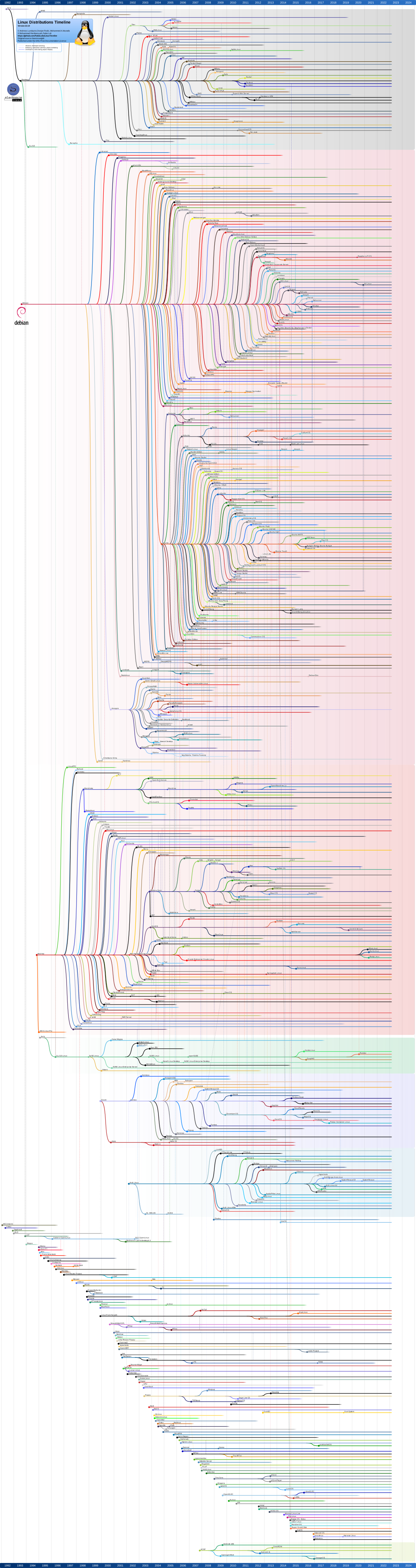
Episode 371 Time Stamps
00:00 Going Linux #371 · Listener Feedback
00:15 Introduction
00.54 Summer weather
01:43 Distro hopping: Ubuntu 18.04 again
04:46 Greg: GNU Linux Distributions Timeline
17:49 Troy: Grub and dual boot
24:06 Highlander: Hiding files
28:54 George: William and the unmountable drive
34:27 Highlander: Communications security
41:57 David: Have you seen these articles?
49:33 Grubb: Finding the right Linux distribution
60:10 Ro: Why won't she boot?
69:16 goinglinux.com, goinglinux@gmail.com, +1-904-468-7889, @goinglinux, feedback, listen, subscribe
79:41 End
Jun 15: #370 · Run your business on Linux - Part 4
After we discuss Bill's latest adventure in distro hopping, we continue our series on Linux applications for running a business. This time, the we are discussing the business of being a writer. From applications to word processors to desktop publishing and graphic creation, LInux has applications for it all.
The following resources are mentioned in this episode:
- Deepin https://www.deepin.org/en/dde/
- Ubuntu MATE https://ubuntu-mate.org/
- Barrier-kvm: https://github.com/debauchee/barrier/releases
- Using barrier-kvm: https://goinglinux.com/articles/UsingSynergyOnLinuxAndWindows_en.htm
- Business Apps: https://www.linuxlinks.com/linux-means-business-best-free-business-apps/
- Software for Writers: https://www.linux.com/learn/2018/11/must-have-tools-writers-linux-platform
- Gimp: https://www.gimp.org/
- LibreOffice Writer: https://www.libreoffice.org/
- WPS Office: https://www.wps.com/en-US/
- Calibre: https://calibre-ebook.com/
- Scribus: https://www.scribus.net/
- Canva: https://alternativeto.net/software/canva/
- Laidout: https://laidout.org/
- Theme music provided by Mark Blasco https://www.podcastthemes.com
Episode 370 Time Stamps
00:00 Going Linux #370 · Run your business on Linux - Part 4
00:15 Introduction
01:14 Distro hopping: Deepin-ing distrust
02:11 Trust
03:14 Ubuntu MATE
10:04 Martin Wimpress
12:41 Community update
18:17 Open Source vs. Proprietary software
20:39 Linux applications for writers
21:22 Linux word processors
21:52 Linux e-book manager, viewer, converter
24:00 Linux software for desktop publishing
25:49 Linux software for graphics and illustrations
32:10 Other testimonials
35:01 Thank you to our team of Minions
37:52 goinglinux.com, goinglinux@gmail.com, +1-904-468-7889, @goinglinux, feedback, listen, subscribe
39:01 End
May 27: #369 · Listener Feedback
With a shout out and application picks, this episode provides more than just listener feedback. The feedback we have received over the past month includes questions about OpenSUSE, Fedora 29, Zorin, Ubuntu, configuration file syntax, mice, printers, and scanners. Of course, there is more.
The following resources are mentioned in this episode:
- Deepin https://www.deepin.org/en/dde/
- Mine Test: https://www.minetest.net/
- No klass support in Fedora: https://ask.fedoraproject.org/en/question/134030/fedorda29-update-blocked-due-to-no-klass-support-msg/
- Winetricks is official for OpenSUSE Tumbleweed, but experimental for the 42.3 and 15 releases. https://software.opensuse.org/package/winetricks
- Linux hardware compatibility lists https://goinglinux.com/articles/Resources_en.htm#hardware-compatibility.
- Here are the links we provide about Linux-compatible printers: Printers - InkJet, Laser, Dot Matrix, etc.
https://openprinting.org/printer_list.cgi
https://www.linuxquestions.org/hcl/index.php/cat/198 - Drive caddy: https://www.amazon.com/dp/B004XIU4T2/ref=cm_sw_r_cp_apa_i_D3z0Cb0J0BQ52
- Send.Firefox.com https://send.firefox.com/
- Why offline backups are important: https://www.cnn.com/2019/05/10/politics/ransomware-attacks-us-cities/index.html
- Barrier: https://github.com/debauchee/barrier/releases
- MakeHuman: https://www.makehumancommunity.org/
- Grur99 Tutorials on YouTube https://www.youtube.com/watch?v=V1y-mbWM3B8&list=WL&index=6&t=0s
- The book 'Using Ubuntu MATE and Its Applications: Ubuntu MATE 18.04 LTS Edition' is now available on Amazon:
E-book version: https://www.amazon.com/Using-Ubuntu-MATE-Its-Applications-ebook/dp/B07FRVXHTH
Paperback version: https://www.amazon.com/dp/ASIN/1983393177 - Theme music provided by Mark Blasco https://www.podcastthemes.com
Episode 369 Time Stamps
00:00 Going Linux #369 · Listener Feedback
00:15 Introduction
01:01 Shout out to Transworld
02:05 Distrohopping: Deepin Linux
03:55 Minetest
05:43 NZ17: How Helios got his voice back
07:38 Highlander: Bypassing GUI update blockage in Fedora 29
10:19 Hamilcar Follow up to Episode 359
12:26 Stephen: Discord and OpenSUSE
18:13 James: Config file syntax
22:00 Albert: Needs a new printer
27:25 Troy: Linux on laptops, tablets, convertibles, etc. for on the road
32:01 George: Comments on Back to Basics
37:01 William: Comments on Zorin
44:37 Highlander: Issue with Firefox security add-ons
46:53 Getto Geek: Ubuntu on an SSD
48:11 Nick: problems with LibreOffice
51:12 Scott: Trim function
56:29 Heath: Scanner issues
58:52 Highlander: Offline backups
59:25 Scott: A mouse tip
62:04 Barrier
65:01 Makehuman
68:00 goinglinux.com, goinglinux@gmail.com, +1-904-468-7889, @goinglinux, feedback, listen, subscribe
69:04 End
May 06: #368 · Back to Basics - Why Linux?
Our objective for this Back To Basics series is to update the information we've been providing over the past 12 years and to ensure that we continue to provide a reference for Linux users who want to adopt Linux for their day-to-day computing needs. Today: What is Linux and Why Linux?
The following resources are mentioned in this episode:
- Make A LiveCD, LiveDVD or LiveUSB From Windows, Mac Or Linux: https://goinglinux.com/articles/BurnACD.html
- How to install Linux: https://goinglinux.com/articles/InstallLinuxUsingLiveMedia_en.htm
- Ubuntu Burning ISO HowTo: https://help.ubuntu.com/community/BurningIsoHowto#Burning_the_ISO_on_to_a_DVD
- The book 'Using Ubuntu MATE and Its Applications: Ubuntu MATE 18.04 LTS Edition' is now available on Amazon:
E-book version: https://www.amazon.com/Using-Ubuntu-MATE-Its-Applications-ebook/dp/B07FRVXHTH
Paperback version: https://www.amazon.com/dp/ASIN/1983393177 - Theme music provided by Mark Blasco https://www.podcastthemes.com
Episode 368 Time Stamps
00:00 Going Linux #368 · Back to Basics - Why Linux?
00:15 Introduction
01:57 Distro hopping to PopOS
05:34 and Ubuntu 19.04
10:05 and Ubuntu MATE 19.04
12:04 and Ubuntu Budgie
13:06 and Scientific Linux
13:54 Cleaning up DropBox
17:51 Last time on 'Back to Basics'
19:16 What is Linux?
20:50 Why Linux?
22:53 Try before you commit
24:08 Multiple sources of support
27:28 Linux is better-supported, safer, and more secure
30:11 Linux is a modern operating system for for any kind of user
32:36 Comparing restoring Windows vs. Linux
34:48 Linux and its applications are developed by its users
37:16 goinglinux.com, goinglinux@gmail.com, +1-904-468-7889, @goinglinux, feedback, listen, subscribe
38:21 End
Apr 28: #367 · Listener Feedback
Audio feedback from Paul starts our episode. We get thanks and emails on printers, SSDs, Linux dock applications, and Linux in the wild.
The following resources are mentioned in this episode:
- HP fax/printer/scanner forum post from Paul: https://forums.linuxmint.com/viewtopic.php?t=272169
- Linux in the wild: https://www.youtube.com/watch?v=269XCYIrBm8
- Brother printer support: https://support.brother.com
- Theme music provided by Mark Blasco https://www.podcastthemes.com
Episode 367 Time Stamps
00:00 Going Linux #367 · Listener Feedback
00:15 Introduction
01:39 Paul: Experience with Samsung printer/scanner on Mint
05:05 Paul: Zorin OS
14:33 Michael: Ubuntu on an SSD
19:27 KF5TQN: Secret Squirrel Discord
20:37 Highlander: CPR falloff
22:44 Triple F Carl: Thanks
24:21 Juan: Controlling dock autostart using different desktop
28:51 Dillon: Linux in the wild
29:24 Greg: Feedback for Mike on printers for business
32:40 goinglinux.com, goinglinux@gmail.com, +1-904-468-7889, @goinglinux, feedback, listen, subscribe
33:42 End
Apr 14: #366 · Revisiting Kubuntu
We revisit Kubuntu, provide Bill's observations, go off the rails a bit, and somehow end up back at Ubuntu MATE.
The following resources are mentioned in this episode:
- Kubuntu: https://kubuntu.org/
- Our going-linux-chat on Discord: https://discord.gg/kahY3C7
- Our Going Linux group on MeWe: https://mewe.com/join/goinglinux
- Community (link from our website): https://https://mewe.com/join/goinglinux
- Theme music provided by Mark Blasco https://www.podcastthemes.com
Episode 366 Time Stamps
00:00 Going Linux #366 · Revisiting Kubuntu
00:15 Introduction
00:53 What happened to MX Linux?
05:08 MeWe adoption results
09:18 Looking at Kubuntu
11:47 Important features
13:43 Vaults
17:09 Kubuntu as a distribution
17:58 Installation
24:09 Bill blames the minions
25:17 The workflow that works for you
25:59 Basic requirements to adopt Linux
26:33 Modest hardware requirements
32:17 Overall: 'Like'
33:40 Distro hopping can help you find the right Linux for the way you work
36:54 Long-term support with no forced upgrades
41:18 You can use Kubuntu to get things done
43:00 Recommended for switchers from Windows
43:37 For switchers from macOs
47:36 Install and start using vs. install and tweak to your way of working
50:17 goinglinux.com, goinglinux@gmail.com, +1-904-468-7889, @goinglinux, feedback, listen, subscribe
51:18 End
Mar 20: #365 · Listener Feedback
We hear from George about Windows and printers. Roger and Gord also comment on printers. Many questions as always, and a report of problems installing the Software Center.
The following resources are mentioned in this episode:
- Ubuntu Budgie: https://ubuntubudgie.org/
- MX Linux: https://mxlinux.org/
- Linux Journey: https://linuxjourney.com
- 2 Youtube channels called “Level1Linux” and “Level1Techs” very interesting, link below:
Level1Techs
https://www.youtube.com/user/teksyndicate/videos
Level1Linux
https://www.youtube.com/channel/UCOWcZ6Wicl-1N34H0zZe38w/videos - HP DRM ink cartridges: https://www.howtogeek.com/403346/hps-ink-subscription-has-drm-that-disables-your-printer-cartridges/
- Ken Starks' Gofundme https://www.gofundme.com/help-a-hero-find-his-voice
- Theme music provided by Mark Blasco https://www.podcastthemes.com
Episode 365 Time Stamps
00:00 Going Linux #365 · Listener Feedback
00:15 Introduction
00:59 Bill tries even more distros
09:01 Our official new community and chat room is MeWe
13:05 Donations
16:40 George from Tulsa: More Windows tales
20:05 Carl: A question for the wise minions and the masters
30:15 Roger: Ubuntu MATE and printer paperweights
33:23 George: Suggested Linux printer
39:01 Gord: More comments on printers
40:48 Tony H from the MintCast: Quality podcast audio
44:02 NZ17: Help for a hero
49:40 Michael: Problems installing the Software Center
54:22 MX Linux
54:53 Podnutz
57:21 goinglinux.com, goinglinux@gmail.com, +1-904-468-7889, @goinglinux, feedback, listen, subscribe
58:43 End
Mar 05: #364 · Back to Basics - Definition of Terms
Today we define some basic terms used in the Linux and Open Source community. This is the first in a series of 'back to basics' episodes in which we will update the information we've been providing over the past 12 years. We also want to ensure that we continue to provide a reference for Linux users to use as a reference when using Linux for their day-to-day computing needs.
The following resources are mentioned in this episode:
- Going Linux Group on MeWe https://mewe.com/join/goinglinux
- Define Free: https://goinglinux.com/articles/DefineFree_en.htm
- Definitions:
'free' https://en.wiktionary.org/wiki/Gratis
'free and open source' https://en.wikipedia.org/wiki/Open-source_software
'closed source' https://en.wikipedia.org/wiki/Closed_source_software
'proprietary' https://en.wikipedia.org/wiki/Non-free_software
'Non-free' https://en.wikipedia.org/wiki/Non-free_software
'freeware' https://en.wikipedia.org/wiki/Freeware
'Shareware' https://en.wikipedia.org/wiki/Shareware - Who works on Linux? https://www.linuxfoundation.org/2017-linux-kernel-report-landing-page/
- Distrowatch: https://distrowatch.com
- Theme music provided by Mark Blasco https://www.podcastthemes.com
Episode 364 Time Stamps
00:00 Going Linux #364 · Back to Basics - Definition of Terms
00:15 Introduction
01:01 Experimenting with MeWe
07:52 The Linux 'Back to Basics' series
09:33 Free: Freedon vs. no charge
13:21 Operating system
18:04 Distribution
19:36 Desktop environment
22:47 Application, Package, and Repository
26:00 Richard Stallman
27:05 Linux Torvalds
27:46 Where to get started
31:38 Distrowatch.com
34:50 Future Back to Basics episodes
36:20 goinglinux.com, goinglinux@gmail.com, +1-904-468-7889, @goinglinux, feedback, listen, subscribe
37:18 End
Feb 20: #363 · Listener Feedback
We reveal the new application for our Community. Our listeners commend on Mint, Slint, and print. We receive greetings, gratitude, and Google. Even more.
The following resources are mentioned in this episode:
- Fenrir manual: https://manpages.ubuntu.com/manpages/bionic/man1/fenrir.1.html
- Slint: https://slint.fr/wiki/en/start
- Slint article: https://aiyumi.warpstar.net/en/blog/slint-linux-review/
- Skip's blog Blog Ghostwriting & Legal Content Services:
https://cvillefoss.blog/2019/01/22/5-things-to-know-when-installing-ubuntu-mate-for-the-first-time/ - Plain text accounting software, ledger: https://hledger.org
- Fix for discord:
https://support.discordapp.com/hc/en-us/articles/360022307532--Known-Issues-Audio-Input-issues-on-Linux-client - Linux printer compatibility list: https://www.openprinting.org/printers
- The book 'Using Ubuntu MATE and Its Applications: Ubuntu MATE 18.04 LTS Edition' is now available on Amazon:
E-book version: https://www.amazon.com/Using-Ubuntu-MATE-Its-Applications-ebook/dp/B07FRVXHTH
Paperback version: https://www.amazon.com/dp/ASIN/1983393177 - The book 'Ubuntu MATE: Upgrading from Windows or OSX' is now available on Amazon:
E-book version: https://www.amazon.com/dp/ASIN/B074JGLB4H
Paperback version: https://www.amazon.com/dp/ASIN/152202994X - Our going-linux-chat on Discord: https://https://mewe.com/join/goinglinux
- Theme music provided by Mark Blasco https://www.podcastthemes.com
Episode 363 Time Stamps
00:00 Going Linux #363 · Listener Feedback
00:15 Introduction
01:33 Michael: Provided us with a recording
05:33 Michael: The Slint distribution
08:04 David: Why he does not upgrade Linux Mint - and it's not why we thought!
09:47 Michael: Software Boutique is not accessible
16:20 Skip: An application for 'run your business on Linux'
18:14 Roger: Greetings from down under
24:38 Paul: Known audio issues on Discord
26:23 Mike: Printers for Mint
31:02 Juan expresses 'Much gratitude!!!!'
35:24 Daniel: Security patches
38:26 Mike: Loving Linux
39:39 Heath: Google Minus
40:36 NZ17: Synchronize your microphones
42:21 Tony from the mintCast: Requesting 'Value Added Extras'
48:18 goinglinux.com, goinglinux@gmail.com, +1-904-468-7889, @goinglinux, feedback, listen, subscribe
52:29 End
Feb 05: #362 · Run your business on Linux - Part 3
In this episode, we thought we'd provide some more ideas around software for every business. Accounting software. If you are running a small business and you are doing the bookkeeping yourself, you will likely quickly run into the need for ensuring that you keep track of your incoming revenue, your outgoing expenses, payroll, and other things related to money. Having to license or purchase accounting software, especially for starting businesses, is expensive. This episode will provide with a few things you can try out at no risk and at no charge to keep track of your business (and personal) finances.
The following resources are mentioned in this episode:
- Business Apps: https://www.linuxlinks.com/linux-means-business-best-free-business-apps/
- GnuCash: https://www.gnucash.org/
- Ledger SMB: https://ledgersmb.org/
- Plain text accounting software, ledger: https://hledger.org
- Apache OFBiz: https://ofbiz.apache.org/
- Xero: https://www.xero.com
- Invoice Ninja: https://www.invoiceninja.com/
- Quicken 2004 for Windows download in Wine: https://www.quicken.com/support/how-and-when-use-intermediate-version-convert-older-versions-quicken
- Skrooge: https://skrooge.org/
- MoneyDance: https://moneydance.com/
- KMyMoney: https://kmymoney.org
- Ubuntu MATE: Upgrading from Windows or OSX
Using Ubuntu MATE and Its Applications
https://goo.gl/H5bwCc - Theme music provided by Mark Blasco https://www.podcastthemes.com
Episode 362 Time Stamps
00:00 Going Linux #362 · Run your business on Linux - Part 3
00:15 Introduction
02:33 GNUCash
03:23 Apache OFBiz
04:29 LedgerSMB
06:29 hledger
09:10 Xero
11:19 Invoice Ninja
12:52 Quicken 2004 running in WINE
14:45 Skrooge
15:17 MoneyDance
16:17 KMyMoney
22:12 goinglinux.com, goinglinux@gmail.com, +1-904-468-7889, @goinglinux, feedback, listen, subscribe
23:11 End
Jan 20: #361 · Listener Feedback
More on accessibility in Linux, solutions for other listeners, and why I moved from Windows to Linux..
The following resources are mentioned in this episode:
- Quicken 2004 for Windows download in Wine:
https://www.quicken.com/support/how-and-when-use-intermediate-version-convert-older-versions-quicken - Master PDF: https://code-industry.net/about/
- Qoppa: https://www.qoppa.com/pdfstudio/
- File to edit for Orca compatibility with MATE:
/usr/lib/mate-tweak/mate-tweak.ui
sudo pluma /usr/lib/mate-tweak/mate-tweak.ui - Mail List: https://mail.gnome.org/mailman/listinfo/orca-list
- Theme music provided by Mark Blasco https://www.podcastthemes.com
Episode 361 Time Stamps
00:00 Going Linux #361 · Listener Feedback
00:15 Introduction
01:33 Making Linux install media from Windows without getting infected with malware
07:29 Primitive One: Gaming recommendations
18:50 Angelo: Compiling slint
21:15 James: A possilbe MATE Tweak solution
24:02 David: Mint upgrades
29:25 George: Mike Tech Show needs Invoice Ninja
31:25 Rick: Mounting shares over OpenVPN
34:27 Angelo: Learning Python
35:08 Highlander: Seize control
37:53 Ken: About episode 358
41:01 Ian: G+ alternative
43:43 Joshua: About episode 358
46:14 Rainy: G+ Alternative
46:52 George: Winders!!!
55:09 goinglinux.com, goinglinux@gmail.com, +1-904-468-7889, @goinglinux, feedback, listen, subscribe
57:32 End
Jan 05: #360 · Run your business on Linux - Part 2
In this episode, we mention some software that you might want to look at if you write for a living. These might be such jobs as a copywriter, an author of novels, or a creator of technical articles for publication in an online magazine.
The following resources are mentioned in this episode:
- Creating Documents:
LibreOffice https://www.libreoffice.org
Calibre https://calibre-ebook.com - Screenshots:
Shutter https://shutter-project.org
Maim https://github.com/naelstrof/maim
Gnome Screenshot https://gitlab.gnome.org/GNOME/gnome-screenshot/tree/master
Flameshot https://github.com/lupoDharkael/flameshot - Creating Graphics:
Gimp https://www.gimp.org
365Layouts https://www.365layouts.com
Canva https://www.canva.com
Desygner https://desygner.com
Fatpaint https://www.fatpaint.com
Lucidpress https://www.lucidpress.com/ - Advanced Graphics
Inkscape https://inkscape.org
Xara Xtreme https://www.xaraxtreme.org
SVG-edit https://github.com/SVG-Edit/svgedit
Skencil https://www.skencil.org
LateXDraw https://latexdraw.sourceforge.net/
Ipe https://ipe.otfried.org
PrintDesign https://sk1project.net - Collaborating
Google docs https://docs.google.com
Google drive https://drive.google.com
Box https://www.box.com
Dropbox https://www.dropbox.com
Quip https://en.wikipedia.org/wiki/Quip_(software)
Zoho https://www.zoho.com
Next Cloud https://nextcloud.com
One Drive https://onedrive.live.com - Software for Writers:
https://www.linux.com/learn/2018/11/must-have-tools-writers-linux-platform - Theme music provided by Mark Blasco https://www.podcastthemes.com
Episode 360 Time Stamps
00:00 Going Linux #360 · Run your business on Linux - Part 2
00:15 Introduction
01:26 Thank you!
04:30 Software for simple writing
05:52 Linux software for electronic books
10:30 Linux software for illustrating your document
14:08 Advanced image creation and editing for Linux
22:12 Collaboration software for writers using Linux
29:57 goinglinux.com, goinglinux@gmail.com, +1-904-468-7889, @goinglinux, feedback, listen, subscribe
31.03 End
2018 Episodes:
Dec 05: #358 · Listener Feedback
Nov 20: #357 · Running your business on Linux - Part 1
Nov 05: #356 · Listener Feedback
Oct 20: #355 · Moving from Windows to Linux - Part 2
Oct 05: #354 · Listener Feedback
Sep 20: #353 · Moving from Windows to Linux - Part 1
Sep 05: #352 · Listener Feedback
Aug 20: #351 · Review of Pinguy 18.04
Aug 05: #350 · Listener Feedback
Jul 20: #349 · Linux Mint 19 Tara
Jul 05: #348 · Listener Feedback
Jun 20: #347 · Using the Terminal
Jun 05: #346 · Listener Feedback
May 20: #345 · Apt and apt-get and aptitude, oh my!
May 05: #344 · Listener Feedback
Apr 05: #343 · HiDPI Auto-detection in Ubuntu MATE
Mar 20: #342 · Listener Feedback
Mar 05: #341 · Listener Feedback
Feb 20: #340 · Security on Linux
Feb 05: #339 · Listener Feedback
Jan 20: #338 · Personalizing Your Linux Desktop
Jan 05: #337 · Listener Feedback
Dec 20: #359 · Listener Feedback
We provide recommendations on Linux computers pre-installed with Linux. We also have two "Gone Linux" stories, recommendations on learning the terminal, some comments on Snap packages, suggestions on listening in Rythmbox, and information on where to purchase Linux distribution media. And more, of course.
The following resources are mentioned in this episode:
- "The Linux Command Line: A Complete Introduction" by William E. Shotts Jr. https://www.amazon.com/dp/1593273894
- Hardware designed for Linux: https://goinglinux.com/articles/HardwareDesignedForLinux_en.htm
- Subscribe using Rhythmbox: https://goinglinux.com/articles/subscribe.html
- Ask Noahhttps://www.asknoahshow.com
- OSDisc: https://OSDisc.com
- Theme music provided by Mark Blasco https://www.podcastthemes.com
Episode 359 Time Stamps
00:00 Going Linux #359 · Listener Feedback
00:15 Introduction
01:10 Myer: Gone Linux Voice Mail
05:37 Joey: Awesome podcast
10:03 Michael: Learning Python programming
13:27 Michael: Comments on Episode 342
16:26 Angelo: Additional comments
16:47 John: Snap Packages
20:39 Sean: 3 topics of feedback
25:03 Michael: Listening to podcasts in Rhythmbox
27:31 Tim: Info on Acer SB111-32N
32:43 Sergio: Greetings from South America
35:36 Stefan: Used applications
37:22 Andy: Gone Linux with Linux Mint 19
39:54 goinglinux.com, goinglinux@gmail.com, +1-904-468-7889, @goinglinux, feedback, listen, subscribe
40:51 End
Dec 05: #358 · Listener Feedback
This month we have voice feedback from Paul, suggestions on alternatives for G+, a question on OpenVPN, alternatives to the Steam gaming platform, and problems moving to Linux. Troy provides a Going Linux story on software for Linux users.
The following resources are mentioned in this episode:
- Subscribe using Rhythmbox: https://goinglinux.com/articles/subscribe.html
- Books: https://goo.gl/H5bwCc
- Alternatives to Steam and Play on Linux: https://itch.io, Lutris, Proton
- Windows Weekly: https://twit.tv/shows/windows-weekly
- Security Now: https://twit.tv/shows/security-now
- Mike Tech Show: https://mikenation.net/category/podcast/
- Theme music provided by Mark Blasco https://www.podcastthemes.com
Episode 358 Time Stamps
00:00 Going Linux #358 · Listener Feedback
00:15 Introduction
01:46 Paul: Boot Partition Saga Audio Feedback
09:00 Greg: A minion response for Paul
12:16 Sergio: G+ alternatives and gaming tip
16:11 Rick: Mounting shares over OpenVPN
19:17 Don: Feedback on moving to Linux
32:20 John: Problems installing Ubuntu MATE
38:29 Troy: Suggestion for forums
39:26 Troy: Windows for business
52:10 goinglinux.com, goinglinux@gmail.com, +1-904-468-7889, @goinglinux, feedback, listen, subscribe
53:10 End
Nov 20: #357 · Running your business on Linux - Part 1
Although the title of this episode says that we'll be talking about running a business on Linux, we focus most of our conversation beyond the operating system and onto other open source applications for use in business.
The following resources are mentioned in this episode:
- Open Source Revolution: https://www.lightreading.com/open-source/the-open-source-revolution-is-over---the-revolutionaries-won/d/d-id/747225
- Microsoft open-sources its patent portfolio: https://www.zdnet.com/article/microsoft-open-sources-its-entire-patent-portfolio/
- Open Source By Default: https://linuxunplugged.com/274
- Network World 14 Apps: https://www.networkworld.com/article/2898174/linux/14-linux-apps-that-will-change-how-you-work.html#slide1
- Business Apps: https://www.linuxlinks.com/linux-means-business-best-free-business-apps/
- Software for DJs: https://www.linuxlinks.com/best-free-linux-software-djs/
- Software for Writers: https://www.linux.com/learn/2018/11/must-have-tools-writers-linux-platform
- Categories: https://www.linuxlinks.com/linux-group-tests-part-1/
- Office Suites: https://www.pcworld.com/article/218394/software-productivity/best-microsoft-office-alternatives.html
- OpenDocument format: https://en.wikipedia.org/wiki/OpenDocument
- Comparison of Microsoft Office Open XML and OpenDocument: https://en.wikipedia.org/wiki/Comparison_of_Office_Open_XML_and_OpenDocument
- Slack alternatives: https://medium.com/ignation/time-to-replace-slack-who-will-win-mattermost-or-riot-matrix-a090e9cdc219
- Theme music provided by Mark Blasco https://www.podcastthemes.com
Episode 357 Time Stamps
00:00 Going Linux #357 · Running your business on Linux - Part 1
00:15 Introduction
04:27 Office Suites
07:15 Open Document Formats
09:48 Compatibility across office suites
12:37 Linux email applications
13:47 Linux browsers
15:48 Linux chat application
21:05 Check you software repositories FIRST!
21:47 Business software for Linux in future episodes
23:21 goinglinux.com, goinglinux@gmail.com, +1-904-468-7889, @goinglinux, feedback, listen, subscribe
24:20 End
Nov 05: #356 · Listener Feedback
We get corrected (again). Michael has success. Daniel is frustrated by the lack of accessibility. Mike shares his Gone Linux story.
The following resources are mentioned in this episode:
- Theme music provided by Mark Blasco https://www.podcastthemes.com
Episode 356 Time Stamps
00:00 Going Linux #356 · Listener Feedback
00:15 Introduction
01:50 Mike Windows: Edge integration
03:47 Michael: Linux on a USB
06:52 Katja: Thanks
08:26 Daniel: Getting to the top panel
12:54 Mike S: Tip for 'no nukes' solution
24:58 Nathan: A minion fo ropenSUSE
28:11 Frank: Lost in the *buntuverse
30:05 Paul: Hard drive update
31:49 Peter: Comments on Paul's feedback
34:38 Gord: Correcting our terminology
37:00 Mel: Name in the toolbar
39:52 Mike: Blind guy gone Linux
44:45 goinglinux.com, goinglinux@gmail.com, +1-904-468-7889, @goinglinux, feedback, listen, subscribe
45:58 End
Oct 20: #355 · Moving from Windows to Linux - Part 2
Our 2-part series on moving from Windows to Linux concludes with ideas on how to install Linux without an Internet connection, how to restore the files you backed up, and what applications you get out of the box, and what you will likely want to install after you have your Linux setup. We conclude with several suggestions for applications that we use, and that you may like.
The following resources are mentioned in this episode:
- Hex Chat https://hexchat.github.io/
- Theme music provided by Mark Blasco https://www.podcastthemes.com
Episode 355 Time Stamps
00:00 Going Linux #355 · Moving from Windows to Linux - Part 2
00:15 Introduction
00:49 Google+ forums will vanish
03:28 Dell recommends Windows - and a subscription to antivirus software!
14:06 So I've got Linux installed. What's next?
15:00 Check for updates
16:42 Installing Linux without an Internet connection
23:17 Restoring the files you backed up
25:45 Installing additional applications after a Linux install
26:23 Browsers
30:17 Office suites
32:52 Text editors
36:24 Audio and video communication
38:11 Entertainment
40:02 Audio recording, playback, and editing
43:20 Video playback, recording, and editing
46:03 Screen shots
49:37 Larry's suggestions: AutoKey, Caffeine, Synergy, Simplenote, Simple Screen Recorder, Rsync
52:21 Bill's suggestions: Wine for games, Play on Linux, LibreOffice, Chrome, Firefox, Opera
56:34 What software do you use on Linux to get things done?
57:35 Application picks: Hex Chat and Shotcut
62:44 goinglinux.com, goinglinux@gmail.com, +1-904-468-7889, @goinglinux, feedback, listen, subscribe
64:19 End
Oct 05: #354 · Listener Feedback
We received audio feedback this time! We also answer questions about accessibility, 'hybrid' systems, replacing swap partitions, Kali, and usb sticks. We read the 'Gone Linux' story we mentioned last month.
The following resources are mentioned in this episode:
- Remove old kernels Linux Mint: https://forums.linuxmint.com/viewtopic.php?f=90&t=277945&p=1528458&hilit=remove+old+kernels&sid=f008b3d6cbe115ccd37e479b048a7ee8#p1528458
- Ubuntu swap file
https://www.digitalocean.com/community/tutorials/how-to-add-swap-space-on-ubuntu-18-04#step-2-%E2%80%93-checking-available-space-on-the-hard-drive-partition
https://www.howtoforge.com/ubuntu-swap-file - Links for show notes: Sean’s Guild Wars: https://en-forum.guildwars2.com/discussion/31192/playing-guild-wars-2-on-linux-performance-optimizations-and-more
- Create an Ubuntu USB on Windows: https://tutorials.ubuntu.com/tutorial/tutorial-create-a-usb-stick-on-windows#0
- Theme music provided by Mark Blasco https://www.podcastthemes.com
Episode 354 Time Stamps
00:00 Going Linux #354 · Listener Feedback
00:15 Introduction
01:31 Thanks to Sean for making Bill's Guild Wars xperience better
04:12 Paul: Audio feedback
12:52 Jackie: Hybrid system
20:35 Daniel: Accessibility on KDE
30:17 David: Linux market research
32:08 Colin: Replacing swap partition with a swap file
33:49 Michael: Putting Linux on USB using Windows
38:00 Hilander: installing Kali
40:47 Angelo: Linux for the blind
42:04 Mario: Gone Linux
47:52 goinglinux.com, goinglinux@gmail.com, +1-904-468-7889, @goinglinux, feedback, listen, subscribe
49:25 End
Sep 20: #353 · Moving from Windows to Linux - Part 1
We look at switching from Windows to Linux in this first of two parts.
The following resources are mentioned in this episode:
- Windows 10 retail EULA: https://www.microsoft.com/en-us/Useterms/Retail/Windows/10/UseTerms_Retail_Windows_10_English.htm
- Windows data collection: https://www.theverge.com/2018/1/24/16927056/microsoft-windows-10-data-collection-viewer-privacy
- Dutch privacy law breach: https://techcrunch.com/2017/10/13/microsofts-windows-10-breaches-privacy-law-says-dutch-dpa/
- Theme music provided by Mark Blasco https://www.podcastthemes.com
Episode 353 Time Stamps
00:00 Going Linux #353 · Listener Feedback
00:15 Introduction
02:21 Extensive show notes links
08:11 Why would I want to ditch Windows if it's working for me?
28:19 Things to look at before you ditch Windows.
34:16 What do you do after you've selected a distribution of Linux to install?
41:48 How can I try it out before I install Linux?
47:24 Before you install, back up everything!
59:42 goinglinux.com, goinglinux@gmail.com, +1-904-468-7889, @goinglinux, feedback, listen, subscribe
60:36 End
Sep 20: #353 · Moving from Windows to Linux - Part 1
We look at switching from Windows to Linux in this first of two parts.
The following resources are mentioned in this episode:
- Windows 10 retail EULA: https://www.microsoft.com/en-us/Useterms/Retail/Windows/10/UseTerms_Retail_Windows_10_English.htm
- Windows data collection: https://www.theverge.com/2018/1/24/16927056/microsoft-windows-10-data-collection-viewer-privacy
- Dutch privacy law breach: https://techcrunch.com/2017/10/13/microsofts-windows-10-breaches-privacy-law-says-dutch-dpa/
- Theme music provided by Mark Blasco https://www.podcastthemes.com
Episode 353 Time Stamps
00:00 Going Linux #353 · Listener Feedback
00:15 Introduction
02:21 Extensive show notes links
08:11 Why would I want to ditch Windows if it's working for me?
28:19 Things to look at before you ditch Windows.
34:16 What do you do after you've selected a distribution of Linux to install?
41:48 How can I try it out before I install Linux?
47:24 Before you install, back up everything!
59:42 goinglinux.com, goinglinux@gmail.com, +1-904-468-7889, @goinglinux, feedback, listen, subscribe
60:36 End
Sep 05: #352 · Listener Feedback
We start with a critical voice mail from Lester. We also have comments on our review of Linux Mint, discussions of Lexmark's lack of support for its printers on Linux, how to provide remote support, increasing swap and boot partitions and more.
The following resources are mentioned in this episode:
- Increase swap size: https://askubuntu.com/questions/367331/how-to-increase-the-size-of-linux-swap-partition
- Guild Wars help: https://en-forum.guildwars2.com/discussion/31192/playing-guild-wars-2-on-linux-performance-optimizations-and-more
- Teamviewer: https://www.teamviewer.us/
- 321 rule: https://blog.wisefaq.com/2010/01/05/backups-with-the-3-2-1-rule/
- Screencast on producing a podcast: https://goinglinux.com/screencasts.html#glsc006
- Theme music provided by Mark Blasco https://www.podcastthemes.com
Episode 352 Time Stamps
00:00 Going Linux #352 · Listener Feedback
00:15 Introduction
00:20 Lester: Pinguy review was too critical
07:05 Cogoman: Mint 19 experiences
21:07 Ken: Comments on the Mint review
26:11 Paul: Hello from Ankara
35:27 John: Failure to reboot
41:45 Josh: An idea for the Lexmark printer
43:50 David: A work-around for the Lexmark
47:59 George: Backing Up iOS on Linux
50:24 Jim: Remote connections
54:59 Preston: Podcasting advice
63:29 Michael Installing Linux without Wifi
67:51 Michael: Coconut Linux
69:57 Paul: Increasing swap and boot partitions size
74:35 Sean: Guildwars tip for Bill
85:36 goinglinux.com, goinglinux@gmail.com, +1-904-468-7889, @goinglinux, feedback, listen, subscribe
86:28 End
Aug 20: #351 · Review of Pinguy 18.04
We review Pinguy Linux, release 18.04.
The following resources are mentioned in this episode:
- MRPTech 108: https://podnutz.com/mrp108/
- Pinguy https://pinguyos.com/
- Antoni Norman links:
https://www.youtube.com/watch?v=vOdKdlFHDbA - https://forum.pinguyos.com/Thread-How-to-Place-Personal-Files-Recycle-Bin-Network-on-my-Desktop
- Theme music provided by Mark Blasco https://www.podcastthemes.com
Episode 351 Time Stamps
00:00 Going Linux #351 · Review of Pinguy 18.04
00:15 Introduction
00:55 The Windows update prevents Bill's machine from booting into Linux, delays our recording
02:38 Guild Wars 2 on Linux
05:21 Pinguy review
09:15 Website looks nice but 'help' section needs a bit of updating
10:03 The developer is responsive
13:01 The 3.2GB ISO image is HUGE!
13:42 Some of the included software
16:29 Not for everyone
19:01 Pinguy relies on a lot of PPAs
21:04 OK for some
21:32 Desktop: A heavily modified Gnome with lots of extensions
22:11 Best Practice: Lean toward Standard vs. Custom functionality, customizations should add value
23:48 Slow, even on powerful hardware
25:57 Theme is not consistent
27:29 Needs a lot of polish
28:16 Could be more intuitive, discoverable
30:28 Bill's suggestions
35:23 Larry's suggestions
37:36 Pinguy needs more help
39:54 Summary
42:11 MRP Tech Podcast
43:54 goinglinux.com, goinglinux@gmail.com, +1-904-468-7889, @goinglinux, feedback, listen, subscribe
44:54 End
Aug 05: #350 · Listener Feedback
Bill has not yet switched from Linux Mint. The eBook version of 'Using Ubuntu MATE and Its Applications- Ubuntu MATE 18.04 Edition' is now available. In this episode, Tom can now suspend, Dan reveals how on-site repair really works, James has a paperweight, and much more.
The following resources are mentioned in this episode:
- The book 'Using Ubuntu MATE and Its Applications: Ubuntu MATE 18.04 LTS Edition' is now available on Amazon - E-book version: https://www.amazon.com/Using-Ubuntu-MATE-Its-Applications-ebook/dp/B07FRVXHTH
- Backup strategies: https://goinglinux.com/articles/Backups.html
- The Lexmark website on the x9575: https://support.lexmark.com/index?page=product&segment=SUPPORT&productCode=LEXMARK_X9575&locale=en&userlocale=EN#1
- Force GRUB to use old kernel: https://askubuntu.com/questions/216398/set-older-kernel-as-default-grub-entry
- Devuan: https://devuan.org/
- Alternative To: https://alternativeto.net
- Theme music provided by Mark Blasco https://www.podcastthemes.com
Episode 350 Time Stamps
00:00 Going Linux #350 · Listener Feedback
00:15 Introduction
00:54 Bill is still using Linux Mint
04:19 2nd edition eBook now available
05:45 Tom: Found a solution to his suspend problem
10:34 Dan: About big-name machine on-sit repairs
14:11 Paul: First experience with Linux Mint 19
20:52 Stefan: Backing up an iPad on Linux
27:10 James: Lexmark x9575 Linux compatibility
31:04 James: A new Debian variant and MS Skype
38:05 goinglinux.com, goinglinux@gmail.com, +1-904-468-7889, @goinglinux, feedback, listen, subscribe
39:25 End
Aug 20: #351 · Review of Pinguy 18.04
We review Pinguy Linux, release 18.04.
The following resources are mentioned in this episode:
- MRPTech 108: https://podnutz.com/mrp108/
- Pinguy https://pinguyos.com/
- Antoni Norman links:
https://www.youtube.com/watch?v=vOdKdlFHDbA - https://forum.pinguyos.com/Thread-How-to-Place-Personal-Files-Recycle-Bin-Network-on-my-Desktop
- Theme music provided by Mark Blasco https://www.podcastthemes.com
Episode 351 Time Stamps
00:00 Going Linux #351 · Review of Pinguy 18.04
00:15 Introduction
00:55 The Windows update prevents Bill's machine from booting into Linux, delays our recording
02:38 Guild Wars 2 on Linux
05:21 Pinguy review
09:15 Website looks nice but 'help' section needs a bit of updating
10:03 The developer is responsive
13:01 The 3.2GB ISO image is HUGE!
13:42 Some of the included software
16:29 Not for everyone
19:01 Pinguy relies on a lot of PPAs
21:04 OK for some
21:32 Desktop: A heavily modified Gnome with lots of extensions
22:11 Best Practice: Lean toward Standard vs. Custom functionality, customizations should add value
23:48 Slow, even on powerful hardware
25:57 Theme is not consistent
27:29 Needs a lot of polish
28:16 Could be more intuitive, discoverable
30:28 Bill's suggestions
35:23 Larry's suggestions
37:36 Pinguy needs more help
39:54 Summary
42:11 MRP Tech Podcast
43:54 goinglinux.com, goinglinux@gmail.com, +1-904-468-7889, @goinglinux, feedback, listen, subscribe
44:54 End
Aug 05: #350 · Listener Feedback
Bill has not yet switched from Linux Mint. The eBook version of 'Using Ubuntu MATE and Its Applications- Ubuntu MATE 18.04 Edition' is now available. In this episode, Tom can now suspend, Dan reveals how on-site repair really works, James has a paperweight, and much more.
The following resources are mentioned in this episode:
- The book 'Using Ubuntu MATE and Its Applications: Ubuntu MATE 18.04 LTS Edition' is now available on Amazon - E-book version: https://www.amazon.com/Using-Ubuntu-MATE-Its-Applications-ebook/dp/B07FRVXHTH
- Backup strategies: https://goinglinux.com/articles/Backups.html
- The Lexmark website on the x9575: https://support.lexmark.com/index?page=product&segment=SUPPORT&productCode=LEXMARK_X9575&locale=en&userlocale=EN#1
- Force GRUB to use old kernel: https://askubuntu.com/questions/216398/set-older-kernel-as-default-grub-entry
- Devuan: https://devuan.org/
- Alternative To: https://alternativeto.net
- Theme music provided by Mark Blasco https://www.podcastthemes.com
Episode 350 Time Stamps
00:00 Going Linux #350 · Listener Feedback
00:15 Introduction
00:54 Bill is still using Linux Mint
04:19 2nd edition eBook now available
05:45 Tom: Found a solution to his suspend problem
10:34 Dan: About big-name machine on-sit repairs
14:11 Paul: First experience with Linux Mint 19
20:52 Stefan: Backing up an iPad on Linux
27:10 James: Lexmark x9575 Linux compatibility
31:04 James: A new Debian variant and MS Skype
38:05 goinglinux.com, goinglinux@gmail.com, +1-904-468-7889, @goinglinux, feedback, listen, subscribe
39:25 End
Jul 20: #349 · Linux Mint 19 Tara
Bill reviews Linux Mint 19 and discusses the Good the Bad and the Ugly. Well, there's really no Ugly. We compare it with Ubuntu MATE 18.04 and render a final verdict on which we'd recommend.
The following resources are mentioned in this episode:
- Using Ubuntu MATE and Its Applications: Ubuntu MATE 18.04 LTS (2nd) Edition
Paperback version is vailable on Amazon: https://www.amazon.com/dp/ASIN/1983393177 - Opensuse sold for 2.5 Billion: https://itsfoss.com/suse-eqt-acquisition/
- Ubuntu MATE:
https://ubuntu-mate.org/
https://askubuntu.com/questions/160036/how-do-i-disable-acpi-when-booting - Linux Mint: https://www.linuxmint.com/
- Flatpack support
https://flatphttps://flatpak.org/
https://www.linuxmint.com/rel_tara_cinnamon_whatsnew.php - Theme music provided by Mark Blasco https://www.podcastthemes.com
Episode 349 Time Stamps
00:00 Going Linux #349 · Linux Mint 19 Tara
00:15 Introduction
11:21 Linux Mint 19
13:10 Working around Alienware problems
17:01 The Good
17:27 Update Center
23:02 Welcome screen
24:01 Comparing Linux Mint 19 with Ubuntu MATE 18.04
35:56 Out-of-the-box support for Flatpack but not for Snap
36:53 Cinnamon
37:57 Mint 19 feels noticably slower
44:07 Mint uses more memory
45:58 Final verdict
49:59 Software pick: ClamTK
50:40 Bonus tip: Be careful out there!
53:03 goinglinux.com, goinglinux@gmail.com, +1-904-468-7889, @goinglinux, feedback, listen, subscribe
54:36 End
Jul 05: #348 · Listener Feedback
We receive feedback on previous Listener Feedback episodes, including feedback for Bill on his issues with his Alienware computer. Joe wants to relive his childhood.
The following resources are mentioned in this episode:
- Serge's links for Bill:
https://eu.alienwarearena.com/ucf/show/256866/boards/general-1/ForumPost/a-non-gamer-s-review-of-the-alienware-17r3
https://helloworldproject.blogspot.com/2016/11/installing-ubuntu-1610-on-alienware.html
https://altshiftkill.com/install-ubuntu-on-alienware-13.html - Thomas' links for Bill:
https://www.dell.com/community/Alienware-General/Alienware-17-R4-Nov-2016-and-Linux/td-p/5624746
https://wiki.archlinux.org/index.php/Touchpad_Synaptic - Debian Hamradio Pure Blend https://www.debian.org/blends/hamradio/
- PenDriveLinux.com https://fossbytes.com/enable-disable-hibernate-option-ubuntu-power-menu/
- Theme music provided by Mark Blasco https://www.podcastthemes.com
Episode 348 Time Stamps
00:00 Going Linux #348 · Listener Feedback
00:15 Introduction
58:46 Bill has a 32bit vs. 64bit battle
05:31 Larry's Dell support call goes horribly wrong
06:55 Paul: Recording Discord
09:23 Daniel: Bad news
11:17 Paul: Linux Mint 19 is coming
15:56 Oscar: Linux on Windows
19:31 Troy: Re: Episode 346
21:53 Greg: Episode 344 feedback
25:15 Serge: Episode 346 Alienware
26:35 Thomas: Regarding Alienware problems
27:22 Serge: Episode 346 Discord for Daniel
30:39 Joe: Relive my childhood through bbs
34:32 P Durao: I’ve got a stupid difficult machine as well
37:19 Mario: Feedback from Listener Feedback #346
40:07 Tom: Ubuntu MATE Acer Laptop BIOS
48:26 goinglinux.com, goinglinux@gmail.com, +1-904-468-7889, @goinglinux, feedback, listen, subscribe
49:45 End
Jun 20: #347 · Using the Terminal
Bill needs some help! Listeners share tips and help for other listeners. George asks for a book. Daniel has problems writing to disk.
The following resources are mentioned in this episode:
- "The Linux Command Line: A Complete Introduction" by William E. Shotts Jr. https://www.amazon.com/dp/1593273894
- Theme music provided by Mark Blasco https://www.podcastthemes.com
Episode 347 Time Stamps
00:00 Going Linux #347 · Using the Terminal
00:15 Introduction
00:43 Terminal basics
02:00 The terminal
04:49 Installing applications
08:17 lshw to display your system info
09:43 inxi to display your system info
11:23 Easter eggs
12:34 Upgrade distribution releases
13:48 Determine if an application is available to install
15:59 Discover what a command does
19:14 Not as difficult as it seems
20:33 goinglinux.com, goinglinux@gmail.com, +1-904-468-7889, @goinglinux, feedback, listen, subscribe
21:30 End
Jun 05: #346 · Listener Feedback
Bill needs some help! Listeners share tips and help for other listeners. George asks for a book. Daniel has problems writing to disk.
The following resources are mentioned in this episode:
- Free PDFs - "Ubuntu MATE - Upgrading from Windows or OSX" and "Using Ubuntu MATE and Its Applications":
https://goinglinux.com/articles/UbuntuMATEBook_en.htm
Print copies and ebooks available for sale on Amazon: https://goo.gl/H5bwCc - Buringing DVD on Ubuntu 18.04 tutorial: https://tutorials.ubuntu.com/tutorial/tutorial-burn-a-dvd-on-ubuntu
- Fedora video drivers: https://rpmfusion.org/Configuration
- Open Streetmap on Garmin: https://wiki.openstreetmap.org/wiki/OSM_Map_On_Garmin
- Theme music provided by Mark Blasco https://www.podcastthemes.com
Episode 346 Time Stamps
00:00 Going Linux #346 · Listener Feedback
00:15 Introduction
01:21 Bill asks the minions for help
10:51 Another reason users switch from Windows to Linux!
13:22 Daniel: Discord is not accessible
15:46 George: May I please have a book?
24:04 Tom: Championing freedom and fostering success in the land of Linux!
25:15 Hilander: Getting Fedora video working
27:22 Leonid: Compare distros and desktops
29:40 Göran: Advice on Garmin GPSs
31:45 Rick: Help for Mike
33:14 Mathias: Help for Joshua on file ownership
35:52 Daniel: Trying to write to disk
38:13 Aaron: Installing software on Linux
42:51 goinglinux.com, goinglinux@gmail.com, +1-904-468-7889, @goinglinux, feedback, listen, subscribe
43:13 End
May 20: #345 · Apt and apt-get and aptitude, oh my!
In Linux there are methods of installing software, from source code by compiling and installing, or through software packages and package managers. There are newer forms of installing software, for example using portable app installers like Appimage, Snap or Flatpak. In this episode we describe the common methods of installing applications on Debian-based distributions.
The following resources are mentioned in this episode:
- apt https://en.wikipedia.org/wiki/APT_(Debian)
- synaptic https://en.wikipedia.org/wiki/Synaptic_(software)
- Theme music provided by Mark Blasco https://www.podcastthemes.com
Episode 345 Time Stamps
00:00 Going Linux #345 · Apt and apt-get and aptitude, oh my!
00:15 Introduction
00:39 Ubuntu MATE 18.04 LTS released
02:30 Debian-based Packages explained by 'minion' Ken Leyba
04:35 Debian-based package managers
14:37 .deb package anatomy
17:44 The dpkg command-line tool
20:07 The advance packaging tool - apt
24:48 Aptitude
26:47 Synaptic
27:39 Just for fun
30:06 Are you a minion?
31:39 goinglinux.com, goinglinux@gmail.com, +1-904-468-7889, @goinglinux, feedback, listen, subscribe
32:58 End
May 05: #344 · Listener Feedback
We have feedback on the Discord package, the Linux In The Hamshack Podcast, Linux hardware, Linux maintenance, file permissions, and more
The following resources are mentioned in this episode:
- Using Ubuntu MATE and Its Applications https://goo.gl/H5bwCc
- VeraCrypt on an antiX/MX live-USB key with persistence:
https://www.youtube.com/user/runwiththedolphin/videos
https://www.youtube.com/watch?v=2vF_dw6Kpo8 - VeraCrypt’s suggestions:
https://www.veracrypt.fr/en/FAQ.html - Three nice reviews from a listener:
https://thishosting.rocks/best-lightweight-linux-distros/
https://thishosting.rocks/best-linux-distros-for-gaming/
https://thishosting.rocks/best-linux-laptops/ - Discord: https://discordapp.com/
Entroware computers: https://ubuntu-mate.boutique/ - Theme music provided by Mark Blasco https://www.podcastthemes.com
Episode 344 Time Stamps
00:00 Going Linux #344 · Listener Feedback
00:15 Introduction
02:02 We've remembered how to record!
02:45 Ubuntu MATE Guide for release 18.04
05:45 David: Update from a year ago
07:59 Michael: Comment on Discord
09:46 Ken: LIHS Podcast
11:22 Michael: Stores selling Linux computers
26:01 Greg: Linux Maintenance
28:28 Frank: Compiling from source
31:58 David: Garmin GPS compatible with Linux
33:20 Serge: Portable VeraCrypt for Linux
34:45 Paul: About AntennaPod
35:16 Michael: Feedback on feedback
36:58 Joshua: File permissions
42:46 ThisHostingRocks: Shameless plug
44:23 goinglinux.com, goinglinux@gmail.com, +1-904-468-7889, @goinglinux, feedback, listen, subscribe
46:17 End
Apr 05: #343 · HiDPI Auto-detection in Ubuntu MATE
Support for high-resolution computer displays (HiDPI or 4K displays) is still being perfected. Not all Linux distributions provide settings that behave well in high-resolution mode -- and most are somewhat clunky. With the 18.04 release, the Ubuntu MATE team is releasing a utility for the MATE desktop that automatically can detect your 4K display and set the appropriate screen scaling for you.
The following resources are mentioned in this episode:
- Creative Commons licensed books on Ubuntu MATE: https://goo.gl/H5bwCc
- Our article on HiDPI on Linux: https://goinglinux.com/articles/HiDPIonLinux_en.htm
- HiDPI workarounds: https://ubuntu-mate.community/t/workarounds-for-apps-that-dont-support-hidpi
- Suggestions from the Arch Linux: https://wiki.archlinux.org/index.php/HiDPI
- Addictive Tips: https://www.addictivetips.com/ubuntu-linux-tips/enable-hidpi-scaling-on-linux/
- Theme music provided by Mark Blasco https://www.podcastthemes.com
Episode 343 Time Stamps
00:00 Going Linux #343 · HiDPI Auto-detection in Ubuntu MATE
00:15 Introduction
00:50 Alone again, naturally.
01:52 Adjusting for 4K on Linux
02:54 High-resolution scaling limitations
04:15 The best HiDPI Linux Desktops (until now)
04:40 Ubuntu MATE's auto-detection and auto-adjust settings
05:26 Choosing a HiDPI resolution
06:56 Adjusting Ubuntu MATE's new HiDPI settings
08:32 Hope for the future of high-resolution support on Linux
09:01 goinglinux.com, goinglinux@gmail.com, +1-904-468-7889, @goinglinux, feedback, listen, subscribe
10:00 End
Mar 20: #342 · Listener Feedback
Serge provides multiple suggestions for replacing Skype. Jim describes some mobile AntennaPod issues, Greg discusses powering off by force, Norm suggests Mail-In-A-Box, Emilio asks about a portable VeraCrypt for Linux, Simohamed offers a suggestion and Jack describes how he has Gone Linux.
The following resources are mentioned in this episode:
- Jitsi https://jitsi.org/
- Framatalk: https://framatalk.org/accueil/
- qTox: https://qtox.github.io/
- appear.in: https://appear.in/
- Hubl.in: https://hubl.in/
- Zoom: https://support.zoom.us/hc/en-us/articles/204206269-Linux-Installation
- Wire: https://wire.com/
- Ring: https://ring.cx/en/about/practical
- Mail-In-A-Box. https://mailinabox.email
- Theme music provided by Mark Blasco https://www.podcastthemes.com
Episode 342 Time Stamps
00:00 Going Linux #342 · Listener Feedback
00:15 Introduction
00:59 Serge: Multiple suggestions for Skype replacement
02:31 Jim: AntennaPod issues on mobile
05:53 Greg: Power off - by force
08:33 Norm: Mail-In-A-Box
11:50 Simohamed: Episode suggestion
12:31 Emilio: Portable VeraCrypt for Linux?
14:58 Jack: Gone Linux
15:57 goinglinux.com, goinglinux@gmail.com, +1-904-468-7889, @goinglinux, feedback, listen, subscribe
18:57 End
Mar 05: #341 · Listener Feedback
Bill takes on a top secret special project. Jeremy recommends a backup solution, Greg removes cruft, George recommends Synology, Daniel asks about our Skype replacement, and more!
The following resources are mentioned in this episode:
- 'Using Ubuntu MATE and Its Applications' https://goo.gl/H5bwCc
- Urbackup: https://www.urbackup.org/
- FSLint: https://www.pixelbeat.org/fslint/
- BorgBackup: https://www.borgbackup.org/
- Webmin: https://webmin.com/
- 9to5 mac article: https://webmin.com/
- Discord: https://discordapp.com/
- Theme music provided by Mark Blasco https://www.podcastthemes.com
Episode 341 Time Stamps
00:00 Going Linux #341 · Listener Feedback
00:15 Introduction
00:54 Internet problems resolved (we hope)
02:06 Jeremy: Backups recommendation
04:44 Greg: Autoremoving cruft
06:19 Greg: That's not an old computer. This is an old computer!
09:34 Scott: FSLint
15:07 Serge: Configuration management suggestion
16:01 Daniel: Replacement for Skype
17:47 George: Synology
19:57 Nigel: Installing Linux applications
22:44 Bill's next project
23:59 goinglinux.com, goinglinux@gmail.com, +1-904-468-7889, @goinglinux, feedback, listen, subscribe
25:06 End
Feb 20: #340 · Security on Linux
We discuss security on Linux and provide basic Linux security guidelines. We discuss in more detail, backups, automated software updates and upgrades, and the uncomplicated firewall.
The following resources are mentioned in this episode:
- 'Using Ubuntu MATE and Its Applications' https://goo.gl/H5bwCc
- Canonical on viruses and malware: https://help.ubuntu.com/community/Linuxvirus
- Linux security guidelines: https://goinglinux.com/articles/BasicLinuxSecurityGuidelines_en.htm
- Backup strategies: https://goinglinux.com/articles/Backups.html
- Theme music provided by Mark Blasco https://www.podcastthemes.com
Episode 340 Time Stamps
00:00 Going Linux #340 · Security on Linux
00:15 Introduction
00:45 Just you and me
02:04 Overview
03:55 Basic Linux security guidelines
05:39 Backups
07:45 What and where to back-up
11:20 Automating disaster recovery
12:26 Software Updater
15:44 Firewalls
17:01 goinglinux.com, goinglinux@gmail.com, +1-904-468-7889, @goinglinux, feedback, listen, subscribe
18:49 End
Feb 05: #339 · Listener Feedback
In this episode, we have a lot of interest in Internet filtering and wiping hard drives for privacy. Also, we answer questions about the Linux screen reader, Orca, make recommendations on hardware, and discuss a multiple screen issue.
The following resources are mentioned in this episode:
- Ubuntu certified computers: https://certification.ubuntu.com/desktop/
- OpenDNS: https://www.opendns.com/home-internet-security/
- Firewalls at a glance: https://www.techsoupforlibraries.org/planning-for-success/networking-and-security/tools/firewalls-at-a-glance
- Gparted: https://gparted.org/index.php
- Theme music provided by Mark Blasco https://www.podcastthemes.com
Episode 339 Time Stamps
00:00 Going Linux #339 · Listener Feedback
00:15 Introduction
00:56 Welcome to the podcast, Bear!
02:14 Daniel: Is Orca included with Linux Mint
06:34 Daniel: New or used limited-budget computer for Linux?
10:43 Alan: Ubuntu 16.04 issue with multiple screens
14:53 Kevin: Command-line access to network-attached storage
19:08 George: Answers for listener questions
25:57 Tony: Privacy on the Internet
26:39 Nathan: Contacting Ikey
28:00 Jim: Ubuntu MATE desktop options and a rant
33:01 Jim: Filtering out adult sites
41:35 Eldon: Fdupes to get rid of duplicate files
42:46 Craig: Hardware for Internet filtering
45:17 Paul: Wiping a hard drive
46:28 goinglinux.com, goinglinux@gmail.com, +1-904-468-7889, @goinglinux, feedback, listen, subscribe
48:07 End
Jan 20: #338 · Personalizing Your Linux Desktop
Although you can do some basic tweaking out of the box with other operating systems, Linux is infinitely more configurable than macOS or Windows. Sure you can get add-on software to personalize your Windows desktop quite a bit, but most Linux distributions provide the customization tools built right in, with additional utilities just a few clicks away in the software repositories. This episode gives you some ideas as to what can be done with Linux, an operating system that is designed to be customizable.
The following resources are mentioned in this episode:
- Available on Amazon: Using Ubuntu MATE and Its Applications https://www.amazon.com/dp/ASIN/1549908154
- Personalizing Your Linux Desktop: https://goinglinux.com/articles/PersonalizingYourLinuxDesktop_en.htm
- Theme music provided by Mark Blasco https://www.podcastthemes.com
Episode 338 Time Stamps
00:00 Going Linux #338 · Personalizing Your Linux Desktop
00:15 Introduction
00:54 Show notes include screenshots and details
01:20 Personalizing the Desktop on Linux
02:50 Ubuntu MATE offers pre-configured panel layouts
04:27 Traditional layout
05:17 Contemparary layout
06:41 Redmond layout
07:34 Cupertino layout
08:32 Pantheon layout
09:07 Mutiny layout
09:48 Netbook layout
10:19 Keep personalizing
11:01 goinglinux.com, goinglinux@gmail.com, +1-904-468-7889, @goinglinux, feedback, listen, subscribe
12:02 End
Jan 05: #337 · Listener Feedback
At the request of our listeners, we provide a few recommendations on various subjects ranging from distributions for a low-powered computer to software to wipe a hard drive.
The following resources are mentioned in this episode:
- Ubuntu MATE: Upgrading from Windows or OSX
Using Ubuntu MATE and Its Applications
https://goo.gl/H5bwCc - FSlint:
https://itsfoss.com/find-duplicate-files-linux/ - Alternative To: https://alternativeto.net
- Cloning Dock
https://www.amazon.com/gp/product/B00N1KXE9K/ref=oh_aui_detailpage_o04_s00?ie=UTF8&psc=1 - eSATA Dock
https://www.amazon.com/gp/product/B005UA3I72/ref=oh_aui_detailpage_o02_s00?ie=UTF8&psc=1 - SATA to eSATA cable/bracket https://www.amazon.com/gp/product/B005E2Y3DE/ref=oh_aui_detailpage_o06_s00?ie=UTF8&psc=1
- Theme music provided by Mark Blasco https://www.podcastthemes.com
Episode 337 Time Stamps
00:00 Going Linux #337 · Listener Feedback
00:15 Introduction
01:41 Mike: Comparing files
06:08 Paul: Why the ThinkPad Wifi was not working
08:17 Paul: Wiping a hard drive
10:31 Craig: Recommendation for cheap computer for content filtering
15:49 Ken: Recommendation for Ubuntu MATE vs. Mint
19:10 Chris: Recommendation for configuration management
22:30 Jeff: Back channel connections to Solus
24:41 Justin: Recommendation on a light-weight distribution
38:56 goinglinux.com, goinglinux@gmail.com, +1-904-468-7889, @goinglinux, feedback, listen, subscribe
40:48 End
2017 Episodes:
Dec 05: #335 · Listener Feedback
Nov 05: #334 · Listener Feedback
Oct 20: #333 · One Installation File - Many Linux Distributions
Oct 05: #332 · Listener Feedback
Sep 20: #331 · Whole Disk Cloning on Linux
Sep 05: #330 · Listener Feedback
Aug 20: #329 · Using 4K Monitors on Linux
Aug 05: #328 · Listener Feedback
Jul 20: #327 · Things You Can Do In Windows And How To Do Them In Linux
Jul 05: #326 · Listener Feedback
Jun 20: #325 · Getting Rid of 'Cruft' After An Upgrade
Jun 05: #324 · Listener Feedback
May 20: #323 · Ubuntu MATE: A Typical Linux Distribution
May 05: #322 · Listener Feedback
Apr 20: #321 · Sabayon Revisited
Apr 05: #320 · Listener Feedback
Mar 20: #319 · Backups with Grsync
Mar 05: #318 · Listener Feedback
Feb 20: #317 · Linux Distros Reviewed
Feb 05: #316 · Listener Feedback
Jan 20: #315 · 10th Anniversary Episode
Jan 05: #314 · Listener Feedback
Dec 20: #336 · 2017 Year End Review
In the Going Linux holiday tradition, Bill and Larry review some of the significant happenings during the past year.
The following resources are mentioned in this episode:
- Ubuntu MATE: Upgrading from Windows or OSX
Using Ubuntu MATE and Its Applications
https://goo.gl/H5bwCc - Distrowatch: https://distrowatch.com/
- Theme music provided by Mark Blasco https://www.podcastthemes.com
Episode 336 Time Stamps
00:00 Going Linux #336 · 2017 Year End Review
00:15 Introduction
02:01 Highlights of 2017
02:57 Ubuntu MATE: Two books and a guide within the distribution.
10:19 Goodbye net neutrality
19:32 The Minion Network begins
22:58 Linux takes over the world!
24:33 Goodbye Linux Journal
28:14 Goodbye AIM
30:01 City of Munich goes back to Windows
35:13 Containers
36:25 Linux malware
39:00 Distrowatch top 10
47:48 Ubuntu leaves Unity for Gnome
51:27 goinglinux.com, goinglinux@gmail.com, +1-904-468-7889, @goinglinux, feedback, listen, subscribe
52:29 End
Dec 05: #335 · Listener Feedback
The minion network grows! After our break for US Thanksgiving, we get more feedback on popular topics like progress when using the dd command, disk cloning, snap packages, and backups. In addition we get a suggestion on using info, and an alternative link to grsync instructions.
The following resources are mentioned in this episode:
- Using Ubuntu MATE and Its Applications: https://www.amazon.com/dp/ASIN/1549908154
- The console-based Pulse Audio mixer is the Snap pre-installed on Ubuntu MATE 17.10: https://community.ubuntu.com/t/cft-ubuntu-mate-17-10-pre-install-snap/455
- TLLTS Episode 183 https://tllts.org/audio/tllts_183-03-14-07.ogg
- Use the command line to save the list as a file named "selections_file.txt":
dpkg --get-selections > selections_file.txt
Then, after you have completed the re-install, you use the command:
dpkg --set-selections < selections_file.txt
to tell the package manager that you want to install the files. - Zoneminder: https://www.zoneminder.com/
- Zoneminder on a pi: https://zoneminder.blogspot.com/p/raspberry-pi-3.html
- University of Auckland article archive link: https://web.archive.org/web/20170410095608/https://www.sit.auckland.ac.nz/Rsync_and_Grsync_Backups_for_Linux
- MRPTech Podcast https://podnutz.com/category/mrp-tech-podcast/
- Theme music provided by Mark Blasco https://www.podcastthemes.com
Episode 335 Time Stamps
00:00 Going Linux #335 · Listener Feedback
00:15 Introduction
00:59 Holiday break
01:24 How to join the Minion Network
04:53 Andrei: One installation file alternative
07:51 Greg: Zoneminder
11:33 Greg: Getting help with Linux
13:04 Rai: Snaps and the like
15:29 Craig: DD progress
16:54 Heath: More on DD progress... and minions
18:27 Göran: Even more DD progress
19:19 Ken: Another volunteer minion
20:57 Jeff: Disk cloning
26:53 Ali: A question about Snaps
29:55 Greg: Another minion!
31:10 Mike: Grsync documentation link
31:56 Michael: An alternative link
32:43 Adrian: A minion-written article!
35:12 Paul: Read-only issue
38:26 Simohamed: A topic suggestion
40:18 Scott: Diagonal menus
46:34 goinglinux.com, goinglinux@gmail.com, +1-904-468-7889, @goinglinux, feedback, listen, subscribe
47:45 End
Nov 05: #334 · Listener Feedback
This month's feedback includes a lot of commentary on why 64-bit Linux download files are sometimes labeled 'AMD64,' and Whole disk cloning. These appear to be very popular topics. We hear from another hardware hoarder... er... uh... collector. Adrian suggests a 'Minion Network.' There's more. You'll have to listen to get it all!
The following resources are mentioned in this episode:
- From Barbara:
To clone sda (system hard drive) to the destination drive, sdb the command is:
sudo dd if=/dev/sda of=/dev/sdb bs=64K conv=notrunc,noerror,sync
This command helps with progress reporting:
sudo pkill -USR1 dd
Progress using the watch command, where # is the number of seconds between displaying cloning progress:
watch -n# 'sudo pkill -usr1'
For instance, to display cloning progress every 15 seconds:
watch -n15 'sudo pkill -usr1' - Backups with Grsync:
https://freedompenguin.com/articles/how-to/making-backups-with-grsync/ - Fsarchiver quick start guide:
https://www.fsarchiver.org/quickstart/ - A graphical interface for PartClone called Apart:
https://github.com/alexheretic/apart-gtk - Theme music provided by Mark Blasco https://www.podcastthemes.com
Episode 334 Time Stamps
00:00 Going Linux #334 · Listener Feedback
00:15 Introduction
00:55 Bill is connected again!
03:48 Logan: Why a 64-bit Linux download is sometimes labeled AMD64
04:10 Ken: Explains AMD64 as well
05:47 Daniel: Explained Intel vs. AMD even more
08:09 Heath: Explains from an instruction set perspective
10:53 Rick: Grsync link is broken
12:04 Barbara: Cloning a drive with dd
15:36 Adrian: Cloning and the 'minion network'
26:14 Adrian: Another hardware hoarder
30:11 Dave: Confused
36:22 Jan: Thanks for the time stamps
36:52 Brune: Using Discord
39:07 John: How about a Patreon page?
41:01 Dennis: Comments on cloning
48:46 Colin: Whole disk cloning
50:02 Andrew: USB write speed
55:18 goinglinux.com, goinglinux@gmail.com, +1-904-468-7889, @goinglinux, feedback, listen, subscribe
57:28 End
Oct 20: #333 · One Installation File - Many Linux Distributions
At a listener's suggestion, we describe three new solutions that try to answer the age-old question, 'Why can Linux distributions not agree on how to install and application?' We describe Snap, AppImage and FlatPak.
The following resources are mentioned in this episode:
- Using Ubuntu MATE and Its Applications: https://www.amazon.com/dp/ASIN/1549908154
- FossMint article: https://www.fossmint.com/flatpak-appimage-and-snap-how-do-they-stack/
- Ask Ubuntu article: https://askubuntu.com/questions/866511/differences-between-snaps-appimage-flatpak-and-others
- Ubuntu MATE ships a Snap: https://plus.google.com/u/1/+MartinWimpress/posts/Se7JZzUS7jG
- Theme music provided by Mark Blasco https://www.podcastthemes.com
Episode 333 Time Stamps
00:00 Going Linux #333 · One Installation File - Many Linux Distributions
00:15 Introduction
00:47 New Book: Using Ubuntu MATE and Its Applications
01:42 Why can Linux distributions not agree on how to install and application?
03:59 Snaps: Intro
05:31 FlatPaks: Intro
06:14 AppImages: Intro
07:02 Snap
08:58 AppImage
11:06 FlatPak
11:55 More details and how to create packages
12:07 Which should I use?
13:57 goinglinux.com, goinglinux@gmail.com, +1-904-468-7889, @goinglinux, feedback, listen, subscribe
14:54 End
Oct 05: #332 · Listener Feedback
An excerpt on accessibility on boot from our new book, 'Using Ubuntu MATE and Its Applications.' Feedback on whole disk cloning, passwords, encryption, BleachBit on Linux, restarting after a freeze, and drivers. We also have a 'gone Linux' story from Craig.
The following resources are mentioned in this episode:
- Using Ubuntu MATE and Its Applications: https://www.amazon.com/dp/ASIN/1549908154
- Passwordsafe: https://sourceforge.net/projects/passwordsafe/
- Imagination Creating DVD slideshows tutorial: https://www.youtube.com/watch?v=v0YJMxmhmRQ
- Discord: https://discordapp.com/
- Theme music provided by Mark Blasco https://www.podcastthemes.com
Episode 332 Time Stamps
00:00 Going Linux #332 · Listener Feedback
00:15 Introduction
00:55 Fun with phones
03:00 Scott: GPartEd for whole disk cloning
05:06 Michael: Which distribution is best for using the Orca screen reader?
19:33 Greg: Linux beta of Password Safe
20:46 Mike: Should I encrypt my backups
27:14 Tom: Recommendations for slide show creation and DVD burning
34:12 John: Bleachbit and autoremove for Linux maintenance
35:58 Paul: Skype alternative and restaring the computer
39:45 Craig: High performance graphics on Linux
45:22 Gone Linux: Craig a 'curiosity' since 1990's has now switched to Linux
49:55 goinglinux.com, goinglinux@gmail.com, +1-904-468-7889, @goinglinux, feedback, listen, subscribe
51:21 End
Sep 20: #331 · Whole Disk Cloning on Linux
We discuss backup and disaster recovery options that involve cloning your computer's entire hard drive. We discuss five Linux-based options for cloning hard drives. We make our recommendations of which to use, but we don't quite agree.
The following resources are mentioned in this episode:
- Our episode on Backup Software: https://goinglinux.com/shownotes.html#glp307
- Make Use Of article: https://www.makeuseof.com/tag/2-methods-to-clone-your-linux-hard-drive/
- Ghost for Linux (G4L): https://www.oakdome.com/lab/?page_id=8
- Discord: https://discordapp.com/
- Theme music provided by Mark Blasco https://www.podcastthemes.com
Episode 331 Time Stamps
00:00 Going Linux #331 · Whole Disk Cloning on Linux
00:15 Introduction
00:51 Podcast 'guests'
03:07 Backup Strategies
04:34 Cloning a hard drive on Linux
06:01 G4L
09:06 dd: Native Linux cloning tool
16:10 Partimage
20:09 Partclone
23:31 Clonezilla
27:20 Our recommendations
28:42 Bye bye Skype
29:30 Hello Discord
34:35 goinglinux.com, goinglinux@gmail.com, +1-904-468-7889, @goinglinux, feedback, listen, subscribe
35:31 End
Sep 05: #330 · Listener Feedback
Our listeners are the BEST! David solves his hard drive issue. Greg wants to know about really old computers. We get show suggestions and questions about such things as secure browsing.
The following resources are mentioned in this episode:
- Security 'maintenance' on Linux: https://goinglinux.com/articles/BasicLinuxSecurityGuidelines_en.htm
- Setting up a VPN on Linux: https://goinglinux.com/shownotes.html#glp247
- VPN on Linux Mint (Computer America) https://goinglinux.com/shownotes.html#glp244
- Theme music provided by Mark Blasco https://www.podcastthemes.com
Episode 330 Time Stamps
00:00 Going Linux #330 · Listener Feedback
00:15 Introduction
01:02 David: Hard drive issue was hardware
07:44 Greg: Really REALLY old computers
14:03 Roger: Telegram?
14:46 Kevin: Advice on maintenence on Linux
19:05 Ken: Some show suggestions
21:00 Sean: Linux game review: Xonotic
21:57 Tom: Comments on the podcast
24:02 Greg: Secure browsing on Linux
29:06 goinglinux.com, goinglinux@gmail.com, +1-904-468-7889, @goinglinux, feedback, listen, subscribe
30:09 End
Aug 20: #329 · Using 4K Monitors on Linux
If you have a HiDPI screen, like the one on the Dell XPS 13, you may find that it has tiny icons and fonts that make it difficult to use. You can certainly change the resolution on your display to 1920x1080 (1080P) and simply not use its full capabilities but this podcast episode walks you through adjusting the settings to take full advantage of the full resolution of your beautiful 4K display.
The following resources are mentioned in this episode:
- HiDPI Displays on Linux:
https://goinglinux.com/articles/HiDPIonLinux_en.htm - The book 'Ubuntu MATE: Upgrading from Windows or OSX' is now available on Amazon:
E-book version: https://www.amazon.com/dp/ASIN/B074JGLB4H
Paperback version: https://www.amazon.com/dp/ASIN/152202994X - Theme music provided by Mark Blasco https://www.podcastthemes.com
Episode 329 Time Stamps
00:00 Going Linux #329 · Using 4K Monitors on Linux
00:15 Introduction
00:50 Bill buys the book
02:45 HiDPI (4K) monitors
07:30 Display settings
09:14 Change the font size
10:43 Change the icon size
12:49 Change the pointer size
13:49 Modify the greeter
15:50 Why you might not want to use the 4K settings
17:57 A wish for the future
20:24 Some thoughts on why you might use 4K
24:58 We switch from Skype to Discord
26:35 goinglinux.com, goinglinux@gmail.com, +1-904-468-7889, @goinglinux, feedback, listen, subscribe
27:32 End
Aug 05: #328 · Listener Feedback
We get feedback on stickers, books and Skype alternatives. We get questions on screen resolution, AppImages, network drives and issues, mouse buttons and more.
The following resources are mentioned in this episode:
- TV as a monitor: https://goinglinux.com/articles/Connect_to_HDTV_1080P_using_VGA_en.htm
- Roy Dressel Photography https://www.roydresselphoto.com
- AppImage article: https://itsfoss.com/use-appimage-linux/
- Stickers: https://system76.com/swag/stickers
- The book ‘Ubuntu MATE: Upgrading from Windows or OSX‘
E-book version: https://www.amazon.com/dp/ASIN/B074JGLB4H
Paperback version: https://www.amazon.com/dp/ASIN/152202994X - Smartmontools: https://www.smartmontools.org/
- Bob’s mouse button solution: https://spartanideas.msu.edu/2017/01/06/mapping-trackball-buttons/
- Music while you work online: https://cmd.fm
- Theme music provided by Mark Blasco https://www.podcastthemes.com
Episode 328 Time Stamps
00:00 Going Linux #328 · Listener Feedback
00:15 Introduction
00:51 Technology adventures
02:02 Bill's new gaming laptop
05:08 Tony: Needs help with screen resolution
08:13 Roy: Asks about App Images
14:03 SkywardAbyss: System76 Stickers
16:21 Serge: Recommended Skype alternatives
20:13 Nancy: About her new book, and ours, 'Your Data, Your Devices, and You'
24:58 Mike: Creating a network drive
28:22 Bob: Mouse button thanks for the offer to help
29:27 Tony: Where do I contribute pictures for network diagrams?
32:41 David: Hardware? Firmware? Software? Bill wins!
38:25 Troy: Learned something new
44:02 Bob: Here's HOW he solved his mouse configuration problems
46:35 Bob: A strange network problem
55:41 Tips on listening to music while you work
58:35 goinglinux.com, goinglinux@gmail.com, +1-904-468-7889, @goinglinux, feedback, listen, subscribe
60:30 End
Jul 20: #327 · Things You Can Do In Windows And How To Do Them In Linux
This time we talk about several of the common things you may be familiar with in Windows and describe how you do those same things while using Linux. Sometimes the process the same, and sometimes it's different. Click the show notes links to find even more than we can cover in this short episode.
The following resources are mentioned in this episode:
- Our article: https://goinglinux.com/articles/ThingYouCanDo.html
- Theme music provided by Mark Blasco https://www.podcastthemes.com
Episode 327 Time Stamps
00:00 Going Linux #327 · Things You Can Do In Windows And How To Do Them In Linux
00:15 Introduction
01:53 This topic is revisited and updated
02:32 Co-hosts revisited
06:41 The Super Key defined
08:53 Display system information (graphical)
11:42 Display system information (command line)
15:54 Shut down or reboot
20:09 How to control the drag and drop action
22:07 Use a dialog box to open an application or a URL
23:10 Lock your computer quickly
26:05 Bill tries Netrunner
31:56 goinglinux.com, goinglinux@gmail.com, +1-904-468-7889, @goinglinux, feedback, listen, subscribe
32:55 End
Jul 05: #326 · Listener Feedback
Larry has published a book: 'Ubuntu MATE: Upgrading from Windows or OSX.' Sebastien solves his problem with the filled-up hard drive. We find out how, and some other things to consider. We find there is no magic key for installing Linux on Apple hardware. Much more!
The following resources are mentioned in this episode:
- Ubuntu MATE: Upgrading from Windows or OSX https://www.smashwords.com/books/view/731432
- Ubuntu Server Edition: https://www.ubuntu.com/server
- Kodi: https://kodi.tv/
- MythTV: https://www.mythtv.org/
- Hauppauge: https://hauppauge.com/
- Intel Home Theater NUC: https://www.intel.com/content/www/us/en/nuc/nuc-core-i5-home-theater-usage-guide.html
- Plex: https://www.plex.tv/
- NAS4Free: https://www.nas4free.org/
- Refind: https://www.rodsbooks.com/refind/
- Pystromo: https://github.com/booms8/Pystromo
- Theme music provided by Mark Blasco https://www.podcastthemes.com
Episode 326 Time Stamps
00:00 Going Linux #326 · Listener Feedback
00:15 Introduction
00:58 Ubuntu MATE: Upgrading from Windows or OSX
02:45 Greg: Servers for home use
06:08 Sebastien: The community found the problem!
07:26 George: 'Magic Key' to installing Linux on a Mac
09:00 Orion: Refind
09:34 Steve: Mouse button mapping with Pystromo
10:38 Malte: Backup files created in the future!
11:18 Jim: Problems with Skype
14:02 John: Ethernet unplugged in Virtualbox
15:56 Paul: Where does a command-line installation get its applications?
18:03 David: The steps for clearing a filled hard drive
19:54 Heath: Other filled hard drive possibilities
22:40 Greg: Any update on Thinkpad T420?
24:39 Göran: File system mounts
26:35 goinglinux.com, goinglinux@gmail.com, +1-904-468-7889, @goinglinux, feedback, listen, subscribe
27:35 End
Jun 20: #325 · Getting Rid of 'Cruft' After An Upgrade
Inspired by an exchange between our community members in our 'Going Linux Podcast' Google+ community, we discuss how Windows, OSX and Linux all leave stuff behind after an upgrade, and what you can do to minimize or eliminate this on Linux. We provide several points of view on the concpets of Nuke and Pave vs. Rolling Release, and the differences between the 'remove' and 'purge' options for the command 'apt-get'. We also describe how to keep your preferences and settings for all of you Linux applications after an OS upgrade and after a nuke and pave.
The following resources are mentioned in this episode:
- Going Linux on G+: https://plus.google.com/u/0/communities/105537318379179685035
- Carbon Copy Cloner: https://bombich.com/
- Clonezilla: https://clonezilla.org/
- AptGet/Howto: https://help.ubuntu.com/community/AptGet/Howto
- Removing unused packages (“cruft”): https://www.ostechnix.com/how-to-find-and-remove-unused-packages-in-linux/
- Theme music provided by Mark Blasco https://www.podcastthemes.com
Episode 325 Time Stamps
00:00 Going Linux #325 · Getting Rid of 'Cruft' After An Upgrade
00:15 Introduction
01:02 It all started innocently enough...
01:34 Rolling release vs. nuke and pave
04:10 Our experiences
16:04 Limitations of upgrades and rolling releases
18:13 Uninstalling applications via the command line
19:03 Remove vs. purge
19:23 man apt-get
21:19 Additional insights
21:39 debOrphan
24:35 Configuration files
25:09 4 easy steps to nuke and pave, retaining all of your preferences and settings
28:40 In the final analysis...
29:40 goinglinux.com, goinglinux@gmail.com, +1-904-468-7889, @goinglinux, feedback, listen, subscribe
30:45 End
Jun 05: #324 · Listener Feedback
We have several suggestions from our listeners for Sebastien on his filled hard drive, a request for a recommendation on a screen recorder for Linux and a story about dual booting. Chard has a recommendation for Bill's next computer.
The following resources are mentioned in this episode:
- Gaming Laptop - Eluktronics N870HK1 Pro Premium: https://www.amazon.com/gp/product/B06WCZMKL1/ref=oh_aui_detailpage_o03_s00?ie=UTF8&psc=1
- Theme music provided by Mark Blasco https://www.podcastthemes.com
Episode 324 Time Stamps
00:00 Going Linux #324 · Listener Feedback
00:15 Introduction
00:57 New processors have Bill drooling
05:10 Voice Mail: On requirement specs in reviews
13:04 Marian: Use 'du' to find out why hard drive is filling up; Linux isn't always easier
18:39 Miguel: A solute and a suggestion to use 'du' or 'ncdu'
19:32 Eldon: Also suggests 'ncdu'
20:48 Small Box Admin: Another vote for 'du'
22:56 Chris: Screen recorders for Linux
26:37 Richard: You will only boot Windows or else!
29:55 Chard: A suggestion for Bill
32:25 goinglinux.com, goinglinux@gmail.com, +1-904-468-7889, @goinglinux, feedback, listen, subscribe
33:52 End
May 20: #323 · Ubuntu MATE: A Typical Linux Distribution
Not every Linux distro is the same, but many have very similar features and applications. In today's episode we review Ubuntu MATE from the perspective that it is a typical modern Linux distro for the average user.
The following resources are mentioned in this episode:
- Ubuntu MATE: https://ubuntu-mate.org/
- Helping Ubuntu MATE: https://goinglinux.com/articles/UbuntuMATEHelp_en.htm
- Ubuntu MATE Help: https://goinglinux.com/ubuntu-mate-web/index.html
- Theme music provided by Mark Blasco https://www.podcastthemes.com
Episode 323 Time Stamps
00:00 Going Linux #323 · Ubuntu MATE: A Typical Linux Distribution
00:15 Introduction
00:45 Ubutu MATE: A distribution for everyone
02:27 A typical modern Linux distribution
03:35 Modern and full-featured
04:07 Pre-configured, yet flexible
04:32 Security built-in
05:13 An official flavor of Ubuntu
08:26 Applications provided by the MATE desktop
09:00 File browser: Caja
09:34 Text editor: Pluma
10:08 Archive manager: Engrampa
11:08 Image viewer: Eye of MATE
11:30 Document viewer: Atril
11:50 MATE System Monitor
12:08 MATE Terminal
12:31 Control Center
15:45 Applications provided by the Ubuntu MATE distribution
16:11 Ubuntu MATE Welcome
18:51 Web browser: Firefox
19:10 Mail: Thunderbird
20:01 Office suite: LibreOffice
21:42 Mobile device support
22:27 Document management
23:10 Printing
23:54 Scanning: SimpleScan
24:52 PDF creation
25:38 Entertainment
25:54 Music and audio player: Rhythmbox
26:36 Digital photo organizer: Shotwell
27:09 Video player: VLC
28:56 Games
31:04 Security
31:35 Continuous updates
32:33 Infection insulation
34:48 Trusted software
36:23 Backups: Déjà Dup
37:47 Firewall: ucfw
38:24 Accessibility software
41:49 Specs? Who needs specs?
43:14 goinglinux.com, goinglinux@gmail.com, +1-904-468-7889, @goinglinux, feedback, listen, subscribe
44:25 End
May 05: #322 · Listener Feedback
Our listeners ask about Wifi issues, Ubuntu's changes, trackball configuration and more. We get comments on a password manager and on installing Linux on an HP Stream.
The following resources are mentioned in this episode:
- Password Safe: https://pwsafe.org/
- Simple Note: https://simplenote.com/
- Theme music provided by Mark Blasco https://www.podcastthemes.com
Episode 322 Time Stamps
00:00 Going Linux #322 · Listener Feedback
00:15 Introduction
00:52 Episode Delay
01:43 Harold: Wifi problems
05:43 Greg: Password Safe and Dropbox
07:45 Ambrose: More wifi problems
12:52 Billy: How long will it take Ubuntu to get back on track?
16:27 Bob: The trackball, continued
19:29 Ambrose: Responds
22:36 Sebastien: Needs help
28:51 David: MATE Rocks!
32:19 App pick: Simplenote
34:44 goinglinux.com, goinglinux@gmail.com, +1-904-468-7889, @goinglinux, feedback, listen, subscribe
35:48 End
Apr 20: #321 · Sabayon Revisited
Bill has taken the time to review Sabayon Linux once again. He revises his score, gives some specific examples, plus and minus.
The following resources are mentioned in this episode:
- Sabayon: https://www.sabayon.org
- Gentoo: https://www.gentoo.org
- KDE: https://www.kde.org
- Display Data Channel (DDC): https://en.wikipedia.org/wiki/Display_Data_Channel
- Ubuntu's swtich to Gnome: https://www.osnews.com/story/29753/Ubuntu_to_switch_back_to_GNOME_drop_Unity
- Theme music provided by Mark Blasco https://www.podcastthemes.com
Episode 321 Time Stamps
00:00 Going Linux #321 · Sabayon Revisited
00:15 Introduction
01:46 Bill needs a new desktop computer: build or buy?
04:57 Larry's upgrade to Ubuntu MATE 17.04
07:36 Sabayon revisited
08:46 System resource usage is quite low
09:57 What is Sabayon?
10:53 Sabayon facts
12:57 Package Manager: Rigo
13:59 Pros and cons
15:30 Rolling release
18:45 System requirements
21:03 Sabayon community
21:59 Rant: KDE!
22:49 Replacing KDE with Cinnamon
23:44 5 Official versions
25:37 Recommendation
28:46 Applications available
31:37 Bill's new rating for Sabayon
33:14 Ubuntu MATE or Linux Mint still better for a new Linux user
36:37 Sabayon should give you a pretty good experience as long as you stay away from KDE
41:58 Ubuntu Gnome vs. MATE
44:00 Recommend a new machine for Bill
45:10 goinglinux.com, goinglinux@gmail.com, +1-904-468-7889, @goinglinux, feedback, listen, subscribe
46:08 End
Apr 05: #320 · Listener Feedback
In this episode we have contributons from listeners on backup software for Linux, and questions on browsing networks, running Wine, setting up extra mouse buttons, buggy wifi, optimal partition sizes, and more.
The following resources are mentioned in this episode:
- Home networking: https://goinglinux.com/articles/BasicsOfHomeNetworking.html
- Mapping trackball buttons: https://spartanideas.msu.edu/2017/01/06/mapping-trackball-buttons/
- Xbindkeys: https://wiki.archlinux.org/index.php/Xbindkeys
- Remote X11:
https://www.howtoforge.com/tutorial/putty-remote-x11-desktop-applications/
https://www.sparxeng.com/blog/software/forward-linux-x11-session-windows - Using xRDP on Ubuntu: https://askubuntu.com/questions/592537/can-i-access-ubuntu-from-windows-remotely
- Computrace: https://threatpost.com/millions-of-pcs-affected-by-mysterious-computrace-backdoor-2/107700/
- Wine: https://www.winehq.org/
- Linkman Pro: https://www.outertech.com/en/bookmark-manager
- Coupé https://en.wikipedia.org/wiki/Coup%C3%A9
- Dave Jackson's "School of Podcasting": https://schoolofpodcasting.com/
- Cliff Ravenscraft's "Podcast Answer Man" free content and his paid "Podcasting A to Z" program. https://podcastanswerman.com/
- Theme music provided by Mark Blasco https://www.podcastthemes.com
Episode 320 Time Stamps
00:00 Going Linux #320 · Listener Feedback
00:15 Introduction
00:54 320 · Listener Feedback
02:36 New computers?
05:23 Mario: Comment on Episode 319
08:30 Nicholai: Browsing a home network
10:56 Paul: Computrace?
15:24 Mike: Remote to Linux from a Surface
17:40 Bob: Using Wine
21:43 Bob: Logitec M570 mouse buttons
24:50 Rainy: Experience with Firefox Ubuntu Gnome
28:10 Daniel: Installing on a USB drive
31:05 Chard: Buggy Ubuntu wifi
34:05 Paul: Optimal home partition size
40:42 Jim: Lucky Backup
41:14 Bill's app pickLibreOffice
43:36 goinglinux.com, goinglinux@gmail.com, +1-904-468-7889, @goinglinux, feedback, listen, subscribe
44:52 End
Mar 20: #319 · Backups with Grsync
Following our recommendations for strategies and methods of backing up your computer, we discuss an old tool, rsync, and it's graphical front-end, grsync. Almost all the options of rsync in a graphical form without the disadvantages of rsync. With the approaching release of the next iteration of Ubuntu and its derivatives, many of us will be looking to upgrade. Before making any major change to your system, a backup is an essential precaution.
The following resources are mentioned in this episode:
- Automatic backups using Rsync Bash and Cron: https://goinglinux.com/articles/Rsync-Bash-Cron-Backups_en.htm
- Backup Strategies: https://goinglinux.com/articles/Backups.html
- Rsync tutorial: https://everythinglinux.org/rsync/
- Grsync backups: https://freedompenguin.com/articles/how-to/making-backups-with-grsync/ The Aukland NZ link is no longer available.
- Grsync ports for Mac and Windows: https://www.opbyte.it/grsync/download.html
- Theme music provided by Mark Blasco https://www.podcastthemes.com
Episode 319 Time Stamps
00:00 Going Linux #319 · Backups with Grsync
00:15 Introduction
00:45 Bill moves to New Mexico
03:40 Grsync
04:06 Backup before you upgrade
04:58 Backup hardware
07:44 Backup software
08:40 A graphical front-end for rsync
09:28 Grsync is cross-platform
11:35 Almost all the options of rsync in a graphical form...
11:53 ... without the disadvantages of rsync
13:53 University of Aukland NZ
16:08 Piero Orsoni's list of features of grsync
19:00 Why use an old program like grsync rather than the more modern options?
21:30 Grsync outputs the rsync commands
25:09 goinglinux.com, goinglinux@gmail.com, +1-904-468-7889, @goinglinux, feedback, listen, subscribe
26:09 End
Mar 05: #318 · Listener Feedback
As always, we receive feedback on previous episodes, but this time we also receive feedback on our feedback on feedback. We have a word of caution for Windows users burning Linux ISO files with ImgBurn, questions on Linux drivers and the differences between distros, suggestions on getting Ubuntu MATE installed, and a Gone Linux story. There is much more feedback in the episode than we can list here, so you will just have to listen. We know you will anyway!
The following resources are mentioned in this episode:
- Gecko Linux: https://geckolinux.github.io/
- Kamakshi Media: https://www.kamakshimedia.in/
- The manual for HP 15-ab269sa: https://h10032.www1.hp.com/ctg/Manual/c04774324
- Installing Linux and UEFI/Secure Boot: https://help.ubuntu.com/community/UEFI
- Matt's work:
Favorite podcasts on Youtube: https://www.youtube.com/watch?v=iFBjvp2m1Qg
MrpTech Reviews: https://www.mrptechreviews.com
MrpTech Podcast: https://podnutz.com/category/mrp-tech-podcast/ - Theme music provided by Mark Blasco https://www.podcastthemes.com
Episode 318 Time Stamps
00:00 Going Linux #318 · Listener Feedback
00:15 Introduction
01:09 David: Feedback on feedback on feedback
02:30 Troy: A word of caution on ImgBurn
04:28 Benjamin: A familiar suggestion
05:08 Charles: Why are there no standard drivers for Linux, like on Windows?
16:32 Paul: Mint 18 or 17.3?
18:48 Mario: Congrats on 10 years!
20:56 Armin: Discovered Linux through BSD
22:29 Michael: What are the real differences between distros?
25:52 Amar: Congrats on 10 years
26:15 Michael: Does Mint MATE come with Orca by default?
27:41 David: MATE 16.04 does not recognize screen resolution in Virutal Box
28:56 Michael: Needs some help
30:35 Matt: Provides a review on video
31:22 Anders: Suggests Lubuntu
33:11 Carl: What kind of voodoo witchcraft is this?
36:12 Jacabo: About the last episode
38:15 Joshua: Gone Linux!
41:36 goinglinux.com, goinglinux@gmail.com, +1-904-468-7889, @goinglinux, feedback, listen, subscribe
42:34 End
Feb 20: #317 · Linux Distros Reviewed
At our listeners' requests, we provide a review of some non-Debian Linux distributions.
The following resources are mentioned in this episode:
- Distrowatch: https://distrowatch.com/
- Distribution: Sabayon
Home Page: https://www.sabayon.org/
Mailing Lists: https://lists.sabayon.org/
User Forums: https://forum.sabayon.org/
Alternative User Forums: LinuxQuestions.org https://www.linuxquestions.org/questions/sabayon-86/
Documentation: https://wiki.sabayon.org/ - Distribution: Scientific Linux
Home Page: https://www.scientificlinux.org/
Mailing Lists: https://www.scientificlinux.org/community/
User Forums: https://scientificlinuxforum.org/
Alternative User Forums: LinuxQuestions.org https://www.linuxquestions.org/questions/linux-distributions-5/
Documentation: https://www.scientificlinux.org/documentation/ - Distribution: openSUSE
Home Page: https://www.opensuse.org/
Mailing Lists: https://en.opensuse.org/openSUSE:Communication_channels
User Forums: https://forums.opensuse.org/
Alternative User Forums: LinuxQuestions.org https://www.linuxquestions.org/questions/linux-distributions-5/
Documentation: https://en.opensuse.org/Portal:Documentation - Distribution: Fedora Project
Home Page: https://getfedora.org/
Mailing Lists: https://fedoraproject.org/wiki/Communicate
User Forums Fedora Forum: https://forums.fedoraforum.org/
Alternative User Forums: LinuxQuestions.org https://www.linuxquestions.org/questions/fedora-35/
Documentation: https://docs.fedoraproject.org/
https://fedoraproject.org/wiki/Docs - Distribution: PCLinuxOS
Home Page: https://www.pclinuxos.com/
User Forums: https://www.pclinuxos.com/forum
Alternative User Forums: LinuxQuestions.org https://www.linuxquestions.org/questions/linux-distributions-5/ - Distribution: ArchBang Linux
Home Page: https://www.archbang.org/
User Forums: https://bbs.archbang.org/
Alternative User Forums: LinuxQuestions.org https://www.linuxquestions.org/questions/linux-distributions-5/
Documentation: https://wiki.archbang.org/ - Theme music provided by Mark Blasco https://www.podcastthemes.com
Episode 317 Time Stamps
00:00 Going Linux #317 · Linux Distros Reviewed
00:15 Introduction
00:59 Rain in the desert
02:03 A review of non-Debian Linux distributions
03:01 RPM vs. DEB
07:12 Sabayon
17:51 Scientific Linux
25:20 openSuSE
35:53 Fedora
43:01 PCLinuxOS
50:10 ArchBang
53:52 So... did Bill switch to an RPM distribution?
60:29 goinglinux.com, goinglinux@gmail.com, +1-904-468-7889, @goinglinux, feedback, listen, subscribe
61:29 End
Feb 05: #316 · Listener Feedback
Bill's frustration with SecureBoot on an Asus netbook nudges him toward a computer with Linux pre-installed. Michael needs help burning a Sonar LiveDVD on Windows. David provides a 3-part email. Tony is burning DVDs. Chandra would like to see more content on RPM distros.
The following resources are mentioned in this episode:
- Burning ISO: https://help.ubuntu.com/community/BurningIsoHowto#Burning_the_ISO_on_to_a_DVD
- Make a Live CD, DVD, or USB: https://goinglinux.com/articles/BurnACD.html Second hard drive: https://support.system76.com/articles/extra-drive/
- Moving home directory: https://help.ubuntu.com/community/Partitioning/Home/Moving
- How to burn a DVD with Brasero (hint: install DVDAuthor first) and other programs. https://askubuntu.com/questions/9575/how-do-i-use-brasero-to-burn-a-movie-in-dvd-format
- Theme music provided by Mark Blasco https://www.podcastthemes.com
Episode 316 Time Stamps
00:00 Going Linux #316 · Listener Feedback
00:15 Introduction
01:08 Will Secure Boot drive Bill to System76?
02:34 Cloud-based software enables Linux
04:41 How the cloud helps eliminate license fees for operating systems as well as applications
08:12 How cloud software improves data security
10:29 Michael: Burning a Live DVD in Windows 10
16:24 David: Installing and mounting additional drives
30:50 Tony: Burn YouTube videos to DVD
32:49 Chandra: More on Fedora, SuSE, and RPM-based distros
38:26 goinglinux.com, goinglinux@gmail.com, +1-904-468-7889, @goinglinux, feedback, listen, subscribe
39:21 End
Jan 20: #315 · 10th Anniversary Episode
We celebrate 10 years of the Going Linux podcast, and review some significant happenings for Linux in 2016.
The following resources are mentioned in this episode:
- Quoted in InfoWorld: https://www.infoworld.com/article/2835035/why-you-should-buy-computers-with-linux-preinstalled.html
- Wayland: https://wayland.freedesktop.org/
- FirefoxOS: https://en.wikipedia.org/wiki/Firefox_OS
- Microsoft Loves Linux: https://techcrunch.com/2016/11/16/microsoft-joins-the-linux-foundation/
- Theme music provided by Mark Blasco https://www.podcastthemes.com
Episode 315 Time Stamps
00:00 Going Linux #315 · 10th Anniversary Episode
00:15 Introduction
00:42 10 years in review
01:39 6 years of Computer America
02:57 The year of change for Bill
04:02 Ubuntu includes support for ZFS
04:59 Open source licensing
08:15 Creative Commons licensing
11:44 Linux kernel license
13:52 10 years of co-hosts
20:18 Another pay increase for Bill!
20:51 10 years of Larry
22:55 Notable accomplishments
25:14 2016 Review
25:53 Fedora is first to ship with Wayland
29:42 Firefox OS
31:56 Mythbuntu shuts down
34:00 Microsoft loves Linux
42:04 KDE turns 20
42:45 Linux turns 25
46:47 Bill's favorite Linux
48:30 Larry's favorite Linux
53:38 2016: A good year for Linux
55:19 goinglinux.com, goinglinux@gmail.com, +1-904-468-7889, @goinglinux, feedback, listen, subscribe
56:52 End
Jan 05: #314 · Listener Feedback
As is our tradition, our first episode of the year is Listener Feedback. We discuss screensharing, backups, and multi-booting. Nathan shares his "Gone Linux" story.
The following resources are mentioned in this episode:
- SynchThing: https://syncthing.net/
- Cryptomator: https://cryptomator.org/
- Team Viewer: https://www.teamviewer.com/en/download/linux/?os=linux
- Open Source screen sharing: https://alternativeto.net/software/screen-sharing/?license=opensource
- System76 article: Install an extra drive. https://support.system76.com/articles/extra-drive/
- Theme music provided by Mark Blasco https://www.podcastthemes.com
Episode 314 Time Stamps
00:00 Going Linux #314 · Listener Feedback
00:15 Introduction
01:12 Llewellyn: Screen sharing across platforms
04:47 Dion: Backups
06:39 David: Recommendations for multi-boot
09:49 Gone Linux: Nathan
11:27 goinglinux.com, goinglinux@gmail.com, +1-904-468-7889, @goinglinux, feedback, listen, subscribe
12:35 End
2016 Episodes:
Dec 05: #312 · Listener Feedback
Nov 20: #311 · Controlling a Remote Desktop
Nov 05: #310 · Listener Feedback
Oct 20: #309 · Today's Security Technology
Oct 05: #308 · Listener Feedback
Sep 20: #307 · Today's Backup Technology
Sep 05: #306 · Listener Feedback
Aug 20: #305 · Gaming on Linux revisited
Aug 05: #304 · Listener Feedback
Jul 20: #303 · Hacked!
Jul 05: #302 · Listener Feedback
Jun 20: #301 · Open Source for Online Media
Jun 05: #300 · Listener Feedback
May 20: #299 · Assistive Technology
May 05: #298 · Listener Feedback
Apr 20: #297 · Choosing distribution for an older computer
Apr 05: #296 · Listener Feedback
Mar 20: #295 · Linux on ThinkPads
Mar 05: #294 · Listener Feedback
Feb 20: #293 · Distro Review
Feb 05: #292 · Listener Feedback
Jan 20: #291 · Year End Review
Jan 05: #290 · Listener Feedback
Dec 20: #313 · Getting Support for Linux Computers
You can get help for your Linux computer in many ways. In this episode we provide some details about each kind of support. Many of the answers to your questions are available on your distribution's website. Often, the fastest and easiest way to get answers to your questions about how to use Linux and its applications is to ask in the distribution's community forum.
The following resources are mentioned in this episode:
- Helping Ubuntu MATE users:
https://goinglinux.com/articles/UbuntuMATEHelp_en.htm - Ubuntu MATE User Guide PDF version:
https://goinglinux.com/resources/Ubuntu%20MATE%20User%20Guide.pdf - Online version:
https://goinglinux.com/ubuntu-mate-web/index.html - Sonar GNU/Linux User Guide:
https://goinglinux.com/resources/Sonar%20Gnome%202014.1.pdf - Official Ubuntu Desktop Guide: https://help.ubuntu.com/lts/ubuntu-help/index.html
- Theme music provided by Mark Blasco https://www.podcastthemes.com
Episode 313 Time Stamps
00:00 Going Linux #313 · Getting Support for Linux Computers
00:15 Introduction
01:12 How to get help when you are using Linux
01:47 Use the F1 key for onboard help
03:14 Official websites
03:21 Community help
05:10 RTFM
05:53 Search in the discussion forums
06:40 Examples of communities you can browse for answers
08:23 You may find your answer in another distribution's forum
11:25 Using search engines like Google
11:42 Enterprise level support
12:59 Contract support for Linux
14:17 Support from your Linux computer manufacturer
15:11 Getting support for Open Source and Linux applications
16:10 Listen to podcasts for support
17:22 Onboard help for Linux applications
22:59 Application-specific support
23:32 Help at the command line
25:40 goinglinux.com, goinglinux@gmail.com, +1-904-468-7889, @goinglinux, feedback, listen, subscribe
26:41 End
Dec 05: #312 · Listener Feedback
In this episode, Bill and Larry discuss feedback about backups, partitioning, cron jobs, Scrivener, the Windows MBR, and more.
The following resources are mentioned in this episode:
- Timeshift: https://launchpad.net/timeshift
- Rsync: https://rsync.samba.org/
- Hard Links: https://en.wikipedia.org/wiki/Hard_link
- Rsnapshot: https://www.rsnapshot.org/
- BackIn Time: https://backintime.le-web.org/
- Timevault: https://wiki.ubuntu.com/TimeVault
- Scivener: https://www.literatureandlatte.com/forum/viewtopic.php?f=33&t=32709&sid=ef21ae7bcad3b12847ccc4280e83f248
- Audacity Timer Recording: https://manual.audacityteam.org/man/timer_record.html
- Cron Tutorial: https://goinglinux.com/articles/Scripts_en.htm
- Edit Master Boot Record with Linux: https://en.wikipedia.org/wiki/Master_boot_record#Editing.2Freplacing_MBR_contents
- Theme music provided by Mark Blasco https://www.podcastthemes.com
Episode 312 Time Stamps
00:00 Going Linux #312 · Listener Feedback
00:15 Introduction
02:14 Lyle: Test your backups!
05:39 Andrew: Partitioning and email
07:45 Jim: Launch Audacity in recording mode
10:09 Allan: Scrivener
13:58 Nathan: Converting others to Linux
18:31 Ambrose: MBR Filter
26:30 Application pick: Firefox
30:09 Application pick: Yelp
32:30 goinglinux.com, goinglinux@gmail.com, +1-904-468-7889, @goinglinux, feedback, listen, subscribe
33:52 End
Nov 20: #311 · Controlling a Remote Desktop
Remote desktop technology for Linux has progressed since we first discussed it in 2010. Our recommendations have changed as a result. Now we recommend X2Go, which is more secure and more flexible. In this episode Larry describes how to install and use X2Go.
The following resources are mentioned in this episode:
- Our Remote Desktop article https://goinglinux.com/articles/RemoteDesktop.html
- Our Installing Apps article https://goinglinux.com/articles/InstallingLinuxApplications_en.htm
- X2Go Wiki https://wiki.x2go.org/doku.php/doc:installation:x2goserver
- Theme music provided by Mark Blasco https://www.podcastthemes.com
Episode 311 Time Stamps
00:00 Going Linux #311 · Controlling a Remote Desktop
00:15 Introduction
01:13 Connecting to, and controlling a remote computer using X2Go
02:32 Installing X2Go
03:03 Installing the X2Go Server
04:59 Installing the X2Go Client
06:35 Setting up an X2Go session
10:10 Using X2Go
12:18 goinglinux.com, goinglinux@gmail.com, +1-904-468-7889, @goinglinux, feedback, listen, subscribe
13:18 End
Nov 05: #310 · Listener Feedback
Bill and Larry solve the world's Linux issues... well the ones provided via our listener feedback anyway! From printers to ThinkPads and from marketing Linux to backups and processors, we discuss it all, and more.
The following resources are mentioned in this episode:
- 12 Button Mouse: https://www.razerzone.com/gaming-mice/razer-naga
- Scribus: https://www.scribus.net/
- Theme music provided by Mark Blasco https://www.podcastthemes.com
Episode 310 Time Stamps
00:00 Going Linux #310 · Listener Feedback
00:15 Introduction
00:52 Larry needs more coffee
02:25 Snake: Partitioning a new hard drive
05:33 Tony: Email issues
09:24 JackDeth: Printers and Linux
14:46 Steve: ThinkPads on Linux
21:34 Marcio: New listener
22:18 JackDeth: 12-button mouse
23:58 Paul: Marketing Linux computers
30:42 Troy: Backups for small businesses
35:22 Ken: AMD processors and Linux
40:14 Eduardo: Securing backups
45:03 Madison: Gone Linux
54:24 goinglinux.com, goinglinux@gmail.com, +1-904-468-7889, @goinglinux, feedback, listen, subscribe
55:33 End
Oct 20: #309 · Today's Security Technology
In today's world of Internet insecurity, it's more important than ever to maximize your safety and privacy, both on line and off. That's why we think that you should use a computer that runs Linux -- because it's safe. Well it's safer, at least, than the two other most popular operating systems, Microsoft's Windows and Apple's MacOS. In this episode we provide an overview as well as some specific recommendations.
The following resources are mentioned in this episode:
- Our article: https://goinglinux.com/articles/BasicLinuxSecurityGuidelines_en.htm
- Wikipedia: Linux Malware https://en.wikipedia.org/wiki/Linux_malware
- Security: The Linux Advantage https://goinglinux.com/articles/Security-TheLinuxAdvantage_en.htm
- Use Linux because it’s safe: (see the additional reading section) https://goinglinux.com/articles/DontUseLinuxBecauseItsFree_en.htm
- Microsoft - Windows 10 data collection isn’t a security risk:
https://www.pcworld.com/article/2997213/privacy/microsoft-doesnt-see-windows-10s-mandatory-data-collection-as-a-privacy-risk.html - Microsoft - Data collection is necessary:
https://www.computerworld.com/article/2968288/microsoft-windows/windows-10-makes-diagnostic-data-collection-compulsory.html - Microsoft retail license:
https://www.microsoft.com/en-us/Useterms/Retail/Windows/10/UseTerms_Retail_Windows_10_English.htm - Linux:
https://en.wikipedia.org/wiki/Linux_kernel - Ubuntu License agreement:
https://www.ubuntu.com/about/about-ubuntu/licensing - Ubuntu: https://wiki.ubuntu.com/BasicSecurity
- openSUSE: https://doc.opensuse.org/documentation/leap/security/html/book.security/index.html
- Fedora: https://fedoraproject.org/wiki/SecurityBasics
- Arch: https://wiki.archlinux.org/index.php/security
- CentOS: https://wiki.centos.org/HowTos/OS_Protection
- Sabayon: https://wiki.sabayon.org/?title=En:Security
- Canonical's malware list: https://help.ubuntu.com/community/Linuxvirus
- An antivirus company saying you need antivirus software on Linux: https://blogs.sophos.com/2015/03/26/dont-believe-these-four-myths-about-linux-security/
- Mike Tech Show Podcast #595 https://mikenation.net/2016/10/06/mike-tech-show-podcast-595-10-06-16/
- Theme music provided by Mark Blasco https://www.podcastthemes.com
Episode 309 Time Stamps
00:00 Going Linux #309 · Today's Security Technology
00:15 Introduction
01:38 Bill has AI overload
03:44 The area of security changes so fast
04:07 Why Linux is safer
04:53 By default, Linux users do not run as administrators
06:36 Get software from trusted sources
07:04 Super User vs. Root
09:16 Linux requires your password to install sofware
10:14 Updates on Linux are never installed without your permission and always require your password
11:23 Good passwords are important
11:59 If you share your computer, setup a guest account
12:43 How is Linux setup to be more secure?
16:49 Passwords: A help or a hinderance for security?
17:42 Browser security
18:09 Tracking and cookies
22:08 Data collection by your operating system
23:15 How much information IS Windows 10 collecting about you?
26:22 ... and what are they doing with it?
28:27 Paranoia or just appropriately cautious?
29:24 Should you know what's in an update and have the choice of whether to install it or not?
31:49 Security patch release timing
34:19 Data collection and virtual assistants
39:30 Encrypting your data
43:21 Our basic Linux security recommendations
45:12 Use antivirus if you touch Windows files
46:05 Enable your software firewall
46:42 Stay updated
47:11 Use strong passwords
47:47 Make backups regularly
47:50 Install only from trusted sources
48:23 Use security-related browser plug-ins
48:56 Use common sense - be aware
52:53 Windows security recommendations
54:20 Run this list of software preventatively
56:05 Run this list of programs weekly
56:39 Run these programs monthly
60:37 goinglinux.com, goinglinux@gmail.com, +1-904-468-7889, @goinglinux, feedback, listen, subscribe
62:03 End
Oct 05: #308 · Listener Feedback
Commercial software licenses are a total FRAUD! That's how our feedback starts this month. We get into the difficulties of installing Ubuntu on a dual-boot system with Win10, audio technical details, full-disk encryption, and much, much more. We even have a Gone Linux story.
The following resources are mentioned in this episode:
- Hardware compatibility resources: https://goinglinux.com/articles/Resources_en.htm#hardware-compatibility
- Accessing BIOS and UEFI to install Linux: https://www.isunshare.com/windows-password/four-methods-to-access-uefi-bios-setup.html
- Theme music provided by Mark Blasco https://www.podcastthemes.com
Episode 308 Time Stamps
00:00 Going Linux #308 · Listener Feedback
00:15 Introduction
00:52 Bill is off
01:13 Charlie: Commercial software licenses are a total FRAUD!
07:09 Scott: Network manager shows only strongest access points
11:25 Bob: Is full disk encryption really encrypting the whole disk in a dual-boot system?
19:50 Richard: Dual booting with Windows 10 is not always easy
22:40 Paul: Building a new computer and looking for a Linux MOBO
25:16 Göran: Writing bash scripts
26:38 Nancy: Audio is perfect now
27:27 John: Thank you! VNC to Ubuntu MATE with VPN
28:38 Bruce: More in-depth on audio
32:41 Dylan: Gone Linux
36:35 goinglinux.com, goinglinux@gmail.com, +1-904-468-7889, @goinglinux, feedback, listen, subscribe
37:59 End
Sep 20: #307 · Today's Backup Technology
We've talked about backups and backup software in at least three previous episodes, but it's been a while. The last time we produced a full-fledged episode was in 2008! We take a fresh look at backups and some of the current applications and methods available today.
The following resources are mentioned in this episode:
- Backup Strategies for your computer https://goinglinux.com/articles/Backups.html
- Using Mint's Backup Tool before upgrading: https://community.linuxmint.com/tutorial/view/2
- Using Deja Dup (Ubuntu-MATE's Backups application): https://www.linuxvoice.com/deja-dup-backup-for-everyone/
- Ubuntu Backup alternatives: https://help.ubuntu.com/community/BackupYourSystem
- Simple Backup: https://www.ubuntugeek.com/backup-and-restore-your-ubuntu-system-using-sbackup.html
- Rsync: https://everythinglinux.org/rsync/
- Theme music provided by Mark Blasco https://www.podcastthemes.com
Episode 307 Time Stamps
00:00 Going Linux #307 · Today's Backup Technology
00:15 Introduction
02:03 Backup Technologies
02:56 How do I know what and where to backup
11:07 Backing up your computer is cheap disaster recovery
16:56 How often should I backup?
21:05 goinglinux.com, goinglinux@gmail.com, +1-904-468-7889, @goinglinux, feedback, listen, subscribe
23:08 End
Sep 05: #306 · Listener Feedback
This month's topics include Virutal Box on Ubuntu, remote into Ubuntu, installing netbeans, the dangers of rm, Mint vs. Ubuntu, wireless printing, network shares and feedback on past episodes.
The following resources are mentioned in this episode:
- Instructables: https://instructables.com
- Good Old Games https://www.gog.com
- The blog "Linux North": https://linuxnorth.wordpress.com/2016/07/02/verifying-the-linux-mint-18-iso-file/#more-1478
- CastBack: https://play.google.com/store/apps/details?id=com.qijaz221.zcast
- Theme music provided by Mark Blasco https://www.podcastthemes.com
Episode 306 Time Stamps
00:00 Going Linux #306 · Listener Feedback
00:15 Introduction
03:01 Galen: Feedback on 303
15:52 John: Asks about VirtualBox and Ubuntu
19:52 John: Audio issues
23:09 Joe: It's my co-worker's fault! I've gone Linux
25:18 Greg: Replies to a question in Episode 304
27:53 John: VNC to Ubuntu with VPN
34:55 Marlo: Netbeans on Ubuntu 16.04
36:48 Brock: The dangers of the rm command
41:31 Augustin: App suggestion CastBack
45:24 Richard: Mint vs. Ubuntu
48:31 Alec: Audio issues with the podcast
50:50: Nancy: More on audio problems
52:13 Paul: Wireless printing on Linux
55:12 Paul: Verifying the Mint 18 ISO
57:58 Dries: Network shares
60:40 Jeff: Feedback from Episode 305
62:07 goinglinux.com, goinglinux@gmail.com, +1-904-468-7889, @goinglinux, feedback, listen, subscribe
63:25 End
Aug 20: #305 · Gaming on Linux revisited
We take a fresh look at gaming on Linux, including the state of Steam and some of the native Linux game titles.
The following resources are mentioned in this episode:
- Theme music provided by Mark Blasco https://www.podcastthemes.com
Episode 305 Time Stamps
00:00 Going Linux #305 · Gaming on Linux revisited
00:15 Introduction
00:46 Billl's audio
04:11 Gaming on Linux
09:26 Gaming with Wine
12:12 Installing games with Steam
12:36 DOS gaming
13:57 No physical media
18:12 How difficult is it to install Steam on Linux?
19:06 Graphics on Linux?
20:56 Sound on Linux
25:41 Bill's favorite games?
25:53 Team Fortress 2
26:16 Flight Gear
27:51 vs. X-plane
31:27 Free software
38:01 Pokemon Go!
39:41 Some games you may not have heard about
43:56 Getting started with gaming on Linux
46:17 What else you should know about Linux gaming
53:14 goinglinux.com, goinglinux@gmail.com, +1-904-468-7889, @goinglinux, feedback, listen, subscribe
54:32 End
Aug 05: #304 · Listener Feedback
Bill completes his move and finds another cloud service. We receive a suggestion from Gus, and a correction from Angelo. We answer questions on TMP partitions and desktop selections. Steve lets us know about Wordpress.
The following resources are mentioned in this episode:
- KXStudio:https://kxstudio.linuxaudio.org/
- Virtual Machine Manager: https://virt-manager.org/
- TMP folder issues:
Firefox article: https://support.mozilla.org/en-US/questions/929051
Fstab considerations: https://wiki.openwrt.org/doc/uci/fstab - Theme music provided by Mark Blasco https://www.podcastthemes.com
Episode 304 Time Stamps
00:00 Going Linux #304 · Listener Feedback
00:15 Introduction
00:53 Welcome to California
02:28 Gus: Provides a suggestion
04:01 Angelo: It's not political correctness
05:15 Paul: TMP file size too small
11:05 Darren: Which desktop?
13:41 Steve: Regarding Wordpress
19:15 Bill finds another cloud service
24:39 Gone Linux: Greg
29:07 Application Pick: Virtual Machine Manager
34:23 goinglinux.com, goinglinux@gmail.com, +1-904-468-7889, @goinglinux, feedback, listen, subscribe
35:16 End
Jul 20: #303 · Hacked!
Did you know that Charles Tendell has his own radio show? Yep. He's on 1690 AM, KDMT Denver's Money Talk. And I was a guest on his show in June. Yep. I'm back on live radio! You can subscribe to his podcast at https://thecharlestendellshow.com/. Yep. He has one of those, too!
The following resources are mentioned in this episode:
- Hacked! The Charles Tendell Show: https://thecharlestendellshow.com/
- Ubuntu-MATE: https://ubuntu-mate.org
- Installing Linux Video https://goinglinux.com/screencasts.html#glsc004
- System76 Linux computers https://system76.com
- Theme music provided by Mark Blasco https://www.podcastthemes.com
Episode 303 Time Stamps
00:00 Going Linux #303 · Hacked!
00:15 Introduction
02:39 Welcome to the Charles Tendell Show
04:16 Who is Larry Bushey?
05:44 What is Linux?
07:02 Where do you find Linux?
07:43 Linux is more secure.
09:53 It's not as terrifying as you think
11:27 Which Linux is right for you?
14:24 Why would I do more work to install Linux
16:45 Does it work with my software
19:17 How easy is it to switch?
19:45 Installing Linux
26:08 How did Linux get its name?
28:03 Will it make my computer better?
31:55 The reasons for switching to Linux
33:10 The government is the problem
35:55 Why is the government still running on floppy-based and green screen computers?
37:29 Linux is widely adopted, but it has no money for advertising
38:52 Dispelling old myths
40:03 Linux 'just works' buy from System76
41:58 Or install it on an older computer
43:42 Email Charles to get a free USB disk to try Linux
45:45 Chromebooks run Linux
47:09 goinglinux.com, goinglinux@gmail.com, +1-904-468-7889, @goinglinux, feedback, listen, subscribe
49:13 End
Jul 05: #302 · Listener Feedback
What are the best Linux certifications to get? Software replacement for a multi-button mouse -- gestures. Linux compatible printers. Follow-ups from previous show topics. A new Linux distro. And much, much more...
The following resources are mentioned in this episode:
- RedHat certification:
https://www.redhat.com/en/services/certification - SUSE certification:
https://training.suse.com/ - LPI certification:
https://www.lpi.org/certification/ - Grsync:
https://www.makeuseof.com/tag/grsync-simple-gui-rsync-easily-linux/ - EasyStroke:
https://www.youtube.com/watch?v=sOWXAyOde18 - Gnome extensions:
https://extensions.gnome.org/extension/584/taskbar/
https://extensions.gnome.org/extension/265/deepin-enhanced-dock/ - Gecko: https://geckolinux.github.io https://distrowatch.com/geckolinux
- Theme music provided by Mark Blasco https://www.podcastthemes.com
Episode 302 Time Stamps
00:00 Going Linux #302 · Listener Feedback
00:15 Introduction
00:51 No voice mail lately
01:12 Cliff: Certifications
05:07 Martyn: Backups on Linux
08:01 Frank: Software pick - Easystroke
09:09 Scott: Can't send a fax
12:24 Gus: Has suggestion for window previews
12:48 Tony: Topic suggestion?
14:59 Richard returns!
16:22 Richard: Thanks
22:38 Sam: Please review Gecko Linux
29:11 Scott: ThinkPads and converts
33:05 Michael: Compatibility
34:27 Gone Linux: Nathan older computers
36:44 goinglinux.com, goinglinux@gmail.com, +1-904-468-7889, @goinglinux, feedback, listen, subscribe
38:37 End
Jun 20: #301 · Open Source for Online Media
Today we discuss Open Source software and services to meet your online media needs. It may be totally free software or it might be a application running on some service you paid for. But it all has one thing in common. Everything we discuss is using, in some part, an Open Source application or service.
The following resources are mentioned in this episode:
- Facebook: https://www.facebook.com/terms
- Wordpress:
https://WordPress.org https://en.wordpress.com/tos/
https://WordPress.com https://en.wordpress.com/tos/ - CryBook: https://themetix.com/crybook/
- FileZilla: https://filezilla-project.org/
- TeamSpeak: https://TeamSpeak.com
- Mumble: https://wiki.mumble.info/wiki/Main_Page
- theMaker: http://www.makercms.org/
- BlueGriffon: https://bluegriffon.org
- VeraCrypt: https://veracrypt.codeplex.com/
- Atom - A hackable Text editor: https://atom.io/
- Theme music provided by Mark Blasco https://www.podcastthemes.com
Episode 301 Time Stamps
00:00 Going Linux #301 · Open Source for Online Media
01:33 Alternatives to Facebook
03:06 Wordpress
15:23 The Maker
20:16 Blue Griffon
21:26 TeamSpeak
22:29 Mumble
26:03 Don't overlook your web host
29:08 FileZilla
29:46 Encrypting stored files
30:37 With open source you have choices
32:59 Application pick: Atom
35:35 goinglinux.com, goinglinux@gmail.com, +1-904-468-7889, @goinglinux, feedback, listen, subscribe
36:41 End
Jun 05: #300 · Listener Feedback
Aidan wants previews, Tony crashes, Will doubts Linux, Michael likes it light, Sean likes Puppy, Frank is unhappy and Angelo corrects some misinformation.
The following resources are mentioned in this episode:
- Firefox kills Flash support: https://www.zdnet.com/article/firefox-now-blocks-all-versions-of-flash-player-by-default/
- Improving Your Life - The Linux Advantage: Improving Your Life - The Linux Advantage: https://goinglinux.com/articles/Community-TheLinuxAdvantage_en.htm
- Beauty - The Linux Advantage: https://goinglinux.com/articles/Beauty-TheLinuxAdvantage_en.htm
- Security - The Linux Advantage: https://goinglinux.com/articles/Security-TheLinuxAdvantage_en.htm
- Community - The Linux Advantage: https://goinglinux.com/articles/Community-TheLinuxAdvantage_en.htm
- Puppy Linux: https://puppylinux.org/
- Vector Linux: https://vectorlinux.com/
- Knoppix: https://knopper.net/knoppix-info/index-en.html
- Tiny Core Linux: https://tinycorelinux.net/
- Old “hidden Amazon spyware” article: https://www.webupd8.org/2013/10/how-to-disable-amazon-shopping.html
- Theme music provided by Mark Blasco https://www.podcastthemes.com
Episode 300 Time Stamps
00:00 Going Linux 300 · Listener Feedback
00:15 Introduction
01:06 Aidan: Window previews with Mutter
03:51 Tony: Flash crash
06:07 Will: Why now, go Linux?
13:17 Michael: What about Linux Lite
15:15 Sean: What no Puppy?
17:38 Frank: Unhappy with Mint and Ubuntu
25:34 Angelo: Misinformation about Assistive Technology
31:19 goinglinux.com, goinglinux@gmail.com, +1-904-468-7889, @goinglinux, feedback, listen, subscribe
32:31 End
May 20: #299 · Assistive Technology
Ever wonder what it's like to work on a Linux distribution? We discuss that, and much, much more in our interview with Kendell Clark, one of the three developers of Sonar/GNU Linux. Sonar is a Linux distribution focused on assistive technology trying to give the best experience for everyone that depends on accessible software.
The following resources are mentioned in this episode:
- Sonar Linux: https://sonargnulinux.com
- Gnome accessibility https://wiki.gnome.org/Accessibility
- Theme music provided by Mark Blasco https://www.podcastthemes.com
Episode 299 Time Stamps
00:00 Going Linux 299 · Assistive Technology
00:15 Introduction
00:48 Welcome Kendell Clark
01:12 What's going on with Sonar?
03:24 Sonar overview
04:43 Sonar's assistive technology
06:58 Sonar developers
07:35 Latest release
10:25 New Sonar MATE version
11:47 A Cinnamon version on the horizon
13:38 The challenges of developing a distro
15:42 Accessibility software on Windows
18:59 The ongoing expense of using accessibility software on Windows
20:59 Chosen few get financial assistance - but for Windows only
23:29 The challenge of accessibility awareness
25:43 Government assistance comes with significant limits and restrictions
26:58 Why Linux for the disabled?
27:43 The challenges of sotware updates
30:05 The challenges with audio communication software
36:03 About fanboy rants
37:58 What's in the future for Sonar?
41:29 The Sonar project needs more people!
43:18 How to help the project
44:39 What you can do to help upstream
49:16 Cooperation with the Windows accessibility community? Nope.
50:23 Accessibility on OSX?
53:32 Accessibility improvements in Windows 10?
54:08 Challenges helping others switch to Linux
57:47 On coming back to Linux later
59:22 Chrome is not accessible
62:23 Other browsers?
63:27 Other applications?
64:20 Accessibility doesn't 'just work' on Windows
65:22 With Sonar, it just works
66:31 Substituting better applications
68:26 Mycroft on Sonar?
70:18 Sonar is not just for the disabled
72:08 Anyone can help with the project
74:21 Gnome accessibility
75:02 Managing expectations
79:13 ARM devices for sale pre-installed with Sonar
82:18 Linux is an equal opportunity operating system
89:17 goinglinux.com, goinglinux@gmail.com, +1-904-468-7889, @goinglinux, feedback, listen, subscribe
90:18 End
May 05: #298 · Listener Feedback
We have plenty of feedback on our ThinkPad episode. We are corrected on Puppy Linux and we discuss backups. Lots more, too.
The following resources are mentioned in this episode:
- Open FOSS Training https://openfosstraining.com/
- Ubuntu-MATE https://ubuntu-mate.org
- Puppy Linux Deconstructed: https://www.youtube.com/watch?v=ymBQPBEVgQI
- Krebs on Security: https://krebsonsecurity.com/2012/07/banking-on-a-live-cd/
- Running as root https://unix.stackexchange.com/questions/46287/when-does-the-puppy-linux-security-model-make-sense
- Using Linux Mint Backup Tool: https://community.linuxmint.com/tutorial/view/2
- Brasero for Backups to CD/DVD: https://www.linux.com/news/using-brasero-data-backup-and-iso-burning
- HP ePrint site: https://www.hpconnected.com
- MyKitaab podcast: https://www.mykitaab.in/podcasts1
- Theme music provided by Mark Blasco https://www.podcastthemes.com
Episode 298 Time Stamps
00:00 Going Linux 298 · Listener Feedback
00:15 Introduction
00:52 Website outage and recovery
03:06 OpenFOSSTraining
04:02 Larry switches to Ubuntu MATE
04:42 Advanced Power Management with TLP
08:29 Pierre: Puppy Linux
11:51 Pedro: Chromebook or used laptop?
19:34 Ken: Bought a Lenovo T420
23:11 Amar: Linux on a 9 year old Dell for business
25:23 George: Is a ThinkPad really the equivalent of a MBP?
33:49 Martin: Disappointed by ThinkPad episode
37:14 Tony: Backups on Mint
42:03 Randy: Brother Printer solution
44:10 Steve: Windows 10 bash shell
51:13 goinglinux.com, goinglinux@gmail.com, +1-904-468-7889, @goinglinux, feedback, listen, subscribe
52:17 End
Apr 20: #297 · Choosing a distribution for an older computer
When you buy a new computer with Windows or OSX pre-installed, you have to deal with planned obsolescence, a 'feature' that is so prevalent with proprietary software. When you replace that limiting OS with Linux, you will have a powerful, modern computer that can be used and updated and upgraded for years without trouble and without cost.
The following resources are mentioned in this episode:
- Our article: Choosing A Distrtribution for an Older Computer
- Theme music provided by Mark Blasco https://www.podcastthemes.com
Episode 297 Time Stamps
00:00 Going Linux 297 · Choosing a distribution for an older computer
00:15 Introduction
01:12 Linux Mint got hacked?
06:53 SKO is finally dead
09:55 Linux: Why on older hardware?
10:56 Planned obsolescence
11:43 Running Linux on your existing computer - old or new
12:20 Is Ubuntu Unity really a resource hog?
15:03 Why should you have to tweak your computer before it works?
20:56 Chrome OS? Really?
22:09 CloudReady
26:29 Xubuntu
32:16 Linux Mint 17.3 Cinnamon or MATE
37:28 Ubuntu MATE
41:26 Ubuntu Unity
44:16 Cub Linux
46:06 Conclusions
49:54 goinglinux.com, goinglinux@gmail.com, +1-904-468-7889, @goinglinux, feedback, listen, subscribe
51:04 End
Apr 05: #296 · Listener Feedback
This time we have comments about our interview with Charles Tendell, overheating fan issues, a fix to softwear rendering mode error, and an expression of amazement with Ubuntu MATE
The following resources are mentioned in this episode:
- Theme music provided by Mark Blasco https://www.podcastthemes.com
Episode 296 Time Stamps
00:00 Going Linux 296 · Listener Feedback
00:15 Introduction
00:54 Victor: Overheating could be the fan
02:52 Ken: Bought a T420 thanks to Charles
04:45 Dominic: Increase swap size to solve suspend/resume issues
07:42 Richard: Switch to MATE to fix 'software rendering mode' issue
09:35 Daniel: Where can I get the T420?
10:42 John: Ubuntu MATE -- WOW!
11:33 goinglinux.com, goinglinux@gmail.com, +1-904-468-7889, @goinglinux, feedback, listen, subscribe
12:32 End
Mar 20: #295 · Linux on ThinkPads
In this episode, Larry speaks with Charles Tendell about Linux on ThinkPad computers. Charles is an ethical hacker and has successfully adopted the 5 year old ThinkPad T420 as an economical substitute for a new Macbook Pro for his business -- without sacrificing performance or capabilities!
The following resources are mentioned in this episode:
- Elementary: https://elementary.io/
- Kali Linux: https://www.kali.org/
- ThinkPad T420 https://www.pcworld.com/article/238835/thinkpad_t420_a_classic_workhorse.html
- Azorian Cyber Security https://azorian.io
- Theme music provided by Mark Blasco https://www.podcastthemes.com
Episode 295 Time Stamps
00:00 Going Linux 295 · Linux on ThinkPads
00:15 Introduction
00:40 Charles Tendell: Certified Ethical Hacker
01:59 Why the ThinkPad instead of a Macbook Pro?
07:07 Comparing specifications: T420 vs. MBP
12:31 Battery life: WOW!
16:21 The skeptic decides
17:25 How the operating system was selected
19:05 Dispelling the myth that Linux is still only for geeks
19:44 Why Elementary and Kali Linux?
22:28 What applications does a hacker use for daily use?
24:35 How does a hacker use Kali?
27:17 The T420 har What applications does a hacker use for daily use?dware quality
28:50 Is the T420 too much computer for the average computer user?
30:38 T420 for media production
32:10 T420 Macbook Pro Killer
32:56 Upgrade recommendations
33:40 Azorian Cyber Security
34:13 Charles Tendell on TV
35:00 goinglinux.com, goinglinux@gmail.com, +1-904-468-7889, @goinglinux, feedback, listen, subscribe
35:59 End
Mar 05: #294 · Listener Feedback
From power issues to vanishing icons to video drivers, we provide suggestions on what to do. We also hear from listeners about their experiences with ligheweight desktops, LibreOffice, PAE Kernels and computers running Chrome or Chrome-like operating systems.
The following resources are mentioned in this episode:
- IBM Learn Linux 101 HD: https://www.ibm.com/developerworks/library/l-lpic1-102-1/
- Rich’s Force PAE recommendation: https://wiki.ubuntu.com/Lubuntu/AdvancedMethods#Pentium_M_and_Celeron_M
- Theme music provided by Mark Blasco https://www.podcastthemes.com
Episode 294 Time Stamps
00:00 Going Linux 294 · Listener Feedback
00:15 Introduction
00:54 Bill is not available for this episode
01:06 Ken: Issues with older Dell computer
06:43 Gus: Lightweight desktops on modern hardware
08:02 John: LibreOffice saves the day
09:37 Martyn: An update... one year later
10:41 Ken: Vanishing icons
14:00 Ken: Cub Linux
16:06 Rich: More on PAE
17:13 Tony: Software rendering mode
19:23 Gone Linux: Lora's daughter gets a Chromebook
21:12 goinglinux.com, goinglinux@gmail.com, +1-904-468-7889, @goinglinux, feedback, listen, subscribe
22:06 End
Feb 20: #293 · Distro Review
This time we break from the traditional format where we review Linux distributions individually. We discuss considerations for choosing a desktop and tackle topics like, 'Does the lightweight Linux desktop still have a place?' and 'Is it a mistake to promote Linux for use on older machines?'
The following resources are mentioned in this episode:
- X-Apps: https://segfault.linuxmint.com/2016/02/the-first-two-x-apps-are-ready/
- Distrowatch: https://www.distrowatch.com
- Theme music provided by Mark Blasco https://www.podcastthemes.com
Episode 293 Time Stamps
00:00 Going Linux 293 · Distro Review
00:15 Introduction
01:19 Distro Review
05:35 Does the lightweight Linux desktop still have a place?
10:34 Is it a mistake to promote Linux for use on older machines?
11:59 The argument for lightweight Linux on new computers
18:14 Is the forced upgrade to Windows 10 the compelling event to move to Linux?
20:03 Bill's favorites
20:52 Larry's favorites
25:13 This is the 'go to' Linux distribution
25:47 This is the Linux distribution for more adventuresome users
29:07 This is the best Linux for new users
29:48 One more Linux choice for the advanced user
30:34 Bill's personal picks
31:35 Choice - Linux lets you choose how you want your computer to work
34:56 Some considerations when choosing your Linux
37:03 goinglinux.com, goinglinux@gmail.com, +1-904-468-7889, @goinglinux, feedback, listen, subscribe
38:24 End
Feb 05: #292 · Listener Feedback
As usual, we have feedback on a wide range of topics, from Kernels to audio software to ham software and browser security. We also discuss laptop battery life, Chromebooks and Ubuntu Studio.
The following resources are mentioned in this episode:
- For Matt’s efforts:
https://opensource.com/life/16/1/hacking-your-linux-computer-better-listening-experience - Ubuntu Studio: https://ubuntustudio.org/
- Internet Archive: https://archive.org
- Kernel upgrade for thinkpads:
https://www.reddit.com/r/thinkpad/comments/2wnnl4/got_a_thinkpad_x250_and_installed_ubuntu_on_it/ - Linux in the Hamshack https://lhspodcast.info
- Test for Hams: https://www.hamtestonline.com
- Theme music provided by Mark Blasco https://www.podcastthemes.com
Episode 292 Time Stamps
00:00 Going Linux 292 · Listener Feedback
00:15 Introduction
02:32 Mark: How Linux improved my life
04:14 Glenn: My PC can't run PAE kernels
06:41 Matt: Should I build my own music layering software
09:52 Ubuntu Studio
12:46 Ambrose: Browser security
16:53 Ken: More Chromebook love
20:00 Chris: Setting up a podcast
24:17 Richard: Laptop battery life
32:53 John: Ham software episode?
35:50 Are we becoming Linux luddites?
36:39 Guake Terminal
39:23 goinglinux.com, goinglinux@gmail.com, +1-904-468-7889, @goinglinux, feedback, listen, subscribe
40:30 End
Jan 20: #291 · Year End Review
Our assessment of the year that was 2015 concludes that it was more of an evolutionary year than a revolutionary year. We look at our own community, a number of stand out distributions, and some factors that have made a difference. We also take a moment to acknowledge the passing of Debian founder Ian Murdock.
The following resources are mentioned in this episode:
- Ian Murdock:
https://arstechnica.com/information-technology/2015/12/ian-murdock-father-of-debian-dead-at-42/
https://boingboing.net/2015/12/31/ian-debian-murdock-dies-af.html - Mintcast: https://mintcast.org/
- Distrowatch: https://distrowatch.com/
- Theme music provided by Mark Blasco https://www.podcastthemes.com
Episode 291 Time Stamps
00:00 Going Linux 291 · Year End Review
00:15 Introduction
00:42 Happy New Year
02:35 2015 was evolutionary, not revolutionary
06:04 Ian Murdock, father of Debian died
08:52 Our Google+ Community exceeds 1000 members
11:01 Ubuntu MATE explodes on the scene
13:47 MATE continues to evolve and improve
17:39 Linux Mint Cinnamon
20:02 Cinnamon and Mint tools continue to evolve and improve
22:17 Ubuntu Studio, Ubuntu Unity, Elementary
25:04 Chromixium
26:40 CloudReady
28:53 Netrunner
29:49 Web Browsers
35:47 With ChromeOS, Google has outdone Apple for making the user experience simple and easy
37:50 Is Windows 10 the nail in the coffin for Linux?
41:06 Apple OSX: More secure, or just better and hiding vulnerabilities?
42:15 The systemD controversy
43:55 The Internet of Things
47:56 Looking forward: The year of the Linux desktop; privicy & security
53:07 goinglinux.com, goinglinux@gmail.com, +1-904-468-7889, @goinglinux, feedback, listen, subscribe
54:40 End
Jan 05: #290 · Listener Feedback
We received no emails for this episode, so we read some of the most recent posts from our G+ Community and provide our comments. We discuss the length of our episodes, Libre Office, getting around blocked websites, how local mirrors work in the latest Mint, video cards and Chromebooks.
The following resources are mentioned in this episode:
- Going Linux Google+ Community: https://plus.google.com/u/0/communities/105537318379179685035
- LibreOffice:
https://extensions.libreoffice.org/extension-center/vrt-network-equipment/
https://www.vrt.com.au/downloads/vrt-network-equipment - Theme music provided by Mark Blasco https://www.podcastthemes.com
Episode 290 Time Stamps
00:00 Going Linux 290 · Listener Feedback
00:15 Introduction
02:31 Jack: Shorter shows and a browser tip
08:00 Bill: Using VPN to stop website blocking
09:33 Matt: Use Ubuntu Server to prevent website blocking
10:27 George: Mint Update Manager - How do local mirrors work?
12:42 Ken L: Libre Office extensions
13:48 Ken L: Story time - video glitches
16:35 Ken B: I love my Chromebook because...
23:51 goinglinux.com, goinglinux@gmail.com, +1-904-468-7889, @goinglinux, feedback, listen, subscribe
25:01 End
2015 Episodes:
Dec 05: #288 · Listener Feedback
Nov 20: #287 · Beauty: The Linux Advantage
Nov 05: #286 · Listener Feedback
Oct 20: #285 · Security: The Linux Advantage
Oct 05: #284 · Listener Feedback
Sep 20: #283 · Community: The Linux Advantage
Sep 05: #282 · Listener Feedback
Aug 20: #281 · Sharing Files Among Multiple Users On One System
Aug 05: #280 · Listener Feedback
Jul 20: #279 · Getting Started With Linux
Jul 05: #278 · Listener Feedback
Jun 20: #277 · Using VeraCrypt
Jun 05: #276 · Listener Feedback
May 20: #275 · Lightweight Linux Distributions Revisited
May 05: #274 · Listener Feedback
Apr 20: #273 · Online Meetings with Linux
Apr 05: #272 · Listener Feedback
Mar 20: #271 · Distro Review
Mar 05: #270 · Listener Feedback and Fossdem
Feb 20: #269 · What to do when things go wrong on Linux-Advanced
Feb 05: #268 · Listener Feedback
Jan 20: #267 · What to do when things go wrong on Linux-Introduction
Jan 05: #266 · Listener Feedback
Dec 20: #289 · Improving Your Life: The Linux Advantage
OK, so it's a bit of a stretch to think of an operating system improving your life. But by the end of this episode I think you'll agree that, if you do it right, using free software can do just that. At the very least, it can save you some money. That would improve your life, wouldn't it?
The following resources are mentioned in this episode:
- Our article on improving your life: https://goinglinux.com/articles/ImprovingYourLife-TheLinuxAdvantage_en.htm
- Theme music provided by Mark Blasco https://www.podcastthemes.com
Episode 289 Time Stamps
00:00 Going Linux 289 · Improving Your Life: The Linux Advantage
00:15 Introduction
01:07 The Linux Advantage Series
01:17 Use Linux: Improve your life
02:14 Hidden hassles, hidden costs
03:36 Life hacks, life upgrades
03:55 6 ways you can improve your life by using Linux and Open Source software
05:18 Online classes
06:18 Free upgrades for life
07:14 A better computer
08:05 Continued support after upgrades, for the software and hardware you use
10:01 Keep your computer longer. Replace the old OS with a new version of Linux
11:32 Pick: The Chrome browser
14:28 goinglinux.com, goinglinux@gmail.com, +1-904-468-7889, @goinglinux, feedback, listen, subscribe
15:45 End
Dec 05: #288 · Listener Feedback
We discuss the possibility that the Going Linux podcast is blocked in Uzbekistan! Orca, the screen reader, is now in Linux Mint. We have a Gone Linux story from Michael
The following resources are mentioned in this episode:
- The Frugal Computer Guy - From XP to Linux playlist: https://www.youtube.com/playlist?list=PLy7Kah3WzqrHrxBGOwGfbWGw1ObL5x0Gx
- Theme music provided by Mark Blasco https://www.podcastthemes.com
Episode 288 Time Stamps
00:00 Going Linux #288 · Listener Feedback
00:15 Introduction
02:14 Kevin: Are we blocked in Uzbekistan?
06:22 Michael: Linux Mint 17.3 will include Orca
07:46 Gone Linux: Michael, the Frugal Computer Guy
11:59 goinglinux.com, goinglinux@gmail.com, +1-904-468-7889, @goinglinux, feedback, listen, subscribe
13:09 End
Nov 20: #287 · Beauty: The Linux Advantage
Have you seen today's Linux? It's beautiful! It's modern! And it's always secure and up to date with the latest in popular computer trends! Beauty may be in the eye of the beholder, but no matter your definition of beauty, with the vast array of modern Linux distributions available today, you'll be sure to find one that suits your taste.
The following resources are mentioned in this episode:
- Our article on beauty: https://goinglinux.com/articles/Beauty-TheLinuxAdvantage_en.htm
- Bodhi: https://www.bodhilinux.com/
- Chromixium: https://chromixium.org/
- Elementary: https://elementary.io/
- Mint Cinnamon: https://www.linuxmint.com/
- Peppermint: https://peppermintos.com/
- Solus: https://solus-project.com/
- Ubuntu MATE: https://ubuntu-mate.org/
- Ubuntu Unity: https://www.ubuntu.com/
Episode 287 Time Stamps
00:00 Going Linux #287 · Beauty: The Linux Advantage
00:15 Introduction
01:01 Bill is famous!
02:40 Our thoughts are with the people of Paris
03:15 Beauty: The Linux Advantage
04:36 In the eye of the beholder
06:37 Improving on perfection
09:39 The eternal beauty of Linux
11:21 goinglinux.com, goinglinux@gmail.com, +1-904-468-7889, @goinglinux, feedback, listen, subscribe
12:18 End
Nov 05: #286 · Listener Feedback
Ubuntu MATE is now our official recommended distribution for new users to Linux. We also discuss Internet filtering, Red Shif, hardware recommendations and fixing Chris' issues that appear after installation. And the cliff hanger... will Larry and Bill both switch to Ubuntu MATE?
The following resources are mentioned in this episode:
- Ubuntu MATE: https://ubuntu-mate.org/
- Internet filtering - DansGuardian, NxFilter and Pluckeye: Look in your software repositories
- RedShift: https://jonls.dk/redshift/
- Spinrite: https://www.grc.com/sr/spinrite.htm
- Theme music provided by Mark Blasco https://www.podcastthemes.com
Episode 286 Time Stamps
00:00 Going Linux #286 · Listener Feedback
00:15 Introduction
00:52 Ubuntu MATE 15.10
03:05 Ubuntu Studio
06:13 #1 distribution for new users: Ubuntu MATE
10:15 Nicholas: Internet filter recommendations
12:42 Fin: f.lux and Red Shift
13:49 Michael: Computer recommendation
17:59 Leonid: Is a separate boot partition really necessary?
22:37 Joe: No show filling banter
23:57 Chris: Problems after installation
34:46 goinglinux.com, goinglinux@gmail.com, +1-904-468-7889, @goinglinux, feedback, listen, subscribe
36:56 End
Oct 20: #285 · Security: The Linux Advantage
We have often talked about the Linux operating system being more secure, and better supported than the operating systems preinstalled on most home computer hardware today. At a high level, Linux is more secure, and we detail four reasons for that.
The following resources are mentioned in this episode:
- Linux Malware:
https://en.wikipedia.org/wiki/Linux_malware - Linux Antivirus:
https://goinglinux.com/articles/AntivirusonLinux_en.htm - Linux Creators:
https://www.linuxfoundation.org/news-media/infographics/who-writes-linux-2015 - Our article on Security:
https://goinglinux.com/articles/Security-TheLinuxAdvantage_en.htm - Theme music provided by Mark Blasco https://www.podcastthemes.com
Episode 285 Time Stamps
00:00 Going Linux #285 · Security: The Linux Advantage
00:15 Introduction
00:44 Hurricane!
06:22 Reasons Linux is more secure
07:21 Reason 1: All updates and upgrades are automatic and from trusted sources.
11:34 Reason 2: Linux is designed with security in mind
14:13 Reason 3: Linux doesn't get infections - as a rule
17:32 Reason 4: Linux users are not administrators by default
22:49 goinglinux.com, goinglinux@gmail.com, +1-904-468-7889, @goinglinux, feedback, listen, subscribe
23:47 End
Oct 05: #284 · Listener Feedback
Email explanations, VPN success, PowerPC and the FCC banning Linux. They are all part of this month's listener feedback episode.
The following resources are mentioned in this episode:
- Knightwise podcast: https://knightwise.com/
- KnightWise dot com Google+ community: https://plus.google.com/u/1/communities/110822627684818168563
- ThinkPenguin: https://www.thinkpenguin.com/
- Save Wifi web site is https://www.savewifi.org
- Save Wifi coalition writeup:
https://prpl.works/2015/09/21/yes-the-fcc-might-ban-your-operating-system/ - FCC Proposed Update:
https://assets.documentcloud.org/documents/2339684/fcc-router-nprm.pdf - The Register:
https://www.theregister.co.uk/2015/09/05/fcc_software_updates/ - Theme music provided by Mark Blasco https://www.podcastthemes.com
Episode 284 Time Stamps
00:00 Going Linux #284 · Listener Feedback
00:15 Introduction
00:56 Roger: IMAP vs. POP3
02:17 Jeremy: VPN success
03:56 Nancy: PowerPC
09:05 Manso: Keep up the good work
09:29 Christopher: FCC effectively going to ban Linux?!
16:53 goinglinux.com, goinglinux@gmail.com, +1-904-468-7889, @goinglinux, feedback, listen, subscribe
18:04 End
Sep 20: #283 · Community: The Linux Advantage
Having an inspiring, engaging, and enjoyable community is the lifeblood of any open source software project. The community provides product and feature ideas, user support, developer talent, documentation, financial support, visionary direction, and cultural norms. All for the benefit of anyone who uses, contributes to, or otherwise supports the project. Community is a 'Linux advantage'.
The following resources are mentioned in this episode:
- The Art of Community (Jono Bacon)
Website: https://www.artofcommunityonline.org/
Amazon: https://www.amazon.com/Art-Community-Building-New-Participation-ebook/dp/B008224FMC - Our article on community: https://goinglinux.com/articles/Community-TheLinuxAdvantage_en.htm
- Theme music provided by Mark Blasco https://www.podcastthemes.com
Episode 283 Time Stamps
00:00 Going Linux #283 · Community: The Linux Advantage
00:15 Introduction
00:51 Bill encrypts his HDD, then forgets his password. Doh!
02:24 Demise of the perfect burger
06:18 Community - The Linux advantage
07:02 Linux distributions and the Linux Community
08:20 Open Source licensing
11:22 Developer Community - Who creates and updates Linux?
12:11 Linux and Open Source Communities
14:37 The advantage of Community
23:51 goinglinux.com, goinglinux@gmail.com, +1-904-468-7889, @goinglinux, feedback, listen, subscribe
24:53 End
Sep 05: #282 · Listener Feedback
Knightwise provides a cross-platform tip. Troy answers Jim's question. Tony, Jeremy and George have issues. Al provides a Gone Linux story. And much more.
The following resources are mentioned in this episode:
- Knightwise: https://knightwise.com/
- VPN2.safelnk.net article: https://jncie.files.wordpress.com/2008/09/350124_thin-client-computing-best-practices-guide-for-ssl-vpn.pdf
- Ubuntu Java: https://help.ubuntu.com/community/Java
- f.lux https://justgetflux.com/
- redshift-gtk https://jonls.dk/redshift/
- Theme music provided by Mark Blasco https://www.podcastthemes.com
Episode 282 Time Stamps
00:00 Going Linux #282 · Listener Feedback
00:15 Introduction
01:48 Knightwise: Cross Platform Mind Mapping
06:54 Jim: Optiplex Bios Issues
15:42 Troy provides assistance to Jim
18:06 Tony: Shockwave is crashing
20:20 Jeremy: VPN issues
23:11 George: Linux on NUCs
30:11 Al: Gone Linux
31:34 Pick: Chrome
32:49 f.lux
35:04 goinglinux.com, goinglinux@gmail.com, +1-904-468-7889, @goinglinux, feedback, listen, subscribe
36:07 End
Aug 20: #281 · Sharing Files Among Multiple Users On One System
Have you ever wanted to share music, videos, podcast episodes and other files between different users on the same computer? This is only a consideration if your computer HAS multiple users, but some of our listeners have asked about it, so if you are one of those listeners, this is the episode for you.
The following resources are mentioned in this episode:
- How To Geek article with details: https://www.howtogeek.com/189508/how-to-share-files-between-user-accounts-on-windows-linux-or-os-x/
- Users and Permissions:
https://goinglinux.com/articles/UsersAndPermissions_en.htm - Add users using the command line:
https://www.tecmint.com/add-users-in-linux/ - Adding users to Linux Mint 15 graphically:
https://itsitrc.blogspot.com/2013/08/adding-user-account-in-linux-mint-15.html - Adding users to Ubuntu graphically:
https://askubuntu.com/questions/315615/ubuntu-create-user-with-password-in-gui - Knightwise: https://knightwise.com/
- Theme music provided by Mark Blasco https://www.podcastthemes.com
Episode 281 Time Stamps
00:00 Going Linux #281 · Sharing Files Among Multiple Users On One System
00:15 Introduction
00:47 Bill has a new recording setup
02:16 Adventures in Internet setup
11:30 Sharing files with multiple users on one system
12:33 Sharing on OSX
13:32 Sharing on Windows
15:03 Sharing on Linux
19:11 The 7 simple steps
23:21 Create additional users first
32:21 goinglinux.com, goinglinux@gmail.com, +1-904-468-7889, @goinglinux, feedback, listen, subscribe
33:18 End
Aug 05: #280 - Listener Feedback
We received a lot of feedback on Episode 279 - Getting Started with Linux. Mark is looking for a Linux alternative to Dragon Naturally Speaking. Ambrose finds the fame a burden. Martyn shares a Gone Linux story... and more!
The following resources are mentioned in this episode:
- Alternatives to Dragon NaturallySpeaking: https://alternativeto.net/software/nuance-dragon-naturallyspeaking/
- Unity Voice: https://launchpad.net/ubuntu/+source/unity-voice
- Simon: https://projects.kde.org/projects/extragear/accessibility/simon
- CMUSphinx (Pocket Sphinx): https://github.com/cmusphinx
- Blather: https://www.jezra.net/projects/blather
- Git version control system tutorial: https://www.atlassian.com/git/
- BitBucket: https://bitbucket.org/
- Theme music provided by Mark Blasco https://www.podcastthemes.com
Episode 280 Time Stamps
00:00 Going Linux #280 · Listener Feedback
00:15 Introduction
00:51 Welcome back Bill!
02:02 Mark: Dragon alternatives
07:53 Alex: Linuxtracker.org
09:26 David: Episode 279 was excellent summary
10:57 Knightwise: Episode 279 clears up FUD
11:16 Martin: Episode 279 is excellent
11:32 Ambrose: Struggling with fame
13:42 Tony: Audio balance issues
16:43 Gone Linux in 6 parts from Martyn
29:14 Picks: Git and BitBucket
29:47 goinglinux.com, goinglinux@gmail.com, +1-904-468-7889, @goinglinux, feedback, listen, subscribe
30:54 End
Jul 20: #279 - Getting Started With Linux
There are literally hundreds of versions of Linux to choose from. Each has its own look and feel. Each is designed with a specific purpose in mind. Each comes pre-packaged with a selection of software applications, and each is the same Linux at the core.
Having said that, if you ask 10 people which version of Linux is best, you will get at least 12 different answers. :) The recommendations we give in this episode are based on our experience and knowledge. (Larry has been using Linux as his exclusive personal computer operating system for about 10 years.)
The following resources are mentioned in this episode:
- PC World: Beginners Guide: https://www.pcworld.com/article/2918397/how-to-get-started-with-linux-a-beginners-guide.html
- Life Hacker: Getting Started Guide: https://lifehacker.com/5778882/getting-started-with-linux-the-complete-guide
- ZD Net Super Computers: https://www.zdnet.com/article/linux-still-rules-supercomputing/
- Tech Radar Which is Best?: https://www.techradar.com/us/news/software/operating-systems/windows-vs-linux-which-os-is-best-for-your-business--1265775
- Best Linux Distros for 2015: https://www.linux.com/news/software/applications/810295-the-top-11-best-linux-distros-for-2015
- Linux FAQs: https://goinglinux.com/articles/Most-Googled-Linux-Questions_en.htm
- Finding the Right Distro: https://goinglinux.com/articles/FindingTheRightDistribution_en.htm
- Screencasts:
#005 - Connecting a Linux printer
#004 - Installing Linux from a LiveCD
#003 - Burning A Linux CD - Burning ISO:
https://help.ubuntu.com/community/BurningIsoHowto
https://www.everydaylinuxuser.com/2014/05/how-to-create-bootable-linux-mint-usb.html
https://pcsupport.about.com/od/file-folder/fl/burn-iso-usb.htm - Installing: https://goinglinux.com/articles/InstallLinuxUsingLiveMedia_en.htm
- Who Writes Linux? https://www.linuxfoundation.org/news-media/infographics/who-writes-linux-2015
- Theme music provided by Mark Blasco https://www.podcastthemes.com
Episode 279 Time Stamps
00:00 Going Linux #279 · Getting Started With Linux
00:15 Introduction
00:55 What is Linux and why should I try it?
04:05 Misconception: For nerds by nerds
04:38 Misconception: Linux can not be used as a Windows replacement
06:15 Choosing the right Linux for you
08:03 Trying Linux
09:44 Installing Linux
10:57 Linux sounds too good to be true!
13:01 Linux FAQ
14:48 Linux is more secure
16:20 goinglinux.com, goinglinux@gmail.com, +1-904-468-7889, @goinglinux, feedback, listen, subscribe
17:30 End
Jul 05: #278 - Listener Feedback
Keneth shares a sharing site. George has concerns. David is doubly honored. Moe, Tim and Richard have issues. Paul offers his thanks and George has gone 100% Linux.
The following resources are mentioned in this episode:
- Telikin computer: https://www.telikin.com/
- LibreOffice: https://www.libreoffice.org/
- OpenOffice: https://openoffice.org
- VeraCrypt: https://veracrypt.codeplex.com/
- Moe's touchpad article: https://news.yahoo.com/tweak-touchpad-taste-linux-153216645.html
- Theme music provided by Mark Blasco https://www.podcastthemes.com
Episode 278 Time Stamps
00:00 Going Linux #278 · Listener Feedback
00:15 Introduction
01:09 Kenneth: LinuxTracker.org p2p sharing
02:41 George: Concerns about downloading software
06:50 Frank: TinyCore
09:13 David: VeraCrypt shocker
11:27 Tim: Chrome Remote Desktop not working
14:40 Moe: Touchpad issues
21:45 Richard: The X250
26:03 Paul: Thanks for the help
26:55 Gone Linux: George LibreOffice vs. OpenOffice
33:25 goinglinux.com, goinglinux@gmail.com, +1-904-468-7889, @goinglinux, feedback, listen, subscribe
34:23 End
Jun 20: #277 - Using VeraCrypt
VeraCrypt is High Security Disk Encryption software that picks up from where TrueCrypt left off. The VeraCrypt team has enhanced the security algorithms used for system and partition encryption, improve security and reduced its vulnerability overall. It can mount your old TrueCrypt volumes and allows you to convert TrueCrypt containers and non-system partitions to the VeraCrypt format.
The following resources are mentioned in this episode:
- OpenOffice: https://openoffice.org
- Goodbye TrueCrypt: https://www.zdnet.com/article/truecrypt-quits-inexplicable/
- Hello VeraCrypt: https://veracrypt.codeplex.com/
- VeraCrypt Download: https://veracrypt.codeplex.com/wikipage?title=Downloads IDRIX: https://www.idrix.fr
- FLOSS Weekly on VeraCrypt: https://twit.tv/show/floss-weekly/340
- VeraCrypt forum: https://sourceforge.net/p/veracrypt/discussion/
- Online Documentation: https://veracrypt.codeplex.com/documentation
- User Guide (PDF download): https://veracrypt.codeplex.com/downloads/get/1372358
- File System comparison: https://en.wikipedia.org/wiki/Comparison_of_file_systems#Supporting_operating_systems
- G+ discussion on file system selection: https://plus.google.com/+GeorgeFromtulsa/posts/iBUenrxCW4Q
- Our VeraCrypt Screencast Tutorial: https://goinglinux.com/screencasts.html#glsc008
- Theme music provided by Mark Blasco https://www.podcastthemes.com
Episode 277 Time Stamps
00:00 Going Linux #277 · Using VeraCrypt
00:15 Introduction
00:44 A new-old office suite to try
05:18 Listener David suggested an episode on TrueCrypt
07:34 What is VeraCrypt?
08:03 System requirements
08:33 Overview
09:47 Installing VeraCrypt
10:26 Cautions when sharing VeraCrypt volumes
13:47 goinglinux.com, goinglinux@gmail.com, +1-904-468-7889, @goinglinux, feedback, listen, subscribe
14:51 End
Jun 05: #276 - Listener Feedback
Bill has finally resolved his audio issues. We offer our opinion on software, Gentoo, Ham Radio and Lenovo X250. More on pronouncing "MATE." We offer help on unresponsive script errors and creating a bootable USB drive from OSX.
The following resources are mentioned in this episode:
- Mate Desktop: https://mate-desktop.org/
- Mate, the beverage and pronunciation: https://en.wikipedia.org/wiki/Mate_(beverage)
- Unresponsive script error:
https://support.mozilla.org/en-US/kb/warning-unresponsive-script - Install Ubuntu (or any Linux) on a Mac from a USB stick:
https://help.ubuntu.com/community/How%20to%20install%20Ubuntu%20on%20MacBook%20using%20USB%20Stick - Lenovo X250 on Ubuntu’s certified hardware program.
https://www.ubuntu.com/certification/hardware/201501-16339/ - Arch Wiki on X250:
https://wiki.archlinux.org/index.php/Lenovo_ThinkPad_X250 - VeraCrypt: https://veracrypt.codeplex.com/
- Theme music provided by Mark Blasco https://www.podcastthemes.com
Episode 276 Time Stamps
00:00 Going Linux #276 · ListenerFeedback
00:15 Introduction
00:53 Bill has rebuilt his microphone: Back to great audio
02:34 RIP openSuSE
03:55 PCLinux OS installer issues
04:47 Seamonkey
07:31 Duck Duck Go Search
09:23 Bill's latest adventures
12:49 Leonid: Opinion on Gentoo
13:35 Lyle: Ham Radio
17:11 David: Bill's noise in recording
19:11 Richard: Opinion on Lenovo X250
25:40 Michael: Make bootable Linux USB stick using OSX
30:30 Michael: New Router
32:11 Richard: An unresponsive script
37:16 Linux In The Wild
40:59 Larry's App Pick: VeraCrypt
42:47 Bill's App Picks: WordPress, Chirp
45:15 goinglinux.com, goinglinux@gmail.com, +1-904-468-7889, @goinglinux, feedback, listen, subscribe
46:46 End
May 20: #275 - Lightweight Linux Distributions Revisited
Windows XP is no longer supported and quite a few of the computers that came with XP installed just do not have the specs to run Windows 7 or Windows 8. It's not safe to run an operating system that is no longer supported, so what do you do? Buy a new machine? Or you could try installing a lightweight Linux distribution. We take a fresh look at the array of lightweight distros available today that might make good alternatives for lower-spec machines.
The following resources are mentioned in this episode:
- LXLE https://lxle.net/
- Ubuntu Mate https://ubuntu-mate.org/
- Lubuntu https://lubuntu.net/
- Puppy Linux https://puppylinux.org/
- Bodhi Linux https://www.bodhilinux.com/
- Tiny Core https://www.tinycorelinux.net/intro.html
- Theme music provided by Mark Blasco https://www.podcastthemes.com
Episode 275 Time Stamps
00:00 Going Linux #275 · Lightweight Linux Distributions Revisited
00:15 Introduction
00:43 Bill records on a phone app
01:33 Bill wants a Cray
02:59 Bill has SuSE system lockups
03:51 Blue Griffon and Wordpress
05:55 Why lightweight Linux distros?
07:36 The criteria
08:13 The process
08:26 LXLE
12:10 Ubuntu MATE
15:12 Lubuntu
17:17 Xubuntu
18:15 Honorable mentions
18:26 Puppy Linux
18:31 Bodi Linux
19:56 Tiny Core Linux
23:27 Application pick: Gentoo file manager
24:04 goinglinux.com, goinglinux@gmail.com, +1-904-468-7889, @goinglinux, feedback, listen, subscribe
25:00 End
May 05: #274 - Listener Feedback
Our fabulous listeners ask the burning questions of the day! They also provide comments on our sound quality, broken hardware, Linux setup, and how they have Gone Linux!
The following resources are mentioned in this episode:
- Skype Install Advice for Jim: https://www.ryankessen.com/2014/08/how-to-install-skype-4-3-on-various-linux-distros/
- Evolution: evolutionlinux.com
- Arch installation: https://isenmann.blogspot.com/2014/09/an-alternative-way-to-install-pure-arch.html
- Stallman on Ubuntu: https://www.youtube.com/watch?v=CP8CNp-vksc
- Veracrypt: https://veracrypt.codeplex.com/
- Redshift: www.makeuseof.com/tag/redshift-eyes-sharp-helps-sleep-linux/
- Theme music provided by Mark Blasco https://www.podcastthemes.com
Episode 274 Time Stamps
00:00 Going Linux #274 · Listener Feedback
00:15 Introduction
00:51 10 things that Windows users can do that Linux users can't
04:48 Jim: 32-bit or 64-bit?
10:36 Ben: Setup done quickly
14:57 Michael: Broken CD/DVD drive
17:54 Sydney: Pronouncing MATE
19:16 Paul: Recently Bill's audio is too low
21:17 Gone Linux: Frank
33:21 goinglinux.com, goinglinux@gmail.com, +1-904-468-7889, @goinglinux, feedback, listen, subscribe
34:43 End
Apr 20: #273 - Online Meetings with Linux
Onine meetings have been popular in business for years. Most applications and services that enable online meetings work well on OSX and Windows, but not all work or work well on Linux. We review and compare important features of some of the most popular solutions and which features of each work on Linux.
The following resources are mentioned in this episode:
- WebRTC:
https://www.webrtc.org/faq - OpenTokRTC:
https://opentokrtc.com/ - GoToMeeting free:
https://free.gotomeeting.com - Firefox hello:
https://www.mozilla.org/en-US/firefox/hello/ - Skype for web and other options:
https://www.pcworld.com/article/2859390/how-to-start-chatting-with-webrtc-the-no-hassle-in-browser-voice-and-video-tech.html - Theme music provided by Mark Blasco https://www.podcastthemes.com
Episode 273 Time Stamps
00:00 Going Linux #273 · Online Meetings with Linux
00:15 Introduction
01:44 Online meeting applications
02:33 Which online meetings work with Linux?
03:05 Skype installed client
05:00 Google Hangouts
06:09 Citrix: GoToMeeting, GoToWebinar, WebEx...
08:45 WebRTC overview
09:50 Skype for web
10:56 Firefox Hello
11:40 GoToMeeting Free
13:39 OpenTalk RTC
14:34 Conclusions
15:08 The winner is...
18:19 goinglinux.com, goinglinux@gmail.com, +1-904-468-7889, @goinglinux, feedback, listen, subscribe
19:15 End
Apr05: #272 - Listener Feedback
We hear from the lead developer on Ubuntu MATE. We answer questions about file and boot repair, and we have a Gone Linux story.
The following resources are mentioned in this episode:
- xmodmap tutorial: https://xahlee.info/linux/linux_xmodmap_tutorial.html
- System Rescue CD: https://www.sysresccd.org/SystemRescueCd_Homepage
- Khan Academy: https://www.khanacademy.org
- Theme music provided by Mark Blasco https://www.podcastthemes.com
Episode 272 Time Stamps
00:00 Going Linux #272 · Listener Feedback
00:15 Introduction
01:50 Len: Facebook?
04:24 Martin W.: Lead developer on Ubuntu MATE
07:23 Roger: Boot Repair caveate for Windows 8
09:07 Martyn: DVD or USB for repair utilities
11:04 Greg: Asus Transformer and Linux?
14:26 Jason: Gone Linux
15:55 Software Pick
17:22 goinglinux.com, goinglinux@gmail.com, +1-904-468-7889, @goinglinux, feedback, listen, subscribe
18:26 End
Mar 20: #271 - Distro Review
Bill has prepared a review of several Linux distributions. He also discusses Flight Gear and provides a Gone Linux story.
The following resources are mentioned in this episode:
- Peppermint: https://peppermintos.com
- Ubuntu MATE: https://ubuntu-mate.org
- Elementary: https://elementary.io
- OpenSUSE: https://www.opensuse.org
- PCLinuxOS: https://www.pclinuxos.com
- Mageia: https://www.mageia.org
- Fedora: https://getfedora.org
- Theme music provided by Mark Blasco https://www.podcastthemes.com
Episode 271 Time Stamps
00:00 Going Linux #271 · Distro Review
00:15 Introduction
02:15 Peppermint
04:46 Ubuntu MATE
06:57 Ubuntu 14.04
09:00 Elementary OS
11:58 openSuSE
12:51 PCLinux OS
13:27 Mageia
13:52 Fedora
14:48 Flight Gear
16:13 Gone Linux story
18:17 Final comments
21:39 goinglinux.com, goinglinux@gmail.com, +1-904-468-7889, @goinglinux, feedback, listen, subscribe
22:40 End
Mar 05: #270 - Listener Feedback and Fossdem
We have feedback on migrating to Linux, remote desktop, Linux on SD cards, media keys, and more. We also talk about Spock, we have a Gone Linux story and Knightwise provides an interview with LibreOffice at Fossdem.
The following resources are mentioned in this episode:
- xdotool utility: https://goinglinux.com/shownotes.html#glp216
- Linux distribution official forums:
Mint forums: https://forums.linuxmint.com/
Ubuntu forums: https://ubuntuforums.org/
Going Linux community: https://plus.google.com/u/0/communities/105537318379179685035 - Open Source in Business:
https://goinglinux.com/articles/OpenSourceInBusiness_en.htm
https://goinglinux.com/articles/LinuxSoftwareEquivalents_en.htm
https://goinglinux.com/shownotes.html#glp233 - RDP:
https://remmina.sourceforge.net/ - TechRadar:
https://www.techradar.com/us/news/software/applications/7-of-the-best-linux-remote-desktop-clients-716346 - Grub:
https://www.youtube.com/watch?v=8lod8sRb_6I
https://www.youtube.com/watch?v=FiJokVR9YaY
https://www.youtube.com/watch?v=i97y5Y2nChs
https://www.youtube.com/watch?v=pmFrEO-kBz8 - TrueCrypt on GRC: https://www.grc.com/misc/truecrypt/truecrypt.htm
VeraCrypt (TrueCrypt fork) https://veracrypt.codeplex.com/ - Theme music provided by Mark Blasco https://www.podcastthemes.com
Episode 270 Time Stamps
00:00 Going Linux #270 · Listener Feedback and Fossdem
00:15 Introduction
00:54 Going Linux meetup at SCaLE
02:15 Leonard Nimoy
03:42 Dave: Migrating to Linux
05:56 Ambrose: Disabling multimedia keys
10:57 Kirill: Remote Desktop
12:58 Mathijn: Installing Linux on SD cards
17:40 Andres: Tip to shut down
18:47 Rob: Truecrypt is still available
20:11 Tony: Backup issues
22:00 Greg: Fixed IP addresses
23:33 David: Lubuntu on an SD card
25:59 Bob: Gone Linux
29:54 Knightwise: LibreOffice Interview at Fossdem
42:05 goinglinux.com, goinglinux@gmail.com, +1-904-468-7889, @goinglinux, feedback, listen, subscribe
43:50 End
Feb 20: #269 - What to do when things go wrong on Linux-Advanced
In our advanced look at what to do when things go wrong on Linux, we describe reinstalling GRUB, using TestDisk to recover deleted partitions, and using BootRepair for a one-button fix for boot problems.
The following resources are mentioned in this episode:
- Download TestDisk: https://www.cgsecurity.org/wiki/TestDisk_Download
- Our TestDisk Screencast Tutorial: https://goinglinux.com/screencasts.html#glsc009
- TestDisk Video:
https://www.youtube.com/watch?v=EncqYP1ijFg - TestDisk Step-By-Step:
https://www.cgsecurity.org/wiki/TestDisk_Step_By_Step - Fixing GRUB
Reinstall Grub2 from Mint LiveCD:
https://community.linuxmint.com/tutorial/view/245
Ubuntu:
https://help.ubuntu.com/community/RecoveringUbuntuAfterInstallingWindows
Videos:
https://www.youtube.com/watch?v=8lod8sRb_6I Nixie Pixel
https://www.youtube.com/watch?v=i97y5Y2nChs
https://www.youtube.com/watch?v=pmFrEO-kBz8
Command line way:
https://howtoubuntu.org/how-to-repair-restore-reinstall-grub-2-with-a-ubuntu-live-cd
Grub Rescue https://www.howtoforge.com/tutorial/repair-linux-boot-with-grub-rescue/ - Boot-Repair
Disk: https://sourceforge.net/p/boot-repair-cd/home/Home/
From PPA:
https://www.ubuntugeek.com/boot-repair-a-simple-tool-to-repair-frequent-boot-issues.html
https://www.howtogeek.com/114884/how-to-repair-grub2-when-ubuntu-wont-boot/
Ubuntu docs: https://help.ubuntu.com/community/Boot-Repair
Video: https://www.youtube.com/watch?v=FiJokVR9YaY - Theme music provided by Mark Blasco https://www.podcastthemes.com
Episode 269 Time Stamps
00:00 Going Linux #269 · What to do when things go wrong on Linux-Advanced
00:15 Introduction
07:28 Reinstall GRUB
10:24 TestDisk
19:45 Using bootable BootRepair media
22:32 Using BootRepair from a bootable Linux distro
27:42 goinglinux.com, goinglinux@gmail.com, +1-904-468-7889, @goinglinux, feedback, listen, subscribe
28:42 End
Feb 05: #268 - Listener Feedback
You, our listeners rock! We have a list of corrections you provided, and lots of shared input and ideas around lockups, syncrhonization, backups and optimizing your use of Linux. We even have a 'Linux in the wild' section this time!
The following resources are mentioned in this episode:
- Amazon Glacier clients: https://www.cloudwards.net/best-backup-tools-amazon-glacier/
- Moving to Linux.
https://goinglinux.com/articles/OpenSourceInBusiness_en.htm
https://goinglinux.com/articles/LinuxSoftwareEquivalents_en.htm
https://goinglinux.com/shownotes.html#glp233 - Getting help getting started with Linux:
Mint forums: https://forums.linuxmint.com/
Ubuntu forums: https://ubuntuforums.org/ - Going Linux community: https://plus.google.com/u/0/communities/105537318379179685035
- Youtube videos:
Youtube DL: https://knightwise.com/kw807-youtube-dl/
ClipGrab: https://www.omgubuntu.co.uk/2015/01/download-youtube-videos-ubuntu-clipgrab - Theme music provided by Mark Blasco https://www.podcastthemes.com
Episode 268 Time Stamps
00:00 Going Linux #268 · Listener Feedback
00:14 Introduction
00:58 Bill: Broken bones
03:32 Our Google+ community rocks!
04:08 Errata
10:15 Glen: A correction Ctrl+Alt+SysReq
12:11 Rick: System lockups
15:43 Tom: Amazon Glacier
20:14 Michael: Orca Firefox issue
23:26 Martin: Insynchq
24:17 Mark: Installing Maker
27:27 David: Installing Lubuntu on an SD Card
31:15 Dave: Migrating a small business to Linux
36:38 JALU: Netrunner clarifications
38:41 Tony: Saving Youtube videos
39:41 Ken: Dual monitor issues
44:18 Michael: Sonar problem solved
45:44 Linux in the wild
46:25 goinglinux.com, goinglinux@gmail.com, +1-904-468-7889, @goinglinux, feedback, listen, subscribe
47:42 End
Jan 20: #267 - What to do when things go wrong on Linux-Introduction
Listener Dave suggested this topic. We detail how to recover from a crashed or frozen system. The topics we outline are: How to restart the Cinnamon desktop environment, how to restart the display server, how to restart and how to shut down a partially crashed responsive computer, and how to restart and shut down a completely unresponsive computer. We also walk through recovering accidentally deleted files from your hard drive or removable drive.
I mistakenly said, "Alt+F3" to start a full-screen terminal session. That is not correct. It's "Ctrl+Alt+F3" that you press. To ensure that all is clear, here are the commands I mentioned.
- Restart Cinnamon: Alt+F2 (run) > “r” > Enter
- Restart XOrg: Ctrl+Alt+Bksp (if it’s enabled)
- Restart responsive system: Ctrl+Alt+F3 > sudo reboot > Enter
- Shut down responsive system: Ctrl+Alt+F3 > sudo halt > Enter
- Restart unresponsive system: Ctrl+Alt+SysRq and then slowly type r-e-i-s-u-b while continuing to hold down the Ctrl and Alt keys
(No need to hold down the SysRq key.) - Shut down unresponsive system (last resort) Press and hold the power button for 2 seconds.
The following resources are mentioned in this episode:
- PhotoRec: https://www.cgsecurity.org/wiki/PhotoRec
- Download TestDisk: https://www.cgsecurity.org/wiki/TestDisk_Download
- Theme music provided by Mark Blasco https://www.podcastthemes.com
Episode 267 Time Stamps
00:00 Going Linux #267 · What to do when things go wrong on Linux-Introduction
00:17 Introduction
00:48 Just Larry
02:38 Examples from Linux Mint
03:33 How to restart Cinnamon
05:35 How to restart X
10:14 How to restart a responsive computer from the command line
12:38 How to shut down a responsive computer from the command line
13:46 How to restart an unresponsive computer
18:05 How to force shut down an unresponsive computer
20:26 How to recover accidentally deleted files
25:52 Using PhotoRec step-by-step
35:11 goinglinux.com, goinglinux@gmail.com, +1-904-468-7889, @goinglinux, feedback, listen, subscribe
36:30 End
Jan 05: #266 - Listener Feedback
As always, we start a new year with your feedback. The Grinch escapes Bill's grasp, Jared helps with printing, Michael asks about Mint versions, Greg wants encryption, Charles gets a new computer and Ken makes a recording.
The following resources are mentioned in this episode:
- TrueCrypt fork - CipherShed: https://ciphershed.org/about/
- PIA VPN + OpenVPN on Netrunner: https://forums.netrunner-os.com/showthread.php?tid=16543&highlight=vpn
- PIA VPN Linux beta: https://www.privateinternetaccess.com/forum/discussion/comment/13850/#Comment_13850 ISO Master: https://www.littlesvr.ca/isomaster/
- Theme music provided by Mark Blasco https://www.podcastthemes.com
Episode 266 Time Stamps
00:00 Going Linux #266 · Listener Feedback
00:15 Introduction
00:54 Happy New Year
05:18 Bill and the Grinch
06:29 Jared: Setting up a Linux printer
11:37 Michael: Which version of Mint?
17:25 Greg: TrueCrypt alternatives
24:14 Jesse: A VPN for Netrunner
28:37 Charles: Linux pre-installed
32:10 Ken: Making voice recordings
36:06 goinglinux.com, goinglinux@gmail.com, +1-904-468-7889, @goinglinux, feedback, listen, subscribe
37:42 End
2014 Episodes:
Dec 19: #264 - Computer America #80
Dec 05: #263 - Listener Feedback
Nov 22: #262 - Computer America #79
Nov 20: #261 - Getting to Know KDE
Nov 05: #260 - Listener Feedback
Oct 20: #259 - Assistive Technology-Advanced
Oct 17: #258 - Computer America #78
Oct 05: #257 - Listener Feedback
Sep 20: #256 - Assistive Technology-Introduction
Sep 19: #255 - Computer America #77
Sep 05: #254 - Listener Feedback
Aug 24: #253 - Computer America #76
Aug 11: #252 - Sonar Gnu/Linux
Aug 05: #251 - Listener Feedback
Jul 24: #250 - Introducing Open Source in Business
Jul 19: #249 - Computer America #75
Jul 05: #248 - Listener Feedback
Jun 20: #247 - Setting up a VPN on Linux
Jun 19: #246 - Computer America #74
Jun 05: #245 - Listener Feedback
May 20: #244 - Computer America #73
May 05: #243 - Listener Feedback
Apr 20: #242 - Cross-platform Chromebook Apps and Extensions
Apr 16: #241 - Computer America #72
Apr 05: #240 - Listener Feedback
Mar 20: #239 - How Linux Is Put Together
Mar 19: #238 - Computer America #71
Mar 05: #237 - Listener Feedback
Feb 24: #236 - An Interview With Door-To-Door Geek
Feb 19: #235 - Computer America #70
Feb 05: #234 - Listener Feedback
Jan 21: #233 - Linux Software Equivalents in Business
Jan 21: #232 - Computer America #69
Jan 05: #231 - Listener Feedback
Dec 20: #265 - 2014 Year End Review
In this, our year end show, we review a few Linux distributions, look at the top of the list on Distrowatch, and comment on some of the significant Linux-related happenings throughout the year.
The following resources are mentioned in this episode:
- Distrowatch: https://www.distrowatch.com
- Google Drive client options: https://www.howtogeek.com/196635/an-official-google-drive-for-linux-is-here-sort-of-maybe-this-is-all-well-ever-get/
- Why no Google Drive native client? https://www.howtogeek.com/196635/an-official-google-drive-for-linux-is-here-sort-of-maybe-this-is-all-well-ever-get/
- Netflix on Linux well sort of..... https://www.pcworld.com/article/2824623/ubuntu-linux-gets-netflix-without-weird-workarounds.html
- Redhat and Centos join up! https://www.redhat.com/en/about/press-releases/red-hat-and-centos-join-forces
- Theme music provided by Mark Blasco https://www.podcastthemes.com
Episode 265 Time Stamps
00:00 Going Linux #265 · 2014 Year End Review
00:15 Introduction
05:49 Open Suse mini review
17:19 Google Drive options
27:03 2014 distro news
27:22 Linux Mint
35:14 Microsoft loves Linux
35:42 Top 5 on Distrowatch
36:35 Mageia
37:54 Devuan
41:32 RedHat gets buddy-buddy with CentOS
45:26 Netflix on Linux
48:19 Shout out to other podcasts
53:20 Sonar GNU/Linux
56:28 Farewell Computer America
60:33 The future of Going Linux
61:59 Was 2014 the year of the Linux desktop?
65:27 Predictions for 2015
69:04 Application pick
71:39 goinglinux.com, goinglinux@gmail.com, +1-904-468-7889, @goinglinux, feedback, listen, subscribe
72:46 End
Dec 19: #264 - Computer America #80
Topic: Applications for Linux That I Use Every Day - And They’re Not Just For Linux! Some of the best Linux software is cross-platform. That means it runs on Windows, OSX and sometimes the ChromeOS, Android and iOS, too. This show contains over 20 applications that I use on a regular basis to manage my personal, podcasting and professional life.
The following resources are mentioned in this episode:
- Chrome: https://www.google.com/chrome/browser/
- LastPass: https://lastpass.com
- Gmail: https://gmail.com
- Google Calendar: https://www.google.com/calendar
- Audacity: https://audacity.sourceforge.net
- LibreOffice: https://www.libreoffice.org
- Maker: https://www.makercms.org/
- BlueGriffon: https://bluegriffon.org
- Gimp: https://www.gimp.org
- Filezilla: https://filezilla-project.org
- HP ePrint: https://en.wikipedia.org/wiki/HP_ePrint
- Synergy: https://synergy-project.org/
- VNC: https://en.wikipedia.org/wiki/Virtual_Network_Computing
- Skype: https://www.skype.com
- Google Hangouts: https://www.google.com/hangouts
- Lightworks: https://www.lwks.com/
- VLC: https://videolan.org/vlc
- Plain Text Email for multiple clients: https://www.maketecheasier.com/read-email-in-plain-text/
- Point Linux: https://pointlinux.org/
- Text Editor: Whatever is the default
- File Sharing & Sync: Google Drive, Dropbox, Box
- Collaboration: Skype Chat, Google Chat, Salesforce Chatter
- Screenshots: Shutter, SnagIt Google app
- Screencasts/Video: RecordMyDesktop (Linux), SnagIt Google app (everywhere), Google Hangouts (groups)
- Theme music provided by Mark Blasco https://www.podcastthemes.com
Episode 264 Time Stamps
00:00 Going Linux #264 · Computer America #80
00:15 Introduction
01:12 Craig, Ben and Larry are joined by Marcel Gagne
02:32 Introducing: Marcel Gagne
05:11 Topic: Applications for Linux That I Use Every Day - And They’re Not Just For Linux!
06:17 Chrome browser
15:09 LastPass
18:29 Gmail
26:53 Cloud File Sync Services
29:21 Google Calendar
29:54 Audacity
31:47 LibreOffice
34:31 Charles Tendell calls in
37:51 Maker
39:00 BlueGriffon
40:04 Gimp
42:55 Inkscape
44:11 Filezilla
44:53 HP ePrint
48:17 Synergy
50:10 Marcel's Christmas message
57:51 VNC
58:37 Skype
59:00 Google Hangouts
59:13 Lightworks
59:43 VLC
60:03 ... and the rest
63:04 Living n the cloud
65:42 Michael: Backups question
68:33 Jonathan: About Charles
70:30 Michael: Getting Orca to read webpages better
74:06 Jim: Leaving computers on all the time
82:04 Sleep mode vs. Hibernation
86:19 David: Leaving computers on all the time? Really?
87:58 John: Point Linux
89:41 Just another Linux distribution
92:03 Jim: Alternative search engine
95:56 Does Larry need a Kickstarter campaign?
97:06 Brandon: Thanks us for Sonar
98:14 Pass the spaghetti
98:55 What? Me, prepare?
100:07 goinglinux.com, goinglinux@gmail.com, +1-904-468-7889, @goinglinux, feedback, listen, subscribe
102:36 End
Dec 05: #263 - Listener Feedback
We have old topics, new topics, questions, "Gone Linux" stories and application picks. This month, we have it all!
The following resources are mentioned in this episode:
- Perspective on BleachBit:
https://www.howtogeek.com/forum/topic/is-bleachbit-a-good-system-cleaner-better-than-ccleaner - Our article that includes how to setup TRIM: https://goinglinux.com/articles/Optimize_Linux_For_SSD_Drive_en.htm
- Theme music provided by Mark Blasco https://www.podcastthemes.com
Episode 263 Time Stamps
00:00 Going Linux #263 · Listener Feedback
00:15 Introduction
03:12 Richard: An old dead topic
04:18 Chard: Disk cleaning
08:32 Jim: An update and some questions
20:38 Brandon: Up and running with Sonar
23:33 Steve: Gone Linux
26:38 Conky Manager
30:21 In-place upgrades
34:42 MATE Desktop
37:05 goinglinux.com, goinglinux@gmail.com, +1-904-468-7889, @goinglinux, feedback, listen, subscribe
38:13 End
Nov 22: #262 - Computer America #79
Larry's second last appearance as the regular Linux correspondent on Computer America. Topic: The computer operating system doesn't matter anymore... so you should use Linux! Call me 'cheap' or just 'frugal' but I don't like spending money without a good reason. As long as you have an Internet connection and a browser, why do you need a specific computer? You don't need an expensive computer. Even a modest one with a good Internet connection can run cloud applications quickly -- because most, if not all, of the processing takes place on the Internet.
The following resources are mentioned in this episode:
- On-line Office products: https://www.tomsitpro.com/articles/cloud-office-suites,2-690.html
- Auphonic: https://auphonic.com/
- AnyMeeting: https://www.anymeeting.com
- BigBluebutton: https://bigbluebutton.org/
- Fuze: https://www.fuze.com
- Google Hangouts: https://www.google.com/+/learnmore/hangouts/
- Skype for the web: https://venturebeat.com/2014/11/14/microsoft-launches-skype-for-web-in-beta-plugin-free-video-chat-that-works-in-all-major-browsers/
- Google Drive: https://support.google.com/drive
- Stallman on Ubuntu: https://www.youtube.com/watch?v=CP8CNp-vksc
- AntiX Linux: https://distrowatch.com/table.php?distribution=antix
- Learn Python for free: https://codecademy.com
- Theme music provided by Mark Blasco https://www.podcastthemes.com
Episode 262 Time Stamps
00:00 Going Linux #262 · Computer America #79
00:15 Introduction
03:56 Announcement
06:33 Topic: The computer operating system doesn't matter anymore... so you should use Linux!
52:45 Frank: Feedback in five parts
61:51 Learning Python
64:21 Software recommendations
68:43 About the show
72:53 Thanks
75:02 Jack: Good work on 261, Bill
76:53 Charles: Does the Galago Pro stand up to everyday use
89:12 Ken: Linux pre-installed
92:40 Michael: Setting up Ubuntu and Orca
94:56 Jack: ssh and Internet connections
100:55 goinglinux.com, goinglinux@gmail.com, +1-904-468-7889, @goinglinux, feedback, listen, subscribe
102:11 End
Nov 20: #261 - Getting to Know KDE
Bill recorded, edited and produced the body of this episode about KDE. He reviews some distributions that feature KDE. He highlights the differences in how KDE is implemented in each of those distributions.
The following resources are mentioned in this episode:
- Theme music provided by Mark Blasco https://www.podcastthemes.com
Episode 261 Time Stamps
00:00 Going Linux #261 · Getting to Know KDE
00:15 Introduction
00:43 Bill does the episode production
03:55 Bill breaks the studio
04:36 What would you like to hear next?
06:23 Getting to know KDE
07:20 Background
07:38 KDE on Kubuntu 14.10
08:41 KDE on OpenSuSE 13.2
10:36 KDE on Fedora 20
12:12 KDE on PCLinuxOS
13:36 goinglinux.com, goinglinux@gmail.com, +1-904-468-7889, @goinglinux, feedback, listen, subscribe
14:57 End
Nov 05: #260 - Listener Feedback
This month, Paul has a complaint, Ryan and Vic have recommendations and Matt and Michael comment on Orca. Check it out! Ryan has a podcast, too! And more...
The following resources are mentioned in this episode:
- Play iTunes content on Linux - tunesviewer: https://tunesviewer.sourceforge.net/
- Auphonic: https://auphonic.com/
- Ryan's podcast - Honest, open and vulnerable podcast: https://hovpodcast.wordpress.com/
- Sonar: https://sonargnulinux.com
- Vinux: https://vinuxproject.org/
- Kali: https://www.kali.org/
- Theme music provided by Mark Blasco https://www.podcastthemes.com
Episode 260 Time Stamps
00:00 Going Linux #260 · Listener Feedback
00:15 Introduction
01:08 TWC under promises and over delivers. Twice!
11:10 Paul: A complaint
16:28 Vic: Tunesviewer
20:06 Mesh networks
23:36 Ryan: Gone Linux story and Auphonic
32:20 Matt: Kali has Orca now
34:48 Michael: Orca 'on' by default?
44:16 Ken: Buying Linux pre-installed
46:11 Steve: Gone Linux
51:08 goinglinux.com, goinglinux@gmail.com, +1-904-468-7889, @goinglinux, feedback, listen, subscribe
52:03 End
Oct 20: #259 - Assistive Technology-Advanced
In today's episode, a more in-depth look at assistive technology for desktop computers. Assistive technology is designed to provide assistance to people with disabilities and impairments to help them improve or maintain the capabilities that their condition is preventing. Looking at the assistive technology in Sonar Linux as an example, we describe some of the assistive software that is available for almost any Linux distribution.
The following resources are mentioned in this episode:
- Sonar: https://sonargnulinux.com
- Computers for Sonar: https://sonargnulinux.com/?page_id=102
- Sonar Getting Started Guide: https://sonargnulinux.com/?p=230
- OpenDyslexic font: https://opendyslexic.org/
- eViacam: https://eviacam.sourceforge.net
- eViacam help: https://eviacam.sourceforge.net/help/en/contents.htm
- Orca screen reader: https://help.gnome.org/users/orca/stable/
- Orca documentation: https://help.gnome.org/users/orca/stable/#reading
- Orca key bindings: https://help.gnome.org/users/orca/stable/howto_key_bindings.html.en
- Theme music provided by Mark Blasco https://www.podcastthemes.com
Episode 259 Time Stamps
00:00 Going Linux #259 · Assistive Technology-Advanced
00:15 Introduction
00:49 New podcast recording and editing machine
04:46 Assistive technology
06:50 Screen Magnification
08:19 On-screen keyboard
09:18 Head and eye-tracking software
11:18 Screen reader
15:03 Keyboard shortcuts
18:14 Usability of web browsers
22:10 Multi-language
23:20 Voice recognition in Sonar
24:30 The Sonar "Getting Started Guide"
25:29 How to help the project
27:43 Accessibility on other distributions
28:51 goinglinux.com, goinglinux@gmail.com, +1-904-468-7889, @goinglinux, feedback, listen, subscribe
29:49 End
Oct 17: #258 - Computer America #78
Topic: Apple was right! The magic of hardware and operating system made for each other. Everything just works when a computer's hardware and software are designed to work together.
The following resources are mentioned in this episode:
- Article -Hardware Designed For Linux: https://goinglinux.com/articles/HardwareDesignedForLinux_en.htm
- System76: https://system76.com
- System76 14.1” Galago UltraPro: https://system76.com/laptops/model/galu1
- Ubuntu: https://www.ubuntu.com/download/desktop
- Linux Mint: https://www.linuxmint.com/
- Zareason 14.1” UltraLap 440: https://zareason.com/shop/UltraLap-440.html
- Ken’s comments on G+: https://plus.google.com/113185965726696368763/posts/BvRKgoi3Stt
- Theme music provided by Mark Blasco https://www.podcastthemes.com
Episode 258 Time Stamps
00:00 Going Linux #258 · Computer America #78
00:15 Introduction
03:19 Topic: Apple was right! The magic of hardware and operating system made for each other
23:21 What does the System76 driver do?
30:15 The reason Windows comes pre-installed
51:35 The reason OSX comes pre-installed
57:58 The reason to get a computer with Linux pre-installed
59:43 Why do we tinker with a computer?
70:33 Ken: Wait! You buy a new computer pre-installed with Linux, then replace the OS?
78:20 Joe: Backups?
87:38 Paul: Bill's mention of encryption
92:06 Ken: Netflix unlocked for Linux?
94:57 Rainy: Problems with AntennaPod
98.59 Rob: Nemo media columns extension problem
100:52 goinglinux.com, goinglinux@gmail.com, +1-904-468-7889, @goinglinux, feedback, listen, subscribe
122:43 End
Oct 05: #257 - Listener Feedback
We've received a lot of email from our listeners around the latest trend in Linux: Security concerns! We discuss the Bash bug, pasting commands into a terminal, and how malicious shell scripts can cause damage. We also discuss speech synthesis and speech recognition, photo management and more.
The following resources are mentioned in this episode:
- Bash bug (Shellshock): https://web.nvd.nist.gov/view/vuln/detail?vulnId=CVE-2014-6271
Shellshock already exploited by Metasploit: https://www.csoonline.com/article/2687265/application-security/remote-exploit-in-bash-cve-2014-6271.html
How to protect yourself. https://plus.google.com/113185965726696368763/posts/9tG6XxSeF5Z - AntennaPod problems: https://plus.google.com/113185965726696368763/posts/ZDbvdDYLqPG
- Encrypted hard drive: https://www.howtogeek.com/116297/how-to-recover-an-encrypted-home-directory-on-ubuntu/?PageSpeed=noscript
- Way too many things to do after installing Linux: https://sites.google.com/site/easylinuxtipsproject/mint-cinnamon-first
- Theme music provided by Mark Blasco https://www.podcastthemes.com
Episode 257 Time Stamps
00:00 Going Linux #257 · Listener Feedback
00:15 Introduction
01:02 Still running Sabayon
01:14 Paul: Shellshock
04:15 How to test
04:57 Are you vulnerable?
06:51 Free OSs beat Google and Apple to a patch
07:30 How will this affect you?
08:23 The real risk is you!
10:00 The bigger problem
11:19 Will virus protection help?
11:41 How does a shell script cause damage?
14:30 Paul: Pasting commands from forums
19:16 Rainy: Problem with AntennaPod
22:05 Angelo: More of screen readers
26:06 Michael: Speech synthesis and recognition
29:44 Shoji: Photo programs
32:48 Paul: So much to do after installing!
36:09 Paul: Linux firewalls
40:05 Stay secure -- stay updated.
40:59 goinglinux.com, goinglinux@gmail.com, +1-904-468-7889, @goinglinux, feedback, listen, subscribe
41:57 End
Sep 20: #256 - Assistive Technology-Introduction
In today's episode, an introduction to assistive technology for desktop computers. Assistive technology is known by several names: Accessible technology, adaptive technology, rehabilitative devices, accessible computing, assistive devices, and more. Whatever it's called, it's designed to provide assistance to people with disabilities and impairments to help them improve or maintain the capabilities that their condition is preventing.
The following resources are mentioned in this episode:
- Sonar: https://sonargnulinux.com
- Screen Readers: https://en.wikipedia.org/wiki/List_of_screen_readers
- OpenDyslexic font: https://opendyslexic.org/
- eViacam: https://eviacam.sourceforge.net
- Orca screen reader: https://help.gnome.org/users/orca/stable/
Episode 256 Time Stamps
00:00 Going Linux #256 · Assistive Technology-Introduction
00:15 Introduction
00:45 Welcome back Bill!
05:06 Assistive Technology
06:02 What is assistive technology?
08:00 What is assistive technology for computers?
08:03 Screen Readers
14:57 Screen magnification
16:56 OpenDyslexic font
18:01 Head and eye tracking software
21:06 On-screen keyboards
21:45 Not just for the disabled
23:08 Why is assistive technology important for the disabled?
24:03 Jonathan Nadeau
26:13 Next time: Advanced
26:47 goinglinux.com, goinglinux@gmail.com, +1-904-468-7889, @goinglinux, feedback, listen, subscribe
27:53 End
Sep 19: #255 - Computer America #77
Topic: The state of accessibility in Linux. "There are 1 billion people in the world with some type of disability. 360 million of these people are blind and have low vision. 90% of these people live in developing countries. How are they accessing technology you and I take for granted everyday? The problem is they're not. There is proprietary software for accessible technology but it is extremely expensive and out of reach of the people that need to use it in order to access a computer. Did you know that 80% of blind people in the United States are unemployed? That's why this is very important."
The following resources are mentioned in this episode:
- Theme music provided by Mark Blasco https://www.podcastthemes.com
Episode 255 Time Stamps
00:00 Going Linux #255 · Computer America #77
00:15 Introduction
01:08 Hello and welcome
06:24 Topic: The state of Accessibility in Linux
08:30 Why does the box shuts when installing applications in Fedora?
10:43 Jaws on 5 systems
12:18 Definition: Accessibility
13:33 Is open source accessibility expensive, like Windows accessibility programs tend to be?
17:09 Why is Jaws so expensive?
19:43 Assistive technology
23:15 Why is assistive technology important?
26:22 Why make a complete operating system for people with disabilities?
29:28 Google and Apple have done great work in text to speech and speech to text
30:12 Interview with Spencer Hunley
32:02 Examples of open source assistive technology
32:38 Orca screen reader
36:39 Screen magnifier
37:48 On-screen keyboard
38:37 eViacam head and eye tracking
41:01 Dasher text entry interface
42:48 OpenDyslexic font
47:22 eViacam details
50:31 Jim: File sharing on a Windows network
59:00 David: Lubuntu question
66:22 Arch slay command issue
70:09 Mario: Wants Tahoma font
72:58 Steve: 16 hour upgrade from he11!
82:01 Will: Find the episode listing
84:11 Curbuntu: AutoKey issues
90:28 Joe: Are 64-bit drivers still a problem?
95:43 Curbuntu: A "going mac" question
99:48 David: Flash is no longer working
103:38 goinglinux.com, goinglinux@gmail.com, +1-904-468-7889, @goinglinux, feedback, listen, subscribe
105:08 End
Sep 05: #254 - Listener Feedback
We have both feedback from listeners an to listeners in this episode. Alternatives to iTunes for Linux, getting past episodes onto CD/DVD, karaoke software for Linux, and increasing the cursor size are the topics for this month.
The following resources are mentioned in this episode:
- Theme music provided by Mark Blasco https://www.podcastthemes.com
Episode 254 Time Stamps
00:00 Going Linux #254 · Listener Feedback
00:15 Introduction
01:54 Stephan: iTunes under Linux
04:25 Paul: Past episodes on CD, karaoke, increasing cursor size
09:09 Feedback for our listeners
11:26 goinglinux.com, goinglinux@gmail.com, +1-904-468-7889, @goinglinux, feedback, listen, subscribe
12:30 End
Aug 24: #253 - Computer America #76
Topic: The most Googled Questions about Linux -- and some answers. We thought we'd try a few searches about our favorite operating system to reveal today's burning questions about Linux. Then we thought we’d answer them for you. We typed these four phrases into Google and waited for the suggestions to pop up.
why is linux
can linux
does linux
will linux
The following resources are mentioned in this episode:
- Our article: https://goinglinux.com/articles/Most-Googled-Linux-Questions_en.htm
- The oddest places you'll find Linux: https://goinglinux.com/shownotes.html#glp199
- Why arguing that Windows is better... makes you look silly: https://www.linux.com/news/software/applications/768257-why-arguing-that-windows-is-better-than-linux-makes-you-look-silly
- exFAT (Microsoft proprietary file system for flash drives): https://askubuntu.com/questions/370398/how-to-get-a-drive-formatted-with-exfat-working
- Netflix: https://www.omgubuntu.co.uk/2014/08/netflix-linux-html5-support-plugins
- Steam: https://www.omgubuntu.co.uk/2014/08/steam-linux-client-new-look-update
- Linux Enterprise Support: (Oracle, Red Hat, Suse) https://www.google.com/search?btnG=1&pws=0&q=linux+enterprise+support
- Wine App Database: https://appdb.winehq.org/
- Minecraft on Linux: https://www.everydaylinuxuser.com/2013/12/how-to-install-minecraft-for-ubuntu.html
- Linux Journal's link bait: https://www.linuxjournal.com/content/linux-security-threats-rise
- Keyboard Remapping:
https://pqrs.org/macosx/keyremap4macbook/pckeyboardhack.html.en
https://pqrs.org/macosx/keyremap4macbook/ - Package repository for OSX: https://brew.sh/
- Sonar 2014.1 https://sonargnulinux.com
- Synergy - share one keyboard and mouse with multiple computers https://goinglinux.com/articles/UsingSynergyOnLinuxAndWindows_en.htm
- Getting to GRUB: https://askubuntu.com/questions/16042/how-to-get-to-the-grub-menu-at-boot-time
- Checking an MD5 Sum: https://help.ubuntu.com/community/HowToMD5SUM
- Theme music provided by Mark Blasco https://www.podcastthemes.com
Episode 253 Time Stamps
00:00 Going Linux #253 · Computer America #76
00:15 Introduction
02:50 IRC Chat Room
05:57 Topic: The most Googled questions about Linux
10:00 Why is Linux better?
16:09 Why is Linux more secure?
23:57 Why is Linux free?
28:43 News Tips Bulletin Review
31:36 Why is Linux better than Windows?
32:12 Why is Linux faster than Windows?
35:02 Can Linux read NTFS?
36:51 Can Linux run Windows games?
43:33 Can Linux read exFAT?
44:40 Can Linux get Viruses?
49:34 Does Minecraft work on Linux?
50:41 Does iTunes work on Linux?
52:59 Does Netflix work on Linux
53:45 Does Steam work on Linux
58:29 Will Linux overtake Windows?
61:06 Will Linux run on a Mac
64:41 Will Linux run on my computer?
65:33 Will Linux run Windows games?
66:29 Will: OSX tips
68:42 Will Linux make me better looking?
70:17 Richard: Upgrade issues
73:08 Del: Can I burn 64-bit on 32-bit?
77:53 Jonathan: Sonar GNU/Linux
73:57 Matt: Do you like Synergy?
76:06 News Tips Bulletin Review
79:27 Bill: Bootloader trouble
83:32 Andrew: Gone Linux story
87:17 Amy: Handling file formats in a Linux-only office
94:40 'Back in my day...'
111:09 goinglinux.com, goinglinux@gmail.com, +1-904-468-7889, @goinglinux, feedback, listen, subscribe
114:26 End
Aug 11: #252 - Sonar Gnu/Linux
Jonathan Nadeau announces and discusses the release of Sonar 2014.1 on our podcast. Sonar has moved from being based off of Ubuntu to now being based off of Manjaro Linux and this is the first release using Manjaro as it's base. Toward the end of the interview, Jonathan mentions a new Sonar flavor. Raspberry!
Now Sonar will always have the latest and greatest in assistive technology for it's users. Sonar uses Gnome as it's default desktop but we will be releaseing a Mate version in a few. weeks. Sonar has been working very close with the Mate team and they had done a lot of work to assure the accessibility of the Mate desktop. They hope to have a Mate release in a few weeks. Here are some of the features of Sonar 2014.1
Gnome 3.12
Orca screen reader for blind users.
Screen magnification for low vision users
A font to use for people with dyslexia
On screen keyboards for people with low motor skills.
Eye/head tracking software to move the cursor on the screen with a webcam.
This is the best release of Sonar yet.
The following resources are mentioned in this episode:
- Sonar GNU/Linux website: https://www.sonargnulinux.com
- Sonar on Manjaro Forums: https://forum.manjaro.org/index.php?board=17.0
- Theme music provided by Mark Blasco https://www.podcastthemes.com
Episode 252 Time Stamps
00:00 Going Linux #252 · Sonar Gnu/Linux
00:15 Introduction
03:44 Release of Sonar 2014.1
04:43 What is Sonar?
05:13 Orca screen reader
05:55 Screen magnification
06:20 On-screen keyboard features
07:55 eViaCam eye-tracking
08:59 How do Manjaro and Arch Linux fit in?
11:27 Why the switch to Manjaro?
15:47 Sonar on the Manjaro forum
16:24 Full-time lead developer Kyle Brouhard
18:52 Jonathan's work with Easter Seals Boston
21:48 What is "Computers for Sonar?"
24:33 What about hardware with EUEFI/Secure Boot?
27:19 Donate a computer for Sonar
27:57 Gnome and MATE versions
30:28 Sonar Pi?
31:35 How to join and donate
32:28 Getting involved with Sonar
34:03 goinglinux.com, goinglinux@gmail.com, +1-904-468-7889, @goinglinux, feedback, listen, subscribe
35:10 End
Aug 05: #251 - Listener Feedback
We help our listeners with upgrade issues, backup suggestions, and installation issues. We also have both a "Gone Linux" story and a "Linux in the Wild" story. Our application pick, yEd, is for anyone who needs to make flow diagrams, process diagrams, network diagrams, etc.
The following resources are mentioned in this episode:
- Clonezilla Article: https://goinglinux.com/articles/ClonezillaLive_en.htm
- Episode 29: https://shownotes.goinglinux.com#glp029
- Episode 31: https://shownotes.goinglinux.com#glp031
- yEd Graph Editor: https://www.yworks.com/en/products_yed_about.html
- Adam Fowler’s talk (YouTube) https://t.co/TpFoH4Rzjy
- Theme music provided by Mark Blasco https://www.podcastthemes.com
Episode 251 Time Stamps
00:00 Going Linux #251 · Listener Feedback
00:15 Introduction
00:58 Solo
01:13 Richard: Upgrading issues
04:36 Rajesh: Software for making mirror backups
08:19 Gomez: (Re)installing packages from a list
13:39 Walter: Gone Linux
16:09 Greg: Linux in the Wild
17:18 Software Pick: yEd
20:04 Linux distro review
20:57 goinglinux.com, goinglinux@gmail.com, +1-904-468-7889, @goinglinux, feedback, listen, subscribe
21:53 End
Jul 24: #250 - Introducing Open Source in Business
In a previous episode, Troy provided us with his (and his company's) recommendations on which applications are best accepted by his Small Business customers switching to Linux. In fact, we wrote an article on the website detailing the list. Today, we thought we'd discuss some things to consider when attempting to get Linux and Open Source software adopted in your company.
The following resources are mentioned in this episode:
- Episode 233: https://shownotes.goinglinux.com#glp233
- Our article: Open Source Software in Business
- Troy’s recommendations:
https://goinglinux.com/articles/LinuxSoftwareEquivalents_en.htm
https://shownotes.goinglinux.com#glp233 - OpenSource.com article:
https://opensource.com/business/14/5/negotiate-open-source-on-the-job - What Open Source means to me:
https://github.com/nickdesaulniers/What-Open-Source-Means-To-Me - Linux Foundation 2013 Report
https://www.linuxfoundation.org/publications/linux-foundation/linux-adoption-trends-end-user-report-2013 - Katherine Noyes PC World:
https://www.pcworld.com/article/2035651/open-source-is-taking-over-the-software-world-survey-says.html - Black Duck Future of Open Source:
https://www.blackducksoftware.com/news/releases/2014-future-open-source-survey-results-revealed - 16 wierdest places you can find Linux:
https://www.computerworld.com/slideshow/detail/142210/16-weirdest-places-you-can-find-Linux - Theme music provided by Mark Blasco https://www.podcastthemes.com
Episode 250 Time Stamps
00:00 Going Linux #250 · Introducing Open Source in Business
00:15 Introduction
01:28 Making the argument
02:37 Delivering the right message
07:11 Convincing the right people
08:28 6 key advantages to use to make your case for open source
09:33 goinglinux.com, goinglinux@gmail.com, +1-904-468-7889, @goinglinux, feedback, listen, subscribe
10:41 End
Jul 19: #249 - Computer America #75
Topic: Linux and total world domination... at least in the world of super computers! During the show, the Java-based chat room crashes 5 times on Craig and he has had enough. Charles takes on the challenge, finds a new chat room, configures it, moves all the listeners to it, and has it up and running before the end of the show. In fact, he goes from concept to fully-functional and live in about an hour. We answer a few Linux questions, solve some problems, listen to a "gone Linux" story and a "Linux in the wild" story as well.
The following resources are mentioned in this episode:
- Top 500 List
The list: https://www.top500.org/lists/
Slice and dice: https://www.top500.org/statistics/list/ - ZDNet on today’s super computers:
https://www.zdnet.com/linux-dominates-supercomputers-as-never-before-7000030890/#ftag=RSS510d04f - Lunduke in Linux.com on the super computers:
https://www.linux.com/news/hardware/servers/780158-the-linux-supercomputers-we-secretly-fear-will-become-sentient - Vic’s out-of-date reference to dpkg problems:
https://podcast.ubuntu-uk.org/2009/07/23/s02e09-the-dimensions-of-time/ - Pete from OpenSmallBusinessSolutions.com (video tutorials) has provided our listeners with a $10 discount by using the discount code "goinglinux". https://www.opensmallbusinesssolutions.com
- Theme music provided by Mark Blasco https://www.podcastthemes.com
Episode 249 Time Stamps
00:00 Going Linux #249 · Computer America #75
00:15 Introduction
01:36 Tech troubles in broadcast land
01:56 New night - third Thursday
04:34 Topic: Linux and total world domination
05:51 The Linux operating system has 97% of the market
24:48 Too... many... chat... windows...
28:21 Audience says... "This topic is boring!"
30:58 The java-based chat crashes 5 times on Craig
31:24 Mission for Charles - Find new chat software
33:10 Charles convices Craig to use IRC (yay!)
34:02 Charles starts to build it - while we are on the air!
35:16 Charles has it running
36:02 Running Portal on a super computer
36:43 Charles finishes the new chat room
37:33 The members of the existing chat room move to the new one
39:07 It works!
41:38 The new chat room runs Linux!
52:00 Vic: Upgrading
62:04 Kevin: NAS or NOT?
70:00 Fiddling with the new chat...
73:34 Tom: Partitioning problems
74:37 More chat tweaks...
79:28 The new Computer America HTML5 IRC chat room (running Linux) is LIVE!
83:02 Pete - opensmallbusinesssolutions.com - a discount code!
86:44 Walter: Microsoft-less
90:35 John: Trouble with Mint17
95:50 Greg: Linux in the wild
97:48 Englebert: Switched to Linux
100:50 goinglinux.com, goinglinux@gmail.com, +1-904-468-7889, @goinglinux, feedback, listen, subscribe
102:45 End
Jul 05: #248 - Listener Feedback
In this episode we discuss file synchronization, installing on EFI machines and answer your questions about backports, where to start, and more.
The following resources are mentioned in this episode:
- Sync Thing instructions: https://plus.google.com/113185965726696368763/posts/fX8uU6Sgx2H
- Mint Backup: Go to step D1.2 in this tutorial. https://community.linuxmint.com/tutorial/view/2
- Install Mint on EFI machine: https://community.linuxmint.com/tutorial/view/1643
- Theme music provided by Mark Blasco https://www.podcastthemes.com
Episode 248 Time Stamps
00:00 Going Linux #248 · Listener Feedback
00:15 Introduction
01:03 Bill tries Spideroak
04:17 SyncThing
05:43 Dropbox is now more liberal?
06:06 OneDrive gives you more space for free
09:21 The return of Resonant Frequency
11:09 Robert: PCLinux OS issues
14:54 Richard: When to use backports
20:34 Bruce: Audio quality and other things
27:10 Craig: A question for new listeners to the podcast
31:12 Amy: Doing her part for open source, talks backups
37:27 Mark: A recommendation for Bill
39:49 Mint17 supports EFI in the installer
42:40 Computer America appearance changes
43:40 goinglinux.com, goinglinux@gmail.com, +1-904-468-7889, @goinglinux, feedback, listen, subscribe
44:36 End
Jun 20: #247 - Setting up a VPN on Linux
In episode 244, Computer America 73, we discussed setting up a particular VPN (Virtual Private Network) That VPN is ProXPN, but there are many other VPN options and in this episode we talk about some of those options. We discuss some of the common settings for using a VPN on some of the most popular Linux distributions.
The following resources are mentioned in this episode:
- GNU Gluco Control: https://www.opensourcediabetes.org/index.php
- ProXPN on Linux:
https://support.proxpn.com/index.php?/Knowledgebase/Article/View/52/7/pptp-on-linux
https://support.proxpn.com/index.php?/Knowledgebase/Article/View/53/7/pptp-on-linux-additional-info - Cinnamon PPA for Ubuntu to close:
https://www.omgubuntu.co.uk/2014/05/ubuntu-cinnamon-desktop-ppa-retired - Shutter 0.91 released:
https://www.omgubuntu.co.uk/2014/06/shutter-0-91-new-icon - Configuring VPN:
https://www.cyberciti.biz/tips/howto-configure-ubuntu-fedora-linux-pptp-client.html - Fix grayed out VPN settings:
https://www.blackmoreops.com/2014/06/05/enable-vpn-kali-linux/ - Theme music provided by Mark Blasco https://www.podcastthemes.com
Episode 247 Time Stamps
00:00 Going Linux #247 · Setting up a VPN on Linux
00:15 Introduction
00:41 Skype fails again!
02:42 Bill moves to Ubuntu 14.04
03:23 CQRLog
03:46 gnuGlucoControl
06:00 Bill crashed Manjaro/Arch
08:13 Sabayon does well in our upcoming review
09:59 Cinnamon Repositories Closing
14:13 What is a VPN?
15:34 Why use a VPN?
22:53 How do I set-up a VPN?
25:58 openVPN
32:31 Does using a VPN affect your connection speed
34:07 Zenmate VPN extension for Chrome
36:58 Shutter
40:34 goinglinux.com, goinglinux@gmail.com, +1-904-468-7889, @goinglinux, feedback, listen, subscribe
41:35 End
Jun 19: #246 - Computer America #74
Topic: "10 things to do after installing Linux Mint 17"
The following resources are mentioned in this episode:
- Going Linux Article: https://goinglinux.com/articles/InitialSetupLinuxMint17_en.htm
- Binary Tides has 20 things to do: https://www.binarytides.com/better-linux-mint-17-cinnamon/
- Broadcom fix: https://forums.linuxmint.com/viewtopic.php?f=49&t=169434&p=870973&hilit=broadcom#p870973
- Installing Apps: Use dpkg to backup and restore installed apps: https://goinglinux.com/shownotes.html#glp245
- Cloud Storage:
Episode 215 https://goinglinux.com/shownotes.html#glp215
Dropbox: https://www.dropbox.com
SpiderOak: https://spideroak.com
OneDrive (formerly SkyDrive): https://onedrive.live.com
Google Drive: https://drive.google.com - SyncThing Peer-to-peer file sharing (based on bittorrent sync):
https://www.webupd8.org/2014/06/syncthing-open-source-bittorrent-sync.html - Podcast Simple-Chapters https://podlove.org/simple-chapters/
Podcast Feature Comparison Matrix (see column R)
https://docs.google.com/spreadsheet/ccc?key=0AjVIXWN8HnOedEpwZllJV0RRMmtqbUFrSmJ5ZFVSekE - Fixing Robb’s boot issue:
https://askubuntu.com/questions/174682/the-disk-drive-boot-efi-is-not-ready-yet-or-not-present-error - Optimize for SSD: https://goinglinux.com/articles/Optimize_Linux_For_SSD_Drive_en.htm
- Theme music provided by Mark Blasco https://www.podcastthemes.com
Episode 246 Time Stamps
00:00 Going Linux #246 · Computer America #74
00:15 Introduction
111:03 goinglinux.com, goinglinux@gmail.com, +1-904-468-7889, @goinglinux, feedback, listen, subscribe
112:05 End
Jun 05: #245 - Listener Feedback
Linux on laptops, how to upgrade Linux Mint, GRUB, passwords and chapters for the podcast are all topics this month.
The following resources are mentioned in this episode:
- simple-chapters: https://podlove.org/simple-chapters/
- Use the command line to save the list as a file named "selections_file.txt":
dpkg --get-selections > selections_file.txt
Then, after you have completed the re-install, you use the command:
dpkg --set-selections < selections_file.txt
to tell the package manager that you want to install the files. - Theme music provided by Mark Blasco https://www.podcastthemes.com
Episode 245 Time Stamps
00:00 Going Linux #245 · Listener Feedback
00:15 Introduction
01:08 Bill: Still running Crunchbang
03:42 Jason: About upgrades
15:45 Chris: Linux on an older laptop
21:29 Kevin: KeePass(X)
23:01 Gus: A GRUB suggestion
24:49 Nils: Podcast chapters
28:03 Linux in the wild
31:39 Renew a ham radio license using Linux
34:03 goinglinux.com, goinglinux@gmail.com, +1-904-468-7889, @goinglinux, feedback, listen, subscribe
35:05 End
May 20: #244 - Computer America #73
Topic: Setting up a VPN on the new Linux Mint 17. We discuss setting up proXPN and other VPN solutions on Mint. We review the new features of Mint 17, as presented in the Release Candidate (RC). We read listener email and Google+ community posts.
The following resources are mentioned in this episode:
- ProXPN Linux Setup:
Thanks to Ferdy at the 24x7 help desk for these instructions.
No client download is necessary for Linux Mint, Ubuntu and most other versions of Linux. You do need the premium account, so use the Computer America discount code. (COMPAM)- Access your Networking settings from System Settings Manager.
- Once you click Add or the plus sign to add a new connection you will be taken to a screen which lets you setup the connection.
- If you are asked to select an Interface, choose “VPN” and click Create.
- Next, select the connection type. Select "Point-to-Point Tunneling Protocol (PPTP) and click Create.
- In the VPN panel under the General add the VPN node of your choice into the Gateway:
Here is a complete list of PPTP VPN hostnames (locations)for Premium proXPN accounts:
UK 78.157.207.134 pptp-uk1.proxpn.com
Seattle 216.18.231.181 pptp-se1.proxpn.com
Singapore 223.27.170.53 pptp-sg1a.proxpn.com
NY1 173.231.141.116 pptp-ny1a.proxpn.com
NY2 50.7.71.84 pptp-bny1.proxpn.com
NL 213.179.213.7 pptp-nl1.proxpn.com
Miami 50.7.67.42 pptp-mfl.proxpn.com
LA 64.27.29.68 pptp-la1.proxpn.com
Dallas 107.6.100.5 pptp-d1.proxpn.com
Czech 50.7.207.238 pptp-cz.proxpn.com - Under optional, enter first your email address then your password.
- Click Advanced and make sure that Use Point-to-Point encryption (MPPE) and Allow stateful encryption under Security and Compression are checked then click OK.
- Click Save.
- ProXPN on Linux:
https://support.proxpn.com/index.php?/Knowledgebase/Article/View/52/7/pptp-on-linux https://support.proxpn.com/index.php?/Knowledgebase/Article/View/53/7/pptp-on-linux-additional-info - Configuring VPN:
https://www.cyberciti.biz/tips/howto-configure-ubuntu-fedora-linux-pptp-client.html - Cinnamon features overview:
https://www.linuxmint.com/rel_qiana_cinnamon_whatsnew.php - MATE feaatures overview:
https://www.linuxmint.com/rel_qiana_mate_whatsnew.php - MPRIS Specification https://specifications.freedesktop.org/mpris-spec/latest/index.html
- Other VPN Software: openvpn https://openvpn.net,
vpnc (Cisco specific) https://www.unix-ag.uni-kl.de/~massar/vpnc/ - Theme music provided by Mark Blasco https://www.podcastthemes.com
Episode 244 Time Stamps
00:00 Going Linux #244 · Computer America #73
00:15 Introduction
03:33 New segment
07:57 Topic: Setting up a VPN on the new Linux Mint 17
10:03 proXPN discount code COMPAM
12:10 proXPN is cross-platform, runs on Linux but is not supported on Linux
12:48 Linux Mint 17 RC
13:22 What is a VPN?
15:40 Must use PPTP for Linux and Android
17:25 openvpn
18:55 Network Manager has PPTP settings built-in
21:29 How does a VPN protect me?
26:46 Are "incognito mode" and/or TOR alternatives to VPN?
28:27 The proXPN interview
29:22 News tips bulletin
36:25 Linux Mint 17 RC in VirtualBox
39:03 Long Term Support: New Mint philosophy
43:28 Improvements in this version of Mint
47:23 Setting up a VPN in NetworkManager
52:19 Improvements in Cinnamon 2.2
58:03 Lee asks for advice “Moving Mother-in-law Off of Windows XP”
64:03 Gnome 3
65:49 Thor asked for help on G+
74:15 Nancy wants some advice with her Macbook
84:36 London minute
87:43 Coherence and Seamless Mode
79:40 Mark has a recommendation for Mint users
93:50 JackDeth: A message for Charles
98:53 Andrew: Linux on Chromebooks
105:16 Jack: BURG instead of GRUB
109:08 goinglinux.com, goinglinux@gmail.com, +1-904-468-7889, @goinglinux, feedback, listen, subscribe
113:02 End
May 05: #243 - Listener Feedback
Our listeners and members of our Google Plus community have given us a list of questions to answer, and we do just that. Moving to Linux, installing Mint, storing passwords securely, and partitioning issues are just some of the topics we discuss.
The following resources are mentioned in this episode:
- Screencast Installing Mint 7: https://goinglinux.com/screencasts.html#glsc004
- Brother printer drivers for Linux: https://support.brother.com/g/b/downloadhowto.aspx?c=us&lang=en&prod=mfc7420_all&os=128&dlid=dlf006893_000&flang=4&type3=625
- Theme music provided by Mark Blasco https://www.podcastthemes.com
Episode 243 Time Stamps
00:00 Going Linux #243 · Listener Feedback
00:15 Introduction
01:33 Robert: Video for Installing Mint
05:10 Robert: Storing Passwords Securely
10:34 John: Help moving his family to Linux
13:46 John: Solution to Brother MFC printer issue
15:55 Thor: Trying Arch Linux
18:23 Lee: Moving Mother-in-law from Windows XP to Linux
23:32 Nancy: Moving Linux from Lenovo to Macbook
33:17 Sumedh: Struggling with Partitions
39:07 Bob: Has a Windows install that is no longer "Genuine"
45:13 goinglinux.com, goinglinux@gmail.com, +1-904-468-7889, @goinglinux, feedback, listen, subscribe
46:13 End
Apr 20: #242 - Cross-platform Chromebook Apps and Extensions
The Chrome operating system from Google is based on Linux. This unique OS runs on Chromebook hardware and has a wide variety of Apps (applications) and Extensions available in the Chrome Store. We describe some of our favorites and provide some links to others so that you can try them for yourself.
The following resources are mentioned in this episode:
- Knightwise "Chrome week":
https://knightwise.com/chrome-week-our-favourite-chrome-extensions-part-1/
https://knightwise.com/chrome-week-our-favourite-chrome-apps-part-2/ - Online Voice Recorder: https://chrome.google.com/webstore/detail/voice-recorder/jehegmanppiacmmpiifhjalpkigpcida?hl=en-US&utm_source=chrome-ntp-launcher
- Theme music provided by Mark Blasco https://www.podcastthemes.com
Episode 241 Time Stamps
00:00 Going Linux #242 · Cross-platform Chromebook Apps and Extensions
00:15 Introduction
00:43 Bill's latest distro: CrunchBang
01:39 Vacations (sort of)
02:17 Not dead yet!
03:39 Chromebook: cross-platform apps and extensions
08:09 VNC Viewer
09:51 Chrome Remote Desktop
11:00 Text
11:42 Google Keep
13:13 Voice Recorder
17:04 CloudConvert
18:46 Google+
20:12 Google Hangouts
22:08 LastPass
25:27 Stitcher
28:05 Feedly
28:50 Box.com
30:21 Dropbox
30:57 SnagIt
34:18 Gmail Offline
39:19 Other resources
40:12 goinglinux.com, goinglinux@gmail.com, +1-904-468-7889, @goinglinux, feedback, listen, subscribe
41:42 End
Apr 16: #241 - Computer America #72
Topic: “Everything I learned about switching from Windows to the Mac I learned from Linux.” Larry gets a new job, a new computer and a new OS for work. OSX! Today we talk about moving from OSX to Linux -- the similarities and the differences.
The following resources are mentioned in this episode:
- GnuTLS Bug
The bug explained: https://www.linux.com/news/featured-blogs/203-konstantin-ryabitsev/765302-what-is-the-gnutls-bug-and-how-to-protect-linux-system-from-it
According to ZDNet (https://www.zdnet.com/gnutls-big-internal-bugs-few-real-world-problems-7000027041/) you can either upgrade to the latest GnuTLS version (3.2.12) or apply the GnuTLS 2.12.x patch. - Heartbleed: Sites vulnerable to Heartbleed (openSSL): https://venturebeat.com/2014/04/12/all-the-passwords-you-should-change-because-of-heartbleed-in-one-handy-graphic/
- Office on Linux:
Installing MS Office using Wine, Crossover software, or Virtual Machine. https://www.howtogeek.com/171565/how-to-install-microsoft-office-on-linux/
Cross-platform opitons: OpenOffice, LibreOffice, Google Apps. - One mouse, one keyboard, many computers. Synergy: https://goinglinux.com/articles/UsingSynergyOnLinuxAndWindows_en.htm
- Printer driver wizard for HP users: https://hplipopensource.com/hplip-web/install_wizard/index.html
- Canonical shuts down Ubuntu One: https://blog.canonical.com/2014/04/02/shutting-down-ubuntu-one-file-services/
- Theme music provided by Mark Blasco https://www.podcastthemes.com
Episode 241 Time Stamps
00:00 Going Linux #241 · Computer America #72
00:15 Introduction
03:44 Larry's secret
07:22 Follow along
08:08 Topic: Everything I learned about switching from Windows to the Mac I learned from Linux
58:43 Mike: I'm spooked!
63:51 Brian: Office on Linux?
76:37 Kenneth: Attempting, unsuccessfully, to go all Linux
84:15 Open ports are a risk, even on Linux.
102:21 Kenneth: More on Office for Linux
105:30 Kelly: Printing tip for Al from 234
107:05 Ken: A tip for users of HP printers
108:25 Ken: Canonical says 'goodbye' to UbuntuOne
109:42 goinglinux.com, goinglinux@gmail.com, +1-904-468-7889, @goinglinux, feedback, listen, subscribe
111:06 End
Apr 05: #240 - Listener Feedback
Bill was unable to record for this episode. Larry answers listener emails, responds to posts on Google+, and provides feedback of his own. From system directories to mouse buttons to Chromebook podcasts, as always, this month's feedback touches on the things that you have said are important to you.
The following resources are mentioned in this episode:
- Arch on binaries: https://mailman.archlinux.org/pipermail/arch-dev-public/2012-March/022625.html
- Logitech Mouse Settings:
Logitech mouse tweaking utility: logitech-applet (cli)
https://pwr.github.io/Solaar/
Key bindings: xbindkeys (cli) xbindkeys-config (gui)
https://askubuntu.com/questions/152297/how-to-configure-extra-buttons-in-logitech-mouse
https://blog.hanschen.org/2009/10/13/mouse-shortcuts-with-xbindkeys/ - Practical Chrome: https://www.practicalchrome.com/
tunein link: https://tunein.com/radio/Practical-Chrome-p575267/ - Chrome Show: https://gigaom.com/2013/04/17/gigaom-chrome-show-the-weekly-podcast-pivots-to-all-things-chrome/
feed: https://gigaom.com/tag/chrome-show/feed/ - ZDNet on GnuTLS bug: https://www.zdnet.com/gnutls-big-internal-bugs-few-real-world-problems-7000027041/
- Theme music provided by Mark Blasco https://www.podcastthemes.com
Episode 240 Time Stamps
00:00 Going Linux #240 · Listener Feedback
00:15 Introduction
00:53 Bill is unable to record today
01:04 Lone Marmot: Podcast 239
01:31 David: 239 was wonderful
02:22 Michael: Binary and library file locations may be moving
04:17 Scott: Mapping mouse buttons
05:38 Matt: Has become a Chromebook owner
07:03 Andrew: Linux on Chromebooks
10:53 Mike: Is a little spooked by GnuTLS bug
12:45 goinglinux.com, goinglinux@gmail.com, +1-904-468-7889, @goinglinux, feedback, listen, subscribe
13:50 End
Mar 20: #239 - How Linux Is Put Together
Many of us use Linux everyday, well the ones that have switched anyway. But do we really know how the system works and how it is put together? We get the disk or usb key and we install it and everything just works for the most part. So in this episode we take some time to talk about how the Linux system is put together.
The following resources are mentioned in this episode:
- Rames Natarajan: https://www.thegeekstuff.com/2010/09/linux-file-system-structure
- Theme music provided by Mark Blasco https://www.podcastthemes.com
Episode 239 Time Stamps
00:00 Going Linux #239 · How Linux Is Put Together
00:15 Introduction
00:45 Chromebook corner
05:34 Bill's latest: Salax
06:47 Rant: DRM on DVDs
09:36 Attribution: Ramesh Natarajan
11:53 root directory (/)
12:15 root user's home (/root)
13:25 user binaries (/bin)
14:16 system binaries (/sbin)
14:47 configuration files (/etc)
17:22 device files (/dev)
18:22 process information (/proc)
19:41 variable files (/var)
20:42 temporary files (/tmp)
21:12 user programs (/usr)
22:38 home (/home)
23:52 boot loader files (/boot)
24:40 system libraries (/lib)
26:28 optional add-on applications (/opt)
27:52 mount directory (/mnt)
28:37 removable media drives (/media)
29:49 service data (/srv)
31:15 dynamic link libraries (/dll)
32:38 Linux is designed to make sense
33:34 goinglinux.com, goinglinux@gmail.com, +1-904-468-7889, @goinglinux, feedback, listen, subscribe
35:23 End
Mar 19: #238 - Computer America #71
Topic: 7 Reasons To Switch To Linux In April. With Windows XP's end of life, now might be the time to make the switch to the Linux operating system. Don't buy new hardware just to continue to run Windows! Install Linux on your XP machine and extend it's life. Of course we answer listener questions from email and the Google+ community.
The following resources are mentioned in this episode:
- OMG Ubuntu: Four Reasons Why XP Users Should Switch to Lubuntu this April https://www.omgubuntu.co.uk/2014/02/four-reasons-why-windows-xp-users-should-switch-to-lubuntu-this-april?utm_source=feedly&utm_reader=feedly&utm_medium=rss&utm_campaign=four-reasons-why-windows-xp-users-should-switch-to-lubuntu-this-april
- PC World: 3 easy Linux alternatives for Windows XP refugees who don't want a new PC https://www.pcworld.com/article/2107641/3-easy-linux-alternatives-for-windows-xp-refugees-who-dont-want-a-new-pc.html
- Linux in the Wild (sort of…): https://mail.google.com/mail/u/1/?ui=2&ik=38207a46fb&view=att&th=1446628914ae5cf3&attid=0.1&disp=safe&realattid=1460963364899389440-local0&zw
- Theme music provided by Mark Blasco https://www.podcastthemes.com
Episode 238 Time Stamps
00:00 Going Linux #238 · Computer America #71
00:15 Introduction
03:53 7 Reasons to switch to Linux in April
54:21 Scott comments on Going Linux episode 236
63:54 Ken asked about printers and Linux
68:46 Jim has a simple request
70:20 Daniel has wifi and bluetooth issue
79:24 Jeremy of the “Linux Startup” wants our opinion
84:24 Patricia: Distros for modern laptops
86:25 Charles provided a photo of “Linux in the Wild”
87:33 Jack has a comment about my appearances on Computer America
91:11 Paul asks about system D
97:20 John provided a topic suggestion
103:06 Rich wonders about RAM
106:37 goinglinux.com, goinglinux@gmail.com, +1-904-468-7889, @goinglinux, feedback, listen, subscribe
107:55 End
Mar 05: #237 - Listener Feedback
Tom? What ever happened to Tom, the cohost of Going Linux from 2007-2012? Listen to find out, and to hear how you can send him a message. This episode also includes a review of file systems, and discussions on such topics as swap space, system D, fixing Linux, and streaming music players.
The following resources are mentioned in this episode:
- TechSNAP and BSD Now: https://www.jupiterbroadcasting.com
- Mintcast on systemD https://lwn.net/Articles/572805/
- Who fixes Linux? https://fossforce.com/2014/01/maintenance-achilles-heel-linux/
- cmd.fm https://cmd.fm/
- Great little radio player: https://sourceforge.net/projects/glrp/
- Shuttleworth blog: https://www.markshuttleworth.com/
- Theme music provided by Mark Blasco https://www.podcastthemes.com
Episode 237 Time Stamps
00:00 Going Linux #237 · Listener Feedback
00:15 Introduction
01:35 Update on Tom: Listen for contact info
05:15 Door-to-Door Geek: Swap space
09:03 Andrew: File systems
09:27 EXT4
10:12 BTRFS
11:22 ZFS
12:34 FAT, FAT32
13:38 NTFS
18:06 Len: Shownotes correction
19:02 Paul: System D
24:08 John: A G+ commented about fixing Linux
26:25 Paul: Who fixes Linux?
28:33 Application pick: Great little radio player
30:26 Application pick: cmd.fm
33:28 goinglinux.com, goinglinux@gmail.com, +1-904-468-7889, @goinglinux, feedback, listen, subscribe
34:29 End
Feb 24: #236 - An Interview With Door-To-Door Geek
Steve McLaughlin (Door-To-Door Geek) is our guest. "Door" is the owner of the Podnutz podcast network. Bill interviews Door and gets some insights on his network, a run-down on some of the shows and some inside information on how he makes his show sound so good.
The following resources are mentioned in this episode:
- Podnutz: https://podnutz.com
- Theme music provided by Mark Blasco https://www.podcastthemes.com
Episode 236 Time Stamps
00:00 Going Linux #236 · An Interview with Door-To-Door Geek
00:15 Introduction
06:06 Bill rants: Silverlight -- WHY!?
12:38 Door-To-Door Geek
70:09 goinglinux.com, goinglinux@gmail.com, +1-904-468-7889, @goinglinux, feedback, listen, subscribe
71:05 End
Feb 19: #235 - Computer America #70
Topic: "Who are the people behind Linux?" Charles reveal's Craig's past as an entertainer. Over 80% of code contributed by people who are paid for their work. The top 10 sponsors of the Linux kernel are all corporations. “Contributions from the mobile and embedded industries continue to increase. Linaro, Samsung, and TI, for example, together contributed 4.4% of the changes in the previous version of this paper; for the period up to 3.10, they contributed almost 11% of all changes.” There is a new Linux kernel release every 70 days. Releases are chunked into “patches” On average: 10,000 patches per release. That’s over 7 changes per hour!
The following resources are mentioned in this episode:
- Linux Foundation Who Writes Linux 2013 Report: “Linux Kernel Development: How Fast It is Going, Who is Doing It, What They are Doing, and Who is Sponsoring It”
https://www.linuxfoundation.org/publications/linux-foundation/who-writes-linux-2013 - Stephen Cass article in IEEE Spectrum:
https://spectrum.ieee.org/computing/software/whos-writing-linux - Linux Foundation infographic:
https://www.linuxfoundation.org/news-media/infographics/who-writes-linux-2013 - How to setup a 1080P HDTV as a monitor using a VGA cable: https://goinglinux.com/articles/Connect_to_HDTV_1080P_using_VGA_en.htm
- Looking for Linux-compatible scanners or other hardware?
https://goinglinux.com/articles/Resources_en.htm#hardware-compatibility - Theme music provided by Mark Blasco https://www.podcastthemes.com
Episode 235 Time Stamps
00:00 Going Linux #235 · Computer America #70
00:15 Introduction
12:17 Topic: Who are the people behind Linux?
16:24 Victor: Which Linux distro is the best?
26:32 London Minute
47:32 Steve: Zorin OS is great
54:32 Craig Crossman: Nightclub singer
59:37 Tony: Monitor issues
63:36 Computer America live video
65:37 Matt: Multiple desktops
72:39 Jonathan: Northeast Linux Fest
76:55 Hunter: Gone Linux - Fedora style
78:52 Lee: Opinion on Manjaro and rolling releases
72:03 Mark: Which scanner should I get?
84:06 Another London Minute
90:49 Carlos: Additional info on swap space
98:11 Paul: Long term support vs. community support
105:08 Jared: Show idea - Tomato and DD-WRT
109:35 goinglinux.com, goinglinux@gmail.com, +1-904-468-7889, @goinglinux, feedback, listen, subscribe
111:12 End
Feb 05: #234 - Listener Feedback
Bill's distro hopping leads him away from Linux. We discuss browser performance. Cody has gone Linux and has some advice. Rich asks about the swap space rule of thumb. Al has trouble printing. (Maybe you can help.) Kevin comments on our year end show and Kelly can't play media.
The following resources are mentioned in this episode:
- Open Dyslexic Font: https://opendyslexic.org/
- RAM and Swap partition for SSDs: https://goinglinux.com/articles/Optimize_Linux_For_SSD_Drive_en.htm
- Playing media on Ubuntu:
https://help.ubuntu.com/community/RestrictedFormats/BluRayAndHDDVD
https://forums.linuxmint.com/viewtopic.php?f=47&t=153529&p=798296&hilit=play+a+commercial+dvd+movie#p798296 - Kelly’s blog: https://roadkell.com
- Theme music provided by Mark Blasco https://www.podcastthemes.com
Episode 234 Time Stamps
00:00 Going Linux #234 · Listener Feedback
00:15 Introduction
00:56 Bill's latest: PC-BSD
01:55 zfs vs. btr fs
04:21 Chrome performance issues?
07:17 Tips for improving browser performance
09:16 Cody: Gone Linux advice
12:37 Gus: Comments about software
14:55 Rich: Why is swap space 2x the amount of RAM?
22:43 Swap space with an SSD
25:22 Al: Print sharing problem
32:39 Kevin: Deserving organizations
35:29 Kelly: Media playback in Mint 16
40:17 goinglinux.com, goinglinux@gmail.com, +1-904-468-7889, @goinglinux, feedback, listen, subscribe
41:55 End
Jan 21: #233 - Linux Software Equivalents in Business
This episode was suggested by Troy, a regular listener both of the Podcast and of the Computer America episodes. Troy is known as "JackDeth" in the Computer America Chat room. Troy provided the suggestion… and the show notes. He did all the work for us!
Although there are other applications that could be recommended, and those other applications may be the default for your particular Linux distribution, the applications mentioned in this episode are the ones recommended by Troy and his business.
The following resources are mentioned in this episode:
- Home & Business Computer Services https://www.hbcs.com
- Theme music provided by Mark Blasco https://www.podcastthemes.com
Episode 233 Time Stamps
00:00 Going Linux #233 · Linux Software Equivalents in Business
00:15 Introduction
01:56 Troy is the honorary "Chief Executive Minion" for this episode
05:25 PDF Reader: KPDF
06:15 Vector Graphic Design: Inkscape
06:49 Photo editing: GIMP, Cinepaint, myPaint
07:14 Page Layout: Scribus
07:48 Photo workflow: Darktable
08:05 Chat: Pigeon, Empathy, Chatzilla
09:06 Media Player: Banshee, Rythmbox, Audacious, Amarok
09:48 Photo management and organization: Digikam, F-spot, Shortwell, Darktable, Picasa
10:17 Office Suites: LibreOffice, OpenOffice
10:46 Web authoring: Bluefish, Kompozer, nVu
11:45 Web browsers: Firefox, Opera, Chromium, Google Chrome
12:25 Email: Evolution, Thunderbird
13:20 Paint: TuxPaint, myPaint
14:00 CD-DVD Burning: Brasero
15:42 Feed readers: Akgregator, Feedly
16:41 Text editors: Gedit, Kate
18:02 Disk partioners: GParted
18:51 Personal Finance: GNUCash, KMyMoney
19:30 Torrent: KTorrent, Transmission
20:01 Video Players: VLC, Totem
21:07 Audio production: Audacity
21:27 Video editing: Cinellera, Keno, Open Shot, VideoLAN Movie Creator
21:58 FTP transfer: Filezilla
22:20 Music ripping: Sound Juicer
22:49 Tethering DSLR cameras: Entagle https://entangle-photo.org/
23:40 Scanning: Xsane
24:21 Remote desktop: KRDC, Vinagre
24:53 HP Print Driver: HP Universal Print Driver for Linux
25:51 Desktop notes: Tomboy notes
26:32 Video format conversion: Handbrake, make MKV
27:07 Backup: Simple Backup, Deja Dupe, Back In Time
27:36 Virtual Machines: VirtualBox
29:25 Record desktop sessions: Desktop Recorder
30:01 Beautiful user interface: Compiz, Cairo Dock
32:02 Thanks Troy!
32:21 Hacks, tips and tweaks: Plex
40:10 goinglinux.com, goinglinux@gmail.com, +1-904-468-7889, @goinglinux, feedback, listen, subscribe
41:10 End
Jan 21: #232 Computer America #69
Topic: "Should I dual-boot Linux with Windows or Mac?" In this episode we answer these questions: What is dual-booting? Why would I want to dual-boot? What are the alternatives?
The following resources are mentioned in this episode:
- Dual Booting Tutorials:
Introduction (audio) https://goinglinux.com/shownotes.html#glp227
Advanced (audio) https://goinglinux.com/shownotes.html#glp229 - Partitioning step-by-step (video) https://goinglinux.com/screencasts.html#glsc007
- Ubuntu dual-booting instructions: https://help.ubuntu.com/community/WindowsDualBoot
- Q&A about dual-booting with UEFI: https://community.linuxmint.com/tutorial/view/858
- Swap Space explained: https://www.linux.com/news/software/applications/8208-all-about-linux-swap-space
- Make a backup with CloneZilla: https://clonezilla.org
- Linux on PPC Macs: https://knightwise.com/the-knightwise-com-podcast-3-04-linux-on-ppc-macs/
- Installing Ubuntu on a Macbook Air: https://www.maketecheasier.com/install-ubuntu-12-10-in-macbook-air/
- Scroogled??
MS scroogled website: https://www.scroogled.com/chromebook
The folks at howtogeek.com wrote a rebutal on behalf of the chromebooks https://www.howtogeek.com/179535/why-microsofts-scroogled-ads-are-wrong-about-chromebooks/ - Simple Screen Recorder: https://www.webupd8.org/2013/06/simplescreenrecorder-powerful-screen.html
- Dual monitor setup: https://wiki.ubuntu.com/X/Config/Resolution/#How_to_setup_a_dual_monitor
- Theme music provided by Mark Blasco https://www.podcastthemes.com
Episode 232 Time Stamps
00:00 Going Linux #232 · Computer America #69
00:15 Introduction
02:43 Topic: Should I dual-boot Linux with Windows or Mac?
05:12 Tu: Should I try Unix, Linux or Ubuntu?
17:45 What is dual-booting?
19:26 Why would I want to dual-boot?
21:06 What are the alternatives?
27:33 Crossman: "I find, really, no reason left to run Windows"
36:26 The cloud option
39:08 Backup, backup, backup!
40:47 What are “partitions” and do I need them?
41:25 Partitioning looks complicated. Do I really have to do it?
43:16 Is it really difficult to install Linux on a Win8 PC?
46:38 What about installing Linux on a Mac?
54:11 Uwe: Done with Linux
59:29 Tom fills us in on Zorin OS
64:16 Victor won’t get “scroogled”
85:04 Bill discovered that his new computer came with UEFI and Secure Boot, but with Secure Boot DISABLED. Ben commented
85:42 Gus provided a suggestion for screen capture
87:59 Paul has gone Linux, but is a little frustrated
94:21 John is in “virtual” trouble:
99:55 Tony is using Mint 16 and is looking for monitor help
104:52 goinglinux.com, goinglinux@gmail.com, +1-904-468-7889, @goinglinux, feedback, listen, subscribe
118:38 End
Jan 05: #231 Listener Feedback
Robert has issues with wifi on Elementary. John wants to know about burning an ISO, Andrew asks about connecting his phone. David asks a few questions. Hunter gets Ubuntu running using Wubi. Mel asks about Linux on a smart phone, and much much more.
The following resources are mentioned in this episode:
- BotSync https://play.google.com/store/apps/details?id=com.botsync&hl=en
- Sonar Project https://sonar-project.org/
- Kali Linux: https://www.kali.org/
- Linux Deploy: https://play.google.com/store/apps/details?id=ru.meefik.linuxdeploy&hl=en
- Kazam: https://launchpad.net/kazam
- Theme music provided by Mark Blasco https://www.podcastthemes.com
Episode 231 Time Stamps
00:00 Going Linux #231 · Listener Feedback
00:15 Introduction
00:56 Chromebooks
02:21 Windows 8 tablet
04:31 Robert: Wifi issues with Luna
08:00 John: Burning an ISO
12:24 Andrew: Connecting a phone to Linux
16:44 Hunter: Wubi for Fedora or Arch in Virtual Box
20:43 David: Installing a dedicated home partition
27:55 Mel: Linux Deploy
30:17 Application Pick: Kazam
32:59 PC Linux OS (again!)
33:21 goinglinux.com, goinglinux@gmail.com, +1-904-468-7889, @goinglinux, feedback, listen, subscribe
34:24 End
2013 Episodes:
Dec 20: #229 - Dual-booting-Advanced
Dec 05: #228 - Listener Feedback
Nov 20: #227 - Dual Booting-Introduction
Nov 19: #226 - Computer America #68
Nov 05: #225 - Listener Feedback
Oct 20: #224 - Open Source Licenses-Advanced
Oct 16: #223 - Computer America #67
Oct 05: #222 - Listener Feedback
Sep 20: #221 - Open Source Licenses-Introduction
Sep 19: #220 - Computer America #66
Sep 05: #219 - Listener Feedback
Aug 21: #218 - Computer America #65
Aug 20: #217 - Cross-platform Web Page Editors
Aug 05: #216 - Listener Feedback
Jul 20: #215 - Cloud Storage
Jul 17: #214 - Computer America #64
Jul 05: #213 - Listener Feedback
Jun 20: #212 - Customizing Linux-Advanced
Jun 19: #211 - Computer America #63
Jun 05: #210 - Listener Feedback
May 26: #209 - Computer America #62
May 20: #208 - Reviews of Sabayon 11 and Open SuSE 12.3
May 05: #207 - Listener Feedback
Apr 20: #206 - Steam and Team Fortress
Apr 16: #205 - Computer America #61
Apr 05: #204 - Listener Feedback
Mar 20: #203 - Customizing Linux-Introduction
Mar 19: #202 - Computer America #60
Mar 05: #201 - Listener Feedback
Feb 20: #200 - Linux 2012 in Review
Feb 19: #199 - Computer America #59
Feb 05: #198 - Listener Feedback
Jan 21: #197 - Audio Files-Advanced
Jan 19: #196 - Computer America #58
Jan 05: #195 - Solid-State Drives on Linux
Dec 28: #230 2013 Year in Review
In this special episode, we review Linux news, highlights and advancements for the year 2013. We even offer a few predictions for the coming 2014. We discuss some of the most promising Linux distributions, Steam OS, making money in Open Source, notable organizations and a Linux distribution that comes with its own hardware: Chrome OS.
The following resources are mentioned in this episode:
- Redhat till making money 348 million up 17% fourth quarter
https://investors.redhat.com/releasedetail.cfm?ReleaseID=751668 - Desktop differences
https://blog.cooperteam.net/2013/03/artistic-differences.html - UEFI tutorial: https://www.ilovefreesoftware.com/17/tutorial/what-is-uefi.html
- Linux Community organizations
1. https://www.fsf.org/ - Free Software Foundation
2. https://www.linuxfoundation.org/ - Linux Foundation
3. https://www.eff.org/ -Electronic Frontier Foundation
4. https://theacf.co/ - The Accessible Computing Foundation - Sonar project: https://sonargnulinux.com/
- Theme music provided by Mark Blasco https://www.podcastthemes.com
Episode 230 Time Stamps
00:00 Going Linux #230 · 2013 Year in Review
00:15 Introduction
00:42 2013 Review
01:53 A new world record for PCLinuxOS
02:49 New technology before year end
03:37 Steam Box
04:23 Chromebook
10:44 News, highlights and advancements
11:44 Active Linux distributions
21:38 Steam
26:24 Invisible Linux
29:19 Ubuntu Community
36:54 Linux Mint's increase in popularity
38:12 Making money with Open Source
39:54 The battle of the dispay technologies
41:18 $32 Million Kickstarter for a phone
47:32 UEFI
56:40 2013 notable orginizations
57:22 Free Software Foundation
57:56 The Linux Foundation
58:23 Electronic Frontier Foundation
59:12 The Accessible Computing Foundation
61:22 2014 predictions
61:40 More screencasts
62:32 Chromebook corner
65:16 The year of the Linux desktop :)
68:18 goinglinux.com, goinglinux@gmail.com, +1-904-468-7889, @goinglinux, feedback, listen, subscribe
70:02 End
Dec 20: #229 Dual-booting-Advanced
We complete our two-episode series on dual-booting by discussing how to manually partion your hard drive to prepare it for the installation of your second operating system. To be sure, you don't need to manually partition your drive with most modern distributions of Linux. Most installers these days will make sensible partitioning decisions for you and perform the partitioning automatically. We discuss why you might want to do the work yourself, and we walk you through the process step-by-step. Look for our upcoming screencast (glsc007) for the video version of these instructions.
We are proud to introduce our new "Hacks, tips and tweaks" segment from knightwise.
The following resources are mentioned in this episode:
- Wikipedia’s list of partitioning tools: https://en.wikipedia.org/wiki/List_of_disk_partitioning_software
- Partitioning Scheme https://www.howtogeek.com/howto/35676/how-to-choose-a-partition-scheme-for-your-linux-pc/
- Hacks, tips and tweaks from Knightwise https://knightwise.com
- Theme music provided by Mark Blasco https://www.podcastthemes.com
Episode 229 Time Stamps
00:00 Going Linux #229 · Dual-booting-Advanced
00:15 Introduction
00:47 Maxx
03:44 Bill's latest OS - dual booted of course
04:49 Mint 16... problems?
07:17 Problem 1: Skype
09:20 Problem 2: Audio default device
13:03 Manual Partitioning for dual-booting
15:36 Command line partitioning tools
18:00 Graphical partitioning tools
19:48 Based on the libparted library
20:24 Partitioners during installation
21:39 Default vs. manual partitioning
23:13 Partitioning manually
33:16 Step 2: Unmount
34:54 Step 3: Make the Windows partition smaller
38:19 Step 4: Choose where to put /home and which file system to use
39:35 Step 5: Decide how many partitions to create
41:05 Step 6: Create a root (or boot) partition
44:35 Step 7: Create a swap partition
47:15 Step 8: Create a home partition
48:51 Step 9: Apply the changes
49:43 Step 10: Be patient and let all the operations complete
50:26 View the final results
51:18 Advantages of a separate home partition
55:04 New segment
56:56 Hacks, tips and tweaks
65:49 goinglinux.com, goinglinux@gmail.com, +1-904-468-7889, @goinglinux, feedback, listen, subscribe
66:54 End
Dec 05: #228 Listener Feedback
Skype causes issues with newer distributions. Adam tells us how to pronounce "Ubuntu." More advice on Sansa devices. Al has gone Linux and Michael has seen Linux in the wild. This and much, much more... all this week on the Going Linux show! (Why does that last sentence seem familiar?)
The following resources are mentioned in this episode:
- Brackets https://brackets.io
- Sansa MTP
https://vh.transmit.net/post/10114881759/using-a-sandisk-sansa-fuze-wit
https://forums.sandisk.com/t5/Sansa-Fuze/Fuze-won-t-mount-in-Ubuntu/td-p/231278 - ampache https://github.com/ampache/ampache/
- WattOS https://distrowatch.com/table.php?distribution=wattos
- Theme music provided by Mark Blasco https://www.podcastthemes.com
Episode 228 Time Stamps
00:00 Going Linux #228 · Listener Feedback
00:15 Introduction
00:46 Send us feedback
01:48 Google+: Our community forums
03:06 Bill's great openSUSE adventure
03:16 Pulse audio latency fix for Skype
04:27 Steam on openSUSE
04:59 Smooth UEFI install with openSUSE
08:23 Why the switch to openSUSE?
10:33 The profit motive
12:07 Robert: How to install Software Center on Zorin
18:50 Steve: Brackets HTML Editor
23:13 Adam: It's oo-boon-too!
26:37 Israel: Ubuntu problems
32:14 Jeff: Helping Paul with Sansa
33:15 Aaron: More Sansa info
34:34 Bert: Advice for Andrew
35:43 Gus: More advice for Andrew
37:01 Richard: Sent a Windows Weekly compilation
40:06 Michael: Linux in the Wild
43:38 Al: Gone Linux
48:05 goinglinux.com, goinglinux@gmail.com, +1-904-468-7889, @goinglinux, feedback, listen, subscribe
51:27 End
Nov 20: #227 Dual Booting-Introduction
Dual booting sounds like it's something difficult or scary, and it's not. Bill and Larry provide a definition and an introduction to the topic, along with why dual booting is an important topic. They also discuss examples and why it might be something that you would want to do. Oh, and we provide an overview of "how-to" of course.
The following resources are mentioned in this episode:
- Solaar: https://pwr.github.io/Solaar/index.html
- Tutorial on community.linuxmint.com https://community.linuxmint.com/tutorial/view/1459
- Web Upd8: https://www.webupd8.org/2013/07/pair-unpair-logitech-unifying-devices.html
- Supported Devices: https://pwr.github.io/Solaar/devices.html
- Ubuntu dual-booting instructions: https://help.ubuntu.com/community/WindowsDualBoot
- Q&A about dual-booting with UEFI: https://community.linuxmint.com/tutorial/view/858
- Swap Space explained: https://www.linux.com/news/software/applications/8208-all-about-linux-swap-space
- CloneZilla: https://clonezilla.org
- The Sonar Project https://SonarGnuLinux.com
- Theme music provided by Mark Blasco https://www.podcastthemes.com
Episode 227 Time Stamps
00:00 Going Linux #227 · Dual Booting-Introduction
00:15 Introduction
00:47 "Hi" from Tom
01:51 SonarGnuLinux
03:37 Our thoughts are in the Philippines
04:27 Definition: Dual Booting
06:04 How might I use dual booting
07:44 Why is dual booting important
09:22 What's the difference between dual booting and a wubi installation?
15:43 Dual booting and malware considerations
19:28 Where do I start?
20:37 Back up, back up, back up!
23:26 Clonezilla
26:44 Make sure Windows is installed first
28:21 Installation variations between distributions
34:38 Dual booting using two drives
40:57 Installation guides
43:03 UEFI and SecureBoot
50:42 Buying a computer with Linux pre-installed
56:10 In summary...
56:49 Additional resources
61:18 Pick: Unifying Receiver pairing tool for Linux - Solaar
65:59 Pick: TerraSync
69:11 goinglinux.com, goinglinux@gmail.com, +1-904-468-7889, @goinglinux, feedback, listen, subscribe
70:44 End
Nov 19: #226 Computer America #68
Topic: When a Linux Distro Dies. We talk about the retirement of Puppy Linux's Barry Kauler and the announcement by SolusOS's Ikey Doherty that he can no longer continue that project. As always, we have plenty of email from listeners to both the Going Linux podcast and Larry's guest appearances on the Computer America radio show.
The following resources are mentioned in this episode:
- Internet Archive - SolusOS: https://web.archive.org/web/20131024224256/https://solusos.com/
- Linux Advocates - SolusOS founder moves on: https://www.linuxadvocates.com/2013/10/solusos-sunsets-as-ikey-doherty-rises.html
- Network World: https://www.networkworld.com/news/2013/102513-beginner-friendly-linux-distro-solusos-to-275262.html
- Puppy Linux founder, Barry Kauler, resigns: https://bkhome.org/blog2/?viewDetailed=00361
- Skype to discontinue API in December: https://support.skype.com/en/faq/FA12349/skype-says-my-application-will-stop-working-with-skype-in-december-2013-why-is-that
- Skype Call Recorder for Linux: https://atdot.ch/scr/
- Free Software Foundation site FAQs https://www.gnu.org/licenses/gpl-faq.html#DoesTheGPLAllowMoney
- Fedora’s “Spot” Callaway's presentation from a while back: https://www.montanalinux.org/lfnw2011-video-tom-callaway-licensing.html
- Van Lnindberg’s “Intellectual Property and Open Source: A Practical Guide to Protecting Code” https://www.amazon.com/Intellectual-Property-Open-Source-Protecting/dp/0596517963
- National Vulnerability Database: nvd.nist.gov
- James’ question on the Going Linux Podcast Google+ Community page: https://plus.google.com/113599082345201151467/posts/3H8mbYWR8az
- Theme music provided by Mark Blasco https://www.podcastthemes.com
Episode 226 Time Stamps
00:00 Going Linux #226 · Computer America #68
00:15 Introduction
01:41 Charles gets harassed
04:53 Topic: When a Linux Distro Dies
06:41 Open Source
09:29 Hacking vs. the media definition
14:09 Puppy Linux
19:01 Desktop environments
21:57 SolusOS
31:24 Spin-off distributions
38:36 Unlike with proprietary software, Open Source projects never die
47:06 When you HAVE to use Windows
54:05 Linux device drivers and updates
66:21 Ray: SolusOS
71:00 James: Why does Going Linux focus on Ubuntu
74:18 Gomez: Linux security updates
83:43 Converting an XP laptop to Linux
86:23 Robert: Going on an email diet
89:07 Kevin: Open Source Licences comments
92:46 Charles' perspective on Free licenses
95:14 What does Larry have against the GPLv3?
99:39 Tivoization
103:06 Richard: The switch to openSuSE
104:31 Open Build Service
108:35 goinglinux.com, goinglinux@gmail.com, +1-904-468-7889, @goinglinux, feedback, listen, subscribe
110:33 End
Nov 05: #225 Listener Feedback
Bill has switched to openSuSE. Larry tries a replacement for iGoogle. Jonathan and Göran comment on our open source licensing episodes and we provide Andrew some advice on setting up a dance studio. There's a lot more in this episode, but you have to listen to find out what. (Yes, I said a dance studio!)
The following resources are mentioned in this episode:
- Iron Key: https://www.ironkey.com/en-US/
- 2011 blog post by David Lohmeyer "Using Dropbox and Keepass to Synchronize Passwords while Staying Secure" https://www.vilepickle.com/blog/2011/04/19/00105-using-Dropbox-and-keepass-synchronize-passwords-while-staying-secure
- John's KeePass-Dropbox how-to:
https://johnwatne.dyndns.org/?p=491
https://minnesotanice-john.blogspot.com/2013/10/using-keepass-with-dropbox-for-cross_9.html - Own Cloud https://owncloud.org/
- Theme music provided by Mark Blasco https://www.podcastthemes.com
Episode 225 Time Stamps
00:00 Going Linux #225 · Listener Feedback
00:15 Introduction
01:01 Version 8.1 issues
02:11 openSuSE: Bill's most recent most popular distro
08:32 iGoogle replacement: NetVibes
11:55 Victor: Pen Drive Linux security and Raspberry Pi
22:47 Jonathan: GPLv3 and the Linux Kernel
27:00 Paul: A reply to our answer to his question
31:27 Andrew: Asks advice on his idea
41:22 John: Feedback on cloud storage
47:08 Göran: Comments on our licensing intro
49:32 David: Linux in the wild
53:55 goinglinux.com, goinglinux@gmail.com, +1-904-468-7889, @goinglinux, feedback, listen, subscribe
55:50 End
Oct 20: #224 Open Sources Licenses-Advanced
Bill and Larry discuss Open Source and "Free" software licenses in a little more depth. This is a very deep subject, so we think we are still just scratching the surface. We do, however, discuss some examples and reasons for choosing one license over another, from both the user's perspective and the developer-distributor perspective. We underline the distinction made by the FSF regarding the GNU Public License (GPL) that its licenses are written to protect the freedoms of the software user by putting restrictions on the software developer.
The following resources are mentioned in this episode:
- OSI Individual Memberships: https://www.fsf.org/associate/dues.html
- FSF https://fsf.org
- LGPL https://www.gnu.org/licenses/lgpl.html
- GPLv3 https://www.tldrlegal.com/license/gnu-general-public-license-v3-(gpl-3)
- GPLv2 https://www.tldrlegal.com/license/gnu-general-public-license-v2-(gpl-2)
- TLDR Legal (license comparisons) https://www.tldrlegal.com/
- OpenSource.org https://opensource.org/licenses
- EULA Defined https://www.linfo.org/eula.html
- Creative Commons Attribution 3.0https://creativecommons.org/licenses/by/3.0/
- Copy Left https://www.gnu.org/copyleft/
- The LGPL on TLDR Legal https://www.tldrlegal.com/license/gnu-lesser-general-public-license-v3-(lgpl-3.0)
- The WTF You Want Public License https://www.tldrlegal.com/license/WTFPL
- Theme music provided by Mark Blasco https://www.podcastthemes.com
Episode 224 Time Stamps
00:00 Going Linux #224 · Open Source Licenses-Advanced
00:15 Introduction
04:29 Our focus
07:42 GPLv2 license
18:32 Licenses for non-software works
19:21 GFDL license
19:59 Creative Commons license
22:24 GPLv3 license
29:00 LGPLv3 license
34:51 Website for comparing open source licenses
39:19 Differences of opinion on the GPL
48:50 Is the GPLv3 holding back adoption of open source software?
52:05 Microsoft Public license
52:45 MIT and BSD licenses for additional freedom - for developer-users
55:43 WTF You Want To Public License Version 2
56:54 Public Domain and Copyright
57:29 License compatibility
59:52 Why you need to be careful how you license your software
61:12 Apache license
62:36 Do you think we still need the GPL?
65:07 A licensing example
69:19 Is the political posturing holding back open source?
70:21 Do you agree to this license?
73:47 The choice is yours
76:13 When you have no choice
80:12 Meeting half way
84:38 Military Drones
86:43 Google Docs
89:47 Choosing the best tool for the job
92:12 True cross-platform features are not "Free"
94:09 goinglinux.com, goinglinux@gmail.com, +1-904-468-7889, @goinglinux, feedback, listen, subscribe
96:00 End
Oct 16: #223 Computer America #67
Craig's new co-host is regular guest Charles Tendell, certified ethical hacker -- and Linux user! This episode is packed with surprises. The topic is "25 Reasons to Switch to Linux" but we take a lot of conversational diversions about Linux, random Windows errors and lots more. This episode is a Skype recording of the Saturday BlogTalkRadio show rather than the regular live show. That's why it's longer and more information-packed than normal.
The following resources are mentioned in this episode:
- 25 Reasons to Convert to Linux: https://www.linfo.org/reasons_to_convert.html
- Unusual places you'll find Linux: https://goinglinux.com/shownotes.html#glp199
- Theme music provided by Mark Blasco https://www.podcastthemes.com
Episode 223 Time Stamps
00:00 Going Linux #223 · Computer America #67
00:15 Introduction
03:43 Charles Tendell: Certified Ethical Hacker
07:41 Topic: 25 Reasons to Convert to Linux
08:53 Reasons for Nancy
12:44 1. It's free
19:28 2. It's Free
30:47 3. High quality support
37:12 4. You are not at the mercy of the software publisher
41:52 5. Little risk of obsolescence
42:59 6. Upgrades are never forced
44:50 7. No upgrade fees
45:26 8. No onerous requirement to track licenses
47:04 9. Far superior security
48:47 10. Resistent to system crashes
51:29 11. There are applications for almost anything
52:58 12. Each distro is unique
53:26 13. Configure Linux the way you want
53:40 14. Applications conform to industry-wide standards
54:03 15. Linux runs faster on the same hardware
54:09 16. Linux is compatible with other OSs
54:23 17. Very high ethical standards
54:51 18. No forced hardware upgrades
54:55 19. Use Linux on almost any processor
55:06 20. Open source - no secrets
56:45 Unusual places you'll find Linux
57:24 Random Windows errors
61:33 Mike: VMWare player
68:14 John: VirtualBox
74:10 Richard: Moving to Unity
78:38 Paul: Sansa malfunction
86:18 Alfred: Printing problem
94:31 Charles Tendell on Linux Mint
98:58 Larry says "SolusOS" but means "Elementary OS"
102:00 Jay: Help for KYengineer
107:04 Ben: Switching Desktop Environments
110:53 End
Oct 05: #222 Listener Feedback
Robert suffers from the Ubuntu forums hack. Kevin and Fuzzy provide some feedback on Open Source licenses. Emails on a new Linux website and Unetbootin. A useful tip for cross-platform mobile text messaging.
The following resources are mentioned in this episode:
- Tiger’s All About Linux website: https://www.taalinux.com
- Pantheon on Ubuntu https://askubuntu.com/questions/66757/how-do-i-install-the-pantheon-desktop-environment
- Theme music provided by Mark Blasco https://www.podcastthemes.com
Episode 222 Time Stamps
00:00 Going Linux #222 · Listener Feedback
00:15 Introduction
02:02 Robert: Hacked
04:02 Kevin: Feedback on our Open Source licenses
11:54 Fuzzy: Background on the GPL
13:30 Andrew: New website about Linux
15:45 Roy: Mixed success with unetbootin
21:27 David: "Linux in the wild"
23:00 Tip: MightyText
25:02 Pantheon
27:41 goinglinux.com, goinglinux@gmail.com, +1-904-468-7889, @goinglinux, feedback, listen, subscribe
29:39 End
Sep 20: #221 Open Source Licenses-Introduction
In this episode we discuss the world of Open Source Licenses. If you run Linux you have had dealings with a Open Source Project, you have heard the term License. For a selected list of licenses, we attempt to answer: What is it? How does it affect you? What does it allow you to do or not do? We cover the basics to give you a idea what all this means.
The following resources are mentioned in this episode:
- Free Software Foundation https://fsf.org
- Open Source Initiative https://opensource.org/licenses
- Apache License, Version 2.0 https://www.apache.org/licenses/
- The BSD 2-Clause License https://opensource.org/licenses/BSD-2-Clause
- The BSD 3-Clause License https://opensource.org/licenses/BSD-3-Clause
- GNU General Public License Versions https://opensource.org/licenses/gpl-license
- The GNU General Public License (GPL-2.0) https://opensource.org/licenses/GPL-2.0
- GNU General Public License, version 3 (GPL-3.0) https://opensource.org/licenses/GPL-3.0
- The GNU Lesser General Public License, version 2.1 (LGPL-2.1) https://opensource.org/licenses/LGPL-2.1
- The GNU Lesser General Public License, version 3.0 (LGPL-3.0) https://opensource.org/licenses/LGPL-3.0
- The MIT License (MIT) https://opensource.org/licenses/MIT
- Open Source at Apple https://www.apple.com/opensource/
- mintStick: https://segfault.linuxmint.com/2013/08/usb-stick-formatter/
- Pen Drive Linux https://www.pendrivelinux.com/
- Unetbootin https://unetbootin.sourceforge.net/
- Theme music provided by Mark Blasco https://www.podcastthemes.com
Episode 221 Time Stamps
00:00 Going Linux #221 · Open Source Licenses-Introduction
00:15 Introduction
00:48 Technical difficulties out of the gate
01:28 Linux malware revisited
13:01 Do I really need to be a computer geek to use Linux?
16:52 Open Source Licenses
17:50 Definition: "Open Source License"
19:39 Free Redistribution
20:39 Source Code
22:54 Derived Works
25:14 Integrity of the Author's Source Code
27:42 No Discrimination Against Persons or Groups
28:51 No Discrimination Against Fields of Endeavor
30:29 Distribution of License
30:57 License Must Not Be Specific to a Product
31:59 License Must Not Restrict Other Software
33:46 Licens Must Be Technology-Neutral
34:37 Why is the license "stuff" important?
36:17 Some of the most popular Open Source licenses
36:37 Apache License Version 2.0
38:34 The BSD 3-Clause License
38:50 The BSD 2-Clause License
39:10 GNU General Public License Versions
39:37 LGPL Licenses
39:58 The MIT License
43:02 Open Source in commercial products
44:32 Examples: LibreOffice and Apache OpenOffice
45:35 Example: WordPress
45:55 Example: The Linux Kernel
46:44 Example: Asterisk
49:29 Pick: mintStick
52:34 Picks: Pendrive Linux and Unetbootin
55:54 goinglinux.com, goinglinux@gmail.com, +1-904-468-7889, @goinglinux, feedback, listen, subscribe
57:43 End
Sep 18: #220 Computer America #66
Grayson Hamilton is Craig Crossman's co-host while Larry talks about what you can do with your Linux computer. There are lots of links in the show notes to specific Linux software applications that you will want to explore as well. As always, there are plenty of emails as well.
The following resources are mentioned in this episode:
- PeppermintFour Linux https://peppermintos.com/
- Gaming https://en.wikipedia.org/wiki/Linux_gaming
- Shotwell https://www.yorba.org/projects/shotwell/
- Digikam https://www.digikam.org/
- Darktable https://www.darktable.org/
- Openshot https://www.openshot.org/
- Lightworks https://www.lwks.com/
- Shotcut https://www.shotcut.org/
- Kdenlive https://userbase.kde.org/Kdenlive
- Ardour https://ardour.org/
- Jokosher https://www.jokosher.org/, https://sourceforge.net/projects/jokosher.mirror/
- Audacity https://audacity.sourceforge.net/
- Apache OpenOffice Writer https://www.openoffice.org/product/writer.html
- LibreOffice Writer https://www.libreoffice.org/features/writer/
- Scribus https://www.scribus.net
- KWord https://kde.org/applications/office/kword/
- LibreOffice Impress https://www.libreoffice.org/features/impress/
- Apache OpenOffice Impress https://www.openoffice.org/product/impress.html
- KPresenter https://kde.org/applications/office/kpresenter/
- Guacamole https://guac-dev.org/
- Splashtop https://www.splashtop.com/home
- Automatic updates https://goinglinux.com/articles/AutomaticUpdates_en.htm
- Remote Desktop https://goinglinux.com/articles/RemoteDesktop.html
- Customize https://goinglinux.com/articles/CustomizeYourDesktop_en.htm
- Vision & Hearing - text to speech and speech to text (Orca, Simon https://accessiblecomputingfoundation.org/accessible-programs)
- Physical and Motor Skills (on-screen keyboard, sticky keys, slow keys, and bounce keys)
- Accessible Computing Foundation https://accessiblecomputingfoundation.org/
- theMaker: https://www.makercms.org/
- Android banking trojan: https://www.informationweek.com/security/vulnerabilities/android-trojan-banking-app-targets-maste/240159509
- Gegeek: https://gegeek.com/
- Theme music provided by Mark Blasco https://www.podcastthemes.com
Episode 220 Time Stamps
00:00 Going Linux #220 · Computer America #66
00:15 Introduction
03:54 Topic: "What can I do with my Linux Computer"
08:34 Be social
15:23 Play games
30:37 Photo editing and photo management
31:56 Video production
32:58 Audio production
39:17 Norman has some further comments on “Linux Malware”
43:09 Clay in Myrtle Beach comments on our website redesign
52:22 Uwe writes to us from Germany
62:16 Gus commented on listener Nancy’s comments on wanting some reasons to use Linux
66:14 Andrew in Perth, Australia comments on “NancyGate”
70:43 Robert just sent us this for a future episode
73:02 goinglinux.com, goinglinux@gmail.com, +1-904-468-7889, @goinglinux, feedback, listen, subscribe
74:59 End
Sep 05: #219 Listener Feedback
Bill and Larry answer your questions and revisit some previous topics like using Audacity, cloud storage and "Nancy-gate." New topics include BitTorrentSync, Own Cloud, a new 'Linux in the Wild' segment, and how to pronounce 'Drachenblut.'
The following resources are mentioned in this episode:
- Show Notes Links: Our Audacity Screencasts (001, 002 and 006.) https://screencasts.goinglinux.com
- Bit Torrent Sync: https://labs.bittorrent.com/experiments/sync.html
- Linux Basement review and tutorial: https://linuxbasement.com/content/lb-episode-82-sync-games
- WebUpd8 on bittorrent sync: https://www.webupd8.org/2013/07/bittorrent-sync-beta-adds-file.html
- Owncloud: TurnKey Linux appliance https://www.turnkeylinux.org/owncloud
- Theme music provided by Mark Blasco https://www.podcastthemes.com
Episode 219 Time Stamps
00:00 Going Linux #219 · Listener Feedback
00:15 Introduction
00:45 OLF 2013
05:12 Robert: Audacity screencasts
10:05 Robert: Something went wrong with UNETBOOTIN
15:22 The origins of "Lord Drachenblut"
17:54 Door-to-door Geek: FAIL
20:03 Andrew: Review of BitTorrentSync
24:06 David: Perfect timing
26:31 Gus: Another comment on Nancy's comments
29:43 Dave: Topic Suggestion
31:14 TheMaker: Great results!
35:44 Gone Linux: Andrew
38:22 Charles: Linux in the Wild
40:00 goinglinux.com, goinglinux@gmail.com, +1-904-468-7889, @goinglinux, feedback, listen, subscribe
41:33 End
Aug 21: #218 Computer America #65
David Perry is Craig Crossman's cohost as Larry discusses malware on Linux. David's experience as a malware expert comes in handy. His recent adoption of 3 Raspberry Pi computers shows that he's not just a Windows guy. This is not your average CA episode.
The following resources are mentioned in this episode:
- Linux Insider Article: https://www.linuxinsider.com/rsstory/78748.html
- RSA’s Security Blog: https://blogs.rsa.com/thieves-reaching-for-linux-hand-of-thief-trojan-targets-linux-inth3wild/
- NetMarketShare: https://www.netmarketshare.com/operating-system-market-share.aspx?qprid=8&qpcustomd=0
- Tech Republic: https://www.techrepublic.com/blog/linux-and-open-source/hand-of-thief-malware-could-be-dangerous-if-you-install-it/
- Linux Journal on Worms (not trojans) https://www.linuxjournal.com/content/worms-and-linux
- Theme music provided by Mark Blasco https://www.podcastthemes.com
Episode 218 Time Stamps
00:00 Going Linux #218 · Computer America #65
00:43 Guest co-host David Perry
05:00 Linux Malware: Hand of Thief Trojan
06:27 Definition: Trojan
16:19 Caitlin: Have bank robbery rates reduced because of cybercrime?
21:43 What can I do about the Trojan?
27:42 Protect yourself from Hand of Thief
29:29 David Perry: "Switching to Linux will make you many hundreds of times more secure than any anti-virus software can make your Windows machine"
36:16 More on Linux malware
45:57 The Raspberry Pi
55:33 Chris: Wifi on an old Dell
60:15 Linux: faster to boot, faster to run, faster to shut down, and sharper screen image
62:13 Dave: A suggest topic for the show
65:38 Paul: Not so fast with Mint 15
68:04 David Perry gets back into Linux
70:32 goinglinux.com, goinglinux@gmail.com, +1-904-468-7889, @goinglinux, feedback, listen, subscribe
71:27 End
Aug 20: #217 Cross-platform Web Page Editors
We've redesign the Going Linux website! It's cleaner, more modern, easier to maintain and responsive to to the smaller screens of mobile devices. In this episode, we discuss a number of cross-platform web page editors and the decision process that lead us to choose one to replace the KompoZer editor that has served us well for over 8 years.
The following resources are mentioned in this episode:
- Wikipedia comparison: https://en.wikipedia.org/wiki/Comparison_of_HTML_editors
- Top ten reviews: https://website-creation-software-review.toptenreviews.com/
- Cyber Librarian on KW Videoblog: https://knightwise.com/kw-videoblog-for-7-6-cyberpunk-librarian-tells-us-about-cross-platform-sliding-at-work/
- BlueGriffon:
https://bluegriffon.org (application)
https://www.bluegriffon.com/ (add-ons) - FLOSS Weekly 254: https://twit.tv/show/floss-weekly/254
- theMaker: https://www.makercms.org/
- Theme music provided by Mark Blasco https://www.podcastthemes.com
Episode 217 Time Stamps
00:00 Going Linux #217 · Cross-platform Web Page Editors
00:49 In our last episode...
01:14 Going Linux website redesign
02:56 The search for web authoring software
04:19 How we got here
07:12 The search begins
08:54 The decision process
09:19 Establishing the requirements
09:40 The "must-have" criteria
09:43 No blogging software
10:23 Must be cross-platform
11:21 Ability to edit CSS and HTML manually
11:45 Free of charge
12:10 Open source
12:37 Not cloud only
13:23 Currently supported and actively developed
13:55 Support for CSS and HTML5
14:44 Optional: Content Management System (cms)
16:08 WYSIWYG
17:49 FTP uploader
18:32 The list of contenders
20:15 Elimination round 1
20:32 Amaya
20:41 Aptana
20:55 Arachnophilia
21:07 Bluefish
21:18 BlueGriffon
21:44 KompoZer
22:06 Magetta
22:19 Seamonkey Composer
22:30 LibreOffice and OpenOffice.org
24:41 The Maker
26:00 Elimination round 2
26:53 The final two
26:58 BlueGriffon
28:24 The final decision
29:45 Decision for: The Maker
30:28 Using The Maker
39:52 goinglinux.com makeover
42:08 goinglinux.com, goinglinux@gmail.com, +1-904-468-7889, @goinglinux, feedback, listen, subscribe
45:26 End
Aug 05: #216 Listener Feedback
As expected, Nancy's request for reasons to use Linux and JALU's response have created a bit of response from our listeners. And we hear from Nancy herself! Lord Drachenblut describes how Samba 4 makes Linux work in an Active Directory environment and suggests Zentyal Linux. Victor has a warning about shared home partitions. Dogphlap recommends xdotool. We talk about how Microsoft seems to be intentionally making Microsoft Office tell users that standards-compliant open document formats are broken and need repair. Imagine that! Much, much more...
The following resources are mentioned in this episode:
- Customize Your Linux Desktop: https://goinglinux.com/articles/CustomizeYourDesktop.html
- Matt's article, on Knightwise's blog, about sharing Home Partitions: https://knightwise.com/the-perfect-partition-setup-for-a-multibooting-system/
- Samba 4: https://www.zdnet.com/samba-4-released-brings-free-alternative-to-active-directory-7000008654/
- Zentyal Linux Small Business Server https://www.zentyal.org/
- Theme music provided by Mark Blasco https://www.podcastthemes.com
Episode 216 Time Stamps
00:00 Going Linux #216 · Listener Feedback
00:15 Introduction
02:02 Ham Radio logging software on Debian
04:10 Change your passwords
04:34 Ubuntu forums security issues
05:21 Victor: Caution. Sharing home partitions on different distros is a bad idea!
11:37 Matt (Lord Drachenblut): Linux compatibility with Active Directory
18:22 Knightwise: Defending Nancy, and freedom without a capital “F”
25:54 Nancy: You're doing it wrong!
33:49 David: Additional feedback related to Nancy’s message
35:25 Open Source Office user interface polish
39:19 MS Office 2010 treats LibreOffice files like they are damaged
42:19 Greg: Samba 4’s free alternative to Active Directory
46:39 The difference between proprietary and open source software
50:44 Dogphlap: xdotool
53:13 Wayland vs. Mir
56:45 Thad: Licensing and working cross-platform
60:42 MS Office vs. LibreOffice: New intentional incompatibility?
64:04 Paul: Printer problems
70:00 Debian 7
71:45 goinglinux.com, goinglinux@gmail.com, +1-904-468-7889, @goinglinux, feedback, listen, subscribe
73:27 End
Jul 20: #215 Cloud Storage
Cloud storage can serve as a backup or just a place for you to share stuff with other people. We tried to pick the most popular ones in use today. This is not an exhaustive list, but should give you an idea of the landscape. We discuss your options, compare prices and identify why each is different from the other. We even help you choose the right one for you.
The following resources are mentioned in this episode:
- Soma FM https://soma.fm
- Dropbox: https://www.dropbox.com
- Ubuntu One: https://one.ubuntu.com
- Box.com: https://www.box.com
- SpiderOak: https://spideroak.com
- SkyDrive: https://skydrive.live.com
- Google Drive: https://drive.google.com
- Theme music provided by Mark Blasco https://www.podcastthemes.com
Episode 215 Time Stamps
00:00 Going Linux #215 · Cloud Storage
00:15 Introduction
00:43 Cloud Storage
01:36 SomaFM.com
05:01 Online storage and how you can use it on Linux
05:56 How we use Dropbox
06:36 What is cloud storage? Why might I use it?
12:06 Share publicly as well as privately
14:57 Available storage
16:26 Dropbox
19:46 Spideroak
27:28 Ubuntu One
33:05 SkyDrive
37:38 Box.com
42:26 Google Drive
43:41 What is a 'client?'
47:16 Chromebooks
53:04 Google Drive pricing
56:30 Which one should I choose?
59:23 What's the catch?
62:42 goinglinux.com, goinglinux@gmail.com, +1-904-468-7889, @goinglinux, feedback, listen, subscribe
64:48 End
Jul 17: #214 Computer America #64
Topic: Customizing your Linux desktop. We discuss the topic from episode 212 but the Computer America hosts put their own spin on things. Of course, we discuss listener emails in hour 2.
The following resources are mentioned in this episode:
- Customize Your Linux Desktop: https://goinglinux.com/articles/CustomizeYourDesktop.html
- Linux Mint “spices”: https://cinnamon.linuxmint.com/
- 5 Tweaks to Make After Installing an SSD Drive: https://goinglinux.com/articles/Optimize_Linux_For_SSD_Drive.html
- Comodo Antivirus For Linux: https://www.comodo.com/home/internet-security/antivirus-for-linux.php
- Great programming interactive courses for newbies:
https://learnstreet.com
https://codeacademy.com - An independent Android Market: https://aptoide.com
- Theme music provided by Mark Blasco https://www.podcastthemes.com
Episode 214 Time Stamps
00:00 Going Linux #214 · Computer America #64
00:15 Introduction
38:00 Rich has questions on using SSD drives
43:21 David is making the switch
46:57 Sebastian from Poland provides some useful links
50:57 Bernd from Germany writes about our most recent episodes
55:30 Changes in Gmail inbox: Tabs!
58:02 Tony from New Jersey asks about screen resolution
62:23 Paul comments on our comments about fixing window/Ubuntu/linux dual boot loader
67:51 willhayes: Which distribution do you use?
68:39 goinglinux.com, goinglinux@gmail.com, +1-904-468-7889, @goinglinux, feedback, listen, subscribe
71:57 End
Jul 05: #213 Customizing Linux-Advanced
The fastest super computers are running the Linux operating system. Bill wants to use the newest super computer for playing Team Fortress. We recommend distributions, help solve dual boot and wifi issues, and hear a rant. Gus and Knighwise provide configuration and software tips.
The following resources are mentioned in this episode:
- Kupfer: https://live.gnome.org/Kupfer
- Reinstall the Windows MBR:
Microsoft technical article: https://support.microsoft.com/kb/927392 - No installation disks?: https://windows7themes.net/how-to-fix-mbr-in-windows-7.html
- Hardware compatibility with Linux:
https://goinglinux.com/articles/Resources.html#hardware-compatibility - gconftool-2 must be installed for this to work.
COMMAND:
gconftool-2 --type Boolean --set /apps/docky-2/Docky/Items/DockyItem/ShowDockyItem False
- Conky-Colors Page:
https://gnome-look.org/content/show.php/?content=92328 - Theme music provided by Mark Blasco https://www.podcastthemes.com
Episode 213 Time Stamps
00:00 Going Linux #213 · Listener Feedback
00:15 Introduction
00:57 Bill wants to use the newest super computer for playing Team Fortress
02:27 Gerjon provides a translation from Dutch
04:20 Knightwise: Kupfer
10:04 No9To5Blogger: Ultimate Edition and PPAs
18:01 Robert: Getting the message out
19:47 Kees: Linux in a big company?
33:20 Rene: Which Mint?
40:18 Dave: Dual booting woes
48:11 Gus: Configuration tips
51:03 Andrew: Wifi issues with an older computer
55:42 JALU: Takes issue with Nanci's attitude.
69:11 goinglinux@gmail.com, +1-904-468-7889, feedback, listen, subscribe
70:54 End
Jun 20: #212 Customizing Linux-Advanced
Bill is back with an idea for a new utility. In this episode we discuss more advanced ways you can customize your Linux desktop. From themes to system monitors to docks and from to applets to special effects, we talk about customizing the user interface of different distributions, and provide lots of links. We also discuss 7-inch and 10-inch tablet computers with Lubuntu Linux pre-installed. Not mentioned in the show is our own article: Customizing your Linux Desktop. How did we miss that?
The following resources are mentioned in this episode:
- Gnome-Look: https://gnome-look.org
- KDE-Look: https://kde-look.org/
- Gnome Project: https://www.gnome.org/
- Gnome Extensions: https://extensions.gnome.org/
- Xfce customize: https://customize.org/xfce
- Make Linux Mint 14/ 13 (Cinnamon) look like Windows 7: https://community.linuxmint.com/tutorial/view/1173
- Win2-7 Theme: https://gnome-look.org/content/show.php/Win2-7+Pack?content=113264
- Adwaita Cupertino SL Theme: https://gnome-look.org/content/show.php/Adwaita+Cupertino?content=147061
- Conky: https://conky.sourceforge.net
- Cairo Dock: https://glx-dock.org/
- Docky: https://wiki.go-docky.com/index.php?title=Welcome_to_the_Docky_wiki
- Plank: https://wiki.go-docky.com/?title=Plank:Introduction
- Cinnamon spices: https://cinnamon-spices.linuxmint.com
- Screenlets: https://apps.ubuntu.com/cat/applications/screenlets/
- Desklets: https://www.gdesklets.de/ (not the same site as the desklets in Cinnamon)
- XFCE on Arch: https://wiki.archlinux.org/index.php/Xfce
- Theme music provided by Mark Blasco https://www.podcastthemes.com
Episode 212 Time Stamps
00:00 Going Linux #212 · Customizing Linux-Advanced
00:15 Introduction
00:47 Bill is back
02:04 Anarchy Online
05:05 Eye candy downsides
06:50 Themes
12:38 Conky
15:25 Bill's Wife "Agro Monitor"
16:39 Docky
17:57 Plank
18:51 Cairo Dock
20:24 Applets
25:24 Screenlets and Desklets
26:57 Extensions
28:47 XFCE Customizations
29:15 Where to find desktop customizations
31:23 Installing proprietary drivers for special effects
36:21 Looking at Arch Linux
37:34 Tweaking KDE
38:11 Testing Internet Explorer on Linux
39:43 Extensions for accessibility
41:06 Compiz!
44:50 Accessibility is free on Linux
45:35 Just the beginning
46:09 PengPod
51:55 goinglinux@gmail.com, +1-904-468-7889, feedback, listen, subscribe
53:41 Knighwise.com
54:48 End
Jun 19: #211 Computer America #63
Topic: How to buy Linux pre-installed. If you are buying a Mac, you buy one with the MacOS pre-installed. If you are buying a Windows PC, you buy one with Windows 8 pre-installed. If you are buying a Chromebook, you buy one with the ChromeOS pre-installed. It only makes sense that if you buy a computer to run Linux, that you buy one with Linux pre-installed.
The following resources are mentioned in this episode:
- Making a Linux CD or DVD (video): https://goinglinux.com/screencasts.html#glsc003
- Installing Linux (video): https://goinglinux.com/screencasts.html#glsc001
- Installing applications: https://goinglinux.com/articles/InstallingLinuxApplications.html
- System76: https://www.system76.com
- ZaReason: https://zareason.com
- Emperor Linux: https://emperorlinux.com/
- Stealth: https://www.stealth.com/portables.htm
- ThinkPenguin: https://www.thinkpenguin.com/
- Telikin: https://www.telikin.com/
- Raspberry Pi: https://www.raspberrypi.org/
- Compulab: https://www.fit-pc.com/web/
- Linux pre-loaded (including outside the US): https://linuxpreloaded.com/
- Point Linux: https://pointlinux.org
- Ultimate Edition is based on the original Ubuntu 12.04 BEFORE it had the UEFI installer. https://help.ubuntu.com/community/UEFI
- Theme music provided by Mark Blasco https://www.podcastthemes.com
Episode 211 Time Stamps
00:00 Going Linux #211 · Computer America #63
00:15 Introduction
03:28 Topic: How to buy Linux pre-installed
08:43 Richard: Tired of infection, wants to look at Linux
23:12 System76
25:33 ZaReason
28:22 Stealth
30:43 ThinkPenguin
31:13 Emperor Linux
31:28 Dell - just one model
31:48 Linux Now
32:20 Linux Emporium
32:32 Tiny Green PC
32:50 Compulab
33:21 Telikin
33:39 Rasberry Pi
35:16 Ray Technology
36:18 Would you really recommend buying Linux pre-installed?
41:06 Emails
42:02 Frank: Already moved to System76
46:44 Kevin: Making a choice to by Linux pre-installed
54:25 Robert: You are getting the message out
56:55 Rene: Distributions for Hams
62:02 Robert: Switching to Ultimate Edition
65:54 Jenni: Criticism for Larry (and for Computer America)
70:07 Year of the Linux "cloud-top"
73:42 goinglinux@gmail.com, +1-904-468-7889, feedback, listen, subscribe
74:36 End
June 05: #210 Listener Feedback
We shouldn't be using or recommending Linux Mint? Trying Mageia, another cohost and "Gone Linux"
The following resources are mentioned in this episode:
- Link to Clem’s political post: https://abriefhistory.org/?p=774
- Theme music provided by Mark Blasco https://www.podcastthemes.com
Episode 210 Time Stamps
00:00 Going Linux #210 · Listener Feedback
00:15 Introduction
01:04 Bob: Have you checked out Mageia?
09:29 Anonymous: We shouldn't use or recommend Linux Mint
12:34 Gus: A similar question
13:06 Andy: Gone Linux
18:38 goinglinux@gmail.com, +1-904-468-7889, feedback, listen, subscribe
20:24 End
May 26: #209 Computer America #62
Topic: The year of the Linux desktop is here NOW!. We discuss how the Chromebook and Google Chrome has made this the "Year of the Linux desktop." Linux has taken over, not the Windows desktop operating system, but has replaced running applications on any computer operating system with Linux-backed applications in the browser.
The following resources are mentioned in this episode:
- InfoWorld article by Simon Phipps: https://www.infoworld.com/d/open-source-software/the-linux-desktop-already-the-new-normal-217818?page=0,0&source=footer
- Macbook Pro Retina: 227 dpi, 2560x1600 https://en.wikipedia.org/wiki/Retina_Display
- Chromebook Pixel: 239 dpi, 2560x1700 https://play.google.com/store/devices/details?id=chromebook_pixel_wifi
- Torrent Sync: https://www.webupd8.org/2013/04/bittorrent-sync-secure-file-sync.html
- Theme music provided by Mark Blasco https://www.podcastthemes.com
Episode 209 Time Stamps
00:00 Going Linux #209 · Computer America #62
00:15 Introduction
03:14 Topic: The year of the Linux desktop is here now!
18:40 Chromebooks
36:30 Magnum: Misses Tom
42:02 David: Misses Tom, too
47:54 Steve: Which distro closely mimics Windows?
52:18 Andrew: Possible reasons for missing free space
57:45 Kevin: Looking for a recommendation
61:31 Daniel: Updater can't find a package
63:35 Old Macs running Linux
64:28 Recommendations for Kevin
66:01 goinglinux@gmail.com, +1-904-468-7889, feedback, listen, subscribe
68:05 End
May 20: #208 Reviews of Sabayon 11 and Open SuSE 12.3
Bill recorded, edited and produced the reviews for this episode. He provides a high-level overview of Sabayon 11 and Open SuSE 12.3.
The following resources are mentioned in this episode:
- Screencast: Using Audacity To Edit Multi-Track Audio
- Sabayon: https://www.sabayon.org
- Open SuSE: https://www.opensuse.org
Episode 208 Time Stamps
00:00 Going Linux #208 Reviews of Sabayon 11 and Open SuSE 12.3
00:15 Introduction
00:56 Bill produced this review
05:52 Sabayon 11
10:48 Open SuSE 12.3
15:45 goinglinux@gmail.com, +1-904-468-7889, feedback, listen, subscribe
17:21 End
May 05: #207 Listener Feedback
Bill tries Fedora with Cinnamon and discovers the true license costs for Windows. We have feedback and ramplings on show 204, and discuss more on UEFI, icons, screen resolutions and desktops.
The following resources are mentioned in this episode:
- Gnome 3 (version 3.8) now has a built-in "classic mode". PC World: https://www.pcworld.com/article/2032800/gnome-3-8-delivers-more-privacy-and-a-new-classic-mode.html
- Theme music provided by Mark Blasco https://www.podcastthemes.com
Episode 207 Time Stamps
00:00 Going Linux #207 Listener Feedback
00:15 Introduction
00:46 Bill tries Fedora with Cinnamon
04:08 Bill's new role
05:27 Paul: My Cinnamon screen resolution gets tiny
11:19 Ben: Preferred desktops
16:56 Andrew: Best upgrades for VMs
24:33 Gordon: Feedback on episode 204
27:04 Default partitions on Windows PCs
29:11 Bill discovers the true license costs for Windows
36:27 Jeff: Irritated with icons
40:48 Mike: UEFI Secure Boot
44:32 Jay: Ramblings from show 204
49:04 Software pick: Clementine
50:29 Tip: Check your Skype
53:05 goinglinux@gmail.com, +1-904-468-7889, feedback, listen, subscribe
54:45 End
Apr 20: #206 Steam and Team Fortress
Tom hangs up his adjustable wrench and flies off into the sunset. Bill is promoted to cohost. A shout out to the minCast and to Linux in the Hamshack. Bill reviews Ubuntu Studio and Steam on Linux and shares his experiences running Team Fortress.
The following resources are mentioned in this episode:
- Jamendo: https://www.jamendo.com/en/
- Rathole Radio: https://ratholeradio.org
- Ubuntu Studio: https://ubuntustudio.org/
- Ubuntu Forums: https://ubuntuforums.org/
- Team Fortress: https://www.teamfortress.com/
- Install: https://store.steampowered.com/about/
- Community: https://steamcommunity.com/linux
- Store: https://store.steampowered.com/browse/linux/
- Theme music provided by Mark Blasco https://www.podcastthemes.com
Episode 206 Time Stamps
00:00 Going Linux #206 Steam and Team Fortress
00:15 Introduction
00:42 Tom Retires from podcasting
02:12 Your indie music library
05:59 Rathole Radio
07:44 Ubuntu Studio review
11:02 mintCast shout out
13:24 Linux in the Hamshack shout out
14:17 Installing Steam for Linux
16:52 Installing Team Fortress
18:37 Launching Team Fortress
19:18 A better video driver
19:55 23 hours later...
23:24 Starting the game
23:47 Performance comparison with Windows
28:23 Which games run on Linux?
30:04 Bill's rating: 4.5 out of 5
30:35 The Windows and Linux clients appear to be identical
31:28 The Steam Community
33:06 Level up
35:36 goinglinux@gmail.com, +1-904-468-7889, feedback, listen, subscribe
37:34 End
Apr 16: #205 Computer America #61
Topic: Safe computing with Linux.
The following resources are mentioned in this episode:
- Telikin safe touch screen computer for seniors of all ages: https://www.telikin.com/
- Common Craft Explains Phishing: https://www.commoncraft.com/video/phishing-scams
- Gregory’s post: https://schier.co/post/install-ubuntu-on-asus-p8p67-ws-revolution-motherboard
- inetken’s answer for kyengineer: https://forum.linuxbasix.com/viewtopic.php?f=53&t=1365&sid=1aee37c8a6411022f0b4e1946e123e05
- The illegal playback issue (Perdu University): https://www.cerias.purdue.edu/site/blog/post/legit-linux-codecs-in-the-us/
- Fluendo Playback Pack: https://www.fluendo.com/shop/product/complete-set-of-playback-plugins/
- Extensions for LibreOffice: https://extensions.libreoffice.org/
- Extensions for OpenOffice: https://extensions.openoffice.org/
- Ribbon: https://news.cnet.com/8301-17939_109-10305160-2.html
- Theme music provided by Mark Blasco https://www.podcastthemes.com
Episode 205 Time Stamps
00:00 Going Linux #205 Computer America #61
00:15 Introduction
04:46 Safe computing with Linux
36:55 Gregory: UEFI and Secure Boot issues
46:43 kyengineer: Web server not visible from the Internet
50:36 Gus: Is playing multimedia on Linux illegal?
64:22 Ivor: Concern over comments
65:40 Richard: The Ribbon is not available for LibreOffice
68:47 Jim: Install Linux from a USB device
72:42 goinglinux@gmail.com, +1-904-468-7889, feedback, listen, subscribe
73:25 End
Apr 05: #204 Listener Feedback
Bill has tried the new openSuSE and has some comments about UEFI and Secure Boot. Bill gets scolded and criticized. Listener David loses half his free space on converting ext3 to ext4 and we don't know why.
The following resources are mentioned in this episode:
- Ohio Linux Fest Call for Papers
https://www.ohiolinux.org/cfp
news@ohiolinux.org
https://ohiolinux.org - Feedly: https://www.feedly.com
- Pulse: https://www.pulse.me
- OldReader: https://theoldreader.com/
- Donna Papacosta’s 5 links: https://news.trafcom.com/2013/03/alternatives-to-google-reader
- Linux Advert https://archive.org/download/LinuxAdvert/LinuxAdvert-mono.mp3
- Palaver:
https://www.muktware.com/5412/how-get-palaver-speech-recognition-work-ubuntu
https://www.youtube.com/watch?v=pxom292XW_g - Sphinx: https://cmusphinx.sourceforge.net/2010/03/pocketsphinx-0-6-release/
- Setting up a home server series from Knightwise:
https://knightwise.com/the-knightwise-com-podcast-3-05-running-your-own-home-linux-server/
https://knightwise.com/kw504-sliders-academy-part-one-installing-your-ubuntu-system/
https://knightwise.com/kw506-sliders-academy-part-2-linux-everywhere/ - LAS Google Drive alternative: https://www.jupiterbroadcasting.com/31201/google-docs-alternative-las-s25e06/
- Theme music provided by Mark Blasco https://www.podcastthemes.com
Episode 204 Time Stamps
00:00 Going Linux #204 Listener Feedback
00:15 Introduction
00:52 OLF CFP
02:01 openSuSE
03:01 Works with UEFI
04:55 Build service
06:25 UEFI and Secure Boot
09:45 Dual booting with Windows 8
11:53 Scott: Scolding Bill
13:35 James: Google Reader and generating text from audio
21:13 kyengineer: Hosting a server from home
23:50 Nick: The year of Linux from Mum and Dad
28:03 Saint e: Why order a hard disk from Dell
29:49 Bruce: A suggestion and a criticism for Bill
32:13 David: Where is the missing free space after reformatting to ext4?
37:09 goinglinux@gmail.com, +1-904-468-7889, feedback, listen, subscribe
38:56 End
Mar 20: #203 Customizing Linux-Introduction
There are many ways to personalize your Linux desktop. We describe how to do this on some of the most popular desktop environments. We cover the basics in this introductory episode. Changing the background, theme, and other things.
The following resources are mentioned in this episode:
- An inspiration: https://knightwise.com/why-like-windows-8-and-why-you-should-not-care/
- SolydXK: https://solydxk.com
- Theme music provided by Mark Blasco https://www.podcastthemes.com
Episode 203 Time Stamps
00:00 Going Linux #203 Customizing Linux-Introduction
00:15 Introduction
00:50 Engines, bolts, meteors, etc. You know the drill
02:35 Things that run Linux
05:35 Larry's 2 year old brand new laptop
07:34 SolydXK
10:03 Customizing your Linux desktop: It's about choice
14:33 Change the wallpaper
18:24 Change your theme
26:45 Icons, fonts and other things
28:27 Accessibility and magnification settings
31:33 goinglinux@gmail.com, +1-904-468-7889, feedback, listen, subscribe
33:14 End
Mar 19: #202 Computer America #60
I have said that the greatest barrier to the adoption of Linux for home computing is the lack of advertising. Back in 2009 Ken Starks produced a professional advertisement for Linux that ran on KLBJ AM radio, the Kim Komando show and elsewhere. The links to the original voice track are broken but fortunately I remastered the ad, added some background music and the result is the first link, below. Everything is Creative Commons licensed and all the attribution is on the Internet Archive where we host our files.
As for print ads or advertising on a website, you may recognize some of the wording, but this fake ad copy illustrates that what the “big boys” say about their OS can apply to Linux as well. We discuss ad copy that might have been used by the Linux Mint distribution if others hadn’t beaten them to it.
The following resources are mentioned in this episode:
- Linux Advert https://archive.org/download/LinuxAdvert/LinuxAdvert-mono.mp3
- Ken Starks' words https://linuxlock.blogspot.com/2009/09/tux-takes-to-airwve.html
- Ashrilyn's "Jungle" https://www.archive.org/details/Ashrilyn
- Remove DRM: https://apple.stackexchange.com/questions/33855/how-can-i-remove-drm-from-my-itunes-music-without-transcoding
- SharePod: https://www.getsharepod.com/
- unetbootin: https://unetbootin.sourceforge.net/
- owncloud https://www.owncloud.org
- Theme music provided by Mark Blasco https://www.podcastthemes.com
Episode 202 Time Stamps
00:00 Going Linux #202 Computer America #60
00:15 Introduction
05:50 Topic: If Apple wrote ad copy for Linux
06:37 A Linux Ad for radio and podcasts you can use
14:13 Apple advertises UNIX
23:01 Office on Linux
28:21 What about devices?
30:02 Printers
30:49 Running Windows apps
32:03 Connect to other PCs
32:46 Easy to use
36:35 Emails
37:46 Charles: Linux in the wild
39:38 Russ: On the edge of the desert in South Africa
43:30 Eric: Shares an idea
48:56 Jeff: A software engineer's view of Linux
55:00 Steve: Using Audacity
56:53 Tim: Asks about clouds
60:05 Jay: Gone Linux
67:22 goinglinux@gmail.com, +1-904-468-7889, feedback, listen, subscribe
69:36 End
Mar 05: #201 Listener Feedback
Knightwise submits a complaint. Bill loans his Mint laptop and doesn't get it back. Robert wants less authentication, and we receive lots of additional questions and suggestions. What great listeners we have!
The following resources are mentioned in this episode:
- Sonar-project: https://www.sonar-project.org/
- Remove DRM: https://apple.stackexchange.com/questions/33855/how-can-i-remove-drm-from-my-itunes-music-without-transcoding
- Open format player for iOS: https://itunes.apple.com/us/app/capriccio-free-ultimate-music/id434829018?mt=8
- SharePod: https://www.getsharepod.com/
- unetbootin: https://unetbootin.sourceforge.net/
- PCLinuxOS Forums: https://www.pclinuxos.com/forum/
- Theme music provided by Mark Blasco https://www.podcastthemes.com
Episode 201 Time Stamps
00:00 Going Linux #201 Listener Feedback
00:15 Introduction
01:31 Fallout from Tom
04:26 Bill tries more games
06:27 Larry's laptop
07:47 Bill helps a coworker
10:57 Robert: Too much authentication
17:17 Gord: Video conversions
19:09 Mike: How I convert video
20:59 Jay: Gone Linux
26:46 Jay: Log permissions and SSD drives
31:27 Benjamin: Open format player for iOS
32:46 Sonar Project
36:40 Andrew: Removing infections in Apples
39:21 Nancy: Challenge - Things Linux can do that Win and Mac can't
44:24 David: Edit PDF files
48:45 Lord Burghley: Live USB Drives
53:26 Linux acceptance
56:03 goinglinux@gmail.com, +1-904-468-7889, feedback, listen, subscribe
57:33 End
Feb 20: #200 Linux 2012 in Review
We reminisce about the old days on Going Linux. Leading distributions, our favorite podcasts, and Linux hardware.
The following resources are mentioned in this episode:
- Linux Timeline: https://upload.wikimedia.org/wikipedia/commons/1/1b/Linux_Distribution_Timeline.svg
- One of the articles with UEFI issues: https://www.linuxinsider.com/rsstory/77278.html
- Theme music provided by Mark Blasco https://www.podcastthemes.com
Episode 200 Time Stamps
00:00 Going Linux #200 Linux 2012 in Review
00:15 Introduction
02:03 Tom's engines acting up again
02:50 Linux professionals make more money
05:10 Reminiscences of 2012
06:40 Linux adoption
10:08 Linux distribution timeline
11:04 Linux Mint
14:29 The Cinnamon desktop
16:27 Mint installs to an SD card
19:03 SolusOS
19:34 Ubuntu
23:55 Slackware and derivatives
25:50 Debian and derivatives
28:45 OpenSuSE
30:44 Is Mandriva dead?
32:09 Fedora
33:22 PC LinuxOS
33:53 Android
35:20 Linux Podcasts 2012
39:20 Raspberry Pi
41:21 Thanks, Linux community
43:54 Going Linux improvements during 2012
47:18 goinglinux@gmail.com, +1-904-468-7889, feedback, listen, subscribe
49:09 End
Feb 19: #199 Computer America #59
LinuxTopic: "The oddest places you'll find Linux and the 10 oddest distros." We also discusss Larry's upcoming 5 year anniversary of appearing on Computer America and Steam on Linux.
The following resources are mentioned in this episode:
- Winehq: https://appdb.winehq.org/
- Julie Bort’s NetworkWorld slide show from 2010: https://www.networkworld.com/slideshows/2010/040110-odd-linux-open-source-subnet.html#slide1
- 10 Exotic Linux distributions: https://www.zdnet.com/photos/exotic-linux-distros-can-come-in-handy/6205307
- Wikipedia on Embedded Linux: https://en.wikipedia.org/wiki/Embedded_Linux
- DansGuardian web site: https://dansguardian.org/?page=whatisdg
- Linux For Devices: https://www.linuxfordevices.com/
- Ouya gaming console built on Android: https://www.ouya.tv/
- Raspberry Pi - A computer for $25? https://www.raspberrypi.org/
- Theme music provided by Mark Blasco https://www.podcastthemes.com
Episode 199 Time Stamps
00:00 Going Linux #199 Computer America #59
00:15 Introduction
02:22 Welcome
06:12 The oddest places you'll find Linux and the 10 oddest distros
09:58 Steve: Where to find applications that run in WINE
41:43 Jan: Helping Slovak Linux users
50:27 David: Help with Audacity
54:59 Almost 5 years on CA
57:08 Chris: Our count is off
59:40 Scott: Recovering from SD card using Linux
60:47 Gary: Gone Linux
63:26 Kevin: Upgrading to Linux
66:42 Steve: Audacity video tutorials
68:10 Steam for Linux released
69:25 goinglinux@gmail.com, +1-904-468-7889, feedback, listen, subscribe
71:38 End
Feb 05: #198 Listener Feedback
Lots of voice mail this month. Knightwise explains ogg on iOS, Richard Roocroft provides a review of NASLite, Mark needs a zoom tool and David wants an Audacity tutorial. Scott finds something Linux can do that Windows and Mac cannot. Gary has gone Linux!
The following resources are mentioned in this episode:
- Screencast: Using Audacity To Edit Multi-Track Audio https://goinglinux.com/screencasts.html#glsc006
- Open Xange: https://distrowatch.com/table.php?distribution=xange
- 2007 Vixta review by Linux.com: https://archive09.linux.com/articles/120278
- OpenXange Home Page:< https://www.openxange.org redirects to https://bweb.pt/
- Zoom the Linux desktop Using Compiz (“super key”+scroll) https://forums.linuxmint.com/viewtopic.php?f=29&t=102527
- Universal Access (like windows) and Wheel Mouse Zoom (like Compiz - alt+scroll) https://forums.linuxmint.com/viewtopic.php?f=218&t=101612
- Microsoft's secret conversion study: https://www.networkworld.com/news/2013/012213-microsoft-won39t-release-study-that-266025.html?page=1
- The oddest places you'll find Linux: https://www.networkworld.com/slideshows/2010/040110-odd-linux-open-source-subnet.html#slide1
- Theme music provided by Mark Blasco https://www.podcastthemes.com
Episode 198 Time Stamps
00:00 Going Linux #198 Listener Feedback
00:15 Introduction
00:49 Our screencast on advanced editing with Audacity
03:00 Tom's mic
04:16 Bill's Steam
04:30 Knightwise: ogg on iOS
08:33 Anonymous: Xange Linux
12:15 Richard Roocroft: NAS Lite review
17:56 Mark: Zoom tool
21:00 David: Request for Audacity tutorials
25:30 Scott: Linux recovers data from SD card
27:30 Gary: Gone Linux
35:00 Pick: gtkRecordMyDesktop
38:42 Pick: Linux
39:00 Pick: IRSSI
39:35 goinglinux@gmail.com, +1-904-468-7889, feedback, listen, subscribe
41:33 End
Jan 21: #197 Audio Files-Advanced
We discuss audio files on Linux in a more in-depth way. We define "compression", "formats", "codecs" and "wrappers" and describe the differences. We also talk about the "best" formats to use on various media players.
The following resources are mentioned in this episode:
- Comparison of container formats: https://en.wikipedia.org/wiki/Comparison_of_container_formats
- Comparison of audio codecs: https://en.wikipedia.org/wiki/Comparison_of_audio_codecs
- Audio format compatiblity on video players: https://en.wikipedia.org/wiki/Comparison_of_video_player_software#Audio_format_ability
- Audio format comparison: https://en.wikipedia.org/wiki/Comparison_of_audio_codecs#External_links
- Frequency of hearing for humans: https://hypertextbook.com/facts/2003/ChrisDAmbrose.shtml
- Vorbis FAQ: https://www.vorbis.com/faq/
- Theme music provided by Mark Blasco https://www.podcastthemes.com
Episode 197 Time Stamps
00:00 Going Linux #197 Audio Files-Advanced
00:15 Introduction
00:51 Bill's audio book adventure
08:59 Converting formats
12:56 Audio compression
18:05 Audio formats vs. codecs
20:07 Containers or wrappers
23:58 4 common formats
24:21 ogg
26:24 mp3
26:49 wma
29:45 flac
30:11 Our recommendation
31:33 The best file formats for audio books
36:01 Audio tools for Linux
38:46 Formats for Android phones
39:44 goinglinux@gmail.com, +1-904-468-7889, feedback, listen, subscribe
44:55 End
Jan 19: #196 Computer America #58
Topic: "Why I choose Linux".
- Choice (choose the distribution that’s right for you... and the desktop that makes you comfortable)
- Cost (free)
- Quality (not developed by a handful of developers - thousands of paid and unpaid developers who work on what they love)
- Can install it anywhere (there is a distribution for almost any hardware)
- Easy (easy to use and install - boot-up & follow the wizard - drivers & applications included)
- Convenient (no reboot after installing or upgrading apps, safe apps in “Software Manager” and repositories, no add-ons for OS and apps updates, significantly reduced vendor lock-in)
- Current and modern (always up to date thanks to repositories and automated updates)
- Longevity (Linux is here for the long term)
- Security (choose a superior security model and implementation - security updates for OS and apps built-in)
- Support (sponsoring vendor, paid support, free documentation, live support chat, web forums, mailing lists and wikis)
- Try before you “buy” (live CD/DVD, USB media, online demos)
- Theme music provided by Mark Blasco https://www.podcastthemes.com
The following resources are mentioned in this episode:
- PC World articles by Katherine Noyes https://www.pcworld.com/article/2023288/make-2013-the-year-you-switch-to-linux.html#jump
https://www.pcworld.com/article/202452/why_linux_is_more_secure_than_windows.html - Synergy https://goinglinux.com/articles/UsingSynergyOnLinuxAndWindows.html
- SSD Drives on Linux https://goinglinux.com/articles/Optimize_Linux_For_SSD_Drive.html
Episode 196 Time Stamps
00:00 Going Linux #196 Computer America #58
00:15 Introduction
02:16 Why I choose Linux
39:43 Charles: Lazarus
42:04 Happy Birthday Tom!
42:48 Clay: Synergy setup
46:30 Jeff Windows domain integration
59:58 Ben: Uphill, both ways, in the snow, in sandals
60:54 Chris: SSD recommendations
67:42 Paul: Expands on SSDs
69:58 Steve: Advice for woud-be SSD users
73:05 goinglinux@gmail.com, +1-904-468-7889, feedback, listen, subscribe
74:08 End
Jan 05: #195 Solid-State Drives on Linux
You, like Larry, may have decided to upgrade your existing PC and not to buy a new Linux ultrabook with a super-fast solid-state drive. When installing a solid-state drive (SSD) in your Linux machine, there are several things you will need to do to optimize Linux to get the best performance from the drive. We detail the 5 tweaks we have discovered for making SSDs work best under Linux.
- Enable the TRIM command to clean up garbage on the drive.
- Stop the system from recording every time files are accessed.
- Use RAM instead of the SSD drive for storing temp and log files.
- Swap more to RAM instead of the SSD.
- Prioritize "reads" over "writes".
- Theme music provided by Mark Blasco https://www.podcastthemes.com
The following resources are mentioned in this episode:
- Article: 5 Tweaks To Optimize Linux for a Solid State Drive
- ZaReason's UltraLap 430
- System76 Lemur Ultra
- https://apcmag.com/how-to-maximise-ssd-performance-with-linux.htm
- https://www.ab9il.net/linux/solid-state-drives1.html
- https://wiki.archlinux.org/index.php/Solid_State_Drives
- https://wiki.archlinux.org/index.php/Maximizing_performance#Swappiness
- https://en.wikipedia.org/wiki/TRIM
- https://youtu.be/nXbkoFSHoy0
- Theme music provided by Mark Blasco https://www.podcastthemes.com
Episode 195 Time Stamps
00:00 Going Linux #195 Solid-State Drives on Linux
00:15 Introduction
00:45 Happy 2013
01:21 How I came to install an SSD on a 2 year old noteook
02:25 ZaReason's UltraLap 430 beats the competition
02:57 System76 Lemur Ultra is the runner up
03:15 Why upgrade vs. replace?
04:59 Researching SSD drives on Linux
05:52 5 Tweaks to optimize your Linux system for a solid-state drive
07:06 Edit fstab to enable TRIM and limit writes to the SSD
09:58 Reduce swappiness
12:00 Edit GRUB to prioritize "reads" over "writes"
15:05 SSD makes an HP dm4 into a fast-booting, high-performance dream
machine
15:50 goinglinux@gmail.com, +1-904-468-7889, feedback, listen, subscribe
17:34 End
2012 Episodes:
Dec 19: #193 - Computer America #57
Dec 14: #192 - Listener Feedback
Nov 30: #191 - Computer America #56
Nov 24: #190 - Virtual Machines-Advanced
Nov 11: #189 - Listener Feedback
Oct 20: #188 - Virtual Machines-Introduction
Oct 17: #187 - Computer America #55
Oct 05: #186 - Listener Feedback
Sep 20: #185 - At What Cost Freedom?
Sep 19: #184 - Computer America #54
Sep 04: #183 - Listener Feedback
Aug 23: #182 - Computer America #53
Aug 20: #181 - Avoiding Windows 8
Aug 05: #180 - Listener Feedback
Jul 20: #179 - Linux Applications-Advanced
Jul 19: #178 - Computer America #52
Jul 05: #177 - Listener Feedback
Jun 23: #176 - Computer America #51
Jun 20: #175 - An Interview with Jono Bacon
Jun 02: #174 - Listener Feedback
May 19: #173 · Computer America #50
May 13: #172 - Linux Applications-Introduction
May 01: #171 - Computer America #49
Apr 24: #170 - Listener Feedback
Apr 05: #169 - Computer America #48
Mar 20: #168 - 32-bit or 64-bit
Mar 05: #167 - Listener Feedback
Feb 22: #166 - Computer America #47
Feb 20: #165 - Switching Linux Desktops
Feb 05: #164 - Listener Feedback
Jan 20: #163 - Computer America #46
Jan 20: #162 - What's Different? Mint 12
Jan 05: #161 - Listener Feedback
Dec 26: #194 Audio Files-Introduction
Bill and Larry discuss how Linux handles audio files. We differentiate lossy and lossless formats. We discuss several popular file formats and how, on the podcast, we are able to use comments that come to us in unusual formats.
The following resources are mentioned in this episode:
- Homework for the next episode:
- https://en.wikipedia.org/wiki/Advanced_Audio_Coding
- https://en.wikipedia.org/wiki/MP3
- https://en.wikipedia.org/wiki/Windows_Media_Audio
- https://en.wikipedia.org/wiki/FLAC
- https://en.wikipedia.org/wiki/Ogg
- https://en.wikipedia.org/wiki/WAV
- Theme music provided by Mark Blasco https://www.podcastthemes.com
Episode 194 Time Stamps
00:00 Going Linux #194 Audio Files-Introduction
00:15 Introduction
00:56 Bill's adventures in new computing
03:15 Larry gets an SSD upgrade
05:34 Upgrades for the holidays
09:38 Homework for the next episode
10:32 Handling audio files in Linux
12:13 Lossless formats
12:47 Lossy formats
15:28 Sound quality vs. file size
17:34 The "best" quality
18:39 Caveat: Use a format that your device can play
21:22 Playing audio formats
22:49 Ripping audio
26:29 mp3 is the current default cross-platform format
28:53 Converting and playing unusual formats
31:14 Linux is superior for audio
32:52 Our favorite audio formats
34:08 goinglinux.com, goinglinux@gmail.com, +1-904-468-7889, @goinglinux, feedback, listen, subscribe
36:26 End
Dec 19: #193 Computer America #57
Larry talks to Craig and Ben about why he uses Linux. To "get things done" of course! They also talk about why YOU might use Linux - even without knowing it.
The following resources are mentioned in this episode:
- NAS4Free:
https://www.nas4free.org/
https://knightwise.com/kw405-nas4free-as-your-cross-platform-network-filehub/ - More Linux podcasts:
https://goinglinux.com/articles/Resources.html#other-podcasts - Netflix on Linux:
https://www.youtube.com/watch?v=Tfte5su5DIA - Making a VM image larger:
https://www.howtogeek.com/124622/how-to-enlarge-a-virtual-machines-disk-in-virtualbox-or-vmware/ - Troubleshooting installations on Ubuntu:
https://help.ubuntu.com/community/PackageManagerTroubleshootingProcedure - Failed installation tip from the show notes of Going Linux episode 15.
https://goinglinux.com/2007shownotes.html#glp015 - Every Day Linux: Making the complex simple:
https://elementopie.com/?q=edl/74 - Theme music provided by Mark Blasco https://www.podcastthemes.com
Episode 193 Time Stamps
00:00 Going Linux #193 Computer America #57
00:15 Introduction
03:24 Topic: "Why do I use Linux?"
14:31 Why you might use Linux
22:56 Steve: How long has Linux been around?
31:40 Richard: WOW 64-bit
36:33 JackDeth: Linux and Active Directory
39:25 Aaron: Mistakes he made buying a Linux laptop
43:19 Rich: De-frigging
4611 Simon: Wants something more advanced
49:21 Robert: NixiePixel installs Netflex on Linux
57:06 Chris: Uses a Zune on a Zenbook
61:21 Göran: VMs and CPUs
62:15 goinglinux.com, goinglinux@gmail.com, +1-904-468-7889, @goinglinux, feedback, listen, subscribe
63:24 End
Dec 14: #192 Listener Feedback
We have voice mail, audio feedback and emails this month. We get feedback on processors, virtual machines, malware and Unity. Bill tries Sabayon again, Tom moves back to Firefox and Larry upgrades to Mint 14.
The following resources are mentioned in this episode:
- Every Day Linux: Making the complex simple
- CloneVDI: https://forums.virtualbox.org/viewtopic.php?f=6&t=22422)
- Proxmox VE: https://www.proxmox.com/products/proxmox-ve
- Intel IronLake i5 with 2 cores, multithreading: https://ark.intel.com/products/43537/Intel-Core-i5-430M-Processor-3M-Cache-2_26-GHz
- Linux rootkit news: https://nakedsecurity.sophos.com/2012/11/27
- Ken Leyba: https://smallboxadmin.blogspot.com/2012/12/vmware-workstation-notes.html
- Theme music provided by Mark Blasco https://www.podcastthemes.com
Episode 192 Time Stamps
00:00 Going Linux #192 Listener Feedback
00:15 Introduction
00:47 No Audible
01:33 Going Linux Google+ Community
06:08 Tom: Back to Firefox from Chrome
07:38 Bill: Sabayon with MATE
08:15 Larry: Mint 14
08:44 Nemo
09:32 AMC Yoooonity vs. a Packard
11:47 Anonymous: Resizing VM images
12:48 "fork saver"?: Multiple cores vs. multiple threads
14:43 Thor: Alt-click-drag
16:14 Ken: Inspired to try VMware
16:47 Eric: Clone VDI and other comments
20:52 Joran: More processor feedback
22:36 Bill: Pet peevesd
29:02 Nancy: Theoretical Linux malware
30:45 Greg: VLC fix?
32:15 John: Can I delete the image file?
35:40 John: Feedback for David
38:28 Bill: Which hard drive?
43:14 goinglinux.com, goinglinux@gmail.com, +1-904-468-7889, @goinglinux, feedback, listen, subscribe
45:09 End
Nov 30: #191 Computer America #56
Topic: "Linux not doing what you want? You're doing it wrong!" This month Ben looks at a System76 Gaming Laptop, Craig notices changes in Firefox, Microsoft gets it wrong and Canonical gets it right. Is Canonical's vision of the future of Ubuntu something like LCARS?
The following resources are mentioned in this episode:
- Linux Mint 14 has been released! https://blog.linuxmint.com/?p=2216
- Ubuntu packages: https://packages.ubuntu.com/
- System Profiler and Benchmarking: HardInfo: a.k.a. "System Information" https://wiki.hardinfo.org/HomePage
- HardInfo screencast (demo): https://wiki.hardinfo.org/Screencast
- HAL Device Manager: https://help.ubuntu.com/community/DeviceManager
- Ubuntu Enables Audacity Record Streaming Audio https://forum.linuxbasix.com/viewtopic.php?f=4&t=884
- Theme music provided by Mark Blasco https://www.podcastthemes.com
Episode 191 Time Stamps
00:00 Going Linux #191 Computer America #56
00:15 Introduction
00:47 Welcome
01:43 Firefox 17 Update
02:54 Linux Mint 14 release
03:19 Ben looks at the System76 Bonobo gaming laptop
04:37 Craig notices a change in behavior in Firefox
05:59 Linux not doing what you want? You're doing it wrong!
11:01 Microsoft is doing it wrong!
11:40 Microsoft: Building a single UI for all devices
12:05 Canonical: A single OS that adapts it's UI to the device
13:32 The future of Linux is SNG
17:14 Star WHAT?
17:41 Video training
19:11 Steve: How do I determine if my computer is Linux-ready?
23:01 Computers with Linux pre-installed
24:29 Menu differences
27:40 Closing a window
29:23 Finding an application
31:11 Package search
32:30 Installing an application
33:05 Software updates
33:50 Getting support
34:22 Upgrading your Operating System
36:34 Ken: Glad to hear his email on the show
40:32 Tom: How to stream audio
44:02 Peter: Comments on VM episode
45:54 Havier: Performance tests
60:59 Scott: Linux on a Mac
64:21 Pagal: Windows games under WINE
66:22 inetken: rEFIt related to using graphics
67:14 Ray: Comments on the UI
68:46 goinglinux.com, goinglinux@gmail.com, +1-904-468-7889, @goinglinux, feedback, listen, subscribe
50:02 End
Nov 24: #190 Virtual Machines-Advanced
A more advanced look at virtual machines. We discuss the virtual machine that is built-in to the Linux kernel, KVM, and Bill describes some of his adventures with VMware. We discuss the differences between "CPU" and "Core" and how that relates to "multi-threading". Curbuntu provides us with a real life example and wonders how to make a virtual machine larger. We also lament the disappearance of the Linux Basement podcast.
The following resources are mentioned in this episode:
- Forum posts on virtual machines: https://forum.linuxbasix.com/viewtopic.php?f=53&t=1230
- Converting a hardware installation into a virtual machine: https://www.vmware.com/products/converter/
- KVM: https://www.linux-kvm.org
KVM tutorials: https://www.howtoforge.com/virtualization-with-kvm-on-ubuntu-12.10 - Enabling automatic updates:
Automating Updates using Aptitude and Cron
https://knightwise.com/automate-your-ubuntu-updates-with-a-simple-command - Theme music provided by Mark Blasco https://www.podcastthemes.com
Episode 190 Time Stamps
00:00 Going Linux #190 Virtual Machines-Advanced
00:15 Introduction
00:45 VLC Leakage
03:27 Removing bolts again
04:25 The KVM virtual machine
08:50 Virtual Machine (VM) review
10:17 Virtualizing a hardware installation
14:56 Improving virtual machine performance
15:24 CPU vs. Core vs. multi-threading
22:25 Other hardware considerations
25:30 A real world example from Curbuntu
26:32 Increasing the virtual machine image size
31:18 Windows license considerations
38:57 Trying VMware
40:33 Try KVM - it's already in Linux
41:40 Linux Basement, where are you?
43:14 Tip: Enabling automatic updates
45:48 Running cron jobs as system administrator (root)
48:09 goinglinux.com, goinglinux@gmail.com, +1-904-468-7889, @goinglinux, feedback, listen, subscribe
50:02 End
Nov 11: #189 Listener Feedback
We dust off some old voice messages and old emails, and we address a few newer topics as well. We revisit some old topics like "73", freshclam, and virtual environments. We talk about Ubuntu 12.10.
The following resources are mentioned in this episode:
- VMWare: Windows, Linux https://www.vmware.com
- VMWare Fusion: Mac https://www.vmware.com/products/fusion/overview.html
- Oracle VirtualBox: Mac, Windows, https://www.virtualbox.org/
- VMWare: Windows, Linux https://www.vmware.com
- Parallels: Mac, Windows, Linux https://www.parallels.com/
- PCLinux OS forum: https://pclosmag.com/html/Issues/201205/page11.html
- Theme music provided by Mark Blasco https://www.podcastthemes.com
Episode 189 Time Stamps
00:00 Going Linux #189 Listener Feedback
00:15 Introduction
03:03 Ubuntu 12.10: New Shopping Lens
10:53 Troy: VirtualBox guest editions
14:24 Bob: Likes Unity now
17:54 Jarrod: Downside to installing multiple desktop environments
20:58 Steve: A fascinating suggestion
24:42 Charles: 73 again
26:11 Bob: A VM correction
27:27 Karim: Freshclam suggestion
29:18 Jenny: Wireless woes during an upgrade
36:46 Steve: 73 again again
31:56 Nikko: Fresher clams
35:01 Kasey: Virtual corrections
36:53 VMware Converter
37:35 Imagination software
40:30 Tom's tip
41:22 goinglinux.com, goinglinux@gmail.com, +1-904-468-7889, @goinglinux, feedback, listen, subscribe
43:34 End
Oct 20: #188 Virtual Machines-Introduction
Our introduction to virtual machines includes a discussion of 4 Virtual Machine software products that run on Linux. Some are cross platform and some are not. We also discuss two Windows-only virtual machines. We talk about installing, features and what to expect.
The following resources are mentioned in this episode:
- Life Hacker 5 best VMs 2010: https://lifehacker.com/5714966/five-best-virtual-machine-applications
- Oracle VirtualBox: Mac, Windows, Linux $0 https://www.virtualbox.org/
- VMWare: Windows, Linux $190 https://www.vmware.com
- Parallels: Mac, Windows, Linux (really!) $80 https://www.parallels.com/
- Azure: XP,Vista,Server 2008,Win7 $500+ monthly fee (eg: 150GB SQL database $225/month, 2TB bandwidth $235/month) https://www.windowsazure.com
- Windows Virtual PC: Windows 7 Pro & Ultimate $0 https://www.microsoft.com/windows/virtual-pc/
- QEMU: Linux $0 https://wiki.qemu.org/Main_Page
- Theme music provided by Mark Blasco https://www.podcastthemes.com
Episode 188 Time Stamps
00:00 Going Linux #188 Virtual Machines-Introduction
00:15 Introduction
01:51 Bill's ASUS G75VW
05:07 Why not a laptop with Linux pre-installed?
10:36 What is a virtual machine?
12:15 Why use a virtual machine?
14:24 System requirements
15:15 VirtualBox
15:42 VMWare
19:23 Parallels
20:59 More on system requirements
25:30 More reasons to use a virtual machine
33:16 QEMU
35:41 Windows VirtualPC
36:46 Microsoft Azure
39:55 Is BootCamp a virtual machine?
43:02 Installing a virtual machine
47:12 How do I get started with VirtualBox?
49:18 Getting started with VMWare
50:51 Virtual modes
57:53 Virtual sharing
58:50 Sharing and backing up your virutal image
62:23 Finding more information
65:09 goinglinux.com, goinglinux@gmail.com, +1-904-468-7889, @goinglinux, feedback, listen, subscribe
66:43 End
Oct 17: #187 Computer America #55
Topic of the month: "Step-by-step: Trying Linux."
The following resources are mentioned in this episode:
- Ubuntu’s on-line demo: https://www.ubuntu.com/tour
- Linux Mint website: https://linuxmint.com
- Burning a Live CD or DVD: https://goinglinux.com/articles/BurnACD.html
- Installing Mint: https://goinglinux.com/articles/InstallFromLiveCD.html
- Theme music provided by Mark Blasco https://www.podcastthemes.com
Episode 187 Time Stamps
00:00 Going Linux #187 Computer America #55
00:15 Introduction
00:47 Step-by-step: Trying Linux
36:38 Hour 2: Listener Feedback
69:51 goinglinux.com, goinglinux@gmail.com, +1-904-468-7889, @goinglinux, feedback, listen, subscribe
70:41 End
Oct 05: #186 Listener Feedback
Back to the basics of listener feedback. From Mars to electric sheep and everything in between.
The following resources are mentioned in this episode:
- MS Office 365 on Mac and Linux: https://www.v3.co.uk/v3-uk/v3-co-uk-labs-blog/2086291/office-365-mac-linux
- Gaming mouse too fast on Linux: https://ubuntuforums.org/showthread.php?t=1343927
- AutoKey: https://code.google.com/p/autokey/
- AutoHotKey: https://www.autohotkey.com/
- TextExpander: https://smilesoftware.com/TextExpander
- Theme music provided by Mark Blasco https://www.podcastthemes.com
Episode 186 Time Stamps
00:00 Going Linux #186 Listener Feedback
00:15 Introduction
01:46 That Mars thing
04:25 Open source's dirty laundry
05:40 Johnathan: Not looking for a fight
06:10 Buyer: Biggest fan
07:00 Victor: Free speech
07:48 Curbuntu: Wing walking
08:20 Mario: Super - Free vs. free
11:34 Mark: Socialism and social movement
13:40 Paul: Antivirus - freshclam
21:00 George: Stallman is correct, not right
24:50 Andy: Gaming mouse to sensitive on Linux
26:45 David: Programming episode?
29:00 Rick: The meaning of 73
31:30 Martin: The 1% has gone Linux
32:35 Software pick: AutoKey
35:40 Electric sheep
36:20 goinglinux.com, goinglinux@gmail.com, +1-904-468-7889, @goinglinux, feedback, listen, subscribe
37:58 End
Sep 20: #185 At What Price Freedom?
We have received so much feedback about episodes 181 and 183. Today, our episode starts with a lengthy email from Jonathan Nadeau of the Accessible Computing Foundation, who is critical, not of the Windows 8 bashing, but of our treatment of Richard M Stallman (RMS) and the Free Software Foundation (FSF).
Despite Richard Stallman's contribution to GNU/Linux, his words and how he says them often overshadow his message. His message is one of extreme socialism in some ways. Our conclusion is that the price you pay for "Free" (Free-as-in-a-social-movement) software, is your freedom of choice.
We also conclude that the Open Source community has actually chosen to exercise all of the four freedoms championed by the FSF. They chose to NOT run GNU/Linux as it is, but to study and change it, and to redistribute copies with those changes. They have forked it! They have chosen to call it "Linux."
The following resources are mentioned in this episode:
- Hear Richard Stallman for yourself:
- https://audio-video.gnu.org
Stallman’s personal blog: https://stallman.org/ - Free software is a "social movement" https://www.gnu.org/philosophy/open-source-misses-the-point.html
- HPR 1064 - OGG Camp 11 Panel Discussion https://hackerpublicradio.org/eps.php?id=1064
- HPR 1063 - Freedom and Licensing https://hackerpublicradio.org/eps.php?id=1063
- Linux Action Show S20E10 https://www.jupiterbroadcasting.com/17822/richard-stallman-gnulas-s20e10/
- Revolution OS https://video.google.com/videoplay?docid=7707585592627775409
- "Badger" courtesy Richard KB5JBV and Russ K5TUX, hosts at the "Linux in the Ham Shack" podcast (Episode 42) https://lhspodcast.info
- Theme music provided by Mark Blasco https://www.podcastthemes.com
Episode 185 Time Stamps
00:00 Going Linux #185 At What Price Freedom?
00:15 Introduction
01:01 Tom goes 15 rounds with Time Warner Cable
04:14 More feedback about Episodes 181 & 183
05:03 "Free," "free," "libre," and "Open Source." What's the diff?
05:51 Tom does not hate Microsoft
06:57 Jonathan Nadeau defends Richard M Stallman
11:05 Really listening to what RMS has to say
12:06 All non-Free software is an injustice
13:51 Credibility crumbles
16:07 Giving kids needles full of herione
17:22 An arrogant socialist
19:15 Out to pasture
20:00 Badger, badger, badger
20:35 Redistribution of wealth
20:40 Read the RMS website
20:19 Ahuka: HPR episode 163
23:18 Freedom is not absolute. There are limits
23:55 Producer freedom vs. user freedom
24:33 The GPL protects only 4 freedoms. Conspicuously missing from the
list is the freedom of choice.
25:50 OGG Camp 11: The future of Linux must include the freedom of choice
25:54 RMS and the FSF work against freedom -- the freedom of choice
26:28 Kudos to Richard M Stallman for the contributions and ideas
28:15 Kudos to Linus Torvalds for making it actually work
30:00 Kudos to Canonical for making it usable and popular
31:07 What is the cost of "Free" software
32:10 The cost of "Freedom" is "freedom of choice"
33:14 The response to Jonathan
34:00 The words overshadowed the message
35:15 The four freedoms
36:25 The missing freedom
37:35 Choosing your own freedom
38:50 The Open Source community abides by the four freedoms - They chose to fork GNU/Linux and called it "Linux"
40:21 Good-bye
42:00 goinglinux.com, goinglinux@gmail.com, +1-904-468-7889, @goinglinux, feedback, listen, subscribe
44:25 End
Sep 19: #184 Computer America #54
The topic this time: "The Linux Community. What is it and how do I join?"
The following resources are mentioned in this episode:
- Distrowatch.com https://distrowatch.com/
- Top 10 organizations sponsoring Linux kernel development https://www.linuxfoundation.org/news-media/announcements/2012/04/linux-foundation-releases-annual-linux-development-report
- Top 50 Open Source companies: https://www.thevarguy.com/2012/05/09/top-50-open-source-companies-where-are-they-now/
- Resources for getting involved: https://goinglinux.com/articles/Resources.html
- Linux.org: https://www.linux.org/
- Linux.org forum: https://www.linuxforum.com/forum.php?s=f9dd4fe6d00afa60d708f711695c6c36
- Other Linux forums: https://lmgtfy.com/?q=linux+help+forums
- Linux Mint community: https://community.linuxmint.com/
- Ubuntu community: https://www.ubuntu.com/community
- Join a LUG: https://www.linuxforum.com/forums/37-User-Groups
- XBMC: https://xbmc.org/about/
- Theme music provided by Mark Blasco https://www.podcastthemes.com
Episode 184 Time Stamps
00:00 Going Linux #184 Computer America #54
00:15 Introduction
02:38 The Linux Community. What is it and how do I join?
07:04 Help others
07:40 What's a LUG?
11:36 Finding a LUG
12:45 Write a blog
14:08 Getting help on forums
17:59 Start a podcast about Linux
20:31 Provide help on Linux forums
23:45 Fix it for others
26:23 Translate documentation
26:53 Work for a company that uses or develops Linux
30:34 Martin: Help for Bob with video
35:59 Linux on Tablets
38:00 Dave: Feedback for another listener
42:33 Gnome, EOL and other pronunciation
43:18 Linux in the Ham Shack
46:38 Bill: Feedback on the Jono Bacon interview
53:45 Vince: XBMC better resolution than native video
58:01 Jim: Use Debian - it's got everything
63:31 goinglinux.com, goinglinux@gmail.com, +1-904-468-7889, @goinglinux, feedback, listen, subscribe
65:06 End
Sep 05: #183 Listener Feedback
We have received feedback from several listeners letting us know that with this episode, we have gone too far. We are beginning to get elitist in our attitude toward non-Linux operating systems, and in fact we are doing way too much Windows bashing! I have posted a public apology to our listeners in my response to K. D. Murray on his blog post, "Going Linux - A Case for Tolerance". Going forward, the Going Linux will focus less on “why this software is better” and return to our focus on “why and how to use Linux to get things done.” Bill and Larry discuss the topic during this episode.
The following resources are mentioned in this episode:
- Blog post: "Going Linux - A Case for Tolerance" https://kdmurray.net/2012/08/24/going-linux-a-case-for-tolerance/
- Theme music provided by Mark Blasco https://www.podcastthemes.com
Episode 183 Time Stamps
00:00 Going Linux #183 Listener Feedback
00:15 Introduction
01:45 The controversy over the direction of Going Linux
02:31 The audio: Knightwise
10:26 The email: Keith Murray
15:20 The trip to the Apple store
15:54 The blog post
16:13 The apology
19:54 The comments and discussion
24:30 The new approach - return to the old approach
29:25 The inspiration: A choice between a new Macbook Pro and a 5 year
old 15.5 inch HP laptop
31:06 The case for cross-platform sliding (credit: Knightwise.com)
33:04 WB4BBC
33:40 goinglinux.com, goinglinux@gmail.com, +1-904-468-7889, @goinglinux, feedback, listen, subscribe
36:41 End
Aug 23: #182 Computer America #53
Topic: "How To Avoid Computer Infections and Malware" We make recommendations on light weight Linux distributions for older computers, describe the differences between major distribtions and more! Listener JackDeth explains that you DO need to install guest editions on each virtual machine with VirtualBox.
The following resources are mentioned in this episode:
- PandaLabs Q2 2012 Report: https://press.pandasecurity.com/news/south-korea-has-the-highest-percentage-of-infected-computers-according-to-pandalabs-q2-report/
- NetMarketShare Desktop OS Market Share https://www.netmarketshare.com/operating-system-market-share.aspx?qprid=8&qpcustomd=0
- Do I Need Antivirus and Anti-Malware Software on Linux? https://goinglinux.com/articles/AntivirusonLinux.html
- A 2011 review of 3 CAD packages for Linux: https://www.techdrivein.com/2011/08/8-best-cad-apps-for-linux.html
- The osalt.com site suggests Cornice as an alternative to ACDSee: https://www.osalt.com/cornice
- And for the CNC machine: https://www.linuxcnc.org/
- Lightweight distribution recommendations:
- Lubuntu https://lubuntu.net
- Mint XFCE https://blog.linuxmint.com/?p=2088
- Bodhi Linux https://www.bodhilinux.com
- Also, you might like teeny distributions, like Tiny Core Linux, that we discussed here on Computer America in August 2011:
https://goinglinux.com/2011shownotes.html#glp147. - For Norman's problem: https://askubuntu.com/questions/162075/my-computer-boots-to-a-black-screen-what-options-do-i-have-to-fix-it
- Theme music provided by Mark Blasco https://www.podcastthemes.com
Episode 182 Time Stamps
00:00 Going Linux #182 Computer America #53
00:15 Introduction
01:55 How to avoid computer infections and malware
30:16 JackDeth: Virtual Box guest editions add-ons explained
35:42 Ken: Looking for specialized applications
40:53 Joe: Light weight distro recommendations
46:08 Gord: An answer for Norman
48:57 Dominic: Another answer for Norman
52:11 Gus: Favorite WINE application
54:02 Greg: The differences between major distributions
60:30 goinglinux.com, goinglinux@gmail.com, +1-904-468-7889, @goinglinux, feedback, listen, subscribe
61:54 End
Aug 20: #181 Avoiding Windows 8
Microsoft's latest operating system release, Windows 8 is coming soon. Maybe you have heard the bad press about the OS formerly known as "Metro" or maybe you haven't. Either way, Microsoft appears to be taking lessons from the Apple by forcing you to use your computer the way they want you to use it. Perhaps you have already decided to avoid the latest from Redmond, but soon you won't have a choice when purchasing a new non-Apple PC in a brick and mortar store. Before you upgrade or buy a computer with Windows 8, there are some things you should know. Computers running an operating system from Microsoft may represent 92% of the computer market, but when you use a Windows computer, you have almost a 1 in 3 chance of becoming infected with malware. Do you REALLY want to take that risk, when you have better choices? Especially if you've decided you don't want the latest "user experience" from Microsoft, you can eliminate the issues around adjusting to an uncomfortable user interface, AND you can avoid malware infections. It's easy. As Knightwise is fond of saying, "Let technology work for you, not the other way around!" Use a Linux computer, and choose from the tens of thousands of no cost native Linux applications.
The following resources are mentioned in this episode:
- Panda Security’s Collective Intelligence: https://press.pandasecurity.com/press-room/reports/
- PandaLabs Q2 2012 Report: https://press.pandasecurity.com/news/south-korea-has-the-highest-percentage-of-infected-computers-according-to-pandalabs-q2-report/
- NetMarketShare Desktop OS Market Share https://www.netmarketshare.com/operating-system-market-share.aspx?qprid=8&qpcustomd=0
- Microsoft forces the new UI: https://tech.slashdot.org/story/12/08/11/0051250/you-cant-bypass-the-ui-formerly-known-as-metro-on-windows-8
- Do I Need Antivirus and Anti-Malware Software on Linux? https://goinglinux.com/articles/AntivirusonLinux.html
- Bit Defender: https://www.bitdefender.com/business/antivirus-for-unices.html
- Clam AV: https://www.clamav.net/ (Windows version: https://www.clamwin.com/)
- AVG for Linux: https://free.avg.com/us-en/download?prd=afl
- Going Linux podcast episodes: #145 Linux Antivirus-Introduction
- #148 Linux Antivirus-Advanced
- Theme music provided by Mark Blasco https://www.podcastthemes.com
Episode 181 Time Stamps
00:00 Going Linux #181 Avoiding Windows 8
00:15 Introduction
00:47 Avoiding Windows 8
02:08 Soon you will have no option but Windows 8 on new computers
02:52 Windows 8 testers can't figure out how to use it
04:34 Microsoft removes bypass of Metro interface
06:11 Why use an operating system already predected to be a flop?
06:56 Why use an operating system with a 31% chance of getting infected?
08:08 There are no Linux viruses in the wild
09:30 Market share: Windows 92% Mac 7% Linux 1%
10:03 You are 3 1/2 times more likely to find a computer user with an infected Windows computer, than to find one running a Mac or Linux
11:34 Linux market share is growing
12:48 Windows 8 represents a growth opportunity for Linux
13:31 How to avoid having to us an OS with bad reviews and a 1 in 3 guarantee of getting infected
15:55 Microsoft slams the door on developers, developers, developers!
16:59 "Let technology work for you, not the other way around!" Knightwise
18:06 You can afford a super computer if you use Linux
19:42 Prevent problems: Don't run applications from Microsoft or designed for the Microsoft OS... ever!
21:12 Ease into Linux: 12 Cross-platform applications you can use today that work exactly the same on Linux
25:16 Save this podcast
26:25 Microsoft Linux
27:18 Software pick: Calibre
27:46 goinglinux.com, goinglinux@gmail.com, +1-904-468-7889, @goinglinux, feedback, listen, subscribe
29:28 End
Aug 05: #180 Listener Feedback
We begin with a review of Skype 4.0 for Linux -- well, it's sort of a review. Bill says goodbye to Windows 8. and Tom interviews Jonathan Nadeau, Executive Director of Accessible Computing Foundation. We answer email questions, as well of course!
The following resources are mentioned in this episode:
- Accessible Computing Foundation (August 25 fundraiser): https://www.accessiblecomputingfoundation.org
- Live Stream: https://thenewradio.net
- Linux Basix: https://linuxbasix.com
- Theme music provided by Mark Blasco https://www.podcastthemes.com
Episode 180 Time Stamps
00:00 Going Linux #180 Listener Feedback
00:15 Introduction
01:46 Skype 4.0 review (sort of)
08:52 Rant: Netflix sux
09:47 Goodbye to Windows 8
12:32 Matt: Doesn't like the last episode
15:02 David: Learning *nix systems
20:31 Norman: Gone back to Windows
30:03 Jim: Failing video. Time for a light server distro?
35:44 Bill: Elitist? Really?
38:50 Defending Ubuntu
42:37 Jonathan Nadeau: AccessibleComputingFoundation.org
44:33 August 25 fundraiser
52:29 accessiblecomputingfoundation.org
53:03 Linuxbasix.com for instructions
53:48 Why is open source assistive technology important?
57:19 Software pick: Firefox
58:14 goinglinux.com, goinglinux@gmail.com, +1-904-468-7889, @goinglinux, feedback, listen, subscribe
59:53 End
Jul 20: #179 Linux Applications-Advanced
Based on our article, "Installing Linux Software" this episode takes a deeper dive into Linux applications. Although it is possible to control where applications are installed with Linux, it's not something you want to do. We discuss why that is so, and how Linux handles this in a much better way. By design, Linux makes backing up, restoring, and reinstalling problematic applications very easy. By design, Linux installs its applications in predictable places... so you know exactly where to go to find the application files. By design, Linux application preferences are stored in a predictable place, too.
The following resources are mentioned in this episode:
- Our article “Installing Linux Software”: https://goinglinux.com/articles/InstallingLinuxApplications.html
- Chrome remote desktop beta https://chrome.google.com/webstore/detail/gbchcmhmhahfdphkhkmpfmihenigjmpp
- Theme music provided by Mark Blasco https://www.podcastthemes.com
Episode 179 Time Stamps
00:00 Going Linux #179 Linux Applications-Advanced
00:15 Introduction
01:03 Bill is still on Ubuntu
02:41 Applications for Linux - advanced
06:43 Binary files: /bin
06:50 Linux kernel the boot loader: /boot
06:56 System-wide configuration files: /etc
07:08 Shared libraries: /lib
07:16 Optional and commercial apps: /opt
07:32 Programs you have installed: /usr/bin /usr/share
07:57 /home/username
08:48 Hidden .folder
09:08 /home/username/.mozilla/firefox
09:30 /home/username/.thunderbird
09:42 Manage misbehaving apps
10:06 Backups made easier
10:45 Predictability by design
11:12 Software pick: Chrome remote desktop
14:26 LibreOffice
15:25 Fedora: What the heck?
18:07 Distribution naming
18:47 goinglinux.com, goinglinux@gmail.com, +1-904-468-7889, @goinglinux, feedback, listen, subscribe
20:21 End
Jul 19: #178 Computer America #52
"What Microsoft's Secure Boot means for Linux" is the topic for tonight. We discuss the firestorm that has arisen in the Linux community about Microsoft's security measure know as "Secure Boot" and who is fanning the flames. Does it really mean you will not be able to install Linux and other operating sytems on Windows 8 certified computer hardware? What about this $99 signed kernel thing?
The following resources are mentioned in this episode:
- Overview articles on ZDNet: https://www.zdnet.com/blog/open-source/linus-torvalds-on-windows-8-uefi-and-fedora/11187
- The other side of the issue: https://www.zdnet.com/blog/bott/leading-pc-makers-confirm-no-windows-8-plot-to-lock-out-linux/4185
- Microsoft's Secure Boot: https://download.microsoft.com/blah-blah-blah-USE_THE_LINK/windows8-hardware-cert-requirements-system.pdf
- Free Software Foundation: https://www.fsf.org/campaigns/secure-boot-vs-restricted-boot/statement
https://www.fsf.org/campaigns/secure-boot-vs-restricted-boot/whitepaper-web - Canonoical: https://blog.canonical.com/2012/06/22/an-update-on-ubuntu-and-secure-boot/
https://lists.ubuntu.com/archives/ubuntu-devel/2012-June/035445.html - Fedora: https://fedoraproject.org/w/index.php?title=Secureboot&oldid=294768
- UEFI: Unified Extensible Firmware Interface https://en.wikipedia.org/wiki/Unified_Extensible_Firmware_Interface
- Recover deleted partitions with TestDisk video with full instructions: https://www.youtube.com/watch?v=EncqYP1ijFg
- Forum posts with suggestions on appications for recovering deleted files: https://askubuntu.com/questions/25311/best-tool-to-recover-removed-files
https://askubuntu.com/questions/32685/formatted-and-lost-6-years-worth-of-photo-memories-any-way-to-get-this-back - Skype 4.0 for Linux: https://www.geek.com/articles/news/skype-4-0-for-linux-now-available-20120614/
- Linux in the Ham Shack: https://lhspodcast.info/
- Theme music provided by Mark Blasco https://www.podcastthemes.com
Episode 178 Time Stamps
00:00 Going Linux #178 Computer America #52
00:15 Introduction
02:03 Topic: “What Microsoft’s Secure Boot means for Linux”
14:14 Linus Torvalds on Secure Boot
18:20 Alternatives to a Windows 8 PC with Secure Boot
21:15 Left-wing organization fueling the Linux community's paranoia
24:38 Let's ask the developers of Linux: Fedora and Canonical on Secure Boot
28:39 What Microsoft actually says about Secure Boot
31:48 So, Windows is trying to destroy Linux
34:28 Greg: Saves an old computer using Linux
39:01 Ham radio and Linux: Linux in the Ham Shack
40:48 Steve: The future of Linux
43:31 Steve: Are there Linux-based mobile phones?
46:54 Paying for Linux
50:06 Nancy: Skype 4.0 for Linux
52:05 Burt: Keeping up with the latest Linux applications
53:59 Chiphead: Recovering deleted files
62:05 Brian: Video problems - a monitor hardware issue
67:25 How we decide on topics for the show
68:14 goinglinux.com, goinglinux@gmail.com, +1-904-468-7889, @goinglinux, feedback, listen, subscribe
69:16 End
Jul 05: #177 Listener Feedback
In today's listener feedback we talk about Windows 8 and Skype 4.0. Oh, and we read all kinds of questions and answers about Linux and open source software. Included are comments on Zotero, MSI Wind Sorcerer Linux and Xubuntu. Linux on old hardware and switching from other operating systems are also discussed.
The following resources are mentioned in this episode:
- MSI Wind: https://www.pcurtis.com/wind.htm#critical_power
- Zotero: Add-on for the browser that helps with footnotes and citations https://zotero.org
- Sorcerer Linux: https://sorcerer.highsphere.net
- Lubuntu: https://lubuntu.net
- f-droid: https://f-droid.org
- Weta Digital: A Linux-using, five-time Academy Award winning visual effects company based in Wellington, New Zealand. https://www.wetafx.co.nz
- You may have seen some of their effects in movies such as: "Heavenly Creatures" "The Lord of the Rings" trilogy "King Kong", "I, Robot", "X-Men: The Last Stand", "Eragon", "Bridge to Terabithia", "Fantastic Four: Rise of the Silver Surfer", "The Water Horse", "Jumper", "The Day the Earth Stood Still", "District 9", "The Lovely Bones", and "Avatar".
- Theme music provided by Mark Blasco https://www.podcastthemes.com
Episode 177 Time Stamps
00:00 Going Linux #177 Listener Feedback
00:15 Introduction
00:46 audiblepodcast.com/goinglinux
01:43 Bill tests W8 for a "friend"
02:40 Tom tries Skype 4.0
03:17 Jono's message for Tom
04:05 Ken: Clarification on episode 172
06:12 Amy: Dual boots Ubuntu and Mint. Reviews Zotero
11:18 Bob: Comments on Ubuntu
17:26 Jared: MSI Wind advice for Tom
18:57 Tony: LUG couldn't help with hardware issue
20:01 Bradley: On using older or newer distros on older hardware
20:39 Burt: Comments on recording with Skype
22:45 Richard: Noticed something odd with Google searches
26:41 Don: Sorcerer Linux
27:35 Mark: Switching from the Glass desktop interface
34:47 Brandon: Has a CR-48 running Xubuntu
36:14 Burt: Gone Linux
48:53 goinglinux.com, goinglinux@gmail.com, +1-904-468-7889, @goinglinux, feedback, listen, subscribe
50:32 End
Jun 23: #176 Computer America #51
Topic: Can a light-weight netbook run a 64-bit operating system? Windows 7 Starter vs. 64-bit Linux: an unfair comparison. We also talk about ultrabooks, Linux tablets and answer listener questions.
The following resources are mentioned in this episode:
- Vivaldi tablet: https://makeplaylive.com
Raspberry Pi - credit card sized computers for $25 and $35: https://www.raspberrypi.org/faqs - Linux for the Visually Impaired: https://vinuxproject.org
- Apache OpenOffice: https://www.openoffice.org
- LibreOffice: https://www.libreoffice.org
- Theme music provided by Mark Blasco https://www.podcastthemes.com
Episode 176 Time Stamps
00:00 Going Linux #176 Computer America #51
00:15 Introduction
00:47 Topic: Can a light-weight netbook run a 64-bit operating system? Windows 7 Starter vs. 64-bit Linux: an unfair comparison.
04:07 Brian's experience with 64-bit Mint on an HP netbook
08:52 You CAN run a 64-bit OS on a netbook - and it runs better than Windows Starter edition
09:46 What about an ultrabook?
11:11 Linux: A lightweight option for modern computers
13:01 Linux on tablet devices
14:56 An unfair comparison?
15:59 The Vivaldi tablet runs KDE
22:41 Who is K?
24:04 Is Linux on a tablet DESIGNED for a touch interface?
25:34 The latest version?
27:17 What about Linux on Ultrabooks?
32:00 Running Microsoft Office on Linux
39:24 Tony: Clock skips, jumpy apps, audio cuts out
42:48 Burt: Gone Linux
44:28 Vinux Linux for the Visually Impaired
46:18 Don: Debian on Raspberry Pi
50:35 The Mint Boxes: Computers pre-installed with Linux Mint
53:27 Burt: OpenOffice and LibreOffice history
60:13 Chris: Virtual Box answers
63:57 goinglinux.com, goinglinux@gmail.com, +1-904-468-7889, @goinglinux, feedback, listen, subscribe
68:09 End
Jun 20: #175 An Interview with Jono Bacon
In this interview, conducted in early June 2012, Bill speaks with Canonical's Jono Bacon, Community Manager for Ubuntu. They discuss some of the decisions that lead to the Unity interface, the current state of Ubuntu with 12.04, and the future of Ubuntu in today's environment of "technology convergence". Knightwise provides a commentary that frames the issue with Unity as the perfect introduction to the interview.
The following resources are mentioned in this episode:
- Ubuntu Linux: https://ubuntu.com
- "The Art of Community" https://www.artofcommunityonline.org
- JuJu: https://juju.ubuntu.com
- Ubuntu TV: https://www.ubuntu.com/devices/tv
- Ubuntu for Android: https://www.ubuntu.com/devices/android
- Knightwise: https://knightwise.com
- Theme music provided by Mark Blasco https://www.podcastthemes.com
Episode 175 Time Stamps
00:00 Going Linux #175 An Interview with Jono Bacon
00:15 Introduction
02:14 Knightwise on Unity
07:59 The Interview
08:34 Overview: What Jono does at Canonical
11:51 Writing "The Art of Community"
12:18 "The Art of Community" 2nd Edition
12:22 About Ubuntu
12:45 The reasons behind Unity
16:53 Another shell for Gnome
18:03 Bill talks about the polish, multiple launches
18:52 Choice: The great thing about Linux
20:24 Developers put their hearts and souls into free software
21:00 Getting to 12.04: Unity has been an evolution
22:17 If you want rock-solid, use LTS
22:47 Unity: The "dumbing down" of Linux? Really?
23:33 Technical elitism
25:36 12.04 has additional configurability for power users
26:06 Community support: The Ubuntu forums
27:32 Juju: It's what's next for Ubuntu
29:28 Ubuntu client offerings: UbuntuTV
30:10 Ubuntu computer/phone convergence
32:37 On Canonical's funding and profitability
34:07 The cult of Mark Shuttleworth
35:03 The importance of community
37:52 Jono tells Tom to upgrade
38:17 How do I get involved in the Ubuntu community?
41:58 goinglinux.com, goinglinux@gmail.com, +1-904-468-7889, @goinglinux, feedback, listen, subscribe
42:49 End
Jun 02: #174 Listener Feedback
This month we have LOTS of audio feedback! Thanks to all of our listeners. A promotion for Eric Nantz's R-Podcast. We discuss Linux distributions, Unity, Skype, feed issues and a "Gone Linux" story or two. Knightwise asks about installing Linux on older computers. Should you use a release from the same year as the older computer, or use a lighter-weight recent release? He's installing it on an iMac G4 from the LAST CENTURY. We have a link to the Knightcast episode where he discusses his installation and plays our audio feedback.
The following resources are mentioned in this episode:
- R-Podcast
https://www.r-project.org
https://www.r-podcast.org - SolusOS: https://solusos.com
https://distrowatch.com/table.php?distribution=solusos - Hardware - Cotton Candy, Raspberry Pi, Mele A1000 and UbuntuTV: https://www.pcworld.com/article/244278/meet_cotton_candy_the_dualcore_android_usb_device.html#tk.mod_stln
- https://www.fxitech.com/products/
- https://www.pcworld.com/businesscenter/blogs/linuxline.html
- https://www.ubuntu.com/devices/tv
- Install ssh on Mint:
https://forums.linuxmint.com/viewtopic.php?f=42&t=13695&sid=938c64a37b34cc5e830118f60208f520 - Knightwise.com Podcast 3.04: Linux on PPC Macs https://knightwise.com/the-knightwise-com-podcast-3-04-linux-on-ppc-macs/
- Theme music provided by Mark Blasco https://www.podcastthemes.com
Episode 174 Time Stamps
00:00 Going Linux #174 Listener Feedback
00:15 Introduction
03:00 R-Podcast
05:52 Welcome back Larry
07:27 Bill likes My Unity
13:29 Bob: has had problems with Skype in Ubuntu
14:33 Nathan: Likes Puppy
15:29 McVries: SolusOS
17:55 David: A problem with our ogg feed
21:59 Don: USB stick issue
30:21 John: Has no sound
38:22 Jared: Has a problem with our podcast feed
42:32 Gus: Trinity - Like MATE for KDE
44:45 Paul: gPodder on Mint 12
46:39 Bob: New mainstream uses for Linux
50:53 Ian: gPodder and ssh on Mint
52:49 Vega: Video card issues?
55:56 Knightwise
67:13 goinglinux.com, goinglinux@gmail.com, +1-904-468-7889, @goinglinux, feedback, listen, subscribe
68:49 End
May 19: #173 Computer America #50
Topic: Resolving (and preventing) issues after installing Linux. Larry joins Craig and Ben and discusses getting help with issues, preventing issues, ensuring hardware compatibility and purchasing a computer with Linux pre-installed and supported.
The following resources are mentioned in this episode:
- Use the Going Linux resources page: https://goinglinux.com/articles/Resources.html#help-sites
- Preventing issues:
1. Ensuring your hardware is Linux-compatible:
https://www.linuxquestions.org/hcl
https://www.linuxcompatible.org/compatdb/index.html
https://goinglinux.com/articles/Resources.html#hardware-compatibility
2. Purchase a computer with Linux pre-installed and supported.
https://www.system76.com
https://zareason.com
https://www.emperorlinux.com
https://lxer.com/module/db/index.php?dbn=14
Hub vs. switch vs. router:
https://compnetworking.about.com/od/homenetworkhardware/f/routervsswitch.htm - Boot from ISO using GRUB on thumb drive:
https://www.pendrivelinux.com/boot-multiple-iso-from-usb-via-grub2-using-linux/
https://www.linuxquestions.org/questions/linux-software-2/booting-of-raw-iso-from-grub-lilo-though-preferably-grub-367901/page2.html#post3968831
https://ubuntuforums.org/showthread.php?t=774539 - Theme music provided by Mark Blasco https://www.podcastthemes.com
Episode 173 Time Stamps
00:00 Going Linux #173 Computer America #50
00:15 Hello and welcome
02:09 Topic: Resolving and preventing issues after installing Linux
03:43 Try the forum
07:36 Linux distributions
10:40 Hardware compatibility
15:37 Dexter: What's a repository?
23:48 Purchase a computer with Linux pre-installed
32:14 John: VirtualBox
36:51 Warren: GNU? Is it still GNU/Linux?
39:06 Richard: Networking issues
50:02 Göran: No "but"
51:57 Clay: Identify a distribution on a thumb drive
57:53 Bob: iTunes DRM? Really?
62:10 Sidney: Shutdown icon vanishes - solution
64:22 goinglinux.com, goinglinux@gmail.com, +1-904-468-7889, @goinglinux, feedback, listen, subscribe
66:39 End
May 13: #172 Linux Applications-Introduction
Larry is missing. Tom and Bill take the episode and make it great! In this episode we discuss some of the key applications used by average users, regardless of the operating system. We identify which versions of those common applications are installed by default by several of the most popular Linux distributions.
The following resources are mentioned in this episode:
- Mint: https://distrowatch.com/mint
- Ubuntu: https://distrowatch.com/ubuntu
- Fedora: https://distrowatch.com/fedora
- openSUSE: https://distrowatch.com/suse
- Sabayon: https://distrowatch.com/sabayon
- Theme music provided by Mark Blasco https://www.podcastthemes.com
Episode 172 Time Stamps
00:00 Going Linux #172 Linux Applications-Introduction
00:15 Introduction
00:47 Larry is absent
01:17 Bill tries the new Ubuntus
02:20 Tom is underwhelmed with 12.04
02:45 Bill tries Ubuntu Studio
04:38 Linux applications
05:42 Ubuntu default applications
06:16 Browser: Firefox
07:40 Music Player: Rythmbox or Banshee
11:18 Photo/graphics editing: Shotwell
13:11 Video player: Mplayer, Totem
15:30 Office: LibreOffice
18:48 Picture viewer: Shotwell
22:35 PCLinuxOS default Applications
22:50 Browser: Firefox
22:55 Music player: Clementine
24:17 Graphics: GIMP
24:25 Music player: VLC
24:56 Office: LibreOffice
25:03 Picture viewer/editor: Digikam
25:49 Linux Mint default applications
26:04 Browser: Firefox
26:13 Music player: Banshee
26:17 Graphics editor: GIMP
26:21 Video player: VLC, Totem
26:38 Office: LibreOffice
26:54 Picture viewer/editor: ImageViewer/Shotwell
28:12 OpenSUSE default aplications
28:40 Browser: Firefox
28:45 Music player: Banshee
28:49 Graphics editing: GIMP
28:53 Video player: Totem
28:58 Office: LibreOffice
29:01 Photo editing: Shotwell
29:09 Fedora default applications
29:15 Browser: Firefox
29:19 Music player: Rythmbox
29:22 Graphics editor: GIMP
29:25 Video player: Totem
29:28 Office: LibreOffice
31:33 Picture viewer: Shotwell
32:00 Debian default applications
32:40 Browser: Ice Weasle
33:46 Music player: Rythmbox
33:57 Graphics editor: GIMP
34:02 Video player: Totem
34:06 Office: OpenOffice
36:36 Picture viewer: Shotwell
37:14 Sabayon default applications
37:53 Browser: Chromium
38:04 Music player: Banshee
38:08 Graphics editor: GIMP
38:11 Video player: VLC
30:19 Picture viewer: Shotwell
39:15 Learning the application names
42:22 Using applications to get things done
43:04 goinglinux.com, goinglinux@gmail.com, +1-904-468-7889, @goinglinux, feedback, listen, subscribe
44:39 End
May 01: #171 Computer America #49
Topic: Adjust your thinking to make using Linux easier.
The following resources are mentioned in this episode:
- Theme music provided by Mark Blasco https://www.podcastthemes.com
Episode 171 Time Stamps
00:00 Going Linux #171 Computer America #49
00:15 Introduction
02:27 Topic: Adjust your thinking to make using Linux easy
05:38 No reboot after installing software
10:11 Look before you buy
14:39 You CAN have the latest modern software
23:30 Copy, share and give it away -- legally!
27:00 Use it for any purpose you want
28:59 If you don't like it, change it!
31:39 Support is just a Google search away
32:11 The terminal is not just for fixing things
35:41 Ian: Multiple X session
37:51 Carlos: An explanation about X sessions
43:13 Richard: Solved his problem
47:33 Rich: PAE Kernel
52:37 32-bit vs. 64-bit
57:57 Shogi: Problem with gPodder
67:01 Bob: Words of encouragement
69:44 goinglinux.com, goinglinux@gmail.com, +1-904-468-7889, @goinglinux, feedback, listen, subscribe
70:36 End
Apr 24: #170 Listener Feedback
More feedback from our Listeners. Tom flys solo this episode.
The following resources are mentioned in this episode:
- Mark Shuttleworth says, "Gnome" https://www.youtube.com/watch?v=nPjMxkFnR_Y
- Theme music provided by Mark Blasco https://www.podcastthemes.com
Episode 170 Time Stamps
00:00 Going Linux #170 Listener Feedback
00:15 Introduction
02:17 Bob: PCLinux OS
04:18 Dogphlap: Puppy
05:58 Grizzly: Gnome or gnome?
08:44 Matt: Hanna Montana is back!
09:41 Joe: ASUS problem
12:18 Keesat: Topic suggestion
13:06 Jonathan: Gone Linux
17:23 goinglinux.com, goinglinux@gmail.com, +1-904-468-7889, @goinglinux, feedback, listen, subscribe
19:22 End
Apr 05: #169 Computer America #48
Topic: Finding the Right Linux Distribution. There are several websites dedicated to helping you pick the Linux distribution that's right for you. We discuss 3 of them. We also answer listener feedback -- as always.
The following resources are mentioned in this episode:
- Finding the right Linux distribution for you:
Linux-chooser: https://www.linux-chooser.com/
Zegenie Studios: https://www.zegeniestudios.net/ldc
Ad-supported chooser by Jalu: https://www.selectsmart.com/FREE/select.php?client=jalucq - Adjusting the Windows clock in a dual boot machine:
https://answers.microsoft.com/en-us/windows/forum/windows_7-performance/does-windows-7-use-utc/e722ad92-a65b-4c0a-8c05-b8a84fb155d1
https://superuser.com/questions/57005/windows-xp-clock-set-incorrectly-after-resume-from-sleep - Theme music provided by Mark Blasco https://www.podcastthemes.com
Episode 169 Time Stamps
00:00 Going Linux #169 Computer America #48
00:15 Introduction
05:43 Tim: Why Linux?
14:06 Choosing the right Linux for you
15:31 Linux Chooser
21:32 zegenie studios
28:52 Getting support after you choose
32:39 Niko: Comments onHanna Montana Linux
42:06 Annie S: Compaq troubles
48:06 Gomez: Suggestion for Charlie's clock, Linux from Scratch
56:21 Niko Freezing problems in F
66:10 goinglinux.com, goinglinux@gmail.com, +1-904-468-7889, @goinglinux, feedback, listen, subscribe
66:56 End
Mar 20: #168 32-bit or 64bit
Most new computers have 64-bit processors. Do you need a 64-bit operating system? What are the differences, advantages and disadvantages of 64-bit Linux vs. 32-bit Linux?
The following resources are mentioned in this episode:
- The Linux Basix forum discussion on 32-bit vs. 64-bit:
https://forum.linuxbasix.com/viewtopic.php?f=20&t=932
https://www.unixtutorial.org/2008/03/install-32-bit-deb-packages-on-64-bit/ - Wikipedia links:
https://en.wikipedia.org/wiki/Physical_Address_Extension
https://en.wikipedia.org/wiki/X86-64 - Theme music provided by Mark Blasco https://www.podcastthemes.com
Episode 168 Time Stamps
00:00 Going Linux #168 32-bit or 64-bit
00:15 Introduction
00:51 NVidia joins Linux Foundation
04:26 Disclaimer
06:16 Definitions
08:57 64-bit - What's in a name?
11:09 Can you run 32-bit apps on a 64-bit machine?
11:45 More RAM
18:02 How do I know if I have a 64-bit machine?
21:13 Larger file sized
22:44 Disadvantages of 64-bit
27:34 Our recommendation
33:54 goinglinux.com, goinglinux@gmail.com, +1-904-468-7889, @goinglinux, feedback, listen, subscribe
35:06 End
Mar 05: #167 Listener Feedback
We discuss running Linux on persistent thumb drives, our errors, multiple logins and multiple x-sessions. Bill hops to another distro. (No surprise.) Oh, and we answer listener questions. :)
The following resources are mentioned in this episode:
- About Us: https://goinglinux.com/aboutus.html
- From Jim's email: Accessing the Internet: https://linux.about.com/od/linux101/a/desktop07.htm
- PCLinuxOS: https://pclosmag.com/
- Full Circle: https://fullcirclemagazine.org/
- RaspberrPi: https://www.raspberrypi.org
- Prefetch: https://askubuntu.com/questions/2194/how-can-i-improve-overall-system-performance
- Preload: https://linux.slashdot.org/story/08/02/26/028210/preload-drastically-boosts-linux-performance
- Prelink: https://serverfault.com/questions/39500/is-there-a-point-in-using-prelink-anymore
- More on prelink vs. prefetch: https://forums.gentoo.org/viewtopic-t-807618-start-0.html
- Ubuntu attracts developers: CRN Article
- Theme music provided by Mark Blasco https://www.podcastthemes.com
Episode 167 Time Stamps
00:00 Going Linux #167 Listener Feedback
00:15 Introduction
01:44 The minion
02:24 Bill has hopped to PCLinuxOS
04:31 Making a persistent thumb drive
08:18 Nautilus is slowing down
10:07 Nathan: Linux experiences and ideas
14:44 Karim: Keeping Windows and Linux on the same time zone
16:49 chattr: Provides a correction
20:54 jimzat: Switching Users on "W"
21:55 Mattew: Installing Apps
23:23 Chris: More on multiple users
27:06 Sean: Multiple x-sessions
30:44 Jim: An email within an email
36:33 Jes: He's a "he"
39:19 Aidan: Asks a few questions
45:19 Walter: Correction on Hulu
46:15 Aldo: Talks technical
48:55 Anonymous: Gone Linux
56:52 goinglinux.com, goinglinux@gmail.com, +1-904-468-7889, @goinglinux, feedback, listen, subscribe
58:47 End
Feb 22: #166 Computer America #47
This month's topic is "Listening to Podcasts - gPodder". We talk to Charlie again, and answer listener questions. Craig talks about trying Linux.
The following resources are mentioned in this episode:
- gPodder application for your computer: https://gpodder.org/
- gPodder on-line podcast service: https://gpodder.net/
- BotSync https://botsync.com/
- The Knightcast https://knightwise.com
- Subscribing to a podcast: https://goinglinux.com/articles/Subscribe.html
- Podcasting in Plain English: https://www.commoncraft.com/podcasting
- Google’s Authenticator for Android https://market.android.com/details?id=com.google.android.apps.authenticator
- Theme music provided by Mark Blasco https://www.podcastthemes.com
Episode 166 Time Stamps
00:00 Going Linux #166 Computer America #47
00:15 Introduction
00:47 Hello and welcome
01:59 Topic: Listening to Podcasts: gPodder
07:41 Definition: What is a Podcast?
09:12 Charles: Installing Linux Mint on a specific partition
16:33 Windows doesn't keep the correct time, but Linux does
21:24 Podcatchers
27:43 Botsync: Wireless sync gPodder to Android
31:54 Richard: Calls Larry out on a comment
37:09 Why not just dual boot?
40:34 Handling hardware under WINE
44:28 Brian: What is Gnome Shell?
50:54 Gregory: Unity Dock fix
54:14 Macbuntu
55:39 Dick: Authenticating on publick computers
59:06 Daniel: Audible client?
63:15 goinglinux.com, goinglinux@gmail.com, +1-904-468-7889, @goinglinux, feedback, listen, subscribe
65:12 End
Feb 20: #165 Switching Linux Desktops
We discuss KDE, XFCE, Gnome 3 Shell, Gnome 2, LXDE, Cinnamon and Mate. We talk about how to install each and how to switch between them on a single computer. Of course we have conversations about how to pronounce "Gnome" and whether it should be "Linux" or "GNU/Linux".
The following resources are mentioned in this episode:
- Definitions: X windowing system, Window Manager, Desktop Environment, Shell
https://www.tuxfiles.org/linuxhelp/xwtf.html
https://en.wikipedia.org/wiki/Comparison_of_X_window_managers
https://en.wikipedia.org/wiki/Comparison_of_X_Window_System_desktop_environments - Cinnamon installers available for Mint 12, Ubuntu 11.10, Fedora 16, OpenSUSE 12.1, Arch, Gentoo, and Sabayon 8: https://cinnamon.linuxmint.com/?page_id=61
- Testing XFS file system-SGI https://en.wikipedia.org/wiki/XFS
- Gnome Foundation https://live.gnome.org/GnomeShell/FAQ
- KDE Tablet https://www.omgubuntu.co.uk/2012/02/e200-kde-tablet-to-ship-may-pre-orders-open-next-wee
- Theme music provided by Mark Blasco https://www.podcastthemes.com
Episode 165 Time Stamps
00:00 Going Linux #165 Switching Linux Desktops
00:15 Introduction
00:49 USB hardware issues
02:44 Skype causes recording issues
04:28 Bill switches to Mint Debian
05:12 XFS tested
06:46 Unity tip: never hide setting
09:14 Will HUD help Ubunut regain popularity on Distrowatch?
19:27 Definitions: X Windowing system, window manager, desktop environment, desktop shell
12:01 Examples
16:07 Switching to KDE
19:24 Switching to XFCE
21:36 Is it Gnome, Gnome or Gnome?
22:05 Switching to Gnome 3 Shell
24:12 Switching to Gnome 2
25:30 Switching to LXDE
30:00 Switching to Cinnamon
41:10 Switching to MATE
43:17 Hardware pick: KDE Tablet
45:33 Software pick: Google search
46:16 Software Pick: Minitube (again)
47:58 Software Pick: Latex and Tux Type
50:13 goinglinux.com, goinglinux@gmail.com, +1-904-468-7889, @goinglinux, feedback, listen, subscribe
51:58 End
Feb 05: #164 Listener Feedback
Tom's back! This month we have feedback from the forums, desktop fun, Linux in space, software picks and lots, lots more.
The following resources are mentioned in this episode:
- Remind: https://www.linuxjournal.com/article/3529?page=0,0
- Hulu/Hulu Plus:
https://www.hulu.com/plus/devices?src=topnav
NASA an open source:
https://open.nasa.gov/blog/tag/open-source/
Ubuntu Enables Audacity Record Streaming Audio
https://forum.linuxbasix.com/viewtopic.php?f=4&t=884 - The Windows way: https://www.howtogeek.com/howto/39532/how-to-enable-stereo-mix-in-windows-7-to-record-audio/
- The Ubuntu way: https://www.ubuntugeek.com/how-to-recording-internal-audio-in-ubuntu.html
- gnome-shell-mousewheel-zoom: https://github.com/tobiasquinn/gnome-shell-mousewheel-zoom
- Tom's Zenity script: zenity_demo.sh
- Theme music provided by Mark Blasco https://www.podcastthemes.com
Episode 164 Time Stamps
00:00 Going Linux #164 Listener Feedback
00:15 Introduction
00:46 Welcome back Tom
02:29 Rant: Google Chrome
05:15 Bill switches to OpenSuse 12.1
07:34 Bert: Comment in the Forum
11:18 TwistedLucidity: Forum post on episode 163
18:47 David: LMDE continued support?
26:11 Bob: Space... the Linux frontier
28:01 Robert: Did my performance improve?
31:06 Sam: A perspective on desktop environments
36:56 Martin: Needs to find old episodes
39:50 Tom's Zenity script
42:02 Eric: Provides a solution to the zoom issue
44:59 Tom: A "Gone Linux" story
47:37 Pick: botsync, ssh and gpodder
48:45 Knightwise
52:01 Pick: Zymeaway
52:31 Pick: Hulu and Remind (TkRemind)
55:22 goinglinux.com, goinglinux@gmail.com, +1-904-468-7889, @goinglinux, feedback, listen, subscribe
57:12 End
Jan 20: #163 Computer America #46
Craig's son has installed Linux Mint 11. Microsoft's Skype gives us trouble again. We help Charlie to upgrade, and many others with their issues.
The following resources are mentioned in this episode:
- Google’s Authenticator for Android https://market.android.com/details?id=com.google.android.apps.authenticator
- How to burn a Linux CD: https://goinglinux.com/articles/BurnACD.html
- How to install Linux Mint: https://goinglinux.com/articles/InstallFromLiveCD.html
- Theme music provided by Mark Blasco https://www.podcastthemes.com
Episode 163 Time Stamps
00:00 Going Linux #163 Computer America #46
00:15 Introduction
00:46 Hello and welcome
01:59 Ben's brother Aaron installs Linux Mint
05:47 Microsoft Skype crashes under Linux
08:18 Faulty SSD causes 12 hour install
11:55 Installs from USB stick
12:18 Why would Mint 11 work when Mint 12 did not
13:24 Success!
14:54 Has Ben installed it yet?
15:37 How long does it take to get used to using Linux?
16:45 Common reasons for converting to Linux
17:23 Linux designed for new users
19:36 With Windows, you're a criminal
21:09 Playing Windows games on Linux
24:38 My son goes to Harvard AND uses Linux!
26:30 Linux in academia
27:28 I don't think he'll be using Windows again.
28:27 You don't need a copy of Windows to use WINE
29:16 Charlie: Upgrading Linux Mint
32:06 SOPA and SMNL
36:25 Charlie is back
38:28 Upgrading from CD or DVD
41:14 Richard: Linux commands on the Windows cmd
43:59 Chris: Playing with Linux/Itunes
49:32 R3AV3R: App to convert .avi to DVD format
52:40 Richard: OggCamp, Unix-based Operating systems, and programming
64:06 End
Jan 20: #162 What's Different? Linux Mint 12
Bill and Larry discuss what's different about Mint 12, previous versions of Mint and other distributions. Topics include Mint extensions, Gnome 3, Cinnamon, Ubuntu and Unity. We also talk abouthow to setup AirPrint on Linux.
The following resources are mentioned in this episode:
- Mint: https://linuxmint.com
- Ubuntu: https://ubuntu.com
- Enable AirPrint for any shared printer: https://forums.linuxmint.com/viewtopic.php?f=42&t=60740&start=0&hilit=airprint
- Autoplus for Fedora: https://dnmouse.org/autoten/
- Unity first apeared in 10.10 of Ubuntu Netbook: https://en.wikipedia.org/wiki/Unity_%28user_interface%29
- Gnome 3 extensions: https://extensions.gnome.org/
- Cinnamon: https://blog.linuxmint.com/?p=1910
- Synergy issue with GnomeShell: https://github.com/linuxmint/Cinnamon/issues/21
- Theme music provided by Mark Blasco https://www.podcastthemes.com
Episode 162 Time Stamps
00:00 Going Linux #162 What's Different? Mint 12
00:15 Introduction
00:43 Black mold in "Studio C"
01:55 AirPrint for Linux
05:45 Autoplus for Fedora
06:58 More on PinguyOS
07:34 Nook ebook reader as media player
08:31 Gnome overview
09:41 Gnome 3 vs Unity
13:20 Similarities: Gnome 2 and Mint 12 with Gnome 3
17:31 Window Managers and Extensions
18:47 Gnome 3 Extensions
22:24 Mint Community vs. Ubuntu Community
26:33 Gnome Shell and Gnome 3: What's the difference?
28:50 Innovation and resistance to change
30:49 Key differences: Gnome 3 vs. Gnome 2
31:33 Additional Gnome 3 extensions
34:39 The Flippery
37:53 Cinnamon
43:48 How do I find settings in Mint 12?
45:41 Where are the categories?
47:48 What's going on with my virtual desktops?
49:26 Desktop zoom and accessibility
52:48 Screen sharing with Skype
54:37 Panel Applets
54:49 Drag windows between virtual desktops
55:54 Default desktop themes
56:13 Synergy issue
61:15 Software pick: Google Docs
62:16 Amazon and Ubuntu music stores
63:25 goinglinux.com, goinglinux@gmail.com, +1-904-468-7889, @goinglinux, feedback, listen, subscribe
65:01 End
Jan 05: #161 Listener Feedback
Tom is beginning to feel better, but our Chief Executive Minion Bill Smith continues as co-host to help answer listener questions, provide software picks and generally add valuable comments to our episode!
The following resources are mentioned in this episode:
- Voip software: https://en.wikipedia.org/wiki/Comparison_of_VoIP_software#Server_software
- IPKall: https://www.ipkall.com
- Karim's blog entry: https://karimlalani.blogspot.com/2011/12/operator-how-may-i-direct-your-call.html
- EFI - Mac part of Ubuntu Forums: https://refit.sourceforge.net
- AJ’s like on managing fan speed: https://ubuntuforums.org/showthread.php?t=842775
- LXDE Design Principles: https://wiki.lxde.org/en/Design_Principles
- Theme music provided by Mark Blasco https://www.podcastthemes.com
Episode 161 Time Stamps
00:00 Going Linux #161 Listener Feedback
00:15 Introduction
04:24 Karim: VOIP on Linux
12:26 George: EFI and Linux
21:13 PinguyOS installs on Mac easily
22:00 AJ: Can't control fan under Lubuntu
27:09 Steve: Making switching languages easy
32:31 Rich: Feedback on Linux desktops
38:36 RadioTray
39:50 Tiny Core Linux and Conky
44:24 goinglinux.com, goinglinux@gmail.com, +1-904-468-7889, @goinglinux, feedback, listen, subscribe
46:15 End
2011 Episodes:
Dec 20: #159 - Computer America #45
Dec 06: #158 - Listener Feedback
Nov 20: #157 - Recording with Skype-Introduction
Nov 16: #156 - Computer America #44
Nov 05: #155 - Listener Feedback
Oct 21: #154 - What's wrong with Linux?
Oct 19: #153 - Computer America #43
Oct 06; #152 - Listener Feedback
Sep 25: #151 - Computer America #42
Sep 20: #150 - Nosillacast and Mintcast
Sep 05: #149 - Listener Feedback
Aug 22: #148 - Linux Antivirus-Advanced
Aug 16: #147 - Computer America #41
Aug 05: #146 - Listener Feedback
Jul 21: #145 - Linux Antivirus-Introduction
Jul 20: #144 - Computer America #40
Jul 05: #143 - Listener Feedback
Jun 21: #142 - Computer America #39
Jun 20: #141 - Install Ubuntu on a Mac
Jun 05: #140 - Listener Feedback
May 22: #139 - Audacity Tutorial & Noscillacast
May 11: #138 - Computer America #38
May 06: #137 - Listener Feedback
Apr 21: #136 - Every Day Things You Can Do With Linux
Apr 20: #135 - Computer America #37
Apr 10: #134 - Listener Feedback
Mar 20: #133 - Produce A Podcast Using Linux
Mar 16: #132 - Computer America #36
Mar 05: #131 - Listener Feedback
Feb 20: #130 - Synergy 1.4.2 for Linux
Feb 16: #129 - Computer America #35
Feb 05: #128 - Listener Feedback
Jan 20: #127 - KWTV Live-The Interview
Jan 18: #126 - Computer America #34
Jan 05: #125 - Listener Feedback
Dec 20: #160 Recording with Skype-Advanced
Tom is still under the weather. Chief Executive Minion Bill Smith takes over the co-hosting duties to help us discuss the details of recording Skype conversations on Linux for a podcast.
The following resources are mentioned in this episode:
- Our forum: https://forum.goinglinux.com
- Article: Recording with Skype https://goinglinux.com/articles/RecordingPodcastsOnSkype.html
- OpenMediaVault https://openmediavault.org
- Opera Unite: https://unite.opera.com
- Episodes on recording using Audacity:
Introduction: https://goinglinux.com/2009shownotes.html#glp059
Advanced: https://goinglinux.com/2009shownotes.html#glp062 - Screencasts on using Audacity:
Recording: https://goinglinux.com/screencasts.html#glsc001
Editing: https://goinglinux.com/screencasts.html#glsc002 - Theme music provided by Mark Blasco https://www.podcastthemes.com
Episode 160 Time Stamps
00:00 Going Linux #160 Recording with Skype-Advanced
00:16 Introduction
00:50 Welcome Bill Smith
02:18 Linux in the Ham Shack
03:15 Managing podcast listening with an Android phone and Linux
04:12 Forums
05:52 Linux Mint 12 vs. Ubuntu 11.10
11:06 Recording using Skype
12:28 Bill's recording setup
13:54 Our article has pictures of the setup
14:53 Photo: The connections
16:15 Why the "Y"?
17:01 The mixer
18:48 Skype-call-recorder
20:39 Timing the podcast
22:03 Audacity for recording
22:34 Google Docs for notes and outline
22:53 Skype Chat
24:50 Audacity description
26:20 Supporting the podcast
41:31 Recording the Computer America episodes
30:35 Software pick: Open Media Vault
35:17 Software pick: Opera Unite
39:41 goinglinux.com, goinglinux@gmail.com, +1-904-468-7889, @goinglinux, feedback, listen, subscribe
41:31 End
Dec 20: #159 Computer America #45
Larry joins Craig and Ben for the last Linux show of the year. The topic of the month is "Synergy" but we don't get to talk about it much. We have a Skype crash, but we get lots of email and even a caller into the show.
The following resources are mentioned in this episode:
- Synergy: https://synergy-foss.org
- Our Synergy article: https://goinglinux.com/articles/UsingSynergyOnLinuxAndWindows.html
- Our interview with Nick Bolton: https://goinglinux.com/shownotes.html#glp130
- Issues installing Linux with software RAID: https://askubuntu.com/questions/44550/problem-installing-on-computer-with-sata-harddrive
- LibreOffice multi-language spell check: https://libreoffice-na.us/English/dictionary.html
- What is EFI? https://en.wikipedia.org/wiki/Extensible_Firmware_Interface
- Theme music provided by Mark Blasco https://www.podcastthemes.com
Episode 159 Time Stamps
00:00 Going Linux #159 Computer America #45
00:15 Introduction
03:42 Topic: Synergy
04:05 Charlie: Got his computer running
12:45 Wy Larry prefers Mint
18:10 Skype crashes
19:45 We're back
20:28 What is Synergy? Which version should I use?
28:14 How Synergy works
32:47 Paul :Tip for LibreOffice users
35:39 Aldo: Trouble with Ubuntu 11.10
40:51 Fred: His Linux goes "poof"
44:50 Martin: Gone Linux
49:24 Paul: Hast trouble installing Linux
54:34 George: Installing any OS can be scary
60:40 goinglinux.com,
goinglinux@gmail.com, +1-904-468-7889, @goinglinux, feedback, listen, subscribe
61:27 End
Dec 06: #158 Listener Feedback
Tom is under the weather, so Larry flys solo. Our listeners share an iTunes killer for Linux, solutions to issues, and a "Gone Linux" story. IFS=$'©' explained. Is Linux Mint Debian Edition (LMDE) abandoned? Is Unity worth it? Is iTunes doomed? Find out. Listen to this episode!
The following resources are mentioned in this episode:
- psych 787’s script: https://ubuntuforums.org/showthread.php?t=324517
- https://bash.cyberciti.biz/guide/$IFS
- IPod sync solution: https://askubuntu.com/questions/31257/unable-to-mount-iphone?answertab=votes#tab-top
- The key commands:
sudo add-apt-repository ppa:pmcenery/ppa
sudo apt-get update
sudo apt-get install ifuse - Theme music provided by Mark Blasco https://www.podcastthemes.com
Episode 158 Time Stamps
00:00 Going Linux #158 Listener Feedback
00:15 Introduction
02:01 Malcore: Don't use my last message
03:36 Mike: Backups and IPod help
10:09 Richard: Has a problem with PDF files
14:57 Bill: Worries about LMDE are well-founded
17:24 Bill: Internet shortcuts under Linux
20:31 Richard: Goodbye to Unity
25:25 Martin: Support of the monetary kind
26:44 Eddie: Has been listening to early episodes
28:07 Mark: Has an issue with Synergy
32:58 John: Gone Linux - no more iTunes!
37:22 goinglinux.com, goinglinux@gmail.com, +1-904-468-7889, @goinglinux, feedback, listen, subscribe
39:06 End
Nov 20: #157 Recording with Skype-Introduction
This episode provides an overview of the magic behind the recording of the Going Linux Podcast. We provide insights into how we do it, and suggestions for others using Linux to record a conversation over Skype, Google Talk or other VOIP setups.
The following resources are mentioned in this episode:
- Links to our new forum:
https://forum.linuxbasix.com/viewforum.php?f=53
https://forums.goinglinux.com or https://forum.goinglinux.com - Theme music provided by Mark Blasco https://www.podcastthemes.com
Episode 157 Time Stamps
00:00 Going Linux #157 Recording with Skype-Introduction
00:17 Introduction
00:51 Synaptic in Hardy looks old now
01:39 Tiger Direct gets kudos... sort of
04:32 Google Talk works!
05:12 Welcome Steve McLaughlin, CES
05:38 We've got forums!
07:54 David: Inspired the episode
09:08 Quality of Service (QOS)
10:01 How do we record the Going Linux Podcast?
10:29 What's the magic?
11:41 What we have tried in the past
11:51 Skype call recorder
12:46 Using 2 computers
14:35 What is comfort noise?
16:04 Make a 'safety recording'
19:06 How we record both ends with one computer
22:48 Tom's setup
23:39 Recording Google Chat - where's the button?
24:46 Forums - Thanks DoorToDoorGeek
25:58 goinglinux.com, goinglinux@gmail.com, +1-904-468-7889, @goinglinux, feedback, listen, subscribe
27:44 End
Nov 16: #156 Computer America #44
Skype and Internet problems. Microsoft's continued support for the Linux version of Skype comes into question. And of course be read your feedback. Tonight's topic: The Software Center: The 'App Store' for Linux.
The following resources are mentioned in this episode:
- Firefox user agent switcher add-in: https://addons.mozilla.org/en-US/firefox/addon/user-agent-switcher/
- RedHat Certifications: https://www.redhat.com/certification/
- LPI Certifications: https://lpi.org/linux-certifications
- Novell Certifications https://www.novell.com/training/certinfo/cle/
- An on-line LPI Study Group and Discussion Forum: https://forum.linuxbasix.com/viewforum.php?f=38
- PCWorld article: https://www.pcworld.com/businesscenter/article/243581/need_linux_skills_12_places_to_learn_online.html
- Theme music provided by Mark Blasco https://www.podcastthemes.com
Episode 156 Time Stamps
00:00 Going Linux #156 Computer America #44
00:15 Introduction
02:18 The App Store for Linux
33:50 The Internet issues continue
35:10 Jenni: User agent for Firefox
43:24 Grandmaster B: Wants to know about Linux certification
53:39 Sean: Going Linux
62:02 Marc: Uncertain about the future support for the Linux version of Skype
67:39 goinglinux.com, goinglinux@gmail.com, +1-904-468-7889, @goinglinux, feedback, listen, subscribe
69:17 End
Nov 05: #155 Listener Feedback
Printing, simple CMS systems, Bluetooth, safe password storage, and government insecurity are all feedback topics this month. Tom and I discuss the state of Ubuntu 11.10 and advertising vs. donations on our podcast.
The following resources are mentioned in this episode:
- Get CMS: https://get-simple.info a CMS for smaller websites.
- Sister Amy’s web seminars: https://www.ahereford.org/registration
- UEFI blog post by Matthew Garrett a Power management and mobile Linux developer at Red Hat https://mjg59.dreamwidth.org/5552.html
- Turn off trackpad: My post on the Mint forum: https://forums.linuxmint.com/viewtopic.php?f=90&t=66856#p427896
- Our bash scripting tutorial: https://goinglinux.com/articles/Scripts_en.htm
- Theme music provided by Mark Blasco https://www.podcastthemes.com
Episode 155 Time Stamps
00:00 Going Linux #155 Listener Feedback
00:15 Introduction
01:47 Ubuntu 11.10 still a no-go
05:04 Bob: Got a non-Linux printer working with Linux!
08:34 Sister Amy: A small CMS called get-simple.info
12:05 Malcor the techie: Backup strategies for videos and for business
15:40 Troy: Amazes his coworkers with Ubuntu
29:02 Primefalcon: Positive comments on Computer America
32:23 Klaatu: What's wrong with Linux?
34:58 Dave: Upgrade errors Ubuntu 11.10
37:56 David: Whats' taking up all that space on my fresh Debian install?
41:42 Rick: Ideas for safe password storage
43:54 Ryan: Offers to contribute content for us.
45:43 Leslie: Locking out Linux
53:38 Kevin: Government websites that insist on a lack of security
56:38 Advertising vs. Donations
59:28 goinglinux.com, goinglinux@gmail.com, +1-904-468-7889, @goinglinux, feedback, listen, subscribe
61:17 End
Oct 20: #154 What's wrong with Linux?
Interviewed live by Knightwise, Larry provides some insight on what's wrong with Linux and what is holding Linux back.
The following resources are mentioned in this episode:
- The Knightcast KC056: https://knightwise.com/knightcast-podcast/871-the-knightcast-kc0056-best-of-kwtv-live
- The video: https://knightwise.com/kwtv-screencast/869-kwtv-live-sessions-for-september-2011
- Theme music provided by Mark Blasco https://www.podcastthemes.com
Episode 154 Time Stamps
00:00 Going Linux #154 What's wrong with Linux?
00:15 Introduction
32:58 End
Oct 019: #153 Computer America 43
Ben makes room for Linux Mint. We talk about 6 reasons NOT to use Linux. (OK, it might be a bit of a tongue-in-cheek list.) Feedback, questions and comments as always.
The following resources are mentioned in this episode:
- Déjà Dup https://live.gnome.org/DejaDup
- Back In Time https://backintime.le-web.org/
- Wikipedia comparison of Statistics applications: https://en.wikipedia.org/wiki/Comparison_of_statistical_packages
- R (that’s the name of a statistics application) https://www.r-project.org/
- Theme music provided by Mark Blasco https://www.podcastthemes.com
Episode 153 Time Stamps
00:00 Going Linux #153 - Computer America #43
00:15 Introduction
00:47 6 Reasons NOT to use Linux
33:34 John: Remoting in to Linux
39:38 Bill: Giving and old computer new life
44:12 Aldo: A suggestion and a complaint
51:08 Leo: A neuroscientist with a comment and a question
64:59 Jenni: Preoccupation with price
72:34 End
Oct 06: #152 Listener Feedback
Tom gets a phone, thanks to Google. Larry tries to pronounce Swedish names. Losts of voice mail and email. "More" tips. Viruses found on Linux! Bill has Gone Linux.
The following resources are mentioned in this episode:
- Wikipedia lists Thorvald Natvig as the original author of Mumble. https://en.wikipedia.org/wiki/Mumble_%28software%29
- https://mumble.sourceforge.net/Contributing
- Disable ACPI/APIC in bios https://ubuntuforums.org/archive/index.php/t-1468165.html
- https://www.youtube.com/watch?v=TDf_fRAophc make software open faster https://community.linuxmint.com/tutorial/view/473
- Pendrivelinux for creating USB discs. https://www.pendrivelinux.com
- Yumi Multiboot USB Creator https://www.pendrivelinux.com/yumi-multiboot-usb-creator/
- Virus testing: https://en.wikipedia.org/wiki/EICAR_test_file
- techSNAP podcast: https://www.jupiterbroadcasting.com/12136/ultimate-home-router-techsnap-23/
- Pronunciations: https://www.forvo.com/ (All the words in the world. Pronounced.)
- Theme music provided by Mark Blasco https://www.podcastthemes.com
Episode 152 Time Stamps
00:00 Going Linux #152 - Listener Feedback
00:15 Introduction
01:52 Tom now uses Google Voice
03:09 ctrl-0 to reset zoom level in a browser
04:54 John: The “more” command
09:03 Mike: Running a Live CD on public computers
15:36 Protecting user names and passwords when using a public computer
16:46 Danny: Asked about Mumble
19:28 Scott: Wants to know how to get his processors back
23:00 Danny: Linux for seniors
24:58 Jes: Speeding up Linux Mint
26:39 Egil: A suggestion we've heard before
29:59 Jay: Found a virus on Linux
31:44 Göran: Found a virus, too
33:28 Bill: Gone Linux
43:15 goinglinux.com, goinglinux@gmail.com, +1-904-468-7889, @goinglinux, feedback, listen, subscribe
45:02 End
Sep 25: #151 Computer America #42
Topic of the month: "What applications come with my Linux distribution?"
The following resources are mentioned in this episode:
- Distrowatch https://www.distrowatch.com
- Backups: https://goinglinux.com/articles/Rsync-Bash-Cron-Backups.html
- Theme music provided by Mark Blasco https://www.podcastthemes.com
Episode 151 Time Stamps
00:00 Going Linux #151 - Computer America #42
00:15 Introduction
00:47 Hello and welcome
04:23: What applications come with my Linux distribution?
11:26 Follow along at distrowatch.com
12:18 Linux Mint
19:20 Why do people develop Linux?
22:00 Fedora
24:33 What's up with Firefox release numbers?
26:48 Linux desktops: screen shots
30:15 Danny: Blind user trying to navigate through LiveCD menus
40:04 3D Desktops
41:59 Mikolaj: Asks about backups
45:27 Danny: Vinuux, Linux for the blind
46:47 Chris: Needs help with wireless
55:34 Intel demos new processor using Linux
57:31 Jim: Listenes on Miro
59:39 Nasser: Should I buy an Alienware PC to run Linux?
63:50 Barry: Switch to Mint is going well
64:34 Jim: I found a Virus on my Linux netbook
70:40 Chris: Browsing network shares cross-platform
71:46 goinglinux.com, goinglinux@gmail.com, +1-904-468-7889, @goinglinux, feedback, listen, subscribe
73:46 End
Sep 20: #150 Nosillacast and Mintcast
Larry's appearances on the Noscillacast and Mintcast podcasts. Both of these segments were recorded earlier this year. In both appearances, Larry talks about Linux Mint. The Nosillacast was recorded a couple of months ago. In this episode Larry helped Allison, the host, step-by-step installing Mint 11 in VMWare on here Macintosh computer. The Mintcast segment was recorded back in May and is the longer of the two segments. This segment will appeal to anyone weighing a rolling release vs. a timed-release distribution.
The following resources are mentioned in this episode:
- Follow along with Allison during the installation steps: Install Linux Mint 11 Tutorial
- The Nosillacast with Allison Sheridan: https://www.podfeet.com
- Download and create your CD: https://goinglinux.com/screencasts.html#glsc003
- How to Burn an ISO on your Mac: https://osxdaily.com/2009/09/11/how-to-burn-an-iso-on-your-mac/
- The Mintcast: https://mintcast.org
- Mint 11 release notes: https://linuxmint.com/rel_katya.php
- Theme music provided by Mark Blasco https://www.podcastthemes.com
Episode 150 Time Stamps
00:00 Going Linux #150 - Nosillacast and Mintcast
00:15 Introduction
01:00 Overview of the two segments
01:47 Noscillacast
50:10 Mincast
73:58 End
Sep 05: #149 Listener Feedback
Larry discusses the disadvantages of a rolling release like Linux Mint Debian Edition (LMDE). Want to learn how to use LibreOffice? We have a resource. How to partition a hard drive with Linux.
The following resources are mentioned in this episode:
- 23 Libre Office Calc Video Tutorials: https://www.thefrugalcomputerguy.com/vtOfcSpreadsheet.php
- Making LMDE more stable: https://blog.linuxmint.com/?p=1781
- Ubuntu on how to partition: https://help.ubuntu.com/community/HowtoPartition
- How to partition your hard drive using GParted: https://help.ubuntu.com/11.04/ubuntu-classic/hardware/C/disks.html#partitioning-device
- Setting up shared printing on your home network:
https://www.murga-linux.com/puppy/viewtopic.php?t=59015
https://help.ubuntu.com/community/NetworkPrintingWithUbuntu
https://goinglinux.com/articles/BasicsOfHomeNetworking.html
https://goinglinux.com/articles/WirelessHomeNetwork.html - Tuxboot https://tuxboot.org
- Theme music provided by Mark Blasco https://www.podcastthemes.com
Episode 149 Time Stamps
00:00 Going Linux #149 - Listener Feedback
00:15 Introduction
01:33 LibreOffice Calc: The Frugal Computer Guy
03:02 Jack Deth explains how to get rid of Skype
07:35 Bill: Mint Debian rolling release
10:24 Richard: More on Mint Debian
11:34 Larry's take on LMDE
18:08 Karim: Android is Linux
21:24 Jim: Linux Mint dual-boot
24:19 Jim: How to partition
24:30 Michael: Removed Ubuntu, won't reinstall
25:54 Michael: Setting up wireless printing
27:54 Software Pick: TuxBoot
30:02 goinglinux.com, goinglinux@gmail.com, +1-904-468-7889, @goinglinux, feedback, listen, subscribe
31:30 End
Aug 22: #148 Linux Antivirus-Advanced
We install two Linux antivirus solutions: ClamAV and BitDefender. We run a scan of each. No surprise, we don't find any viruses. We go about all of this like a neophyte Linux user might, and have some trouble, just like a new user would! We don’t think you need an antivirus to protect you from Linux malware just yet. There is no Linux-specific malware in the wild. But you might want antivirus software installed on your Linux computer for three reasons:
1. To be prepared - just in case there is malware released for Linux.
2. To be courteous to your friends who use other operating systems. Antivirus for Linux currently scans your computer looking for malware that might infect other operating systems.
3. To connect to networked Windows machines and clean up their infections
The following resources are mentioned in this episode:
- Our article on Antivirus for Linux: Antivirus on Linux - Do I Need It?
- Bit Defender: https://www.bitdefender.com/business/antivirus-for-unices.html
- Clam AV: https://www.clamav.net/ (Windows version: https://www.clamwin.com/)
- AVG for Linux: https://free.avg.com/us-en/download?prd=afl
- Change swappiness:
sudo sysctl vm.swappiness=10 - https://help.ubuntu.com/community/SwapFaq#What is swappiness and how do I change it?
- Theme music provided by Mark Blasco https://www.podcastthemes.com
Episode 148 Time Stamps
00:00 Going Linux #148 - Linux Antivirus-Advanced
00:15 Introduction
01:34 No crashes (we are professionals)
02:54 Let us know if your Linux antivirus finds any running viruses, let us know
04:22 3 reasons why you might want to install a Linux antivirus
05:50 The ClamAV installation begins
10:44 Overview of the ClamAV options
15:24 Updating the virus definitions fails (not intuitive)
18:40 The scan ClamAV begins
21:27 Installing BitDefender from the website (navigating the marketing hype)
25:50 The BitDefender download
30:58 The BitDefender installation (multiple attepts)
40:34 Overview of BitDefender user interface
42:58 Updating the virus definitions
44:33 Running BitDefender (not!)
45:38 What we learned
47:00 Change swappiness to speed up your computer
52:20 goinglinux.com, goinglinux@gmail.com, +1-904-468-7889, @goinglinux, feedback, listen, subscribe
53:59 End
Aug 16: #147 Computer America #41
Connection issues, ringing phones, commercial breaks. All of that is edited out. This is just Craig, Ben and Larry talking about Linux and answering your Linux questions. (We did leave in the bit about hooker names in Linux Mint.) The topic of the month: 5 Linux distributions for computers you never thought would run again!
The following resources are mentioned in this episode:
- 5 Tiniest Linux Distributions For Your Ancient Computers:
https://www.junauza.com/2011/07/5-tiniest-linux-distributions-for-your.html
1. DSL (Damn Small Linux) or Digital Subscriber Line! :)
486 processor, 8 MB RAM, 50 MB disk space (can run in 128 MB RAM) very usable, not currently being developed
https://www.damnsmalllinux.org/
2. SliTaz (Simple Light Incredible Temporary Autonomous Zone)
x86 or i486 processor, min 16 MB RAM (256 recommended), 0 disk space (can run from RAM) very usable
https://www.slitaz.org/en/get/
3. Puppy Linux
128 MB RAM, 0 disk space (can run from RAM) designed for rescuing broken systems, but very usable day-to-day
https://www.puppylinux.com/
4. Tiny Core Linux or Micro Core Linux
Usable but is not a complete desktop OS. Limited hardware support.
i486DX processor, 48 MB RAM, 0 disk space (designed to run from RAM)
https://distro.ibiblio.org/tinycorelinux/welcome.html
5. Basic Linux (BL3)
Designed for older laptops for web browsing, email and presentations. PCMCIA support built-in, and MagicPoint presentation software out-of-the-box.
Intel 386 processor, 3MB RAM, DOS
Intel 386 processor, 12MB RAM and 2 1.44 MB floppies
https://distro.ibiblio.org/pub/linux/distributions/baslinux/ - Get Libre Office: https://www.libreoffice.org/download/
- Changing elevated privilege timeout in Ubuntu and Mint: https://ubuntuforums.org/showthread.php?t=183418
- On-line lug (using Mumble): https://wiki.linuxbasix.com/
- Allison Sheridan’s Noscillacast Mac Podcast: https://www.podfeet.com
- The Knightcast: https://knightwise.com
- Theme music provided by Mark Blasco https://www.podcastthemes.com
Episode 147 Time Stamps
00:00 Going Linux #147 - Computer America #41
00:15 Introduction
00:42 Hello and welcome
01:49 5 Tiny Linux Distributions for really old computers
35:07 Hour 2
37:00 Richard: Define Linux terms, commands and directory structure
47:46 Steven wrote with a question about opening old word processor documents.
52:43 Jeff: Asks about the Linux equivalent of "administrator mode"
59:53 Johnny was a little upset at a comment I made on the last Computer America show
64:36 Bob asked for help in staring a local Linux User Group (LUG)
69:20 Don provided some feedback on my appearance on the Noscillacast Mac podcast
70:52 Kids these days! You have it so easy with your point and click and swipe and gestures
73:36 End
Aug 05: #146 Listener Feedback
We get feedback on Linux antivirus software, Computer America episodes and Skype. Learn how to install Ubuntu with a NetInstall. Larry is corrected: Is Finland part of Scandinavia or not?
The following resources are mentioned in this episode:
- Stitcher: https://stitcher.com/
- Swiffy: https://swiffy.googlelabs.com/
- Ubuntu's mini ISO: https://archive.ubuntu.com/ubuntu/dists/natty/main/installer-i386/current/images/netboot/mini.iso
- Documented NetInstall: https://help.ubuntu.com/community/Installation/QuickNetboot
- Comparison table of DLNA servers: https://www.rbgrn.net/content/21-how-to-choose-dlna-media-server-windows-mac-os-x-or-linux
- Theme music provided by Mark Blasco https://www.podcastthemes.com
Episode 146 Time Stamps
00:00 Going Linux #146 - Listener Feedback
00:15 Introduction
02:14 Stitcher
04:10 Tom tries Ekiga
05:07 Chief Executive Minion Bill: Swiffy
06:55 Google Chrome features
09:15 Anonymous: Calling from iPod
10:03 Paul: Hooked on Linux Mint
14:14 Anonymous: How do I change Ubuntu's indicator applet?
17:09 Setve: Mac exploit required no click. A problem for Linux?
19:25 Hans: Comment on Larry’s description of Linus Torvalds’ homeland
21:27 David: Ignoring Computer America episodes again
24:58 Gordon: Linux AV scans for Windows viruses
26:52 Justin: Run Linux AV to protect your friends with Windows
27:38 Bradley: Update ClamAV with "freshclam"
29:48 Jeff: Try Ekiga as an alternative to Skype
31:01 Ilya: Ubuntu has a NetInstall from a mini ISO
37:59 Roger: DLNA Servers comparison table for streaming media
40:40 Use the "1" key in top to display separate processors details
41:58 Use Conky for desktop system monitor details
44:26 goinglinux.com, goinglinux@gmail.com, +1-904-468-7889, @goinglinux, feedback, listen, subscribe
47:05 End
Jul 21: #145 Linux Antivirus-Introduction
The market for antivirus and anti-malware software is booming. Windows has over 1000 new viruses a day, so this is not likely to decrease any time soon. Now the Mac users are getting the fake antivirus warnings, and because more and more Windows users are moving away from the OS, the new Mac users are falling for it! Can Linux users be far behind?
The following resources are mentioned in this episode:
- Our article on Antivirus for Linux: Antivirus on Linux - Do I Need It?
- Linux Format (UK) Magazine online linked to this TuxRadar article: https://www.tuxradar.com/content/get-best-virus-scanner-linux
- Bit Defender for Linux: https://www.bitdefender.com/PRODUCT-80-en--BitDefender-Antivirus-Scanner-for-Unices.html
- Clam AV: https://www.clamav.net/ (Windows version: https://www.clamwin.com/)
- AVG for Linux: https://free.avg.com/us-en/download?prd=afl
- Theme music provided by Mark Blasco https://www.podcastthemes.com
Episode 145 Time Stamps
00:00 Going Linux #145 - Linux Antivirus-Introduction
00:15 Introduction
02:16 It's chilly
03:24 Ubuntu drops Synaptic package manager, drops in popularity
06:48 Switch to Linux: Beat Windows 8 and Mac OSX Lion by a year!
08:40 Antivirus for Linux. Really?
11:35 Linux is difficult to infect
12:39 Social engineering is how you could be infected
15:08 Don't say 'yes' to the fake anti-malware
16:45 Can Linux be infected?
19:50 Antivirus for Linux
24:28 Should you install antivirus software?
25:22 YOU are the hacker!
27:19 How to prevent an infection
31:23 Recent switchers to Linux are most at risk
32:45 goinglinux.com, goinglinux@gmail.com, +1-904-4-OUR-TUX, @goinglinux, feedback, listen, subscribe
34:41 End
Jul 20: #144 Computer America #40
Topic of the month: Installing Linux-What are the options? Lots of questions from the chat room, facebook and the phone lines.
The following resources are mentioned in this episode:
- Install beside or in place of your current operating system (dual-boot, boot camp)https://goinglinux.com/shownotes.html#glp141
- Install "inside" your current operating system (wubi, virtual machine)
https://www.ubuntu.com/download
https://linuxmint.com/download.php - Wireless issues with Ubuntu: https://help.ubuntu.com/community/WifiDocs/Driver/Ndiswrapper
- Change Ubuntu UID to match Mac UID to access Mac hard drive from Linux.
https://ubuntuforums.org/showthread.php?t=1802981
https://ubuntuforums.org/showthread.php?p=1918408#post1918408 - Theme music provided by Mark Blasco https://www.podcastthemes.com
Episode 144 Time Stamps
00:00 Going Linux #144 - Computer America #40
00:16 Introduction
05:00 Topic: Installing Linux - What are the options
10:17 Linux means personal preference - lots of varieties
13:44 Can you change the Linux kernel?
18:01 Linux on an older computer - what about replacing Windows 95
21:25 Is Linux free? Can you charge for Linux?
25:50 Charlie: New computer, now has no wireless on Ubuntu and Linux Mint
37:09 Hour 2
37:45 305t3ch: DLNA server for server
39:48 Bill: Minitube is awsome!
44:51 Bill: Gone Linux with Smoothwall Express, Bondi Blue iMac, freeNX
49:58 John: Issues because Apple does not provide iTunes for Linux
54:50 kyengineer: Install Linux on a Mac Mini as a file server
57:50 Frank: Where can I find what are the latest features of Linux
58:56 S!ick: Installing both Joli OS and Ubuntu using WUBI alongside Windows
61:37 Paul: What Linux certifications are available? Where to get them?
68:31 goinglinux.com, goinglinux@gmail.com, +1-904-4-OUR-TUX, @goinglinux, feedback, listen, subscribe
70:40 End
Jul 05: #143 Listener Feedback
Larry has switched to Linux Mint Debian Edition. (LMDE) Firefox vs. Chrome. No more slash Linux. Mumble mumble... We explain that there is a reason it's called a "voice mail line." Ubuntu 11.04 isn't ready. Ubuntu 11.04 is great. How to tweak Gnome 3 so that it works. Skype is dead. Long live Microsoft Skype! Now what do we do?
The following resources are mentioned in this episode:
- Starting a Linux user group (LUG): https://www.tldp.org/howto/user-group-howto.html
- PCWorld: Google.com/linux is gone
- Create a Chrome TOR button: https://lifehacker.com/5614732/create-a-tor-button-in-chrome-for-on+demand-anonymous-browsing
- Now Unity makes sense: https://www.youtube.com/watch?v=WRZCAHqz23A&feature=feedrec_grec_index
- Mint upgrades: https://community.linuxmint.com/tutorial/view/2
- Ars Technica: Fixing, er, ah, tweaking Gnome 3
- mintCast Podcast: https://mintcast.org
- Linux Basix Podcast https://linuxbasix.com
- Linux Basix Forum: https://forum.linuxbasix.com
- Tech-Vets Podcast: https://tech-vets.com
- Theme music provided by Mark Blasco https://www.podcastthemes.com
Episode 143 Time Stamps
00:00 Going Linux #143 - Listener Feedback
00:15 Introduction
02:45 Larry goes Linux Mint Debian's rolling release
05:15 Chrome vs. Firefox
10:30 Steve: On-line lug at the Linux Basix forum
14:05 Anonymous: Installing Linux on a specific drive
18:12 Robert: How would I start a local Linux Group?
20:01 Bill: Hello google.com/linux
20:29 Steve: Goodbye google.com/linux
22:28 John: Unity is working well
25:19 Brian: Issues with Vidalia TOR bundle
28:54 Primefalcon: A separate home partition helps when backing up
31:00 Rich: Now Unity makes sense (see the video)
32:13 Mike: Banshee problem on Mint
36:26 Paul: A rant about open source and audio
42:33 Paul: Switching desktop environments without switching distros
47:41 Jared: Are there any Skype alternatives?
52:38 Brian: Tweaking Gnome 3 to add back removed features
53:31 Rick: Gone Linux Mint
56:50 Software picks: mumble and minitube
60:28 goinglinux.com, goinglinux@gmail.com, +1-904-4-OUR-TUX, @goinglinux, feedback, listen, subscribe
63:35 End
Jun 21: #142 Computer America #39
Topic: "Has Adobe abandoned Linux?" Craig introduces Larry to his new co-host -- his son, Ben. Ben is a Windows gamer who hasn't looked at Linux since the 1990's. Larry has him convinced to try Linux by the end of the show!
The following resources are mentioned in this episode:
- Listener Bradley provided this link for the Adobe topic: https://blogs.adobe.com/open/2011/06/focusing-on-the-next-linux-client.html
- Net Market Share OS Trend information: https://marketshare.hitslink.com/operating-system-market-share.aspx?qprid=8&qpcustomd=#
- Rich’s links for getting used to XFCE 4.8 and Xubuntu Linux XFCE settings overview (18 minutes)
https://www.youtube.com/watch?v=tHgp8BGZfOc
Basic customizations and keystroke launcher (21 minutes)
https://www.youtube.com/watch?v=YHzP3ZLpjpM - Theme music provided by Mark Blasco https://www.podcastthemes.com
Episode 142 Time Stamps
00:00 Going Linux #142 - Computer America #39
00:16 Introduction
00:53 Meet Ben - new guy does good
03:00 Didn't know it existed, still?
03:49 Has Adobe abandoned Linux?
05:30 Adobe AIR software development platform no longer being supported
07:20 Adobe to focus on mobile phone platforms
11:00 "The Linux Minute" -- sorry Intel
11:18 Linux flat, Android growing, iOS growind, Mac OS flat, Windows declining
12:35 Linux community to the rescue!
14:54 It's all about the money
23:00 Android is Linux
27:17 Ben thinks he is a secret Linux admirer and didn't know it until now
27:38 Browsers on Linux
29:42 Computer America Facebook page
30:14 How to get started with Linux: Linux Mint 11 LiveCD
33:25 Ben: Why would I want to use something that is not intuitive
36:22 Bill: NetFlix on Linux?
41:58 Curtis: Unity - as slow as Windows on an older laptop
47:21 Rich: Some alternatives to Unity - XFCE, LXDE
49:04 Who is Shuttleworth?
50:00 Jared: Gone Linux
52:57 Ben: What are the pros of using Linux?
55:52 Ben: Can I create a partition on my hard drive and use both Linux and Windows?
59:06 Ben: In one show you are convincing me to try Linux!
59:38 305t3ch: What about ClearOS for a small buiness server
62:54 Any distros that come with Joomla CMS pre-installed?
64:23 dogphlap: Samsung driver for CX-3175 printer is NOT proprietary!
68:27 Ubuntu's contribution to the Linux community
72:45 Mike: New listener - coupon printing (again!)
77:37 End
Jun 20: #141 Install Ubuntu on a Mac
Let technology work for you rather than the other way around. Larry interviews Knightwise of The Knightcast, KWTV screencasts, Live webcasts, the Aussie Geek Podcast and the Noscillacast, etc. Knightwise is a cross-platform slider who uses Windows, Linux and Mac computers and other technology. The topic is "Installing Ubuntu on a Mac" but we veer off into other things, like podcasting sound quality and aircraft engine maintenance at 10,000 feet.
The following resources are mentioned in this episode:
- Knightwise: https://knightwise.com #dearknightwise
- The Aussie Geek Podcast: https://www.aussiegeekpodcast.com
- The Noscillacast: https://www.podfeet.com
- Thanks to listener Aldo for this link: https://help.ubuntu.com/community/MacBook
- Theme music provided by Mark Blasco https://www.podcastthemes.com
Episode 141 Time Stamps
00:00 Going Linux #141 - Install Ubuntu on a Mac
00:15 Introduction
01:40 Who is Kightwise?
10:28 Mac hardware quality and variability
13:37 Why install Linux on Mac hardware?
15:00 Linux on a Macbook Air
16:13 Installation process on Mac hardware
17:49 Differences in installing Linux vs. on a Mac as on PCs
19:06 What could possibly go wrong?
20:49 Mac hardware drivers for Linux
23:59 It's faster! And it rocks!
26:46 OSX slows down or gets a little unstable after a year or so
27:51 Refit: a better way to dual-boot Linux and OSX with bootcamp for podcast production
29:37 Tom does durability testing: Aircraft engine maintenence in mid-flight at 10,000 feet
32:12 Getting support for Ubuntu on your Mac
34:30 What's tha-a-a-t? Impress your friends!
36:02 Cautions and tips about installing Ubuntu on your Mac
38:45 Installing on Macs with G3, G4, G5 processors
41:32 It's my computer. I'll do with it what I want!
45:29 Lenovo: The PC equivalent of Mac hardware
46:12 Improve your Mac experience with Linux
47:12 What's next? All-Linux podcast production on a Mac
50:27 End
Jun 05: #140 Listener Feedback
Larry switches to Ubuntu 11.04. Larry switches to Xubuntu 11.04. Will he stay with Xubuntu, or switch to Mint... or openSuSE? We answer questions and discuss Unity, XFCE, Plop, upgrades, Gnome Shell, Mark Shuttleworth, and much more.
The following resources are mentioned in this episode:
- Plop: https://www.plop.at/en/ploplinux.html
- Shuttleworth had an online chat: https://irclogs.ubuntu.com/2011/05/04/%23ubuntu-classroom.html#t14:33
- Theme music provided by Mark Blasco https://www.podcastthemes.com
Episode 140 Time Stamps
00:00 Going Linux #140 - Listener Feedback
00:15 Introduction
02:10 Larry installs Ubuntu 11.04
03:16 Until Unity is finished, Ubuntu is no longer for noobs
06:55 Larry switches to Xubuntu 11.04 - requires "tweaking"
13:39 Tom does not upgrade to Ubuntu 11.04
15:56 Aaron: Plop for installing from a USB
16:02 Bob: If I upgrade will I need to re-do compatibility
20:07 Roy: Try gnome-shell --replace command
20:46 Tom tries Roy's suggestion -- while recording the show!
24:43 Brad: Try Xubuntu 11.04 as an alternative to Ubuntu 11.04 with Unity
26:56 Brian: Monitor headaches
31:45 Rich: Shuttleworth on Unity's future
36:30 Curtis: Nosillacast was special
38:33 Egroegeorge: Show topicsuggestions, listen to Going Linux like Star Wars
41:41 Software picks: ARandR, gprename
45:00 goinglinux.com, goinglinux@gmail.com, +1-904-4-OUR-TUX, @goinglinux, feedback, listen, subscribe
47:12 End
May 22: #139 Audacity Tutorial & Noscillacast
We have some new listener-contributed content. Thanks to Richard Roocroft for his tutorial on how to use the Audacity audio recording and editing program.
The following resources are mentioned in this episode:
- Richard Roocroft's Rusty Microphone: www.rustymicrophone.com
- Allison Sheridan's Noscilla Cast: https://www.podfeet.com
- Our screencasts on using Audacity to produce a podcast:
Recording a Podcast
Editing a Podcast - Southern California Linux Expo:
https://www.socallinuxexpo.org/scale9x
Larry's Presentation page on the SCaLE website - Theme music provided by Mark Blasco https://www.podcastthemes.com
Episode 139 Time Stamps
00:00 Going Linux #139 - Audacity Tutorial & Noscillacast
00:19 Introduction
02:03 Richard: Audacity Tutorial
13:48 Lots of links
14:38 Allison: Chit Chat Across the Pond
59:56 End
May 11: #138 Computer America #38
Subject: "Linux gets a new look". Larry is on the Computer America show as Carey's co-host, while Craig is on vacation.
The following resources are mentioned in this episode:
- Gnome 3 - a way to use an operating system: https://www.gnome.org/gnome-3/
- Ubuntu’s Unity user interface meets with mixed reviews:
Linux Journal article: https://tinyurl.com/3el7ecj - Ubuntu screen shots: (half-way down the page) https://www.ubuntu.com/ubuntu/features
- Compiling on Slax: https://www.slax.org/forum.php?action=view&parentID=12003
- Redo Backup: https://redobackup.org
- Theme music provided by Mark Blasco https://www.podcastthemes.com
Episode 138 Time Stamps
00:00 Going Linux #138 - Computer America #38
00:17 Introduction
01:00 "Patch Tuesday" - Avoid it all. Install Linux
03:27 Microsoft buys Skype - changes in the works?
06:44 Copyright infringement law suit. Will it affect Linux users?
18:10 New looks for Linux
27:50 Gnome 3 and Unity as compared with KDE 4
29:38 Isn't WINE a desktop?
34:20 Virtual Machines and Coupons
37:45 Curtis: Use power line adapter in place of wireless card
46:52 Seth: Compiling on Slax 6.1.2
51:25 dogphlap: Likes RedoBackup
53:53 Drive cloning
57:55 Charles: Upgrade Derringer to Natty - no issues
62:22 Kross: Download Helper plugin for streaming videos in Firefox
66:27 End
May 06: #137 Listener Feedback
Tom and Larry discuss Ubuntu 11.04 and Unity (after a total of about 10 minutes of use between them.) Stickers for your "Windows" key. Resistance to change. Listener questions. Gone Linux.
The following resources are mentioned in this episode:
- System76 Super-Key stickers https://system76.com/swag/stickers
- Getting Started with Ubuntu 10.04 (Official Ubuntu Linux manual) https://ubuntu-manual.org/
- Ubuntu's ten lessons for the desktop PDFs: (student guide and instructor guide)
https://wiki.ubuntu.com/Training?action=AttachFile&do=get&target=student.pdf
https://wiki.ubuntu.com/Training?action=AttachFile&do=get&target=instructor.pdf - Linux Mint Official User Guide https://www.linuxmint.com/blog/?p=1507
- On-line Linux Tutorials and Courses:
https://www.howtoforge.com
https://linuxbasics.org/tutorials/start
https://linuxbasics.org/course/start
https://beginlinux.org
https://linux.learnhub.com/
https://gnulinux.learnhub.com/ - On-line Applications Tutorials:
https://www.gimp.org/tutorials
https://beginlinux.org
https://opensource.learnhub.com/ - SliTaz Forum: https://scn.slitaz.org/forums/
- Compiling on Puppy: https://puppylinux.org/wikka/compiling
- Linux Link Tech Show: https://tllts.org
- Redo Backup: https://redobackup.org
- Theme music provided by Mark Blasco https://www.podcastthemes.com
Episode 137 Time Stamps
00:00 Going Linux #137 - Listener Feedback
00:15 Introduction
02:31 Ubuntu 11.04 impressions
08:53 Super Key stickers
12:38 Blogfan: Having trouble with Ubuntu 7.10
17:25 Brian: Finds Ubuntu “just seems to work”
26:27 Ed: Problems with installing an ebook reader on his SliTaz Linux computer
32:44 Steve: Where do you think the gaps and weaknesses are in the world of linux?
38:13 Robert: Bleach Bit stopped his working webcam, tries sudo chmod +x /dev/video0
43:49 Charles: Installed Ubuntu 11.04 on Racing Cow and Derringer
48:26 James: Wrote about his printing experience - hplip
53:32 William: Gone Linux, too
54:53 Ray: Roku let's Ray use Linux and Netflix
57:12 Redo Backup - "bare metal" restore
59:40 goinglinux.com, goinglinux@gmail.com, +1-904-4-OUR-TUX, @goinglinux, feedback, listen, subscribe
61:53 End
Apr 21: #136 Every Day Things You Can Do With Linux
Listener Danny Crone provided us with this episode on every day things you can do with Linux. Danny discusses the topic of Linux, audio recording, accessibility and more. He also interviews a Linux user, who goes by the name Stormdragon, about Linux.
The following resources are mentioned in this episode:
- Vinux: https://www.vinuxproject.org
- Frostbite systems: https://frostbitesystems.com
- Theme music provided by Mark Blasco https://www.podcastthemes.com
Episode 136 Time Stamps
00:00 Going Linux #136 - Every Day Things You Can Do With Linux
00:16 Introduction
01:48 What is Linux
08:20 Orca
08:39 Interview with Stormdragon
19:20 Skype
20:18 Money Management
21:13 Advantages of computers with Linux pre-installed
30:13 End
Apr 20: #135 - Computer America #37
As usual, Larry is the guest on the Computer America radio show. Unlike usual, A.J. Stringham of the Linux Geekdom podcast is the co-guest. Welcome A.J.! Great job. Today's topic: "10 Ways Linux Can Fix PCs."
The following resources are mentioned in this episode:
- The article Bill provided that is the basis of our topic today: https://www.howtogeek.com/howto/31804/the-10-cleverest-ways-to-use-linux-to-fix-your-windows-pc/
- Linux Geekdom https://linuxgeekdom.com
- Multi-boot Linux on a pen (flash) drive: YUMI Multiboot USB Creator for Windows https://www.pendrivelinux.com/yumi-multiboot-usb-creator/
- SARDU Multiboot USB Creator for Windows https://www.pendrivelinux.com/sardu-multiboot-usb-creator-windows/
- LinuxLive USB Creator for Windows https://www.linuxliveusb.com/
- Universal USB Linux Installer for Windows https://www.pendrivelinux.com/universal-usb-installer-easy-as-1-2-3/
- MultiSystem Multiboot USB Creator for Linux https://www.pendrivelinux.com/multiboot-create-a-multiboot-usb-from-linux/
- Getting Started with Ubuntu 10.04 (Official Ubuntu Linux manual) https://ubuntu-manual.org/
- Linux Mint Official User Guide https://www.linuxmint.com/blog/?p=1507
- Theme music provided by Mark Blasco https://www.podcastthemes.com
Episode 135 Time Stamps
00:00 Going Linux #135 - Computer America #37
00:16 Introduction
00:54 Welcome Larry
02:15 10 Ways Linx Can Fix PCs
05:50 Welcome AJ
11:34 Which distribution should you use?
14:24 Anthony: How do I learn about Linux, converting from a Mac?
21:00 Alternate methods of fixing PCs
21:54 JackDeth: Rescues a DVR using Linux
23:40 Mohammed: Making a bootable thumb drive
28:13 USB boot drive vs. CD repair utilities
30:08 Linux-based repair tools are not intimidating
31:50 Use a repair CD if possible, but a LiveCD will do in an emergency
32:44 Linux on Web servers
34:27 Linux security updates
35:42 Linux geekiness
39:55 David: Where do I get older Computer America episodes?
47:25 Larry: Looking for a light-weight distribution
52:10 Michael: Media player as a rescue disk
56:10 Tim: Sharing printers in a Windows network
64:15 William: Conversion to Linux success story
66:15 Aldo: Uses Going Linux podcast to improve his English
67:50 goinglinux.com, goinglinux@gmail.com, +1-904-4-OUR-TUX, @goinglinux, feedback, listen, subscribe
71:32 End
Apr 10: #134 - Listener Feedback
We have so much feedback we have had to summarize a few of them together. My guess is that we'll be doing more of this. We also received a lot of audio feedback and voice mails for this episode.
The following resources are mentioned in this episode:
- Larry's appearance on the Noscillacast podcast: Episode 305 How to Podcast Without Power...
- Boot Portable Live USB Linux on Older Hardware:
Your Linux is Portable, But Where's the Port?
Emery Fletcher, Linux Planet, Friday, March 11, 2011
https://www.linuxplanet.com/linuxplanet/reviews/7319/1/ - Rusty Microphone: www.rustymicrophone.com
- Bob's WikiHow Articles:
https://www.wikihow.com/Run-a-Computer-from-a-USB-Drive-Using-Puppy-Linux
https://www.wikihow.com/Control-Two-Computers-Using-One-Mouse-and-Keyboard-With-Quicksynergy
10 ways Linux can fix PC's:
https://www.howtogeek.com/howto/31804/the-10-cleverest-ways-to-use-linux-to-fix-your-windows-pc/
Multi-boot Linux on a pen (flash) drive:
YUMI Multiboot USB Creator for Windows https://www.pendrivelinux.com/yumi-multiboot-usb-creator/
SARDU Multiboot USB Creator for Windows https://www.pendrivelinux.com/sardu-multiboot-usb-creator-windows/
LinuxLive USB Creator for Windows https://www.linuxliveusb.com/
Universal USB Linux Installer for Windows https://www.pendrivelinux.com/universal-usb-installer-easy-as-1-2-3/
MultiSystem Multiboot USB Creator for Linux https://www.pendrivelinux.com/multiboot-create-a-multiboot-usb-from-linux/ - Theme music provided by Mark Blasco https://www.podcastthemes.com
Episode 134 Time Stamps
00:00 Going Linux #134 - Listener Feedback
00:16 Introduction
02:39 Listen to Larry's SCaLE presentation
05:17 Bill provides Tom with another opportunity to tinker
08:16 Linux Planet article on PLOP
10:13 AJ: Linux Geekdom is back! Sceencast and Voice Mail software
13:37 Bill: Distro reviewDistro review - Cunchbang
22:03 Richard: How to use Levelator on Linux using Wine
26:15 Danny: Every day tasks that can be done with Linux
27:38 Bob: WikiHow on Puppy and Quick Synergy
28:42 Aario: Laptop gets too hot
32:54 James: Needs one-on-one help
34:34 Ray: Any kind of freedom as long as you use Mint
37:00 Bill: Using Linux to fix Windows
37:49 Daryl: Set us straight on multiboot
41:27 Brad: Gone Linux (so has his wife and brother-in-law)
46:27 Tom Wubis his sister's computer
49:28 goinglinux.com, goinglinux@gmail.com, +1-904-4-OUR-TUX, @goinglinux, feedback, listen, subscribe
51:29 End
Mar 20: #133 - Produce An Audio Podcast Using Linux
This is the audio from Larry's presentation at the Southern California Linux Expo (SCaLE9x) on February 27, 2011.
The following resources are mentioned in this episode:
- Follow along with Larry's presentation:
Produce An Audio Podcast Using Linux.odp
Video Presentation
Southern California Linux Expo:
https://www.socallinuxexpo.org/scale9x
Larry's Presentation page on the SCaLE website - Noscilla Cast "Podcasting on Podcasting" series (12-step program): https://www.podfeet.com/wordpress/podcasting-on-podcasting
- Podcast411's Podcast 101 (11-step program) https://podcast411.com/podcast101
- Libsyn's Podcasting Starter Kit https://imake.libsyn.com/podcast-podcasting-starter-kit-for-absolute-newbies
- Get Professional Help:
Sallie Goetsch: https://www.podcastasylum.com
Dave Jackson: https://schoolofpodcasting.com
Donna Papacosta: https://trafcom.typepad.com/blog/the-podcasters-checklist.html - Flickr Photos from SCALE9X: https://www.flickr.com/search/?w=all&q=scale9x&m=text
- Our screencasts on using Audacity to produce a podcast:
Recording a Podcast
Editing a Podcast - Theme music provided by Mark Blasco https://www.podcastthemes.com
Episode 133 Time Stamps
00:00 Going Linux #133 - Produce An Audio Podcast Using Linux
00:16 Introduction
nm
01:40 Hi Bob!
02:40 Special thanks to Allison Sheridan for "Podcasting on Podcasting"
04:25 Produce An Audio Podcast Using Linux
62:41 End
Mar 16: #132 - Computer America #36
This month's topic: "Other Podcasts for people interested in Linux". We list a lot of the Linux podcasts on Larry's media player. AJ of Linux Geekdom podcast calls in to ask a question. We also answer listener questions from the emails we have received.
The following resources are mentioned in this episode:
- The Linux Action Show! https://www.jupiterbroadcasting.com/?cat=4
Feeds: https://feeds.feedburner.com/TheLinuxActionShowOGG or
https://feeds.feedburner.com/TheLinuxActionShow
Linux Basement https://www.linuxbasement.com
Feeds: https://feeds.feedburner.com/linuxbasement or
https://www.linuxbasement.com/ogg
Linux Geekdom https://linuxgeekdom.com
Feeds: https://linuxgeekdom.com/rssogg.xml or
https://linuxgeekdom.com/rssmp3.xml
Linux in the Ham Shack https://lhspodcast.info
Feeds: https://lhspodcast.info/category/podcast-ogg/feed or
https://lhspodcast.info/category/podcast-mp3/feed
Linux Outlaws https://linuxoutlaws.com
Feeds: https://feeds.feedburner.com/linuxoutlaws or
https://feeds.feedburner.com/linuxoutlaws-ogg
Tux Radar https://www.tuxradar.com/podcast
Feed: https://www.tuxradar.com/files/rss-small.png
Ubuntu UK https://podcast.ubuntu-uk.org
Feeds: https://feeds.feedburner.com/UbuntuUkPodcastOgg-high?format=xml or
https://feeds.feedburner.com/UbuntuUkPodcastMp3-high?format=xml
mintCast (Linux Mint) https://mintcast.org
Feed: https://mintcast.org/podcasts-only/rss2.aspx
Lotta Linux Links https://www.lottalinuxlinks.com
Feed: https://lottalinuxlinks.com/podcast/rss.xml
The Linux Link Tech Show https://tllts.org
Feeds: https://www.thelinuxlink.net/tllts/tllts_ogg.rss or
https://www.thelinuxlink.net/tllts/tllts.rss
The GNU World Order (Formerly "The Bad Apples") https://www.thebadapples.info/
Feeds: https://www.thebadapples.info/thebadapples/HOME/rss.xml or
https://www.thebadapples.info/ogg.xml - Not-so-active shows
Fresh Ubuntu https://freshubuntu.org/
Feeds: https://freshubuntu.org/mp3feed or
https://feeds2.feedburner.com/FreshUbuntuOgg
The Linux Install Podcast https://thelip.net
Feeds: https://thelip.net/lipmp3.xml or https://thelip.net/lipogg.xml
Linux Reality https://www.linuxreality.com
Feed: https://feeds.feedburner.com/linuxreality
Productive Linux https://productivelinux.com
Feeds: https://feeds.feedburner.com/productivelinux/ymoN or
https://feeds.feedburner.com/productivelinux/GOXS - Theme music provided by Mark Blasco https://www.podcastthemes.com

Episode 132 Time Stamps
00:00 Going Linux #132 - Computer America #36
00:16 Introduction
00:52 Hello and welcome
03:18 Other Podcasts for people interested in Linux
07:04 AJ from Linux Geekdom
16:00 The Linux Action Show!
20:17 Linux Basement
23:25 Linux in the Ham Shack
24:39 Linux Outlaws
26:58 Tux Radar
29:16 Ubuntu UK
30:07 mintCast (Linux Mint)
32:07 Lotta Linux Links
32:56 The Linux Link Tech Show
35:07 The introduction of IE9 could mean more converts to Linux
42:11 Chris: Removing kernels
54:25 Brian: After 2 years, gone Linux!
56:56 Steve: Gone Linux
60:55 Is Larry switching from Ubuntu?
62:51 Rosa: Finding downloaded mp3 stream
67:31 U-Cubed
68:12 End
Mar 05: #131 - Listener Feedback
Our topics this month include: Grappling with skype-call-recorder on Ubuntu 10.10. Grappling with Mobilin - and failing. Media player as a rescue device. Oh, and we answer listener questions.
The following resources are mentioned in this episode:
- Richard's website: https://www.rustymicrophone.com
- Chris' Dynamic Compressor plugin: https://pdf23ds.net/software/dynamic-compressor
- 64-bit Ubuntu driver for Lexmark Prevail Pro 705: https://support.lexmark.com/index?docLocale=en_US&page=content&id=DR20846&locale=EN&userlocale=EN_US
- WD TV Live HD+: https://en.wikipedia.org/wiki/WD_TV#WD_TV_Live_Plus
- Using multiple cams on Linux:
https://fixunix.com/hardware/526637-multiple-webcams-ubuntu-fedora-win-xp.html
https://ubuntuforums.org/showthread.php?t=741001 - Where to get started with Going Linux:
#9 - Adjusting to Linux (Introduction)
#17 - Word Porcessors and Text Editors (Introduction)
#29 - Backups (Intro)
#65 - Linux Desktops-Introduction
#76 - Linux File System-Introduction
#94 - SCaLE 8x - Learning about Linux:
Resources: https://resources.goinglinux.com
"The manual" for various Linux distributions https://goinglinux.com/shownotes.html#glp126
Kid-friendly Linux distributions and apps: https://www.lifehack.org/articles/technology/linux-for-children.html - Ubuntu Mini: https://ubuntumini.com
- Theme music provided by Mark Blasco https://www.podcastthemes.com
Episode 131 Time Stamps
00:00 Going Linux #131 - Listener Feedback
00:15 Introduction
00:46 Skype Call Recorder does not separate channels on Ubuntu 10.04 and Ubuntu 10.10
03:27 Tom's attempt at using Moblin
08:01 Thanks for the feedback
08:45 Audible
10:31 Richard: Levelator vs. Chris' Dynamic Compressor vs. Audacity's Compressor
24:04 Nick: Gone Linux over a 5 year period
29:21 Mike: Struggling with Lexmark Prevail Pro 705 printer/scanner on 64-bit Ubuntu
32:03 Paul: Boxee does not have an RPM package!
36:12 Ryan: Boxee does not yet have Netflix on Linux
38:29 JD: WD TV Live HD+ runs on Linux AND supports Netflix
41:13 Thomas: Using an old computer as a security system and file server
45:23 Heather: Where should I start with Going Linux? What about Linux for kids?
49:00 Bill: Ubuntu installed in 60 minutes on a cast-off computer
50:22 AA has BSOD in DFW
52:15 goinglinux.com, goinglinux@gmail.com, +1-904-4-OUR-TUX, @goinglinux, feedback, listen, subscribe
55:37 End
Feb 20: #130 - Synergy 1.4.2 for Linux
With the recent release of Synergy for Linux, our updated setup instructions are simpler and easier for Linux users than ever before. Today, on the day of the release of Synergy 1.4.2, I interview one of the project owners, Nick Bolton, on the release of Synergy 1.4.2 for Linux. We discuss the origins of the project, the features of the latest release and why this new synergy is the easiest to use ever.
The following resources are mentioned in this episode:
- Our new Synergy setup instructions: https://goinglinux.com/articles/UsingSynergyOnLinuxAndWindows.html
- The newest Synegy https://synergy-foss.org
- The 3 original projects: The original Synergy, Synergy+, and QSynergy
- Utility QuickSynergy
- Theme music provided by Mark Blasco https://www.podcastthemes.com
Episode 130 Time Stamps
00:00 Going Linux #130 - Synergy 1.4.2 for Linux
00:17 Introduction
00:35 Interview with Nick Bolton
30:40 End
Feb 16: #129 - Computer America #35
Topic: "Getting ready for Linux with cross-platform, open source applications" (On-line apps don't count!) We talk about applications that run on Windows, Mac and Linux, and using them to ease the transition to Linux. We explore LibreOffice a bit, and answer listener feedback.
The following resources are mentioned in this episode:
- Larry's talk at SCALE 9X: https://www.socallinuxexpo.org/scale9x/presentations/produce-audio-podcast-using-linux
- Browsers: Firefox, Chrome, Opera
- Mail: Thunderbird
- Office: OpenOffice, LibreOffice
- PDF reader: Adobe Reader
- Media players: VLC
- DVD ripper: Handbrake
- Audio editor: Audacity
- Photo editors: GIMP, Inkscape, Picasa
- Instant messaging: Pidgin
- Website development: Kompozer
- The OpenDisc Project: https://www.theopendisc.com/
- Add "PPA" Repositories in Ubuntu: https://help.ubuntu.com/community/Repositories/Ubuntu
- Knightcast Podcast: https://knightwise.com/knightcast-podcast
- Removing Windows after going Linux:
https://www.howtogeek.com/howto/17787/clean-up-the-new-ubuntu-grub2-boot-menu/
https://ubuntuforums.org/showthread.php?t=1195275 - Theme music provided by Mark Blasco https://www.podcastthemes.com
Episode 129 Time Stamps
00:00 Going Linux #129 Listener Feedback
00:52 Introduction
01:34 Cross-platform software
36:26 Joe and Larry: How do I remove GRUB menu entries?
43:30 Al: How do I find repositories?
52:06 Sean: Stallman, FSF and Linux marketing
61:35 Lester: Great show!
65:33 SCALE 9X Promo: Listen for a 40% discount on your registration!
66:48 End
Feb 05: #128 - Listener Feedback
Android, Ubuntu, Slackware, Mint, Puppy... we talk about them all in this episode. Tom tries some cool new stuff. The pragmatic Larry returns... and rants again. (Well, a mini-rant.) We discuss video issues, wireless issues, gPodder/iPod issues, and much, much more. Two cool software picks and two cool Linux events. Listen to get 40% off your registration for the Southern California Linux Expo (SCALE 9X) Larry will be speaking. Listen to the end to get a 40% discount off of your registration. Below is a link to the details of his talk.
The following resources are mentioned in this episode:
- Larry's talk at SCALE 9X: https://www.socallinuxexpo.org/scale9x/presentations/produce-audio-podcast-using-linux
- Indiana Linux Fest: https://indianalinux.org
- Ger's Site: https://www.mcvries.nl
- Harley's Site: https://kgitechnologies.com
- Boxee:
Boxee Website: https://www.boxee.tv
Nosilla Cast episode: https://www.podfeet.com/wordpress/2011/01/16/295-lastpass-twitter-explained-boxee/ - Video issues:
https://bbs.archlinux.org/viewtopic.php?pid=307216
https://help.ubuntu.com/community/BinaryDriverHowto/Nvidia - Oracle and Open Source: https://oss.oracle.com/
- pySDM: https://pysdm.sourceforge.net/
- Theme music provided by Mark Blasco https://www.podcastthemes.com
Episode 128 Time Stamps
00:00 Going Linux #128 - Listener Feedback
00:14 Introduction
02:58 Tom tries a bootable USB drive
06:07 Bob: Android player is Linux, right?
07:38 Ger: Gone Linux, the hard way! Ubuntu with a table pre-installed? Episode on PGP?
13:49 Charles: Out of range error suggestion for Tony: resolution settings
20:00 Bradley: Resolution error may be due to off-brand monitor
21:14 Paul: Lack of Netflix streaming service under Linux
22:26 Nosilla Cast mentions Boxee which may have Netflix
27:45 David: WUSB54G problems solved in Ubuntu 11.04 pre-beta
32:00 Tom is no longer afraid of Enlightenment
32:50 Todd: gPodder working with iPod
33:42 Harley: Ubuntu/Slackware family
35:15 Keld: Video problem: Editing xorg.conf is still possible on Mint 10
38:22 Jerrod: MSI Wind BIOS update... is it safe to do?
42:23 Charles: Shutdown icon is missing!
46:26 Gene: Agrees with Larry's rant about RMS
50:46 Steve: I want the pragmatic Larry back! Linux advertising. Disagrees with Larry's opinion of Oracle.
54:37 Software Picks: pySDM - Python Storage Device Manager, motion - motion detection for your webcam
59:13 goinglinux.com, goinglinux@gmail.com, +1-904-4-OUR-TUX, @goinglinux, feedback, listen, subscribe
61:10 SCALE 9X Promo: Listen for a 40% discount on your registration!
62:25 Indiana Linux Fest https://indianalinux.org
63:27 End
Jan 20: #127 - KWTV Live-The Interview
Knightwise interviews Larry on his 2010 year-end extravaganza. You can use the link below to go directly to the recording of the full live 'cast including all the interviews from day one, and the music as well. You can get the day two recording and all of Knightwise's podcast and videocastings at www.knightwise.com.
The following resources are mentioned in this episode:
- Knighwise's KWTV LIVE 2010 : Day one: https://www.knightwise.com/kwtv-screencast/794-kwtv-live-2010--day-one
- Theme music provided by Mark Blasco https://www.podcastthemes.com
Episode 127 Time Stamps
00:00 Going Linux #127 - KWTV Live-The Inteview
00:16 Introduction
01:35 Knightwise and KWTV LIVE, hour 1, interview 1
39:46 End
Jan 18: #126 - Computer America #34
Topic: Resources for learning about Linux. Tom visits the chat room in hour 1. We provide a lengthy list of links to manuals, training courses and classes to learn about Linux. Of course we answer listener emails as well.
The following resources are mentioned in this episode:
- These links (and more) are all listed at https://resources.goinglinux.com
- Getting Started with Ubuntu 10.04 (Official Ubuntu Linux manual) https://ubuntu-manual.org/
- Linux Mint Official User Guide https://www.linuxmint.com/blog/?p=1507
- On-line Linux Tutorials and Courses:
https://www.howtoforge.com
https://linuxbasics.org/tutorials/start
https://linuxbasics.org/course/start
https://beginlinux.org
https://linux.learnhub.com/
https://gnulinux.learnhub.com/ - Ubuntu's ten lessons for the desktop PDFs: (student guide and instructor guide)
https://wiki.ubuntu.com/Training?action=AttachFile&do=get&target=student.pdf
https://wiki.ubuntu.com/Training?action=AttachFile&do=get&target=instructor.pdf
On-line Applications Tutorials:
https://www.gimp.org/tutorials
https://beginlinux.org
https://opensource.learnhub.com/
Additional links:
https://ubuntuguide.org/wiki/Ubuntu:Lucid
https://www.socallinuxexpo.org/scale9x/presentations/produce-audio-podcast-using-linux - Theme music provided by Mark Blasco https://www.podcastthemes.com
Episode 126 Time Stamps
00:00 Going Linux #126 - Computer America #34
00:16 Introduction
05:05 Resources for learning about Linux
06:00 Where it the manual?
07:06 Ubuntu Manual PDF documentation for the beginner
09:24 An open source manual
11:15 Ubuntu Manual PDF for more advanced users
13:45 International translations are standard practice for Linux documentation
16:27 Linux Mint Offical Users Guide
18:20 Is WUBI right for Carey's client wanting to try Linux?
23:21 Is there a better option?
25:00 The Going Linux guys can help with support
26:00 What is Quick Shot?
29:19 You don't have to have a degree (or even a manual) to learn how to use Linux
31:53 Additional resources to use to learn about Linux
35:15 Computer America back episodes
36:38 Amy: Sharing encryption key files on Dropbox
40:47 Chris: Synergy and a Gone Linux story
52:25 Jim: Thanks for Disk Utility
55:07 SpinRite: Good or bad?
60:19 Paul: Can't find Remote Desktop Viewer on Linux Mint
63:23 Larry will be talking at the Southern California Linux Expo (SCALE)
67:22 End
Jan 05: #125 - Listener Feedback
Two voice messages, listener questions and our answers. We catch up on some e-mail that has been around for a while, get some listener suggestions for other listeners, and learn some things along the way.
The following resources are mentioned in this episode:
- Dropbox wiki website: https://wiki.dropbox.com/DropboxAddons/DropboxPath
- PyDropboxpath: https://dl.dropbox.com/u/552/pyDropboxPath/index.html
- Ubuntu Stack exchange: https://askubuntu.com
- Media Aggregators: https://linuxappfinder.com/multimedia/mediaaggregators
- Theme music provided by Mark Blasco https://www.podcastthemes.com
Episode 125 Time Stamps
00:00 Going Linux #125 - Listener Feedback
00:15 Introduction
02:39 Larry helps Tom with alias
05:57 Steve: Could have tried E17
08:21 Jim: Tracking cookies and fake antivirus
13:39 Mark: Coupon printing explained
17:01 Martin: Updated distributions graphic
19:31 Luis: Why go to the trouble of installing Ubuntu extras? Use Linux Mint
21:47 Rob: ssh explanation
23:13 Tony: A problem with his golf game
24:48 Ppevel: Finds the podcast helpful
25:32 Michael: Moving the DropBox folder
35:42 Mike: Ubuntu stack exchange
36:45 Sam: Wireless suggestion for Mark
37:45 Mark: Filed a bug regarding the wireless
39:30 Chester: A list of media aggregators
40:23 Nancy: Trilinugual: Mac, Windows and Linux
45:24 Software Picks WinFF, Arista Transcoder
47:16 goinglinux.com, goinglinux@gmail.com, +1-904-4-OUR-TUX, @goinglinux, feedback, listen, subscribe
49:24 Computer America promo for Going Linux
51:20 End
2010 Episodes:
Dec 23: #123 - Computer America #33
Dec 11: #122 - Listener Feedback
Nov 21: #121 - Switching to Linux-Through the Years
Nov 17: #120 - Computer America #32
Nov 05: #119 - Listener Feedback
Oct 24: #118 - Remote Assistance Software for Linux
Oct 21: #117 - Computer America #31
Oct 05: #116 - Listener Feedback
Sep 23: #115 - Computer America #30
Sep 21: #114 - Setup Remote Desktop
Sep 05: #113 - Listener Feedback
Aug 20: #112 - Linux for Small Business
Aug 19: #111 - Computer America #29
Aug 05: #110 - Listener Feedback
Jul 22: #109 - Computer America #28
Jul 20: #108 - Using the GUI for Shell Command Junkies-Advanced
Jul 05: #107 - Listener Feedback
Jun 25: #106 - Using the GUI for Shell Command Junkies-Introduction
Jun 18: #105 - Computer America #27
Jun 05: #104 - Listener Feedback
May 24: #103 - Computer America #26
May 20: #102 - Computing In The Cloud-Advanced
May 05: #101 - Listener Feedback
Apr 20: #100 - Synaptics-Advanced MultiTouch for Linux
Apr 20: #99 - Computer America #25
Apr 10: #98 - Listener Feedback
Mar 22: #97 - Linux and Cloud Computing-Introduction
Mar 17: #96 - Computer America #24
Mar 15: #95 - Listener Feedback
Feb 27: #94 - SCaLE 8x
Feb 21: #93 - Computer America #23
Feb 05: #92 - Listener Feedback
Jan 20: #91 - Linux Games-Advanced
Jan 19: #90 - Computer America #22
Jan 10: #89 - Listener Feedback
Dec 24: #124 - Gone Linux
Going Linux listerner, Curbuntu, recorded an episode for Hacker Public Radio, HPR, entitled "I Blame Tom Merritt." In the episode, Curbuntu describes how he came to use Linux. What better "gone linux" episode! In addition, Curbuntu touches on many of the reasons many of us moved to Linux.
The following resources are mentioned in this episode:
- Hacker Public Radio Episode 0609: https://hackerpublicradio.org/eps.php?id=0609
- Theme music provided by Mark Blasco https://www.podcastthemes.com
Episode 124 Time Stamps
00:00 Going Linux #124 - Gone Linux
00:16 Introduction
02:18 Curbuntu on Hacker Public Radio
17:11 End
Dec 23: #123 - Computer America #33
Topic: Holiday Gift Giving: Donating to Open Source Projects. This time of the year, many people's thoughts turn to the giving of gifts. Something our listeners might want to think about is, if they use Open Source software, giving a donation of money or time to those Open Source projects. Larry discusses why you might want to choose Linux and Open Source software over proprietary, commercial software with vendor lock-in. Craig and Carey say a lot of nice things about Open Source, Linux, and the Going Linux software.
The following resources are mentioned in this episode:
- Defining "Free": https://goinglinux.com/articles/DefineFree.html
- Wikipedia https://en.wikipedia.org/wiki/Gratis_versus_Libre
- Mozilla Project (Firefox, Thunderbird, etc.) https://www.mozilla.org/contribute/
- Ubuntu Linux: https://www.ubuntulinux.org/community/get-involved
- Open Source Initiative: https://www.opensource.org/donate
- Document Foundation (LibreOffice) https://www.documentfoundation.org/contribution/
- TrueCrypt: https://www.truecrypt.org/donations/
Veracrypt (TrueCrypt fork) https://veracrypt.codeplex.com/ - Setting Up Synergy on Linux: https://goinglinux.com/articles/UsingSynergyOnLinuxAndWindows.html
- Theme music provided by Mark Blasco https://www.podcastthemes.com
Episode 123 Time Stamps
00:00 Going Linux #123 - Computer America #33
00:16 Introduction
00:52 Hello and welcome
03:00 Even when you use Linux, you have to be careful on the Internet
08:05 Holiday Gift Givint: Donating to Open Source Projects
11:21 What's great about Open Source is...
12:47 The difference between "free" software and "Free" software
14:49 The difference between "Free" and "Open Source" software
18:55 To the average user, who is not a developer, why does this really matter?
19:54 Why does it matter to a developer?
20:43 Why the average user should use Open Source instead of closed source, proprietary software?
25:44 One more reason consumers should choose Open Source over commercial software
28:52 Isn't Linux just other people's work, repackaged?
31:11 Donate money, time, or help to an Open Source project
34:12 LinuxFreak: Will Linux every be a major player on the desktop for the general public?
37:10 Ordering a computer with Linux pre-installed
38:34 Rick: Runs Linux from USB flash drive.
42:31 John: Wants to control two computers from one keyboard and mouse
51:44 Carey records a pomotion for goinglinux!
58:00 Gene: Options for trying a different desktop environment without risk
62:40 Todd: Linux at 34,000 ft.
65:05 Thanks
66:42 End
Dec 11: #122 - Listener Feedback
Tom has self-inflicted computer wounds. Larry hears from Target. We both answer listener questions.
The following resources are mentioned in this episode:
- LinuxBasix: https://linuxbasix.com
- Mikogo: https://www.mikogo.com
- Linux, 25 Oct 2010: Canonical Ubuntu splits from GNOME over design issues
- Orca on Unity: https://osdir.com/ml/ubuntu-accessibility/2010-10/msg00006.html
- Linuxers, 03 Nov 2010: Set Gmail as the default email-client on your Gnome Desktop using gnome-gmail
- Linux Format remote control review: https://www.techradar.com/news/software/applications/7-of-the-best-linux-remote-desktop-clients-716346
- Hawkforce: www.hawkforce.de
- Graphical installer and manual partitioning: https://www.linuxbsdos.com/2010/10/12/ubuntu-10-10-manual-disk-partitioning-guide
- Converting from openSuSE to Ubuntu: https://ubuntuforums.org/showthread.php?p=9141619
- GPG keys post: https://ubuntuforums.org/showthread.php?t=1339490
- Theme music provided by Mark Blasco https://www.podcastthemes.com
Episode 122 Time Stamps
00:00 Going Linux #122 - Listener Feedback
00:15 Introduction
00:44 Tom has computer trouble
02:30 Target responds... sort of...
04:08 Northeast Linux Expo
06:56 Martin: Voice mail about Teamviewer
11:28 Steve: Voice mail about streaming host
13:02 Ron: iPod with gPodder
14:02 Lee: LinuxBasix and Mikogo
16:50 Brian: Will Unity be accessible?
20:20 Mike: Remote Assistance feedback
20:50 Pascal: Linux pre-installed from Hawkforce
25:55 Jeff: Backtrak Linux
27:13 Jon: Streaming advice
29:14 Tom returns
32:22 Bill: Converting openSuse to Ubuntu
39:25 Travis: HP-Compaq F-keys can be changed in BIOS
42:14 Charles: Racing Cow fears Unity will send her to the farm
47:24 Ray: Compiling and installing from tar.gz
51:51 Jameel: Software Center error and what's up with server edition?
56:49 Scott: Maverick update fixes issue
62:23 Bill: Move to Ubuntu went well
65:14 goinglinux.com, goinglinux@gmail.com, +1-904-4-OUR-TUX, @goinglinux, feedback, listen, subscribe
69:19 End
Nov 21: #121 - Switching to Linux-Through the Years
Tom and Larry reminisce about the old days of Linux, when penguins roamed the earth and before graphical user interfaces. What is life like starting today vs when you did some of the beginner shows when you began. How about comparing through time what it was like in the 90s to begin Linux, to when you started the podcast to now?
The following resources are mentioned in this episode:
- GNU/Linux Distro Timeline (Lundqvist and Rodic): https://futurist.se/gldt/ (most up-to-date listing, thanks to listener Martin Wildam)
- Wubi installer guide: https://wiki.ubuntu.com/WubiGuide
- BIOS access and boot order access by manufacturer https://michaelstevenstech.com/bios_manufacturer.htm
- Theme music provided by Mark Blasco https://www.podcastthemes.com
Episode 121 Time Stamps
00:00 Going Linux #121 - Switching to Linux-Through the Years
00:15 Introduction
01:27 Tom's upgrade to Ubuntu 10.04
06:20 GNU/Linux Distributions Timeline
27:32 Installing Linux
35:32 Installing Applications
41:23 Using Applications
43:05 Hardware Compatibility
45:17 Cloud Compatibility
46:46 Larry's rant about Target locking you into using aroprietary OS to print their discount coupons
45:23 goinglinux.com, goinglinux@gmail.com, +1-904-4-OUR-TUX, @goinglinux, feedback, listen, subscribe
58:33 End
Nov 17: #120 - Computer America #32
Topic of the month: "Linux: It doesn't always work". What's in a Linux forum, how do I use one, and why should I log in?
The following resources are mentioned in this episode:
- When things go wrong:
Distribution-agnostic forums: https://www.linuxforums.org/forum/
Ubuntu forums: https://ubuntuforums.org/
Fedora forums: https://www.fedoraforum.org/
Linux Mint forums: https://forums.linuxmint.com/
OpenSuSE forums: https://forums.opensuse.org/
Debian forums: https://forums.debian.net/
PCLinuxOS forums: https://www.pclinuxos.com/forum/index.php
Sabayon forums: https://forum.sabayon.org/
Mandriva forums: https://forum.mandriva.com/
Arch Linux forums: https://bbs.archlinux.org/
Puppy Linux forums: https://murga-linux.com/puppy/ - Here is a link to instructions on how to install WICD: https://blog.sudobits.com/2010/07/23/install-wicd-network-manager-on-ubuntu-10-04/
- And here is an older article that also discusses how to use it: https://www.ubuntugeek.com/wicd-wired-and-wireless-network-manager-for-ubuntu.html
- This is the Ubuntu community page on WICD: https://help.ubuntu.com/community/WICD
- Here is an post in the Ubuntu forums confirming that the WUSB54G is a problem after Ubuntu 9.10 https://ubuntuforums.org/showthread.php?t=1397062&highlight=WUSB54G
- Here is a link confirming that using the NDISwrapper is a solution https://ubuntuforums.org/showthread.php?t=1499149&highlight=WUSB54G
- Here are a couple of other links discussing NDISwrapper that might be useful:
https://help.ubuntu.com/community/WifiDocs/Driver/Ndiswrapper
https://goinglinux.com/articles/BroadcomNDIS.html - Theme music provided by Mark Blasco https://www.podcastthemes.com
Episode 120 Time Stamps
00:00 Going Linux #120 - Computer America #32
00:16 Introduction
01:35 Linux: It doesn't always work
05:56 What goes wrong with computers
06:19 What to when something goes wrong
07:20 Community forums: How to
07:56 What is a forum?
09:07 Ray: How do I install Linux, and what happens to my Windows data?
15:07 Linux forums list for the Distrowatch top 10 Linux distributions
17:23 What is in a forum?
19:15 Ray: Which Linux is easiest to learn?
20:29 Why is a Linux "community" important?
23:20 How do I find help in a forum?
24:39 Why should I sign-in to a forum?
28:24 When is a forum "open for business"
31:36 Jonathan: Don't be fooled. Apple, HP, Dell all use the same parts
39:39 Mark: Wireless connection speed issue could not be resolved
48:50 David: Wireless card issue could not be resolved
52:20 If everything is working,
don't break it by upgrading!
57:14 Chatroom may have convinced Ray to try Linux
57:54 goinglinux.com, goinglinux@gmail.com
59:15 End
Nov 05: #119 - Listener Feedback
Another fun packed show! (A tip of the "fedora" to the Ubuntu UK Podcast. https://podcast.ubuntu-uk.org)
Jon's instructions:
1) Install an SSH server - it can be at either end, but for simplicity sake, we'll make it at the same end as we're trying to access.
>sudo apt-get install openssh-server
2) Port forward to the SSH server - I tend to change the incoming port from 22 (which is the standard SSH port) to something unusual, perhaps 10022 or 7654, it doesn't really matter as long as it's above 1024 (to avoid conflicts) and both ends know what this port number is. This will help avoid filling your logs with connection attempts from machines trying to find open hosts on the internet. You discussed briefly how to do port forwarding before, but there are a whole load of guides on how to do it at this URL: https://portforward.com/
3) Create an SSH session to the server. Here we're connecting from the machine providing support to the machine it's providing support to, and we're using the non-standard port I mentioned before:
ssh -o Port=7654 -L 5901:localhost:5900 remote.host.i.p
If the SSH server is sitting on the machine providing support, then someone sitting at the client end would need to do this:
ssh -o Port=7654 -R 5901:localhost:5900 support.host.i.p
4) Connect to the VNC server, over the tunnel. Because there's a chance you might already have port 5900 configured for your own VNC server, I've changed the port number to 5901 instead of 5900, so in this case you would VNC to localhost:1 or localhost::5901
The following resources are mentioned in this episode:
- Larry's big Ubuntu 10.10 adventure: https://ubuntuforums.org/showthread.php?p=9991215
- PCCMOSCleaner: https://www.pccmos.com/
- Port forwarding: https://portforward.com/ provides a list of routers,etc and how to set them up
- NX (a cross-platform, compressed SSH + X connection) https://help.ubuntu.com/community/FreeNX
- Hamachi (a low-configuration VPN service, using the LogMeIn servers to negotiate the tunnels) https://secure.logmein.com/products/hamachi2/
- Enhance your Ubuntu: https://blog.thesilentnumber.me/2010/04/ubuntu-1004-post-install-guide-what-to.html
- GPG-crypter: https://gpg-crypter.sourceforge.net/
- Games: https://www.wolfire.com/humble
- Fix sudo: https://www.psychocats.net/ubuntu/fixsudo
- Linux on a flash drive:
https://wiki.ubuntu.com/LiveUsbPendrivePersistent
https://www.howtogeek.com/howto/14912/create-a-persistent-bootable-ubuntu-usb-flash-drive/ - Theme music provided by Mark Blasco https://www.podcastthemes.com
Episode 119 Time Stamps
00:00 Going Linux #119 - Listener Feedback
00:15 Introduction
00:43 www.audiblepodcast.com/goinglinux
02:21 Larry's adventure with Ubuntu 10.10 networking on an HP Pavilion dm4
10:16 Tom's adventure with Teamviewer
15:25 Troy: Discovers our voice mail
17:00 Victor: Phone numbers and Remote Desktop
22:04 Kenny: Zimbra Desktop alternative to Outlook
24:01 Joseph: Starting a Linux streaming radio station
26:33 Jon: More Remote Desktop via SSH
32:42 Ian: More SSH
35:29 Bill: Enhancing Ubuntu 10.04
36:47 TJ: Security with DropBox
38:39 Andre: Awsome games
39:13 Ray: Command line help with Android Install on Nokia
42:22 Mike: Fix sudo
43:43 Keld: Install Kubuntu with Ubuntu
47:02 Kelly: What was that website again? freelinuxbox.org
48:08 Tony: Logs? Do I need Firefox?
51:44 Bob: Linux on a flash drive
61:42 James: Dell chats about Linux
66:18 Eugene: Gnome or KDE?
68:32 goinglinux.com, goinglinux@gmail.com, +1-904-4-OUR-TUX, @goinglinux, feedback, listen, subscribe
70:21 End
Oct 24: #118 - Remote Assistance Software for Linux
One of the weaknesses of supporting Linux computers is that there are not as many good screen sharing, remote control, and collaborative tools. Having said that, the situation is changing. In this episode we discuss some tools that can make supporting Linux computers much easier, and one of them leads the pack by a great distance. Listen-in to find out which one!
The following resources are mentioned in this episode:
- List and ranking of various solutions: https://alternativeto.net/software/teamviewer/?profile=linux&platform=linux
- GoToMeeting: https://gotomeeting.com (heavily advertised, but no support for Linux)
- LogMeIn: https://secure.logmein.com/US/products/free/ (Free, but can't control a Linux Machine)
- Yugma: https://www.yugma.com/ (Not free, but works great, clunky interface)
- Vyew: https://vyew.com (appears to be a way to make presentations... not for remote assistance since no screen sharing)
- WizHelp: https://www.wizhelp.com (WizHelp is dead)
- Yuuguu: https://www.yuuguu.com/download/linux_download_others_preview (Great for screen sharing but no remote control.)
- Team Viewer: https://teamviewer.com/download/index.aspx?os=linux (Free for non-commercial use. Linux, Windows, and Mac!)
- ISL Light: https://www.islonline.com (not free, 15-day free trial, no installation required)
- How to setup and use Remote Access on your Ubuntu PC: https://goinglinux.com/articles/RemoteDesktop.html
- VNC manual page: https://help.ubuntu.com/community/VNC
- Theme music provided by Mark Blasco https://www.podcastthemes.com
Episode 118 Time Stamps
00:00 Going Linux #118 - Remote Support Software for Linux
00:17 Introduction
00:42 10-10-10 Ubuntu 10.10 release day
04:23 audiblepodcast.com/goinglinux
05:17 42-day (101010 = 42)
08:49 Remote assistance software that is available for Linux
12:40 GoToMeeting
13:32 LogMeIn
15:42 Yugma
19:23 Vyew
20:50 WizHelp
21:55 Yuuguu
23:51 ISL Light
25:34 Team Viewer
26:18 We give the top-rated package a try - in real-time
28:00 Downloading and installing
30:29 Launching and making the connection
32:52 Viewing and controlling the remote screen
34:38 Switching sides
35:47 Other features
36:25 Disconnecting
38:24 Even more options
43:42 goinglinux.com, goinglinux@gmail.com, +1-904-4-OUR-TUX, @goinglinux, feedback, listen, subscribe
47:04 End
Oct 21: #117 - Computer America #31
Our best Computer America episode yet! The topic: "Linux Accessibility" Our additional guest tonight is Jonathan Nadeau. Jonathan is a blind computer user who runs a computer business called Frostbite Systems. He builds Linux computers and sells them, specializing in computers pre-configured and optimized for the sight-impaired. He builds and sells computers for sighted people, too. When Johnathan is not building computers he is educating and empowering the Linux community through his own podcasts. He interviews luminaries from the Linux and open source world about their work and contributions to the Linux computing community. His podcasts include Frostcast, Orcacast, This Week in Debian, and This Week in Fedora.
The following resources are mentioned in this episode:
- Johnathan's website is at https://frostbitesystems.com
- Johnathan's media presence on-line is at https://www.frostbitemedia.org
- 1-click installation sites was Episode 86. https://goinglinux.com/2009shownotes.html#glp086
- The website is AllMyApps https://allmyapps.com/windows/install-pc
- Theme music provided by Mark Blasco https://www.podcastthemes.com
Episode 117 Time Stamps
00:00 Going Linux #117 - Computer America #31
00:17 Introduction
00:53 Hello and welcome
01:10 Linux Accessibility
05:13 About Johnathan and Frostbite Systems
08:13 Johnathan Nadeau blasts JAWS
24:22 Jim: How do I buy a blind-optimized computer?
26:10 Johnathan discusses more Linux Accessibility
40:46 Johnathan does not use a monitor or a mouse
50:45 Tom is in the chat room!
50:36 Doug: Gone Linux
52:46 Garrett: What was the name of that website?
55:29 John: Gone Linux (Except for Adobe's Lightroom)
61:42 Rob: Acer Aspire One wireless suggestion
64:03 Paul: What do you think about Mint 9
70:42 End
Oct 05: #116 - Listener Feedback
We should be paying for Linux. VNC protocol is insecure. Linux is vulnerable to viruses and malware. Klaatu is the head of The GNU World Order. Remember the milk. Advertising for Linux. Prompted by our listeners' feedback, these are all things mentioned and discussed in this episode.
The following resources are mentioned in this episode:
- Remmina remote control software: https://remmina.sourceforge.net/
- World wide Internet TV https://wwitv.com
- Tasque task manager: https://live.gnome.org/Tasque
- Remember the Milk: https://blog.rememberthemilk.com/2008/04/getting-organized-with-tasque
- Remember the Milk Thunderbird plugin: https://addons.mozilla.org/en-US/thunderbird/addon/7125/
- Zimbra email-client: https://www.zimbra.com/products/desktop_features.html
- Zimbra Outlook integration: https://www.zimbra.com/forums/general-questions/19566-migrating-m-outlook-zimbra-desktop.html#post101706
- Shuttleworth on Zimbra: https://www.zimbra.com/products/desktop_reviews.html
- The Gnu World Order Podcast: https://www.thebadapples.info/
- Bill's new blog: https://scattertalk.com/
- Theme music provided by Mark Blasco https://www.podcastthemes.com
Episode 116 Time Stamps
00:00 Going Linux #116 - Listener Feedback
00:15 Introduction
01:12 audiblepodcast.com/goinglinux
03:10 Jon: VNC Protocol is very insecure
05:50 Steve: SCiTE, not Scipe
09:27 Angelo: Thanks for the help with talking rescue disk
12:09 Paul: Resolved his own webcam/audio issue, MSN doesn't stream
15:34 Paul: Resolved his own bashpodder issue
17:38 Mike: Klaatu helps Mike to mount a Mac-formatted hard drive
20:52 Dogphlap: Printer advice for Larry
24:14 Greg: Portable Apps, and why completely remove doesn't
28:41 Evan: Advice for Jim/Mike on converting from Outlook
35:05 Chris: Linux IS vulnerable to viruses and malware
38:56 Yorgi: Why is Linux not better adopted by the average user?
46:54 PDF Tool Kit: pdftk
48:29 Chief executive minion, Bill
49:26 goinglinux.com, goinglinux@gmail.com, +1-904-4-OUR-TUX, @goinglinux, feedback, listen, subscribe
51:07 End
Sep 23: #115 - Compter America #30
"Cloud-based Linux distributions" is the topic for today. We discuss operating systems that are specifically designed to quickly and efficiently getting you on the Internet, and provides you with as many applications as possible to work FROM the Internet. Examples of cloud-based applications are Google's "Docs and Spreadsheets" office suite, and the on-line iTunes clone, "The Cloud Player." Peppermint OS is a fast, lightweight Linux distribution, based on Linux Mint and Ubuntu, using very few hard-drive based applications. This distribution uses a concept called "Site Specific Browsers" to present web applications in a single-purpose browser window, that makes it look and work much like a traditional, installed application. To put web apps on your desktop, Peppermint OS uses Mozilla's Firefox and Mozilla's Prism technology. Peppermint Ice uses Google's Chromium browser. As always, we answer plenty of listener e-mail as well.
The following resources are mentioned in this episode:
- Peppermint OS and Peppermint Ice OS https://peppermintos.com/about-peppermint
- Mozilla Prism https://prism.mozillalabs.com
- The Cloud Player https://www.thecloudplayer.com
- Another cloud-based Linux: GoodOS (gOS) https://www.thinkgos.com
- Theme music provided by Mark Blasco https://www.podcastthemes.com
Episode 115 Time Stamps
00:00 Going Linux #115 - Computer America #30
00:16 Introduction
02:56 Cloud-based Linux distributions
14:31 Peppermint One and Peppermint Ice
18:11 Site Specific Browsers
25:30 "Wacky orange flavor" Linux
26:00 Getting started with Peppermint Linux
35:13 Other "cloud" operating systems
38:32 Alexander: Which operating system is best? Windows, Mac, or Linux?
50:32 Jon: Portable Apps for the library user
54:52 Scott: Problem affects both wired and wireless network on Ubuntu
67:48 Jeff: Google offers "Talk" with chat
69:42 Mike: Which routers are compatible with Linux?
70:54 goinglinux.com, goinglinux@gmail.com, +1-904-4-OUR-TUX, @goinglinux, feedback, listen, subscribe
74:46 End
Sep 21: #114 - Setup Remote Desktop
Tom and I walk through the setup for Remote Desktop. We also connect to each other's computers over the network. We discuss how to use port forwarding to enable the ability to use Remote Desktop to connect computers through a firewall or router. We also discuss alternative methods of connecting computers remotely over the Internet.
The following resources are mentioned in this episode:
- Audible contact information:
Going Linux sponsor page: https://www.audiblepodcast.com/goinglinux
Developers offer help here: greatideas@audible.com
Customer Support: https://audible.custhelpcom/ - Going Linux article: Setup and use Remote Desktop
- Ubuntu wiki article: https://ubuntuguide.org/wiki/Ubuntu:Lucid#Remote_Access
- How to configure Remote Desktop To Your Ubuntu Desktop:
https://www.howtoforge.com/configure-remote-access-to-your-ubuntu-desktop
How to setup and use Remote Access on your Ubuntu PC:
https://www.simplehelp.net/2010/05/17/how-to-setup-and-use-remote-access-on-your-ubuntu-pc/
Audible releases app for Android mobile phones -- but what does this mean for accessibility? - No Machine NX Free:
https://www.nomachine.com/select-package.php?os=linux&id=1 - KnightCast KC0037:
https://www.knightnet.be/knightcast-podcast/751-the-knightcast-kc0037-ubuntu-linux-as-a-terminal-server - NeatX:
https://www.ubuntugeek.com/how-to-install-neatx-similar-to-freenx-server-on-ubuntu-10-04-lucid-lynx.html - Secure Remote Access to your desktop:
https://www.linux.com/archive/feature/119446 - Theme music provided by Mark Blasco https://www.podcastthemes.com
Episode 114 Time Stamps
00:00 Going Linux #114 - Setup Remote Desktop
00:17 Introduction
00:44 Don't use FAT32 on multi-GB USB backup drives because of file size limit
04:47 Google voice number +1-904-4-OUR-TUX 1-904-468-7889
07:03 Remote desktop setup to allow connection to your computer
18:15 Making the connection
20:20 A complete meltdown on the Internet
22:06 Port forwarding to allow bypassing of a router or firewall (port 5900)
25:30 Finding your local IP address
27:44 Connecting through your corporate network
30:26 SSH option vs. VNC?
32:13 JPEG helps with viewing video remotely
33:09 Do not run Compiz (desktop effects)
34:57 Alternative methods of connecting remotely to computers NX Free, NeatX, SSH
37:46 Software Pick: Audible player for Android
44:40 goinglinux.com, goinglinux@gmail.com, +1-904-4-OUR-TUX, @goinglinux, feedback, listen, subscribe
46:54 End
Sep 05: #113 - Listener Feedback
We have lots of audio feedback. Thanks everyone. More "Gone Linux" success stories, and questions - as always.
The following resources are mentioned in this episode:
- Audible contact information:
Going Linux sponsor page: https://www.audiblepodcast.com/goinglinux
Developers offer help here: greatideas@audible.com
Customer Support: https://audible.custhelpcom/ - Run physical XP in VM on Hardy:
https://dotneverland.blogspot.com/2008/08/running-your-physical-windows-xp.html - Convert a physical Vista partition to a .vdi file:
https://forums.virtualbox.org/viewtopic.php?f=2&t=32518 - Portable Apps: https://portableapps.com
- Omg! Ubuntu!:
https://feedproxy.google.com/%7Er/d0od/%7E3/7HGQEnlQPEw/lin-app-website-provides-surprisingly.html - TerminalRun: https://addons.mozilla.org/en-US/firefox/addon/9738/
- UNetbootin: https://unetbootin.sourceforge.net
- Wubi: https://wubi-installer.org
- Tux Radar: https://www.tuxradar.com/podcast
- Theme music provided by Mark Blasco https://www.podcastthemes.com
Episode 113 Time Stamps
00:00 Going Linux #113 - Listener Feedback
00:16 Introduction
01:12 www.audiblepodcast.com/goinglinux
04:00 Steve McLaughlin - The Door To Door Geek: scipe text editor
06:05 Bill: Fedora 13 review (sort of)
09:22 Skwiggs: How do I boot physical W7 partition in Virtual Box on Ubuntu host?
13:40 Jim: Moving Outlook to Thunderbird, not so easy
26:32 Troy: HP OfficeJet 8500 install, on W7 took 4 hours; on Linux, just plug it in
30:37 Jason: Don't claim OOo is 100% compatible with MS Office
34:33 Mike: Use Portable Apps to run Firefox in Library instead of IE
37:22 Mike: Commercial apps for Linux
39:26 Trevor: Highlight text in a browser and run in a terminal - TerminalRun
40:07 Angelo: How do I install Ubuntu on a system with no CD or DVD drive?
44:18 Keld: Would like to see "You dare us" like on TuxRadar
47:52 Mike: With Mint there really isn't a reason for Windows users not to switch
50:34 Dakota: Linux has made my life easier and more fun
54:58 George: Using Rhythmbox since losing iPod, now is catching up on our podcast
56:24 Zeb: Why does "complete removal" not mean "complete removal?"
62:29 OLF Promo
63:37 End
Aug 20: #112 - Linux for Small Business
This episode focuses on Linux for small business, but we also discuss a bootable rescue CD on a flash drive. We discuss hardware requirements, operating systems and software applications for specific purposes as well.
The following resources are mentioned in this episode:
- Audible contact information:
Going Linux sponsor page: https://www.audiblepodcast.com/goinglinux
Developers offer help here: greatideas@audible.com
Customer Support: https://audible.custhelpcom/ - LinuxInsider article:
This Is Your Brain on Linux Desktop
Elbert Hannah
08/06/10
https://www.linuxinsider.com/rsstory/70568.html?wlc=1281164759 - Linux Magazine article:
The Ubuntu Advantage? Canonical Takes On Red Hat
Christopher Smart
Wednesday, June 9th, 2010
https://www.linux-mag.com/cache/7803/1.html - LinuxInsider article:
Scribus: Worth the Effort for the Linux-Loving Desktop Publisher
Jack M. Germain
Wednesday, June 9th, 2010
https://www.linuxinsider.com/rsstory/70157.html - Articles on Small Business
Seven-Reasons-to-Move-to-Linux
https://www.reallylinux.com/docs/moveto.shtml
software-services-applications-network-software - Linux Basement on Drupal: Preparing and Installing
- Nightwise on NXfree: Building a terminal server using Ubuntu Linux
- grml: https://grml.org
- Carbonite: https://www.carbonite.com/
- SpiderOak: https://www.spideroak.com/
- Scribus: https://www.scribus.net/
- Ubuntu System Requirements: https://help.ubuntu.com/community/Installation/SystemRequirements
- Theme music provided by Mark Blasco https://www.podcastthemes.com
Episode 112 Time Stamps
00:00 Going Linux #112 - Linux for Small Business
00:16 Introduction
01:06 Vinux as a bootable talking rescue thumb drive
05:58 https://www.Audiblepodcast.com/goinglinux
08:05 Thanks to Frazer and Kevin and Martin
08:29 Articles on Linux for small business
11:57 Frazer: Needs online backup and hardware requirements a new computer
16:41 Kevin: A Linux distribution for business?
22:15 Martin: Suggestions for an episode (This one)
25:09 Which hardware to choose for Linux compatibility
32:05 Software for scanning
34:27 Content Management System (CMS)
37:04 Customer Relationship Management (CRM)
40:46 Mobile phone sync with Linux
43:54 Connecting from ouside
46:39 Digitally signed documents
48:56 Enterprise Content Managment (ECM)
50:05 Software suggestions from Martin
58:38 Compatibility of files
60:12 Software pick: man2html create manuals at https://localhost/cgi-bin/man/man2html
64:33 goinglinux.com, goinglinux@gmail.com, @goinglinux, feedback, listen, subscribe
66:56 OLF Promo
67:57 End
Aug 19: #111 - Computer America #29
Topic of the month: Office for Linux. KOffice: KWord (word processor, desktop publishing) | KSpread (spreadsheets, formulas, charts) | KPresenter (presentations) | Kexi (database) | KPlato (project planning) | Kivio (diagramming and flowcharting) - not yet released | Karbon (drawing, vector graphics) | Krita (painting and image editing). OpenOffice.org, formerly from Sun Microsystems (now part of Oracle): Writer (word processor, desktop publishing, WYSIWYG html editor) | Calc (spreadsheet, formulas, charts) | Impress (presentations) | Draw (drawing, vector graphics) | Base (database) | Math (scientific formulas and equations) | Plugins from OpenOffice and third parties.Go-oo: Distributed as OpenOffice.org, with openSUSE, Mandriva and Ubuntu Linux.
The following resources are mentioned in this episode:
- KOffice office suite for Linux (Windows and Mac are still experimental) https://www.koffice.org/
- OpenOffice office suite is available for Linux, Windows, Intel Mac and PowerPC Mac.
- Formerly from Sun Microsystems (now part of Oracle) https://www.openoffice.org/
- OpenOffice.org documentation site:
https://doctumentation.openoffice.org/
OpenOffice 3.2 PDF manuals:
https://wiki.services.openoffice.org/wiki/Documentation/OOo3_User_Guides/Chapters - Go-OO: OpenOffice derivative https://en.wikipedia.org/wiki/Openoffice#Go-oo
- Theme music provided by Mark Blasco https://www.podcastthemes.com
Episode 111 Time Stamps
00:00 Going Linux #111 - Computer America #29
00:17 Introduction
02:10 Office for Linux
03:39 OpenOffice.org
04:53 KOffice
05:50 Are office suites for Linux compatible with Microsoft Office?
07:50 Go-oo is distributed, and branded as OpenOffice.org, with many Linux distributions
10:47 How do I open a Microsoft Office document in OpenOffice?
13:01 Why not use a cloud-based office suite instead of OpenOffice?
17:52 Components and derivatives of office suites for Linux
21:08 Will Oracle kill OpenOffice?
24:18 Go-oo can open and save files with those new docx, xlsx and pptx files.
30:59 goinglinux.com, goinglinux@gmail.com, @goinglinux, feedback, listen, subscribe
35:08 Ohio Linux Fest 2010 Promo
35:35 Göran: Correcting Larry's mistake
40:35 Jim: OpenOffice documentation
43:25 Henry: Will I be able to dual boot Windows 7 and Ubuntu?
54:35 Reese: Copy and paste is different on Linux than on Windows
59:32 Where do I find Going Linux?
62:48 John: Trouble opening .mht files in Firefox (use the unMHT plug-in)
64:42 End
Aug 05: #110 - Listener Feedback
It's only been a month, but it seems like a long time since we recorded a Listener Feedback episode. This time we discuss why we have taken on Audible as a sponsor. Audible provides DRM-restricted audio books and requires a prprietary player that doesn't work on Linux. Listen in to find out what we're doing and how you can help. Len and David provide us with audio feedback, and we discuss everything from Vinux and Mythbuntu, to hardware drivers and Linux pottery.
The following resources are mentioned in this episode:
- Audible contact information:
Going Linux sponsor page: https://www.audiblepodcast.com/goinglinux
Developers offer help here: greatideas@audible.com
Customer Support: https://audible.custhelpcom/ - Accounting software:
https://www.gnucash.org/
https://search.quickbooksonline.com/
Check out our resources page for software for Linux: https://goinglinux.com/articles/Resources.html#SoftwareEquivalents - Pat Davila on Mythbuntu
https://www.tllts.org/planet/?cat=7&paged=2
https://showmedo.com/videotutorials/series?name=y5cJIkCUi - GDM: https://ubuntuforums.org/showthread.php?t=447264
- Theme music provided by Mark Blasco https://www.podcastthemes.com
Episode 110 Time Stamps
00:00 Going Linux #110 - Listener Feedback
00:15 Introduction
01:48 What's up with the Audible advertisement?
03:00 Let's work together to encourage Audible to help develop a player for Linux
05:10 Audible responds... and says they are working with the Linux community
06:16 Write to customer service, especially if you are a Linux developer
09:52 Len: Corrects Larry's mistake on the show notes page
12:30 David: Rythmbox issue
16:08 Lester: Graphical version of wget... gwget
18:22 Podcast Alley thanks
19:01 k9joshua: Found us on Miro and catchin up
22:28 lightacannon: Looking for accounting software for Linux
23:40 Angelo: Wants a talking rescue disk
27:41 Ray: Disagrees with Larry and Carey that IE9 support dropped on XP will boost Linux sales
30:42 David: Additional information on Prism... no plugins
35:49 John: Tries Mythbuntu, then wishes he hadn't when it removes ubuntu-desktop
43:15 Yo! Pandabear: Nod32 antivirus for Linux
44:56 Martin: Sound volume problems when recording videos
49:03 Charles: Painting pottery
50:11 Tony: Audio streaming skips. Is it the sound card?
53:23 Richard: Needs DVD codecc
54:55 David: Gone Linux on Netbook and amateur radio
57:28 goinglinux.com, goinglinux@gmail.com, @goinglinux, feedback, listen, subscribe
59:29 End
Jul 22: #109 - Computer America #28
Topic of the month: "Supporting Linux Computers." One of the weaknesses of supporting Linux computers is that there are not as many good screen sharing and collaborative tools. Having said that, the situation is changing. Once again, Carey defends the fact that he does like Linux. As a Windows support tech, he just doesn't see value for him to use it. Yes, of course he uses embedded Linux in his NAS devices, etc.
The following resources are mentioned in this episode:
- Yugma: https://www.yugma.com/
- Team Viewer: https://teamviewer.com/download/index.aspx#downloadAreaLinux
- Vyew: https://vyew.com
- Yuuguu: https://www.yuuguu.com/download/linux_download_others_preview
- WizHelp: https://www.wizhelp.com/WizPortal/en/home
- LogMeIn: https://secure.logmein.com/US/products/free/
- How to setup and use Remote Access on your Ubuntu PC: https://www.simplehelp.net/2010/05/17/how-to-setup-and-use-remote-access-on-your-ubuntu-pc/
- VNC manual page: https://help.ubuntu.com/community/VNC
- Wikipedia article on SFTP: https://en.wikipedia.org/wiki/SSH_file_transfer_protocol
- A comparison of FTP programs: https://en.wikipedia.org/wiki/Comparison_of_FTP_client_software
- FileZilla features: https://filezilla-project.org/client_features.php
- How to secure the server for SSH: https://wiki.filezilla-project.org/Howto
- How to secure the server for SSL: https://wiki.filezilla-project.org/SSL/TLS#SSL.2FTLS_.28FTPS.29_vs_SSH_.28SFTP.29
- More network configuration stuff the server guys should already know: https://wiki.filezilla-project.org/Network_Configuration
- Theme music provided by Mark Blasco https://www.podcastthemes.com
Episode 109 Time Stamps
00:00 Going Linux #109 - Computer America
00:17 Introduction
01:51 The Comupter America hosts chit-chat about this and that
06:24 The Linux stuff starts here
08:33 Supporting Linux computers
10:10 Larry admits the "negative side"
15:54 Some software that Linux support techs might use
20:23 Other ways to get support for Linux
26:00 Distractions from the chat room
29:09 If there is no value for the individual, they will not switch to Linux
32:54 How to get the Going Linux podcast
35:17 Carey loves Linux
37:52 Barry: Have faith, Linux figures out the drivers for printers without help
48:10 Martin: Creates another Linux convert
55:08 Selecting e-mail for the show
56:56 Frazer: He uploads files using Linux on unsecure FTP connection because they don't trust Linux
69:59 Paul: Copying files over a NAS is so slow compared with using Windows?
71:26 goinglinux.com, goinglinux@gmail.com, @goinglinux, feedback, listen, subscribe
75:03 End
Jul 20: #108 -
Using the GUI for Shell Command Junkies-AdvancedWe conclude our episode to show old bash shell junkies, how to to do in the GUI, many of the things they do today from the command prompt. Of course users of the graphical user interface can learn a thing or two about the command line as well.
The following resources are mentioned in this episode:
- Audible: https://www.audiblepodcast.com/goinglinux
- Nautilus plugins: https://168hours.wordpress.com/2008/08/18/10-total-commander-alternatives-for-linux/
- Python gui options: https://wiki.python.org/moin/GuiProgramming
Additional details: https://wiki.python.org/moin/GUI%20Programming%20in%20Python - A comparison FTP programs: https://en.wikipedia.org/wiki/Comparison_of_FTP_client_software
- Theme music provided by Mark Blasco https://www.podcastthemes.com
Episode 108 Time Stamps
00:00 Going Linux #108 - Using the GUI for Shell Command Junkies-Advanced
00:12 Introduction
00:67 www.audiblepodcast.com/goinglinux
03:22 Our inspiration
04:32 Delete and "move to trash": gparted
09:11 Users, groups, permissions and owners
12:21 Browsing and managing files
14:16 Text editors and advanced features for programmers
21:21 Starting and stopping services (processes)
23:51 System monitor
27:03 Programming and IDEs
30:09 Remote control, FTP and stuff we aren't going to cover here
31:02 mySQL administration
32:41 File downloads - FileZilla and using the browser with Nautilus
37:56 Installing applications
41:32 Thanks Jeff
42:07 Software Picks: Peppermint One Linux, Prism web application launcher
50:43 goinglinux.com, goinglinux@gmail.com, @goinglinux, feedback, listen, subscribe
52:37 End
Jul 05: #107 - Listener Feedback
Geek appreciation, advice on browsers, dreams of being a minion, and getting Frostbite. We rip off (er, I mean we're inspired by) the Linux Action Show again. Cross and Keld have both Gone Linux.
The following resources are mentioned in this episode:
- The code Mike mentioned:
# set PATH so it includes user's private bin if it exists
if [ -d "$HOME/bin" ] ; then
PATH="$HOME/bin:$PATH"
fi - Frostbite Systems
Podcasts: frostbitemedia.org
Website: frostbitesystems.com
Blog site frostbitesystems.org - Theme music provided by Mark Blasco https://www.podcastthemes.com
Episode 107 Time Stamps
00:00 Going Linux #107 - Listener Feedback
00:15 Introduction
00:47 What's missing?
02:04 Haresh: browsers and tabs
05:15 Christos: Going Linux - an acquired taste, dreams of being a "minion"
11:21 Things that run Linux (tip of the hat to the Linux Action Show)
12:38 Doug: Running a physical Windows intall as a virtual box image
16:56 Frazer: Gets better help from the Linux community than from that old Microsoft OS
18:09 Mike: You can run scripts and links to executables from your home folder
20:07 Jonathan: Frostbite Systems now has Frostbite Media
21:44 Roy: Correction - CENTOS is not sponsored by Red Hat
24:09 Cross: Gone Linux!
26:35 Keld: Gone Linux with 50 old PCs
27:53 Free Linux Box donations
28:51 goinglinux.com, goinglinux@gmail.com, @goinglinux, feedback, listen, subscribe
31:18 FreeLinuxBox.org
31:50 End
Jun 25: #106 - Using the GUI for Shell Command Junkies-Introduction
The idea for the episode came from listener, Jeff. He suggested we produce an episode to show old bash shell junkies like him, how to to do in the GUI, many of the things he's been doing for years from the command prompt. It will take us more than one episode to cover all of this, so this is the "introductory" episode.
The following resources are mentioned in this episode:
- Going Linux Article: Backups https://goinglinux.com/articles/Backups.html
- HUBackup:
https://packages.ubuntu.com/intrepid/hubackup
https://wiki.ubuntu.com/HomeUserBackup - Simple Backup
https://www.ubuntugeek.com/backup-and-restore-your-ubuntu-system-using-sbackup.html - Bacula https://www.bacula.org
- Theme music provided by Mark Blasco https://www.podcastthemes.com
Episode 106 Time Stamps
00:00 Going Linux #106 - Using the GUI for Shell Command Junkies-Introduction
00:22 Introduction
01:27 A Linux virus?! NOT!
04:24 Linux on point-of-sale terminals
07:26 Tribute to Linux Action Show (well, sort of)
07:56 Jeff suggest the topic for this episode
13:02 Command-line tip for script writers
14:39 GUI alternative to back-ups instead of using dar and dar_manager
19:39 Disk Usage analayzer is the graphical alterative to the du command.
21:26 We discover some differences between Ubuntu 10.04 and 9.10
22:47 Find files using Search for Files (gnome-search-tool) instead of find, sed, locate and awk
28:15 Advanced search options in the gnome-search-tool
37:47 goinglinux.com, goinglinux@gmail.com, @goinglinux, feedback, listen, subscribe
40:04 End
Jun 18: #105 - Computer America #27
The topic, "Linux on the Small Business Desktop," starts a conversation about point-of-sale terminals. We discuss the need for Office Suites on Linux to be compatible with Microsoft Office, 7 reasons to move to Linux, and how Internet Explorer 9 could lead to success for Firefox and the Linux OS. Why are Linux users concerned with Windows terms of use? We answer listener questions.
The following resources are mentioned in this episode:
- Three links to articles related to Linux for small business.
https://www.smallbusinesscomputing.com/.../Seven-Reasons-to-Move-to-Linux.htm
https://www.reallylinux.com/docs/moveto.shtml
https://www.canonical.com/news/ubuntu-10.04-desktop-edition - Microsoft's latest terms of use for Windows
https://www.microsoft.com/About/Legal/EN/US/IntellectualProperty/UseTerms/Default.aspx - Learning Latin websites. (Not Linux-specific.)
https://archives.nd.edu/latgramm.htm
https://anki.ichi2.net/account/login - Ubuntu's minimum system requirements:
https://help.ubuntu.com/community/Installation/SystemRequirements (Most computers made in the last 5 years exceed those specs easily.) - BTRFS https://btrfs.wiki.kernel.org/index.php/Main_Page
- Theme music provided by Mark Blasco https://www.podcastthemes.com
Episode 105 Time Stamps
00:00 Going Linux #105 - Computer America #27
00:17 Introduction
03:08 Movie talk
09:45 Kevin wrote an e-mail that inspired today's topic
12:05 Small business software needs: Microsoft-compatible Office Suite
15:29 PDF creation for free
18:38 Point-of-sale terminals
20:08 What about support?
21:29 A POS system is a computer
27:07 Get a professional to support your Linux server
36:28 7 Reasons for small business to switch to Linux
40:37 Michael: Podcast Alley feedback Windows licenses for Linux users
47:52 Microsoft's lack of IE9 support in Windows 7 could be good for Linux
52:51 Podcast Bunker (now listing the Going Linux podcast)
54:19 Why Linux users worry about Windows licenses
56:27 Dannyboy: What makes the android phone a better device than the iPhone?
58:52 Glen: Sensors-applet & hardware-monitor are in the "universe" repository.
60:52 Deniz: What about the Going Linux CDs.
66:36 John: Learning about Unix rather than Linux in school
69:49 CitizenX: Latin support in Linux.
71:45 goinglinux.com, goinglinux@gmail.com, @goinglinux, feedback, listen, subscribe
77:00 End
Jun 05: #104 - Listener Feedback
Lots of links from our listenters with help for Tom's Chrome woes, Larry's black-on-black menu issues and more. More links to cloud apps and late breaking news from Klaatu.
The following resources are mentioned in this episode:
- How to Install VMWare Tools in Ubuntu https://chrysaor.info/?page=faq#28
- How to: MacOS 9 on Ubuntu Using SheepShaver https://www.osnews.com/story/23321/Howto_MacOS_9_on_Ubuntu_Using_SheepShaver
- 22 Cool Wallpapers to Download for Ubuntu 10.04 Lucid https://www.clickonf5.org/linux/22-cool-wallpapers-ubuntu-lucid-1004/7387
- Ubuntu 10.04 Shutdown Problem, Fix https://www.lockergnome.com/linux/2010/05/18/ubuntu-10-04-shutdown-problem-fix/
- Richard's computer repair shop in GA I added a link to your site on our site https://www.simplecomputerrepair.net
- Printer PSC 1400 info: https://www.openprinting.org/printer/HP/HP-PSC_1400
- Using a password manager: https://jdpfu.com:82/2010/04/24/keepassx-password-manager
- Concerns with cloud-based services: https://jdpfu.com:82/2010/03/24/concerns-with-software-as-a-service
- EverNote - https://evernote.com - Universal Note Taking / OCR
- 30 Boxes - https://30boxes.com - Calendaring
- Toodledo - https://www.toodledo.com/info/compare.php - ToDo List
- Remember The Milk - https://www.rememberthemilk.com - ToDo List
- Picaso - https://picasaweb.google.com - Photo Gallery
- Flickr - https://www.flickr.com - Photo Gallery
- Mint - https://mint.com - Quicken Replacement
- Hulu - https://www.hulu.com - Online TV Shows and Movies (currently free)
- Basecamp - https://basecamphq.com - Project Management, Project Organization for small biz
- DimDim - https://www.dimdim.com - Online collaboration / Screen Sharing
- Flash drive compatibility list: https://www.ubuntumini.com/2009/03/usb-flash-drive-compatibility-list.html
- The Small Box Admin Blog
https://www.smallboxadmin.com - New Web Site!
https://smallboxadmin.blogspot.com - GNU Linux Media Sprint results https://www.skyehaven.net/blog/linux-multimedia-sprint
- Theme music provided by Mark Blasco https://www.podcastthemes.com
Episode 104 Time Stamps
00:00 Going Linux #104 - Listener Feedback
00:15 Introduction
01:14 Ubuntu Lucid allows simultaneous recording and Skype
04:52 Mattias: Using Dropbox to share settings on multiple computers
09:15 Michael: AdTwart for Chrome
14:43 Daniel: Blocking ads and opening all tabs easily in Chrome
16:45 Scott: Choose from "cleanlooks" in Skype to fix the black-on-black menu problem
19:06 Gord: Subscribe links fail. (Right-click and copy to podcatcher.)
21:05 Brian: Multiple links to interesting articles
23:00 Richard: Video card and printer problems may both be driver issues
27:10 Martin: Apps for blind users
29:35 Martin: Symbolic links to a command
30:45 Dharmin: Used iTunes and iPod; went mad on Vista, has now switched to ubuntu and HTC Magic
32:37 John: Expert advice and links for on-line services
37:48 Terry: Not all flash drives are created equal; choose carefully
44:28 Matt: Thumb drive advice while riding a mower (Listen. You'll figure it out.)
47:44 Chris: Gone Linux for programming
48:28 Josh: Gone Linux - the novel
53:06 Ken: How The Small Box Admin has Gone Linux
56:37 xPenguins
58:05 GNU Linux Media Sprint results
61:05 goinglinux.com, goinglinux@gmail.com, @goinglinux, feedback, listen, subscribe
62:50 End
May 24: #103 - Computer America #26
Linux "OS-10" The latest Ubuntu is more like Mac OS-X than ever.
- Designed to be easy to use.
- Online music store and integrated music player.
- Pre-packaged with all the basic applications an average user will need.
- Advanced applications are also available that expand the basic capabilities.
- And now the close, minimize and maximize buttons are on the left of each window.
The following resources are mentioned in this episode:
- Ubuntu Linux:
https://www.ubuntulinux.org
https://www.ubuntulinux.org/products/whatisubuntu/1004features - The Middle Georgia Linux Users Group https://mgalug.org
- Thunderbird Setup: https://goinglinux.com/articles/ThunderbirdSetup.html
- Moving applications (Thunderbird, OpenOffice, and Firefox) from Windows to Linux: https://goinglinux.com/articles/MoveAppsToNewComputer.html
- Lexmark officially supports Linux... Tux logo on the box: https://www.phoronix.com/scan.php?page=article&item=lexmark_linux&num=1
- Theme music provided by Mark Blasco https://www.podcastthemes.com
Episode 103 Time Stamps
00:00 Going Linux #103 - Computer America #26
00:17 Introduction
02:19 Hello and welcome
04:01 Chat room troubles
05:15 Linux OS-10: Ubuntu 10.04 has a lot in common with the Mac OSX
09:05 Stability
11:41 Reliability
12:55 Why, oh why can't Larry get into the chat room?
14:12 On-line music store and integrated music player
18:13 Why has Apple not created a version of iTunes for Linux?
19:55 Looking at the Ubuntu 10.04 desktop
22:45 Computer up-time with Linux-based NAS devices
27:40 NAS: Build or buy?
32:50 Two versions of Java are NOT better than one
36:59 Hour two
38:18 John: Wants to installing 10.04 on machine with Ubuntu already installed using Wubi
46:02 Jeff: Looking forward to multi-touch on Linux
50:38 Dharmin: Looking for Linux alternative to iTunes
56:02 David: Uses Thunderbird. Wants mail left on the Hotmail server
60:52 Lightning and Sunbird for calendaring
62:42 Daniel: Lexmark is now officially supporting Linux
65:38 Ken: Takes issue of my characterization of non-LTS releases of Ubuntu
70:57 Ubuntu: An excellent user experience out of the box
73:08 goinglinux.com, goinglinux@gmail.com, @goinglinux, feedback, listen, subscribe
76:02 End
May 20: #102 - Computing In The Cloud-Advanced
We explain David Falcone's 100th episode audio congratulation. Larry waits to install Ubuntu 10.04 -- he waits for a day after its release! We provide lots of links, here in the show notes, for all of the topics we discuss. The Knightcast KC0035 plays a big part in this episode of Going Linux. Thanks to Knightwise for his excellent review of cloud computing -- and for saving us a lot of work! :)
The following resources are mentioned in this episode:
- The Knightcast KC0035 "Life in a Browser"
- Cloud Storage:
UbuntuOne: https://one.ubuntu.com
Box.net: https://www.box.net
Dropbox: https://www.dropbox.com
Amazon S3: https://aws.amazon.com/s3
Internet Archive: https://www.archive.org - Bookmark Sync:
Weave (Firefox plug-in) https://addons.mozilla.org/en-US/firefox/addon/10868?src=api
Xmarks: https://www.xmarks.com - Zoho Office: https://www.zoho.com
- Gliffy: https://www.gliffy.com
- Google does healthcare: https://www.google.com/health
- Google Docs has changed (improved): https://tech.slashdot.org/story/10/04/12/1816205/Google-Rebuilds-Docs-Platform
- More Google stuff:
https://www.gmail.com
https://calendar.google.com
https://documents.google.com
https://maps.google.com - Look at what the folks at Microsoft are working on! https://seattletimes.nwsource.com/html/businesstechnology/2011284309_msftcloud08.html
- Aviary - A cloud-based audio editing studio: https://aviary.com
- Kevin's games links:
https://www.gettheglass.com
https://media.y8.com/games/content/Governor_of_Poker.swf
https://www.flashchess3.com
https://a.espncdn.com/arcade/prod/games/pool/20090619/pool_Secure.swf
https://media.y8.com/games/content/Crush_The_Castle_may_5th_2009.swf
https://a.espncdn.com/arcade/prod/games/airhockey/20090619/pipeline-airhockey_Secure.swf - Kevin's cloud apps links:
https://www.go2web20.net
https://www.feedmyapp.com
https://simplespark.com
https://whatsonmypc.wordpress.com/cloudware-apps - Kevin's blog: https://linuxbacktobasics.blogspot.com
- Theme music provided by Mark Blasco https://www.podcastthemes.com
Episode 102 Time Stamps
00:00 Going Linux #102 - Computing In The Cloud-Advanced
00:17 Introduction
01:20 Thanks to "the guys" at the Bar B Ranch
03:27 Tom tries Chrome again. Stays with Firefox
05:34 Larry waited to install Ubuntu 10.04 (Sure he did!)
08:04 Tom really will wait
12:13 Cloud Computing Applications - more than we thought
13:42 Google is in the healthcare business
16:40 Cloud-based office suites: documents, spreadsheets, presentations, flow diagrams and more
21:16 Cloud-based storage
29:53 Browser bookmark synchronization
34:10 Knightwise and The Knightcast podcast
36:30 Google docs and other stuff
39:20 Microsoft virtually in the cloud and delivering pizza
42:19 The Kightcast KC0035
51:38 Edward: eyeOS - cloud-base operating system
53:26: Kevin: Links courtesy of Linux Back to Basics
58:47 goinglinux.com, goinglinux@gmail.com, @goinglinux, feedback, listen, subscribe
60:54 End
May 05: #101 - Listener Feedback
After we recorded Episode 101, we received an e-mail from David Falcone, who recorded a 100th episode audio congratulation on Audacity, running under openSuse 11.2, on an old laptop and using a webcam for a mic. Nicely done David! Explanations, suggestions, solutions and ideas -- all from our listeners. Thanks once again everyone! Tom and I both have software picks this time.
The following resources are mentioned in this episode:
- John's blog entry about backups: https://jdpfu.com:82/2009/10/24/linux-home-backup-with-rdiff-backup
- Roger's command for launching Skype with webcam drivers preloaded:
env LD_PRELOAD=/usr/lib/libv4l/v4l1compat.so skype - Help from Ubuntu: https://wiki.ubuntu.com/SkypeWebCams
- Theme music provided by Mark Blasco https://www.podcastthemes.com
Episode 101 Time Stamps
00:00 Going Linux #101 - Listener Feedback
00:15 Introduction
01:12 David Falcone: Congratulations on your 100th episode
02:43 Ubuntu 10.04
03:08 Question: WAV or no WAV?
05:02 Tom wants to get back at spammers
07:18 Your computer IS infected. Download this program to fix it.
08:30 Russ Woodman: Xaster explained, DSL modem help
13:50 Danny: Using Orca and Debian
16:46 Dharmin: An alternative for iTunes?
19:15 John: Print screen and backups
21:48 Roger: Skype webcam solution
25:54 Alexey: More Skype webcam and printscreen ideas
35:24 Doug: Booting your physical Windows partition from within a Linux VM
36:29 Svrivani: How do I write a command-line program for Linux?
38:44 Grigory: Suggests we do an episode on light-weight distros.
41:44 Software pick: Real Player
42:55 Software pick: Any LiveCD Linux distribution
47:58 goinglinux.com, goinglinux@gmail.com, @goinglinux, feedback, listen, subscribe
49:51 End
Apr 20: #100 - Synaptics' TouchPads Support MultiTouch on Linux!
This special episode recognizes a hardware manufacturer who has gone out of their way to support Linux. Synaptics, maker of user interface touch devices for computer, mobile phones, remote controls and other devices companies, have just announced that they are bringing mult-touch capability to the Linux desktop with their Synaptics Gesture Suite (SGS) for Linux. Tom and I discuss. Oh, and we make the special announcement we teased on episode 98.
The following resources are mentioned in this episode:
- Synaptics Brings Advanced MultiTouch to Linux https://www.synaptics.com/go/SGSL
- Theme music provided by Mark Blasco https://www.podcastthemes.com
Episode 100 Time Stamps
00:00 Going Linux #100 - Synaptics
00:15 Introduction
01:20 Adopting Ubuntu 10.04
02:45 Is Larry switching to Mint?
04:20 Announcing our DVD archives (coming soon)
08:42 Synatpics (not the package manager) introduces advance MultiTouch capabilities for Linux
13:44 The press release
17:36 Is it downloadable?
18:05 Current TouchPad capabilitieson Linux laptops
22:48 iTunes, goinglinux.com, goinglinux@gmail.com, @goinglinux, feedback, listen, subscribe
25:29 End
Apr 20: #099 - Computer America #25
Recorded on April 20, this month's radio appearance topic is "Hardware manufacturers and support for Linux."
The following resources are mentioned in this episode:
- Synaptics Brings Advanced MultiTouch To Linux: https://goinglinux.com/articles/SynapticsBringsAdvancedMultiTouchToLinux.html
- Synaptics Press release: https://bit.ly/dgZ795
- Hardware compatibility: https://goinglinux.com/articles/Resources.html#hardware-compatibility
- 50 Places: https://www.focus.com/fyi/information-technology/50-places-linux-running-you-might-not-expect/
- Theme music provided by Mark Blasco https://www.podcastthemes.com
Episode 99 Time Stamps
00:00 Going Linux #099 - Computer America #25
00:17 Introduction
61:54 iTunes, goinglinux.com, goinglinux@gmail.com, @goinglinux, feedback, listen, subscribe
62:21 End
Apr 10: #098 - Listener Feedback
This time we have no audio feedback, but we have lots of e-mail for our "Gone Linux" segment. People seem to love sharing their stories of moving to Linux with us, and we sure enjoy reading them.
The following resources are mentioned in this episode:
- Backups with rdiff-backup
Website: https://www.nongnu.org/rdiff-backup
Video: https://www.fosscasts.com/screencasts/tag/rdiff-backup - Keryrix: https://keryxproject.org
- Building a kernel: https://www.digitalhermit.com/linux/Kernel-Build-HOWTO.html
- Trucrypt: https://www.truecrypt.org
- Theme music provided by Mark Blasco https://www.podcastthemes.com
Episode 98 Time Stamps
00:00 Going Linux #098 - Listener Feedback
00:15 Introduction
01:13 An announcement about an announcement
02:20 OggCamp
03:44 Pete: Dead computer + Linux = new PC. Vista + infection = time for Linux
07:49 Larry and Tom: Skype issues, Windows won't allow a screen shot
12:40 Bob: Left XP on over night, got infection, now using Linux
17:18 David: From Unix to Caldera to Slackware and Arch
18:31 David: Puts Ubuntu on netbook and converts Dad to Linux
20:24 Ohio: Was slipped a copy of Linux while taking the Microsoft certification
23:18 Scott: Why Linux is safer?
26:02 Jeff: Finding where a Linux program is located
29:32 Tim: Suggests that we refresh some older episodes for modern distributions
31:04 Greg: Suggests rdiff-backup and shares a link
33:10 Darshana: Is the Prolink Hurricane H8600 Linux-compatible?
36:16 Jeff: Suggestions regarding the SCaLE presentation
38:05 Michael: Using the Ctrl+Alt+F7 tip
38:50 Andrew: Keryx for downloading applications on one computer and installing on another
41:52 Steve: Why you should NOT run Windows in a VirtualBox
44:18 David: Using TrueCrypt and Dropbox to store data in the cloud securely
47:06 iTunes, goinglinux.com, goinglinux@gmail.com, @goinglinux, feedback, listen, subscribe
49:26 Southeast Linux Fest
50:22 End
Mar 22: #097 - Linux and Cloud Computing-Introduction
What is "cloud computing" anyway? We give examples of some applications that are considered to be "in the cloud."
The following resources are mentioned in this episode:
- Cloud computing defined: https://www.commoncraft.com/cloud-computing-video
- Some cloud computing apps:
Google Docs & Spreadsheets
ThinkFree Office Online
Zoho Office Suite
MS Office Online
UbuntuOne
DropBox - Articles:
Online Office Suites: The Winner Is Clear
By Richard Ericson, ComputerWorld, January 17, 2007
Review: Open-Source Office Suites Compared
By Serdar Yegulalp, InformationWeek, April 10, 2009
Microsoft girds Office 2010 with free Web versions
ComputerWorld, By Eric Lai, July 13, 2009
Theme music provided by Mark Blasco https://www.podcastthemes.com
Episode 97 Time Stamps
00:00 Going Linux #097 - Linux and Cloud Computing-Introduction
00:17 Introduction
02:07 Definition: Cloud Computing
03:16 Examples of Cloud Computing
04:08 The trade-offs of computing in the cloud
05:02 Some security issues
06:40 The convenience of cloud computing
07:34 Drop Box: Do they have my whole hard drive?
10:46 Free vs. paid features of cloud-based office suites
12:51 Free vs. paid: DropBox and UbuntuOne
14:01 Google Docs: now with file sharing
14:34 Updates and updates are automatic on the cloud without downloading
15:15 Cloud computing in the corporate enterprise
16:45 More details in the advanced episodes
17:30 Tom's picks: Terminal Run for Firefox, zooming in Firefox
20:51 Larry's pick: Google Chrom for Linux
25:05 iTunes, goinglinux.com, goinglinux@gmail.com, @goinglinux, feedback, listen, subscribe
26:53 End
Mar 17: #096 - Computer America #24
Topic: Googling for Linux help.
The following resources are mentioned in this episode:
- Custom Linux Search: https://www.google.com/linux
- Basic Search: https://www.google.com/support/websearch/bin/answer.py?hl=en&answer=134479
- Advanced Search: https://www.google.com/support/websearch/bin/answer.py?hl=en&answer=136861
- PlayOnLinux: https://www.playonlinux.com
- Reset the password and enable the ability to install software packages on Acer with Linpus Lite:
https://www.aspireoneuser.com/2008/07/09/aspire-one-advance-linpus-mode-hack/ - Installing Skype on Acer with Linpus Lite:
https://www.linux.com/archive/forums/topic/2559
Kaspersky Rescue CD: https://devbuilds.kaspersky-labs.com/devbuilds/RescueDisk/ - Bit Defender Rescue CD: https://download.bitdefender.com/rescue_cd/
- Theme music provided by Mark Blasco https://www.podcastthemes.com
Episode 96 Time Stamps
00:00 Going Linux #096 - Computer America #24
00:17 Introduction
01:51 Is that sunset a screensaver or is it live?
05:20 Linux at Disney
06:06 What about Fedora?
07:26 Linux: Not just for geeks any more
09:32 Charlie: Problems getting on the Internet resolved
14:29 Linux Mint has many of the "extras" installed by default
16:31 Charlie has room to install Ubuntu 8.04, Ubuntu 9.10, Linux Mint and Windows 7 at the same time
18:35 What is Puppy Linux?
21:21 How do I find help for myself about Linux?
23:32 The special Google search page for Linux topics
25:04 Using the right terms when you search
26:06 Google's search help topics
29:23 Choosing the right words for a search
32:06 Using "+" and "-" to refine your search
34:20 Promo: Southeast Linux Fest
37:19 Dave: Recommends PlayOnLinux to run iTunes under Linux
42:56 Calder: Locked-down Linpus version of Linux on Acer Aspire One
48:52 Paul: Trouble booting LiveCD on dual-monitor setup
54:45 Zonric: Recommends PlayOnLinux for games
63:00 Vaughn: Scanning for Windows viruses using antivirus software running on Linux works!
65:32 iTunes, goinglinux.com, goinglinux@gmail.com, @goinglinux, feedback, listen, subscribe
72:12 End
Mar 15: #095 - Listener Feedback
Scott's question about a Mac-like dock for Linux generated a lot of feedback. We read and answer other questions as well.
The following resources are mentioned in this episode:
- Mac-like dock applications for Linux:
Avant Window Manager (AWN) https://launchpad.net/awn
SimDock https://sourceforge.net/projects/simdock
docbarx https://launchpad.net/~dockbar-main/+archive/ppa
wbar https://code.google.com/p/wbar/
Cairo https://launchpad.net/cairo-dock
Daisy https://www.kde-look.org/content/show.php/Daisy?content=102077
Mac4Lin https://sourceforge.net/projects/mac4lin/
glx-doc https://www.glx-dock.org/
Enlightenment E17 https://www.enlightenment.org - 5 Mac docks for Linux https://www.internetling.com/2008/03/24/linux-docks-5-mac-os-x-docks-for-ubuntu-and-other-linux-distros/
- Enlightenment screen shot screen shot screen shot
https://blog.thedebianuser.org/wp-content/uploads/2007/11/gos.jpg - Instruction to turn on Gnome compositing: https://tombuntu.com/index.php/2008/03/31/enable-metacity-compositing-in-gnome-222/
- Win2-7: https://gnome-look.org/content/show.php/Win2-7+Pack?content=113264
- defenestrate: https://en.wiktionary.org/wiki/defenestrate Definition 3: (computing, humorous, slang) To stop using the Windows operating system.
- Theme music provided by Mark Blasco https://www.podcastthemes.com

Episode 95 Time Stamps
00:00 Going Linux #095 - Listener Feedback
00:15 Introduction
01:14 Jim: Installed Ubuntu on a custom computer, now has multiple Linux computers
04:50 Bob: Has used many operating systems. Because of the MS "you are a criminal" attitude, moved to Linux.
08:24 Zonrick: Now running Ubuntu, even though he is a gamer.
09:21 Scott's question generates lots of recommendations
10:22 RoadSurfer: recommends AWN, docbarx
15:30 Chuck: AWN
15:52 Klaatu: Wbar, AWN, Daisy
17:43 Door To Door Geek: Enlightenment 17
19:07 Zonrick: Simdock
20:02 JFL: Mac4Lin
20:36 Steve: Dreamlinux
22:14 Daniel: AWN, Cairo-Dock, Docky, wbar
25:29 Matt: Cairo-Dock
26:57 Terry: Cairo-Dock
30:41 Ohio: Acer, Power PC recommendations
31:27 Dejan: Installing and using Linux without a fast Internet connection
36:49 JFL: Views Linux as a modular operating system
38:35 Klaatu: Sawtooth G4 installation suggestions. Low spec computing considerations.
42:28 Mikolaj: Defenestrate
43:20 iTunes, goinglinux.com, goinglinux@gmail.com, @goinglinux, feedback, listen, subscribe
44:25 End
Feb 27: #094 - SCaLE 8x
In this episode, we present the audio from Larry's talk at the 8th Southern California Linux Expo.
The following resources are mentioned in this episode:
- Larry's SCaLE 8x Presentation: Linux for Windows Users (Penguins Don't Feel Pain) PDF Format | Open Document Format
- Theme music provided by Mark Blasco https://www.podcastthemes.com
Episode 94 Time Stamps
00:00 Going Linux #094 - SCaLE 8x
00:17 Introduction
01:08 Penguins Don't Feel Pain
66:15 Ogg Camp promo
67:23 End
Feb 21: #093 - Computer America #23
Topic for the month: "Anti-virus software for Linux"
The following resources are mentioned in this episode:
- Linux Format (UK) Magazine online linked to this TuxRadar article: https://www.tuxradar.com/content/get-best-virus-scanner-linux
- Bit Defender for Linux: https://www.bitdefender.com/PRODUCT-80-en--BitDefender-Antivirus-Scanner-for-Unices.html
- Clam AV: https://www.clamav.net/ (Windows version: https://www.clamwin.com/)
- AVG for Linux: https://free.avg.com/us-en/download?prd=afl
- Using Add-on chat with Linux https://goinglinux.com/articles/AddOnChat.html
- Theme music provided by Mark Blasco https://www.podcastthemes.com
Episode 93 Time Stamps
00:00 Going Linux #093 - Computer America #23
00:15 Introduction
01:52 Anti-virus software for Linux
06:00 Are virus writers writing for Linux, or is it like the Mac?
07:49 Use anti-virus software under Linux to prevent passing on Windows viruses.
08:35 What about platform-independent vulnerabilities, like Java security holes?
10:23 Do you get security updates automatically with Linux?
11:20 If Linux is open source, how do you know you can trust the security updates?
13:56 I get all the updates if I purchase support, but what about if I am using a free distribution of Linux?
16:09 Are the updates only for the kernel, or for applications, too?
18:15 Is the kernel the same from distribution to distribution?
20:26 It would be difficult to get infected with a Linux virus, if they existed.
22:30 Don't be part of the problem
23:15 How much choice do I have when it comes to Linux anti-virus software?
24:27 Which Linux anti-virus is the best?
30:55 Review by Tux Radar's review of anti-virus
31:40 Charlie: Problems that he can not connect to the Internet on his dual boot, system -- when using Linux!
44:43 John: Trouble-shooting a DVD drives that read files on a DVD, but won't allow copying. DRM?
52:49 John: Can I scan a Windows partition from Linux, to remove infections.
57:39 John: Do drivers get installed automatically when you install Linux?
58:48 Tony: Problems getting onto the Computer America's Add-on Chat.
61:52 Carey's understanding of (and appreciation for) Linux
62:52 Jonathan: Audio problems with gtk-recordmydesktop to create screencasts
64:17 Next-up on Going Linux
66:57 freelinuxbox.org promo
67:30 End
Feb 05: #092 - Listener Feedback
A new Linux computer vendor, help for our listeners, and a new segment for the podcast. Gone Linux!
The following resources are mentioned in this episode:
- Linux computers from Frostbite Systems: https://www.frostbitesystems.com
- Acrossad Linux Oggcast: https://www.acrossad.org
- Greasmonkey script to replace Flash player with mplayer https://addons.mozilla.org/en-US/firefox/addon/748
- Firefox optimization and troubleshooting https://ubuntuforums.org/showthread.php?t=1193567
- Mint Cast article on installing after upgrade:
https://www.mintcast.org/2008/12/upgrading-linux-without- having-to-manually-reinstall- programs/ - Acer Aspire One ZA3 and Ubuntu:
https://ubuntuforums.org/showthread.php?s=b1024487e6b07b09e969017779222598&t=1235819&page=2
https://ubuntuforums.org/showthread.php?t=1204386&page=2
https://help.ubuntu.com/community/AspireOne
Linux for the PPC:
https://www.ghacks.net/2009/06/10/revive-your-old-mac-g3-g4-or-g5-with-linux/
https://www.linux.com/archive/forums/topic/1894
https://www.pure-mac.com/unix.html - Ubuntu Customization Kit: https://uck.sourceforge.net/
- Free and Open Source Screencasts: https://fosscasts.com

- Theme music provided by Mark Blasco https://www.podcastthemes.com
Episode 92 Time Stamps
00:00 Going Linux #092 - Listener Feedback
00:15 Introduction
01:15 SCaLE 8x Southern California Linux Expo
02:19 Jonathan: Frostbite systems - computers with Linux installed, specializing in computers for blind users
05:02 Yiorgi: Suggestions for making Going Linux an even better podcast
10:34 Lester: Cell phone connects quickly in Linux, difficult in Windows
12:51 Rafael: Switched to Ubuntu after Windows virus infestation
14:19 Scott: Wiped out Windows and went 100% to Linux
16:54 Luke: Needs older version of Skype because of pulse audio problems
18:34 Rex: Has a podcast and a revolutionary Open Source business idea
20:44 James: Adding missing application icons to the Linux menu
22:36 Definition: The command line pipe
24:24 James: Linux is just a command-line operating system with a GUI pasted on top
30:18 Scott: Seems to be installing Ubuntu on every computer in sight!
34:03 Pete: De-Microsofting his life
35:51 Jim: What does it mean to "install" software?
40:29 Amarok issues
41:41 Max: Mint Cast provides info on re-installing settings after a fresh install.
42:34 Tony: Failed install of Firefox 3.6 disables plugins
45:53 John: Software pick is the fusion-icon package
50:07 Phil: Google IS evil. Acer Aspire One problems with Ubuntu installed
53:14 Linux could be (but isn't) like Mac, and support only specific hardware; or like Windows, and require hardware upgrades
57:15 John: Lost his NTFS "C:" drive on his dual-boot system
59:43 Tim: Trying to install Linux on a G4 Sawtooth Mac
62:28 John: FOSSCasts screencasts are available
63:30 Software pick: UCK Ubuntu Customisation Kit
65:31 iTunes, goinglinux.com, goinglinux@gmail.com, @goinglinux, feedback, listen, subscribe
67:20 End
Jan 20: #091 - Linux Games-Advanced
The long-awaited Advanced Linux Gaming episode is finally here! From native Linux games to Play on Linux, we discuss the things you need to know to get advanced games to run on your Linux machine.
The following resources are mentioned in this episode:
- Linux Games:
Penumbra https://www.penumbragame.com/game.php
Sauerbraten https://sauerbraten.org/
Alien Arena https://icculus.org/alienarena/rpa/aquire.html
Open Arena https://www.openarena.ws/ - James' steps for getting WoW working on WINE:
You need to copy the fonts from the Microsoft core fonts package into your wine folder:
$ cp /usr/share/fonts/truetype/msttcorefonts/* ~/.wine/drive_c/windows/Fonts/
For WoW, you will need to edit the launcher (icon) by right clicking on it, and add "-opengl" to the very end of the command line... The game will now run flawlessly. - Steps for EveOnLine on Ubuntu 9.10:
For Eve Online, change the launcher's command line to something like:
env WINEPREFIX="/home/[YOUR USERNAME]/.wine" wine
explorer /desktop=EVE,1440x1080 "C:\Program Files\CCP\EVE\eve.exe" - Theme music provided by Mark Blasco https://www.podcastthemes.com
Episode 91 Time Stamps
00:00 Going Linux #091 - Linux Games-Advanced
00:18 Introduction
01:30 Larry's talk at SCaLE 8x is on "Linux for Windows Users"
02:37 Get your drivers "in a row" to get ready for gaming
03:22 Proper video drivers are critical for gaming on Linux
04:45 Turn off Compiz before you start
05:06 Where do I go to install hardware drivers for Ubuntu?
07:00 There are some great native Linux games... like Penumbra
09:38 Saurbraten, Open Arena and Alien Arena are like Quake
12:17 Microsoft games are designed to run on Windows. Don't expect miracles!
13:27 Finding instructions for getting games to run under WINE on Linux
13:56 Considerations for differences in computer harware
15:18 James: An e-mail with suggestions for setting up Windows games on Linux
21:56 Play On Linux: Not just for gaming
23:20 Play On Linux works like Add/Remove Programs for installing many Windows apps like iTunes and others.
25:19 The Play On Linux website has an extensive "scripts" list
27:42 Thanks, Tom for your personal sacrifice, testing all these games
28:28 Caution: Be careful of 3rd party applications. Wine can get Windows viruses!
29:34 iTunes, goinglinux.com, goinglinux@gmail.com, @goinglinux, feedback, listen, subscribe
31:22 SCaLE 8x promo
32:21 End
Jan 19: #090 - Computer America #22
Larry is back on the Computer America radio show for the beginning of yet another new year. The topic is "Linux for Windows users" but we talk about Linux for Windows, Mac and any kind of user. Listener e-mails in hour 2 as always. Larry provides a promo code for Computer America listeners to get a discount off of their SCaLE 8x registration..
The following resources are mentioned in this episode:
- Chip In site: https://helpshawnpowersfamily.chipin.com/help-shawn-powers-family Help Shawn Powers & his family.
- PartedMagic: https://partedmagic.com/ and https://distrowatch.com/table.php?distribution=partedmagic
- Come see Larry's talk at SCaLE 8x: https://www.socallinuxexpo.org/scale8x/presentations/linux-windows-users
- Theme music provided by Mark Blasco https://www.podcastthemes.com
Episode 90 Time Stamps
00:00 Going Linux #090 - Computer America #22
00:17 Introduction
01:12 Hello and welcome
03:22 Craig's new computer
07:13 Craig's new iMac would run Linux blazingly fast
10:30 Carey's new NAS does run Linux
12:36 Why make a NAS yourself when you can buy one, already setup?
13:13 Craig's son wants to build his own computer
13:35 Carey recommends his 10-part series of videos on building your own computer
14:00 Larry recommends his 1-part video on installing Linux on that newly-built computer
16:00 Keyboard cat... without the cat
18:15 "Linux for Windows Users" is the title of Larry's talk at SCaLE 8x
20:34 Why use Linux if you are already using Windows?
22:26 The Windows 7 Ultimate DVD is pretty... nice and shiny
22:53 That gives you the OS and Notepad
23:14 Next you can get OpenOffice and other cross-platform application for free
23:55 Learn to use common Linux applications (OpenOffice, Firefox Thunderbird, GIMP etc.) while using Windows)
25:24 Other Open Source applications used on Linux that have versions that work on Windows
29:38 Google runs Linux
30:02 Corel had their own Linux distribution at one point
31:20 Why should I choose Linux or a Mac instead of Windows?
32:58 You have a choice of operating systems at various price points
33:37 For a business, switching to Linux can save you a lot of money on license fees paid to Microsoft
35:29 Is Linux right for Windows users? It's an important choice
39:39 Southern California Linux Expo promo
40:37 Hello and welcome to hour 2 and listener e-mail
42:45 Linux Journal's Shawn Powers loses home and pets to fire
46:15 Ian: Comments on upgrading Ubuntu Linux vs. a fresh installation
51:55 Proprietary software vs. Open Source vs. Public Domain software
56:24 Carl: Kubuntu took 5 days to install because wireless card was not supported natively under Linux
59:23 Carl wants to use his iPod and iTunes in Linux, Going Linux episode 91 will describe how
62:48 "Upgrading and repairing Window" book (Larry recommends Linux to do this)
66:04 David: Wants software to allows assigning the right-click action to the lower right corner of the trackpad
70:42 Mr. Happy Face: Used Linux since 1999, recommends the PartedMagic Linux distribution
74:17 Jim: Google Chrome borrows plugins like Flash from your Firefox installation
76:07 Larry takes issue with Jim's comment that Linux is a command line OS with a GUI pasted on top
77:10 Podcast listeners can get 40% off your SCaLE 8x registration by using the code "CAST"
77:54 iTunes, goinglinux.com, goinglinux@gmail.com, @goinglinux, feedback, listen, subscribe
81:14 End
Jan 10: #089 - Listener Feedback
As always we have lots of listener feedback. This time we say we're sorry, we get corrected on a few things and receive some excellent links to videos, articles and websites that will be of interest to all. Larry makes an announcement about SCaLE 8x.
The following resources are mentioned in this episode:
- FOSS Events: https://fossevents.org
- Geeknic: https://geeknic.org
- Firewall ports info:
The Small Box Admin story:
https://smallboxadmin.blogspot.com/2009/11/junkless-software-installs-from-source.html - KdenLive tutorial: https://kdenlive.org/tutorial/kdenlive-animate-images-over-video
- Cinellera article from The Computer Doctor: https://computerdoctor-mitchel.blogspot.com/2009/12/and-getting-video-editor-to-work-is.html
- Computer Security article from Knightwise: https://www.knightwise.com/content/view/644/9/
- Upgrading Ubuntu: https://help.ubuntu.com/community/UpgradeNotes
- Malware attack on Linux: https://linux.slashdot.org/story/09/12/09/2215253/Malware-Found-Hidden-In-Screensaver-On-Gnome-Look
- Gaming on Linux:
https://www.youtube.com/watch?v=ndjVk_nh4uI
https://www.youtube.com/watch?v=Y-3nee8JTc0 - Come see Larry's talk at SCaLE 8x: https://www.socallinuxexpo.org/scale8x/presentations/linux-windows-users
- Theme music provided by Mark Blasco https://www.podcastthemes.com
Episode 89 Time Stamps
00:00 Going Linux #089 - Listener Feedback
00:15 Introduction
01:12 Advanced Gaming episode will be a little delayed
01:58 Google Chrome browser for Linux is snappy, X-marks software lives up to its "alph" designation
08:27 Tom's tinkering causes issues, but his computer is running again
12:06 Greg: What is XML?
14:46 Greg: Packages under Gnome and KDE
17:55 Kevin: Printer incompatibility raises ire
21:58 Johnathan: Provides liks to great FOSS Events sites
24:32 Clinton: Kiwi LTSP and networking issues with Realtek r8169 Gigabit card
33:47 David: What was that command, again, for backing up? Episode 36, 61, and 73.
39:26 Shawn: Loves the command line. What firewall ports are used for streaming?
42:54 Ken: Provides a blog post for checkinstall
44:04 Bill: Hooked on Ubuntu. Thanks the Going Linux Podcast
45:20 Henk: How do I setup a COM (serial) port for use with an HP nc8430 PLC?
51:14 Scott: Takes issue with comments on Linux gaming
54:38 Greg: Problems with our feed on gpodder fixed by deleting corrupted config file
59:13 Mitchel: The Computer Doctor does video
67:20 Knightwise: Wise words of caution for our listeners about wireless security
70:57 Alan: Popey corrects our sudo apt-get dist-upgrade mistake
79:32 Kevin: We made him out to be an angry gamer. He isn't.
83:15 Larry will be speaking at the Southern California Linux Expo 2010 in February
84:17 iTunes, goinglinux.com, goinglinux@gmail.com, @goinglinux, feedback, listen, subscribe
85:57 SCaLE 8x Promo
86:57 End
2009 Episodes:
Dec 17: #87 - Computer America #21
Dec 05: #86 - Listener Feedback
Nov 22: #85 - Computer America #20
Nov 21: #84 - Gaming with Linux-Introduction
Nov 05: #83 - Listener Feedback
Oct 22: #82 - Computer America #19
Oct 20: #81 - Changing Linux Default Applications
Oct 07: #80 - Listener Feedback
Sep 25: #79 - Computer America #18
Sep 22: #78 - Linux File System-Advanced
Sep 05: #77 - Listener Feedback
Aug 20: #76 - Linux File System-Introduction
Aug 19: #75 - Computer America #17
Aug 04: #74 - Listener Feedback
Jul 18: #73 - Listener Feedback
Jul 09: #72 - Computer America #16
Jul 04: #71 - Linux Desktops - Advanced
Jun 18: #70 - Computer America #15
Jun 05: #69 - Listener Feedback
May 22: #68 - Linux Media Special
May 21: #67 - Computer America #14
May 07: #66 - Listener Feedback
Apr 28: #65 - Linux Desktops-Introduction
Apr 25: #64 - Computer America #13
Apr 08: #63 - Listener Feedback
Mar 26: #62 - Podcasting with Linux-Advanced
Mar 18: #61 - Computer America #12
Mar 05: #60 - Listener Feedback
Feb 24: #59 - Podcasting with Linux-Introduction
Feb 19: #58 - Computer America #11
Feb 05: #57 - Listener Feedback
Jan 21: #56 - Computer America #10
Jan 20: #55 - Home Networking-Super Advanced
Jan 05: #54 - Listener Feedback
Dec 20: #088 - Fresh Ubuntu #1
Larry appears on the Fresh Ubuntu podcast. Harlem Quijano and Peter Nikolaidis welcome Larry as their guest host for this episode.
The following resources are mentioned in this episode:
- All of the links and show notes are here, on the Fresh Ubuntu site: https://freshubuntu.org/content/privacy-violations
- Theme music provided by Mark Blasco https://www.podcastthemes.com
Episode 88 Time Stamps
00:00 Going Linux #088 - Fresh Ubuntu #1
00:17 Introduction
01:51 FreeLinuxBox.org
02:27 Fresh Ubuntu
03:50 Why a podcast?
05:04 Your favorite distribution is Ubuntu?
06:22 Do Harlem and Tom even have last names?
08:18 Oregon weather and Karmic-related stuff
15:12 Karmic and the Software Center
18:40 Peter does Python and 200 squats
20:25 Fresh Ubuntu -m
21:00 Google DNS... what about privacy?
28:10 Google, Gooogle, and more Goooogle!
46:22 Facebook... what about privacy?
53:14 Lucid Lynx Alpha 1
56:23 Ubuntu looking for artwork
59:57 Goodbye Gimp
67:38 Dell Optiplex Ubuntu-ready Desktops
71:54 Linux Mint Helena
74:40 Linux on 100% of netbooks, Windows has the other 100%
77:38 Fedora moves to Git
78:45 Malware for Linux available on Gnome-Look! Really?
80:28 Thunderbird 3
84:56 French Army Chooses Open Source for Email
88:28 Use axel to improve apt-get update and apt-get upgrade: apt-fast
93:12 Things KDE
95:33 Feedback
100:17 End
Dec 17: #087 - Computer America #21
Topic for the month: "Linux and Open Source for the Holidays" On a budget? Got a geek on the gift list? Give the gift of Linux and Linux-compatible products for the holidays!
The following resources are mentioned in this episode:
- Donate a gift. FreeLinuxBox.org https://freelinuxbox.org/about.php
- Android Phone:
What is "Android" anyway? https://en.wikipedia.org/wiki/Android_%28operating_system%29
List of Android phones: https://en.wikipedia.org/wiki/List_of_Android_devices
Market Share of various mobile phone operating systems:
https://en.wikipedia.org/wiki/Mobile_operating_system - Purchase a gift. Going Linux Hardware Compatibility List: https://goinglinux.com/articles/Resources.html#hardware-compatibility
- Computers with Linux preinstalled (or no operating system installed):
https://www.dell.com/content/topics/segtopic.aspx/ubuntu
https://www.system76.com
https://www.emperorlinux.com
https://lxer.com/module/db/index.php?dbn=14
https://www.linux.org/vendor/system/index.html
https://www.linuxquestions.org/hcl/index.php/cat/507
https://lmgtfy.com/?q=linux+preinstalled - External Storage - Firewire, USB, Pen Drives, Compact Flash, etc. https://www.linuxquestions.org/hcl/index.php/cat/197
- Portable media players - Players with support for the open source OGG
format:
https://wiki.xiph.org/index.php/PortablePlayers
https://www.linuxquestions.org/hcl/index.php/cat/478 - Printers - InkJet, Laser, Dot Matrix, etc.
https://openprinting.org/printer_list.cgi
https://www.linuxquestions.org/hcl/index.php/cat/198 - Scanners - USB, parallel etc.
https://www.sane-project.org/sane-supported-devices.html
https://www.linuxquestions.org/hcl/index.php/cat/199 - Theme music provided by Mark Blasco https://www.podcastthemes.com
Episode 87 Time Stamps
00:00 Going Linux #087 - Computer America #21
00:16 Introduction
01:52 Linux and Open Source for the holidays
13:43 Linc from the Linux Link Tech Show
15:28 FreeLinuxBox.org
27:12 Who is the right person for a Linux-related gift?
32:05 Give Linux phone for the holidays
34:41 Give a computer that is pre-installed with Linux
37:36 FreeLinuxBox.org promo from Linc
38:07 Robert: A question about Windows licensing in a virtual machine
51:43 Jim: I need a compelling reason to continue using Linux
63:33 Chris: My Ubuntu machine doesn't see my NAS (Synology DS109j). Win 7 does.
70:42 goinglinux.com, @goinglinux, feedback, listen, subscribe, vote.
72:27 End
Dec 05: #086 - Listener Feedback
Lots of audio feedback from listeners. Thanks. We love it! Karmic troubles. Erratta. Installing Linux Apps. Linux for the visually impaired. Amarok: not so good any more. How to ensure that external devices are mounted the same (with the same name) each time. Serious gamer is disappointed.
The following resources are mentioned in this episode:
- LinuxInstall.net podcast https://linuxinstall.net
- Camp KDE: San Diego, CA, Jan 15-22, 2010 https://camp.kde.org
- AllMyApps https://allmyapps.com
- GetDeb: https://www.getdeb.net
- AptLinex Article: https://www.ubuntugeek.com/aptlinex-web-browser-addon-to-install-ubuntu-packages-with-a-click.html
- Adriane Knoppix:
https://www.knopper.net/knoppix-adriane/index-en.html
https://www.dedoimedo.com/computers/knoppix-adriane.html - Linux in the Ham Shack: https://blacksparrowmedia.com/lhs
- Theme music provided by Mark Blasco https://www.podcastthemes.com
Episode 86 Time Stamps
00:00 Going Linux #086 - Listener Feedback
00:15 Introduction
01:15 Karmic troubles for Tom
04:18 Fresh install, fresh install, fresh install
05:06 LinuxInstall.net podcast
06:12 Recording a podcast using Linux running from a LiveCD
06:52 Paul, from Finland: corrected Larry's pronunciation
09:53 Greg: Running Xp in a VM in Xandros. Has a limited machine but building a better one.
13:43 Greg: Tried apt-get update and apt-get upgrade but he still seems to be on 8.10. What changed?
18:26 Brendan: Thanks for picking up where Chess Griffin left off.
19:45 Jos: Tells us about Camp KDE, January 2010.
21:47 Brian: forward info on AllMyApps, GetDeb, AptLinex
23:53 James: Information on why screen reader has problems with OpenOffice.
26:52 John: Another Linux distro for blind and visually impared users: Adriane Knoppix.
30:01 Graham: How to get external devices to use the same name each time.
34:40 Kevin: A semi-serious gamer says Linux games still aren't the best quality. Thanks for DLJ.
41:17 Ron: Recommends Play On Linux.
44:03 Carlos: Advice for John and information about Amarok with portable media players.
47:24 Richard of Linux in the Ham Shack: When Bill gets his own podcast...
48:43 goinglinux.com, @goinglinux, feedback, listen, subscribe, vote.
50:42 End
Nov 22: #085 - Computer America #20
Why Linux is better -- inspired by an e-mail from listener TJ.
The following resources are mentioned in this episode:
- The website contributed by TJ: https://www.whylinuxisbetter.net
- Start screen reader when the Ubuntu LiveCD boots: https://help.ubuntu.com/community/Accessibility
- Article on DJL (for Linux Games) https://maketecheasier.com/linux-access-100-games-instantly-with-djl/2009/10/17
- Theme music provided by Mark Blasco https://www.podcastthemes.com
Episode 85 Time Stamps
00:00 Going Linux #085 - Computer America #20
00:15 Introduction
01:49 Hello and welcome
03:37 Linux
05:00 Why Linux is better
06:41 Pixar uses Linux
08:28 Non-controversial topic tonight, "Why Linux is better"
12:00 Jim: Simple Backup has stopped working
22:42 What about drivers for Linux?
30:06 Richard: Does Linux recognize FAT32 formatted drives?
36:54 Richard: Wants to install Ubuntu, but wants to know how to start the screen reader at boot
41:25 Yiorgi: Sniggering? Craig and Carey? Never! Adjusting fonts in Thunderbird signature files.
50:33 Why copy software when you can get it for free? Like a Photoshop alternative, GIMP.
52:49 Update all of your software with a single click.
54:05 Filing and tracking bugs is easy with Linux
56:16 Gaming with Linux (revisited)
58:19 When Linux is not better
59:25 Isn't all Linux software free?
63:26 Linux at CES
66:30 Goog411, 1800-bing-411, couchsurfing.com and other free services
69:28 iTunes, goinglinux.com, goinglinux@gmail.com, @goinglinux
74:33 End
Nov 21: #084 - Gaming with Linux-Introduction
In this introduction to gaming with Linux, Tom and Larry discover that there are many more games available for Linux than either of them had realized. These games range from children's games to first person shooters, and massively multiplayer role playing games. Tom has discovered an excellent game manager that simplifies the installation of advanced games as well.
The following resources are mentioned in this episode:
- Frets on Fire in action: https://video.google.com/videoplay?docid=-4385700275120314654#
- DJL game manager: https://en.djl-linux.org
- Article on DJL: https://maketecheasier.com/linux-access-100-games-instantly-with-djl/2009/10/17
- Our Article: PC Gaming: Not Just For Wiindows Any More
- Theme music provided by Mark Blasco https://www.podcastthemes.com
Episode 84 Time Stamps
00:00 Going Linux #084 - Gaming with Linux-Introduction
00:15 Introduction
01:13 Do you really have to keep Windows to play games?
02:05 Dazzling array of games are available for Linux in the repositories
04:19 Disclaimer: request for corrections
04:43 Kmahjongg
06:03 pouetChess
06:30 PokerTH (Texas Hold'em)
07:00 Planet Penguin Racer
07:23 Tux Typing
09:23 Ksirk (Risk-like game)
10:03 Torcs (Car racing game)
10:39 Frozen Bubble
12:18 Frets on Fire (think Guitar Hero)
14:29 Sauerbraten, Alien Arena and other First Person Shooter games
15:01 More advanced options Making it easy with DJL
15:44 What is DJL? Why should I use a game manager?
17:22 What you get: GUI for finding and easily installing games (free ware, share ware, GPL games)
19:48 Select from different genres of games
20:18 Assault Cube
21:48 Plane Shift
24:52 Installing DJL
26:27 iTunes, goinglinux.com, goinglinux@gmail.com, @goinglinux
28:13 End
Nov 05: #083 - Listener Feedback
Looking forward to Karmic karma. Other topics include: removing junk, Nautilus-actions plug-in, Linux Experiment, Virtual Box, installing Windows 7, and KMyMoney.
The following resources are mentioned in this episode:
- Install Ubuntu software https://appnr.com
- Martin's blog: https://it-tactics.blogspot.com/2009/10/stationary-under-ubuntu.html
- The Linux Experiment: https://www.thelinuxexperiment.com
- Virtual Box: https://www.virtualbox.org
- Theme music provided by Mark Blasco https://www.podcastthemes.com
Episode 83 Time Stamps
00:00 Going Linux #083 - Listener Feedback
00:15 Introduction
01:13 Ubuntu 9.10 Karmic Koala
02:24 Install Ubuntu software at the appnr.com website
06:11 Reese: Removing RAR and TAR junk
08:43 Martin: Fun with Nautilus - context menus
13:42 Tyler: The Linux Experiment website and podcast
16:04 James: Ubuntu 9.10 review
20:10 Seth: Use Virtual Box (non-open source) to get USB support
22:54 Bill: Is he upset with us?
27:23 John: If PC came with Windows, can I install XP or 7 on a virtual machine?
38:21 Ray: All of KDE installed along with KMyMoney!
42:44 Software pick: Use "mount" to open an ISO image without burning to disk
46:16 Software pick: xsane scanning, printing, fax application
47:41 goinglinux.com, @goinglinux, feedback, listen, subscribe, vote
49:34 Linux-compatible software promo
51:00 End
Oct 22: #082 - Computer America #19
Have you heard? There's a new version of our favorite OS being released this month!
The following resources are mentioned in this episode:
- Ubuntu 9.10 (Only days to go!): https://www.ubuntu.com
- Type "Epson Workforce 600 printer" into the search field over at the Ubuntu forums.
- This forum thread looks promising for solving listener, Mark's problem: https://ubuntuforums.org/showthread.php?t=1015830&highlight=Epson+Workforce+600+printer
- Samsung's Linux-compatible all-in-one laser printer: https://www.pcmag.com/article2/0,2817,2334444,00.asp
- Theme music provided by Mark Blasco https://www.podcastthemes.com
Episode 82 Time Stamps
00:00 Going Linux #082 - Computer America #19
00:16 Introduction
01:51 Hello and welcome!
03:27 Battlestar Gallactica
06:08 Have you heard about the new OS (not Windows 7)
07:47 Does the Linux kernel get upgraded with a distribution upgrade?
10:05 Definition: Linux distribution
13:44 Intentional or conicidence? New releases Windows and Linux in same month
14:34 Microsoft considers Linux a serious competitor, contributes to Linux code base
16:49 Isn't software from a single source better? How do I know Linux software will work?
20:52 Lester: Switched to Linux. Should I upgrade right away?
27:18 Will things disappear after the upgrade? What about my preferences?
36:57 Scott: 32-bit or 64-bit Linux. Which is better?
45:41 John: Fresh install or upgrade. Which should I do?
50:23 Tim: Logitech keyboard and mouse work great! What will I do with PC Tools?
52:56 Mark: Epson Workforce 600 Printer. Drivers?
60:54 Media/podcatching software to sync with my media player
65:05 James: Reviews Ubuntu Linux version 9.10, Karmic Koala
66:39 Open Source development let's you follow the fixing of bugs -- and contribute!
68:04 Mark: Comments on the cost of converting to Linux. It has saved him time and money!
70:54 iTunes, goinglinux.com, @goinglinux
75:58 End
Oct 20: #081 - Changing Linux Default Applications
Step-by-step instructions for changing default applications in Linux. Changing your browser, e-mail client, terminal, screen reader, media player, word processor, spreadsheet application, and more. Promos for OggCamp, Yugma, and Linux.
The following resources are mentioned in this episode:
- Open files from the Linux command line: https://linuxcommando.blogspot.com/2009/05/open-file-from-command-line-using-its.html
- Ogg Camp: https://oggcamp.org
- Our Yugma Promo: https://www.archive.org/details/CompatibleWithLinux
- Original Linux Radio Advert: https://linuxlock.blogspot.com/2009/09/tux-takes-to-airwve.html
- Our version of the Linux Advert: https://www.archive.org/details/LinuxAdvert
- Theme music provided by Mark Blasco https://www.podcastthemes.com
Episode 81 Time Stamps
00:00 Going Linux #081 - Changing Linux Default Applications
00:16 Introduction
01:16 Thanks to listener "alistair.graham" for the topic idea
02:16 Changing default applications is accomplished in several locations
03:04 Install the alternate applications before making the changes to the defaults.
03:24 Changing the default browser and e-mail client in Linux
05:01 Changing the default media player in Linux
05:28 Changing the default terminal (command line) application in Linux
05:52 Changing the default screen reader and other accessibility applications in Linux
06:05 Using Nautilus to change default applications that open file types
06:32 Change applications that open files temporarily
07:11 Changing the default application that opens a file
07:54 Three ways to open a file using file associations at the Linux command line
09:00 Changing the default application for e-mailing OpenOffice documents as attachments
11:05 Promo: OggCamp
13:10 Promo: Yugma
15:25 Promo: Linux
17:27 iTunes, goinglinux.com, @goinglinux
19:10 End
Oct 07: #080 - Listener Feedback
Audio feedback, a Linux podcast promo, and an advertisement for Linux are all included in this episode along with the regular lister feedback and questions. Our version of the Linux Advert is available from our website (Creative Commons License) using Ken Starks' words, and music (Ashrilyn's "Jungle") from https://www.archive.org/details/Ashrilyn.
The following resources are mentioned in this episode:
- Linux Advertisement
stereo ogg
stereo mp3
mono ogg
mono mp3 - Talk Geek To Me https://talkgeektome.us
- Linux User Podcast https://www.linuxuserpodcast.com
- Linux Radio Advert https://linuxlock.blogspot.com/2009/09/tux-takes-to-airwve.html
- IEs4Linux https://www.tatanka.com.br
- Alex's script multimedia.sh
- Linux in the Ham Shack https://blacksparrowmedia.com/lhs/
- Linux POS software https://wiki.openbravo.com/wiki/OpenbravoPOS_Installation#On_Ubuntu
- Streaming Media:
ampache - web-based audio file management system - www.ampache.org
mpeg4ip-server - end-to-end system to explore streaming multimedia
vls - lightweight MPEG and DVD video streaming server (related to VLC)
theorur - simple tool for Ogg/Theora streaming written in GTK+2
peercast - P2P audio and video streaming server
icecast-server - MPEG Layer III Streaming Server
icecast2 - Ogg Vorbis and MP3 streaming media server
flumotion - Fluendo Streaming Server - manager, worker and admin
ezstream - easy media streaming client over icecast servers
mserv - centralized multiuser music environment - server- Flame desktop https://www.flamedesktop.com
- Theme music provided by Mark Blasco https://www.podcastthemes.com
Episode 80 Time Stamps
00:00 Going Linux #080 - Listener Feedback
00:15 Introduction
01:15 Karmic talk
04:16 Talk Geek To Me
05:14 Linux User Podcast
07:16 James: Suggests IEs4Linux to browse Microsoft-only compatible sites
12:47 Linux Advert
14:06 Rick: Tired of Microsoft stealing the wheels off of his pc
14:39 Eric: Problems with wireless under Fedora
20:18 Peter: How to add folders as bookmarks in Nautilus
22:19 Alex: Shares a script to install "restricted" software when you upgrade to Ubuntu 9.10
25:28 Rich: Solution for defragging Windows machines -- install a better OS
26:19 Akshay: Ham radio on a Linux pc
27:34 Marc: Marc gets lucky, gets Ubuntu One, and gets spell checking suggestions
35:31 Kross: Starts a big project, converting a school to Linux
40:15 Brian: Also starts a big project, converting a bridal shop business to Linux
42:49 Jeff: provides suggestions for setting up a streaming media server
46:19 Shane: First Linux podcast he likes
47:47 iTunes, goinglinux.com, @goinglinux
49:36 EndSep 25: #079 - Computer America #18
Is Linux really more secure than Windows? We help a caller with a printer issue. Larry and Carey square off without getting into an argument. Larry shows his drumming talent.
The following resources are mentioned in this episode:
- Linux compatible printers: https://openprinting.org
- Linux Doomed to Virus Plague. (Again.)
By Carla Schroder in LinuxToday on July 30, 2009
https://blog.linuxtoday.com/blog/2009/07/linux-doomed-to.html - On Bugs, Viruses, Malware and Linux
By Katherine Noyes in LinuxInsider on August 10, 2009
https://www.ecommercetimes.com/story/security/67818.html?wlc=1252336419 - Is Linux the most secure OS?
By Chad Perrin in TechRepublic on June 17, 2008
https://blogs.techrepublic.com.com/security/?p=471- - The truth about viruses
By Chad Perrin in TechRepublic on September 12, 2007
https://blogs.techrepublic.com.com/security/?p=286 - Security through visibility: The secrets of open source security
Chad Perrin in TechRepublic on April 25, 2006
https://articles.techrepublic.com.com/5100-10878_11-6064734.html - Linux and viruses (by Scott Granneman of SecurityFocus)
By Ian MacGregor in his blog Ian's Thoughts on February 10, 2009
https://ardchoille42.blogspot.com/2009/02/linux-and-viruses.html - Theme music provided by Mark Blasco https://www.podcastthemes.com
Episode 79 Time Stamps
00:00 Going Linux #079 - Computer America #18
00:16 Introduction
01:46 Movies - Not!
03:03 Fourth Tuesday this month
04:30 Is Linux really more secure than Windows?
06:40 Caller John: Looking for driver for a Lexmark X75 all-in-one printer
12:57 Determine your printer's Linux compatibility
16:57 Larry plays the drums
18:48 Who is responsible for developing printer drivers for Linux?
19:50 Multi-function printer drivers are complex under Windows, Mac and Linux
22:45 Larry calls for hardware manufacturers to publicize, rather than hide, their Linux compatibility
26:44 Which printer manufacturers are most Linux-friendly
29:53 Larry gets a little fancy with the drums
31:41 A company with the initials HP is most Linux compatible
34:46 Daniel: Doesn't agree that Linux will get attacked when it gets more popular
38:43 Windows leaves fighting viruses to antimalware
41:11 Is computer security just a matter for computer users to implement?
44:44 Using Linux does not prevent all users from getting infected
47:40 More fancy drumming
48:47 60,000 new Windows threats per day
51:08 Attachments in e-mail: Linux users have to explicitly give files permission to run
53:24 Windows users must use antivus and anti spyware, and practice "safe computing"
55:33 Linux is designed to prevent infection, and to minimize damage if it happens.
58:15 Drumming one-handed
59:24 Does the better security in Linux make it more difficult to use?
61:01 The security vs. ease-of-use trade-off with ANY operating system
62:54 Linux repositores all but eliminate the need to download software from third party sites
66:35 John: Why does Ubuntu Linux warn me about viruses in JPEG files if it is more secure?
68:18 Now the drumming technique is just getting ridiculous
69:40 iTunes, goinglinux.com, @goinglinux
73:23 EndSep 22: #078 - Linux File System-Advanced
We discuss some of the more advanced things you can do with the Linux file system. The file manager provided with your distribution has many features for manipulating files and folders. We discuss some of them. We also talk about tools that can be used to examine the file system... and to alter it.
The following resources are mentioned in this episode:
- Gnome Documentation: https://library.gnome.org/devel/platform-overview/stable/nautilus.html.en
- GParted: https://gparted.sourceforge.net/livecd.php
- Clonezilla: https://clonezilla.org
- G4L: https://g4l.sourceforge.net
- g4u: https://www.feyrer.de/g4u
- Partimage: https://partimage.org
- SystemRescueCD: https://www.sysresccd.org
- Theme music provided by Mark Blasco https://www.podcastthemes.com
Episode 78 Time Stamps
00:00 Going Linux #078 - Linux File Systems-Advanced
00:15 Introduction
01:16 Skype revisited, for Pete's sake!
03:20 The file manager
04:46 The Nautilus file manager - local, remote and plug-ins
07:20 Dragging and dropping - controling the copy, move and link actions
08:36 Changing permissions graphically
09:06 Which files are taking up the most space on my hard drive? Two tools
11:00 Modify the file system using GParted
12:48 Manage disk partitions - partitioning utilities
14:30 How we use GParted with flash drives to ensure compatibility with Windows and Linux
19:18 Command line utilities
20:30 goinglinux.com, @goinglinux, feedback, listen, subscribe, vote
22:20 EndSep 05: #077 - Listener Feedback
In this episode: Skype rant! Adopting Linux rant! Oh, and we answer listener questions as well.
The following resources are mentioned in this episode:
- Glyn Moody's June 30 article in ComputerWorld UK: https://www.computerworlduk.com/community/blogs/index.cfm?entryid=2316&blogid=14
- HM Linux: https://hannahmontana.sourceforge.net
- WattOS: https://www.planetwatt.com
- Sabayon: https://www.sabayonlinux.org
- Linux Mint: https://linuxmint.com
- Medibuntu media repositories for Ubuntu: https://www.medibuntu.org
- Compiz-Switch on Forlong's blog: https://forlong.blogage.de/entries/pages/Compiz-Switch
- One way to streaming media from website: https://mediaplayer.yahoo.com
- Theme music provided by Mark Blasco https://www.podcastthemes.com
Episode 77 Time Stamps
00:00 Going Linux #077 - Listener Feedback
00:15 Introduction
01:16 Tom rants: Skype beta breaks audio and video on Ubuntu 9.04
05:14 Gil: Windows is less expensive to run than Linux
09:35 Larry rants: Windows is less expensive only if you already use it, don't buy software, and upgrade by buying a new PC.
13:24 Screenlets is an alternative for Conky
15:26 Maintenance is less with Linux
16:43 Reese: Hannah Montana Linux and Linux file systems feedback
17:17 Victor: Windows free since 2005... Carey can install Linux!
18:43 Richard: Gets the word out about malicious commands
19:52 Norman: Likes Sabayon, likes Mint better for new users
22:09 Replacing the Linux Mint slab menu with the traditional Gnome menu
24:54 Jason: MS terminal services for the listener wanting to connect to MS servers
28:33 Judy: Creative Soundblaster not working under Ubuntu 9.04!
31:52 Scott: WattOS - small and "power" full... add icons to desktop... iTunes?
37:00 Qlix alternative for Zune
37:35 Mike: Wants to setup a music library website
39:22 Adam: Using a Linux-formatted drive for Windows iTunes media storage
44:49 Jacob: Correction - IDE and SATA drives all show as /dev/sdx these days
46:21 Who we missed this time
47:10 Software pick: compiz-switch, compiz-check
50:27 goinglinux.com, @goinglinux, feedback, listen, subscribe, vote
51:49 Extra stuff
52:51 EndAug 20: #076 - Linux File System-Introduction
Inspired by a request from listener, Reese, and armed with an outline modeled after Chess Griffin's Linux Reality #11, we provide an explanation of the Linux file system. Our discussion begins with a comparison of the Windows and Linux file structure, then we dig into the directories (folders) that are common on most Linux systems.
The following resources are mentioned in this episode:
- Hannah Montana Linux: https://hannahmontana.sourceforge.net/Site/Home.html
- The standard is described at https://en.wikipedia.org/wiki/Filesystem_Hierarchy_Standard
- The Free Standards Group's website is https://www.pathname.com/fhs/
- Linux Reality Episode 11 https://linuxreality.com/archives.php
- File structure tree https://www.secguru.com/files/linux_file_structure.jpg
- Binary Signal created two YouTube videos using Chess's audio from episode 11 https://www.youtube.com/watch?v=460IxkYmZxQ (part 1)
- https://www.youtube.com/watch?v=WMaWG5ZRht4 (part 2)
- Theme music provided by Mark Blasco https://www.podcastthemes.com
Episode 76 Time Stamps
00:00 Going Linux #076 - Linux File Systems-Introduction
00:15 Introduction
01:17 Update on Larry's evaluation of Linux for use in the corporate world.
01:58 Evaluation of Linux used to get a better deal from Microsoft.
02:48 Tom reviews Hannah Montana Linux, finds it "evil"
06:47 Thanks to Reese and Chess
07:21 Differences and Similarities XP and Ubuntu
07:49 Windows paths use "\" while Linux uses "/"
08:26 Linux drives are labeled sda, sdb, fda, fdb, cda, cdb, etc.
09:24 Windows uses letters A: B: C: D:
10:34 Windows has "magical" "Desktop" and "My Documents" folders for each user that are not where they appear to be.
11:40 Linux file system has a top-level root directory ("/") and every directory is under it.
12:26 The backup of saved data and application settings and preferences is easy under Linux
13:55 The 12 common basic Linux directories
15:00 /bin - binaries
16:00 /lib - libraries
16:44 /dev - devices
17:14 /etc - etcetera
17:40 /home - home
18:02 /mnt - mount
19:48 /proc - processes
20:52 /root - root directory for the root user
21:47 /sbin - secure binaries
22:06 /tmp - temporary
22:39 /usr - unix system resources
23:09 /var - variable
23:21 /boot, /media, and /opt
24:30 The Free Standards Group: standard file hierarchy for Linux
25:13 Additional resources
25:53 Binary Signal's screencast of Linux Reality #11
26:24 File system fragmentation and a grocery list...
27:50 goinglinux.com, @goinglinux, feedback, listen, subscribe, vote
29:54 EndAug 19: #075 - Computer America #17
Linux success stories. Going Linux Podcast publishes screencasts on burning a Linux LiveCD, and installing Linux from a LiveCD!
The following resources are mentioned in this episode:
- Screencasts: https://screencast.goinglinux.com
- Burn A Linux LiveCD From Windows Or Linux: https://goinglinux.com/articles/BurnACD.html
- How To Install Linux using a LiveCD: https://goinglinux.com/articles/InstallFromLiveCD.html
- Screencast-o-matic: https://www.screencast-o-matic.com (Website says Mac and Windows. Crash-o-matic on Linux!)
- Screentoaster: https://www.screentoaster.com (Linux, Mac OSX and Windows. Nice!)
- UbuntuStudio: https://ubuntustudio.org is a Linux distribution, based on Ubuntu.
- Theme music provided by Mark Blasco https://www.podcastthemes.com
Episode 75 Time Stamps
00:00 Going Linux #075 - Computer America #17
00:17 Introduction
01:51 Movie talk
03:03 Welcome Larry!
05:08 Linux success stories
08:22 Kross: What to do when your OS just works?
10:53 Screencasting software on the Internet
14:50 Larry introduces Carey and Craig to the two screencasts he made for Carey
15:50 Video tutorial: Burning a Linux CD
21:39 Posting screencasts: Carey suggests Facebook (https://www.facebook.com/profile.php?id=100000160608558&v=app_2392950137)
25:45 We run out of time in hour 1
27:04 Video tutorial: Installing Linux from the LiveCD
33:01 Addison: How would I get Google Earth running in Ubuntu?
34:41 Definitions: "package manager" and "repository"
36:52 Laura: How do I install Linux alongside Vista on my new computer?
40:33 Ray: If I can install Mint, so can Carey!
43:08 Installing Linux using Wubi
45:47 Jonathan: Blind Linux user builds accessible Linux computers, includes our episodes
48:13 Trihexiphenidyl: Microsoft shut off XP. I'm switching to Linux!
52:22 Linux: no viruses, you can copy it as much as you want, and you can give it away
53:49 Browser and OS security
58:07 ZenDead: Has installed Ubuntu on Desktop and Netbook, interested in Ubuntu Studio
62:43 EndAug 04: #074 - Listener Feedback
No Windows bashing here! From screencasting tips to Windows add-ons that make the MS OS work more like Linux, our listeners come through with suggestions and tips. Wondering how to actually install Linux using a LiveCD? Check out our latest screencast!
The following resources are mentioned in this episode:
- Screencast software reviews: https://www.tuxradar.com/content/group-test-screencasting-apps
- Article: "Bad block HOWTO for smartmontools" https://smartmontools.sourceforge.net/badblockhowto.html
- Windows utilities to make it more like Linux:
DexPot: https://www.dexpot.de/index.php
360Desktop: https://www.360desktop.com - User Agent Switcher: https://addons.mozilla.org/en-US/firefox/addon/59
- Mitchel's blog: https://www.computerdoctor-mitchel.blogspot.com
- Using Audacity: https://screencasts.goinglinux.com
- Theme music provided by Mark Blasco https://www.podcastthemes.com
Episode 74 Time Stamps
00:00 Going Linux #074 - Listener Feedback
00:15 Introduction
01:16 Discombobulation
02:09 Bill: audio file conversions - oggconvert utility
04:44 John: Likes pokes and jabs at Microsoft, but not the hate; runs 5 distros
12:06 Tom holds back...
12:49 Larry reviews the SATA drive issue; is John in "dependency hell" with SuSE?
15:33 The need to use the terminal
17:16 Vic: List of TuxRadar review on screencasting apps
18:37 Jason: Linux has been almost life-changing
20:29 Göran: Troubleshooting hard drive issue on an NTFS hard drive with Linux
26:50 Larry suggest a "better way"
27:56 Andy: 20 desktops and 360 desktop for Windows
29:30 Ray: Really likes Linux Mint
31:29 Jenny: IT major just discovered open source software!
32:50 Tim: The new intro is better, additional suggestions
34:32 Tim: How can I connect to a site that requires IE from Linux without paying a license?
38:35 Mitchel: Blogs about his move to Linux
41:02 goinglinux.com, @goinglinux, feedback, listen, subscribe, vote
43:42 Extra stuff
44:36 EndJul 18: #073 - Listener Feedback
We express our opinion on netbooks, Google Chrome and the "commoditization" of operating systems. We revamp the intro, help with desktop freezes and slow browsers, and relay listener tips. Andrew writes a song mixed with clips of Larry's voice from the podcast.
The following resources are mentioned in this episode:
- More desktop sharing for Linux
- Dimdim https://www.dimdim.com/
- Yuuguu https://www.yuuguu.com/home
- WizHelp https://www.wizhelp.com/WizPortal/en/home
- Brian's blog https://brimeyblotter.net
- "I Love Penguins" by partition36
On YouTube: https://www.youtube.com/watch?v=aBLNunYzgcY
Andrew's website: https://www.partition36.com - Theme music provided by Mark Blasco https://www.podcastthemes.com
Episode 73 Time Stamps
00:00 Going Linux #073 - Listener Feedback
00:15 Introduction
01:14 Tom prepares to go wireless
01:45 Kyle: Asks for our opinion on the netbook market
04:50 Google's Chrome Operating System is based on Linux
06:35 Tom rants about netbook operating systems
08:07 Larry thinks computer operating systems are becoming a commodity
10:37 James: Your intro is too long and slow! (We changed it for him.)
12:46 Stan: Don't you have to backup the hidden Linux folders, too?
16:56 Zeb: Life cycle is another difference between free and commercial versions of Linux.
17:34 Martin: Suggests additional desktop sharing apps that work with Linux
21:24 Developers, we want apps named T0m and Larieeee. ;-)
22:21 Martin: Intel video driver on Dell Latitude 5500 gives desktop freezes.
26:14 Mark from Lanzarote: Tip - drag a file from Nautilus to a terminal to get the path right
30:00 Tom suggests: Drag from Firefox to a folder to download a file.
31:47 Mark: What is that mini-window thing in KDE called? Is it in Gnome? It's a task switcher.
32:36 Use Alt+Tab to switch tasks. Use simple-ccsm to assign the Shift Switcher (Cover) setting.
35:43 Emily: Firefox is slow. Even slower since upgrading to 3.5.
36:44 It's your Stumble Upon add-on that is causing your browser to be sluggish!
40:00 Reminiscence of the old days of 300 baud modems and all night downloads.
40:43 Brian: I have failed to be able to install Kubuntu. Bad technology is at fault.
43:26 Andrew mixes our podcast into a song about Linux - "I Love Penguins"
45:43 Tom is loaded for bear!
46:20 goinglinux.com, @goinglinux, feedback, listen, subscribe
47:45 I Love Penguins
53:14 EndJul 09: #072 - Computer America #16
Lost bus lane fines due to Conficker Worm infestation at city hall: $70,000... Consulting fees paid to Microsoft to fix the problem: $975,000... Listening to arguments about the high cost of ownership of Linux: Priceless! Larry is on Computer America early this month.
The following resources are mentioned in this episode:
- Glyn Moody's June 30 article in ComputerWorld UK: https://www.computerworlduk.com/community/blogs/index.cfm?entryid=2316&blogid=14
- Distrowatch https://distrowatch.com
- Suse Linux: https://www.opensuse.org
- Ubuntu Linux: https://ubuntulinux.org
- Going Linux screencasts: https://screencasts.goinglinux.com
- Theme music provided by Mark Blasco https://www.podcastthemes.com
Episode 72 Time Stamps
00:00 Going Linux #072 - Computer America #16
00:15 Introduction
01:50 The "How was your weekend" segment
03:04 Why the schedule change?
08:00 866-606-TALK live@computeramerica.com
09:24 Linux is a free operating system. You can also pay for support, or purchase CDs.
10:50 Microsoft pushes the Total Cost of Ownership (TCO) argument against Linux, but you have similar costs with ANY operating system
13:50 When you pay for Linux you get someone to call for support and perhaps some
additional utilities
15:30 Definition: "Linux distribution"
17:32 Use a LiveCD to try a distribution before you install it on you computer
18:40 Where to find a Linux distribution to try for home or business
22:13 Purchasing Linux support for the Corporate environment
24:00 Does it make sense for a business to pay for Linux?
26:30 Does it make sense to pay for Linux at home?
28:40 Wade: Are there terminal services for Linux? Can I run proprietary software under Linux?
32:50 Listeners request new segments on Computer America
36:04 James: The advice you gave a caller in the last show, about reinstalling, was wrong!
40:28 John: I am that guy who called! No harm done.
42:32 Restoring Windows boot loader after uninstalling Linux
43:30 What to do before attempting to install software that requires you to compile it from sourcecode.
46:20 Computer America contest winners
48:00 Chat room participant downloaded a Linux ISO, burned the LiveCD and was
running Fedora in 45 minutes.
49:00 Troy: Wireless on an inherited T41 doesn't work!
53:20 John: Tablet PC works perfectly with SuSE. Has display resolution trouble
after deciding to try Ubuntu.
60:10 Sometimes people make their own trouble... especially the geeks who like to experiment!
63:18 For the "normal" user who doesn't want to experiment, Linux just works.
65:40 ComputerWorldUK article highlights the *real* TCO advantage of Linux... no lost productivity or expense involved in fighting malware!
67:30 Check out our screencast on how to burn a Linux CD
70:49 EndJul 04: #071 - Linux Desktop-Advanced
How to eliminate the most annoying sound in the world. Bandwidth caps. Stick with 32-bit -- for now. Compiz Configuration Managers. Multiple desktops, not just for Linux anymore. Using multiple monitors under Linux. Mirror screens vs. extended desktop.
Fix for the most annoying sound in the world:
sudo nano /etc/modprobe.d/blacklist.conf
Add these lines
# remove annoying beep on shutdown
blacklist pcspkrThe following resources are mentioned in this episode:
- mintCast podcast #16 on customizing Gnome. https://mintcast.org/2009/08/01/mintcast-episode-16-customizing-gnome/
- Going Linux Articles: Changing your mouse behavior (17-Mar-2007)
- Create application icons on your KDE desktop (19-Mar-2007)
- Create KDE desktop URL links from Firefox (Updated 10-Dec-2006)
- Create "System" icons on the Linux desktop (14-Jun-2007)
- Display your computer's hardware specifications (30-Aug-2008)
- Folder or Directory. Which is correct? (15-Feb-2009)
- Makeover the Ubuntu Gnome Desktop (04-Dec-2007)
- Save your documents where you want them (19-Jul-2007)
- Tabbed browsing (11-Mar-2007)
- Use a dialog box to open an application or URL (14-Jun-2007)
- Dropbox https://www.getdropbox.com
- Canonical's Ubuntu One https://www.linux-magazine.com/Online/News/Dropbox-Clone-Ubuntu-One
- Yugma https://www.yugma.com
- Theme music provided by Mark Blasco https://www.podcastthemes.com
Episode 71 Time Stamps
00:00 Going Linux #071 - Linux Desktops-Advanced
00:15 Introduction
01:41 Schedule change with Computer America for July
02:43 Larry switches back to 32-bit Ubuntu 9.04. That fixed the printer and Synergy issues
03:45 Larry discovers the most annoying sound in the world... and a fix for it.
06:32 Tom rants about bandwidth caps and metering.
09:44 The Mint Cast #16 did a better job than we could in describing Compiz and customizing Gnome.
10:43 How to get the control panel for Compiz (hint: package manager)
12:24 Conflicting effects with Compiz
13:21 Not all graphics cards and drivers can handle the 3-D effects of Compiz
14:47 Using and switching between multiple desktops
16:42 Using multiple monitors (dual head) - mirrored vs extended
19:20 Additional resource
20:56 Tom's software pick Dropbox
22:34 Larry shares an alternative to Dropbox from Canonical
23:50 Larry's pick Yugma a better (and less expensive) alternative to GoToMeeting that works with Linux!
28:56 goinglinux.com, @goinglinux, feedback, listen, subscribe
30:55 EndJun 18: #070 - Computer America #15
"The good, the bad and the ugly" (No, not the movie.) This time we talk about the good, the bad, and the ugly sides of Linux, as described in our listener e-mail.
The following resources are mentioned in this episode:
- Linux User Groups: https://www.linux.org/groups
- Pen Drive Linux: https://www.pendrivelinux.com Install a full Linux distribution on a pen/flash drive.
- UNetBootIn: https://unetbootin.sourceforge.net Select the distribution to install on a flash drive.
- Article on UNetBootIn: https://www.howtoforge.com/unetbootin_windows_ubuntu_fedora
- Ubuntu UK Podcast (https://podcast.ubuntu-uk.org)
- Ubuntu Screencasts at https://screencasts.ubuntu.com
- Theme music provided by Mark Blasco https://www.podcastthemes.com
Episode 70 Time Stamps
00:00 Going Linux #070 - Computer America #15
00:15 Introduction
01:50 Movie reviews - NOT!
03:20 Off-topic banter - not so much!
04:23 Welcome Larry
05:30 What is a screencast?
06:52 Computer America, the video - talking heads
11:02 The good, the bad, and the ugly
13:50 What is the "ugly" of Linux
15:18 Unplugging and external USB device Linux, Windows and Mac
18:36 Unplugging drives, when Windows won't let you
21:29 The hazards of unplugging storage devices
24:33 John in San Diego: Needs to resize the Ubuntu partition
27:14 How to repartition and reinstall from LiveCD
30:02 What's this? I thought Linux doesn't need security updates.
31:35 Am I protected if I simply run from a Linux LiveCD?
35:53 Richard (Stallman?): It's "GNU-Linux", not "Linux!"
44:06 Joe: What do I need to setup my own Linux server at home?
45:51 Richard in Escondido: Does Ubuntu have the Orca screen reader in the LiveCD
46:45 Orca is in the Ubuntu LiveCD and can even be enabled during installation
47:28 Where do I go to find a Linux User Group (LUG) in my area?
49:30 Marc in Germany: Recommends PenDriveLinux - and wins some Windows software from CA!
52:12 You can partition a flash drive to hold PenDriveLinux and also use it as a regular flash drive
53:31 UNetBootIn is an alternative to PenDriveLinux for creating a "LiveCD" flash drive
56:28 Jon in the UK: Provides some helpful suggestions on creating screencasts
59:31 Sherry: Should I upgrade Ubuntu to 9.04?
61:17 Jason, contest winner
63:50 What is a long-term support releases of Linux software
66:11 Tony in New Jersey: Despises Linux, going back to XP
71:20 Zeb: My Ubuntu theme changes on it's own!
72:23 Larry recommends an "ugly" solution
73:13 goinglinux.com, feedback, listen, subscribe
76:26 EndJun 05: #069 - Listener Feedback
Larry and Tom have both switched to the latest Ubunutu. Tom gets a new laptop. Audio feedback from Bill S. who donated the laptop to Tom. Thanks Bill! Ray reviews his experiences installing the Windows 7 and Linux Mint 7 release candidates on the same computer. For most working features, out-of-the-box, guess which one wins!
The following resources are mentioned in this episode:
- Peter Nikolaidis of the Fresh Ubuntu Podcast https://freshubuntu.org/
- Black Sparrow Media's Linux in the Ham Shack podcast
Site: https://blacksparrowmedia.com/lhs/
Feeds: https://blacksparrowmedia.com/lhs/category/podcast-ogg/feed
https://blacksparrowmedia.com/lhs/category/podcast-mp3/feed - The mintCast podcast
Site: https://mintcast.org
Feed: https://mintcast.org/podcasts-only/rss2.aspx - Articles:
This article from linux.com provides an overview and an example or two of Nautilus extensions. The nautilus-info-provider script looks promising.
This article, on live.gnome.org, provides additional examples and some instructions on where to place the Nautilus scripts.
This forum post from linuxquestions.org discusses some alternate installation information and the fact that you may need to install other components (available in the repositories) to make Nautilus scripts work.
This forum post: "The 10,000 Page Guide to Sound Troubleshooting and Configuration for Hardy Heron 8.04 and Intrepid 8.10 and Jaunty 9.04" - Theme music provided by Mark Blasco https://www.podcastthemes.com
Episode 69 Time Stamps
00:00 Going Linux #069 - Listener Feedback
00:15 Introduction
01:34 We have switched to Ubuntu 9.04, Jaunty Jackelope
02:35 Turn off special effects when playing games
04:30 Compiz effects may not work on all video hardware
05:51 64-Bit advantages and issues (slow printing, Synergy does not work)
10:00 Tom thanks Bill S. for his donation of an HP Pavillion TX laptop!
11:15 Bill S.: Audio contribution - "alien" for converting from rpm, tar.gz or others to deb
18:18 Richard: Use GTK-recordmydesktop for screen cast videos
19:38 Fred: Says thanks and makes a donation
21:09 T.J.: Shares a Gentoo success story
23:19 Bob: Ubuntu 9.04 wants to have running apps continue after reboot
24:32 Try changing the Startup Applications Preferences settings
25:49 David: Wants a file manager that allows sorting by specific audio/video file properties
28:19 Nautilus accepts extensions and scripts that might help
32:51 Ray: Windows 7 RC vs. Linux Mint 7 RC side-by-side
35:58 Tony: Media players stop playing after a few minutes (pulse audio problems?)
38:53 Tony: Wants kaffeine as his default player
40:30 goinglinux.com, twitter.com/goinglinux, feedback, listen, subscribe
42:53 EndMay 22: #068 - Linux Media Special
J. Daniel Sawyer's Down From Ten Preview Episode.
The following resources are mentioned in this episode:
- Episode 14: Dan's audio podcast short story collection, Sculpting God
- Episode 46: Dan Sawyer and I discuss his Linux media studio
and his audio book podcast Antithesis, Book 1 - Dan Sawyer's website: https://jdsawyer.net/
- Artistic Whispers Productions: https://www.artisticwhispers.com
- Dan Sawyer's publications: https://jdsawyer.net/publications
- Podio Books: https://podiobooks.com/
- Theme music provided by Mark Blasco https://www.podcastthemes.com
Episode 68 Time Stamps
00:00 Going Linux #068 - Linux Media Special
00:16 Introduction
01:24 Screen cast update
03:31 Revisiting a guest from 2007 Dan Sawyer
04:47 Promoting Antithesis Book 1 in 2008
05:37 Antithesis was an all-Linux production
07:44 Preview of Dan's next podio book, Down From Ten
17:35 EndMay 21: #067 - Computer America #14
Craig convinces Larry to do a screen cast, lots of button pushing, lots of free stuff, 5 contest winners and much, much more.
The following resources are mentioned in this episode:
- Screen casts using Linux: https://wiki.ubuntu.com/ScreencastTeam/RecordingScreencasts
- QuickCam Linux compatibility info: https://www.quickcamteam.net/devices
- New Ubuntu 9.04, Jaunty Jackelope:
The best-supported Linux - designed for new Linux users, but equally at home on Linux expert's desktop. Home Page - https://www.ubuntulinux.org
Get Ubuntu Page - https://www.ubuntulinux.org/getubuntu - Open Source Alternative Software: https://www.osalt.com https://www.altlinux.com
- Article: "Switching My Dad to Linux"
- Keir Thomas, PC World | Tuesday, May 12, 2009
Part One: https://tinyurl.com/SwitchDad-1
Part Two: https://tinyurl.com/SwitchDad-2
Article: The five best, new things in Ubuntu Linux 9.04 - Steven J. Vaughan-Nichols, Computer World Blogs
https://tinyurl.com/5-BestThings - Theme music provided by Mark Blasco https://www.podcastthemes.com
Episode 67 Time Stamps
00:00 Going Linux #067 - Computer America #14
00:16 Introduction
01:52 Carey pushes the right button
03:53 Free show, free operating system, free prizes
05:44 Windows-free episode
06:37 New software Ubuntu 9.04 Jaunty Jackelope
08:00 Carey's screencasts
10:15 Larry pushes the right button
11:15 Linux in video production
13:07 Carey asks Larry to produce a screencast to help walk him through installing Linux
16:37 Carey explains the challenge
20:04 Larry accepts the challenge
22:25 Carey talks about how he produces his screencasts
24:18 Carey wants to use Linux to produce screencasts!
27:15 Mike wins the contest! (5th place)
30:30 Doug has troubles with a Logitech webcam on Xubuntu on an old computer
32:49 Linux driver issue, camera hardware issue, computer hardware issue?
35:53 Carey suggest it may be a USB issue
37:10 Kyle wins the contest! (4th place)
39:02 New contest do-over
40:00 Buddy list winner
42:45 All the right buttons are pushed for hour two
43:50 Kevin: Where is the "control panel" in Linux? Equivalent functions?
45:30 Where to adjust display settings using openSUSE's YaST and using Gnome's System menu
49:35 Support for the Linux community can help you discover how to do things
51:29 Mike: www.osalt.com is an excellent resource for software equivalents
52:09 How to find Linux equivalents to Windows applications
54:05 Definition: Software Repositories and Package Manager
55:32 Jonathan wins the contest! (3rd place)
58:30 Gary wins the contest! (6th caller)
59:20 Gary and Carey discuss using the prize to make backups
61:17 Brad wins the contest! (2nd place)
62:37 Nancy: Disagrees that everything will be moving to the cloud. Not everyone can even get the cloud.
65:05 The future of computing is applications for the "cloud" especially with browser-based portable devices
67:37 The "average" computer user just wants the computer to work
70:06 Cloud computing "just works" for users who want the computer to work like an appliance
82:02 Cloud computing allows users to switch computers
83:04 Disadvantage of using Windows to access the cloud is viruses,
Linux has the advantage for accessing the cloud
85:09 Joshua wins the contest! (1st place - grand prize)
90:13 EndMay 07: #066 - Listener Feedback
Tom discusses his "appearance" on Computer America. We made a mistake. We help listeners, and they help each other, with their Linux issues. We define "PEBKAC." Vista and Mac have nothing on Linux desktop effects!
The following resources are mentioned in this episode:
- Linux Podcasts:
Linux Outlaws: https://linuxoutlaws.com
Linux Reality: https://linuxreality.com
Productive Linux: https://productivelinux.com
Tux Radar: https://www.tuxradar.com/podcast - Wes' fix for Compaq LiveCD problem: Article: https://answers.launchpad.net/ubuntu/+question/27321
- Wes' website: https://matrix7.deviantart.com
- Article: Ubuntu help - edit xorg.conf for screen resolutions that aren't automatically detected. https://wiki.ubuntu.com/X/
Config/Resolution - Article: Linux.com Tips on editing the xorg.conf file. https://www.linux.com/feature/
118108 - Theme music provided by Mark Blasco https://www.podcastthemes.com
Episode 66 Time Stamps
00:00 Going Linux #066 - Listener Feedback
00:15 Introduction
04:27 Len: Show topic suggestion - Knoppix as rescue CD
05:42 Ryan: htop is a better top
08:34 John: Creative Zen software doesn't play Going Linux podcast
11:35 Charles: Is KDE the "lead weights package" of auto interiors?
12:16 Tony: How do I find URLs for streams?
14:11 The Gourd Captain (Gourdie?): Don't log out using Ctrl-Alt-Bksp! System Monitor/NVIDIA problems
19:50 Tim: Choosing a distro - in less than 10 years! Upgrade or reinstall?
31:47 James: Sometimes you just CAN'T undelete from a NAS
34:50 Wes: Compaq won't boot LiveCDs or install from CD. Blacklisting agp fixes the problem.
39:48 Eduardo: Fix screen resolution - Debian on PowerMac G4
44:35 goinglinux.com, twitter.com/goinglinux, feedback, listen, subscribe
46:18 EndApr 28: #065 - Linux Desktops-Introduction
Have you ever wondered how to switch between different Linux desktop environments? Tom and Larry discuss Linux desktop environments how to install them, and how to switch between them. Correction: OOPS! we said "apt get-install" and we should have said "apt-get install" of course!
The following resources are mentioned in this episode:
- https://savetheinternet.com
- https://www.freepress.net
- Comparison of desktops in many distros: https://en.wikipedia.org/wiki/Comparison_of_Linux_distributions#Technical
- Rtorrent https://libtorrent.rakshasa.no
- Theme music provided by Mark Blasco https://www.podcastthemes.com
Episode 65 Time Stamps
00:00 Going Linux #065 - Linux Desktops
00:15 Introduction
01:36 Screencasts redux
03:15 Tom's rant: bandwidth caps and metering
10:13 Rant #2: temporary taxes
11:54 Definition: What is a desktop?
13:00 Default applications with desktop applications
14:40 A Linux desktop is like an automobile dashboard
17:06 Comparing desktop managers
19:02 Comparing Konqueror with Dolphin, Firefox and Midnight Commander
22:13 Considerations for selecting a window manager or desktop environment
23:03 Installing multiple desktop environments on Ubuntu
27:18 Installing desktop packages sometimes brings all of the applications with them
30:30 Switching between desktops
32:59 Changing login managers (gdm vs. kdm)
35:15 Software Pick: System Monitor
39:54 Software pick: r-torrent
43:31 goinglinux.com, twitter.com/goinglinux, feedback, listen, subscribe
45:10 EndApr 25: #064 - Computer America #13
Tom joins Larry for the first time, on the Computer America show. Well, he's in the chat room... but that counts! Free Rescue and Utility CDs based on Linux.
The following resources are mentioned in this episode:
- IMAGING AND CLONING:
Some free disk or partition backup and image tools, which provide live CD or USB flash drive so that you do not have to install or configure them:
Clonezilla Live https://clonezilla.org - Clonezilla live is used to clone single machine without installation.
It uses Linux utilities DRBL, Partition Image, ntfsclone, partclone, dd and udpcast to clone Linux
or Windows hard drives.
G4L https://g4l.sourceforge.net - G4L (formerly known as Ghost for Linux)
g4u https://www.feyrer.de/g4u - g4u ("ghosting for unix") is a NetBSD-based bootfloppy/CD-ROM that allows easy cloning of
PC harddisks to deploy a common setup on a number of PCs using FTP.
PartImage https://www.partimage.org - PartImage (Partition Image) is a Linux utility which saves partitions having a supported file system to an image file. - RESCUE TOOL KITS:
Some of the available free rescue LiveCDs. Many support the following file systems: ext2, ext3, ext4, fat16, fat32, hfs, hfs+, jfs, linux-swap, ntfs, reiserfs, reiser4, and xfs.:
Article: Using a standard Ubuntu LiveCD to fix your Windows MBR (Master Boot Record) https://tinyurl.com/d5d9lh
Super Grub Disk https://www.supergrubdisk.org - After all, booting is the most important thing your computer does -- without the boot process, you would not have an operating system to use! Super Grub Disk is also a teaching tool to help you learn more about bootloaders and the booting process.
Trinity Rescue Kit https://trinityhome.org/Home/index.php?wpid=1&front_id=12 - Trinity Rescue Kit or TRK is a free live Linux distribution that aims specifically at recovery and repair operations on Windows machines, but is equally usable for Linux recovery issues.
GParted LiveCD https://gparted.sourceforge.net/livecd.php - GParted is an industrial-strength package for creating, destroying, resizing, moving, checking and copying partitions, and the file systems on them. GParted Live can be installed on CD, USB, PXE server, and Hard Disk then run on an x86 machine.
Knoppix https://www.knopper.net/knoppix/index-en.html - Knoppix is a with a fully functional Linux OS with lots of rescue utilities.)
Parted Magic https://www.partedmagic.com - Parted Magic uses the Linux utilities GParted and Parted to handle partitioning tasks and features the
Partition Image, TestDisk, fdisk, sfdisk, dd, and ddrescue utilities. An extensive collection of fileystem tools are also included.
PLD RescueCD https://rescuecd.pld-linux.org - PLD RescueCD is a System Rescue CD https://www.sysresccd.org/Main_Page - System Rescue CD is a frequently updated collection of utilities
Ubuntu-Rescue-Remix https://ubuntu-rescue-remix.org - Ubuntu-Rescue-Remix Ultimate Boot CD https://www.ultimatebootcd.com - Ultimate Boot CD grml https://grml.org - grml is a Debian based live CD for sysadmins. 2.3 GB of text tools and documentation compressed onto one CD. Popular with blind users also as it just works.
Recovery Is Possible https://www.tux.org/pub/people/kent-robotti/looplinux/rip
RIP is a Linux rescue system - Theme music provided by Mark Blasco https://www.podcastthemes.com
Episode 64 Time Stamps
00:00 Going Linux #064 - Computer America #13
00:15 Introduction
03:15 Movie reviews (NOT!)
03:50 Free Rescue and Utility Tools CDs based on Linux
06:00 Carey's client needs to recover files from a NAS (Network Attached Storage)
09:30 Larry recommends Knoppix
11:00 Knoppix has both CD and DVD versions
14:37 Using the Knoppix Linux distribution CD to connect to a network drive
17:00 Welcome co-host Tom!
18:15 Undeleting files on the NAS - Backup to avoid this
21:37 Rescue CDs and other Distribution Live CDs for system rescue
23:00 Dedicated CDs: Gparted, Parted Magic, etc.
24:00 Now utility CDs are better documented than ever.
26:30 Many full distro install CDs can be used for rescue
27:27 RIP Recovery Is Possible
28:00 Linux tools: dd, fdisk (not the Windows fdisk)
29:51 use --help and man pages for help
31:43 Tom suggests dd_rescue for Carey's customer has a computer with a hard drive that died
36:30 Hour 2 begins
39:36 Bill H: Trinity Rescue Kit
42:30 Booting from a network server using PXE
44:08 Alexandro: Gentoo was misrepresented (Not Miss Represented!)
46:30 Gentoo lets you optimize the installation for your hardware
47:42 Can we coax Tom to call into the show?
49:25 The Great Gazoo: Thanks to Craig and Carey. They should try a live CD again
52:09 John: Linux dual-boot success story. How do I get more space when I re-install Ubuntu?
56:25 Backup "home" directory; reinstall Linux, replacing existing install; copy home to new install
60:29 Or install to free space, then delete the old partition using Gparted
61:16 Tony: How to install Firefox under WINE, it runs faster
64:00 Carey compares with early days of raid drives
66:00 Why install a browser under WINE?
67:04 https://DownForEveryoneOrJustMe.com
70:00 Why Linux Mint over Ubuntu?
71:20 What's next on the Going Linux podcast? https://subscribe.goinglinux.com
76:24 EndApr 08: #063 - Listener Feedback
Tom finds that running the Windows versions of Firefox under WINE performs faster than running the native Linux Firefox. Larry is now running Ubuntu at work, and is part of a project to evaluate Open Source software for the business computing environment.Our first photographic feedback. Typing special characters and symbols in Linux. Much more...
The following resources are mentioned in this episode:
- Linux Video Podcasts:
Jupiter Broadcasting: https://www.jupiterbroadcasting.com
Category5 Live TV and podcast https://www.category5.tv - Linux Planet https://www.linuxplanet.org/casts
- Ubuntu pocket guide: https://feeds.gawker.com/~r/lifehacker/full/~3/ikg0aP4edkU/ubuntu-pocket-guide-available-as-a-free-download
- Ubuntu guide: https://ubuntuguide.org/wiki/Ubuntu:Intrepid
- Ubuntu forums for help: https://ubuntuforums.org or https://www.ubuntu.com/support/community/webforums
- Unicode characters:
https://www.unicode.org/charts/charindex.html
https://www.unicode.org/charts/
https://ubuntuforums.org/showthread.php?t=508650 - Use dpkg to migrate installed apps to new installation
Forum post:
https://ubuntuforums.org/showthread.php?t=169062
https://ubuntuforums.org/showthread.php?t=908979
Commands:
dpkg --get-selections > selections_file.txt
dpkg --set-selections < selections_file.txt
Cheese forum postz:
https://ubuntuforums.org/showthread.php?t=1018840&page=2
https://bigbrovar.wordpress.com/2008/11/20/ubuntu-intrepid-ibex-on-dell-xps-m1330/ - Theme music provided by Mark Blasco https://www.podcastthemes.com
Episode 63 Time Stamps
00:00 Going Linux #063 - Listener Feedback
00:15 Introduction
01:37 Lots and lots of e-mail
02:27 Ending abruptly
03:23 Tom finds Windows version of Firefox under Wine runs faster
06:33 Larry now runs Linux on the desktop AT WORK!
09:49 Microsoft asks the US government for a bail out
10:47 Reed: CPU usage is too high, lost graphical Firefox buttons, looking for Linux video podcast
13:39 Use the top command or the System Monitor, disable themes and plug-ins and enable one at a time
16:18:13 Suggestions for Linux video podcasts
19:07 Kent: Suggestion for changing screen resolution on a virtual machine
21:59 Nick: Where is the screen cast?
23:11 Brian: Ubuntu Pocket Guide
24:30 Tom recommends Linux Mint over Ubuntu for newbies
25:39 Brad: Alternative browser security and media plug-ins for Opera
29:35 John: Ubuntu wireless problems with WICD
33:30 How to move back to the Gnome Network Manager (using CD-ROM as repository)
35:45 WICD support team solves John's problem
37:43 Jim: How do I insert special characters and symbols using the keyboard?
38:40 °: Alt+248 (ASCII 248) in Windows translates to Ctrl+Shift+u+00B0 (Unicode 00B0) in Linux.
41:47 Jay: Upgrade or fresh install? If a fresh install retain all my installed software?
46:49 Eduardo: Cheese does not detect web cam
48:48 Pictorial feedback: https://i41.tinypic.com/4h9s2a.png
49:40 goinglinux.com, twitter.com/goinglinux, feedback, listen, subscribe
51:26 Linux Outlaws promo
53:00 EndMar 26: #062 - Podcasting With Linux-Advanced
Larry and Tom talk about how to use Audacity to record an audio podcast. We discuss microphone placement, reducing noise and tips for editing.
The following resources are mentioned in this episode:
- Audacity Audio Editing and Recording https://audacity.sourceforge.net
- The Levelator https://www.conversationsnetwork.org/levelator
- Going Linux Screencasts: https://screencasts.goinglinux.com
- Theme music provided by Mark Blasco https://www.podcastthemes.com
Episode 62 Time Stamps
00:00 Going Linux #062 - Podcasting With Linux-Advanced
00:15 Introduction
01:48 Overview of the introductory episode
03:00 Our screen cast
03:32 Google Docs for sharing the show outline
05:30 Installing Audacity
06:00 The LAME encoder
08:03 Using Ogg file format only may limit your audience
10:07 Adjusting the levels (volume) to prevent clipping
11:43 Use the mixer to adjust the recording settings and volume
14:15 Use mic boost to amplify the volume if it is too low
15:20 Selecting the right device in the mixer
17:16 Getting connected and making the recording
19:08 Reducing and eliminating noise in the recording
21:00 Microphone placement and pop filters
24:34 Exporting vs. saving
29:06 Transfer the file to the person who will do the editing
30:04 Import the second audio file into the first audio project
31:01 Editing out noises and extraneous sounds
32:08 Finding a theme and music for your podcast
34:39 Importing your podcast theme and bumpers
35:08 Massage the voice tracks: Normallize and Levelling
40:20 Podcast feeds and websites
41:25 goinglinux.com, feedback, listen, subscribe
43:15 EndMar 18: #061 - Computer America #12
Craig and Carey, hosts of the Computer America radio show welcome Larry for the 12th time to their show to discuss all things Linux. This time we discuss Linux software alternatives, answer listener questions, and make plans for next month's episode. We also have more than our fair share of technical difficulties in hour 1.
The following resources are mentioned in this episode:
- Gentoo Linux https://www.gentoo.org/
- Linux equivalent software list https://goinglinux.com/articles/Resources.html#SoftwareEquivalents
- Going Linux episode 36 https://goinglinux.com/2008shownotes.html#glp036
- Reinstall all applications after an Ubuntu fresh install:
Use the command line to save the list as a file named "selections_file.txt":
dpkg --get-selections > selections_file.txt
Then, after you have completed the re-install, you use the command:
dpkg --set-selections < selections_file.txt
to tell the package manager that you want to install the files. - Ubuntu forums links:
https://ubuntuforums.org/showthread.php?t=169062
https://ubuntuforums.org/showthread.php?t=908979 - Theme music provided by Mark Blasco https://www.podcastthemes.com
Episode 61 Time Stamps
00:00 Going Linux #061 - Computer America #12
00:16 Introduction
01:52 Welcome to the Computer America Show
03:28 Blue Icicle USB microphone adapter
07:31 Geek cruise vacation
12:50 Internet connection on a cruise
15:12 T.J.: Asks Larry's opinion on Gentoo Linux
18:30 Are some distributions better than others for the "computer geek?"
20:35 Having many distributions of Linux gives you more choices
22:10 Linux equivalents to Windows software
26:02 More technical difficulties
27:21 Carey learns a lesson re-installing Windows: It takes a long time!
28:40 Carey suspects Linux doesn't have this problem -- he's right!
30:53 Some Linux distributions are pre-configured for specific purposes: multimedia, business, etc.
33:26 All distributions have the same capability, the differences are mostly centered around the applications that are packaged with it
34:51 The "roll your own" Linux distribution
36:06 Is that Will Smith? -- more technical difficulties
36:43 Finding equivalents for Windows applications for use with Linux
38:10 Larry talks about F-Spot, but means Google's Picassa
39:47 Oscar: Have you tried the Itroliu Linux distribution
41:48 Jay C: Upgrading vs. fresh install will it automatically re-install applications?
43:49 Using dpkg to save your installed applications to a text file for easy re-install
46:01 David: Linux can be used for more than just light-weight jobs
47:27 Carey agrees and Larry elaborates
51:25 Carey is not anti-Linux
52:57 Computer America contest
55:04 Tony: problems with Kubuntu panel icons
56:34 Linux is embedded into many devices, such as routers, GPS systems and Windows Computers
58:47 Are Windows experts anti-Linux by definition?
63:39 Linux-powered LiveCDs can be invaluable for file recovery and resolving Windows problems
68:12 Partition imaging and backup CDs run Linux
69:12 Dell, Lenovo, etc. use a version of Linux to help make computers boot faster
71:14 Linux-based tools will be the topic of the next Computer America Linux show
72:05 Carey needs to find a job for his eeePC
73:43 What's coming up on Going Linux
78:48 EndMar 05: #060 - Listener Feedback
We asked for it, we got it! Listener topic suggestions include Knoppix and Linux-compatible hardware, especially OGG players. Also, problems with laptop display resolution, suggestions for virtualization, and a new article from Paul Hardy.
The following resources are mentioned in this episode:
- Hacker Public Radio podcast https://www.hackerpublicradio.org
- Fix screen resolution on Fedora:
https://www.newlinuxuser.com/screen-resolution-got-all- funky-try-dpkg-reconfigure- xserver-xorg/ - Fix screen resolution with dpkg-reconfigure:
https://www.freesoftwaremagazine.com/ columns/how_to_fix_your_ computers_graphics_with_dpkg- reconfigure - Article: Give an old computer a new lease on life with Linux
- CrunchBang Linux (a.k.a. #!) https://crunchbanglinux.org
- Podcast Alley: https://www.podcastalley.com
- Theme music provided by Mark Blasco https://www.podcastthemes.com
Episode 60 Time Stamps
00:00 Going Linux #060 - Listener Feedback
00:15 Introduction
01:37 Episode 299 of Hacker Public Radio was a painful example of how not to demonstrate Linux
08:13 Ryan was looking for me at SCaLE. I didn't make it this year.
09:16 Podcast Alley comments.
11:00 Michael: Would like hardware episodes. Play lists problem with Sansa Fuze.Listener help?
16:46 Garejnc: Would like an episode on audio players that work with OGG files.
18:59 Martin: Would like a show on Knoppix and recovery tools.
22:28 Glen: Uses VM Ware rather than dual-booting Windows and Linux. Recommends CrunchBang Linux.
24:57 Chris: Can only get 800x600 resolution on his Acer Aspire 5735Z.
27:00 Paul Hardy has contributed a new article: "Give that old Hardware a new lease on life"
28:21 Per: Why Windows requires reboots and why Linux does not.
29:28 More detail on Windows paging file vs. Linux swap space/partitin.
36:07 goinglinux.com, feedback, listen, subscribe
37:33 EndFeb 24: #059 - Podcasting with Linux-Introduction
In this introduction to using Linux and Linux applications to record a podcast, we focus on doing it on the cheap. We reveal the hardware and software we use. We discuss that you don't have to have a fast, new computer and expensive recording equipment to make a good quality podcast recording. From recording to editing and from creating a feed to creating a supporting website, we talk about the free and open source software we use. We also give some tips on the logistics of the recording process and hosting your audio files for free.
The following resources are mentioned in this episode:
- CommonCraft Video: Podcasting In Plain English
- Hardware:
Headsets: Logitech USB Headset, Playstation USB Headset - Microphone: Audio-Technica ATR30
- Mixer: Alesis Multimix 8 USB
- Software:
Audacity https://audacity.sourceforge.net
Skype https://skype.com
Skype Call Recorder https://atdot.ch/scr
EasyTag https://easytag.sourceforge.net
RSS 2.0 specification: https://blogs.law.harvard.edu/tech/rss - iTunes info: https://www.apple.com/itunes/whatson/podcasts/tips.html
- Creative Commons license: https://creativecommons.org/about
- Legal considerations for podcasters: https://wiki.creativecommons.org/Podcasting_Legal_Guide
- Google's Feed Burner https://www.feedburner.com
- Web hosting: https://www.site5.com/in.php?id=44470-6
- Editing the website: https://kompozer.net
- Audio file storage: https://www.archive.org
- Theme music provided by Mark Blasco https://www.podcastthemes.com
Episode 59 Time Stamps
00:00 Going Linux #059 - Podcasting with Linux-Introduction
00:17 Introduction
01:28 How to record a podcast using Linux
01:44 Installing Windows XP takes 5 hours because of SATA drive
06:51 Larry has switched to Gnome from KDE!
08:26 Tom has switched from from Gnome to XFCE and LXDE!
11:16 How to use Linux software to record a podcast
12:07 Overview: You can record a podcast for free - or close to it
14:06 Requirements
15:35 Larry's hardware for podcast recording
16:24 The monitoring headset
17:04 The podcasting microphone
18:00 The sound mixer for multiple inputs and to remove noise
20:10 Tom's podcasting computer
20:51 The headset microphone
21:27 You don't need expensive equipment
22:15 The role of Botox in podcasting
23:18 Using Ubuntu and Xubuntu for recording a podcast
23:13 Audacity with LAME for recording, editing and exporting files
27:01 Considerations for using Skype to record a podcast
29:25 Recording a "double-ender"
30:00 Adding ID3 tags to your podcast files
33:31 Editing your RSS feed (an XML file)
37:20 Don't get your RSS feed upside down!
39:14 Get your podcast listed in iTunes
40:47 Distributing your podcast - use a Creative Commons license
43:29 Support your podcast with a blog or a website
44:37 Kompozer for editing your podcast website
46:15 Storing your podcast files to eliminate download and bandwidth costs
48:56 Next user experience episode: Using Audacity
49:43 goinglinux.com, feedback, listen, subscribe
51:07 EndFeb 19: #058 - Computer America #11
Live and on the air, Craig, Carey and Larry discuss Linux on the Computer America Radio show! Don't fear the penguin! Carey likes Linux, REALLY he does. We discuss why Linux is not for everyone, including Carey. There are various newbie guides available for free on the Internet. Is it "Folder" or "Directory?"
The following resources are mentioned in this episode:
- The Ubuntu Pocket Guide (Free e-book download) https://www.ubuntupocketguide.com
- 5-Page newbie's guide to Linux: Don't Fear The Penguin https://snipurl.com/dont-fear-penguin
- PC World's Ubuntu Easy Install Guide (on-line) https://snipurl.com/ubuntu-install-guide
- Going Linux Article: Is it "Folder" or "Directory?" https://goinglinux.com/articles/DirectoryVsFolder.html
- Theme music provided by Mark Blasco https://www.podcastthemes.com
Episode 58 Time Stamps
00:00 Going Linux #058 - Computer America #11
00:17 Introduction
02:21 Movie talk
05:10 The Computer America archives had a problem
06:34 Welcome Larry - with fanfare!
08:56 Don't fear the penguin
12:19 Why try Linux?
15:29 Today's Linux is newbie freindly
21:19 Linux isn't for everyone
26:46 Carey likes Linux - really he does!
31:40 Designing software and hardware for Linux
33:55 How you use the computer determines whether it is right for you
40:53 Brian: Introduces us the the Ubuntu Pocket Guide
46:16 Nate: Installs Compiz, but it doesn't work. How to uninstall?
50:00 What is the correct term, "directory" or "folder?"
54:23 Contest
57:55 A computer is an appliance
65:20 65:20 What did we do before the computer?
68:52 A computer is like an appliance: a dishwasher, not a toaster
70:57 When we will no longer need an operating system
75:15 goinglinux.com - 3 episodes a month, for free!
80:20 End
Feb 05: #057 - Listener Feedback
From new Linux podcasts, to fixing sound problems and discussing the mysteries of Linux terminology, we cover a lot of different topics in this episode. Tom takes a moment to provide an audio demonstration of his Rockbox media player, and we have audio feedback this month!
The following resources are mentioned in this episode:
- KPTech Blog https://kptechblog.com
- Linux fans: https://kptechblog.com/2009/01/19/linux-fans-can-get-a-little-defensive
- Article: Connecting to the Computer America chat with Linux https://goinglinux.com/articles/AddOnChat.html
- Sound preferences screen shot
- Chipmark: https://chipmark.com
- Foxmarks: https://foxmarks.com
- Furl: https://furl.net
- Avidemux - to encode video
- Handbrake - for dvds 2 video
- DeVeDe - for video 2 DVD
- AcetoneISO2 - to read CD/DVD image formats
- Rockbox rocks: https://www.rockbox.org
- Sansa E250: https://astore.amazon.com/forkbott-20/detail/B000ETXOC8
- Problems with Wall Street: https://jimwarholic.com/2008/04/powerbook-g3-wallstreet-old-world-mac.php
- Free Linux Help Line: https://freelinuxhelpline.net
- Linux Geekdom Podcast: https://linuxgeekdom.com
- SCALE 7x is February 20-22, 2009 For more information, or to register, see https://socallinuxexpo.org
- Theme music provided by Mark Blasco https://www.podcastthemes.com
Episode 57 Time Stamps
00:00 Going Linux #057 - Listener Feedback
00:15 Introduction
01:37 Provide your topic suggestions for the show as Podcast Alley comments
05:03 BrotherRed: What's up with recursive acronyms?
07:58 Kyle: Teen listner likes the show and has his own tech blog
09:45 Ryan: Having sound mixer problems, lists media software he uses
14:33 Tony: No sound! Uninstalled kmix
17:45 Our article on getting into Computer America Chat
18:14 AJ: Master sound control doesn't work
20:14 Jason: Suggests Chipmark for synchronizing bookmarks
22:53 Foxmarks is an alternative
23:22 John: stunnel software can get you through proxies
24:54 John has offered to mirror our site
25:43 Wil: Uses Rockbox on Sansa
27:03 Tom demonstrates speech feature of Rockbox
28:55 Ken: Likes the show
29:25 Jason: Problem finding graphics driver for his Inspiron for Ubuntu 8.10
31:40 Mark: With Klaatu's help, found installing Linux on "Wallstreet" Mac is difficult
33:44 Jeff Smith: A new podcast - Free Linux Help Line
34:56 AJ: Linux Geekdom Podcast promo
37:06 goinglinux.com, feedback, listen, subscribe
38:32 SCALE 7x Promo
39:33 EndJan 21: #056 - Computer America #10
Linux-based HP Mini Mi ships with command line disabled. Is this good? Linux: The biggest threat to the future of Windows. I heard Keith Curtis' book "After the Software Wars" discussed by Paul Thurrott on the Windows Weekly podcast. It was described as "a book which states that open source software, not Apple, is the real future competition to the Windows operating system." We have had more than a couple of Linux users who have had difficulty getting into the Computer America chat room. I have created an article on the Going Linux website that gives Computer America's listeners who use Linux, step-by-step instructions for installing the right version of Java so that the Computer America chat will work.
The following resources are mentioned in this episode:
- Curtis says open source is the real future competition for Windows
- Link to book: https://www.lulu.com/content/4964815
- Link to the podcast: https://twit.tv/ww90
- HP Mini Mi Netbook: arsTechnica article: https://snipurl.com/mini-mi
- 12 reasons why Windows is better than Linux for non-techies.
- Bablotech article: https://snipurl.com/12-reasons-windows
- Connecting to the Computer America Chat using Linux The article: https://goinglinux.com/articles/AddOnChat.html
- Portable Ubuntu - Run ubuntu inside Windows:
Article: https://yatsite.blogspot.com/2008/09/run-ubuntu-inside-windows-without.html
Download: https://portableubuntu.sourceforge.net/ - Super Ubuntu - Multimedia and Helpful Extras Rolled into Ubuntu:
Article: https://snipurl.com/superubuntuarticle
Download: https://hacktolive.org/wiki/Super_Ubuntu - Theme music provided by Mark Blasco https://www.podcastthemes.com
Episode 56 Time Stamps
00:00 Going Linux #056 - Computer America #10
00:17 Introduction
01:48 Welcome to Computer America
05:39 Will Windows 7 slow the growth of Linux?
08:09 Linux is perfect for netbooks
10:35 Is the Linux boot time really faster?
12:55 The difference between sleep and hibernate
15:29 Linux sleep and hibernate works the same was as on Windows
19:04 Netbooks are not designed for long-term use. Are they are a fad?
21:05 Computer America Contest
23:23 The evolution of Netbook computers from UMPC
24:45 Netbook margins are razor thin
26:01 Open source software threatens Windows
29:10 Carey returns to Linux on eeePC because Windows XP runs so slowly
31:09 What is the average user of a Netbook?
33:29 The HP Mini Mi for the "average user" - runs Linux, but no command line
35:57 Hour 1 wrap-up
40:43 12 Reasons why Windows is better than Linux for non-techies
43:50 Which distro should I use? The Linux community can help!
45:17 Super Ubuntu - includes the proprietary goodies you need
47:29 Finding and installing software is more convenient and easier on Linux...
50:38 ... and you don't have to reboot -- even after security updates
54:09 Some Windows and Mac software applications are integrated into the operating system
57:49 When SHOULD you reboot your computer?
60:02 Think about all the lost productivity as people reboot their Windows PCs at work!
61:08 Listener Paul asks: Have they come up with a better way of getting proprietary drivers on Linux?
65:05 Listener Tony asks about the weather
67:47 Instructions for Linux users having trouble getting onto Computer America Chat
70:46 Listener Wil takes issue with the fuss about malware - it's easy to prevent
73:45 Can malware be prevented simply by changing behavior?
75:03 Today's computer user is using their computer as an appliance
80:15 EndJan 20: #055 - Home Networking-Super Advanced
This is the third of three episodes on Home Networking. This "super advanced" episode provides you with step-by-step instructions on how to share a printer between two Ubuntu machines; connecting to a Linux printer from Gnome, KDE, Windows XP and Windows Vista; and connecting to a Windows Vista printer from Ubuntu using SMB. We also introduce the topic of Linux remote control.
Errata: Lots of mistakes in this episode!
- We mistakenly refer to the Linux Remote Desktop Viewer as Remote Desktop Client (RDC). Apologies to the Windows folks on this.
- My software tip mistakenly identified as Super Ubuntu the software that allows you to run Ubuntu from within Windows without a VM. The actual software is Portable Ubuntu. Super Ubuntu is a standard distribution of Ubuntu 8.10 that is pre-configured with OpenOffice 3 and lots of non-free extras for better real world support. Apologies to Claudio C�sar S�nchez Tejeda of Portable Ubuntu, and apologies to the developers of Super Ubuntu.
- Super Ubuntu is at https://hacktolive.org/wiki/Super_Ubuntu
- Portable Ubuntu is at https://portableubuntu.sourceforge.net
- Printing Documentation:
https://www.gentoo.org/doc/en/printing-howto.xml
https://www.linuxquestions.org/linux/answers/Networking/Setting_Up_a_Network_Printer_using_CUPS
https://help.ubuntu.com/ubuntu/serverguide/C/cups.html
https://wiki.ubuntu.com/PrinterSharing - Klaatu talks about printing in Linux https://www.hackerpublicradio.org/eps.php?id=0269
- Linux Reality Episodes: https://www.linuxreality.com/podcast/episode-29-printer-networking/
- Going Linux Home Networking Episodes:
Introduction: https://goinglinux.com/2008shownotes.html#glp050
Advanced: https://goinglinux.com/2008shownotes.html#glp053 - HPR Episodes:
Klaatu on CUPS: https://www.hackerpublicradio.org/eps.php?id=0269
SSH Tunneling: https://www.hackerpublicradio.org/eps.php?id=0112 - Skype Call Recorder: https://atdot.ch/scr/
- Super Ubuntu: https://hacktolive.org/wiki/Super_Ubuntu
- Portable Ubuntu: https://portableubuntu.sourceforge.net
- Remote Desktop Viewer: https://www.gnome.org/projects/vinagre/
- VNC https://www.tightvnc.com/ https://www.realvnc.com
- X11 VNC: https://www.karlrunge.com/x11vnc
- CrossLoop: https://crossloop.com
- LogMeIn software: https://secure.logmein.com/
products/free - Linux planet 3-part tutorial: NXClient and NX Server Graphical Remote Control Desktops for Linux
https://www.linuxplanet.com/linuxplanet/tutorials/6567/1/
https://www.linuxplanet.com/linuxplanet/tutorials/6571/1/
https://www.linuxplanet.com/linuxplanet/tutorials/6575/1/ - SCALE 7x is February 20-22, 2009 For more information, or to register, see https://socallinuxexpo.org
- Theme music provided by Mark Blasco https://www.podcastthemes.com
Episode 55 Time Stamps
00:00 Going Linux #055 - Home Networking-Super Advanced
00:20 Introduction
01:43 You do not need a "network printer" or "printer server"
02:39 Klaatu talks about Linux printing on HPR269
03:24 We discuss the easiest cross-platform printing - CUPS
04:35 Share a printer between two Ubuntu machines
09:22 Preparing your Linux computer and printer
11:55 Connecting to a Linux printer from Gnome
13:49 Connecting to a Linux printer from KDE
14:50 Connecting to a Linux printer from Windows XP
16:18 Connecting to a Linux printer from Windows Vista
17:43 Connecting to a Windows Vista printer from Ubuntu (SMB)
24:58 To summarize...
26:33 Connecting to shared Linux printers using the command line
26:57 Remote control one computer from another
27:25 Remote control software
28:41 VNC and SSH Tunneling for security
29:29 NXClient and NXServer
30:00 Remote Desktop uses VNC
32:10 LogMeIn: Control Windows from Linux, Windows or Mac
33:27 Cross Loop: Control Windows from Windows or WINE
35:18 Skype Call Recorder for Linux
37:26 PortableUbuntu: Run Ubuntu 8:10 under Windows without a VM (We said Super Ubuntu)
41:08 goinglinux.com, feedback, listen, subscribe
43:12 SCALE 7x Promo
44:13 EndJan 05: #054 - Listener Feedback
We begin our third year of Going Linux with listener feedback. From complaints to show suggestions, this episode is packed with information. We include help for listeners from other listeners, and from other podcasters! Listen to learn about installing Linux on a black Macbook G3, proxies, remote control software, and more...
NEW PODCAST: We missed (by a matter of hours) including a promo in for a new Linux podcast by our frequent contributor, A.J. Check out Linux Geekdom at https://linuxgeekdom.com. [mp3promo] [oggpromo]The following resources are mentioned in this episode:
- LogMeIn software: https://secure.logmein.com/
products/free - 32 mb bootstrap image of Yellow Dog Linux: ftp://mirror.anl.gov/pub/
yellowdog/releases/yellowdog- 6.0/os/images/ - Ext2IFS to access Linux partitions from Windows: https://www.fs-driver.org
- Hardware Compatibility Lists: Mandriva: https://hcl.mandriva.com/
- Linux Questions: https://www.linuxquestions.org/
hcl - Dean-O's tutorial for installing DansGuardian: https://ubuntuforums.org/showthread.php?t=207008 SCALE 7x is February 20-22, 2009
- For more information, or to register, see https://socallinuxexpo.org
- Theme music provided by Mark Blasco https://www.podcastthemes.com
Episode 54 Time Stamps
00:00 Going Linux #054 - Listener Feedback
00:15 Introduction
01:36 Alex: Great show, but...
02:48 DBiddie: Networking and remote control
06:42 A.J.: Sharing printers over a home network
09:17 Stephen: Tiny Linux distributions
11:15 Mark gets help from Klaatu of The Bad Apples with his Powerbook G3
16:16 Vaughan: Linux on a VM is better than dual-booting
20:43 Carlos: Windows CAN see Linux partitions with the Ext2IFS driver
21:42 A.J.: Proxies answer for Gabe. Remote control using VNC
25:00 Mark: Thanks for Synergy
25:40 Alexandro: Bring back KDE topics, highlight Linux certified hardware
28:48 Dean-O: Got Dansguardian working with help of Ubuntu Forums
29:25 Steven vents about our Mac vs. Windows vs. Linux episode
32:46 Ryan: It's "Kross", not "k-ross"! Snooks chooses Linux for her laptop.
35:19 G�ran: LVM and advanced files systems
38:32 SCALE 7x Promo
40:47 goinglinux.com, feedback, listen, subscribe
42:13 End2008 Episodes:
Dec 22: #53 - Home Networking-Advanced
Dec 17: #52 - Computer America #9
Dec 09: #51 - Listener Feedback
Nov 24: #50 - Home Networking-Introduction
Nov 20: #49 - Computer America #8
Nov 05: #48 - Listener Feedback
Oct 23: #47 - Computer America #7
Oct 20: #46 - J. Daniel Sawyer
Oct 05: #45 - Listener Feedback
Sep 20: #44 - A Taste Of Wine
Sep 17: #43 - Computer America #6
Sep 05: #42 - Listener Feedback
Aug 21: #41 - Command Line Basics-Advanced
Aug 20: #40 - Computer America #5
Aug 08: #39 - Listener Feedback
Jul 24: #38 - Command Line Demystified
Jul 16: #37 - Computer America #4
Jul 11: #36 - Listener Feedback
Jun 27: #35 - Getting Podcasts Delivered Automatically
Jun 18: #34 - Computer America #3
Jun 07: #33 - Listener Feedback
May 25: #32 - Computer America #2
May 22: #31 - Backups (Advanced)
May 04: #30 - Listener Feedback
Apr 21: #29 - Backups (Intro)
Apr 15: Computer America Special
Apr 05: #28 - Listener Feedback
Mar 20: #27 - Why Switch? (Advanced)
Mar 10: #26 - Listener Feedback
Feb 20: #25 - Why Switch? (Intro), Klaatu interview at SCaLE 6x
Feb 05: #24 - Listener Feedback
Jan 20: #23 - Firewalls (Advanced)
Jan 01: #22 - Listener Feedback
Dec 22: #053 - Home Networking-Advanced
This episode is the second of three on Home Networking, where Larry helps Tom setup a home network for two computers. This time we dig into how to share files and folders. We also detail how to make the connection from a Linux computer to a Linux share, from a Linux computer to a Windows share, and from a Windows computer to a Linux share.
Setup a fixed IP address:
openSUSE:
YaST>Network Devices>Network Card>Traditional Setup.......>Edit>enter the Static IP address and Subnet mask>Routing>enter the default gateway (your router's IP address)>click Next until all is done.KDE3:
K-menu>Settings>System Settings>Network Settings>select your ethernet adapter>Configure Interface>select "Manual">enter IP address and subnet mask>select "Activate when the computer starts">OKKDE4:
right-click the KNetworkManager icon in the notification area of the panel>Edit Connection>select your connection (or click new connection)>Edit Connection>"Next" if wireless>select "Use manual IP configuration">enter IP address and subnet mask>Next>select "Autoconnect">SaveUbuntu 8.10 (Gnome 2.24):
Right-click the network manager icon in the notification area of the upper panel. Select "Edit Connection">Select your connection>Edit>IPv4 Settings tab>Set Method to Manual>Add>enter IP address and subnet mask>OKThe following resources are mentioned in this episode:
- Podcast Episodes:
- Linux Reality Episoce 25: https://www.linuxreality.com/podcast/episode-25-windows-networking-part-1/
- Linux Reality Episode 26: https://www.linuxreality.com/podcast/episode-26-windows-networking-part-2/
- Going Linux Episode 21 Firewalls (Intro)
https://goinglinux.com/shownotes.html#glp021 - Going Linux Episode 23 Firewalls (Advanced)
https://goinglinux.com/shownotes.html#glp023 - Networking Topics:
https://help.ubuntu.com/8.10/internet/C/networking-enable.html
https://help.ubuntu.com/8.10/internet/C/networking-disable.html
https://help.ubuntu.com/8.10/internet/C/networking-shares.html
https://www.linuxhomenetworking.com/wiki/index.php/Quick_HOWTO_:_Ch03_:_Linux_Networking
https://www.debian.org/doc/manuals/reference/ch-gateway.en.html
https://ubuntuforums.org/showthread.php?t=991708&highlight=network+setup
https://library.gnome.org/users/user-guide/stable/nautilus-accessnetwork.html.en - Other resources:
https://en.wikipedia.org/wiki/WiFi
https://en.wikipedia.org/wiki/WPA2 - Theme music provided by Mark Blasco https://www.podcastthemes.com
Episode 53 Time Stamps
00:00 Going Linux #053 - Home Networking-Advanced
00:15 Introduction
02:38 Chess Griffin's Linux Reality has already done the command line
03:49 Definitions: IP Address, WAN, LAN, SAMBA, NFS, CUPS
06:39 The network components
08:22 Find your IP address using ifconfig (use ipconfig on Windows)
10:30 Routers assign IP addresses using DHCP
11:47 Setup a fixed or static IP address...
13:43 ... with Windows XP
15:16 ... with Linux
16:25 ... with openSUSE
17:05 ... with KDE 3
17:31 ... with KDE 4
18:08 ... with Ubuntu 8.10 (Gnome 2.24)
18:43 Open ports on your firewall
19:58 Enable file and printer sharing...
20:00 ... with Windows
21:13 ... with Ubuntu and Kubuntu 8.10
23:10 ... with KDE 3
24:12 ... with other Linux distros
24:27 Use the file manager to access shared files and folders across the network
26:23 Mount shares at boot time
27:21 Thanks to our listeners, and to everyone who donated using the PayPal button
27:51 goinglinux.com, feedback, listen, subscribe
29:26 EndDec 17: #52 - Computer America #9
"Linux for the holidays" is the topic of the month. Lots of e-mail focusing on antivirus for Linux and Linux for the visually impared. IBM offers a Microsoft-free computer, saving business big bucks. A teacher rants that free software holds students back!
The following resources are mentioned in this episode:
- IBM Launches Microsoft-Free Linux PCs https://snipurl.com/ibm_with_no_ms
- Linux Virus Scanners that scan for Windows viruses: More discussion: https://goinglinux.com/shownotes.html#glp051
- Some examples: ClamAV: Available in many Linux repositories, and at https://www.clamav.net/
- ClamAV docs: https://www.clamav.net/doc/latest/clamdoc.pdf
- F-Prot: https://www.f-prot.com/products/home_use/linux/
- AVG Free 7.5: https://free.avg.com/download?prd=afl
- OpenAntiVirus: https://www.openantivirus.org/
- Sophos: https://www.sophos.com/
- Linux for the Visually Impaired: Vibuntu 1.0: A Customized Version of Ubuntu for Visually Impaired Users https://linuxtoday.com/news_story.php3?ltsn=2008-12-02-014-35-NW-RL
- Thanks to listener Harold K. for these links: Teacher's rant: https://linuxlock.blogspot.com/2008/12/linux-stop-holding-our-kids-back.html
- The resolution: https://linuxlock.blogspot.com/2008/12/character-assasinations-aint-us.html
- Theme music provided by Mark Blasco https://www.podcastthemes.com
Episode 52 Time Stamps
00:00 Going Linux #052 - Computer America #9
00:16 Introduction
01:48 Welcome to Computer America
02:19 Craig and Carey at the movies
06:48 Klaatu barrada nikto
10:00 Linux for the holidays - give Linux, or buy a computer with Linux pre-installed
12:20 Advice on Netbooks
14:46 Roy C. corrects Larry's mistake about WUBI. It installs Ubuntu distributions only.
20:33 Brian W. introduces us to Vibuntu - a Linux distribution for the visually impared.
24:33 James D.: Antivirus on Linux acts like a coal mine canary
28:07 Using antivirus on the Linux desktop protects your Windows friends
32:42 Antivirus programs that run on both Linux and Windows
36:55 Next on Going Linux "Advanced Networking"
39:17 Alexandro: Unless you run a server, you don't need an antivirus.
44:44 The Linux community provides support for new users
46:19 How the Going Linux podcast works
47:26 CUPS is not something you find at Hooters!
47:19 Information Week: Get a Microsoft-free computer from IBM - for business
51:19 If you have Windows on your computer get the critical security patches
52:22 The Computer America contest is open to Going Linux listeners
56:00 A Microsoft-free computer will be received well by business, prevents layoffs
59:14 A teacher rants against Linux:
"No software is free and spreading that misconception is harmful"
62:05 Microsoft would be happy to provide free copies of Windows
63:53 Students should be learning about what will be used in the future
66:08 What Internet coupons and downloaded Linux distributions have in common
72:17 Teaching skills for the future is not an excuse for focusing on a specific software vendor
73:15 Teach "word processing" not "Microsoft Word"
and teach "using a spreadsheet" not "Microsoft Excel"
78:22 EndDec 09: #51 - Listener Feedback
Tom and Larry read comments from Podcast Alley, then launch into listener e-mail. Parted Magic for backups, dual-booting, Microsoft licensing under Linux, converting VM images and more.
The following resources are mentioned in this episode:
- The SoupyGato Show: https://soupygato.com hosted by Daniel J. Harris
- Linux Users Groups (LUGS): https://www.linux.org/groups
- Parted Magic: https://partedmagic.com/wiki/PartedMagic.php
- Articles on backups:
Backup your computer
Backups with Clonzilla
Backups using Rsync, bash and cron - Writing to Linux partitions from Windows:
https://ubuntuforums.org/showthread.php?t=286002
https://www.fs-driver.org - Theme music provided by Mark Blasco https://www.podcastthemes.com
Episode 51 Time Stamps
00:00 Going Linux #051 - Listener Feedback
00:15 Introduction
01:43 Thanks for voting on Podcast Alley. It keeps us in the top 5!
02:47 Steve4010, LauraJ, bdiddie, vair2, jefflacy, jukegiant, capra43, drahciream, soupygato, kchristy, tomshepp, paul_hardy
09:21 Laura: Update on iMac adventure -- still needs help
12:43 Tom: Using a firewall and antivirus on Linux is probably a good idea
15:23 Gabe: Parted Magic for backups, suggestions for dual boot
18:05 Gabe: Do I need another license of Office to run it on both operating systems on a dual boot system?
21:11 Gabe: Proxy servers?
22:25 Tim: Converting a running Linux or Windows installation to a VM image
24:20 Mike: Pleased with progress educational approach on Computer America
26:39: Tom: Correction -- illegal users of Windows CAN get security updates
29:17 goinglinux.com, feedback, listen, subscribe
30:54 EndNov 24: #50 - Home Networking-Introduction
This episode is the first of two where Larry helps Tom setup a home network for two computers and a shared printer. In the process we discuss wired and wireless networking hardware, basics and setup considerations. In this introduction, we discuss how the network hardware connects together, security considerations and some basic setup. Most of the concepts related to networking are exactly the same whether your compter operating system is Linux, Windows, Mac or a mixture of all three. This episode will be useful whether you have already made the switch to Linux, or you are just preparing the network for the Linux computer you are about to add.
The following resources are mentioned in this episode:
- Articles:
Connecting a router and modem in your home network
Home networking basics
Setting up your wireless home network
Setting up a Broadcom wireless card with Ubuntu 8.04 Linux using NDIS Wrapper - Networking Tutorials:
Tutorials from the Cisco/Linksys Learning Center - Software:
SMPlayer https://smplayer.sourceforge.net
Synergy https://synergy2.sourceforge.net
Other resources:
https://en.wikipedia.org/wiki/WiFi
https://en.wikipedia.org/wiki/WPA2 - Theme music provided by Mark Blasco https://www.podcastthemes.com
Episode 50 Time Stamps
00:00 Going Linux #050 - Home Networking-Introduction
00:15 Introduction
01:41 Definition: Home Networking
02:26 Why do I need a network?
03:36 Wireless and wired security
07:00 What do I need?
07:29 Where does the router go?
08:00 Initial setup: change the password
09:50 Home networking is cross-platform - Linux, Windows and Mac
10:47 Wireless security: WPA-2 vs. WPA vs. WEP
13:08 Connecting your computer to the network
14:39 The wireless card and Linux support
16:33 Cisco/Linksys networking tutorial
17:18 Software picks: SMPlayer, Synergy
21:50 goinglinux.com, feedback, listen, subscribe
23:31 EndNov 18: #49 - Computer America #8
Larry, Craig and Carey discuss the topic. "Can I use my old familiar software if I switch to Linux?" We answer questions from callers and e-mails. Which Linux distribution for refurbished Power Mac computers in the classroom? Larry recommends Ubuntu for the seeing-impared because of it's excellent accessibility software including the Orca screen reader.
The following resources are mentioned in this episode:
- The Wubi installer: https://wubi-installer.org
- Wine HQ website: https://www.winehq.org
- VMWare: https://www.vmware.com
- Crossover: https://www.codeweavers.com/products/cxlinux
- ALSA: Advanced Linux Sound Architecture: https://www.alsa-project.org
- OSS: Open Sound System for Unix, Linux and BSD https://www.opensound.com
- Orca screen reader: https://projects.gnome.org/orca
- Linux for the Mac:
openSUSE Linux: https://software.opensuse.org
Yellow Dog Linux: https://www.yellowdoglinux.com
Slackintosh Linux: https://workaround.ch
Debian Linux: https://debian.org - Theme music provided by Mark Blasco https://www.podcastthemes.com
Episode 49 Time Stamps
00:00 Going Linux #049 - Computer America #8
00:14 Introduction
01:47 Economic conditions may make the free software more popular
08:02 California fires
10:56 Can I use my old familiar software if I switch to Linux?
15:14 Getting help with Linux applications
18:46 How long does it take to get comfortable with Linux?
22:12 Switching to a free operating system an all new free software has to be attractive.
24:05 Carey doesn't get questions about Linux.
25:20 Linux doesn't have a $300 million marketing machine.
26:03 Chris is having a problem dual-booting Linux with Windows an a computer with two SATA drives.
30:06 Wubi or VMWare to run Linux under Windows.
32:14 Wine or CrossOver to run Windows programs you need to run.
36:00 Contest details
38:55 Richard wants to install a Linux that has a screen reader, without burning a CD.
48:54 Laura wants to install Linux on PowerPC Macs for a school, but which Linux?
54:14 Slackintosh: Slackware for the Macintosh geek.
56:31 Tom wondres if he needs antivirus or firewall software for Linux
62:13 Why are there no Linux viruses?
69:35 A.J. Doesn't see Skype in the Ubuntu 8.10 (Intrepid) repositories.
73:57 Next on Going Linux, an introduction to home networking
79:04 EndNov 05: #48 - Listener Feedback
Tom and Larry answer listener questions and read listener comments and feedback. Topics include backups, files and folders in Linux, sharing Going Linux episode, Linux on a USB stick, and protecting your surfing.
The following resources are mentioned in this episode:
- PING (Partedit Is Not Ghost) https://ping.windowsdream.com
- Paul Hardy Article: Linux Concepts - Files
- Linux Reality Episode 11 https://www.syndicateone.net/archives/2006/05/the_linux_files.html
- Article: Organize Your Files
Creative Commons: https://creativecommons.org
Attribution 3.0 License
Sampling+ 1.0 License - OpenGEU Linux: https://opengeu.intilinux.com/Home.html
- USB Flash Drive: create-a-bootable-ubuntu-usb-flash-drive-the-easy-way
- Net Nanny for Linux: https://www.techtalkz.com/ubuntu-linux/64559-net-nanny.html
- Dans Guardian: https://dansguardian.org
- Theme music provided by Mark Blasco https://www.podcastthemes.com
Episode 48 Time Stamps
00:00 Going Linux #048 - Listener Feedback
00:14 Introduction
01:39 John has problems with streaming audio
06:49 Tim likes the the change of pace with the Dan Sawyer interview in episode #46
08:30 Junwei wants to dual-boot Vista and Fedora
14:06 Barry, Daniel, Erno, Ryan, Greg, John, Todd and Roy explain Larry's mistake in episode #45 about controlling Ubuntu's boot loader installation location
18:20 Kross trouble installing Ubuntu 8.10 Beta on Avertec computer
21:33 John loves PING for backups, switched to Ubuntu after Windows re-installs fail
25:15 Joshua: With Fedora 9, how do I take full advantage of the space on a second hard drive?
28:01 Paul Hardy's latest article on file concepts, folders and common commands
28:42 Karen found a printer sharing work-around, for Vista's broken compatibility with SAMBA
32:11 Zep asks about distributing Going Linux episodes on CD
34:33 Creative Commons explained
35:53 Brian wants to know more about Enlightenment E17
38:01 Brian creating a bootable Ubuntu USB flash drive
38:41 A.J. reviews Pen Drive Linux
43:45 Steve: Do I need drivers for the Alesis Multimix 12 Firewire mixer?
46:22 Dean-O: Any program like Net Nanny for safe surfing under Linux?
47:25 Next episode: Computer America #8
47:40 goinglinux.com, feedback, listen, subscribe
48:58 EndOct 23: #47 - Computer America #7
Craig and Carey are the hosts of Computer America, the longest running, nationally syndicated (USA) radio talk show on computers and technology. In this episode, they talk with Larry about Star Trek movies. Then we get back on track, discussing the topic, "I'm ready to try Linux. I'm also going to be using Windows (or Mac). How do I minimize the learning curve and maximize compatibility?"
The following resources are mentioned in this episode:
- Wikipedia adopts Ubuntu for its server infrastructure
- October 9, 2008 (Ars Technica): Wikipedia simplifies IT infrastructure by moving to one Linux vendor
- October 9, 2008 (Computerworld): CD Burning software for Linux: (available from your software repositories)
- Brasero https://www.gnome.org/projects/brasero
- K3B https://www.k3b.org
- Readings on Linux Sound Systems: (for Trevor's e-mail) ALSA: Advanced Linux Sound Architecture – project home page
- OSS: Open Sound System for Unix, Linux and BSD – OSS home page
- Free and paid Linux support sites for distributions: (for Jonathan's e-mail)These sites provide the opportunity to purchase support where it is available.
- Debian: https://www.debian.org/support
- Fedora: https://fedoraproject.org/en/get-help
- Mandriva: https://www.mandriva.com/enterprise/en/services/
- RedHat: https://www.redhat.com/support
- SUSE: https://support.novell.com/linux
- Ubuntu: https://www.ubuntu.com/support
- This site has a list of Linux support vendors by country: https://www.linux.org/vendor/support.html
- Same site, other support options: https://www.linux.org/vendor/#support
- Theme music provided by Mark Blasco https://www.podcastthemes.com
Episode 47 Time Stamps
00:00 Going Linux #047 - Computer America #7
00:15 Introduction
03:20 Discussion: The new Star Trek movie
06:27 Larry joins the discussion
11:08 I'm ready to try Linux, how do I minimize the learning curve?
12:27 Linux on a PC or a Mac, Vista is not for me
13:33 People are switching to the Mac, the #2 OS, and Linux, the #3 OS
15:23 Linux is a solid OS to leave viruses and spyware behind
16:40 If you already have a PC, Linux is THE choice
17:18 If you will be purchasing a computer, a Mac is an alternative, but expensive
19:17 For people on a budget, Linux is the optimal choice as an alternative to Windows
20:23 Many people want to breathe new life into an old computer
22:23 Are there Mac switchers to Linux?
23:30 What about people with older Macs?
25:08 Some people with a Mac want to experiment with Linux
26:14 Linux provides Intel Mac users with a more full-featured Unix-like environment
30:15 Apple needs to protect its Darwin Kernel
33:00 The "Sahara Experiment"
35:13 A "precipitating event" to motivate the switch from Windows
37:10 Carey's clients with servers might be better off with NAS and an old PC running Linux
41:59 Hour 2
43:00 Listener Daryl: Uses Linux to recover data from a dying hard drive, revived old computer as server
45:44 Linux can make an old laptop an file storage, print server or firewall
48:07 Linux be used for everything, or as a single-function device
51:53 What's an ISO?
55:17 How do I make or burn a Linux CD or DVD disc from an ISO image with Windows?
61:12 Burning and ISO with Linux
66:40 Where do I get an ISO and which version do I download?
68:05 Ubuntu Linux 8.10 will be out soon
70:33 Listener Trevor: In that face of sound problems, will Linux allow me to re-install Ubuntu without losing data and settings?
73:18 Backup the Linux home directory since it stores user-generated data AND preferences for your software
74:57 Listener Jonathan: Wants to pay for Linux support he can bundle with the computers he builds and sells
80:12 EndOct 20: #46 - J. Daniel Sawyer
Dan Sawyer and I discuss his Linux media studio, the Cradlepoint external wireless router for connecting to 3G wireless networks, and his interview with Corey Doctorow. Dan describes his latest audio book, and reveals his latest projects. We play a promo for the full cast audio book thriller, Antithesis, Book 1: Predistination and Other Games of Chance.
The following resources are mentioned in this episode:
- Artistic Whispers Productions https://www.artisticwhispers.com
- Dan Sawyer's publications: https://jdsawyer.net/publications
- Linux Journal article: Hot and Bothered at Starbuck's
- Theme music provided by Mark Blasco https://www.podcastthemes.com
Episode 46 Time Stamps
00:00 Going Linux #046 - J. Daniel Sawyer
00:14 Introduction
01:20 Welcome Dan
01:47 Dan's media company runs Linux
03:02 Dan writes regularly for Linux Journal and Linux.com
04:50 Dan runs 64-bit Linux in his studio and only runs Windows for specific client requirements
06:44 A 64-bit operating system is "a dream" for processor intensive work like video production
07:47 "Hot And Bothered At Starbucks" Dan's article about the Cradlepoint PHS300
16:20 Dan will interview science fiction author and activist, Corey Doctorow, in Linux Journal.
21:39 Filming a project for J.C. Huthins "Obsidian"
25:50 Antithesis series: Full cast audio drama
27:25 Audio production is not easy
28:39 What Dan uses for audio production: Adour is more flexible than Audacity for professional work
31:00 Antithesis, Book 1: about the story, in the author's words
35:10 The difference between a character-driven and a plot-driven work
39:03 Get the book and Dan's other works at iTunes and podio books
40:20 Dan's next project
41:00 Promo: Antithesis, Book 1: Predistination and Other Games of Chance
42:47 EndOct 05: #45 - Listener Feedback
This episode brings a variety of feedback from our listeners. We discuss Ohio Linux fest and the new Linux Planet site that aggregates the blogs and podcasts from today's most popular Linux bloggers and podcasters. Contributions from Listeners include an audio tip and an article about switching to Linux. As always, we try some of the suggestions and tips from listeners. Tom and Larry answer questions on KDE, Wine, speech recognition software, and much more. Promo for the full cast a Antithesis, Book 1: Predistination and Other Games of Chance.
The following resources are mentioned in this episode:
- Linux Planet:
https://www.linuxplanet.org/blogs
https://www.linuxplanet.org/casts - Paul Hardy's Article: Linux - is it Right for Me or My Business?
- Ubuntu screen casts: https://screencasts.ubuntu.com
- Wikipedia on speech recognition in Linux:
https://en.wikipedia.org/wiki/Speech_recognition_in_Linux
YouTube video testing Vista's speech recognition with Microsoft's Office and with OpenOffice:
https://au.youtube.com/watch?v=5sVQlphmqsU - Sansa Clip now plays OGG audio files: forum post: https://forums.sandisk.com/sansa/board/message?board.id=clip&thread.id=6720
updater: https://www.sandisk.com/Retail/Default.aspx?CatID=1376
video: https://mp3support.sandisk.com/mp3/updatefirmware.wmv
Ubuntu's Wine forum: https://ubuntuforums.org/forumdisplay.php?f=313 - Old versions of Windows applications: https://www.oldapps.com
- Theme music provided by Mark Blasco https://www.podcastthemes.com
Episode 45 Time Stamps
00:00 Going Linux #045 - Listener Feedback
00:14 Introduction
01:39 Linux Planet blogs and podcasts site.
04:28 A.J.: Dual monotor tip.
07:58 Paul Hardy: Is Linux Right For Me?
08:48 Randall: Prefers Mandriva. Ubuntu has no option for installing boot loader on dual-boot system.
12:10 Tom: Uses jott.com to record podcast tips while driving.
14:13 Kevin: Will the switch to Linux change the visual experience from Windows?
18:29 Jordan: Got the Compiz "cube" running by disabling "wall".
19:33 Luis: A trainer who likes the way we present topics. Shares the ubuntu screencasts site
21:47 Steve: Has some additional KDE shortcuts. Needed to install lshw from repositories on PCLinuxOS.
24:05 Jeff: Speech recognition programs with OpenOffice under Linux.
26:26 Dr. C.: Listens on wifi radio. Likes the show format. Suggests Gnome's force quit applet.
29:43 Zonrai75: Sansa clip can now play OGG files.
32:06 David: Can I use printer drivers installed under Wine to run unsupported printers under Linux?
34:20 Dan: Provides a link to Ubuntu's Wine forum.
34:50 Doug: Shares a site with old versions of Windows software that might work under Wine.
37:21 Emmanuel: Interested in opinions on KDE 4.1.
39:55 Klaatu likes KDE 4.
40:36 Tom on Computer America?
41:22 Ohio Linux Fest
43:04 Next episode: An interview with the author of the scifi crime novel, Antithesis.
44:04 goinglinux.com, feedback, listen, subscribe
45:18 EndSep 20: #44 - A Taste Of Wine
Larry and Tom provide an introduction to the topic of Wine, the program that lets you run some Windows programs under Linux. We discuss the following points:
- What is WINE?
- Why do I need it?
- What does it do?
- How to install WINE
- Installing a Windows program under Wine
- WineHQ: finding out what programs have been tested under WINE
The following resources are mentioned in this episode:
- Wine HQ website: https://www.winehq.org
- Wine applications database: https://appdb.winehq.org
- Wine documentation: https://www.winehq.org/site/documentation
- WineHQ Wiki: https://wiki.winehq.org/FrontPage
- WineHQ IRC: https://wiki.winehq.org/IRC
- The msiexe tool for installing Windows programs: https://wiki.winehq.org/msiexec
- VMWare: https://www.vmware.com
- Win4Lin: https://www.win4lin.com
- Theme music provided by Mark Blasco https://www.podcastthemes.com
Episode 44 Time Stamps
00:00 Going Linux #044 - A Taste Of Wine
00:19 Introduction
01:37 Different sound
02:35 Definition: Wine
03:56 Why is Wine important?
04:52 Some alternatives to using Wine
05:37 Advantages of Wine
06:13 How to get a copy of Wine
06:53 You may already be running Wine
07:21 How to install a Windows application under Wine
08:33 What if that doesn't work?
09:30 How to run a Windows program using Wine
10:53 WineHQ
11:14 Still have problems? Consider these alternatives to using Wine
12:42 Running iTunes under Wine
13:20 Running MS Office 2003 under Wine
15:31 Uninstalling Office
16:17 U-Torrent under Wine
17:24 Getting help with your installation of Wine
19:30 Summary
22:22 goinglinux.com, feedback, listen, subscribe
23:59 EndSep 17: #43 - Computer America #6
Larry talks to Craig and Carey about the question, "Now that I've started using Linux, where do I find help?"
Here are 12 ways to get help:- Call-in to the Computer America show on the 3rd Tues. of the month. 1-866-606-TALK
- Purchase support from the publisher of the Linux distribution you use.
- Get help from other users at the forums for your distribution.
- Get help from other users at the forums for OTHER distributions. (We're a helpful community!)
- Join a LUG (Linux Users Group)
- Use the documentation on your computer. (Help screens, "Man pages" for commands, etc.)
- Google for help.
- Listen to a podcast (or two, or three, or ten)
- Follow a published tutorial.
- Take a course on-line.
- Take a course offered by your local college.
- Read a Linux magazine (on line or in print) or a Linux blog.
The following resources are mentioned in this episode:
- The Large Hadron Collider runs Linux
https://blog.internetnews.com/skerner/2008/09/large-hadron-collider---powere.html
https://snipurl.com/lhcrunslinux - Linux Journal: https://www.linuxjournal.com
- Linux Insider: https://www.linuxinsider.com
- Linux Magazine: https://www.linux-mag.com
- Linux Today: https://linuxtoday.com
- Linux.com: https://www.linux.com
- Distrowatch: https://distrowatch.com
On-line Tutorials and Courses for Linux and Linux applications
Other Podcasts for Linux Newbies - Ubuntu's ten lessons for the desktop (PDF): https://wiki.ubuntu.com/Training?action=AttachFile&do=get&target=student.pdf
- Interview with Thomas Cherryhomes of the LinuxMCE project: https://www.hackerpublicradio.org/eps/hpr0182.mp3
- Linux MCE home page: https://www.linuxmce.org/
- Linux Conferences:
(For people interested in Linux, BSD, free software and open-source software.) - Atlanta Linux Fest 2008 https://atlantalinuxfest.org
Saturday, September 20, 2008, 11 - 6pm
IBM Hillside Conference Center, 4111 Northside Pkwy Atlanta, GA - Ohio Linux Fest https://www.ohiolinux.org/
The sixth annual Ohio LinuxFest will be on October 10-11, 2008
Greater Columbus Convention Center, in downtown Columbus, OH - Ontario Linux Fest https://onlinux.ca
Ontario Linux Fest will be Saturday October 25th, 2008,
Days Hotel and Conference Centre Toronto Airport East, Toronto, ON Canada - SCaLE https://socallinuxexpo.org/
The 7th Annual Southern California Linux Expo will be February 20-22, 2009.
Los Angeles Airport Westin Hotel, Los Angeles, CA - LinuxFest Northwest 2009 https://linuxfestnorthwest.org/
April 25 & April 26 — Bellingham, WA - Southeast Linux Fest https://www.southeastlinuxfest.com/wiki/index.php/Main_Page
The very first Southeast Linux Fest is scheduled for June 13, 2009
The Madren Conference Center at Clemson University, Charleston, SC - LinuxWorld Conference https://www.linuxworldexpo.com/live/12/
August 10-13, 2009
The Moscone Center, San Francisco, CA - Other North America Linux Conferences
Wikipedia: https://en.wikipedia.org/wiki/Linux_conference#North_America - Theme music provided by Mark Blasco https://www.podcastthemes.com
The following resources are mentioned in this episode:
Episode 43 Time Stamps
00:00 Going Linux #043 - Computer America #6
00:15 Introduction
01:33 Craig and Carey discuss movies, DVDs and pay per view
05:23 Upgrading the iPhone OS to 2.1
07:40 Linux is the important operating system
08:44 The Large Hadron Collider runs Linux
10:37 CERN backs the Scientific Linux distribution
11:48 It's not the end of the earth (we hope)
13:28 No "blue screen of death"
15:14 Listener Randall: Mandriva works for him. Ubuntu and openSUSE did not.
17:30 New users should try different distributions to find one that's configured to work with YOUR hardware.
20:14 If you trying different distributions, are you missing out on anything?
25:03 Listener Paul: Installed Ubuntu Server 8.04 (Hardy Heron) to host his own website, wiki, etc. File sharing does not work as it did under Ubuntu Feisty Fawn 7.04. Needed to use WebMin to change file permissions.
29:33 You can change file properties in the Nautilus file manager.
32:00 Next: Intripid Ibex and Jaunty Jackelope
32:32 Listener Chris: Does Linux have anything to work with a TV?
34:05 Will my Vista machines share information with the Linux machine.
35:27 MythTV or Mythbuntu for media center, LinuxMCE is a media center and whole house management system.
38:42 Hour 2
40:27 Now that I have decided to go Linux, where do I find help?
41:35 Purchase support from the publisher
42:24 Go to the support forums for your distribution
43:03 Go to the forums for other distributions
43:20 Paul's problem may be specific to Ubuntu or Ubuntu Server
44:30 Google for help or use the "Help" that's on your computer
44:54 Join a LUG (Linux User Group) for install-fests through instruction and help.
48:00 Courses, tutorials and certification for Linux
49:10 On-line courses: LinuxBasics.org, BeginLinux.org
51:03 What certifications are available?
52:03 Confusion over this month's Computer America contest
57:20 Larry gets dropped
60:09 Linux Certification Red Hat Certified Engineer (RHCE)
61:42 Linux Professional Institute (LPI) 3 levels
64:58 Linux conferences (see the list in the show notes)
66:49 Linux conference registration and fees (if any)
68:08 Other Linux podcasts for newbies (see the list in the show notes)
71:44 On-line Linux publications (Some also available in print)
73:34 Luke: Purchased PCMCIA card to fix his laptop, wants a recommendation for a wifi manager on Kubuntu.
74:07 KNetwork Manager comes with Kubuntu. You can also use WICD.
74:58 Next on Computer America
77:41 https://goinglinux.com
80:03 EndSep 05: #42 - Listener Feedback
Tom and Larry get corrected on the chmod command. Listeners provide audio feedback on scripting, as well as command line and sripting tips. Two listeners rant and one provides a tip that helps Larry boost the signal of his wireless access point without hacking into the hardware or the software! Richard, the host of the Resonant Frequency Podcast offers to field questions regarding Linux software for ham radio enthusiasts. What about a Going Linux IRC channel?
The following resources are mentioned in this episode:
- Going Linux Show Notes: https://shownotes.goinglinux.com
- Podcast Ready: https://www.podcastready.com
Midnight Commander for Linux
Article: How to display your computer's hardware and system information - Wireless AccessPoint signal booster project: https://www.freeantennas.com/projects/template2/
- Article: Windows is Not Linux https://www.linux.oneandoneis2.org/LNW.htm
The Resonant Frequency Podcast: https://blacksparrowmedia.com/resonantfrequency/
IRC chat:
The Linux Basement Podcast -- #linuxbasement on irc.freenode.net
The Linux Link Tech Show -- irc://thelinuxlink.net/#techshow
The Linux Reality Podcast -- #linuxreality on irc.freenode.net - Theme music provided by Mark Blasco https://www.podcastthemes.com
Episode 42 Time Stamps
00:00 Going Linux #042 - Listener Feedback
00:15 Introduction
01:43 Per: Chmod does not require a root (administrative) user
05:06 Dan: Audio feedback on using chmod, bash vs. sh, xmessage vs zenity
10:05 Jeff: Use !! when you forget sudo before your command
12:13 John: Problems with the variable bit rate episodes of the podcast
17:25 Jeff: Get the old episodes at https://shownotes.goinglinux.com
18:36 Will: Rants about inadequate mp3 players
22:53 David: Recommends podcatcher Podcast Ready
26:36 Jack: Does a Clonezilla backup require reconfiguring the boot loader?
28:27 Tim: Recommends the Midnight Commander command line file manager
30:18 Jeff: Would like an episode on SSH to connect remotely
32:49 A.J.: Wants to know *everything* about his computer hardware
37:30 A.J.: Boost your wireless access point's range
38:53 Jack: Article on moving to Linux. Thanks from Oz
41:47 Karen: Problems sharing networked printer on Ubuntu with Vista
46:37 James: Ubuntu disables Compiz with ATI graphics
49:58 Jordan: Tip for getting the Compiz cube working on Compaq and HP
51:30 Richard: Answers ham radio Linux questions on the Resonant Frequency podcast
54:50 T.J.: Suggest an IRC channel for the Going Linux podcast
58:13 goinglinux.com, feedback, listen, subscribe
59:50 EndAug 21: #41 - Command Line Basics-Advanced
Tom and Larry continue with the basics of the command line. The include a bonus cron job to automate one of the example scripts.
The following resources are mentioned in this episode:
- Best Script Tutorial: https://www.freeos.com/guides/lsst/ch02.html
- Shell script tutorials and examples:
The date.sh script
The calendar.sh script
The fetchglp.sh script
The notify.sh script
The cron job tutorial - Theme music provided by Mark Blasco https://www.podcastthemes.com
Episode 41 Time Stamps
00:00 Going Linux #041 - Command Line Basics-Advanced
00:18 Introduction
01:36 Best beginner bash tutorial https://www.freeos.com/guides/lsst/ch02.html
02:30 Are we qualified?
04:14 Documentation is better for the command line than for the GUI
06:09 Definition: Bash Shell script
07:17 Test your commands in the terminal first
09:31 Comments
09:45 The first line of any Bash script
12:00 Our first shell script (date.sh)
13:13 Change permissions using chmod (command line and graphical)
16:13 Running a bash shell from the terminal
17:28 Our second shell script (calendar.sh)
18:12 Read command and defining variables
20:38 Calling a variable and writing interactive user prompts
21:51 Saving
22:30 Running the interactive script
23:57 A more advanced script (fetchglp.sh)
24:42 The wget command
26:02 Using variables in a file path
30:47 Using the wget command
32:05 Using quotations marks in scripts
33:51 Running fetchglp.sh to get an episode of GoingLinux
35:34 Learning more about wget
35:46 Creating a cron job (notify.sh)
37:57 Have fun with the tutorials - see the show notes
38:30 goinglinux.com, feedback, listen, subscribe
40:03 EndAug 20: #40 - Computer America #5
Larry generates some interest in Craig and Carey when he mentions the fact that Linux package managers automate the updating of all applications, not just the operating system itself. More on Clonezilla. How you do some familiar Windows tasks in Linux. How to install Firefox in Kubuntu.
The following resources are mentioned in this episode:
- Computer America Archive Vault
- Clonezilla: https://www.clonezilla.org/
- How to shut down or reboot your Linux computer
- Changing mouse behavior in Linux
- Lock your Linux (KDE) workstation
- Click and drag with a Linux mouse
- Theme music provided by Mark Blasco https://www.podcastthemes.com
Episode 40 Time Stamps
00:00 Going Linux #040 - Computer America #5
00:15 Introduction
01:32 CompUSA Contest
03:07 Try a Linux LiveCD on these Sony laptops
04:44 How to get viruses and spyware on Linux
06:47 When will Linux be more GUI friendly?
08:35 Switchers from Windows already find the Linux GUI quite familiar
10:05 Windows is better for gaming, but there are some nice Linux games
13:50 Strong points of Linux: Stability and Security
14:54 Linux-Unix similarities
17:27 Is 64-bit Linux available?
19:59 What Linux does Larry run?
22:40 Can you clone a Linux hard drive to another computer?
24:11 Restoring with CloneZilla
25:20 Where to find Going Linux
29:35 Hour 2
31:32 Computer America Show archives
34:59 How to shut down and reboot in Linux (very similar to Windows)
38:32 Changing mouse clicks is more difficult to find
40:19 Listener Mike: Using Linux and CloneZilla thanks to Computer America
43:12 Listener Frank: Needs help installing Firefox on Kubuntu
44:37 Background: Repositories, Packages and Package Managers
48:22 Installing Firefox using the package manager step-by-step
51:20 What if I want to install something that is not in the package manager
53:15 Can I share my package manager configuration with others?
55:22 Using the package manager lets you get automatic updates for all of your installed applications as well as the operating system itself
57:54 Advantages of package manager over Window updaters
60:52 Are Craig and Carey starting to get "Linux envy" over this?
67:23 EndAug 08: #39 - Listener Feedback
This month, we answer questions about ham radio software for Linux, tell a joke, inform a Brit on the intricacies of US commercial radio, and read a listener's list of reasons to (and not to) switch from Windows to Linux.
The following resources are mentioned in this episode:
- Resonant Frequency - Richard's amateur radio podcast:
https://blacksparrowmedia.com/ - Terry Dawson's impressive list of Linux software for ham operators:
https://radio.linux.org.au - Source Forge info on ham radio software:
https://hams.sourceforge.net - Bruce Perens' (Debian) interest in ham radio:
https://www.debian.org/doc/manuals/project-history/ch-detailed.en.html - Ubuntu packages for ham radio:
https://packages.ubuntu.com/hardy/hamradio/
Ham Radio LiveCD project:
https://hamspot.com/ham/Ham_Radio_LiveCD. - The Debian X Configuration tool, dexconf:
Note: you can also rebuild your xorg.conf file using this command line fix
after booting into Ubuntu's rescue mode:
sudo dpkg-reconfigure xserver-xorg - Barbara's tutorial on using Audacity:
https://www.dailymotion.com/tanjentsdotcom/video/x2mozp_audacity-tutorial_music - Possible solutions for Barbara:
Firefox plug-in: https://addons.mozilla.org/en-US/firefox/addon/3590
Article: https://maketecheasier.com/ubuntu-how-to-extract-audio-from-youtube-video/2008/06/30#more-508 - Theme music provided by Mark Blasco https://www.podcastthemes.com
Episode 39 Time Stamps
00:00 Going Linux #39 - Listener Feedback
00:15 Introduction
01:40 Steve: Reasons for (and against) switching from Windows to Linux
06:20 Tom's sense of humor
07:13 Why commercials interrupt US radio programs like Computer America
10:00 Thinks never stay still in Linux land
10:45 Ian: liked the command line episode
11:15 John: Uses dexconf to fix his display after he can't get the Compiz cube working
14:50 Richard: Wants info on distributions for amateur (ham) radio software
15:53 Roy: Also is looking for ham radio software that don't require compiling
17:24 Debian distributions seem the best bet. Check the show notes for the links to articles and ham packages.
20:28 Ham Radio LiveCD project
20:50 Thomas: Gone back to XP because of wireless problems
21:55 Check the Fresh Ubuntu podcast for a recent episode on a wireless option, also try WICD.
24:25 John: Happy with Windows but trying Linux because it will rule the world in 5 years
26:06 Charles: Looking forward to the WINE episode
26:54 Andy: Listening to us because Lug Radio has stopped
27:39 Barbara:Thanks for the help, Audacity not helping much with recording streaming audio from Internet
30:42 Tom suggest ffmpeg, Barbara finds a tutorial with fewer steps
32:29 goinglinux.com, feedback, listen, subscribe
33:54 EndJul 24: #38 - Command Line Demystified
Larry and Tom take a different approach to introducing the Linux command line. They answer questions like: What is the command line? Why is it important? How do I use the terminal and the command prompt? How do I know what to type on the command line? So dive right in! Give it a try.
The following resources are mentioned in this episode:
- Ubuntu Cheet Sheet: https://fosswire.com/2008/04/22/ubuntu-cheat-sheet/
- Command Cheet Sheet: https://fosswire.com/2007/08/02/unixlinux-command-cheat-sheet/
- Command Line Lesson: https://gnulinux.learnhub.com/lesson/page/1895-cli-basics
- Command Line Tutorial: https://www.tldp.org/LDP/abs/html/
- Advanced Bash Script Guide: https://www.tldp.org/LDP/abs/html/
- Theme music provided by Mark Blasco https://www.podcastthemes.com
Episode 38 Time Stamps
00:00 Going Linux #038 - Command Line Demystified
00:15 Introduction
01:37 Generating hate
02:30 What is the command line and why is it important?
03:17 Differences between GUI and CLI
04:17 Creating a file (script) to re-run
04:43 Learning the "new language"
05:15 Guides and manuals are available in the terminal
05:27 Open a terminal: KDE
06:10 Open a terminal: Gnome
06:27 The command prompt
07:05 Command Line Tutorial - comments
09:45 The ls command
11:12 Options for the ls command
11:58 Man pages - the manual for the ls command
14:15 Arguments for the ls command
15:09 Quit the man page
15:27 Magic with the ls command
16:20 Redirecting data into a file
17:36 Moving into and out of directories using the terminal
19:11 Tab autocompletion
19:47 The top command
20:55 GUI uses more resources than CLI
21:24 Resources: lists of Linux commands and definitions
23:39 Date, time and calendars in the terminal
24:11 The uptime command
25:34 Resource: Advanced Bash script scripting guide
26:30 Resource: Tutorials and references
27:25 goinglinux.com, feedback, listen, subscribe
28:47 EndJul 16: #37 - Computer America #4
Craig Crossman and Carey Holzman host the Computer America radio show. Larry discusses with them, "all things Linux" in the July 15 show. Larry helps listener and new Linux user "CitizenX" fix a Java installation live, on the air, so that she can get onto the Computer America chat room. How long does it take Carey to install Windows? How long does it take Larry to install Linux? Listen to find out. Larry reads and answers some listener questions.
The following resources are mentioned in this episode:
- Want a computer with Linux pre-installed?
https://www.linux.org/vendor/system/desktop.html - You know what application you used in Windows. But now you've switched to Linux! Here are some lists to let you find a Linux alternative to what you used in Windows: https://resources.goinglinux.com#SoftwareEquivalents
- Enabling Ubuntu Linux's Multimedia Support: https://goinglinux.com/articles/UbuntuMultimedia.html
- A Linux replacement for iTunes: Amarok: https://amarok.kde.org/
- Using Amarok with an iPod: https://www.howtoforge.com/linux_amarok_ipod
- Subscribe to a podcast: https://subscribe.goinglinux.com#amarok
- VLC Media Player: https://www.videolan.org/vlc/
for Windows/Mac/Linux/BeOS/BSD/Solaris (Can you say, "cross-platform"?) - Songbird Media Player: https://www.songbirdnest.com/download for Windows/Linux/Mac
- Listener Paul asked how to setup a USB cellular broadband card under Linux.
- Listener Mark provided this link.
Mobile broadband setup guide for Linux: https://www4.sprint.com/pcsbusiness/downloads/Sprint_Mobile_Broadband_Setup_Guide.pdf - Theme music provided by Mark Blasco https://www.podcastthemes.com
Episode 37 Time Stamps
00:00 Going Linux #036 - Computer America #4
00:15 Introduction
01:55 Welcome to Computer America
03:29 Listener "CitizenX" has trouble connecting to the chat room with her new Ubuntu installation
10:42 What is the Synaptic package manager?
13:05 Add-on chat works great with Linux as well as Windows
13:40 Carey describes "one of the problems with Linux"
15:54 Larry takes issue with Carey's position Windows has issues, too.
17:32 CitizenX gets into the chat room!
18:05 A business moving to Linux from Windows would need to hire a Linux guru for support
18:49 A business moving to Mac from Windows would need to hire a Mac guru for support
21:31 Some distributions are pre-configured with "issues" resolved up-front E.g. Linux Mint comes pre-installed for playing media.
23:23 There are Linux distributions for people who don't want to tinker with their computer
27:07 How can you try Linux? Try different distributions. Purchase a computer with Linux pre-installed.
29:20 How long does it take an experienced Windows tech to install Windows from scratch to fully functional with anti-virus and drivers installed and Windows updates completed?
32:50 How long does it take an experienced Linux tech to install Linux from scratch to fully functional with full Office Suite, games, programming applications and drivers installed and updates completed?
34:58 Psychology of the Linux fanatic and "geek cache"
38:14 Does Linux get in its own way when it comes to adoption and acceptance?
43:19 Three types of Listener feedback: "Great show!" "Help me!" and "Here's a tip"
45:21 How to play mp3 files on Ubuntu Linux: ubuntu-restricted-extras package
48:08 Paul wants to Verizon USB720 cellular modem to work under Linux
49:56 Responses from listeners: Mark provides suggestion to use the package KPPP and provides a link to PDF instructions
52:51 How to adjust font options in Linux
56:41 Change your mindset to learn Linux like learning a new language
59:51 More on fonts
61:54 KDE for the user who likes to tweak settings, Gnome for simpler settings with most settings already set
64:41 Limitation to hard drive size? What about files systems.
67:40 Do I need to choose a file system with Linux?
69:00 Steve: question about iTunes replacements for listening to podcasts in Linux
71:41 Recommended Linux options to replace iTunes: Songbird, Amarok
74:45 Why I recommend Amarok as a full Linux replacement for iTunes
79:51 EndJul 11: #36 - Listener Feedback
Lots of Podcast Alley comments this month, and lots of e-mail, too. Paul needs help with a cellular modem. Listener tip on how to make OpenOffice documents look more like MS Office documents by using core fonts. We find out that Rhythmbox does have features for moving audio onto your portable media player. Listeners help Tom prevent Rythmbox opening automatically when he plugs-in his media player. Gpodder is a podcatcher that we overlooked in episode 35. Judy wants to purchase a desktop computer with Linux pre-installed. Listeners suggest Going Linux episodes on using the command line and using Wine. We get criticized about the lack of Linux in the last Computer America episode. How do experienced users upgrade when there is a new release of a distribution?
The following resources are mentioned in this episode:
- Live TV and podcast: https://www.category5.tv
- Excellent podcatcher, gpodder: https://gpodder.berlios.de
- Rockbox: https://www.rockbox.org
- Clonezilla Live https://www.clonezilla.org/
- Computers with Linux pre-installed: https://www.linux.org/vendor/system/desktop.html
- The Techie Geek Podcast: https://thetechiegeek.com/
- Randy's Amarok script: (He's not so sure about it!)https://de.kde-apps.org/content/show.php/importOpmlAsPodcast+script?content=30719
- Theme music provided by Mark Blasco https://www.podcastthemes.com
Episode 36 Time Stamps
00:00 Going Linux #36 - Listener Feedback
00:15 Introduction
01:37 Thanks for your Podcast Alley comments and votes
02:20 G7VBX: Likes the show
03:03 Mr. Mepis: Really likes Basket
04:38 LaserTagRocks: Perfect show
04:54 Robster: Wants software picks
05:22 annyfe: Entertaining
06:08 Yo_PandaBear: Best yet
06:35 Lawlezz75: Left Vista for Linux
07:23 Window_man: Informative and easy to understand
07:50 Paul: Truck driver wants to use Verizon cellular modem
09:37 NickTheGreekk: Converted to Ubuntu AAA+++ rating
10:18 DougOnLine: Linux more like dessert than raw meat
10:42 Steve: Thanks for the hard work
10:54 Ian: Giving to the community
11:28 TMCarson1: Helped with the transition to Ubuntu
11:51 Herb: Tip - Make OpenOffice docs look like MS Office docs
13:03 John: Resource - Robbie Ferguson video www.category5.tv
14:34 George: Rhythmbox can move audio to a media player
17:32 Thomas: Preventing Rhythmbox from opening automatically
18:30 Germ: Disable activation of software on insertion of any media
20:27 Gordon: gpodder is an excellent dedicated podcatcher, too
23:48 Dan: Wants us to cover the basics of Wine
25:26 Brian: Rhythmbox syncs with iPod shuffle
26:57 Benjamin: wants to learn to use the command line
29:12 Thomas: mp3 vs. ogg downloads
30:55 Michael: Criticism - iTunes can control auto start
33:06 Randy: Computer America didn't focus on Linux last time
35:19 Judy: Wants computer with Linux pre-installed, but not from Dell
37:04 Mike: What is the best way to update from one Linux release to another?
42:26 Alexandro: Rants about Computer America - eeePC is great
47:09 Russ TheTechieGeek: Clozilla works great
48:07 Herb: Can I listen to past episodes?
49:13 Scott: If I install Linux, can I still use the Windows system restore?
52:12 Doug: Move Mythbuntu partition from a small drive to a larger one
55:47 Sorry about the feedback line
56:14 goinglinux.com, feedback, listen, subscribe
57:45 EndJun 27: #35 - Getting Podcasts Delivered Automatically
If you have ever wished that your computer would just go and find new podcast episodes for you and download them automatically without your intervention, then this is the episode for you. Tom and Larry provide step-by-step instructions for subscribing to a podcast using various Linux podcatchers. We compare them with iTunes and describe the limitations of some of the software available.
The following resources are mentioned in this episode:
- Going Linux Article: How to subscribe to a podcast
https://goinglinux.com/articles/Subscribe.html - Article: Chess Griffin's review of audio players for Linux
https://www.linuxreality.com/podcast/episode-22-audio-players/ - Wikipedia's Bashpodder article: https://en.wikipedia.org/wiki/BashPodder
- Bashpodder tutorial: https://www.linux.com/articles/114219
- HowToForge article "How To Manage An iPod From A Linux Desktop With gtkpod"
https://www.howtoforge.com/linux_gtkpod_ipod - SimpleHelp.net article "How to use Banshee to manage your iPod in Ubuntu"
https://www.simplehelp.net/2007/07/08/how-to-use-banshee-to-manage-your-ipod-in-ubuntu/ - HowToForge article "How To Manage An iPod From A Linux Desktop With Songbird"
https://www.howtoforge.com/using-an-ipod-with-songbird-0.3 - SimpleHelp.net article "How to use Songbird to manage your iPod" (for Mac)
https://www.simplehelp.net/windows/how-to-use-songbird-to-manage-your-ipod/ - gtkpod: https://www.gtkpod.org/about.html
Support: https://gtkpod.wikispaces.com/ - bashpodder: https://lincgeek.org/bashpodder/
- iTunes: https://www.apple.com/itunes/
- Songbird: https://www.songbirdnest.com/download
- Theme music provided by Mark Blasco https://www.podcastthemes.com
Episode 35 Time Stamps
00:00 Going Linux #35 - Getting Podcasts Delivered Automatically
00:16 Introduction
01:53 Definition: podcast (audio, video, other)
03:15 The difference between a podcast and simple downloadable media files
04:23 Definition: podcasting software
04:56 Definition: RSS
05:18 Definition: podcatcher (podcast receiving software)
06:00 Definition: media player (hardware)
06:39 Definition: media player (media manager software)
07:11 Switching from iTunes to Linux software
09:29 Comparing the Linux applications for receiving, playing and transferring podcasts
10:07 gtkpod (transfers media to iPod ONLY)
11:00 Bashpodder (command-line podcatcher ONLY)
13:48 User-submitted goodies for bashpodder
14:45 mplayer, vlc (plays media ONLY)
15:35 Modular method: use bashpodder, media player and gtkpod (iPod only)OR use bashpodder with media manager software
17:23 Limitations of Rhythmbox
19:12 All-in-one solutions
20:18 See the How To Subscribe Article on goinglinux.com
21:07 Subscribe to a podcast using bashpodder
24:00 gtkpod can't subscribe to, or play a podcast
24:19 Subscribe to a podcast using Banshee
28:04 Subscribe to a podcast using Songbird
30:17 Subscribe to a podcast using Rhythmbox
30:44 Subscribe to a podcast using Amarok
32:48 Linux software has different features from iTunes
34:53 goinglinux.com, feedback, listen, subscribe
36:44 EndJun 18: #34 - Computer America #3
This month Craig, Carey and Larry discuss the release of Firefox 3 for Linux, and the Mac. Carey provides the review of the Eee PC that some of our listeners have been asking for. Listener Barbara provides an excellent tip on using a Knoppix LiveCD for recovering data from a troublesome hard drive.
The following resources are mentioned in this episode:
- Asus Eee PC https://eeepc.asus.com
- Koppix Live CD https://www.knoppix.com
- Ophcrack https://ophcrack.sourceforge.net
- PCMagazine link to dual-booting:
https://www.pcmag.com/article2/0,2704,2319615,00.asp?kc=PCRSS03129TX1K0000625 - Theme music provided by Mark Blasco https://www.podcastthemes.com
Episode 34 Time Stamps
00:00 Going Linux #034 - Computer America #3
00:16 Introduction
04:17 Welcome back to Computer America
05:00 Firefox 3 release
06:07 New features: Linux, Windows, Mac
06:39 Scroll "break"
07:43 Add-ons improvements
09:03 Back and forward arrows
10:23 Bookmarks
10:45 Site exemptions
12:55 Unsorted bookmarks
16:20 Firefox for Linux
17:35 Asus eee PC 900 review (Xandros Linux)
18:24 20GB Hard drive - not really!
20:32 Several models Linux/Windows
23:23 No optical drive (CD/DVD)
27:18 Boot using a USB flash drive
29:13 Not all flash drives are bootable
30:11 eee PC sees flash drives as hard drives
33:20 XP Drivers provided on CD
35:00 Keyboard is it's weakest point (tiny keys)
35:27 Short battery life
35:35 Slow to start with Windows XP, faster with Linux
37:15 Can't use hibernation
42:09 eee PC was designed to run Linux
42:32 Video card is nice, works well with external monitor
45:26 alternative HP mini-Note (SuSE Linux)
47:30 Linux (Xandros) interface on eee PC is simplistic (for a child)
50:44 Listener Barbara: Knoppix Linux bootable CD can easily recover data from a troublesome Windows drive
56:20 Knoppix is a full distributon, not just a rescue CD
57:20 Ophcrack to recover Windows password
60:04 Dual-boot Windows and Linux on eee PC
61:33 The "mini-PC" is a novelty
65:00 The future of mini-PCs
71:15 Upcoming episodes on the Going Linux podcast
72:44 New versions of Linux
79:40 EndJun 07: #33 - Listener Feedback
Tom and Larry answer lister questions ranging from choosing distributions and Linux applir.cations to installing applications and making VLC the default media player. Lots of links this month.
The following resources are mentioned in this episode:
- Article: Installing Applications https://goinglinux.com/articles/PackageRepositories.html
- Article: Ubuntu Multimedia https://goinglinux.com/articles/UbuntuMultimedia.html
- Article: Resources Page https://goinglinux.com/articles/Resources.html (Linux applications)
- Article: LinuxQuestions.org
https://www.linuxquestions.org/questions/linux-desktop-74/seemingly-random-freezes-532247/ - Article: ubuntuguide.org Make VLC the default
https://ubuntuguide.org/wiki/Ubuntu:Hardy#How_to_make_VLC_open_when_you_insert_a_DVD - The Computer America Radio Show: https://www.computeramerica.com
- Article: Kim Komando Show
https://www.komando.com/messageboard/topic.asp?TOPIC_ID=10545&whichpage=2 - FreshUbuntu podcast #71
https://freshubuntu.org/podcast/143/
https://ubuntuforums.org/showthread.php?t=564301 - Ubuntu Guide: https://ubuntuguide.org/wiki/Ubuntu:Gutsy
- Scripting Tutorial: https://www.tldp.org/LDP/abs/html/
- Linux Application Selectors
https://ubuntulinuxhelp.com/ top-100-of-the-best-useful-opensource-applications/
https://www.osalt.com
https://bbs.archlinux.org/viewtopic.php?pid=321848
https://www.bellevuelinux.org/appslist.html
https://www.softpedia.com/reviews/linux/ - Linux distribution choosers
https://www.zegeniestudios.net/ldc/
https://polishlinux.org/choose/quiz/
https://www.zegeniestudios.net/ldc/ - Linux Distributions
https://www.ubuntulinux.org/products/whatisubuntu/xubuntu
https://www.puppylinux.org
https://www.damnsmalllinux.org
https://www.damnsmalllinux.org/dsl-n
https://debris.moonmind.net/
https://www.linuxmint.com/rel_daryna.php - Linux applications
AptOnCD: https://aptoncd.sourceforge.net/
Floola: https://www.floola.com/
Pidgin: https://www.pidgin.im/
Clonezilla Live https://www.clonezilla.org/
Parted Magic https://distrowatch.com/partedmagic - Theme music provided by Mark Blasco https://www.podcastthemes.com
Episode 33 Time Stamps
00:00 Going Linux #33 - Listener Feedback
00:14 Introduction
01:13 Mark: What are the best Linux applications? (Less Windows-bashing please!)
13:05 Len: What happens when an incremental backup is corrupted?
16:45 Per: Linux Distribution Chooser sites
18:31 Robert: Choosing a distribution to replace Win98 on Toshiba Satellite 2520 CDS
25:26 Anthony: Tips for getting the latest version of an application
28:09 Paul: Installing new applications on his EeePC
29:39 Bob: What was that "bumper" music (intro-3-long.ogg)
31:42 David: Wants an episode on shell scripting
33:01 Jonathan: Backup application AptOnCD
34:46 Colin: PartedMagic for imaging and backups
35:47 Kim: Linux newbie - looking forward to episode on syncing iPod under Linux
37:27 Dan: Uses Floola on his iPod
39:15 John: Tutorial on installing Ubuntu under VMWare, getting VLC working
45:59 Kedar: Is Tom being discriminated against?
47:23 Chris: Compaq Presario SR1520NX graphics problems
52:07 Dan: Setting VLC as default application
53:55 goinglinux.com, feedback, listen, subscribe
55:34 EndMay 25: #32 - Computer America #2
Originally aired on May 20, 2008, this is Larry's second appearance on Craig Crossman's Computer America, a live radio show, syndicated nationally in the United States. This time, Craig Crossman and Carey Holzman have a discussion with Larry about such Linux topics as getting Linux support, malware on Linux, the cost of going Linux, and can you make Linux look like OSX or Windows? Larry also answers some listener questions.
The following resources are mentioned in this episode:
- Distrowatch https://distrowatch.com
- SystemRescue https://distrowatch.com/systemrescue
- Clonezilla Live https://www.clonezilla.org/
- Parted Magic https://distrowatch.com/partedmagic
- The Computer America Radio Show: https://www.computeramerica.com
- Theme music provided by Mark Blasco https://www.podcastthemes.com
Episode 32 Time Stamps
00:00 Going Linux #32 - Computer America May 20, 2008
00:17 Introduction
01:20 Hour 1
05:47 Why hasn't Linux penetrated the home market? Or has it?
10:32 Getting support for Linux
12:02 Support forums, podcasts
18:27 Do the different distributions fragment Linux support?
22:30 Linux support is about community
28:28 Purchasing support with Linux
32:53 Spyware and viruses less of an issue with Linux
34:20 Hour 2
40:00 Eric: Can I install Linux and Windows on the same computer?
41:27 Try Linux using a Live CD
43:51 Should Linux look and behave more like Windows?
46:46 Switching to Linux from Windows because of Vista
48:03 The cost of Linux training vs. ongoing operating and upgrade costs
51:30 Making Linux look more like a Mac
52:43 Linux: You get what you pay for?
55:33 Are you entitle to support with Linux if you purchase it?
59:34 Where to go to get a complete list of available Linux distributions
61:42 Specialized Linux distributions
63:35 Charles: How to change which OS boots first on a dual-boot system
66:35 Henry: How to enable auxilary buttons on a Logitec mouse
69:26 Mark: Linux certification programs
72:12 What makes the Going Linux podcast unique?
76:32 Dan: Setting VLC as the default media player
80:41 EndMay 22: #31 - Backups (Advanced)
The advanced episode on backing up your computer. From daily, simple backups to Windows and Linux drive imaging, we provide our recommendations and step-by-step instructions. Listener Daniel provides a tutorial on using Rsync, together with Bash and Cron to automate backups. (Yes, I know I said "episode 30" in the intro. You know that this is really episode 31!)
The following resources are mentioned in this episode:
- Article: Using Rsync, Bash and Cron to automate backups
- Article: (Ubuntu Geek) Backups using Simple Backup
- Article: Using Clonezilla Live
- Podcast Episode: (Productive Linux) Simple Backup on Hardy
Rsync
sbackup Simple Backup
Hubackup
Clonezilla Live
G4L - The Productive Linux podcast: https://productivelinux.com/
- The Linux Basement podcast: https://linuxbasement.com
- Theme music provided by Mark Blasco https://www.podcastthemes.com
Episode 31 Time Stamps
00:00 Going Linux #031 - Backups - Advanced
00:16 Introduction
01:24 Overview
02:06 The importance of backing up
04:16 Definitions: Full backups, incremental backups
05:56 Rsync, bash and cron: automated backups - command line
08:10 Simple Backup: automated backups - graphical ui
10:56 G4L: needs more research
12:55 Clonezilla Live: clone partitions or whole hard drives
20:07 Backup and Restore Windows and Linux partitions
28:40 Resizing partition to different size drives
31:51 Hardy Heron 8.04 discussion
35:47 goinglinux.com, feedback, listen, subscribe
37:48 EndMay 04: #30 - Listener Feedback
This is a listener feedback episode with a twist. As a result of a listener question, "How and why is Linux free?" Tom and Larry host a Linux podcaster round-table discussion on the topic. We are joined by Chad Wollenberg of the Linux Basement podcast, Dann Washko of The Linux Link Tech Show, Klaatu of The Bad Apples podcast, and the ubiquitous Linux podcast guest, Verbal.
The following resources are mentioned in this episode:
- The Linux Basement podcast: https://linuxbasement.com
- The Linux Link Tech Show: https://tllts.org
- The Bad Apples Podcast: https://thebadapples.info
- Verbal's new Linux Trivia podcast feed: https://setbit.org/lt-ogg.xml
- Theme music provided by Mark Blasco https://www.podcastthemes.com
Episode 30 Time Stamps
00:00 Going Linux #030 - Listener Feedback
00:15 Introduction
02:12 Podcaster Round Table Discussion
46:28 goinglinux.com, feedback, listen, subscribe
48:25 EndApr 21: #29 - Backups (Introduction)
In this episode, Larry and Tom discuss backing up your Linux computer. Topics discussed include why you should backup, what files should be included in a backup, where should you backup (and where you should keep your backups), and how often you should backup. We provide an overview of some of the Linux backup software available, including alternatives to Norton Ghost and Acronis True Image.
The following resources are mentioned in this episode:
- Article: Backup strategies for Linux (and other) computers
- sbackup Simple Backup
- rdiff-backup
- backerupper
- hubackup
- rsync and grsync
- clonezilla
- G4L
- andLinux
- www.rockbox.org
- Theme music provided by Mark Blasco https://www.podcastthemes.com
Episode 29 Time Stamps
00:00 Going Linux #029 - Introduction to Backups
00:15 Introduction
01:23 You SHOULD be backing up. Have you?
01:57 Why should you backup?
03:36 What should you backup?
05:17 Where should you make the backup?
13:27 How often should you backup?
16:14 How do you make a backup?
19:15 Linux backup software
21:02 sbackup (Simple Backup)
21:46 rdiff-backup
22:11 backerupper
22:37 hubackup (Home User Backup)
23:30 rsync
24:25 grsync
25:13 Clonezilla Live
27:47 G4L (formerly Ghost for Linux)
30:19 Larry's software pick: andLinux
34:47 Tom's software pick: Rockbox rocks!
37:04 goinglinux.com, feedback, listen, subscribe
38:37 EndApr 15: #28.5 - Computer America Special
Larry was invited a guest on the live radio show Craig Crossman's Computer America! Craig and his co-host Carey Holzman interview Larry about this podcast and "all things linux". Craig and Carey have graciously allowed us to download, edit and post the entire program, here on our website. You will also be able to download both hours of the show (including the commercials) from the Computer America site for about 2 weeks. After that, this will be the only place you can hear the interview.
This single episode is licensed under the Creative Commons Attribution-Noncommercial-No Derivative Works 3.0 United States License.The following resources are mentioned in this episode:
- The andLinux distribution: andLinux
The Computer America Radio Show: https://www.computeramerica.com
Apr 05: #28 - Listener Feedback
Tom and Larry recommend a Linux distribution (or three) and PCs with Linux pre-installed. A listener installs Windows on 6 year old son's PC because Windows is a "toy" operating system. A Darwin-based distribution DOES exist. AAC is not evil. We talk about why Linux is free, and how to get free beer -- digitally!
The following resources are mentioned in this episode:
- Xara graphics program https://xara.com
- The Going Linux Resources page: https://resources.goinglinux.com
- Dell and System76 computers pre-loaded with Linux
- Ubuntu, Kubuntu, and the support community
- Distrowatch https://distrowatch.com
- Article: Subscribe to a podcasts
- The GNU-Darwin Linux distribution
- The Bad Apples podcast
- Bruce: Undeleting files from ext3 file system
- Halloween documents: https://catb.org/%7Eesr/halloween/
- The BOINC Project https://boinc.berkeley.edu/
- Free beer version 3.X https://freebeer.org/blog/faq/
- Article: Kill a "hung" or "runaway" application in Linux
- Theme music provided by Mark Blasco https://www.podcastthemes.com
Episode 28 Time Stamps
00:00 Going Linux #028 - Listener Feedback
00:15 Introduction
01:09 Jim: Wants more frequent episodes
03:21 Byron: Advanced Windows user, which Linux distro is right for new PC
06:38 Buy a computer with Linux pre-installed (Ubuntu/Kubuntu or Mint)
10:21 Alan: It's all our fault! He's gone Linux! Working with iPods
14:05 Ralph: Windows programmer, gone Mac and Linux, software should be free, it's my computer! Windows is a toy
18:19 Kedar: Klaatu was wrong about Darwin Linux distro
20:12 Ashaman: AAC is an open format, Apple lossless has DRM
22:57 Teresa: How about an episode on setting up a Linux printer
24:20 Bruce: You CAN undelete files from ext3 formatted drive
25:01 Santos: The Bad Apples and Going Linux are a "symbiosis of awsomeness"
26:27 David: Why, and how, is Linux free?
29:44 The long, "short" answer...
33:31 Why don't Linux users need to worry about malware?
38:12 BOINC runs slowly on an old laptop on older Ubuntu
40:48 How do I download "free beer"
42:23 Matt: Ctrl-Esc for process list (KDE only)
45:03 Johnathan: Backup Linux applications (Ghost alternative)
45:53 Next time: Backups - Intro
46:03 goinglinux.com, feedback, listen, subscribe
47:05 Visit our Cafe Press store
48:07 EndMar 20: #27 - Why Switch? (Advanced)
In Episode 27 we discuss the reasons why one might want to switch from Windows to Linux instead of from Windows to the Mac. We follow-up a discussion we began with Klaatu on episode 2x11 of the Bad Apples podcast about the comparative costs of switching from Mac to Linux. We discuss Apple's marketing, "unix certified", Darwin, and support for open source. Does the Apple machine really play nicely with FOSS, give back to the FOSS community and share the workload with FOSS? We also talk about viruses, supportability, crashes, true Open Source, using Open Source applications, DRM and fiel formats, freedom and flexibility.
The following resources are mentioned in this episode:
- The Bad Apples podcast
- The Linux Basement podcast
- The Linux Action Show podcast
- Article: Win-vs-Mac-vs-Lin comparison
- Article: Kill a "hung" or "runaway" application in Linux
- Theme music provided by Mark Blasco https://www.podcastthemes.com
Episode 27 Time Stamps
00:00 Going Linux #027 - Why Switch? - Advanced
00:16 Introduction
01:28 We lied...
01:54 Klaatu - The Bad Apples Podcast, long time mac user
03:17 Should you move from Windows to Mac, or to Linux?
04:21 Mac is Unix-based, but what IS "Unix Certified" anyway?
06:24 Definition: BSD
08:19 BSD, Unix and Linux
09:15 Apple and the Unix philosophy
09:39 Is Mac as flexible and open as BSD or Unix?
10:09 Is Mac really Open Source? Who knows how to compile the Darwin kernel?
12:37 Source code available, but not an Open Source project!
13:41 Running Unix/Linux applications on the Mac (sort of)
15:40 Klaatu tries to make the Mac a pure BSD box
16:17 The Fink and Mac Ports projects - software ported to Mac
18:40 The reality - Apple fights back
19:24 The Apple marketing machine, Quick Time, DRM and AAC
21:40 Reasons to choose Linux over Mac
22:57 Mac is "unsupportable" if you customize too much
23:40 Problems you aren't allowed to have on a Mac
24:15 But a Mac just works and doesn't crash, right?
25:14 The spinning beach ball of death - be cool while you crash
25:57 Using the terminal to kill a process in Linux: xkill (Ctrl-Alt-Esc)
28:00 You only thought it crashed...
29:33 Linux Basement's VA Tech interview - Mac clusters
31:29 Window, Mac, Linux all work for e-mail and browsing, right?
32:27 Recovering data? Good luck! Linux Action Show
33:04 Mac + Unix for the technical user? Not!
34:20 Why fix problems when we can make it a feature of the next release?
35:06 Do you want to report this error?
35:46 The Linux sense of community to the rescue
37:36 But the Mac looks cool...
38:15 Klaatu's final thoughts
39:10 Next episode: Listener Feedback
39:18 goinglinux.com, feedback, listen, subscribe
40:15 Visit our Cafe Press store
41:07 EndMar 10: #26 - Listener Feedback
In this listener feedback episode, one of our listeners provides musical feedback, we get taken to task for bashing Mac OSX, and discuss several Linux alternatives to Windows applications. Between the recording of this episode and its release, Klaatu has released the episode we talk about recording. You can listen to what we've learned about OSX, and hear Klaatu's comparison of the costs of Mac and Linux.
The following resources are mentioned in this episode:
- The Bad Apples podcast
- Linux Basement podcast https://www.linuxbasement.com
- Mac Break Weekly podcast https://twit.tv/mbw
- Greg's blog: https://www.internetling.com
- The largest Slovenian open source portal: https://odprtakoda.org
- Bart's blog: https://www.bartbusschots.ie/blog
- Kompozer: https://www.kompozer.net
- Distrowatch https://www.distrowatch.com
- Linux Software Equivalents: Our "Resources" page
- Linux alternatives to MS Money:
GnuCash, KMyMoney, jGnash, MoneyDance, Grisbi, and PLCash. - WineHQ Article: Running Tax Cut under Wine
- Zenity: https://live.gnome.org/Zenity
- Drew's recording scripts: RecScripts.tar.gz
- Theme music provided by Mark Blasco https://www.podcastthemes.com
Episode 26 Time Stamps
00:00 Going Linux #026 - Listener Feedback
00:21 Introduction
01:15 Audio feedback
01:30 Verbal: Use WGET command to download files from the Internet
02:57 Greg: Installing .rpm and .deb packages
09:50 Phone line calls
10:44 Sonny: Why I switched to Linux
12:05 Bruce (Mr. Gadget) sings the blues (Eat your heart out Chad Wollenberg!)
15:00 Emmanuel: Kompozer replaces NVu, comments on Windows vs. Linux
18:45 Richard: A question on the legality of using restricted drivers in Linux
19:44 Klaatu's answer from Episode 25
21:28 Use VLC for converting audio file formats
22:41 Rich: Linux alternatives for Microsoft Money and Tax Cut
22:36 GnuCash, KMyMoney, jGnash, MoneyDance, Grisbi, and PLCash
26:50 Linux alternatives for iTunes
27:30 Definition: Smart playlists,
28:10 Amarok: Synchronize your iPod or other audio player
30:10 Drew: Recording streams using Bash scripts, Zenity
35:09 Teresa: Tries Kubuntu on Dell C610 with no OS, never looks back
37:13 Bart: Manages Linux, uses Mac OSX's Unix;
39:36 Bart: Please, no Mac-bashing! OSX-Linux similarities and differences
42:17 We'll talk to Klaatu (see Bad Apples Season 2, Episode 11)
44:28 Apple's software cost for comparison
47:07 Next episode: An introduction to backups
47:33 goinglinux.com, feedback, listen, subscribe
48:27 Visit our Cafe Press store
49:22 EndFeb 20: #25 - Why Switch? (Intro), Klaatu interview at SCaLE 6x
This month we talk about the reasons why one might want to switch from other operating systems to Linux. In addition, Larry interviews Klaatu at SCaLE about playing video and audio under Linux -- legally.
The following resources are mentioned in this episode:
- Southern California Linux Expo: SCaLE 6x
- Cory Doctorow: A Cost Analysis of Windows Vista Part 1, Part 2, Part 3, Part 4.
- The Bad Apples Podcast
- Theme music provided by Mark Blasco https://www.podcastthemes.com
Episode 25 Time Stamps
00:00 Going Linux #025 - Why Switch?, Klaatu interview at SCaLE 6x
00:22 Introduction
01:45 Why Tom switched to Linux
02:38 Why Larry switched to Linux
04:10 The security issue
05:03 The cost issue
05:36 Configuring equivalent systems: Vista vs. Linux
06:10 The hardware issue
06:43 Upgrade vs. "full" version
08:52 Office suites
12:40 Mail application
14:40 The cost of previous software and hardware
15:40 The cost of "content protection"
17:24 BSOD
18:10 The cost of additional software included with Linux distros
20:50 Final (software only) cost Vista ultimate: $3,000 Linux: $0
21:38 The performance cost of "assistant" programs
23:14 Cost summary
24:13 Getting new application upgrades
26:58 No Scan Disk or Defrag
28:00 No reboot for months
28:56 Community support
30:48 User-influenced development
31:42 Linux: Built on the shoulders of giants
33:24 Security: less risk for malware
34:20 Why don't people switch to Linux? Fear of change
35:30 Finding application equivalents
27:25 Linux vs. Apple
39:20 SCaLE 6x Review
44:50 Interview with Klaatu of The Bad Apples Podcast
56:30 Linux codecs legal vs. illegal
57:10 Next episode: Listener Feedback
57:24 goinglinux.com, feedback, listen, subscribe
58:47 EndFeb 05: #24 - Listener Feedback
This month's listener feedback includes our first two voice mails from our Listener Feedback line, a suggestion to cover the command-line, and a listener who needs help with Yellow Dog Linux on a PS3.
The following resources are mentioned in this episode:
- Linux Basement podcast https://www.linuxbasement.com
- Linux Reality podcast https://www.linuxreality.com
- Linux Outlaws podcast https://www.linuxoutlaws.com/
- Southern California Linux Expo: SCaLE 6x
- The Great Bit Bucket In The Sky: https://www.thegreatbitbucket.com
- Article: 10 Reasons Why the Command Line is More User-Friendly than the Desktop
- Software picks: Apropos, OpenOffice Extension Sun Presentatio Minimizer
- Theme music provided by Mark Blasco https://www.podcastthemes.com
- Promos: Linux Basement, The Bad Apples, JD Sawyer
Episode 24 Time Stamps
00:00 Going Linux #024 - Listener Feedback
00:15 Introduction
01:19 SCALE 6x
02:55 Bill: Playing Real Player streams
04:29 Emmanuel: Listener Tip - sudo !! repeats last command as root
08:02 Jim: Wants us to cover how to install Compiz Fusion on Ubuntu/Kubuntu
10:21 Stuff: Nice podcast
10:41 Steve: Clear and straightforward
12:17 Charles: Tom's color commentary helps family move from Vista to Linux
13:08 Ernie: Fantastic
13:17 Arash2005: Cool podcast
13:32 Bob: Kick the "stuff" out of Microsoft
15:48 Bill (not Gates): Finds openSuSE slab menu clunky, adopts Ubuntu on AMD 64
19:20 Ron: Needs help installing Flash and mPlayer on YDL on a PS3
20:25 Nid good: Really likes podcast
20:30 Josh: Tom's new mic helps -- he sounded too close to mic on Episode 15
21:43 Michael: Nessus scans Tom's computer for the Aardvark Challenge
22:57 Steve: Environmental factors help with Aardvark Challenge
23:38 Greg: Would like command line tips as a regular segment
22:47 Software picks: Apropos,
29:24 OpenOffice extension -- Sun Presentation Minimizer
34:00 Next episode: Why switch?
34:51 goinglinux.com, feedback, listen, subscribe
35:35 Promos
42:44 EndJan 20: #23 - Firewalls (Advanced)
We complete the discussion on Linux firewalls we began last month. Our focus is on answering the question, "How would I use a firewall... if I wanted one?"
The following resources are mentioned in this episode:
- Linux Basement podcast https://www.linuxbasement.com
- Linux Resonance podcast https://www.linuxresonance.com
- Southern California Linux Expo: SCaLE 6x
- The NetFilter website: https://www.netfilter.org/
- Article: Mark Stone's 2004 primer https://www.linux.com/articles/113828
- FAQs.org: Firewalls-faq
- The Internet Assigned Numbers Authority:
https://www.iana.org/assignments/port-numbers - Firestarter has an online user manual: https://www.fs-security.com/docs.php
- Article: (Tux Magazine) Guarddog https://www.tuxmagazine.com/node/1000267
- Articles: (How Stuff Works)
Introduction to How Firewalls Work
How Firewalls Work: What It Does
How Firewalls Work: Making the Firewall Fit
How Firewalls Work: What It Protects You From - Theme music provided by Mark Blasco https://www.podcastthemes.com
- Promos: The Bad Apples, JD Sawyer, Linux Reality
Episode 23 Time Stamps
00:00 Going Linux #023 - Firewalls-Advanced
00:16 Introduction
01:17 Results: Aardvark Challenge
04:40 SCALE 6x
07:20 The story so far...
08:12 Definition: IPTables
10:15 Why use both software and hardware firewalls?
11:34 Windows XP firewall vs. the GuardDog Linux firewall
13:44 How do I setup a firewall?
14:08 Firestarter's default settings
16:53 Events Tab: Allowing blocked incoming connections
19:10 Policy Tab: Proactively setting policies
19:54 Port Numbers: What does each port do?
21:41 Firestarter for Gnome, GuardDog for KDE
23:22 Why the firewall works when Firestarter and GuardDog are turned off
24:22 GuardDog's default settings
24:56 Advanced planning: browsing, banking and server
25:19 Protocol Tab: Internet Zone (browsing and banking)
26:45 Protocol Tab: Local Zone (server)
27:26 Turn the firewall on and off
27:50 When to turn the software firewall on
28:25 Resources for firewall information
31:29 Going Linux Cafe Press store: www.cafepress.com/goinglinux
31:48 goinglinux.com, feedback, listen, subscribe
33:32 Promos
37:15 EndJan 01: #22 - Listener Feedback
In this month's Listener Feedback: The Aardvark Challenge, new "Donate" button,errata corrected, an alternative to Basket for Gnome, KnoppMyth, two alternative Linux distributions, mutimedia, a USB novelty, and software picks.
The following resources are mentioned in this episode:
- Linux Basement https://www.linuxbasement.com
- Article: Ubuntu forums (Basket, OneNote alternative for Gnome):
https://ubuntuforums.org/showthread.php?t=535774 - Debris Linux: https://debris.moonmind.net/index.php
- IcePodder: https://www.icepodder.com/
- Tux Droid: https://www.kysoh.com/#
- The Wubi installer: https://wubi-installer.org/
- Real Player: https://www.real.com/linux/
- KnoppMyth: https://mysettopbox.tv/knoppmyth.html
- Geubuntu: https://geubuntu.intilinux.com/
- FileLight: https://www.methylblue.com/filelight/
- Avidemux: https://www.avidemux.org/
- Theme music provided by Mark Blasco https://www.podcastthemes.com
- Promo: Sculpting God podcast: https://sculptgod.jdsawyer.net
Episode 22 Time Stamps
00:00 Going Linux #022 - Listener Feedback
00:15 Introduction
01:21 The Aardvark Challenge
03:44 Now you can donate - button on https://goinglinux.com
04:45 Ben: AbiWord is stand alone word processor, KWord is part of KOffice
05:26 Henry: Basket and OneNote equivalent for Gnome Tomboy, TiddlyWiki, TiddlySnip, Jarnal and Gournal
06:50 Bobby: Debris Linux and IcePodder for older computers
09:25 Wayne: Tux Droid
11:02 Bill: Wubi, enabling multimedia and Real Player
13:48 Steve: Knoppmyth for a MythTV PVR, Geubuntu looks nice
17:18 Verbal: Listener Tip - AC Adapters
18:47 Software Picks: FileLight, Avidemux
22:26 New feature: Promo Exchange
23:17 Next episode
23:22 goinglinux.com, listen, subscribe
24:22 Promo
26:20 End
2007 Episodes:
Dec 05: #20 - Listener Feedback
Nov 21: #19 - Office Suites (Advanced)
Nov 07: #18 - Listener Feedback
Oct 22: #17 - Word Porcessors and Text Editors (Introduction)
Oct 05: #16 - Listener Feedback
Sep 20: #15 - Installing Linux Applications (Advanced)
Sep 05: #14 - Listenter Feedback and Dan Sawyer Interview
Aug 20: #13 - Getting Updates and Installing Software (Introduction)
Aug 05: #12 - Listener Feedback
Jul 20: #11 - Adjusting to Linux (Advanced)
Jul 05: #10 - Listener Feedback
Jun 20: #9 - Adjusting to Linux (Introduction)
Jun 05: #8 - Listener Feedback
May 20: #7 - Linux E-mail (Advanced)
May 05: #6 - Listener Feedback
Apr 20: #5 - Linux E-mail (Introduction)
Mar 30: #4 - Listener Feedback
Mar 20: #3 - Linux Web Browsers (Advanced)
Feb 20: #2 - Linux Web Browsers (Introduction)
Jan 20: #1 - Introduction
Dec 20: #21 - Firewall Considerations (Introduction)
We begin our introduction to Linux firewalls with a definition, the reasons you might want to use a firewall, and why it's important. We also introduce the "aardvark challenge."
The following resources are mentioned in this episode:
- Dan Sawyer: Sculpting God podcast: https://sculptgod.jdsawyer.net
- Chad Wollenberg: Linux Basement Episode #6
- Chess Griffin: Linux Reality Episode #89
- Pauldotcom Weekly Security Podcast https://pauldotcom.com/security_weekly
- IPTables tutorial by Oskar Andreasson:
https://iptables-tutorial.frozentux.net/iptables-tutorial.html - Wikipedia: https://en.wikipedia.org/wiki/Firewall
LinuxQuestions.org: Laptop Firewall Considerations - FAQs.org: Firewalls-faq
- Beware of malicious commands on Linux community forums:
Lug Radio Episode #89
FreshUbuntu Podcast Episode #49
Ubuntu Forums Malicious Commands post
Linux Outlaws Podcast Episode #15 - Theme music provided by Mark Blasco https://www.podcastthemes.com
Episode 21 Time Stamps
00:00 Going Linux #021 - Firewall Considerations-Introduction
00:16 Introduction
01:25 Thank you Dan Sawyer and Chad Wollenberg
01:44 Advanced Windows user, you should begin using Linux right away.
02:46 What is a firewall, why is that important
03:19 Definition: Firewall
03:43 Types of firewalls
04:50 IPTables
05:32 Graphical firewall applications openSuSE, Guard Dog, Fire Starter
06:55 Where to find more information: podcasts, websites, discussion threads
08:32 What and why: The bottom line
09:14 Ports allow access to your computer
10:50 By default, ports are turned OFF
11:49 Uninstall or disable the firewall to enable all ports
12:26 Unconvinced: The Aardvark Challenge
14:30 Even with a firewall you can get hacked: social engineering
15:17 Beware the helpful command-line fix on forum posts
16:47 How to check out a command before you run itwill
17:56 Next episode
18:29 goinglinux.com, listen, subscribe
19:47 EndDec 05: #20 - Listener Feedback
In this month's Listener Feedback, we discuss everything from podcast fiction, through TV on Linux, and giving Gnome a makeover, to TinyMe Linux.
The following resources are mentioned in this episode:
- Dan Sawyer: Sculpting God podcast: https://sculptgod.jdsawyer.net
- The Linux Link Tech Show: https://tllts.org
TLLLTS Forums: forums at https://thelinuxlink.net/forum - Mythbuntu: https://www.mythbuntu.org
- Confusion about the Wubi installer
- Article: Make Ubuntu more like Windows (for Mom)
- Gentoo Article: How to integrate Firefox with KDE [link no longer active]
- Article: Print to PDF
- Xpad application
- TinyMe Linux: https://tinyme.mypclinuxos.com
- Theme music provided by Mark Blasco https://www.podcastthemes.com
Episode 20 Time Stamps
00:00 Going Linux #020 - Listener Feedback
00:15 Introduction
01:21 Dan Sawyer: Sculpting God stories released
02:26 Sculpting God promo
04:34 The Linux Link Tech Show
05:06 Verbal: Listener Tip
06:04 Randy: Links to files not working
07:37 Lamar: extend laptop battery life under openSuSE, TV tuner cards
09:16 MythUbuntu.org, forums at https://thelinuxlink.net/forum, episode 5
11:08 Bill: GMail paranoia, sharing browser bookmarks, Wubi confusion
15:17 Wubi is an installer, not virtualization
18:25 Jordan: Use nVidia "legacy" drivers for older hardware
19:06 Luke: Kubuntu on older desktop, Xubutu on old laptop BusyBox error
21:27 Forum posts: Try another version of install CD, try another distro, TinyME
22:53 Ray: likes how-to's, software selections, problem solving techniques,
24:12 Playing podcasts, suggestion: undoing mistakes
25:19 Linux podcast receivers and media players: Amarok, Rhythmbox, restricted extras
27:58 Bill: Suggests donation button, provides openSuSE 10.3 overview
31:53 Supporting Going Linux: Send us an e
32:56 Ryan: Making Gnome look more like Windows for "Mom"
33:25 Install KDE; move the panels, change theme; delay
35:46 Kelly: Audio quality needs improving
38:01 Dave: Firefox printing suggestion <gentoo link> PDF Download Extension
40:00 John: Installing Ubuntu on new hardware, link plugs for other shows
41:38 Rick: XPad for Gnome rather than Basket using TinyME
42:29 XPad is a sticky note program, not a full replacement for Basket
43:27 Henry: Local LUG helps solve nVidia problem on Dell--BIOS change!
44:53 Podcast Alley comments: Match harware and distro, don't give up, Tom is entertaining
47:38 goinglinux.com, listen, subscribe
48:54 EndNov 21: #19 - Office Suites (Advanced)
Larry and Tom provide a high-level overview of Office Suites for Linux, with a focus on OpenOffice. Ever wondered how to move your OpenOffice settings from one computer to another or how to edit your custom dictionary? You'll learn that, and the basics of what the OpenOffice Navigator does as well. Two software picks that you'll want to check out.
The following resources are mentioned in this episode:
- Chad Wollenberg: Linux Basement https://www.linuxbasement.com
- Article: Move applications to your new computer
- Article: Edit (Correct) your OpenOffice custom dictionary
- KOffice: https://www.koffice.org
- OpenOffice.org: https://www.openoffice.org
- Using Macros in OpenOffice.org:
https://www.oooforum.org/forum/viewtopic.phtml?t=50952 - OpenOffice.org forum:
https://www.oooforum.org/forum/ - Tutorials for OpenOffice.org:
https://www.tutorialsforopenoffice.org/ - Extras for OpenOffice.org:
https://www.smalldataproblem.org/ooextras/ - Switching to OpenOffice.org:
https://openoffice.blogs.com/openoffice/switching_to_openoffice/index.html - Solveig Haugland's blog: (consultant and trainer)
https://openoffice.blogs.com/openoffice - OpenOffice.org documentation site:
https://documentation.openoffice.org/ - Software picks:
Ad Block Plus: https://adblockplus.net.org
KSnapshot (and Gnome-Snapshot) - Theme music provided by Mark Blasco https://www.podcastthemes.com
Episode 19 Time Stamps
00:00 Going Linux #019 - Office Suites-Advanced
00:16 Welcome
01:24 Linux Basement Podcast from Chad Wollenberg
03:08 Thanks for voting on Podcast Alley
03:17 Focus on OpenOffice
03:58 Definition: Office Suite
04:40 MS Office: Word, Excel, PowerPoint
04:53 OpenOffice: Writer, Calc, Impress
05:02 KOffice: Kword (NOT AbiWord), KSpread, KPresenter
05:28 Why would I need an Office Suite?
06:49 Moving the OpenOffice Custom Dictionary (and other settings) between computers
08:39 Display hidden directories in Linux.
10:08 Editing the OpenOffice Custom Dictionary
11:38 Automating Keystrokes with Office Macros
12:01 Definition: Macro
13:24 Macro (in)compatibility
14:06 Resources: Using OpenOffice Macros
14:22 OpenOffice Navigator
16:28 Resources: Learning to use OpenOffice
18:08 Software picks: AdBlockPlus, KSnapshot
21:27 goinglinux.com, listen, subscribe
22:45 EndNov 07: #18 - Listener Feedback
Final results of the October voting Podcast Alley this month. New web hosting and questions answered. We talk about installing Linux without a CD drive or Internet connection, some good Linux distributions for older machines, possible alternatives for DocumentsToGo, and Restricted Drivers.
The following resources are mentioned in this episode:
- Hosting by Site5
- Linux Reality podcast
- LottaLinuxLinks podcast
- Boot a CD from a floppy: Smart Boot Manager
- HowToForge Article: UNetBootIn
- openSuSE Article: UNetBootIn
- DSL Article: Install Ubuntu using Compact Flash (CF) Card
- Linux.com Article: XMerge
- OpenOffice.org Article: XMerge
- Installing Linux under Windows: Wubi
- Linux for older machines: Xubuntu, Puppy, DSL
- Ubuntu Restricted Drivers articles: NVIDIA Highlight, NVIDIA Official
- Theme music provided by Mark Blasco https://www.podcastthemes.com
Episode 18 Time Stamps
00:00 Going Linux #018 - Listener Feedback
00:15 Welcome
01:38 New Web Host: Site5
03:21 Podcast Alley survey results - Thank you!
04:15 Comments from Podcast Alley
08:03 Verbal: Audio tip on the Kate text editor
09:45 Jim: Audio comment Excel-OpenOffice compatibility
12:57 Jonathan: Sabayon
14:27 Jeff: Listens again, recommends Fedora-KDE Rawhide
17:33 Command line tab completion
18:55 Why dialog boxes look different from app to app
20:45 Sarel: Installing Linux on an old laptop with no USB or CD
21:38 Smart Boot Manager
23:08 Network Installation
24:49 CF Card Installation of DSL
28:44 Alan: Linux alternatives to DocumentsToGo software
30:56 Wayne: Gutsy requires BIOS of 2000+
32:10 Updating the older computer BIOS
33:04 For old hardware, try Xubuntu, Puppy, DSL, DSL-N
34:29 Also try Wubi to install Linux on a Windows machine
35:58 A WubiCDBoot.exe install file is included on the Gutsy CD
37:35 Tom's trials with Gutsy - Lesson: Understand before goofing with the innards
38:11 Lee: More screen shots, or add screen cast videos
39:29 Henry: Ubuntu on Inspiron 2650, not able to play demanding games
40:30 Setting up WPA on Ubuntu
44:52 goinglinux.com, listen, subscribe
46:36 EndOct 22: #17 - Word Porcessors and Text Editors (Introduction)
Still some time left in our effort to determine more accurately how many people listen to the podcast. We ask you to vote at Podcast Alley this month. Vote more often if you want, but at least vote once. We'll let you know the final results next month.
In this, our first episode on Linux applications (rather than the operating system itself) we begin our discussion with word processors and text editors.The following resources are mentioned in this episode:
- Cory Doctorow uses gEdit https://craphound.com
- Some common text editors https://www.panix.com/%7Eelflord/linux/editors/
- Kate https://kate.kde.org
- Abiword https://www.abisource.com/ plugins https://www.abisource.com/download/plugins.phtml
- OpenOffice.org https://www.openoffice.org
- MS Office OpenOffice comparison (Brett Bonfield & Laura S. Quinn)
- https://www.techsoup.org/learningcenter/software/page4765.cfm
- https://www.idealware.org/articles/msoffice_vs_openoffice.php
- LinuxInsider "Showdown" artice (Pam Baker)
- https://www.linuxinsider.com/rsstory/59637.html
- 11 Tips for Moving to OpenOffice.org
openoffice.org version
LinuxJournal version - Sharing files between OpenOffice.org and MS Office
- Comparison of Word Processors
- Theme music provided by Mark Blasco https://www.podcastthemes.com
Episode 17 Time Stamps
00:00 Going Linux #017 - Word Processors and Text Editors-Introduction
00:17 Welcome
01:46 Podcast Alley results so far
04:36 Some common text editors
05:49 Definition: text editor
06:06 Kate text editor
08:35 gEdit text editor
10:25 Abiword stand alone word processor
12:17 KWord word processor (part of KOffice)
16:05 OpenOffice.org Writer word processor
17:28 OpenOffice.org vs. Microsoft Office
21:32 Tips for moving to OpenOffice.org
25:25 Sharing files between OpenOffice.org and MS Office
26:39 Comparison of word processors
27:20 Software pick of the month
30:27 goinglinux.com, listen, subscribe
31:56 EndOct 05: #16 - Listener Feedback
In this episode, Larry and Tom thank the new and loyal listeners to the podcast. In an effort to determine more accurately how many people listen to the podcast, we ask you to vote at Podcast Alley this month. Vote more often if you want, but at least vote once. We'll let you know the results next month.
In this month's listener e-mails, we discuss compiling applications from source code (relax… it's not a how-to!), burning Linux CD's from ISO images, Linux alternatives to iTunes and Microsoft Office's OneNote, synchronizing a PocketPC with Linux, and a former listener's failed attempt to move to Linux.The following resources are mentioned in this episode:
- A Beginner's Guid To Compiling Source Code by Larry Ayers: https://www.linuxjournal.com/article/216
- Linux Tutorials: https://goinglinux.com/articles/Resources.html#help-sites
- Linux Reality Podcast: https://linuxreality.com
- Using Rhythmbox to manage your music library:
https://www.howtoforge.com/linux_rhythmbox_ipod - Using Amarok to manage your music library:
https://www.howtoforge.com/linux_amarok_ipod - Subscribing to podcasts in both Amarok and Rhythmbox:
https://goinglinux.com/articles/Subscribe.html - Alternative to OneNote: Basket https://basket.kde.org
- Repositories for openSuSE:
https://en.opensuse.org/Additional_YaST_Package_Repositories - Guru Repository server name: ftp.gwdg.de
- Guru Repository directory on the server:
/pub/linux/misc/suser-guru/rpm/10.2/RPMS - Link to Jonathan's OneNote review: https://goinglinux.com/articles/BasketReview.html
- Article: Move your IE Favorites to Linux browser bookmarks
- Article: Move your Outlook mail to Thunderbird
- Printer Compatibility List: https://openprinting.org/printer_list.cgi
- Articles on using PocketPC with Linux:
https://help.ubuntu.com/community/PortableDevices/WindowsMobile
https://www.strangeparty.com/2006/11/16/pocket-pc-sync-in-linux/
https://ubuntuforums.org/archive/index.php/t-112236.html
https://www.synce.org/index.php/SynCE-Wiki
https://www.linux.com/articles/114065
https://sourceforge.net/projects/synce/ - Theme music provided by Mark Blasco https://www.podcastthemes.com
Episode 16 Time Stamps
00:00 Going Linux #016 - Listener Feedback
00:15 Welcome
01:51 About 40 visits per day 800 visitors per month
03:48 Help us be more accurate. Vote on Podcast Alley - just once is OK
05:15 Ryan: Compile applications from source code
07:08 Definition: Compiling from source code on Linux
08:30 Advantages of compiling from source code
10:11 Dennis: DOS error when booting CD from Linux ISO
11:02 Don't use burner software to make Linux LiveCD bootable - it already is!
14:07 Make sure your computer is setup to boot from the CD
15:25 Jonathan: Linux alternatives to iTunes and MS OneNote under openSuSE
17:16 Sync your iPod under Linux using Rhythmbox
18:53 Replace MS Office OneNote using Basket for Linux
22:47 Adding a 3rd party openSuSE repository to install Basket
26:25 Jonathan: Basket software review (student perspective)
30:10 Jeff: Failed attempt to move to Linux
31:25 Jeff could have used distribution support, community wikis, message boards, online publications and the Going Linux website
32:06 The command line vs. graphical user interface
36:15 Bill: Sync PocketPC with Kmail, sync iPod
37:04 Sync your iPod under Linux using Amarok
37:49 Sync PocketPC with Kmail using SynCE-KDE
38:58 Software pick of the month
39:41 goinglinux.com, listen, subscribe
41:17 EndSep 20: #15 - Installing Linux Applications-Advanced
The topics for this episode: How to install new software packages. Finding new applications and installing stuff. Finding applications not in your repositories. What's that "repository" thing all about? Don't worry! We cover that.
The following resources are mentioned in this episode:
- How to install software and add source repositories:
Ubuntu/Kubuntu
https://help.ubuntu.com/community/InstallingSoftware
https://help.ubuntu.com/community/Repositories/Kubuntu - Tutorials:
Package management (Synaptic) for Debian-based distros
LinuxBasics.org - Synaptic and Ubuntu
Novell - Installing applications in openSuSE
LinuxBasics.org - Installing DEB, RPM, Slackware, Tarballs, from source
IBM - Installing Linux Software - Linux Equivalents For Windows Software
LinuxQuestions.org's wiki
Going Linux article - Alternative Installers:
Wine-doors - https://www.wine-doors.org
Automatix - https://www.getautomatix.com
Is Automatix bad? https://mjg59.livejournal.com/77440.html
EasyUbuntu https://easyubuntu.freecontrib.org/index.html - Recovering from failed Linux installations and updates
Synaptic - https://help.ubuntu.com/community/SynapticHowto
Fix failed Adept/Synaptic:
In a terminal, type: sudo apt-get update | sudo apt-get install -f - Theme music provided by Mark Blasco https://www.podcastthemes.com
Episode 15 Time Stamps
00:00 Going Linux #015 - Installing Linux Applications-Advanced
00:17 Welcome
01:49 In this episode
02:22 Definition: Repositories
03:50 A word of caution about installing software...
06:28 Adding source repositories to the package manager
08:15 The advantage of installing from a repository
09:26 Enabling supported repositories
09:56 Example: Kubuntu - enabling Adept repositories
11:35 Example: Ubuntu - enabling Synaptic repositories
12:16 Documentation and tutorials for YOUR distribution of Linux
13:35 LinuxBasics.org tutorial on installing Linux applications
14:31 How do I find Linux equivalents for Windows software?
15:47 Alternative software installers: Winedoors, Automatix
17:05 Recovering from a failed Linux installation or update
18:46 Definition: Broken Dependency
20:04 Command line recovery
21:09 Next 2 episodes
22:07 goinglinux.com, listen, subscribe
23:08 EndSep 05: #14 - Listener Feedback and Dan Sawyer Interview
This is a listener feedback episode with a couple of twists. Guest and Linux video expert Dan Sawyer answers listener Rick's questions about producing video using Linux. Dan runs a media production company that uses Linux exclusively! He is also an author and podcaster. The second twist? In this episode, the Going Linux podcast gets a guest co-host.
The following resources are mentioned in this episode:
- J.C. Hutchins 7th Son podcast https://www.jchutchins.net
- Scott Sigler audio book podcasts https://scottsigler.net
- J. Daniel Sawyer's Literary Ambitions https://jdsawyer.net
- Dan Sawyer's articles in LinuxJournal:
Deep Images https://www.linuxjournal.com/article/9706
Linux Video Production: the State of the Art https://www.linuxjournal.com/article/8589
DVD Mastering using QDVDAuthor https://www.linuxjournal.com/article/8566
Kino https://kinodv.org
Open Movie Editor https://openmovieeditor.sourceforge.net
Blender https://www.blender.org
Kdenlive https://www.kdenlive.org
Cinelerra https://heroinewarrior.com/cinelerra.php3
Polyschizmatic Reprobates Hour podcast https://reprobateshour.com
Blender Wars: Open source film making community https://www.blenderwars.com
Artistic Whispers Productions https://www.artisticwhispers.com - Theme music provided by Mark Blasco https://www.podcastthemes.com
Episode 14 Time Stamps
00:00 Going Linux #14 - Listener Feedback
00:14 Introduction
01:45 Changes to the format
02:31 Listener Tom: Show needs a co-host
03:26 Tom Choudoir becomes guest co-host!
04:00 Tom's experiences with Linux
05:03 Listener Curtis: Likes that we cover Linux "from the beginning"
06:34 Listener Dan: Offers to be a guest expert on Going Linux
07:24 Interview with J. Daniel Sawyer
08:00 How did you find the Going Linux podcast?
08:37 Dan's fiction podcasts "Scultping God" and "Predestination and Other Games of Chance"
09:59 LinuxJournal articles
10:42 Questions from listener Rick (hitekwaiter)
12:08 Definition: Codec?
12:54 Lossy vs. lossless
15:33 Free and open source codecs for video
16:29 Open source non-free codecs for video
17:35 Free and open source delivery codecs
19:24 Alpha software and Beta software in "Linux land" vs. "Windows land"
20:55 Video cameras compatible with Linux
23:27 Recommendation: Linux video applications for editing single-track: kino, multi-track: openmovieeditor, blender, kdenlive, cinellera
31:07 Commercial solutions for Linux
31:38 Definition: Video compositing
34:31 Writing articles for magazines and journals
36:35 What is author Scott Sigler really like?
38:00 Polyschizmatic Reprobates Hour podcast
43:00 Advice from Dan Sawyer for media newbies using Linux
44:43 Blender Wars: Open source film making community
45:15 Artistic Whispers Productions: Dan's Sawyer's media services company and tutoring
46:47 Thanks Dan
47:28 Tom Chaudoir joins Going Linux
47:43 goinglinux.com, listen, subscribe
49:00 EndAug 20: #13 - Getting Updates and Installing Software-Introduction
In this episode you will learn how to get updates for your Linux computer, how to install new software packages, how to get new software applications from repositories, and how to finding what you want.
The following resources are mentioned in this episode:
- Ideal Linux setups from Falko Timme mentioned in episode 12
- Using the repositories for some popular newbie-friendly distributions:
Setting-up Ubuntu repositories:
https://help.ubuntu.com/community/Repositories/Ubuntu
Setting-up Kubuntu repositories:
https://help.ubuntu.com/community/Repositories/Kubuntu
Freespire's CNR Warehouse:
https://wiki.freespire.org/index.php/CNR_Warehouse
Setting-up openSuSE repositories:
https://en.opensuse.org/Add_Package_Repositories_to_YaST - The articles on this website, including:
Installing software from package repositories - Theme music provided by Mark Blasco https://www.podcastthemes.com
Episode 13 Time Stamps
00:00 Going Linux #13 - Getting Updates and Installing Software-Introduction
00:18 Introduction
01:46 Where to find Linux software to install: repositories
03:24 Deciding what to install
04:42 Getting software updates for Linux: the updater
06:23 Using the updater to retrieve and install updates
Reminder definitions: packages, installers, package managers
07:50 Using the package manager
09:01 Installing packages from repositories: 3 examples
Finding and installing Firefox on Kubuntu (Adept)
Finding and installing software on Freespire (CNR)
Finding and installing Audacity on openSuSE (YaST)
12:30 Summary
13:27 Next Episodes
13:44 Possible Format Changes
13:55 goinglinux.com, listen, subscribe
14:57 EndAug 05: #12 - Listener Feedback
Listener e-mail and some addition information on moving from Windows to Linux.
This episode contains: links to share, Linux alternatives for a Media Center PC and DVRs, alternatives for synchronizing a Pocket PC to a Linux alternative to Outlook, enabling mouse buttons, converting RPM installation packages to DEB, how to decide what applications to install on your Linux computer and how to record a podcast.The following resources are mentioned in this episode:
- Linux videos from Macroron:
Learning Linux Episode 3
https://www.youtube.com/v/rts0xK5Uu3M
https://www.ubuntuvideo.com/learning_linux_episode_3 - Apple IIe serial term (Connected to Gentoo Linux):
https://www.dataswamp.net/apple2eserialterm/ - Sabayon Linux
Sabayon Linux - Multisync and SynCE: sync a Pocket PC with the Evolution mail client.
- Link to an Ubuntu community article with some details:
https://help.ubuntu.com/community/PortableDevices /WindowsMobile - Some other links that might be of help:
https://www.synce.org/index.php/SynCE-Wiki
https://www.linux.com/articles/114065
https://sourceforge.net/projects/synce/ - Media Center alternatives:
Ubuntu Studio https://ubuntustudio.org
Ubuntu Media Center https://www.ubuntummc.com
Mythbuntu https://www.mythbuntu.org
LinuxMCE https://linuxmce.com
Ideal Linux configurations - "Perfect Setups" from HowToForge:
Ubuntu 7.04 Desktop
Ubuntu 7.04 Server
Ubuntu Studio 7.04
openSuSE 10.2 Server
SuSE 10.1 Desktop
Mandriva 2007 Spring Free
Fedora 7
Debian Etch
CentOS 5.0 - How to record a podcast using Linux:
Audio recording: Audacity 1.2.6, LAME 3.96.1
Editing ID3 tags: EasyTag 2.1
Editing the RSS feed: KXML Editor 1.1.4
Editing the website: Nvu 20060810
Audio file storage: Internet Archive
Website hosting: Vizaweb (We switched to Site5 in November 2007.)
Microphone: Audio-Technica ATR30 (Sorry, I said "Audiovox" in the episode.)
Mixer: Alesis Multimix 8 USB
Headphones: Logitech Notebook Headset USB and Analog with Mic - Theme music provided by Mark Blasco https://www.podcastthemes.com
Episode 12 Time Stamps
00:00 Going Linux #12 - Listener Feedback
00:14 Introduction
02:24 Macroron: Links to share
02:53 Learning Linux Episode 3
04:51 Apple IIe Serial Terminal running Gentoo
06:09 Sabayon Linux video
06:38 Fernando: Still here listening! Thanks for the icons
07:28 Henry: Windows XP Media Center (MCE) alternatives
07:44 Outlook equivalent sync to Pocket PC
08:05 Enable advanced mouse buttons
08:15 Convert RPM to DEB
09:01 DVR replacement
09:30 Larry's answers:
09:35 Multisync & SynCE sync to Evolution
10:35 MCE Alternatives:
UbuntuStudio
Ubuntu Media Center
Mythbuntu
LinuxMCE
13:00 DVR: MythTV & Mythbuntu
14:06 Alien: convert RPM to DEB
15:46 Configure mouse: lomoco, logitech_applet, mdetect
18:37 How to decide what to install
20:57 Charles: Recording the podcast
27:44 Next Episode
28:24 goinglinux.com, listen, subscribe
29:30 EndJul 20: #11 - Adjusting to Linux-Advanced
Larry starts the episode with some encouragement to try Linux. Picking up from Episode 9, Larry provides a list of some additional things you can do in Windows and how to do them in Linux, as well as things you can do in Linux "out of the box" that you just can't do in Windows "out of the box". Other topics are discussed in some detail and include: How to organize your files on a Linux computer; searching for files, folders, mail, contacts, and more; and moving your e-mail, browser bookmarks and Office settings from Windows to Linux.
The following resources are mentioned in this episode:
- Videos for potential switchers from Windows that are still on the fence:
Linux - A Windows Vista Alternative
Dell's Linux 101: What's All The Fuss? - Some LiveCDs you can try:
ubuntu.com kubuntu.com
openSuSE.org
pclinuxos.com
freespire.org - Article: Things you can do in Windows and how to do them in Linux
- Article: Edit your Office dictionary
- Linux Reality www.linuxreality.com
- Video of Linux Reality Episode 11 - Linux File System
- Article: Organize your files on a Linux PC
- Article: Set programs to save files where you want
- Searching the Linux Desktop:
KFind
Beagle Search
Google Desktop Search (GDS) - Linux Action Show #53 Beagle vs. Google Desktop
- HowToForge article: Installing GDS on PCLinuxOS (KDE) and Ubuntu (Gnome)
- Article: Defining "Free Software"
- Article: Move your applications to Linux - Thunderbird, Firefox, OpenOffice
- Article: Move your Outlook to Thunderbird
- Mozillazine article: Moving Outlook to Thunderbird
- Theme music provided by Mark Blasco https://www.podcastthemes.com
Episode 11 Time Stamps
00:00 Going Linux #11 - Adjusting to Linux-Advanced
00:15 Introduction
02:15 Try something new!
02:53 Ubuntu videos: Linux: A Windows Vista alternative Dell's Linux 101 - What's All The Fuss About?
03:57 Edit your Office dictionary
05:20 Switching users - Linux sessions
06:30 Keyboard shortcuts
07:29 Organizing your files
08:25 The best place to file your files
10:05 The Master Documents folder
10:42 Create subfolders
11:35 Setup programs to save files automatically
13:18 Use shortcut icons
13:55 Easy backup
14:30 Finding your files
14:53 KFind
17:25 Beagle Search
20:22 Google Desktop Search
22:36 Defining 'Free'
23:00 Things you can do in Linux but not in Windows
25:21 Move from Windows to Linux
26:37 Move your Thunderbird mail
28:29 Move from Outlook or Outlook Express
30:44 Move your Firefox bookmarks
32:13 Move your Internet Explorer favorites
34:11 Move your OpenOffice settings
36:28 Next Episode
36:45 goinglinux.com, listen, subscribe
37:45 EndJul 05: #10 - Listener Feedback
This month's feedback includes messages from listeners and veteran podcasters, and an podcast audio book promo. Lucas provides a resource for Bill C on using a winmodem under Linux. Ed Labonte takes over the Linux Install Podcast. Macroron provides helps resolve Ed's Zenwalk swap partition problem. Larry adds some music to improve the podcast--thanks Donna Papacosta. Big-O provides feedback. Big-O and J.C. Hutchins host "Clone Line LIVE" on July 5. J.C. launches 7th Son, Book 3 on July 7. Chess Griffin provides feedback on Going Linux. Thanks Chess.
The following resources are mentioned in this episode:
- Linmodem resource: www.linmodems.org
- It's back: thelip.net
- Ron's links:
Instructables, step-by-step www.instructables.com
Swap problem https://support.zenwalk.org/index.php/topic,9257.0.html
Best tech videos https://blog.bestechvideos.com/category/screencasts/
Google desktop search for Linux https://desktop.google.com/linux/download.html - Donna Papacosta, Trafcom News podcast: trafcomnews.com
- TechnoFodder podcast: technofodder.com
- FourBitsWorth podcast: fourbitsworth.com
- J.C. Hutchins, 7th Son podcast audio book jchutchins.net
- Linux Reality www.linuxreality.com
- Theme music provided by Mark Blasco https://www.podcastthemes.com
Episode 10 Time Stamps
00:00 Going Linux #10 - Listener Feedback
00:14 Introduction
01:33 In this episode
01:50 Lucas: A winmodem resource for Linux
03:43 Ed Labonte: The LIP is back thelip.net
06:00 Macroron: The LIP, links and swap file help for Zenwalk
07:52 Definitions: Swap partition (Linux), Swap file (Windows)
08:55 Improving the podcast: Trafcom News
09:48 Big-O TechnoFodder promo exchange
11:12 fourbitsworth.com
11:33 Big-O and J.C. Hutchins Clone Line Live (7th Son Book 3 launch July 5)
14:25 Chess Griffin, Linux Reality: Great job!
15:41 Next episode overview
16:15 goinglinux.com, listen, subscribe
17:10 EndJun 20: #9 - Adjusting to Linux
Topics focus on suggestions that might help switchers from Windows to adjust to the Linux environment. We discuss creating desktop icons, using the mouse, and other things you can do in Windows and how you can do them in Linux. We also overview how to get help for Linux and Linux applications, and how to get the most out of your distribution's support resources.
The following resources are mentioned in this episode:
- Article: Create A Web Page "Shortcut" On Your Linux Desktop
- Article: Create Application Icons On The Linux Desktop
- Article: Create "System" Icons On The Linux Desktop
- Falko Timme (HowToForge): How to display icons on a GNOME desktop
- Kevin Guertin (LinuxFUD): Display Trash To KDE Desktop
- KDE Wiki: Add Trash icon to KDE desktop
- KDE Wiki: Display Home folders on KDE desktop
- Article: Control The File Drag-And-Drop Action
- ArsLinuxWiki: About Defragmentation
- Article: Shut Down Or Reboot Your Computer
- Article: Run An Application From Dialog Box
- Article: Run Programs When Your Computer Starts Up
- Article: Lock The Workstation
- Article: Make The Linux Mouse Work Like It Does In Windows
- Article: Resources And Links
- Google's dedicated Linux search page https://www.google.com/linux
- Theme music provided by Mark Blasco https://www.podcastthemes.com
Episode 9 Time Stamps
00:00 Going Linux #9 - Adapting to Linux-Introduction
00:16 Introduction
01:33 In this episode
02:07 Previous episodes
02:47 KDE desktop icons 03:48 Application icons
05:10 System icons
06:55 My Computer, Home (Documents), Printers, Trash
11:21 Control mouse actions
12:30 Disk defragmentation
13:15 Kill a "runaway" program
14:41 Ways to reboot the computer
15:28 Launch programs from a dialog box
16:02 Run programs when your computer starts
16:59 Lock the your computer
17:12 Change the way the mouse works
18:15 Getting help for Linux and Linux applications
18:28 Documentation
19:19 Online resources
20:24 Googling for Linux
22:15 Next episode overview
22:45 goinglinux.com, listen, subscribe
23:54 EndJun 05: #8 - Listener Feedback
More listener e-mail and Linux tips. This month's topics include: Linux installation troubles, how to determine whether your computer hardware will work with Linux, how to determine whether a particular Linux distribution will work with your computer hardware, printing to PDF, future topics for the show, pros and cons of Windows, Mac and Linux operating systems, how to subscribe to a podcast--and why you would want to.
The following resources are mentioned in this episode:
- The Linux Install Podcast https://thelip.net
- Kubuntu Live CD https://kubuntu.org/download.php#latest
- openSuSE Live DVD https://en.opensuse.org/Released_Version
- Marcel Gagne https://www.marcelgagne.com - book: (Moving to Ubuntu Linux)
- Print to PDF from Firefox
- Computer America radio show https://www.computeramerica.com
- Xandros Linux distribution
- CodeWeavers CrossOver (run Windows products under Linux)
- Links to Linux-compatible hardware lists
- Article: Subscribing using Amarok
- Article: Subscribing using Rhythmbox
- Article: Subscribing using iTunes
- Dave Jackson's https://learntosubscribe.com
- Theme music provided by Mark Blasco https://www.podcastthemes.com
Episode 8 Time Stamps
00:00 Going Linux #8 - Listener Feedback
00:14 Introduction
01:47 Bill C - Trials & tribulations installing Feisty
03:55 No modem support
05:22 Monitor resolution: Firefox doorknob
06:24 Printer support
07:10 GUI
07:29 Rant: Linux fragmentation
08:15 Larry - Distribution consolidation & competitive pressure
09:23 Use Live CD to test hardware compatibility
10:53 Linux is ready. Have you ever installed Windows?
11:43 Bill C - Recommends Marcel Gagne's book
12:32 Rant: Geek elitism
15:18 Mike P - Printing PDF from Firefox is easy
16:51 Larry - I tried it and it works!
17:19 James F - Why not Xandros? Newbie podcasts should stick to GUI.
19:10 How about a show on Crossover?
19:36 Larry - We will stick to the GUI. Xandros $100 price might be a put-off. I'll try Crossover.
21:12 Jon L - Which Distro is a good one for newbie with a PC and a PPC?
22:23 Larry - Try Kubuntu for PC or openSuSE for either hardware. Try the Kubuntu Live CD or openSuSE DVD first.
26:18 Bill C - Gets recommendations from Computer America show.
30:25 Rant: Linux not ready for the masses.
30:08 Larry - Installing ANY operating system can be difficult.
33:02 Win Modem depends on Windows to work.
33:20 Use the hardware compatibility list can help.
35:08 George M - Job well done!
35:47 Larry - Open to different points of view. No Bashing.
35:16 Windows vs. OS X vs. Linux.
37:53 Frank - How do I subscribe?
38:09 Larry - Subscribing with Amarok and Rhythmbox.
44:29 Dave Jackson's howtosubscribe.com.
44:45 Next episode overview.
45:24 goinglinux.com, listen, subscribe
46:26 EndMay 20: #7 - Linux E-mail-Advanced
Ever wished you could color code your e-mail so that it is easy to identify? (E.g. personal:green, work:red, hobbies:blue) In this episode we tell you how. We also cover how to use e-mail automated features to automatically file your e-mail, take out the trash and delete spam.
We start the episode with how to create and use pre-defined signatures in your outgoing e-mail messages.
As always, we provide links, here in the show notes, to resource with the step-by-steps.The following resources are mentioned in this episode:
- Going Linux Articles https://goinglinux.com/articles.html
- Open Source Articles (OSA) https://opensourcearticles.com (Windows instructions)
- Message filters
- Junk mail filters
- E-mail signatures
- Theme music provided by Mark Blasco https://www.podcastthemes.com
Episode 7 Time Stamps
00:00 Going Linux #7 - E-mail-Advanced Topics
00:15 Introduction
01:41 Topics
02:11 Managing you inbox
02:54 E-mail signatures
05:30 Resources: Articles, Show Notes and opensourcearticles.com
06:40 Automated mail management features of Thunderbird
07:26 Pre-sort your mail into folders
09:53 Color code your incoming mail
10:59 Take out the trash
11:49 Eliminate electronic junk mail and spam
14:32 Block images and java script for safety
15:07 Searching for mail messages
16:13 goinglinux.com, listen, subscribe
17:13 End
May 05: #6 - Listener Feedback
Larry responds to listener e-mail and comments from other podcasters. Additional topics covered: networking in a mixed environment and definitions of some important Linux terms.
The following resources are mentioned in this episode:
- Geek Acres www.geekacres.info
- Linux Reality www.linuxreality.com
- Linux Action Show www.linuxactionshow.com
- Linux System Administration www.linuxsystemadmin.org
- Home Network Help homenetworkhelp.info
- Run Your Own Server Podcast runyourownserver.org
- Distrowatch: top 10 distribtions distrowatch.com
- LWN.net: 300 Linux Distributions lwn.net/distributions
- Theme music provided by Mark Blasco https://www.podcastthemes.com
Episode 6 Time Stamps
00:00 Going Linux #6 - Listener Feedback
00:25 In this episode
00:37 Feedback from Geek Acres Podcast - Doug Rapson
04:08 Feedback from Linux System Administration Podcast - Ted Streit
05:55 Jim - Home networking in a mixed environment
07:30 Norahaura - Dual boots Ubuntu/XP on the desktop
08:34 Tracy (High Tech Redneck) - Linux server recommendation
09:09 My home network configuration
10:33 Considerations for mixed-environment networks
12:03 Stuart - Podcast format recommendations, distro confusion
15:45 Linux Distributions: Compared with Windows Vista, examples and references
21:55 Definitions: Linux, kernel, desktop, K-menu/Start menu, kicker/taskbar, software
25:27 Summary
25:53 goinglinux.com, listen, subscribe
27:05 EndApril 20: #5 - Linux E-mail-Introduction
Many versions of Linux (Linux distributions) come with e-mail software pre-installed for you. Learn which e-mail clients they are. Learn how e-mail works, and how to setup Thunderbird mail on your Linux PC.
The following resources are mentioned in this episode:
- The Linux Install Podcast https://thelip.net
- How Stuff Works website https://www.howstuffworks.com/email.htm
- Distro Watch https://distrowatch.com
- E-mail software: Evolution, Sendmail, Seamonkey and Thunderbird
- Google's website for help on setting-up mail clients to work with Gmail
- Google's Thunderbird setup for Gmail
- Enable Gmail's POP mail feature
- The Going Linux article on setting up Thunderbird for Linux
- Theme music provided by Mark Blasco https://www.podcastthemes.com
Episode 5 Time Stamps
00:00 Episode 5 - E-mail-Introduction
00:17 Welcome
00:25 Topics
00:36 Where is Serge?
01:38 Want to be a podcaster?
02:17 Thank you Serge
03:54 Introduction to e-mail
04:21 Definition - e-mail client software
06:04 How e-mail works
07:42 Definitions - POP3, IMAP
08:30 E-mail software in Linux
09:14 Browser-based e-mail systems
09:51 Setup Thunderbird to receive Gmail
11:19 Incoming mail settings
14:40 Outgoing mail settings
15:44 Articles section for details
16:17 Using Thunderbird
17:00 Next episodes
17:36 goinglinux.com, listen, subscribe
18:44 EndMarch 30: #4 - Listener Feedback
In this episode, Serge and Larry discuss a possible new format for the show. We also have lots and lots of listener e-mails with feedback and questions. (Of course we try to answer the questions.)
The following resources are mentioned in this episode:
- The Linux Install Podcast https://thelip.net
- The Middle Management Lobotomy podcast https://mmlpodcast.libsyn.com
- The Linux Link Tech Show https://tllts.org
- The Linux Action Show podcast https://www.linuxactionshow.com
- The Linux Reality podcast https://www.linuxreality.com
- The Home Network Help podcast https://www.homenetworkhelp.info
- Theme music provided by Mark Blasco https://www.podcastthemes.com
Episode 4 Time Stamps
00:00 Episode 4 - Listener Feedback
00:14 Welcome
00:25 New format - an experiment
01:14 Listener feedback episodes
02:09 Linux install episodes
03:42 Linux user experience episodes
04:04 New release schedule
04:54 Thanks: Middle Management Lobotomy
05:32 Thanks: The Linux Link Tech Show
06:52 Listener Feedback
07:36 Bill C: Finds dial-up modem for Ubuntu-Dell system
09:32 Ridgid: Thanks for fixing download problem
09:53 Jack: Pushed to Ubuntu Linux by cost of staying MS for development
12:42 Neil C: Networking and Linux servers
14:39 Neil C: Follow-up re: VMware and Parallels running Linux
16:47 goinglinux.com, listen, subscribe
18:02 EndMarch 20: #3 - Linux Web Browsers-Advanced
On March 23 we uploaded version #3a to get around the problems some listeners reported in downloading the file. Sorry for the inconvenience.
This episode, takes the topic we started last month a little further. Our primary examples continue to be from the KDE desktop, and our sample browsers are Konqueror and Firefox.
We discuss browser add-ons, including themes and extensions. We describe how to install the most common plug-ins using graphical package managers for three Linux distributions. We provide some step-by-steps on Konqueror's "web shortcuts," tabbed browsing and creating URL links to web pages. We also identify some alternative browsers that our listeners might want to try.
We also have lots and lots of listener e-mails with feedback and questions. (Of course we try to answer the questions.)The following resources are mentioned in this episode:
- Firefox Extensions and Themes
- The articles on this website, including:
- Firefox add-ons
- browser plugins
- installing software from package repositories
- creating desktop URL Links from Konqueror and Firefox
- Konqueror's "web shortcuts" feature
- tabbed browsing - Theme music provided by Mark Blasco https://www.podcastthemes.com
Episode 3 Time Stamps
00:00 Episode 3 - Linux Browsers-Advanced
00:15 Welcome
00:45 Overview
01:48 Konqueror Web Shortcuts
04:31 Desktop Links-Konqueror
06:03 Desktop Links-Firefox
09:21 Tabbed Browsing
10:11 Konqueror Tabs
11:29 Changing Konqueror
13:20 Firefox Tabs
13:49 Changing Firefox
14:48 Browser Add-Ons
15:51 Firefox Extensions and Themes
17:15 Plug-ins
18:10 Definition: Repositories
19:37 Installing Plug-ins
21:36 FreeSpire-Click and Run
22:30 Kubuntu-Adept
23:30 OpenSuSE-YaST
24:37 Alternative Browsers
25:22 GUI-based: Opera, Epiphany, Netscape, Mozilla, and SeaMonkey
26:40 Text-based: Lynx and W3M
27:55 Thanks For Listener Feedback
28:47 Alexandro - Geek Speak https://www.gultab.org
31:45 Chris - Great Show!
32:01 George - Audio Quality
33:12 Chris - Ubuntu or Kubuntu?
34:26 Rick - Newbie Reference
37:38 Greg - Familiar Cross-Platform Apps
42:07 Jackie - Loving Linux
43:23 Mike - Linux On A Mac
49:11 Ed - Dual Boot Confusion
53:46 goinglinux.com, listen, subscribe
54:58 EndFebruary 20: #2 - Linux Web Browsers-Intro
In this episode, we introduce two Linux web browsers, Konqueror and Firefox. We discuss the advantages and the limitations of each.
We already have an audience and we read the two e-mails that came in before we recorded the episode. We have more to share in the next episode. (Send us your feedback and we'll include it in a future episode.)
As a bonus, Larry provides a review of his 1-day visit to the Southern California Linux Expo in Los Angeles. Six Linux distributions provide information on whether their "distro" is best for new users. (See the links in the time stamps, below.)The following resources are mentioned in this episode:
- The Linux Reality podcast https://www.linuxreality.com
- The Middle Management Lobotomy podcast https://mmlpodcast.libsyn.com
- The Linux Action Show podcast https://www.linuxactionshow.com
- The Linux Install Podcast https://thelip.net
- The articles on this website, including our resources page
- Theme music provided by Mark Blasco https://www.podcastthemes.com
Episode 2 Time Stamps
00:00 Episode 2 - Linux Browsers-Intro
00:16 Welcome
00:24 Topics: Two browsers, SCALE review
01:14 Definitions: Distribution, kernel
04:09 More information
04:24 Definition: Desktop environment
05:33 Konqueror
12:15 Firefox
16:35 Resources: Going Linux Articles, Linux Reality Podcast
18:47 Thanks: Middle Management Lobotomy Podcast
19:25 Listener Feedback
21:07 SCALE Review
22:23 Jono Bacon - Canonical Community
23:08 6 Linux Distributions
26:08 Debian
28:04 Gentoo
29:48 Linspire, FreeSpire
34:26 Novell - openSUSE, SLED
38:46 Red Hat - Fedora Core
42:56 Ubuntu
46:24 Swag
47:41 goinglinux.com, listen, subscribe
48:31 EndJanuary 20: #1 - Introduction
In this episode, we introduce the podcast and ourselves. We discuss why this podcast will be of interest to our listeners, and why you should listen to us.
We discuss the main goals of the Going Linux podcast (world domination) and that our desire is to make the transition to Linux, and the Linux experience easy for you. We make some assumptions, including that most users will use the "out-of-the-box" default settings wherever possible, and will experiment later.
We talk in a general way about some of the issues surrounding using open source software like Linux in business, in academia and at home.The following resources are mentioned in this episode:
- The Linux Install Podcast https://thelip.net
- The FourBitsWorth Podcast https://fourbitsworth.com
- The articles on this website, including how to subscribe to this podcast.
- Theme music provided by Mark Blasco https://www.podcastthemes.com
Episode 1 Time Stamps
00:00 Episode Overview
00:44 Goals Going Linux
01:34 Easy Transitions
02:02 World Domination
04:25 Assumptions
05:18 Podcast Format
06:04 Why Listen?
06:17 Larry
08:33 Serge
10:55 Linux Install Podcast
12:04 FourBitsWorth Podcast
13:18 Corporate Users
14:53 Academic Users
15:37 Home Users
17:35 goinglinux.com
18:45 Your Feedback
19:00 Listen-Subscribe
19:39 Thanks
20:29 End


Theme music for the Going Linux podcast is generously provided by Mark Blasco. https://www.podcastthemes.com
 Going Linux Podcast by Larry Bushey is licensed under a Creative Commons Attribution 4.0 International License.